warning light LINCOLN AVIATOR 2021 Workshop Manual
[x] Cancel search | Manufacturer: LINCOLN, Model Year: 2021, Model line: AVIATOR, Model: LINCOLN AVIATOR 2021Pages: 667, PDF Size: 7.01 MB
Page 418 of 667
As a result of the above dimensional
differences, sport utility vehicles and trucks
often have a higher center of gravity and a
greater difference in center of gravity
between the loaded and unloaded condition.
These differences that make your vehicle so
versatile also make it handle differently than
an ordinary passenger car.
TIRE CARE
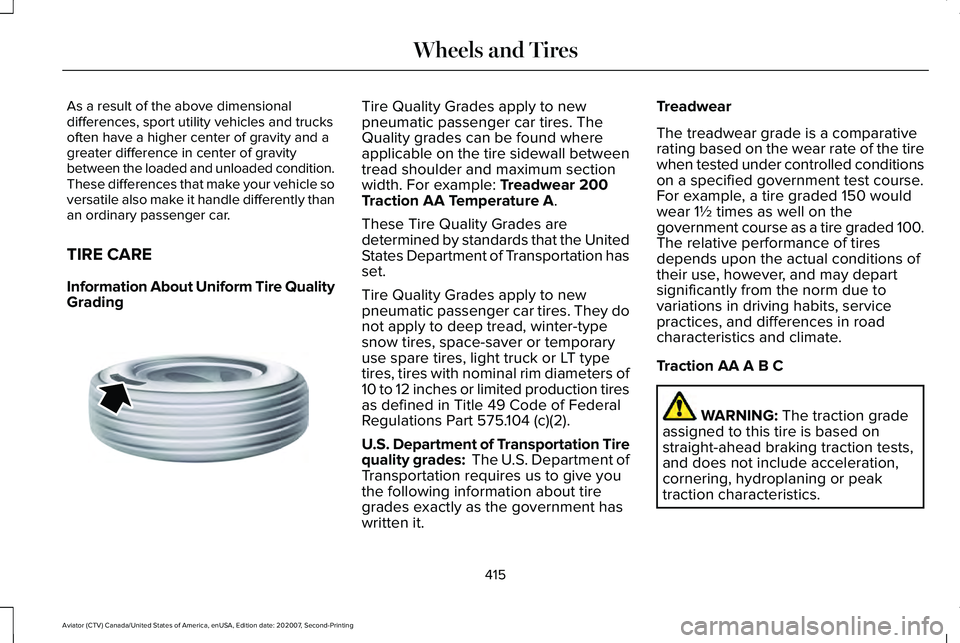
Information About Uniform Tire Quality
Grading
Tire Quality Grades apply to new
pneumatic passenger car tires. The
Quality grades can be found where
applicable on the tire sidewall between
tread shoulder and maximum section
width. For example: Treadwear 200
Traction AA Temperature A.
These Tire Quality Grades are
determined by standards that the United
States Department of Transportation has
set.
Tire Quality Grades apply to new
pneumatic passenger car tires. They do
not apply to deep tread, winter-type
snow tires, space-saver or temporary
use spare tires, light truck or LT type
tires, tires with nominal rim diameters of
10 to 12 inches or limited production tires
as defined in Title 49 Code of Federal
Regulations Part 575.104 (c)(2).
U.S. Department of Transportation Tire
quality grades: The U.S. Department of
Transportation requires us to give you
the following information about tire
grades exactly as the government has
written it. Treadwear
The treadwear grade is a comparative
rating based on the wear rate of the tire
when tested under controlled conditions
on a specified government test course.
For example, a tire graded 150 would
wear 1½ times as well on the
government course as a tire graded 100.
The relative performance of tires
depends upon the actual conditions of
their use, however, and may depart
significantly from the norm due to
variations in driving habits, service
practices, and differences in road
characteristics and climate.
Traction AA A B C
WARNING:
The traction grade
assigned to this tire is based on
straight-ahead braking traction tests,
and does not include acceleration,
cornering, hydroplaning or peak
traction characteristics.
415
Aviator (CTV) Canada/United States of America, enUSA, Edition date: 202007, Second-Printing Wheels and TiresE142542
Page 419 of 667
The traction grades, from highest to
lowest are AA, A, B, and C. The grades
represent the tire
’s ability to stop on wet
pavement as measured under controlled
conditions on specified government test
surfaces of asphalt and concrete. A tire
marked C may have poor traction
performance.
Temperature A B C WARNING: The temperature
grade for this tire is established for a
tire that is properly inflated and not
overloaded. Excessive speed,
underinflation, or excessive loading,
either separately or in combination,
can cause heat buildup and possible
tire failure.
The temperature grades are A (the
highest), B and C, representing the tire ’s
resistance to the generation of heat and
its ability to dissipate heat when tested
under controlled conditions on a
specified indoor laboratory test wheel.
Sustained high temperature can cause the material of the tire to degenerate
and reduce tire life, and excessive
temperature can lead to sudden tire
failure. The grade C corresponds to a
level of performance which all
passenger car tires must meet under the
Federal Motor Vehicle Safety Standard
No. 139. Grades B and A represent
higher levels of performance on the
laboratory test wheel than the minimum
required by law.
Glossary of Tire Terminology
*
Tire label: A label showing the original
equipment tire sizes, recommended
inflation pressure and the maximum
weight the vehicle can carry.
*
Tire Identification Number (TIN): A
number on the sidewall of each tire
providing information about the tire
brand and manufacturing plant, tire size
and date of manufacture. Also referred
to as DOT code.
*
Inflation pressure: A measure of the
amount of air in a tire. *
Standard load: A class of P-metric or
Metric tires designed to carry a
maximum load at set pressure. For
example: For P-metric tires
35 psi
(2.4 bar) and for Metric tires 36 psi
(2.5 bar). Increasing the inflation
pressure beyond this pressure will not
increase the tire ’s load carrying
capability.
*
Extra load: A class of P-metric or Metric
tires designed to carry a heavier
maximum load at
42 psi (2.9 bar).
Increasing the inflation pressure beyond
this pressure will not increase the tire ’s
load carrying capability.
*
kPa: Kilopascal, a metric unit of air
pressure.
*PSI: Pounds per square inch, a standard
unit of air pressure.
*
Cold tire pressure: The tire pressure
when the vehicle has been stationary
and out of direct sunlight for an hour or
more and prior to the vehicle being
driven for
1 mi (1.6 km).
416
Aviator (CTV) Canada/United States of America, enUSA, Edition date: 202007, Second-Printing Wheels and Tires
Page 423 of 667
*Traction: The traction grades, from
highest to lowest are AA, A, B, and C.
The grades represent the tire's ability to
stop on wet pavement as measured
under controlled conditions on specified
government test surfaces of asphalt and
concrete. A tire marked C may have
poor traction performance.
*
Temperature: The temperature grades
are A (the highest), B and C,
representing the tire's resistance to the
generation of heat and its ability to
dissipate heat when tested under
controlled conditions on a specified
indoor laboratory test wheel.
M.
Maximum Inflation Pressure:
Indicates the tire manufacturers'
maximum permissible pressure or the
pressure at which the maximum load
can be carried by the tire. This pressure
is normally higher than the vehicle
manufacturer's recommended cold
inflation pressure which can be found
on the Safety Compliance Certification
Label (affixed to either the door hinge
pillar, door-latch post, or the door edge
that meets the door-latch post, next to the driver's seating position), or Tire
Label which is located on the B-Pillar or
the edge of the driver’
s door. The cold
inflation pressure should never be set
lower than the recommended pressure
on the vehicle label.
The tire suppliers may have additional
markings, notes or warnings such as
standard load or radial tubeless.
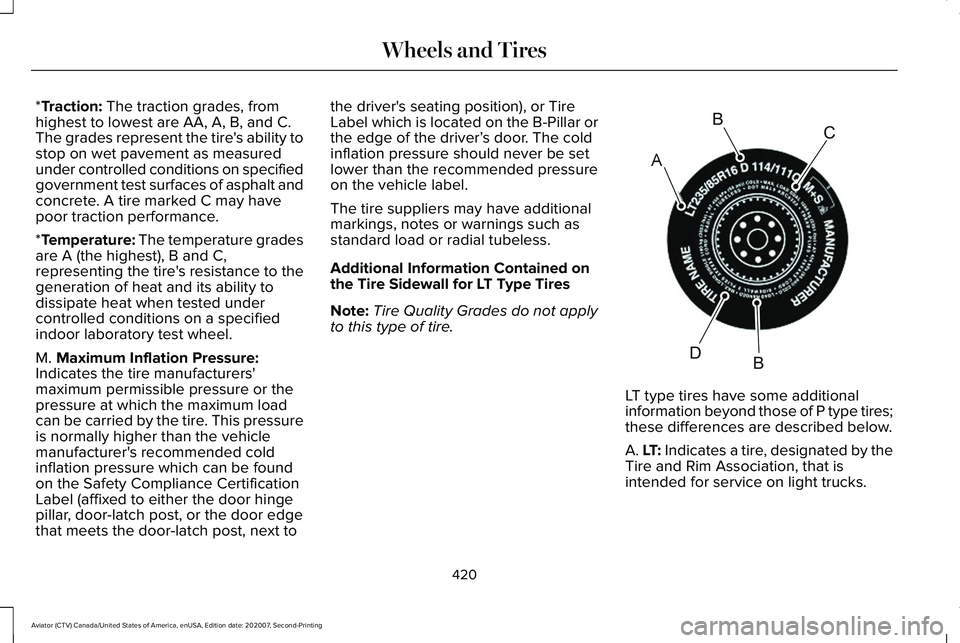
Additional Information Contained on
the Tire Sidewall for LT Type Tires
Note: Tire Quality Grades do not apply
to this type of tire. LT type tires have some additional
information beyond those of P type tires;
these differences are described below.
A. LT: Indicates a tire, designated by the
Tire and Rim Association, that is
intended for service on light trucks.
420
Aviator (CTV) Canada/United States of America, enUSA, Edition date: 202007, Second-Printing Wheels and TiresA
BC
BDE142544
Page 434 of 667
functioning properly. Always check the TPMS
malfunction telltale after replacing one or
more tires or wheels on your vehicle to
ensure that the replacement or alternate tires
and wheels allow the TPMS to continue to
function properly.
This device complies with Part 15 of the FCC
Rules and with License exempt RSS
Standards of Industry Canada. Operation is
subject to the following two conditions:
1. This device may not cause harmful
interference, and
2. This device must accept any interference
received, including interference that may
cause undesired operation. WARNING: Changes or modifications
not expressively approved by the party
responsible for compliance could void the
user's authority to operate the equipment.
The term "IC:" before the radio certification
number only signifies that Industry Canada
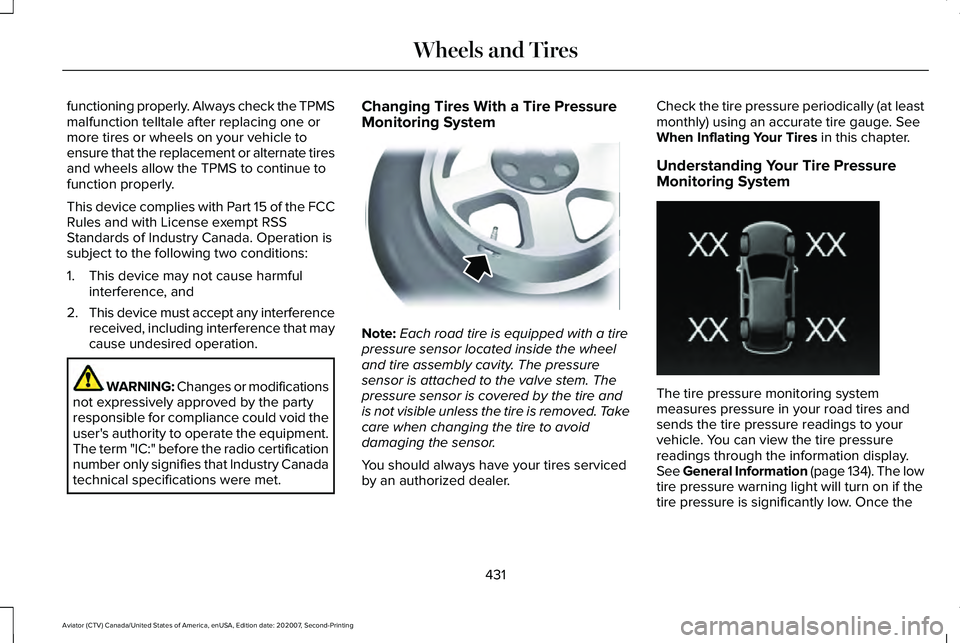
technical specifications were met. Changing Tires With a Tire Pressure
Monitoring System
Note:
Each road tire is equipped with a tire
pressure sensor located inside the wheel
and tire assembly cavity. The pressure
sensor is attached to the valve stem. The
pressure sensor is covered by the tire and
is not visible unless the tire is removed. Take
care when changing the tire to avoid
damaging the sensor.
You should always have your tires serviced
by an authorized dealer. Check the tire pressure periodically (at least
monthly) using an accurate tire gauge. See
When Inflating Your Tires in this chapter.
Understanding Your Tire Pressure
Monitoring System The tire pressure monitoring system
measures pressure in your road tires and
sends the tire pressure readings to your
vehicle. You can view the tire pressure
readings through the information display.
See General Information (page 134). The low
tire pressure warning light will turn on if the
tire pressure is significantly low. Once the
431
Aviator (CTV) Canada/United States of America, enUSA, Edition date: 202007, Second-Printing Wheels and TiresE142549 E250820
Page 436 of 667
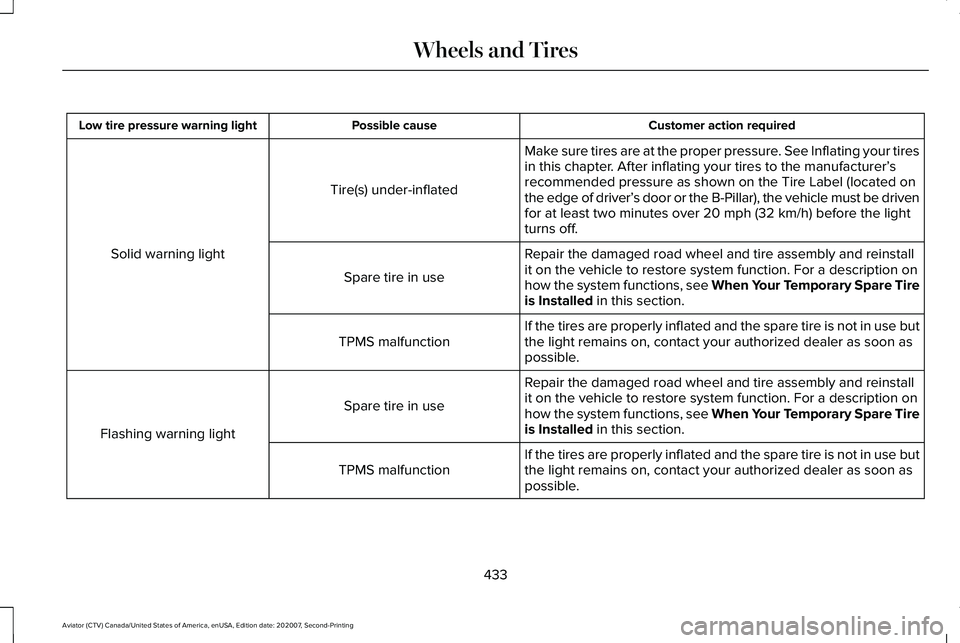
Customer action required
Possible cause
Low tire pressure warning light
Make sure tires are at the proper pressure. See Inflating your tires
in this chapter. After inflating your tires to the manufacturer’s
recommended pressure as shown on the Tire Label (located on
the edge of driver’ s door or the B-Pillar), the vehicle must be driven
for at least two minutes over 20 mph (32 km/h) before the light
turns off.
Tire(s) under-inflated
Solid warning light Repair the damaged road wheel and tire assembly and reinstall
it on the vehicle to restore system function. For a description on
how the system functions, see When Your Temporary Spare Tire
is Installed
in this section.
Spare tire in use
If the tires are properly inflated and the spare tire is not in use but
the light remains on, contact your authorized dealer as soon as
possible.
TPMS malfunction
Repair the damaged road wheel and tire assembly and reinstall
it on the vehicle to restore system function. For a description on
how the system functions, see When Your Temporary Spare Tire
is Installed
in this section.
Spare tire in use
Flashing warning light If the tires are properly inflated and the spare tire is not in use but
the light remains on, contact your authorized dealer as soon as
possible.
TPMS malfunction
433
Aviator (CTV) Canada/United States of America, enUSA, Edition date: 202007, Second-Printing Wheels and Tires
Page 437 of 667
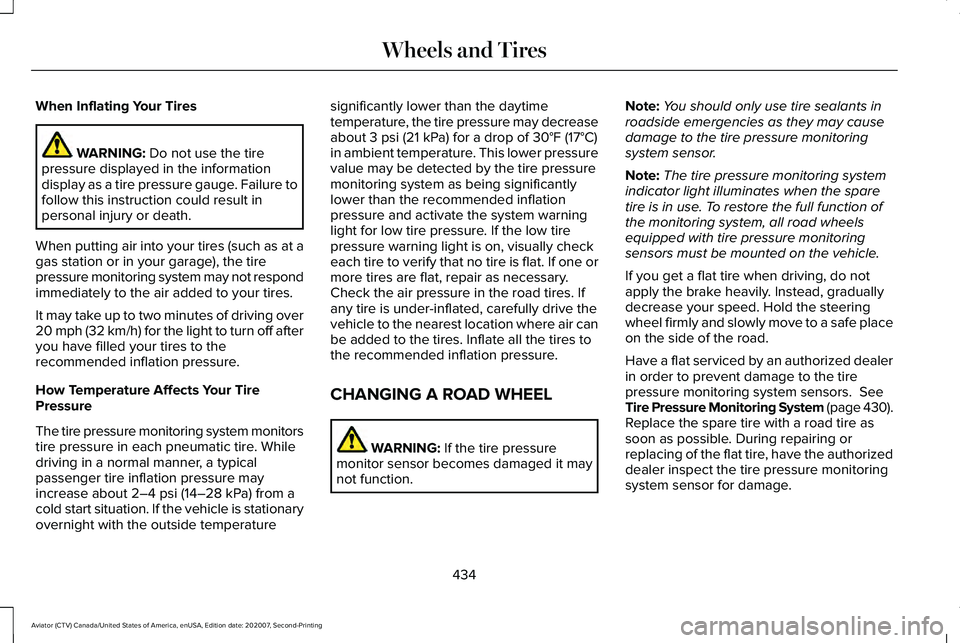
When Inflating Your Tires
WARNING: Do not use the tire
pressure displayed in the information
display as a tire pressure gauge. Failure to
follow this instruction could result in
personal injury or death.
When putting air into your tires (such as at a
gas station or in your garage), the tire
pressure monitoring system may not respond
immediately to the air added to your tires.
It may take up to two minutes of driving over
20 mph (32 km/h) for the light to turn off after
you have filled your tires to the
recommended inflation pressure.
How Temperature Affects Your Tire
Pressure
The tire pressure monitoring system monitors
tire pressure in each pneumatic tire. While
driving in a normal manner, a typical
passenger tire inflation pressure may
increase about
2–4 psi (14–28 kPa) from a
cold start situation. If the vehicle is stationary
overnight with the outside temperature significantly lower than the daytime
temperature, the tire pressure may decrease
about
3 psi (21 kPa) for a drop of 30°F (17°C)
in ambient temperature. This lower pressure
value may be detected by the tire pressure
monitoring system as being significantly
lower than the recommended inflation
pressure and activate the system warning
light for low tire pressure. If the low tire
pressure warning light is on, visually check
each tire to verify that no tire is flat. If one or
more tires are flat, repair as necessary.
Check the air pressure in the road tires. If
any tire is under-inflated, carefully drive the
vehicle to the nearest location where air can
be added to the tires. Inflate all the tires to
the recommended inflation pressure.
CHANGING A ROAD WHEEL WARNING:
If the tire pressure
monitor sensor becomes damaged it may
not function. Note:
You should only use tire sealants in
roadside emergencies as they may cause
damage to the tire pressure monitoring
system sensor.
Note: The tire pressure monitoring system
indicator light illuminates when the spare
tire is in use. To restore the full function of
the monitoring system, all road wheels
equipped with tire pressure monitoring
sensors must be mounted on the vehicle.
If you get a flat tire when driving, do not
apply the brake heavily. Instead, gradually
decrease your speed. Hold the steering
wheel firmly and slowly move to a safe place
on the side of the road.
Have a flat serviced by an authorized dealer
in order to prevent damage to the tire
pressure monitoring system sensors.
See
Tire Pressure Monitoring System (page 430).
Replace the spare tire with a road tire as
soon as possible. During repairing or
replacing of the flat tire, have the authorized
dealer inspect the tire pressure monitoring
system sensor for damage.
434
Aviator (CTV) Canada/United States of America, enUSA, Edition date: 202007, Second-Printing Wheels and Tires
Page 651 of 667
Air Filter
See: Changing the Engine Air Filter..............389
Air Suspension..............................................338 Switching the systems on or off.....................338
Using Cargo Loading.........................................338
Using Easy Entry.................................................338
Using the Service Mode...................................338
Alarm See: Anti-Theft Alarm...........................................98
All-Wheel Drive
.............................................250
Ambient Lighting............................................115
Adjusting the Brightness....................................116
Changing the Color.............................................116
Switching Ambient Lighting Off........................116
Switching Ambient Lighting On........................116
Anti-Theft Alarm
..............................................98
Arming the Alarm..................................................98
Disarming the Alarm............................................99
Using the System..................................................98
Appendices...................................................609
Apps.................................................................537 SiriusXM Traffic and Travel Link.....................539
Using Apps on an Android Device................
538
Using Apps on an iOS Device........................538
Using Mobile Navigation on an Android Device...............................................................538
At a Glance.......................................................22 Audible Warnings and Indicators
..............133
Headlamps On Warning Chime.......................133
Keyless Warning Alert........................................133
Parking Brake On Warning Chime..................133
Audio Control
.................................................102
You can operate the following functions with
the control:.......................................................102
Audio System
.................................................481
General Information............................................481
Audio Unit......................................................482 Accessing the Source Menu...........................483
Adjusting the Volume........................................
482
Changing Radio Stations..................................482
Locking the Rear Audio Controls...................483
Playing or Pausing Media.................................483
Rear Audio Control Lock Message................484
Rear Passenger Audio Controls.....................
483
Selecting a Preset..............................................483
Selecting the Audio Modes.............................483
Switching Repeat Mode On and Off ..............483
Switching Shuffle Mode On and Off..............483
Switching the Audio Control On and Off......................................................................484
Switching the Audio Unit On and Off............
483
Switching the Display On and Off..................483
Using Seek, Fast Forward and Reverse.......483
Auto Air Refresh Hints..................................177
Auto Air Refresh Indicators.........................176 Auto Hold
........................................................261
Auto Hold Indicator.............................................261
Switching Auto Hold On and Off.....................261
Using Auto Hold..................................................261
Autolamps........................................................110 Windshield Wiper Activated Headlamps.......110
Automatic Climate Control.........................168 Accessing Rear Climate Controls...................
168
Accessing the Air Distribution Controls........168
Accessing the Climate Control Menu............168
Setting the Blower Motor Speed.....................168
Setting the Temperature...................................169
Switching Auto Mode On and Off...................169
Switching Maximum Air Conditioning On and Off........................................................................\
171
Switching Maximum Defrost On and Off........171
Switching Recirculated Air On and Off...........171
Switching the Air Conditioning On and Off.......................................................................170
Switching the Climate Control On and Off.......................................................................170
Automatic High Beam Control....................117
Automatic High Beam Control Indicators.......................................................118
Automatic Transmission
.............................245
Automatic Return to Park.................................246
If Your Vehicle Gets Stuck in Mud or
Snow.................................................................249
648
Aviator (CTV) Canada/United States of America, enUSA, Edition date: 202007, Second-Printing Index
Page 666 of 667
Ventilation
See: Climate Control..........................................168
VIN See: Vehicle Identification Number...............450
Voice Control
.................................................102
W
Warning Lamps and Indicators..................129 Adaptive Cruise Control....................................129
Anti-Lock Braking System.................................129
Auto Hold Active.................................................129
Auto Hold Unavailable.......................................129
Automatic High Beam Control.........................129
Auto Start-stop.....................................................129
Battery....................................................................129
Blind Spot Monitor..............................................129
Brake System Warning Lamp...........................
130
Cruise Control......................................................130
Direction Indicator...............................................130
Distance Alert.......................................................130
Door Ajar...............................................................130
Electric Park Brake..............................................130
Engine Oil...............................................................131
Engine or Motor Coolant Temperature..........130
Fasten Rear Seatbelt...........................................131
Fasten Seatbelt.....................................................131
Front Airbag...........................................................131 Front Fog Lamps...................................................131
High Beam..............................................................131
Hill Descent............................................................131
Hood Ajar...............................................................131
Lamps On...............................................................131
Liftgate Ajar............................................................131
Low Beam Warning..............................................131
Low Fuel Level......................................................131
Low Tire Pressure Warning...............................132
Low Washer Fluid................................................132
Powertrain Fault...................................................132
Ready to Drive......................................................132
Service Engine Soon..........................................132
Stability Control....................................................132
Stability Control Off.............................................132
Stop Safely Now..................................................133
Tow Haul Indicator..............................................133
Vehicle Plugged in..............................................133
Washer Fluid Check.....................................401
Washers See: Cleaning the Exterior...............................405
See: Wipers and Washers.................................105
Waxing............................................................406
Welcome Lighting..........................................114 Switching the Welcome Lighting On or
Off........................................................................\
114
What Is 911 Assist
............................................64 What Is Adaptive Cruise Control With Lane
Centering......................................................291
What Is Auto Air Refresh.............................175
What Is Automatic High Beam Control............................................................117
What Is Cruise Control................................289 Requirements......................................................289
What Is Drive Mode Control......................329
What Is Hill Descent Control
.....................270
What Is Intelligent Adaptive Cruise Control
...........................................................291
What Is Phone As a Key................................72
What Is Reverse Braking Assist................263
What Is the Cabin Air Filter.........................175
What is the Rear Occupant Alert System...........................................................195
Wheel Nuts See: Changing a Road Wheel.........................434
Wheels and Tires...........................................413 General Information............................................413
Technical Specifications...................................442
Windows and Mirrors....................................119
Windshield Washers.....................................107 Front Camera Washer........................................107
Windshield Wipers - Vehicles With: Heated Wiper Blades...............................................106
Heated Wiper Blade...........................................106
663
Aviator (CTV) Canada/United States of America, enUSA, Edition date: 202007, Second-Printing Index