battery LINCOLN AVIATOR 2023 Owners Manual
[x] Cancel search | Manufacturer: LINCOLN, Model Year: 2023, Model line: AVIATOR, Model: LINCOLN AVIATOR 2023Pages: 681, PDF Size: 9.33 MB
Page 431 of 681
Body
• Wash your vehicle thoroughly to remove
dirt, grease, oil, tar or mud from exterior
surfaces, rear-wheel housing and the
underside of front fenders.
• Periodically wash your vehicle if it is
stored in exposed locations.
• Touch-up exposed or primed metal to
prevent rust.
• Cover chrome and stainless steel parts
with a thick coat of auto wax to prevent
discoloration. Re-wax as necessary when
you wash your vehicle.
• Lubricate all hood, door and luggage
compartment hinges and latches with a
light grade oil.
• Cover interior trim to prevent fading.
• Keep all rubber parts free from oil and
solvents.
Engine
• Change the engine oil and filter prior to
storage because used engine oil contains
contaminates which may cause engine
damage.
• Start the engine every 15 days for a
minimum of 15 minutes. Run at fast idle
with the climate controls set to defrost
until the engine reaches normal
operating temperature.
• With your foot on the brake, shift through
all the gears while the engine is running.
• We recommend that you change the
engine oil before you use your vehicle
again.
Fuel system
• Fill the fuel tank with high-quality fuel
until the first automatic shutoff of the fuel
pump nozzle.
Cooling system
• Protect against freezing temperatures.
• When removing your vehicle from
storage, check coolant fluid level.
Confirm that there are no cooling system
leaks and that fluid is at the
recommended level.
Disconnecting Your 12 Volt Battery
• Check and recharge as necessary. Keep
connections clean.
• If storing your vehicle for more than 30
days without recharging the battery, we
recommend that you disconnect the
battery cables to maintain battery charge
for quick starting.
Note:It is necessary to reset memory
features if you disconnect the battery cables.
428
Vehicle Care
Page 432 of 681
Plugging in Your HYBRID
We recommend the following options for
your plug-in vehicle (PHEV) :
• Leave your vehicle plugged in. The 12
volt battery maintains power if left
plugged in. However, this periodically
uses electricity from the household
outlet.
• Connect a battery charger to your 12 volt
battery and leave it on a continuous, slow
charge.
• Disconnect the 12 volt battery. If your 12
volt battery is located in the luggage
compartment, do not fully shut the
luggage compartment after
disconnecting the 12 volt battery. Only
leave the luggage compartment open if
your vehicle is stored in a locked
location.
Brakes
• Make sure the brakes and parking brake
release fully.
Tires
• Maintain recommended air pressure.
Miscellaneous
• Make sure all linkages, cables, levers and
pins under your vehicle are covered with
grease to prevent rust.
• Move vehicles at least 25 ft (7.5 m) every
15 days to lubricate working parts and
prevent corrosion.
Removing Vehicle From Storage
When your vehicle is ready to come out of
storage, do the following:
• Wash your vehicle to remove any dirt or
grease film build-up on window surfaces.
• Check windshield wipers for any
deterioration.
• Check under the hood for any foreign
material that may have collected during
storage such as mice or squirrel nests.
• Check the exhaust for any foreign
material that may have collected during
storage.• Check tire pressures and set tire inflation
per the Tire Label.
• Check brake pedal operation. Drive your
vehicle 15 ft (4.5 m) back and forth to
remove rust build-up.
• Check fluid levels (including coolant, oil
and gas) to make sure there are no leaks,
and fluids are at recommended levels.
• If you remove the battery, clean the
battery cable ends and check for
damage.
Contact an authorized dealer if you have any
concerns or issues.
BODY STYLING KITS (IF EQUIPPED)
The distance between the underside of your
vehicle and the ground is less than that of
other models. Drive with extreme care to
avoid damage to your vehicle.
429
Vehicle Care
Page 465 of 681
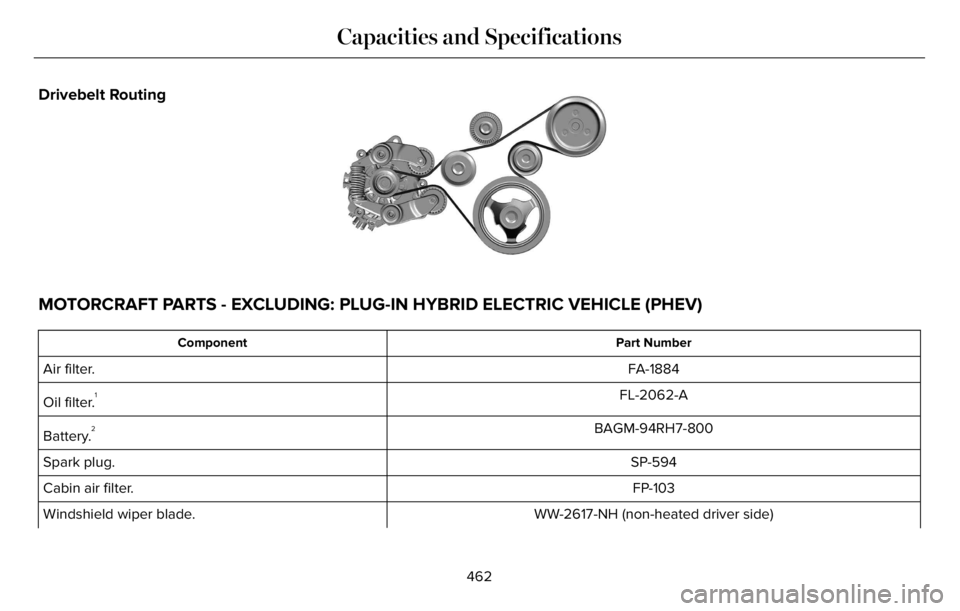
Drivebelt Routing
E294410
MOTORCRAFT PARTS - EXCLUDING: PLUG-IN HYBRID ELECTRIC VEHICLE (PHEV)
Part Number Component
FA-1884 Air filter.
FL-2062-A
Oil filter.
1
BAGM-94RH7-800
Battery.2
SP-594 Spark plug.
FP-103 Cabin air filter.
WW-2617-NH (non-heated driver side) Windshield wiper blade.
462
Capacities and Specifications
Page 467 of 681
MOTORCRAFT PARTS - PLUG-IN HYBRID ELECTRIC VEHICLE (PHEV)
Part Number Component
FA-1884 Air filter.
FL-2062-A
Oil filter.
1
BAGM-94RH7-800 (main-engine compartment)
Battery.2
BHAGM-AUX1-A (auxiliary-rear mount)
SP-594 Spark plug.
FP-103 Cabin air filter.
WW-2617-NH (non-heated driver side) Windshield wiper blade.
WW-2618-H (heated driver side)
WW-2619-R (refill driver side)
WW-2114-NH (non-heated passenger side)
WW-2115-H (heated passenger side)
WW-2116-R (refill passenger side)
WW-1111 Rear window wiper blade.
1 If a Motorcraft oil filter is not available, use an oil filter that meets industry performance specification SAE/USCAR-36.2 See your authorized dealer for correct replacement.
We recommend Motorcraft replacement parts available at your authorized dealer or at fordparts.com for scheduled maintenance. These parts
engineered for your vehicle meet or exceed our specifications. Use of other parts could impact vehicle performance, emissions and durability.
Your warranty could be void for any damage related to use of other parts.
464
Capacities and Specifications
Page 482 of 681
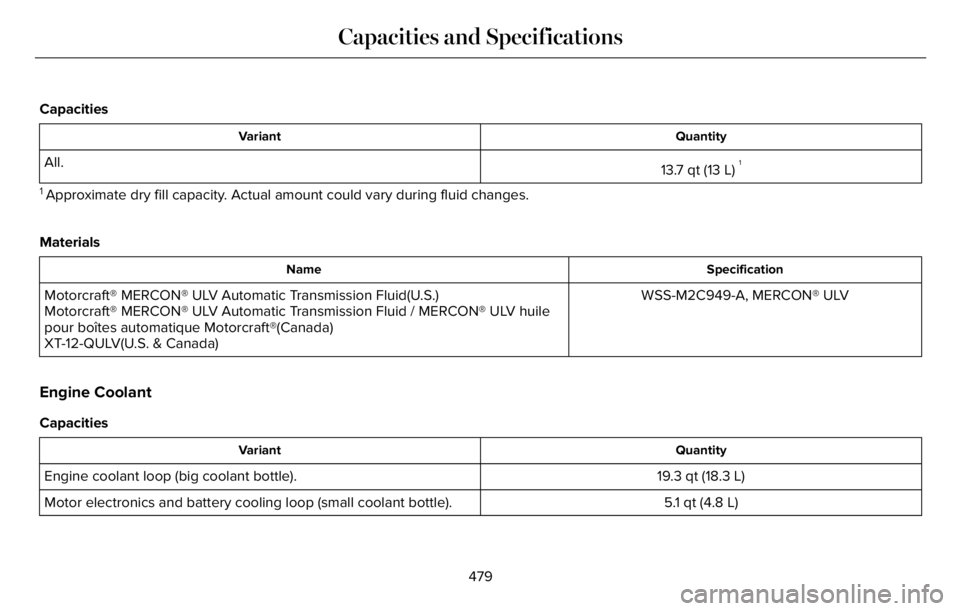
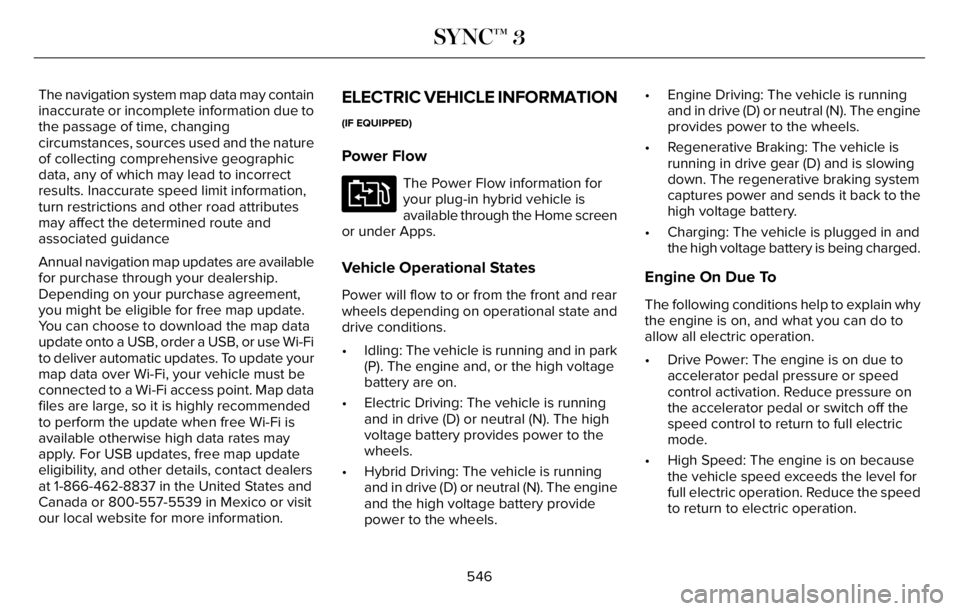
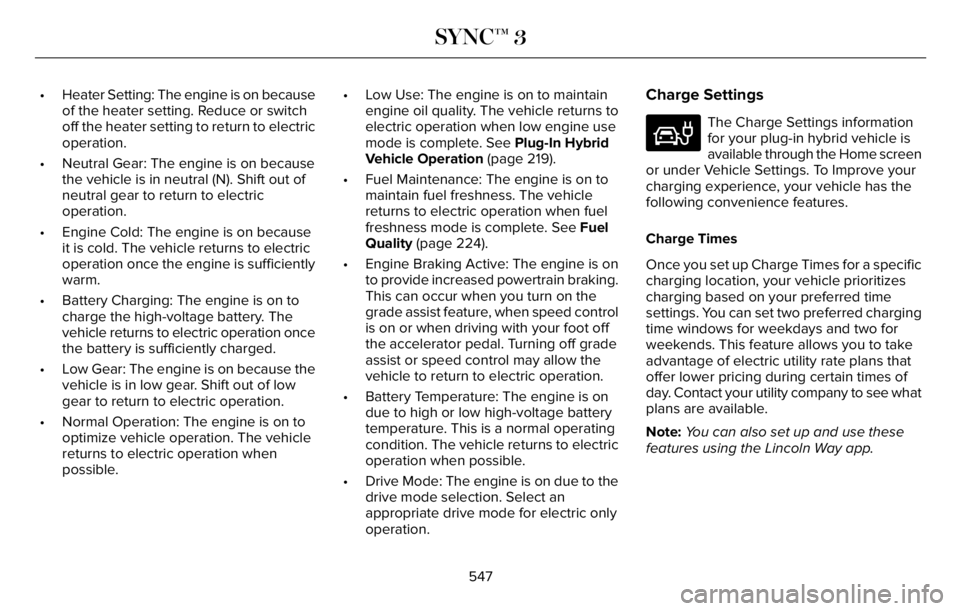
Capacities
Quantity Variant
13.7 qt (13 L)1All.
1 Approximate dry fill capacity. Actual amount could vary during fluid changes.
Materials
Specification Name
WSS-M2C949-A, MERCON® ULV Motorcraft® MERCON® ULV Automatic Transmission Fluid(U.S.)
Motorcraft® MERCON® ULV Automatic Transmission Fluid / MERCON® ULV huile
pour boîtes automatique Motorcraft®(Canada)
XT-12-QULV(U.S. & Canada)
Engine Coolant
Capacities
Quantity Variant
19.3 qt (18.3 L) Engine coolant loop (big coolant bottle).
5.1 qt (4.8 L) Motor electronics and battery cooling loop (small coolant bottle).
479
Capacities and Specifications
Page 549 of 681
The navigation system map data may contain
inaccurate or incomplete information due to
the passage of time, changing
circumstances, sources used and the nature
of collecting comprehensive geographic
data, any of which may lead to incorrect
results. Inaccurate speed limit information,
turn restrictions and other road attributes
may affect the determined route and
associated guidance
Annual navigation map updates are available
for purchase through your dealership.
Depending on your purchase agreement,
you might be eligible for free map update.
You can choose to download the map data
update onto a USB, order a USB, or use Wi-Fi
to deliver automatic updates. To update your
map data over Wi-Fi, your vehicle must be
connected to a Wi-Fi access point. Map data
files are large, so it is highly recommended
to perform the update when free Wi-Fi is
available otherwise high data rates may
apply. For USB updates, free map update
eligibility, and other details, contact dealers
at 1-866-462-8837 in the United States and
Canada or 800-557-5539 in Mexico or visit
our local website for more information.ELECTRIC VEHICLE INFORMATION
(IF EQUIPPED)
Power Flow
E304437
The Power Flow information for
your plug-in hybrid vehicle is
available through the Home screen
or under Apps.
Vehicle Operational States
Power will flow to or from the front and rear
wheels depending on operational state and
drive conditions.
• Idling: The vehicle is running and in park
(P). The engine and, or the high voltage
battery are on.
• Electric Driving: The vehicle is running
and in drive (D) or neutral (N). The high
voltage battery provides power to the
wheels.
• Hybrid Driving: The vehicle is running
and in drive (D) or neutral (N). The engine
and the high voltage battery provide
power to the wheels.• Engine Driving: The vehicle is running
and in drive (D) or neutral (N). The engine
provides power to the wheels.
• Regenerative Braking: The vehicle is
running in drive gear (D) and is slowing
down. The regenerative braking system
captures power and sends it back to the
high voltage battery.
• Charging: The vehicle is plugged in and
the high voltage battery is being charged.
Engine On Due To
The following conditions help to explain why
the engine is on, and what you can do to
allow all electric operation.
• Drive Power: The engine is on due to
accelerator pedal pressure or speed
control activation. Reduce pressure on
the accelerator pedal or switch off the
speed control to return to full electric
mode.
• High Speed: The engine is on because
the vehicle speed exceeds the level for
full electric operation. Reduce the speed
to return to electric operation.
546
SYNC™ 3
Page 550 of 681
• Heater Setting: The engine is on because
of the heater setting. Reduce or switch
off the heater setting to return to electric
operation.
• Neutral Gear: The engine is on because
the vehicle is in neutral (N). Shift out of
neutral gear to return to electric
operation.
• Engine Cold: The engine is on because
it is cold. The vehicle returns to electric
operation once the engine is sufficiently
warm.
• Battery Charging: The engine is on to
charge the high-voltage battery. The
vehicle returns to electric operation once
the battery is sufficiently charged.
• Low Gear: The engine is on because the
vehicle is in low gear. Shift out of low
gear to return to electric operation.
• Normal Operation: The engine is on to
optimize vehicle operation. The vehicle
returns to electric operation when
possible.• Low Use: The engine is on to maintain
engine oil quality. The vehicle returns to
electric operation when low engine use
mode is complete. See Plug-In Hybrid
Vehicle Operation (page 219).
• Fuel Maintenance: The engine is on to
maintain fuel freshness. The vehicle
returns to electric operation when fuel
freshness mode is complete. See Fuel
Quality (page 224).
• Engine Braking Active: The engine is on
to provide increased powertrain braking.
This can occur when you turn on the
grade assist feature, when speed control
is on or when driving with your foot off
the accelerator pedal. Turning off grade
assist or speed control may allow the
vehicle to return to electric operation.
• Battery Temperature: The engine is on
due to high or low high-voltage battery
temperature. This is a normal operating
condition. The vehicle returns to electric
operation when possible.
• Drive Mode: The engine is on due to the
drive mode selection. Select an
appropriate drive mode for electric only
operation.Charge Settings
E304452
The Charge Settings information
for your plug-in hybrid vehicle is
available through the Home screen
or under Vehicle Settings. To Improve your
charging experience, your vehicle has the
following convenience features.
Charge Times
Once you set up Charge Times for a specific
charging location, your vehicle prioritizes
charging based on your preferred time
settings. You can set two preferred charging
time windows for weekdays and two for
weekends. This feature allows you to take
advantage of electric utility rate plans that
offer lower pricing during certain times of
day. Contact your utility company to see what
plans are available.
Note:You can also set up and use these
features using the Lincoln Way app.
547
SYNC™ 3
Page 551 of 681
Departure Times
Setting Departure Times allows you to
control charging schedules and have the
vehicle cabin heated or cooled while
plugged in, so your vehicle is ready to drive
when you are. By setting a departure time
your vehicle can use your charge time
settings to minimize your electricity costs but
still prioritize finishing charging before your
scheduled departure. A calendar view allows
you to program two departure times per day
for each day of the week.
Note:You can also set up and use these
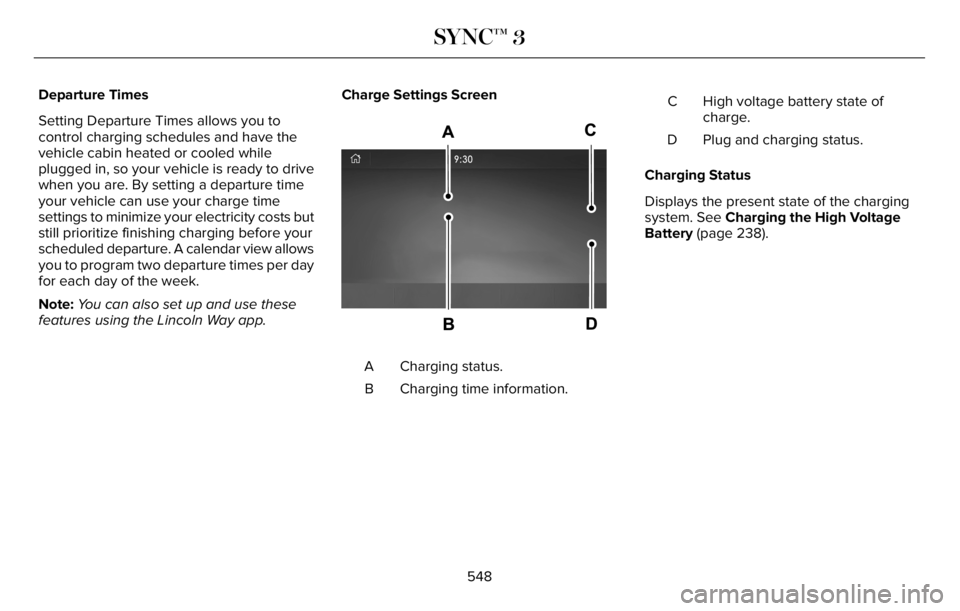
features using the Lincoln Way app.Charge Settings Screen
E304455E304455
Charging status. A
Charging time information. BHigh voltage battery state of
charge. C
Plug and charging status. D
Charging Status
Displays the present state of the charging
system. See Charging the High Voltage
Battery (page 238).
548
SYNC™ 3
Page 552 of 681
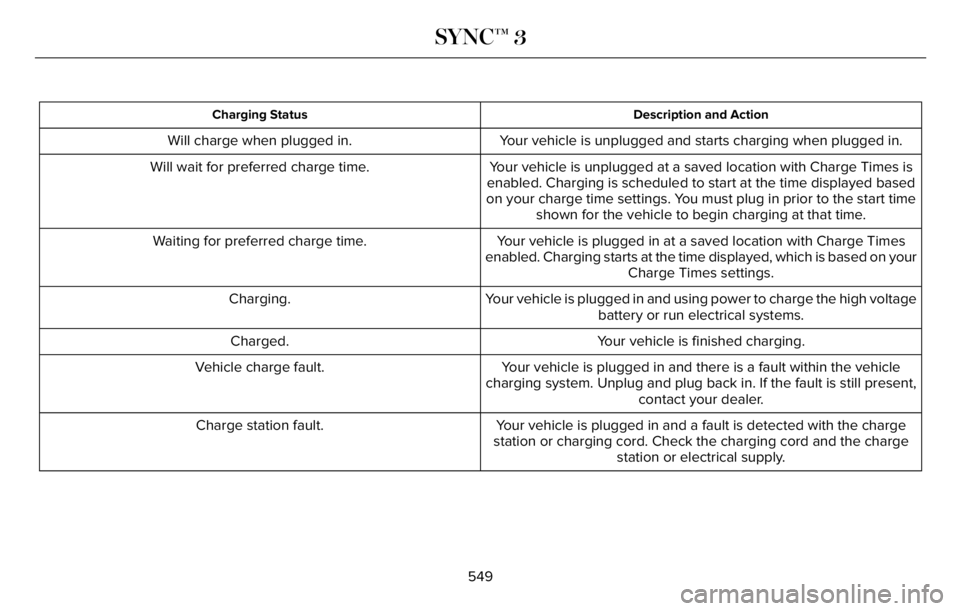
Description and Action Charging Status
Your vehicle is unplugged and starts charging when plugged in. Will charge when plugged in.
Your vehicle is unplugged at a saved location with Charge Times is
enabled. Charging is scheduled to start at the time displayed based
on your charge time settings. You must plug in prior to the start time
shown for the vehicle to begin charging at that time. Will wait for preferred charge time.
Your vehicle is plugged in at a saved location with Charge Times
enabled. Charging starts at the time displayed, which is based on your
Charge Times settings. Waiting for preferred charge time.
Your vehicle is plugged in and using power to charge the high voltage
battery or run electrical systems. Charging.
Your vehicle is finished charging. Charged.
Your vehicle is plugged in and there is a fault within the vehicle
charging system. Unplug and plug back in. If the fault is still present,
contact your dealer. Vehicle charge fault.
Your vehicle is plugged in and a fault is detected with the charge
station or charging cord. Check the charging cord and the charge
station or electrical supply. Charge station fault.
549
SYNC™ 3
Page 553 of 681
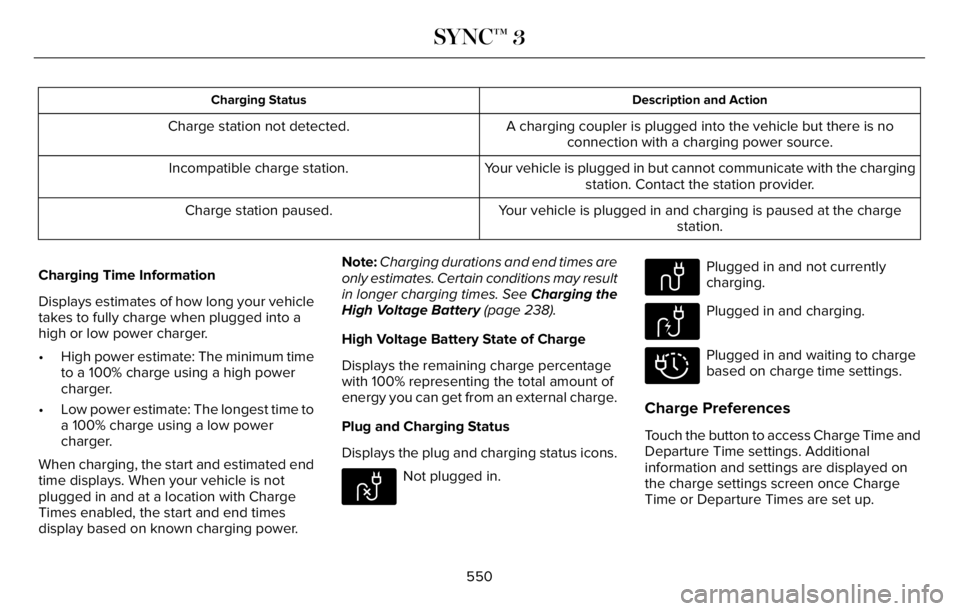
Description and Action Charging Status
A charging coupler is plugged into the vehicle but there is no
connection with a charging power source. Charge station not detected.
Your vehicle is plugged in but cannot communicate with the charging
station. Contact the station provider. Incompatible charge station.
Your vehicle is plugged in and charging is paused at the charge
station. Charge station paused.
Charging Time Information
Displays estimates of how long your vehicle
takes to fully charge when plugged into a
high or low power charger.
• High power estimate: The minimum time
to a 100% charge using a high power
charger.
• Low power estimate: The longest time to
a 100% charge using a low power
charger.
When charging, the start and estimated end
time displays. When your vehicle is not
plugged in and at a location with Charge
Times enabled, the start and end times
display based on known charging power.Note:Charging durations and end times are
only estimates. Certain conditions may result
in longer charging times. See Charging the
High Voltage Battery (page 238).
High Voltage Battery State of Charge
Displays the remaining charge percentage
with 100% representing the total amount of
energy you can get from an external charge.
Plug and Charging Status
Displays the plug and charging status icons.
E304458
Not plugged in.
E304459
Plugged in and not currently
charging.
E304460
Plugged in and charging.
E304461
Plugged in and waiting to charge
based on charge time settings.
Charge Preferences
Touch the button to access Charge Time and
Departure Time settings. Additional
information and settings are displayed on
the charge settings screen once Charge
Time or Departure Times are set up.
550
SYNC™ 3