lock LINCOLN AVIATOR 2023 Owners Manual
[x] Cancel search | Manufacturer: LINCOLN, Model Year: 2023, Model line: AVIATOR, Model: LINCOLN AVIATOR 2023Pages: 681, PDF Size: 9.33 MB
Page 563 of 681
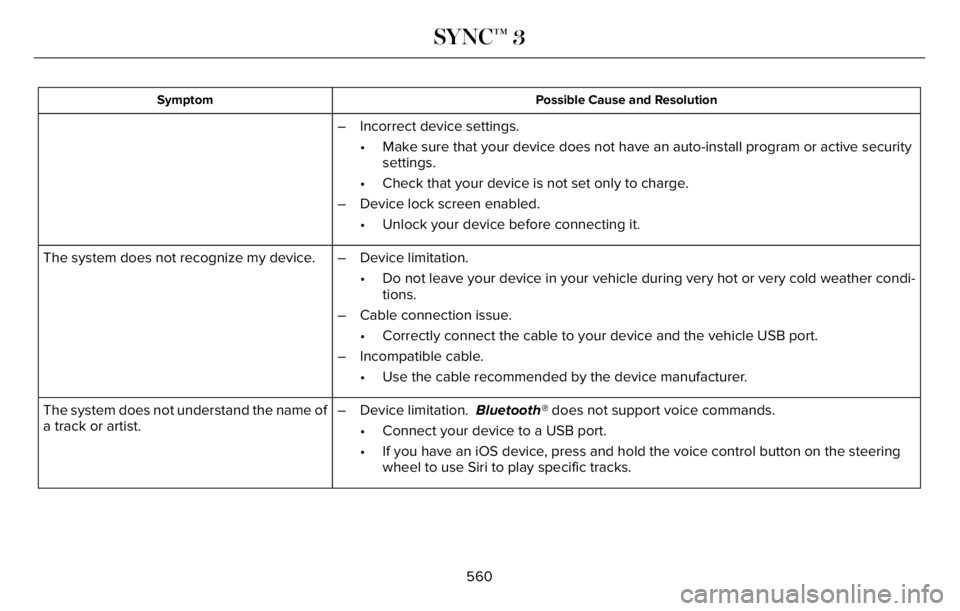
Possible Cause and Resolution Symptom
– Incorrect device settings.
• Make sure that your device does not have an auto-install program or active security
settings.
• Check that your device is not set only to charge.
– Device lock screen enabled.
• Unlock your device before connecting it.
The system does not recognize my device. – Device limitation.
• Do not leave your device in your vehicle during very hot or very cold weather condi-
tions.
– Cable connection issue.
• Correctly connect the cable to your device and the vehicle USB port.
– Incompatible cable.
• Use the cable recommended by the device manufacturer.
The system does not understand the name of
a track or artist.– Device limitation. Bluetooth® does not support voice commands.
• Connect your device to a USB port.
• If you have an iOS device, press and hold the voice control button on the steering
wheel to use Siri to play specific tracks.
560
SYNC™ 3
Page 564 of 681
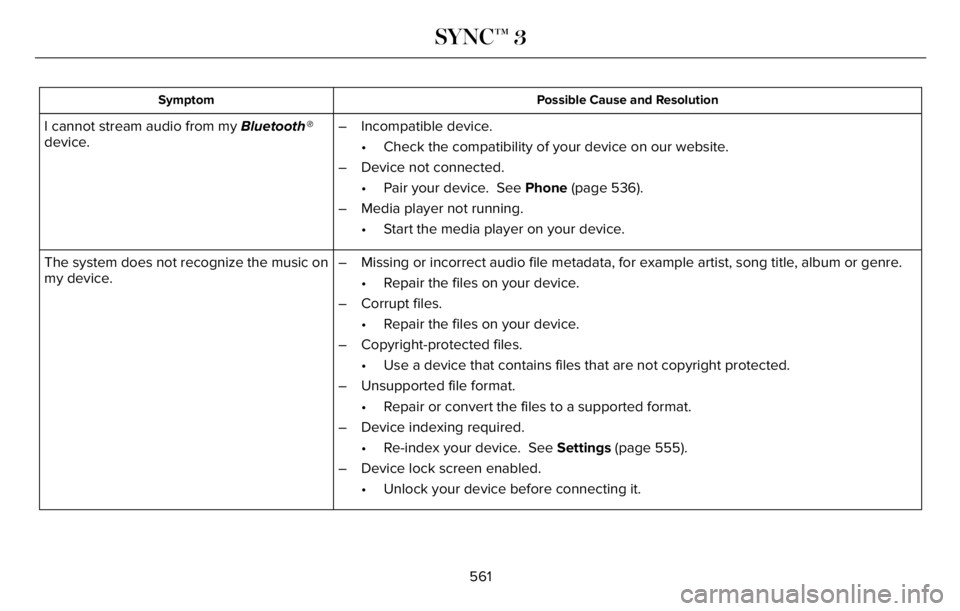
Possible Cause and Resolution Symptom
I cannot stream audio from my Bluetooth®
device.– Incompatible device.
• Check the compatibility of your device on our website.
– Device not connected.
• Pair your device. See Phone (page 536).
– Media player not running.
• Start the media player on your device.
The system does not recognize the music on
my device.– Missing or incorrect audio file metadata, for example artist, song title, album or genre.
• Repair the files on your device.
– Corrupt files.
• Repair the files on your device.
– Copyright-protected files.
• Use a device that contains files that are not copyright protected.
– Unsupported file format.
• Repair or convert the files to a supported format.
– Device indexing required.
• Re-index your device. See Settings (page 555).
– Device lock screen enabled.
• Unlock your device before connecting it.
561
SYNC™ 3
Page 566 of 681
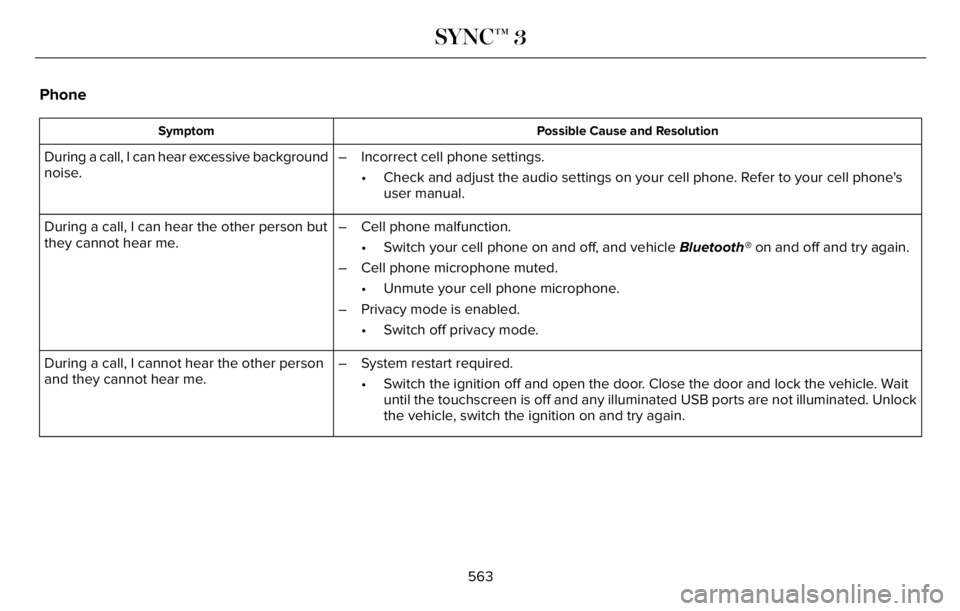
Phone
Possible Cause and Resolution Symptom
During a call, I can hear excessive background
noise.– Incorrect cell phone settings.
• Check and adjust the audio settings on your cell phone. Refer to your cell phone's
user manual.
During a call, I can hear the other person but
they cannot hear me.– Cell phone malfunction.
• Switch your cell phone on and off, and vehicle Bluetooth® on and off and try again.
– Cell phone microphone muted.
• Unmute your cell phone microphone.
– Privacy mode is enabled.
• Switch off privacy mode.
During a call, I cannot hear the other person
and they cannot hear me.– System restart required.
• Switch the ignition off and open the door. Close the door and lock the vehicle. Wait
until the touchscreen is off and any illuminated USB ports are not illuminated. Unlock
the vehicle, switch the ignition on and try again.
563
SYNC™ 3
Page 574 of 681
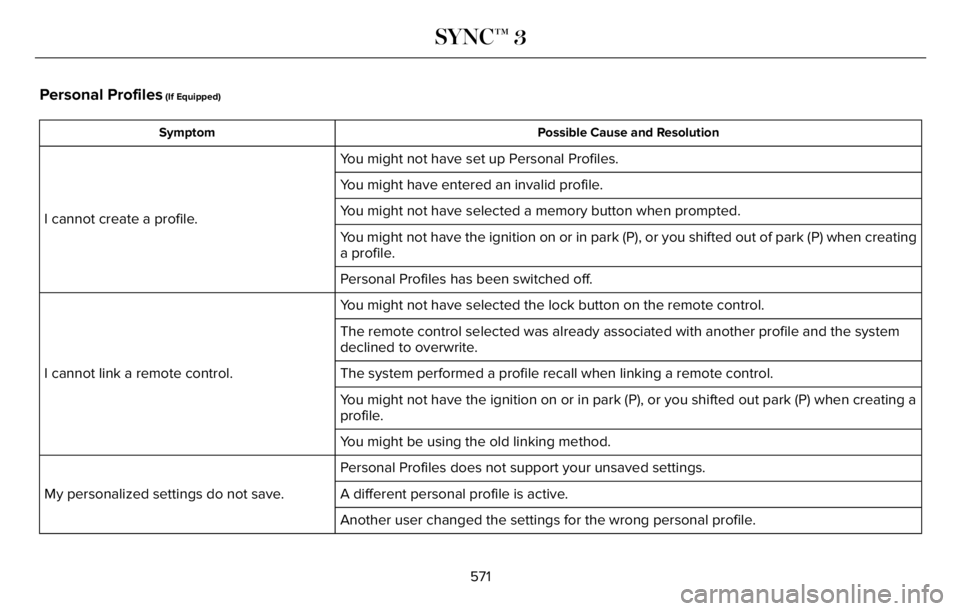
Personal Profiles (If Equipped)
Possible Cause and Resolution Symptom
You might not have set up Personal Profiles.
I cannot create a profile.You might have entered an invalid profile.
You might not have selected a memory button when prompted.
You might not have the ignition on or in park (P), or you shifted out of park (P) when creating
a profile.
Personal Profiles has been switched off.
You might not have selected the lock button on the remote control.
I cannot link a remote control.The remote control selected was already associated with another profile and the system
declined to overwrite.
The system performed a profile recall when linking a remote control.
You might not have the ignition on or in park (P), or you shifted out park (P) when creating a
profile.
You might be using the old linking method.
Personal Profiles does not support your unsaved settings.
My personalized settings do not save. A different personal profile is active.
Another user changed the settings for the wrong personal profile.
571
SYNC™ 3
Page 575 of 681
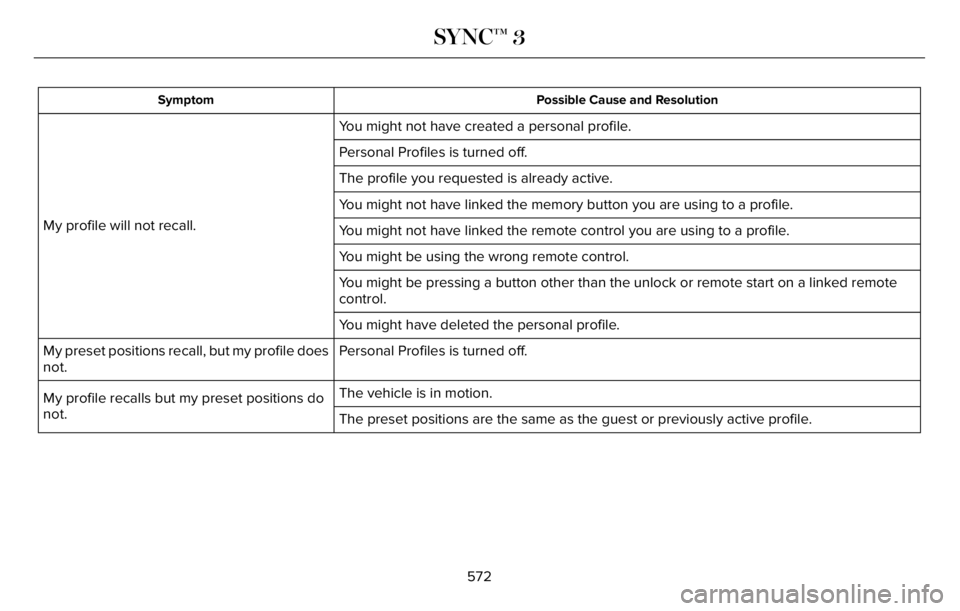
Possible Cause and Resolution Symptom
You might not have created a personal profile.
My profile will not recall.Personal Profiles is turned off.
The profile you requested is already active.
You might not have linked the memory button you are using to a profile.
You might not have linked the remote control you are using to a profile.
You might be using the wrong remote control.
You might be pressing a button other than the unlock or remote start on a linked remote
control.
You might have deleted the personal profile.
Personal Profiles is turned off. My preset positions recall, but my profile does
not.
The vehicle is in motion.
My profile recalls but my preset positions do
not.
The preset positions are the same as the guest or previously active profile.
572
SYNC™ 3
Page 579 of 681
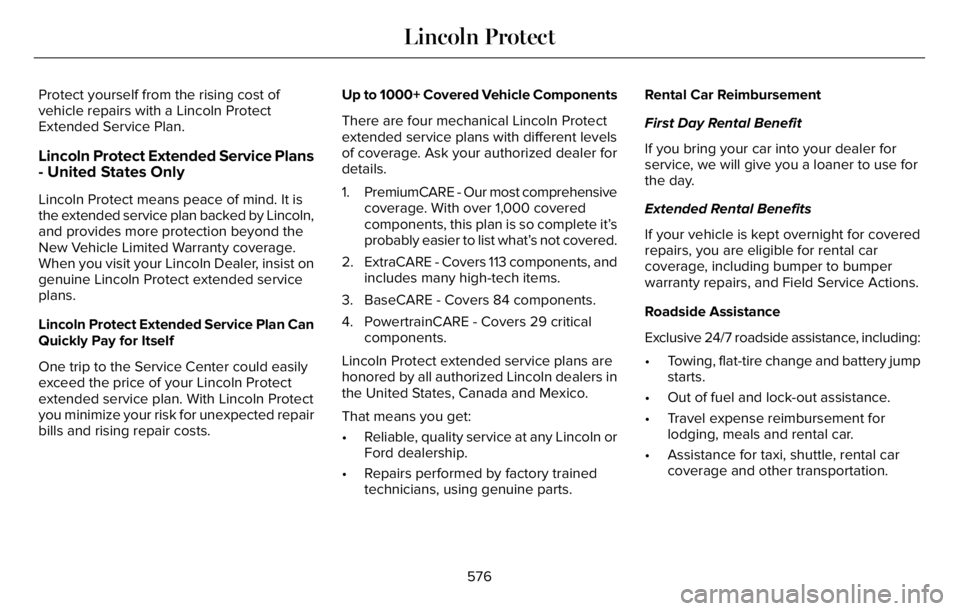
Protect yourself from the rising cost of
vehicle repairs with a Lincoln Protect
Extended Service Plan.
Lincoln Protect Extended Service Plans
- United States Only
Lincoln Protect means peace of mind. It is
the extended service plan backed by Lincoln,
and provides more protection beyond the
New Vehicle Limited Warranty coverage.
When you visit your Lincoln Dealer, insist on
genuine Lincoln Protect extended service
plans.
Lincoln Protect Extended Service Plan Can
Quickly Pay for Itself
One trip to the Service Center could easily
exceed the price of your Lincoln Protect
extended service plan. With Lincoln Protect
you minimize your risk for unexpected repair
bills and rising repair costs.Up to 1000+ Covered Vehicle Components
There are four mechanical Lincoln Protect
extended service plans with different levels
of coverage. Ask your authorized dealer for
details.
1. PremiumCARE - Our most comprehensive
coverage. With over 1,000 covered
components, this plan is so complete it’s
probably easier to list what’s not covered.
2. ExtraCARE - Covers 113 components, and
includes many high-tech items.
3. BaseCARE - Covers 84 components.
4. PowertrainCARE - Covers 29 critical
components.
Lincoln Protect extended service plans are
honored by all authorized Lincoln dealers in
the United States, Canada and Mexico.
That means you get:
• Reliable, quality service at any Lincoln or
Ford dealership.
• Repairs performed by factory trained
technicians, using genuine parts.Rental Car Reimbursement
First Day Rental Benefit
If you bring your car into your dealer for
service, we will give you a loaner to use for
the day.
Extended Rental Benefits
If your vehicle is kept overnight for covered
repairs, you are eligible for rental car
coverage, including bumper to bumper
warranty repairs, and Field Service Actions.
Roadside Assistance
Exclusive 24/7 roadside assistance, including:
• Towing, flat-tire change and battery jump
starts.
• Out of fuel and lock-out assistance.
• Travel expense reimbursement for
lodging, meals and rental car.
• Assistance for taxi, shuttle, rental car
coverage and other transportation.
576
Lincoln Protect
Page 584 of 681
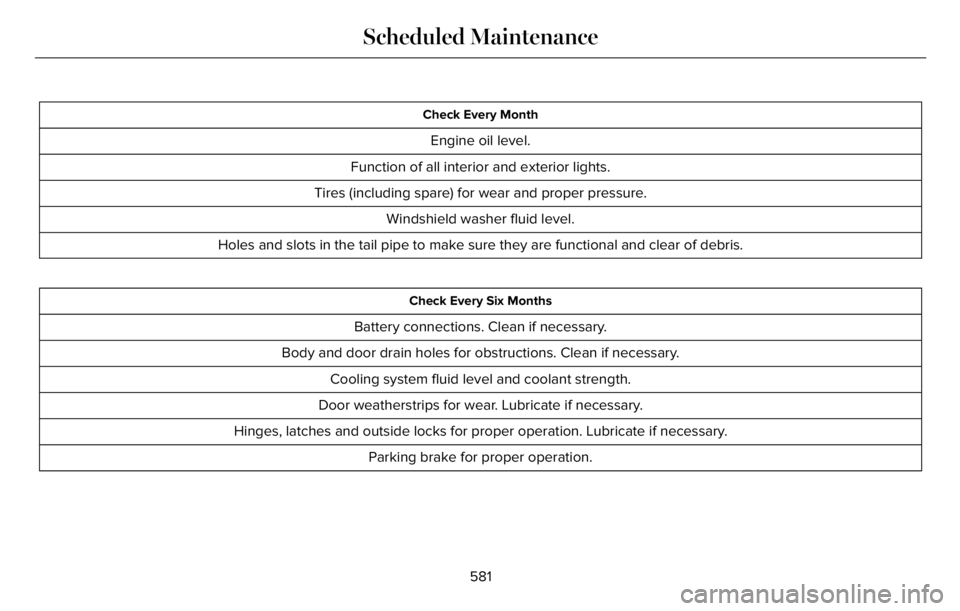
Check Every Month
Engine oil level.
Function of all interior and exterior lights.
Tires (including spare) for wear and proper pressure.
Windshield washer fluid level.
Holes and slots in the tail pipe to make sure they are functional and clear of debris.
Check Every Six Months
Battery connections. Clean if necessary.
Body and door drain holes for obstructions. Clean if necessary.
Cooling system fluid level and coolant strength.
Door weatherstrips for wear. Lubricate if necessary.
Hinges, latches and outside locks for proper operation. Lubricate if necessary.
Parking brake for proper operation.
581
Scheduled Maintenance
Page 670 of 681
3
360 Degree Camera...................................300
9
911 Assist...........................................................66
A
A/CSee: Climate Control..........................................165
About This Manual...........................................11
ABS
See: Brakes...........................................................271
ABS driving hintsSee: Hints on Driving With Anti-Lock
Brakes...............................................................272
Accessories....................................................574
Accessories
See: Replacement Parts Recommendation.....14
Active Park Assist.........................................292
Adaptive Cruise Control.............................305
Adaptive Cruise Control –
Troubleshooting..............................................316
Adaptive Cruise Control Indicators -
Vehicles With: Adaptive Cruise Control
With Lane Centering..................................312Adaptive Cruise Control Indicators -
Vehicles With: Adaptive Cruise Control
With Stop and Go.......................................313
Adaptive Cruise Control Indicators -
Vehicles With: Intelligent Adaptive Cruise
Control...........................................................313
Adaptive Cruise Control Limitations -
Vehicles With: Adaptive Cruise Control
With Lane Centering.................................307
Adaptive Cruise Control Limitations -
Vehicles With: Adaptive Cruise Control
With Stop and Go......................................307
Adaptive Cruise Control Precautions -
Vehicles With: Adaptive Cruise Control
With Lane Centering.................................305
Adaptive Cruise Control Precautions -
Vehicles With: Adaptive Cruise Control
With Stop and Go......................................306
Adaptive Cruise Control –
Troubleshooting..........................................316
Adaptive Cruise Control – Information
Messages..........................................................316
Adaptive Headlamps.....................................114
Adjusting the Headlamps............................416
Adjusting the Set Speed Tolerance..........316
Adjusting the Steering Wheel - Vehicles
With: Manual Adjustable Steering
Column..........................................................102Adjusting the Steering Wheel - Vehicles
With: Power Adjustable Steering
Column..........................................................102
AFS
See: Adaptive Headlamps.................................114
Airbag Disposal...............................................64
Air Conditioning
See: Climate Control..........................................165
Air FilterSee: Changing the Engine Air Filter..............402
Air Suspension..............................................352
Alarm
See: Anti-Theft Alarm.........................................100
All-Wheel Drive.............................................264
Ambient Lighting............................................117
Anti-Theft Alarm............................................100
Appendices...................................................630
Apps................................................................552
At a Glance.......................................................24
Audible Warnings and Indicators..............135
Audio Control.................................................104
Audio System................................................496
General Information...........................................496
Audio Unit.......................................................497
Auto Air Refresh Hints..................................175
Auto Air Refresh Indicators.........................174
Auto Hold.......................................................275
Autolamps........................................................112
667
Index
Page 671 of 681
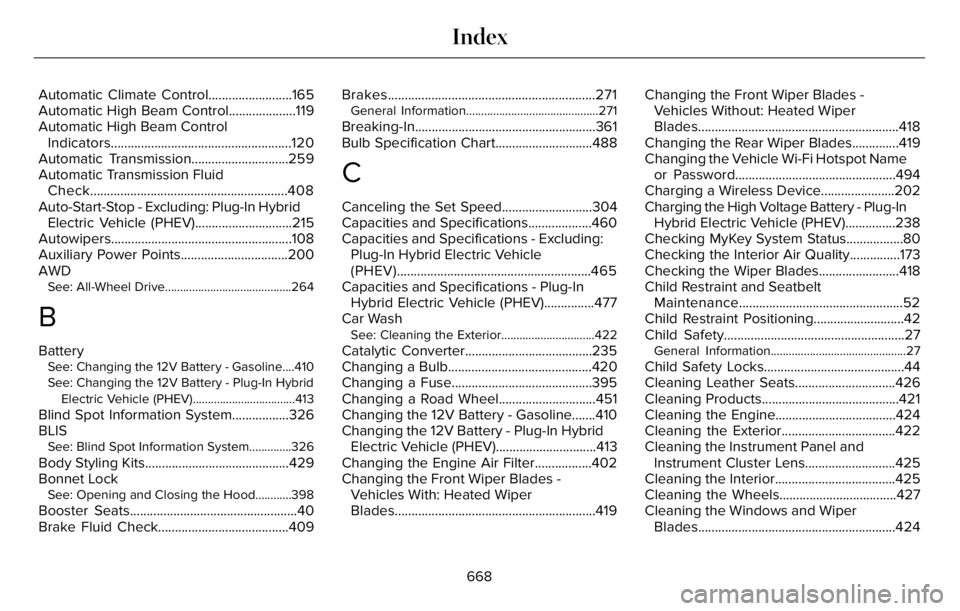
Automatic Climate Control.........................165
Automatic High Beam Control....................119
Automatic High Beam Control
Indicators......................................................120
Automatic Transmission.............................259
Automatic Transmission Fluid
Check...........................................................408
Auto-Start-Stop - Excluding: Plug-In Hybrid
Electric Vehicle (PHEV).............................215
Autowipers......................................................108
Auxiliary Power Points................................200
AWD
See: All-Wheel Drive..........................................264
B
BatterySee: Changing the 12V Battery - Gasoline....410
See: Changing the 12V Battery - Plug-In Hybrid
Electric Vehicle (PHEV)..................................413
Blind Spot Information System.................326
BLIS
See: Blind Spot Information System..............326
Body Styling Kits...........................................429
Bonnet Lock
See: Opening and Closing the Hood............398
Booster Seats..................................................40
Brake Fluid Check.......................................409Brakes..............................................................271
General Information............................................271
Breaking-In......................................................361
Bulb Specification Chart.............................488
C
Canceling the Set Speed...........................304
Capacities and Specifications...................460
Capacities and Specifications - Excluding:
Plug-In Hybrid Electric Vehicle
(PHEV)..........................................................465
Capacities and Specifications - Plug-In
Hybrid Electric Vehicle (PHEV)...............477
Car Wash
See: Cleaning the Exterior...............................422
Catalytic Converter......................................235
Changing a Bulb...........................................420
Changing a Fuse..........................................395
Changing a Road Wheel.............................451
Changing the 12V Battery - Gasoline.......410
Changing the 12V Battery - Plug-In Hybrid
Electric Vehicle (PHEV)..............................413
Changing the Engine Air Filter.................402
Changing the Front Wiper Blades -
Vehicles With: Heated Wiper
Blades............................................................419Changing the Front Wiper Blades -
Vehicles Without: Heated Wiper
Blades............................................................418
Changing the Rear Wiper Blades..............419
Changing the Vehicle Wi-Fi Hotspot Name
or Password................................................494
Charging a Wireless Device......................202
Charging the High Voltage Battery - Plug-In
Hybrid Electric Vehicle (PHEV)...............238
Checking MyKey System Status.................80
Checking the Interior Air Quality...............173
Checking the Wiper Blades........................418
Child Restraint and Seatbelt
Maintenance.................................................52
Child Restraint Positioning...........................42
Child Safety......................................................27General Information.............................................27
Child Safety Locks..........................................44
Cleaning Leather Seats..............................426
Cleaning Products.........................................421
Cleaning the Engine....................................424
Cleaning the Exterior..................................422
Cleaning the Instrument Panel and
Instrument Cluster Lens...........................425
Cleaning the Interior....................................425
Cleaning the Wheels...................................427
Cleaning the Windows and Wiper
Blades...........................................................424
668
Index
Page 672 of 681
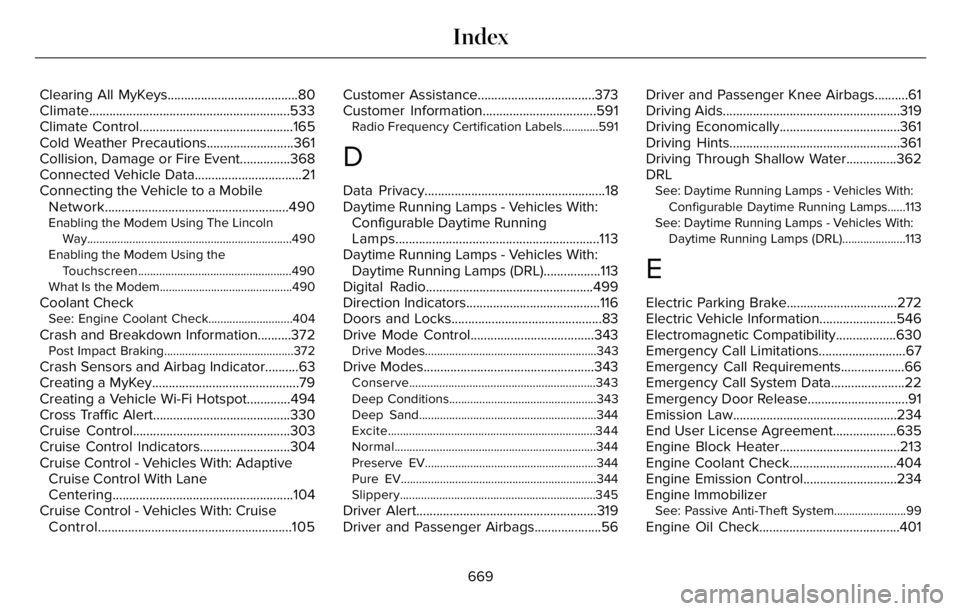
Clearing All MyKeys.......................................80
Climate............................................................533
Climate Control..............................................165
Cold Weather Precautions..........................361
Collision, Damage or Fire Event...............368
Connected Vehicle Data................................21
Connecting the Vehicle to a Mobile
Network.......................................................490
Enabling the Modem Using The Lincoln
Way....................................................................490
Enabling the Modem Using the
Touchscreen...................................................490
What Is the Modem............................................490
Coolant CheckSee: Engine Coolant Check............................404
Crash and Breakdown Information..........372Post Impact Braking...........................................372
Crash Sensors and Airbag Indicator..........63
Creating a MyKey............................................79
Creating a Vehicle Wi-Fi Hotspot.............494
Cross Traffic Alert.........................................330
Cruise Control...............................................303
Cruise Control Indicators...........................304
Cruise Control - Vehicles With: Adaptive
Cruise Control With Lane
Centering......................................................104
Cruise Control - Vehicles With: Cruise
Control..........................................................105Customer Assistance...................................373
Customer Information..................................591
Radio Frequency Certification Labels............591
D
Data Privacy......................................................18
Daytime Running Lamps - Vehicles With:
Configurable Daytime Running
Lamps.............................................................113
Daytime Running Lamps - Vehicles With:
Daytime Running Lamps (DRL).................113
Digital Radio..................................................499
Direction Indicators........................................116
Doors and Locks.............................................83
Drive Mode Control.....................................343
Drive Modes.........................................................343
Drive Modes...................................................343Conserve..............................................................343
Deep Conditions.................................................343
Deep Sand...........................................................344
Excite.....................................................................344
Normal...................................................................344
Preserve EV.........................................................344
Pure EV.................................................................344
Slippery.................................................................345
Driver Alert......................................................319
Driver and Passenger Airbags....................56Driver and Passenger Knee Airbags..........61
Driving Aids.....................................................319
Driving Economically....................................361
Driving Hints...................................................361
Driving Through Shallow Water...............362
DRL
See: Daytime Running Lamps - Vehicles With:
Configurable Daytime Running Lamps......113
See: Daytime Running Lamps - Vehicles With:
Daytime Running Lamps (DRL).....................113
E
Electric Parking Brake.................................272
Electric Vehicle Information.......................546
Electromagnetic Compatibility..................630
Emergency Call Limitations..........................67
Emergency Call Requirements...................66
Emergency Call System Data......................22
Emergency Door Release..............................91
Emission Law.................................................234
End User License Agreement...................635
Engine Block Heater....................................213
Engine Coolant Check................................404
Engine Emission Control............................234
Engine Immobilizer
See: Passive Anti-Theft System........................99
Engine Oil Check..........................................401
669
Index