service indicator LINCOLN AVIATOR 2023 User Guide
[x] Cancel search | Manufacturer: LINCOLN, Model Year: 2023, Model line: AVIATOR, Model: LINCOLN AVIATOR 2023Pages: 681, PDF Size: 9.33 MB
Page 274 of 681
GENERAL INFORMATION
Note: Occasional brake noise is normal. If
a metal-to-metal, continuous grinding or
continuous squeal sound is present, the
brake linings may be worn. Have your
vehicle checked. If your vehicle has
continuous vibration or shudder in the
steering wheel when braking, have your
vehicle checked.
Note: Brake dust may accumulate on the
wheels, even under normal driving
conditions. Some dust is inevitable as the
brakes wear and does not contribute to
brake noise. Wet brakes result in reduced
braking efficiency. Gently press the brake
pedal a few times when driving from a car
wash or standing water to dry the brakes.
See Cleaning the Wheels (page 427).
Brake Over Accelerator
In the event the accelerator pedal becomes
stuck or entrapped, apply steady and firm
pressure to the brake pedal to slow the
vehicle and reduce engine power. If you
experience this condition, apply the brakes
and bring your vehicle to a safe stop. Move
the transmission to park (P), switch the
engine off and apply the parking brake.
Inspect the accelerator pedal for any
interference. If none are found and the
condition persists, have your vehicle
checked. If your vehicle has to be towed,
we recommend that you contact a
professional towing service.
Emergency Brake Assist
Emergency brake assist detects when you
brake heavily by measuring the rate at which
you press the brake pedal. It provides
maximum braking efficiency as long as you
press the pedal. Emergency brake assist
can reduce stopping distances in critical
situations.Note:Depending on applicable laws and
regulations in the country for which your
vehicle was originally built, your brake lamps
may flash during heavy braking. Following
this, your hazard lights may also flash when
your vehicle comes to a stop.
Anti-lock Brake System
This system helps you maintain steering
control during emergency stops by keeping
the brakes from locking.
This lamp illuminates momentarily
when you switch the ignition on to
confirm the lamp is functional.
If the warning lamp does not illuminate
during start up, remains on or flashes, the
system may be disabled. Have the system
checked. If the anti-lock brake system is
disabled, normal braking is still operational.
See Warning Lamps and Indicators (page
131).
Note:Indicators vary depending on region.
271
Brakes
Page 368 of 681
If you need to arrange roadside assistance
for yourself, Lincoln reimburses a reasonable
amount for towing to the nearest Lincoln
dealership within 100 mi (160 km). To obtain
reimbursement information, United States
clients, call 1-800-521-4140. Clients need to
submit their original receipts.
Vehicles Sold in Canada: Getting
Roadside Assistance
To fully assist you should you have a vehicle
concern, Lincoln offers a complimentary
roadside assistance program. This program
is eligible within Canada or the continental
United States.
The service is available 24 hours a day,
seven days a week.
This program is separate from the New
Vehicle Limited Warranty, beginning from
the original warranty start date and lasts the
life of the vehicle for the original owner.
Subsequent owners receive coverage that
is concurrent with the 6 years or 70,000 mi
(110,000 km) (whichever occurs first)
powertrain warranty coverage period.Note:Canadian roadside coverage and
benefits may differ from the U.S. coverage.
For complete program coverage details,
review your warranty guide, contact your
dealer, call us in Canada at 1-800-387-9333,
or visit our website at
www.lincolncanada.com.
If you purchased your vehicle in Canada and
require roadside assistance, please call
1-800-387-9333 or contact Roadside
Assistance using the Lincoln Way mobile
app.
Note:For quick reference, complete the
roadside assistance identification card found
in the glove compartment of your vehicle
and place it in your wallet.
HAZARD FLASHERS
Note:The hazard flashers operate when the
ignition is in any position, or if the key is not
in the ignition. If used when the vehicle is not
running, the battery loses charge. As a result,
there may be insufficient power to restart
your vehicle.
The flasher control is on the
instrument panel. Use your hazard
flashers when your vehicle is
creating a safety hazard for other motorists.
• Press the flasher control and all front and
rear direction indicators flash.
• Press the button again to switch them off.
FUEL SHUTOFF
WARNING: If your vehicle has been
involved in a crash, have the fuel system
checked. Failure to follow this instruction
could result in fire, personal injury or death.
Note:When you try to restart your vehicle
after a fuel shutoff, the vehicle makes sure
that various systems are safe to restart.
Once the vehicle determines the systems
are safe, then the vehicle allows you to
restart.
Note:In the event that your vehicle does not
restart after your third attempt, contact a
qualified technician.
365
Roadside Emergencies
Page 445 of 681
WARNING: To reduce the risk of
serious injury, when mounting
replacement tires and wheels, you
should not exceed the maximum
pressure indicated on the sidewall of
the tire to set the beads without
additional precautions listed below. If
the beads do not seat at the maximum
pressure indicated, re-lubricate and
try again.
WARNING: For a mounting
pressure more than 20 psi (1.38 bar)
greater than the maximum pressure,
a Ford dealer or other tire service
professional should do the mounting.
WARNING: Always inflate steel
carcass tires with a remote air fill with
the person inflating standing at a
minimum of 12 ft (3.66 m) away from
the wheel and tire assembly.
WARNING: When inflating the
tire for mounting pressures up to
20 psi (1.38 bar) greater than the
maximum pressure on the tire sidewall,
the following precautions must be
taken to protect the person mounting
the tire:
• Make sure that you have the correct
tire and wheel size.
• Lubricate the tire bead and wheel
bead seat area again.
• Stand at a minimum of 12 ft (3.66 m)
away from the wheel and tire
assembly.
• Use both eye and ear protection.
Important: Remember to replace the
wheel valve stems when the road tires
are replaced on your vehicle.
It is recommended that the two front
tires or two rear tires generally be
replaced as a pair if the worn tires still
have usable depth.To avoid potential All Wheel Drive (AWD)
malfunction or All Wheel Drive (AWD)
system damage, it is recommended to
replace all four tires rather than mixing
significantly worn tires with new tires.
The tire pressure sensors mounted in
the wheels (originally installed on your
vehicle) are not designed to be used in
aftermarket wheels.
The use of wheels or tires not
recommended may affect the operation
of your tire pressure monitoring system.
If the tire pressure monitoring system
indicator is flashing, your system is
malfunctioning. Your replacement tire
might be incompatible with your tire
pressure monitoring system, or some
component of the system may be
damaged.
442
Wheels and Tires
Page 454 of 681
When Inflating Your Tires
WARNING: Do not use the tire
pressure displayed in the information
display as a tire pressure gauge. Failure to
follow this instruction could result in
personal injury or death.
When putting air into your tires (such as at a
gas station or in your garage), the tire
pressure monitoring system may not respond
immediately to the air added to your tires.
It may take up to two minutes of driving over
20 mph (32 km/h) for the light to turn off after
you have filled your tires to the
recommended inflation pressure.
How Temperature Affects Your Tire
Pressure
The tire pressure monitoring system monitors
tire pressure in each pneumatic tire. While
driving in a normal manner, a typical
passenger tire inflation pressure may
increase about 2–4 psi (14–28 kPa) from a
cold start situation. If the vehicle is stationary
overnight with the outside temperaturesignificantly lower than the daytime
temperature, the tire pressure may decrease
about 3 psi (21 kPa) for a drop of 30°F (17°C)
in ambient temperature. This lower pressure
value may be detected by the tire pressure
monitoring system as being significantly
lower than the recommended inflation
pressure and activate the system warning
light for low tire pressure. If the low tire
pressure warning light is on, visually check
each tire to verify that no tire is flat. If one or
more tires are flat, repair as necessary.
Check the air pressure in the road tires. If
any tire is under-inflated, carefully drive the
vehicle to the nearest location where air can
be added to the tires. Inflate all the tires to
the recommended inflation pressure.
CHANGING A ROAD WHEEL
If you get a flat tire when driving, do not
apply the brake heavily. Instead, gradually
decrease your speed. Hold the steering
wheel firmly and slowly move to a safe place
on the side of the road.Have a flat serviced by an authorized dealer
in order to prevent damage to the tire
pressure monitoring system sensors. See
Tire Pressure Monitoring System (page 447).
Replace the spare tire with a road tire as
soon as possible. During repairing or
replacing of the flat tire, have the authorized
dealer inspect the tire pressure monitoring
system sensor for damage.
Note:You should only use tire sealants in
roadside emergencies as they may cause
damage to the tire pressure monitoring
system sensor.
Note:The tire pressure monitoring system
indicator light illuminates when the spare
tire is in use. To restore the full function of
the monitoring system, all road wheels
equipped with tire pressure monitoring
sensors must be mounted on the vehicle.Dissimilar Spare Wheel and Tire
Assembly Information
WARNING: Failure to follow these
guidelines could result in an increased risk
of loss of vehicle control, injury or death.
451
Wheels and Tires
Page 547 of 681
Adjusting the Guidance Prompt Volume
Turn the volume control when a guidance
prompt plays to adjust the volume.
Note:If you have inadvertently adjusted the
volume to zero, press the turn indicator
button to play the last voice prompt and then
adjust the volume to the desired level.
Muting Guidance Prompts
Select the mute option on the
screen to mute guidance prompts.
Note:The system mutes the next and all
future guidance prompts.
Adding Waypoints
You can add a waypoint to a navigation route
as a destination along your route. You can
add up to five waypoints.
1. Select the search option on the map.
2. Set a destination.
3. Select Add Waypoint.
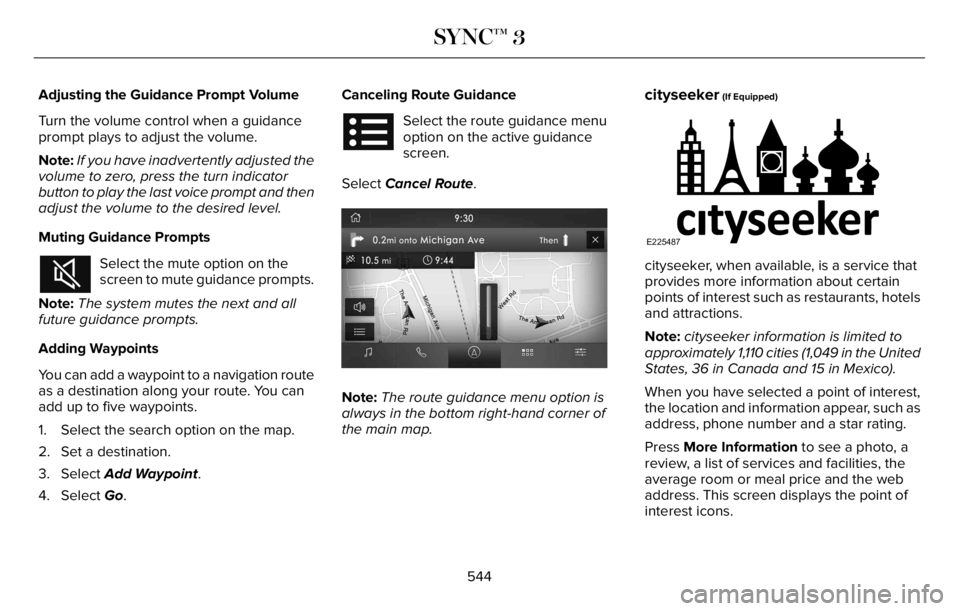
4. Select Go.Canceling Route Guidance
Select the route guidance menu
option on the active guidance
screen.
Select Cancel Route.
E297860E297860
Note:The route guidance menu option is
always in the bottom right-hand corner of
the main map.
cityseeker (If Equipped)
E225487
cityseeker, when available, is a service that
provides more information about certain
points of interest such as restaurants, hotels
and attractions.
Note:cityseeker information is limited to
approximately 1,110 cities (1,049 in the United
States, 36 in Canada and 15 in Mexico).
When you have selected a point of interest,
the location and information appear, such as
address, phone number and a star rating.
Press More Information to see a photo, a
review, a list of services and facilities, the
average room or meal price and the web
address. This screen displays the point of
interest icons.
544
SYNC™ 3
Page 583 of 681
When the oil change message appears in
the information display, it is time for an oil
change. Make sure you perform the oil
change within two weeks or 500 mi (800 km)
of the message appearing. Make sure you
reset the Intelligent Oil-Life Monitor after
each oil change. See Oil Change Indicator
Reset (page 402).
If your information display resets prematurely
or becomes inoperative, you should perform
the oil change interval at six months or
5,000 mi (8,000 km) from your last oil
change. Never exceed one year or 10,000 mi
(16,000 km) between oil change intervals,
Your vehicle is very sophisticated and built
with multiple, complex performance systems.
Every manufacturer develops these systems
using different specifications and
performance features. That is why it is
important to rely upon your dealership to
properly diagnose and repair your vehicle.We have recommended maintenance
intervals for various parts and component
systems based upon engineering testing.
We rely upon this testing to determine the
most appropriate mileage for replacement
of oils and fluids to protect your vehicle at
the lowest overall cost to you and
recommends against maintenance schedules
that deviate from the scheduled maintenance
information.
We strongly recommend the use of only our
genuine manufactured or our authorized
re-manufactured replacement parts
engineered for your vehicle.
Additives and Chemicals
This owner's manual and our Workshop
Manual list the recommended additives and
chemicals for your vehicle. We do not
recommend using chemicals or additives not
approved by us as part of your vehicle’s
normal maintenance. Please consult your
warranty information.Oils, Fluids and Flushing
In many cases, fluid discoloration is a normal
operating characteristic and, by itself, does
not necessarily indicate a concern or that the
fluid needs to be changed. However, a
qualified expert, such as the factory-trained
technicians at your dealership, should
inspect discolored fluids that also show signs
of overheating or foreign material
contamination immediately.
Make sure to change your vehicle’s oils and
fluids at the specified intervals or in
conjunction with a repair. Flushing is a viable
way to change fluid for many vehicle
sub-systems during scheduled maintenance.
It is critical that systems are flushed only with
new fluid that is the same as that required
to fill and operate the system or using our
approved flushing chemical.
Owner Checks and Services
Make sure you perform the following basic
maintenance checks and inspections every
month or at six-month intervals.
580
Scheduled Maintenance
Page 592 of 681
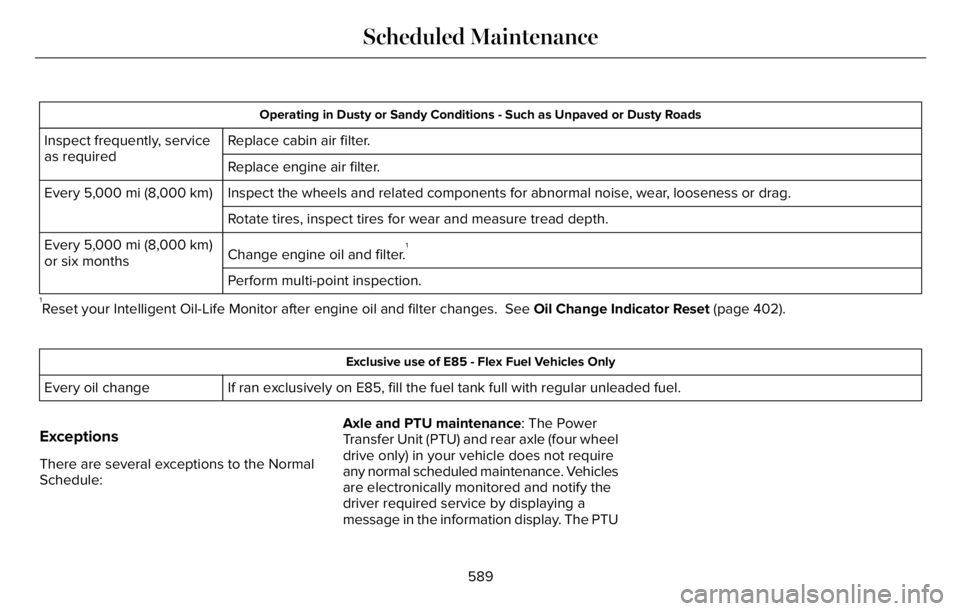
Operating in Dusty or Sandy Conditions - Such as Unpaved or Dusty Roads
Replace cabin air filter. Inspect frequently, service
as required
Replace engine air filter.
Inspect the wheels and related components for abnormal noise, wear, looseness or drag. Every 5,000 mi (8,000 km)
Rotate tires, inspect tires for wear and measure tread depth.
Change engine oil and filter.
1Every 5,000 mi (8,000 km)
or six months
Perform multi-point inspection.
1Reset your Intelligent Oil-Life Monitor after engine oil and filter changes. See Oil Change Indicator Reset (page 402).
Exclusive use of E85 - Flex Fuel Vehicles Only
If ran exclusively on E85, fill the fuel tank full with regular unleaded fuel. Every oil change
Exceptions
There are several exceptions to the Normal
Schedule:Axle and PTU maintenance: The Power
Transfer Unit (PTU) and rear axle (four wheel
drive only) in your vehicle does not require
any normal scheduled maintenance. Vehicles
are electronically monitored and notify the
driver required service by displaying a
message in the information display. The PTU
589
Scheduled Maintenance
Page 673 of 681
Engine Oil Dipstick.......................................401
Engine Specifications - Excluding: Plug-In
Hybrid Electric Vehicle (PHEV)..............460
Engine Specifications - Plug-In Hybrid
Electric Vehicle (PHEV).............................461
Entertainment.................................................521
Environment.....................................................23
EPB
See: Electric Parking Brake..............................272
Essential Towing Checks............................357
Event Data.........................................................19
Export Unique Options...................................16
Exterior Mirrors..............................................122
F
Fastening the Seatbelts................................47
Flat Tire
See: Changing a Road Wheel..........................451
Floor Mats......................................................362
Fog Lamps - Front
See: Front Fog Lamps.........................................113
Front Fog Lamps............................................113
Front Parking Aid.........................................288
Front Passenger Sensing System..............58Front Wiper Blades
See: Changing the Front Wiper Blades - Vehicles
With: Heated Wiper Blades..........................419
See: Changing the Front Wiper Blades - Vehicles
Without: Heated Wiper Blades....................418
Fuel and Refueling.......................................223
Fuel Consumption........................................233
Fuel Filler Funnel Location........................224
Fuel Filter.........................................................418
Fuel Quality....................................................224
Fuel Shutoff...................................................365
Fuses...............................................................382
Fuse Specification Chart............................382
G
Garage Door Opener...................................195
Garage Door Opener Introduction...........195
Garage Door Opener Precautions and
Frequencies.................................................195
Gauges.............................................................128
Gearbox
See: Transmission..............................................259
General Information on Radio
Frequencies..................................................68
General Maintenance Information...........579
Getting Assistance Outside the U.S. and
Canada..........................................................377Getting the Services You Need.................373
Global Opening and Closing......................122
H
Hazard Flashers............................................365
Headlamp Adjusting
See: Adjusting the Headlamps........................416
Headlamp Exit Delay.....................................113
Headrest
See: Head Restraints..........................................177
Head Restraints..............................................177
Heated Exterior Mirrors................................171
Heated Rear Window....................................171
Heated Seats...................................................191
Heated Steering Wheel...............................106
Heating
See: Climate Control..........................................165
High Voltage Battery...................................238General Information...........................................238
Hill Descent Control....................................284
Hill Descent Control Indicator...................285
Hill Start Assist..............................................274
Hints on Controlling the Interior
Climate..........................................................168
Hints on Driving With Anti-Lock
Brakes...........................................................272
670
Index
Page 676 of 681
Tire Pressure Monitoring System
Sensors..............................................................621
Wireless Accessory Charging Module..........627
Rear Occupant Alert System Audible
Warnings.......................................................194
Rear Occupant Alert System
Indicators......................................................194
Rear Occupant Alert System
Limitations....................................................193
Rear Occupant Alert System
Precautions..................................................193
Rear Occupant Alert System......................193
Rear Parking Aid...........................................286
Rear Passenger Climate Controls -
Vehicles With: Quadruple Zone
Automatic Temperature Control.............169
Rear Passenger Climate Controls -
Vehicles With: Triple Zone Automatic
Temperature Control..................................170
Rear Seats.......................................................187
Rear Under Floor Storage..........................346
Rear View Camera.......................................297
Rear View Camera
See: Rear View Camera....................................297
Rear Window Wiper and Washers............109
Rear Wiper Blades
See: Changing the Rear Wiper Blades..........419
Recommended Towing Weights..............356Reduced Engine Performance...................361
Refreshing the Interior Air...........................174
Automatically Refreshing the Interior Air.......174
Manually Refreshing the Interior Air...............174
Refueling - Excluding: Hybrid Electric
Vehicle (HEV)..............................................226
Refueling - Plug-In Hybrid Electric Vehicle
(PHEV)..........................................................229
Remote Control...............................................69
Remote Start...................................................172
Repairing Minor Paint Damage.................427
Replacement Parts Recommendation........14
Replacing a Lost Key or Remote
Control.............................................................73
Replacing the Cabin Air Filter.....................173
Reporting Safety Defects (Canada
Only)..............................................................380
Reporting Safety Defects (U.S. Only)......380
Resuming the Set Speed...........................304
Reverse Braking Assist Indicators...........278
Reverse Braking Assist Precautions........277
Reverse Braking Assist...............................277
Reverse Braking Assist –
Troubleshooting.............................................279
Reverse Braking Assist –
Troubleshooting.........................................279
Reverse Braking Assist – Frequently Asked
Questions........................................................280Reverse Braking Assist – Information
Messages.........................................................279
Roadside Assistance...................................364
Roadside Emergencies...............................364
Rollover Warning...........................................591
Roof Racks and Load Carriers...................347
Running-In
See: Breaking-In..................................................361
Running Out of Fuel....................................225
S
Safety Canopy™................................................61
Safety Precautions.......................................223
Satellite Radio...............................................502
Scheduled Maintenance............................579
Seatbelt Extensions.......................................53
Seatbelt Height Adjustment.........................49
Seatbelt Reminder..........................................50
Seatbelts...........................................................46
Principle of Operation..........................................46
Seatbelt Warning Lamp and Indicator
Chime..............................................................49
Seats.................................................................176
Security.............................................................99
Selecting a Drive Mode..............................343
Service Data......................................................19
Settings Data...................................................20
673
Index