steering wheel LINCOLN AVIATOR 2023 User Guide
[x] Cancel search | Manufacturer: LINCOLN, Model Year: 2023, Model line: AVIATOR, Model: LINCOLN AVIATOR 2023Pages: 681, PDF Size: 9.33 MB
Page 107 of 681
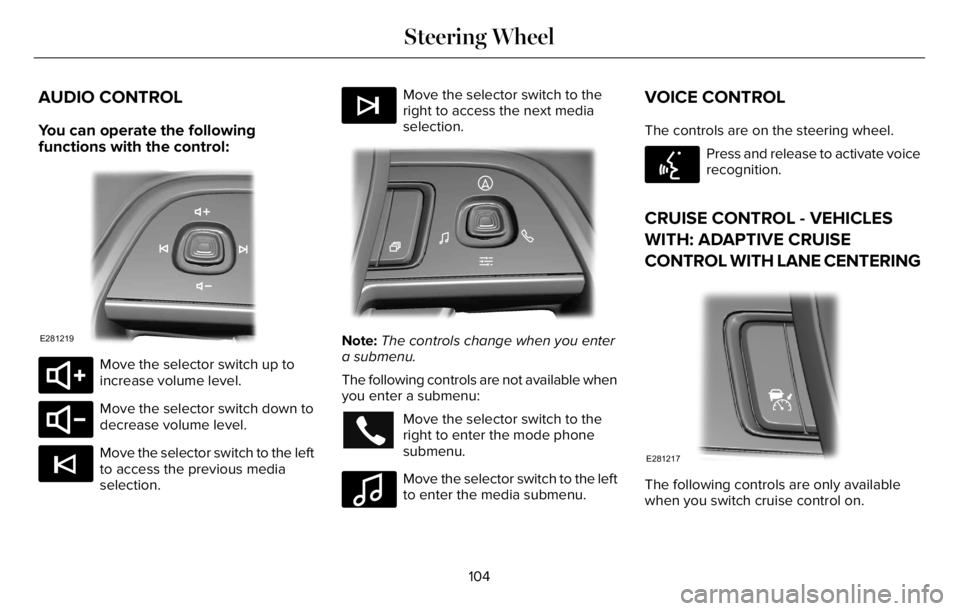
AUDIO CONTROL
You can operate the following
functions with the control:
E281219
E280803
Move the selector switch up to
increase volume level.
E280802
Move the selector switch down to
decrease volume level.
E265045
Move the selector switch to the left
to access the previous media
selection.
E265044
Move the selector switch to the
right to access the next media
selection.
EE28128181818181811111182202202202222202220220
Note:The controls change when you enter
a submenu.
The following controls are not available when
you enter a submenu:
Move the selector switch to the
right to enter the mode phone
submenu.
E100027
Move the selector switch to the left
to enter the media submenu.
VOICE CONTROL
The controls are on the steering wheel.
E142599
Press and release to activate voice
recognition.
CRUISE CONTROL - VEHICLES
WITH: ADAPTIVE CRUISE
CONTROL WITH LANE CENTERING
E281217
The following controls are only available
when you switch cruise control on.
104
Steering Wheel
Page 108 of 681
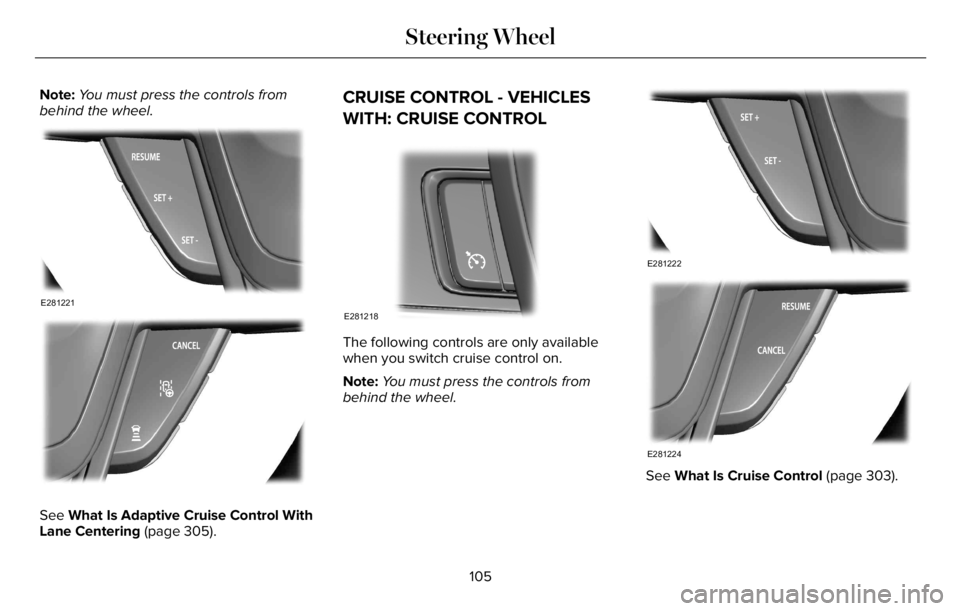
Note:You must press the controls from
behind the wheel.
E281221
E281225
See What Is Adaptive Cruise Control With
Lane Centering (page 305).
CRUISE CONTROL - VEHICLES
WITH: CRUISE CONTROL
E281218
The following controls are only available
when you switch cruise control on.
Note:You must press the controls from
behind the wheel.
E281222
E281224
See What Is Cruise Control (page 303).
105
Steering Wheel
Page 109 of 681
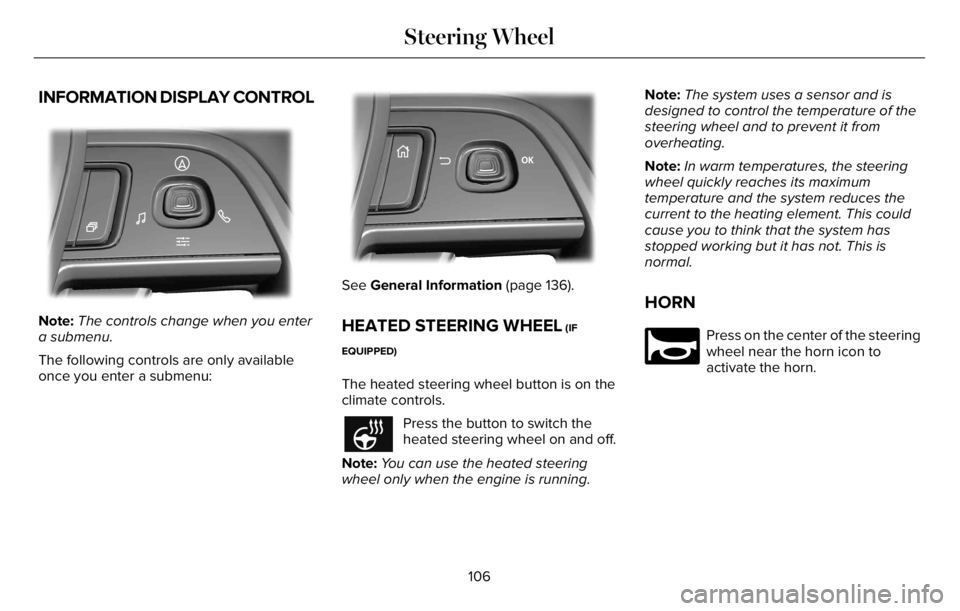
INFORMATION DISPLAY CONTROL
EE28128181818181811111822022220220222022022220
Note:The controls change when you enter
a submenu.
The following controls are only available
once you enter a submenu:
EE2992999999999999999999701707070170100701701
See General Information (page 136).
HEATED STEERING WHEEL (IF
EQUIPPED)
The heated steering wheel button is on the
climate controls.
Press the button to switch the
heated steering wheel on and off.
Note:You can use the heated steering
wheel only when the engine is running.Note:The system uses a sensor and is
designed to control the temperature of the
steering wheel and to prevent it from
overheating.
Note:In warm temperatures, the steering
wheel quickly reaches its maximum
temperature and the system reduces the
current to the heating element. This could
cause you to think that the system has
stopped working but it has not. This is
normal.
HORN
E270945
Press on the center of the steering
wheel near the horn icon to
activate the horn.
106
Steering Wheel
Page 139 of 681
GENERAL INFORMATION
WARNING: Driving while distracted
can result in loss of vehicle control, crash
and injury. We strongly recommend that
you use extreme caution when using any
device that may take your focus off the
road. Your primary responsibility is the safe
operation of your vehicle. We recommend
against the use of any hand-held device
while driving and encourage the use of
voice-operated systems when possible.
Make sure you are aware of all applicable
local laws that may affect the use of
electronic devices while driving.
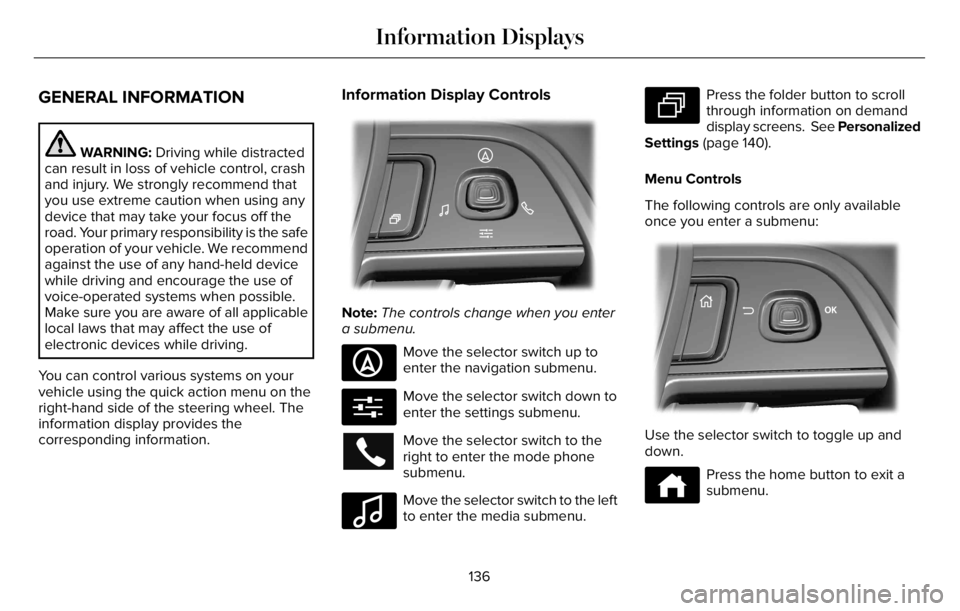
You can control various systems on your
vehicle using the quick action menu on the
right-hand side of the steering wheel. The
information display provides the
corresponding information.
Information Display Controls
EE281281818181818111118220222222022022220220
Note:The controls change when you enter
a submenu.
E281481
Move the selector switch up to
enter the navigation submenu.
E280315
Move the selector switch down to
enter the settings submenu.
Move the selector switch to the
right to enter the mode phone
submenu.
E100027
Move the selector switch to the left
to enter the media submenu.
E281483
Press the folder button to scroll
through information on demand
display screens. See Personalized
Settings (page 140).
Menu Controls
The following controls are only available
once you enter a submenu:
EE2992992999999999999999701701701070107010701
Use the selector switch to toggle up and
down.
E272621
Press the home button to exit a
submenu.
136
Information Displays
Page 157 of 681
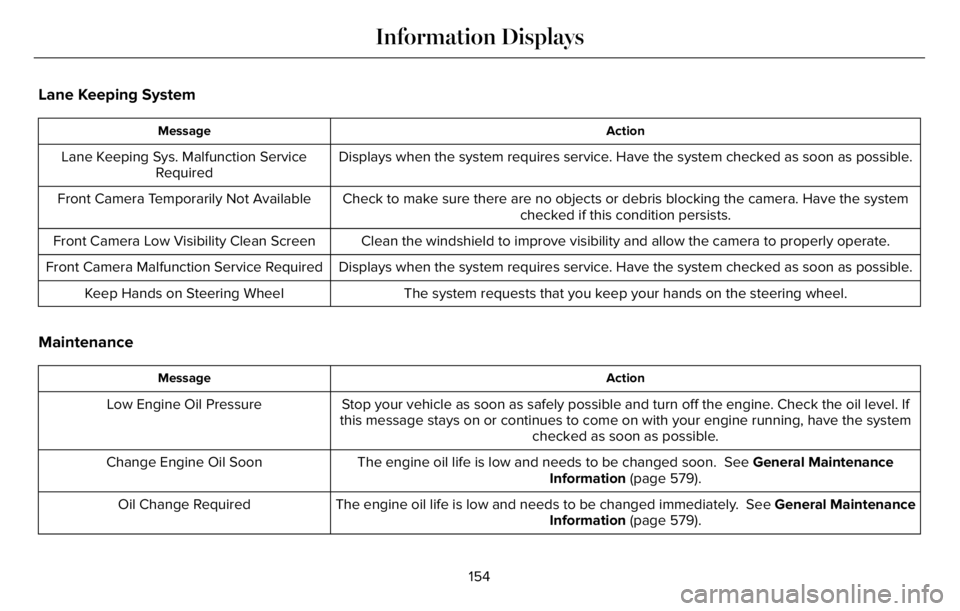
Lane Keeping System
Action Message
Displays when the system requires service. Have the system checked as soon as possible. Lane Keeping Sys. Malfunction Service
Required
Check to make sure there are no objects or debris blocking the camera. Have the system
checked if this condition persists. Front Camera Temporarily Not Available
Clean the windshield to improve visibility and allow the camera to properly operate. Front Camera Low Visibility Clean Screen
Displays when the system requires service. Have the system checked as soon as possible. Front Camera Malfunction Service Required
The system requests that you keep your hands on the steering wheel. Keep Hands on Steering Wheel
Maintenance
Action Message
Stop your vehicle as soon as safely possible and turn off the engine. Check the oil level. If
this message stays on or continues to come on with your engine running, have the system
checked as soon as possible. Low Engine Oil Pressure
The engine oil life is low and needs to be changed soon. See General Maintenance
Information (page 579). Change Engine Oil Soon
The engine oil life is low and needs to be changed immediately. See General Maintenance
Information (page 579). Oil Change Required
154
Information Displays
Page 175 of 681
REMOTE START
The climate control system adjusts the
interior temperature during remote start.
You can switch this feature on or off and
adjust the settings using the touchscreen.
See Settings (page 555).
You cannot adjust the climate control setting
during remote start operation. Switch the
ignition on to make adjustments.
Based on your remote start settings, the
following vehicle-dependent features may
or may not remain on after remote starting
your vehicle:
• Climate controlled seats.
• Heated steering wheel.
• Heated mirrors.
• Heated rear window.
• Windshield wiper de-icer.
Note:For dual zone climate controlled seats,
the passenger seat setting defaults to match
the driver seat during remote start.
Automatic Settings
If Auto is on, the system sets the interior
temperature to 72°F (22°C) and heats or
cools the vehicle interior as required to
achieve comfort.
Note:In cold weather, the heated rear
window and heated mirrors turn on.
Last Settings
If Last Settings is on, the system uses the
settings last selected before you turned off
the vehicle.
Heated and Cooled Features
In Auto mode, certain heated features may
switch on during cold weather, and cooled
features during hot weather.
172
Climate Control
Page 179 of 681
SITTING IN THE CORRECT
POSITION
WARNING: Sitting improperly, out of
position or with the seatback reclined too
far can take weight off the seat cushion
and affect the decision of the passenger
sensing system, resulting in serious injury
or death in the event of a crash. Always sit
upright against your seat back, with your
feet on the floor.
WARNING: Do not recline the seat
backrest too far as this can cause the
occupant to slide under the seatbelt,
resulting in personal injury in the event of
a crash.
WARNING: Do not place objects
higher than the top of the seat backrest.
Failure to follow this instruction could result
in personal injury or death in the event of
a sudden stop or crash.
E68595
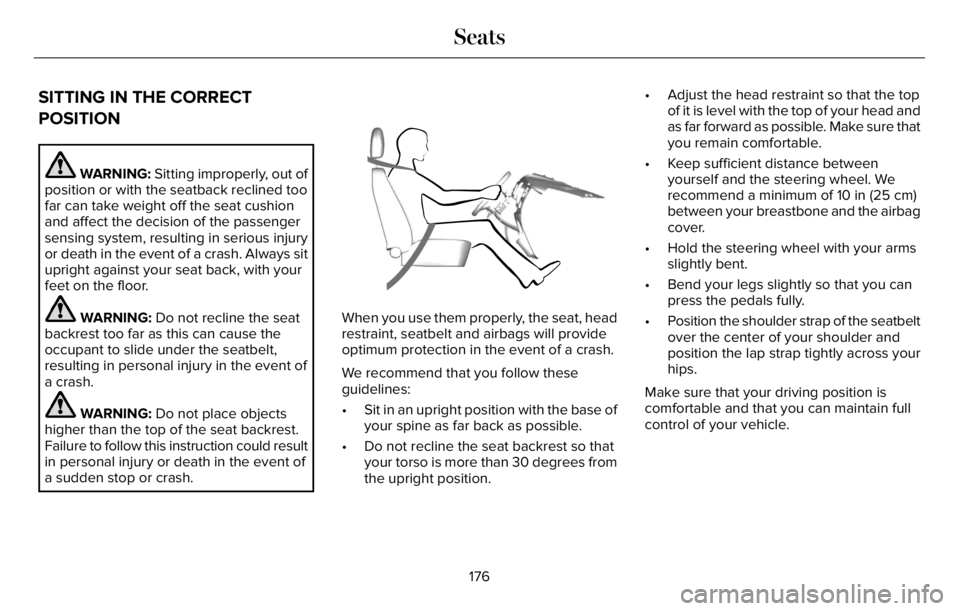
When you use them properly, the seat, head
restraint, seatbelt and airbags will provide
optimum protection in the event of a crash.
We recommend that you follow these
guidelines:
• Sit in an upright position with the base of
your spine as far back as possible.
• Do not recline the seat backrest so that
your torso is more than 30 degrees from
the upright position.• Adjust the head restraint so that the top
of it is level with the top of your head and
as far forward as possible. Make sure that
you remain comfortable.
• Keep sufficient distance between
yourself and the steering wheel. We
recommend a minimum of 10 in (25 cm)
between your breastbone and the airbag
cover.
• Hold the steering wheel with your arms
slightly bent.
• Bend your legs slightly so that you can
press the pedals fully.
• Position the shoulder strap of the seatbelt
over the center of your shoulder and
position the lap strap tightly across your
hips.
Make sure that your driving position is
comfortable and that you can maintain full
control of your vehicle.
176
Seats
Page 218 of 681
AUTO-START-STOP - EXCLUDING:
PLUG-IN HYBRID ELECTRIC
VEHICLE (PHEV)
The system helps reduce fuel consumption
by automatically stopping and restarting the
engine when your vehicle has stopped. The
engine restarts automatically when you
release the brake pedal.
In some situations, your vehicle may restart
automatically, for example:
• To maintain interior comfort.
• To recharge the battery.
Note:Power assist steering turns off when
the engine is off.
Note:If your vehicle is flex fuel capable,
Auto-Start-Stop will be inhibited for a short
time after a refuel event while the system is
verifying the fuel type being used.
WARNING: Apply the parking brake,
shift into park (P), switch the ignition off
and remove the key before you leave your
vehicle. Failure to follow this instruction
could result in personal injury or death.
WARNING: Apply the parking brake,
shift into park (P), switch the ignition off
and remove the key before you open the
hood or have any service or repair work
completed. If you do not switch the ignition
off, the engine could restart at any time.
Failure to follow this instruction could result
in personal injury or death.
WARNING: The system may require
the engine to automatically restart when
the auto-start-stop indicator illuminates
green or flashes amber. Failure to follow
this instruction could result in personal
injury.
The Auto-Start-Stop system status is
available at a glance within the information
display. See Information Displays (page
136).
Enabling Auto-Start-Stop
The system automatically enables every time
you start your vehicle if:
• Your vehicle exceeds an initial speed of
3 mph (5 km/h) after you have initially
started your vehicle.
• You have stopped your vehicle.
• Your foot is on the brake pedal.
• The driver door is closed.
• The interior compartment has cooled or
warmed to an acceptable level.
• The front windshield defroster is off.
• You have not turned the steering wheel
rapidly or you do not have it at a sharp
angle.
• The vehicle is not on a steep road grade.
• The battery is within optimal operating
conditions (battery state of charge and
temperature in range).
• The engine coolant is near operating
temperature.
• Elevation is below about 12,000 ft
(3,650 m).
• Ambient temperature is moderate.
215
Unique Driving Characteristics
Page 267 of 681
USING ALL-WHEEL DRIVE
WARNING: Vehicles with a higher
center of gravity (utility and four-wheel
drive vehicles) handle differently than
vehicles with a lower center of gravity
(passenger cars). Avoid sharp turns,
excessive speed and abrupt steering in
these vehicles. Failure to drive cautiously
increases the risk of losing control of your
vehicle, vehicle rollover, personal injury
and death.
WARNING: Do not become
overconfident in the ability of all-wheel
drive vehicles. Although an all-wheel drive
vehicle may accelerate better than a
two-wheel drive vehicle in low traction
situations, it won't stop any faster than
two-wheel drive vehicles. Always drive at
a safe speed.The intelligent AWD system continuously
monitors vehicle conditions and adjusts the
power distribution between the front and
rear wheels. It combines transparent
all-surface operation with highly capable
all-wheel drive.
The AWD system is always active and
requires no driver input. It is capable of
handling all road conditions including street
and highway driving as well as off-road and
winter driving. You can optimize more AWD
control by selecting different drive modes.
See Selecting a Drive Mode (page 343).
Note:A warning message displays in the
information display when an AWD system
fault is present. See Information Messages
(page 142). A AWD system fault causes the
AWD system to default to rear-wheel drive
only mode. When this warning message
displays, have your vehicle serviced.Note:A warning message displays in the
information display if the AWD system
overheats. See Information Messages
(page 142). This condition could occur if you
operate your vehicle in extreme conditions
with excessive wheel slip, such as deep
sand. To resume normal AWD function as
soon as possible, stop the vehicle in a safe
location and stop the engine for at least 10
minutes. After you restart the engine and the
AWD system adequately cools, the warning
message turns off and normal AWD function
returns.Operating All-Wheel Drive (AWD)
Vehicles With Spare Tires
Do not use a different size spare tire other
than the tire provided. If the mini-spare tire
is installed, the AWD system will disable and
enter rear-wheel drive only mode to protect
driveline components. Some limited AWD
traction could be provided if the mini-spare
is installed on one of the front wheels. If you
are in driving conditions where limited AWD
traction is needed while the mini-spare is
installed, it is recommended the mini-spare
be installed on the front axle.
264
All-Wheel Drive (If Equipped)
Page 268 of 681
If the mini-spare is installed, this condition is
indicated by a warning in the information
display.
The slip response system could activate if
the mini spare is installed on the front
wheels. If the mini spare was installed on the
rear wheels the slip response system will
fully disable. In situations where there is a
wintery mix or an off road situation, and you
need to use a mini spare, you must install
the mini spare in the front tire position and
move a full size tire to the rear tire position
for the slip response system to function.
Operating ALL-Wheel Drive (AWD)
Vehicles with Mismatched Tires
WARNING: Only use replacement
tires and wheels that are the same size,
load index, speed rating, and type as those
originally provided for your vehicle. The
recommended tire and wheel sizes can be
found on the Tire Label on the driver side
door frame or the edge of the driver door.
If this information is not found in those
locations, or for additional options, contact
your authorized dealer. Use of any tire or
wheel not recommended, could affect the
safety and performance of your vehicle,
which could result in an increased risk of
loss of vehicle control, vehicle rollover,
personal injury and death.
Major dissimilar tire sizes between the front
and rear axles (for example, 17 inch low
profile tires on the front axle and 22 inch high
profile tires on the rear axle) could cause the
AWD system to stop functioning and default
to rear-wheel drive or damage the AWD
system.
For optimum AWD Performance, it is
recommended to follow the tire rotation
maintenance schedule. To avoid potential
AWD malfunction or AWD system damage,
it is recommended to replace all four tires
rather than mixing significantly worn tires
with new tires. For example, using 3 worn
tread tires and 1 new tread tire all of the same
original tire size/brand, can be tolerated by
the AWD system as long as the worn tires
still have usable tread depth.How Your Vehicle Differs from Other
Vehicles
Truck and utility vehicles can differ from
some other vehicles. Your vehicle could be
higher to allow it to travel over rough terrain
without getting hung up or damaging
underbody components.
The differences that make your vehicle so
versatile also make it handle differently than
an ordinary passenger car.
Maintain steering wheel control at all times,
especially in rough terrain. Since sudden
changes in terrain can result in abrupt
steering wheel motion, make sure you grip
the steering wheel from the outside. Do not
grip the spokes.
Drive cautiously to avoid vehicle damage
from concealed objects such as rocks and
stumps.
265
All-Wheel Drive (If Equipped)