brake LINCOLN AVIATOR 2023 Owner's Manual
[x] Cancel search | Manufacturer: LINCOLN, Model Year: 2023, Model line: AVIATOR, Model: LINCOLN AVIATOR 2023Pages: 681, PDF Size: 9.33 MB
Page 158 of 681
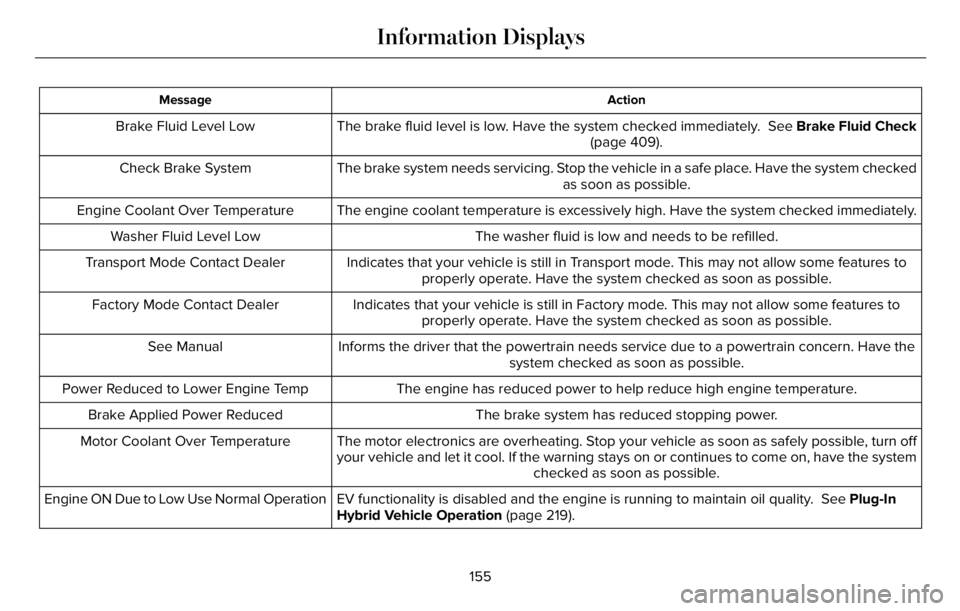
Action Message
The brake fluid level is low. Have the system checked immediately. See Brake Fluid Check
(page 409). Brake Fluid Level Low
The brake system needs servicing. Stop the vehicle in a safe place. Have the system checked
as soon as possible. Check Brake System
The engine coolant temperature is excessively high. Have the system checked immediately. Engine Coolant Over Temperature
The washer fluid is low and needs to be refilled. Washer Fluid Level Low
Indicates that your vehicle is still in Transport mode. This may not allow some features to
properly operate. Have the system checked as soon as possible. Transport Mode Contact Dealer
Indicates that your vehicle is still in Factory mode. This may not allow some features to
properly operate. Have the system checked as soon as possible. Factory Mode Contact Dealer
Informs the driver that the powertrain needs service due to a powertrain concern. Have the
system checked as soon as possible. See Manual
The engine has reduced power to help reduce high engine temperature. Power Reduced to Lower Engine Temp
The brake system has reduced stopping power. Brake Applied Power Reduced
The motor electronics are overheating. Stop your vehicle as soon as safely possible, turn off
your vehicle and let it cool. If the warning stays on or continues to come on, have the system
checked as soon as possible. Motor Coolant Over Temperature
EV functionality is disabled and the engine is running to maintain oil quality. See Plug-In
Hybrid Vehicle Operation (page 219). Engine ON Due to Low Use Normal Operation
155
Information Displays
Page 161 of 681
Park Brake
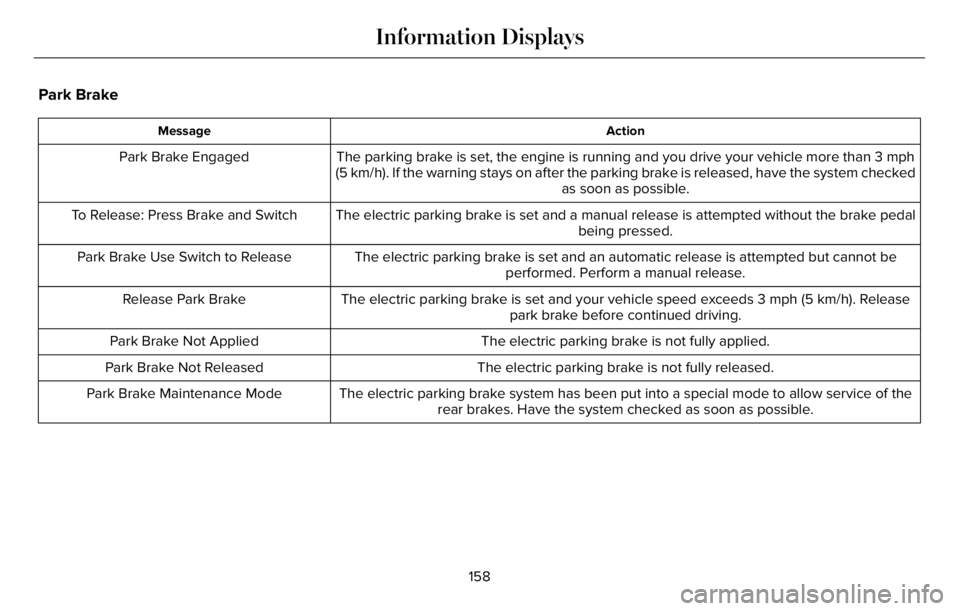
Action Message
The parking brake is set, the engine is running and you drive your vehicle more than 3 mph
(5 km/h). If the warning stays on after the parking brake is released, have the system checked
as soon as possible. Park Brake Engaged
The electric parking brake is set and a manual release is attempted without the brake pedal
being pressed. To Release: Press Brake and Switch
The electric parking brake is set and an automatic release is attempted but cannot be
performed. Perform a manual release. Park Brake Use Switch to Release
The electric parking brake is set and your vehicle speed exceeds 3 mph (5 km/h). Release
park brake before continued driving. Release Park Brake
The electric parking brake is not fully applied. Park Brake Not Applied
The electric parking brake is not fully released. Park Brake Not Released
The electric parking brake system has been put into a special mode to allow service of the
rear brakes. Have the system checked as soon as possible. Park Brake Maintenance Mode
158
Information Displays
Page 162 of 681
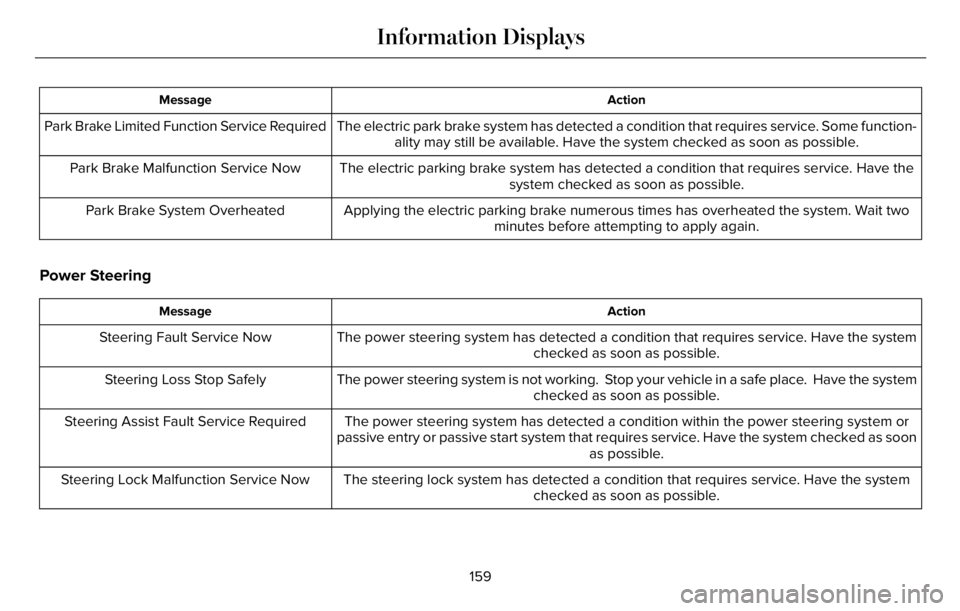
Action Message
The electric park brake system has detected a condition that requires service. Some function-
ality may still be available. Have the system checked as soon as possible. Park Brake Limited Function Service Required
The electric parking brake system has detected a condition that requires service. Have the
system checked as soon as possible. Park Brake Malfunction Service Now
Applying the electric parking brake numerous times has overheated the system. Wait two
minutes before attempting to apply again. Park Brake System Overheated
Power Steering
Action Message
The power steering system has detected a condition that requires service. Have the system
checked as soon as possible. Steering Fault Service Now
The power steering system is not working. Stop your vehicle in a safe place. Have the system
checked as soon as possible. Steering Loss Stop Safely
The power steering system has detected a condition within the power steering system or
passive entry or passive start system that requires service. Have the system checked as soon
as possible. Steering Assist Fault Service Required
The steering lock system has detected a condition that requires service. Have the system
checked as soon as possible. Steering Lock Malfunction Service Now
159
Information Displays
Page 163 of 681
Pre-Collision Assist
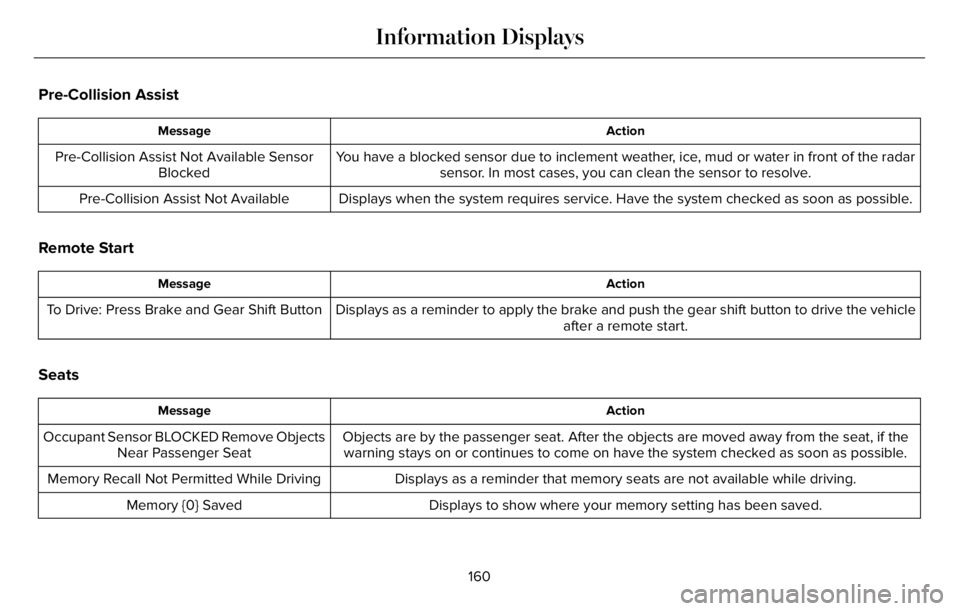
Action Message
You have a blocked sensor due to inclement weather, ice, mud or water in front of the radar
sensor. In most cases, you can clean the sensor to resolve. Pre-Collision Assist Not Available Sensor
Blocked
Displays when the system requires service. Have the system checked as soon as possible. Pre-Collision Assist Not Available
Remote Start
Action Message
Displays as a reminder to apply the brake and push the gear shift button to drive the vehicle
after a remote start. To Drive: Press Brake and Gear Shift Button
Seats
Action Message
Objects are by the passenger seat. After the objects are moved away from the seat, if the
warning stays on or continues to come on have the system checked as soon as possible. Occupant Sensor BLOCKED Remove Objects
Near Passenger Seat
Displays as a reminder that memory seats are not available while driving. Memory Recall Not Permitted While Driving
Displays to show where your memory setting has been saved. Memory {0} Saved
160
Information Displays
Page 164 of 681
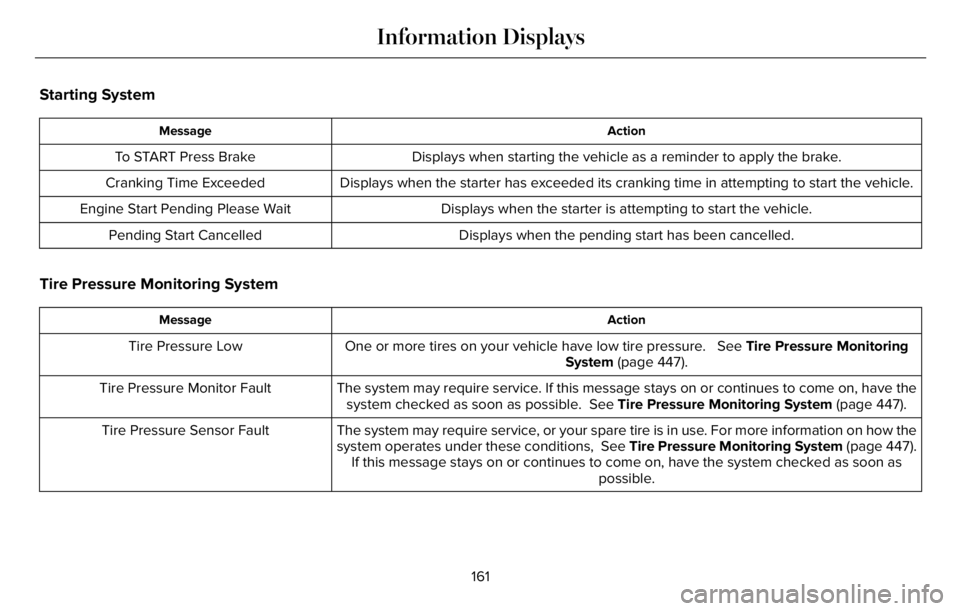
Starting System
Action Message
Displays when starting the vehicle as a reminder to apply the brake. To START Press Brake
Displays when the starter has exceeded its cranking time in attempting to start the vehicle. Cranking Time Exceeded
Displays when the starter is attempting to start the vehicle. Engine Start Pending Please Wait
Displays when the pending start has been cancelled. Pending Start Cancelled
Tire Pressure Monitoring System
Action Message
One or more tires on your vehicle have low tire pressure. See Tire Pressure Monitoring
System (page 447). Tire Pressure Low
The system may require service. If this message stays on or continues to come on, have the
system checked as soon as possible. See Tire Pressure Monitoring System (page 447). Tire Pressure Monitor Fault
The system may require service, or your spare tire is in use. For more information on how the
system operates under these conditions, See Tire Pressure Monitoring System (page 447).
If this message stays on or continues to come on, have the system checked as soon as
possible. Tire Pressure Sensor Fault
161
Information Displays
Page 165 of 681
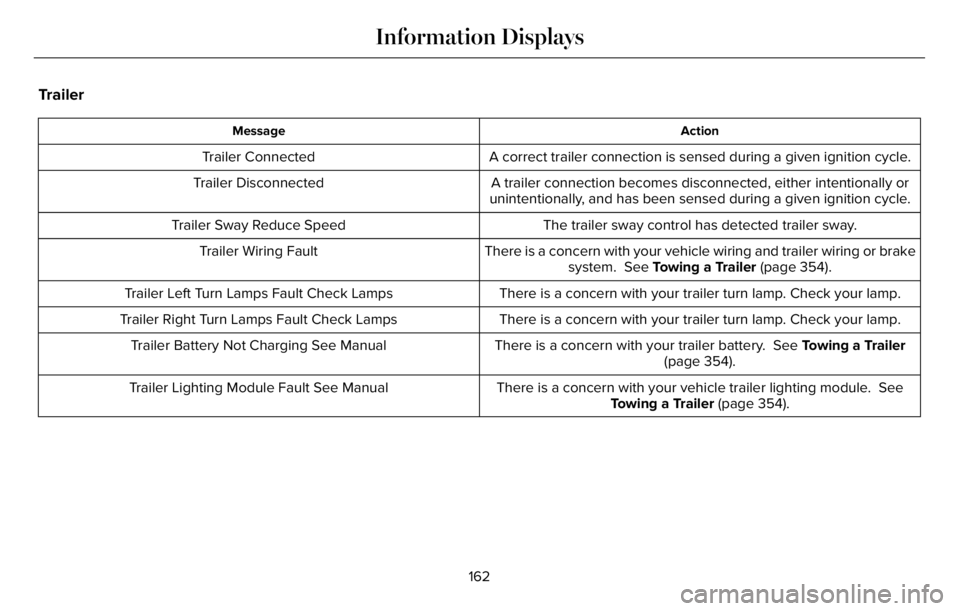
Trailer
Action Message
A correct trailer connection is sensed during a given ignition cycle. Trailer Connected
A trailer connection becomes disconnected, either intentionally or
unintentionally, and has been sensed during a given ignition cycle. Trailer Disconnected
The trailer sway control has detected trailer sway. Trailer Sway Reduce Speed
There is a concern with your vehicle wiring and trailer wiring or brake
system. See Towing a Trailer (page 354). Trailer Wiring Fault
There is a concern with your trailer turn lamp. Check your lamp. Trailer Left Turn Lamps Fault Check Lamps
There is a concern with your trailer turn lamp. Check your lamp. Trailer Right Turn Lamps Fault Check Lamps
There is a concern with your trailer battery. See Towing a Trailer
(page 354). Trailer Battery Not Charging See Manual
There is a concern with your vehicle trailer lighting module. See
Towing a Trailer (page 354). Trailer Lighting Module Fault See Manual
162
Information Displays
Page 166 of 681
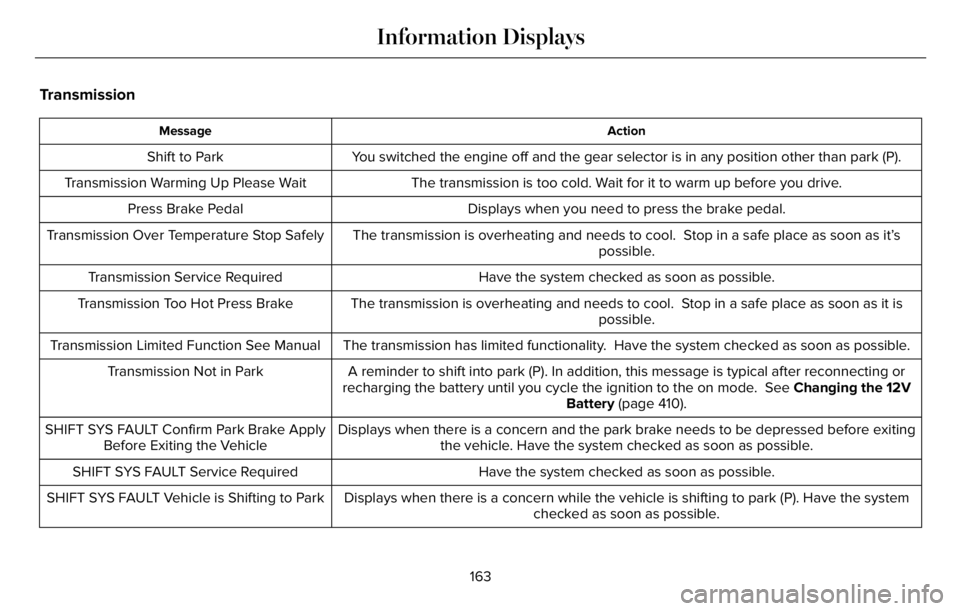
Transmission
Action Message
You switched the engine off and the gear selector is in any position other than park (P). Shift to Park
The transmission is too cold. Wait for it to warm up before you drive. Transmission Warming Up Please Wait
Displays when you need to press the brake pedal. Press Brake Pedal
The transmission is overheating and needs to cool. Stop in a safe place as soon as it’s
possible. Transmission Over Temperature Stop Safely
Have the system checked as soon as possible. Transmission Service Required
The transmission is overheating and needs to cool. Stop in a safe place as soon as it is
possible. Transmission Too Hot Press Brake
The transmission has limited functionality. Have the system checked as soon as possible. Transmission Limited Function See Manual
A reminder to shift into park (P). In addition, this message is typical after reconnecting or
recharging the battery until you cycle the ignition to the on mode. See Changing the 12V
Battery (page 410). Transmission Not in Park
Displays when there is a concern and the park brake needs to be depressed before exiting
the vehicle. Have the system checked as soon as possible. SHIFT SYS FAULT Confirm Park Brake Apply
Before Exiting the Vehicle
Have the system checked as soon as possible. SHIFT SYS FAULT Service Required
Displays when there is a concern while the vehicle is shifting to park (P). Have the system
checked as soon as possible. SHIFT SYS FAULT Vehicle is Shifting to Park
163
Information Displays
Page 167 of 681
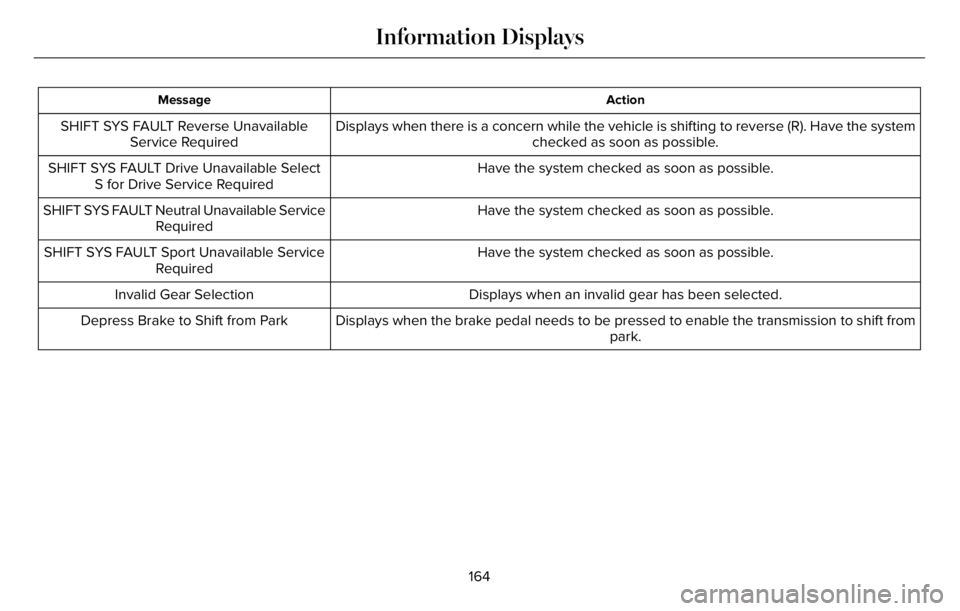
Action Message
Displays when there is a concern while the vehicle is shifting to reverse (R). Have the system
checked as soon as possible. SHIFT SYS FAULT Reverse Unavailable
Service Required
Have the system checked as soon as possible. SHIFT SYS FAULT Drive Unavailable Select
S for Drive Service Required
Have the system checked as soon as possible. SHIFT SYS FAULT Neutral Unavailable Service
Required
Have the system checked as soon as possible. SHIFT SYS FAULT Sport Unavailable Service
Required
Displays when an invalid gear has been selected. Invalid Gear Selection
Displays when the brake pedal needs to be pressed to enable the transmission to shift from
park. Depress Brake to Shift from Park
164
Information Displays
Page 209 of 681
• Without applying the brake pedal, press
and release the button once when the
ignition is in the on mode, or when your
vehicle is running but is not moving.
On: All electrical circuits are operational and
the warning lamps and indicators illuminate.
• Without applying the brake pedal, press
and release the button once.
Start: Starts your vehicle. The engine may
not start when your vehicle starts.
• Press the brake pedal, and then press
the button for any length of time. An
indicator light on the button illuminates
when the ignition is on and when your
vehicle starts.
STARTING A GASOLINE ENGINE
When you start the engine, the idle speed
increases. This helps to warm up the
engine. If the engine idle speed does not
slow down, have your vehicle checked as
soon as possible.Note: You can crank the engine for a total
of 60 seconds without the engine starting
before the starting system temporarily
disables. The 60 seconds does not have to
be all at once. For example, if you crank the
engine three times for 20 seconds each time,
without the engine starting, you reached the
60-second time limit. A message appears
in the information display alerting you that
you exceeded the cranking time. You
cannot attempt to start the engine for at
least 15 minutes. After 15 minutes, you are
limited to a 15-second engine cranking time.
You need to wait 60 minutes before you can
crank the engine for 60 seconds again.
Before starting your vehicle, check the
following:
• Make sure all occupants have fastened
their seatbelts.
• Make sure the headlamps and electrical
accessories are off.
• Make sure the parking brake is on.
• Make sure the transmission is in park (P).
• Switch the ignition on.
Note:Do not touch the accelerator pedal.Note:You must have your intelligent access
key in your vehicle in order to shift the
transmission out of park (P).
1. Fully press the brake pedal.
2. Press the push button ignition switch.
The system does not function if:
• The passive key frequencies are jammed.
• The key battery has no charge.
If you are unable to start your vehicle, do the
following:
206
Starting and Stopping the Engine
Page 210 of 681
E297378
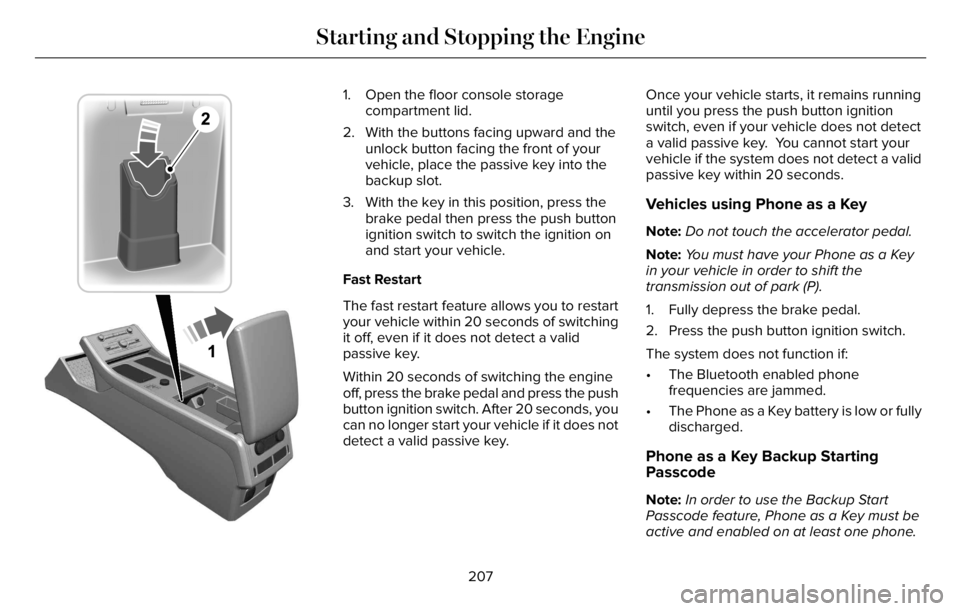
1. Open the floor console storage
compartment lid.
2. With the buttons facing upward and the
unlock button facing the front of your
vehicle, place the passive key into the
backup slot.
3. With the key in this position, press the
brake pedal then press the push button
ignition switch to switch the ignition on
and start your vehicle.
Fast Restart
The fast restart feature allows you to restart
your vehicle within 20 seconds of switching
it off, even if it does not detect a valid
passive key.
Within 20 seconds of switching the engine
off, press the brake pedal and press the push
button ignition switch. After 20 seconds, you
can no longer start your vehicle if it does not
detect a valid passive key.Once your vehicle starts, it remains running
until you press the push button ignition
switch, even if your vehicle does not detect
a valid passive key. You cannot start your
vehicle if the system does not detect a valid
passive key within 20 seconds.
Vehicles using Phone as a Key
Note:Do not touch the accelerator pedal.
Note:You must have your Phone as a Key
in your vehicle in order to shift the
transmission out of park (P).
1. Fully depress the brake pedal.
2. Press the push button ignition switch.
The system does not function if:
• The Bluetooth enabled phone
frequencies are jammed.
• The Phone as a Key battery is low or fully
discharged.
Phone as a Key Backup Starting
Passcode
Note:In order to use the Backup Start
Passcode feature, Phone as a Key must be
active and enabled on at least one phone.
207
Starting and Stopping the Engine