service LINCOLN AVIATOR 2023 Owner's Manual
[x] Cancel search | Manufacturer: LINCOLN, Model Year: 2023, Model line: AVIATOR, Model: LINCOLN AVIATOR 2023Pages: 681, PDF Size: 9.33 MB
Page 149 of 681
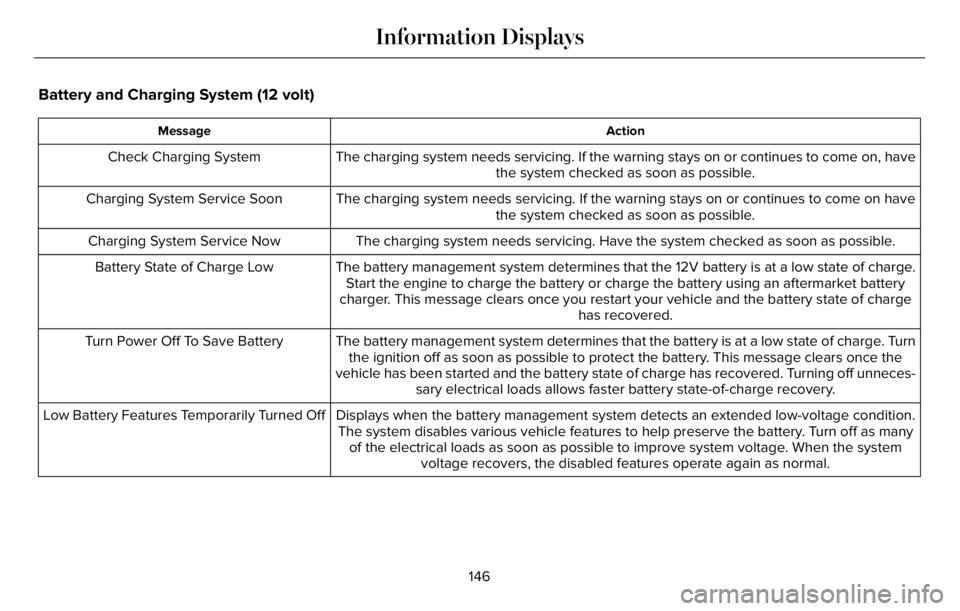
Battery and Charging System (12 volt)
Action Message
The charging system needs servicing. If the warning stays on or continues to come on, have
the system checked as soon as possible. Check Charging System
The charging system needs servicing. If the warning stays on or continues to come on have
the system checked as soon as possible. Charging System Service Soon
The charging system needs servicing. Have the system checked as soon as possible. Charging System Service Now
The battery management system determines that the 12V battery is at a low state of charge.
Start the engine to charge the battery or charge the battery using an aftermarket battery
charger. This message clears once you restart your vehicle and the battery state of charge
has recovered. Battery State of Charge Low
The battery management system determines that the battery is at a low state of charge. Turn
the ignition off as soon as possible to protect the battery. This message clears once the
vehicle has been started and the battery state of charge has recovered. Turning off unneces-
sary electrical loads allows faster battery state-of-charge recovery. Turn Power Off To Save Battery
Displays when the battery management system detects an extended low-voltage condition.
The system disables various vehicle features to help preserve the battery. Turn off as many
of the electrical loads as soon as possible to improve system voltage. When the system
voltage recovers, the disabled features operate again as normal. Low Battery Features Temporarily Turned Off
146
Information Displays
Page 151 of 681
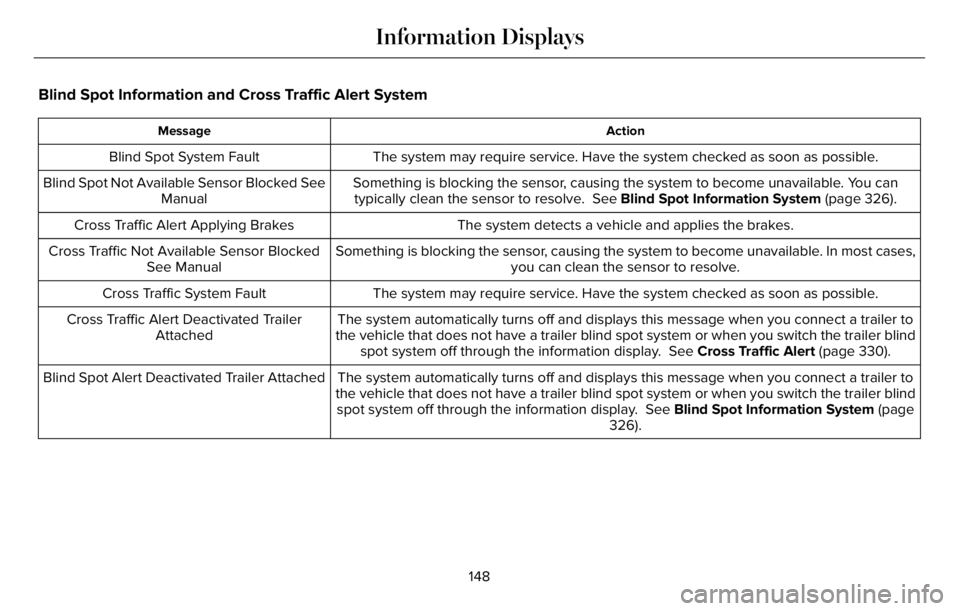
Blind Spot Information and Cross Traffic Alert System
Action Message
The system may require service. Have the system checked as soon as possible. Blind Spot System Fault
Something is blocking the sensor, causing the system to become unavailable. You can
typically clean the sensor to resolve. See Blind Spot Information System (page 326). Blind Spot Not Available Sensor Blocked See
Manual
The system detects a vehicle and applies the brakes. Cross Traffic Alert Applying Brakes
Something is blocking the sensor, causing the system to become unavailable. In most cases,
you can clean the sensor to resolve. Cross Traffic Not Available Sensor Blocked
See Manual
The system may require service. Have the system checked as soon as possible. Cross Traffic System Fault
The system automatically turns off and displays this message when you connect a trailer to
the vehicle that does not have a trailer blind spot system or when you switch the trailer blind
spot system off through the information display. See Cross Traffic Alert (page 330). Cross Traffic Alert Deactivated Trailer
Attached
The system automatically turns off and displays this message when you connect a trailer to
the vehicle that does not have a trailer blind spot system or when you switch the trailer blind
spot system off through the information display. See Blind Spot Information System (page
326). Blind Spot Alert Deactivated Trailer Attached
148
Information Displays
Page 152 of 681
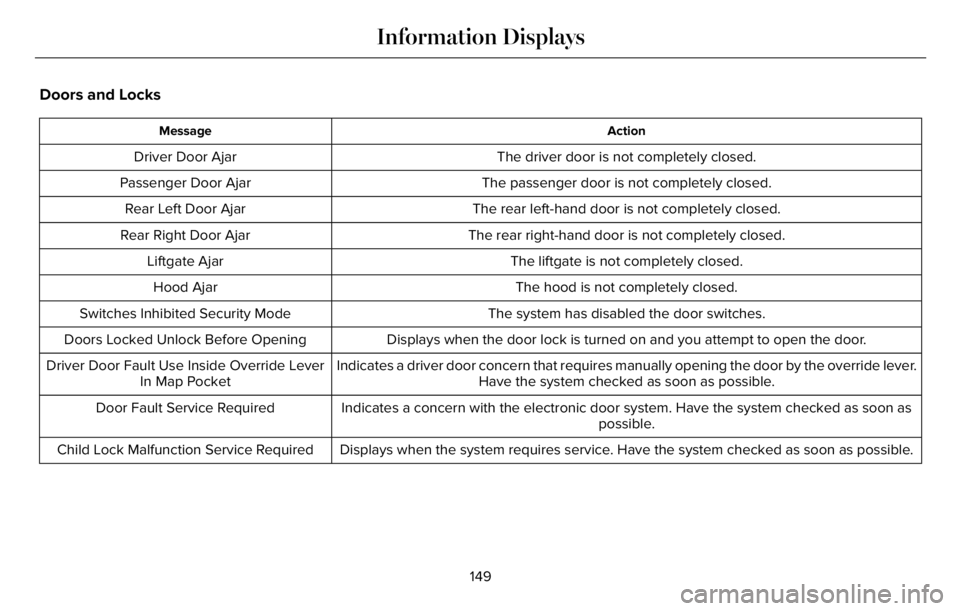
Doors and Locks
Action Message
The driver door is not completely closed. Driver Door Ajar
The passenger door is not completely closed. Passenger Door Ajar
The rear left-hand door is not completely closed. Rear Left Door Ajar
The rear right-hand door is not completely closed. Rear Right Door Ajar
The liftgate is not completely closed. Liftgate Ajar
The hood is not completely closed. Hood Ajar
The system has disabled the door switches. Switches Inhibited Security Mode
Displays when the door lock is turned on and you attempt to open the door. Doors Locked Unlock Before Opening
Indicates a driver door concern that requires manually opening the door by the override lever.
Have the system checked as soon as possible. Driver Door Fault Use Inside Override Lever
In Map Pocket
Indicates a concern with the electronic door system. Have the system checked as soon as
possible. Door Fault Service Required
Displays when the system requires service. Have the system checked as soon as possible. Child Lock Malfunction Service Required
149
Information Displays
Page 157 of 681
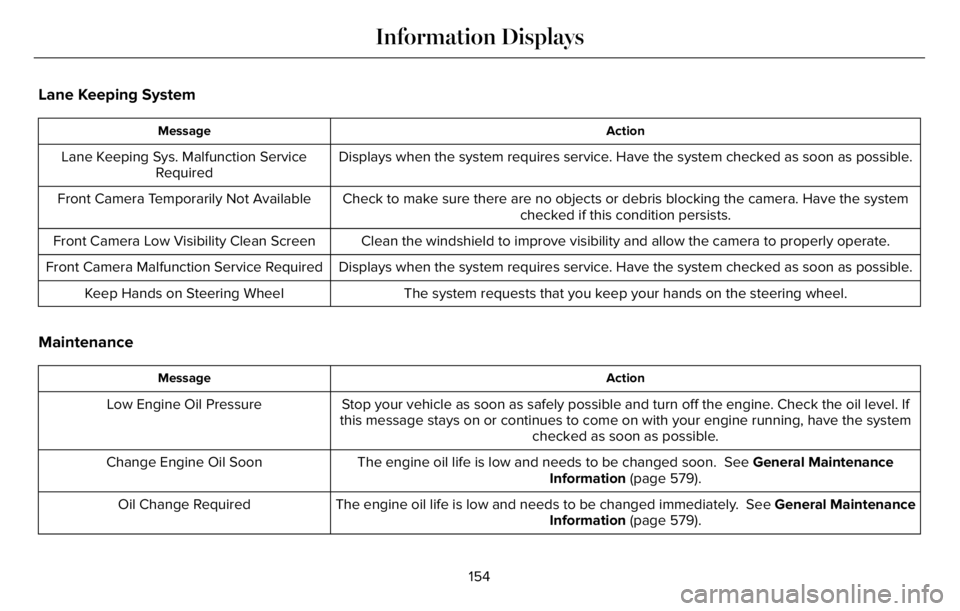
Lane Keeping System
Action Message
Displays when the system requires service. Have the system checked as soon as possible. Lane Keeping Sys. Malfunction Service
Required
Check to make sure there are no objects or debris blocking the camera. Have the system
checked if this condition persists. Front Camera Temporarily Not Available
Clean the windshield to improve visibility and allow the camera to properly operate. Front Camera Low Visibility Clean Screen
Displays when the system requires service. Have the system checked as soon as possible. Front Camera Malfunction Service Required
The system requests that you keep your hands on the steering wheel. Keep Hands on Steering Wheel
Maintenance
Action Message
Stop your vehicle as soon as safely possible and turn off the engine. Check the oil level. If
this message stays on or continues to come on with your engine running, have the system
checked as soon as possible. Low Engine Oil Pressure
The engine oil life is low and needs to be changed soon. See General Maintenance
Information (page 579). Change Engine Oil Soon
The engine oil life is low and needs to be changed immediately. See General Maintenance
Information (page 579). Oil Change Required
154
Information Displays
Page 158 of 681
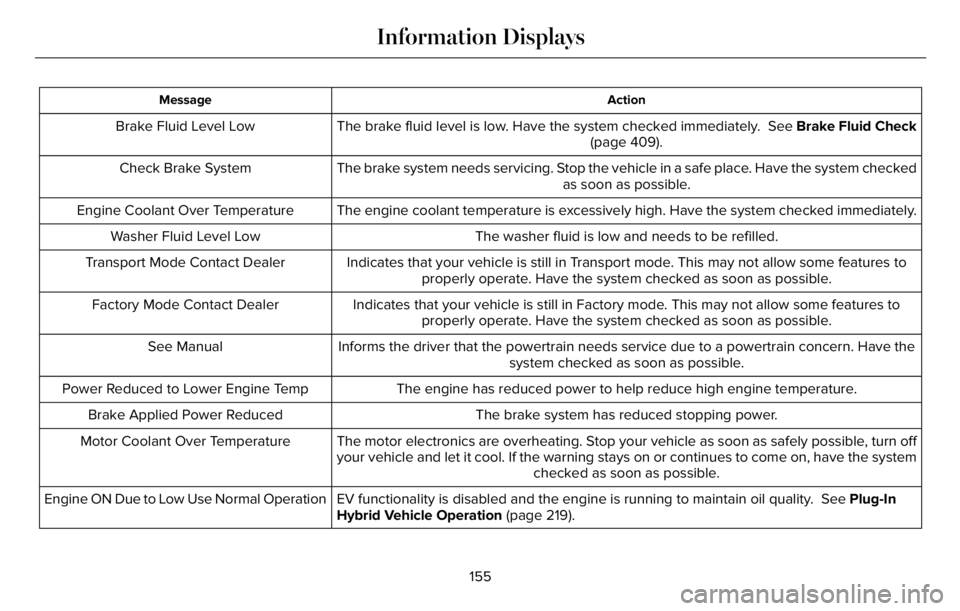
Action Message
The brake fluid level is low. Have the system checked immediately. See Brake Fluid Check
(page 409). Brake Fluid Level Low
The brake system needs servicing. Stop the vehicle in a safe place. Have the system checked
as soon as possible. Check Brake System
The engine coolant temperature is excessively high. Have the system checked immediately. Engine Coolant Over Temperature
The washer fluid is low and needs to be refilled. Washer Fluid Level Low
Indicates that your vehicle is still in Transport mode. This may not allow some features to
properly operate. Have the system checked as soon as possible. Transport Mode Contact Dealer
Indicates that your vehicle is still in Factory mode. This may not allow some features to
properly operate. Have the system checked as soon as possible. Factory Mode Contact Dealer
Informs the driver that the powertrain needs service due to a powertrain concern. Have the
system checked as soon as possible. See Manual
The engine has reduced power to help reduce high engine temperature. Power Reduced to Lower Engine Temp
The brake system has reduced stopping power. Brake Applied Power Reduced
The motor electronics are overheating. Stop your vehicle as soon as safely possible, turn off
your vehicle and let it cool. If the warning stays on or continues to come on, have the system
checked as soon as possible. Motor Coolant Over Temperature
EV functionality is disabled and the engine is running to maintain oil quality. See Plug-In
Hybrid Vehicle Operation (page 219). Engine ON Due to Low Use Normal Operation
155
Information Displays
Page 160 of 681
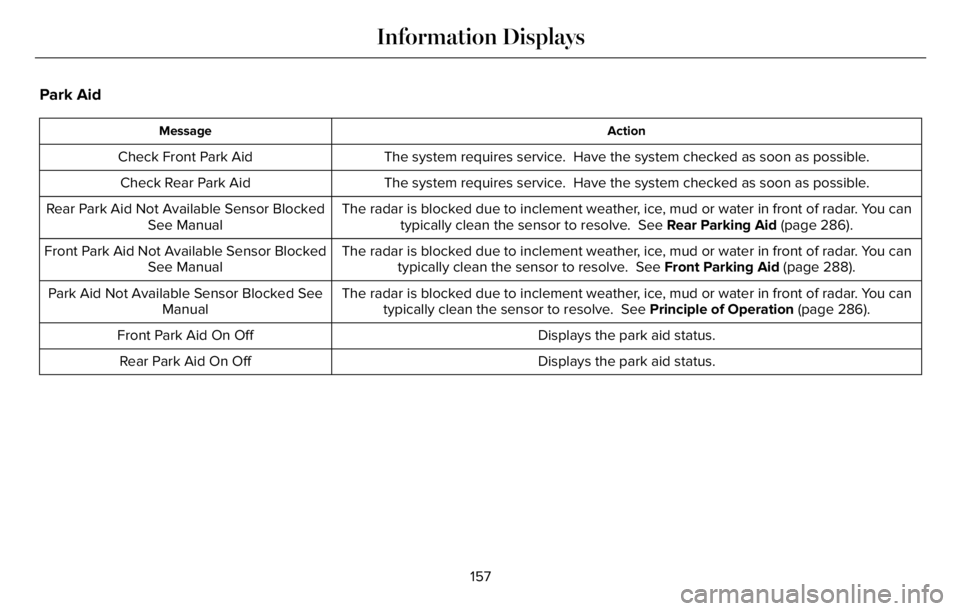
Park Aid
Action Message
The system requires service. Have the system checked as soon as possible. Check Front Park Aid
The system requires service. Have the system checked as soon as possible. Check Rear Park Aid
The radar is blocked due to inclement weather, ice, mud or water in front of radar. You can
typically clean the sensor to resolve. See Rear Parking Aid (page 286). Rear Park Aid Not Available Sensor Blocked
See Manual
The radar is blocked due to inclement weather, ice, mud or water in front of radar. You can
typically clean the sensor to resolve. See Front Parking Aid (page 288). Front Park Aid Not Available Sensor Blocked
See Manual
The radar is blocked due to inclement weather, ice, mud or water in front of radar. You can
typically clean the sensor to resolve. See Principle of Operation (page 286). Park Aid Not Available Sensor Blocked See
Manual
Displays the park aid status. Front Park Aid On Off
Displays the park aid status. Rear Park Aid On Off
157
Information Displays
Page 161 of 681
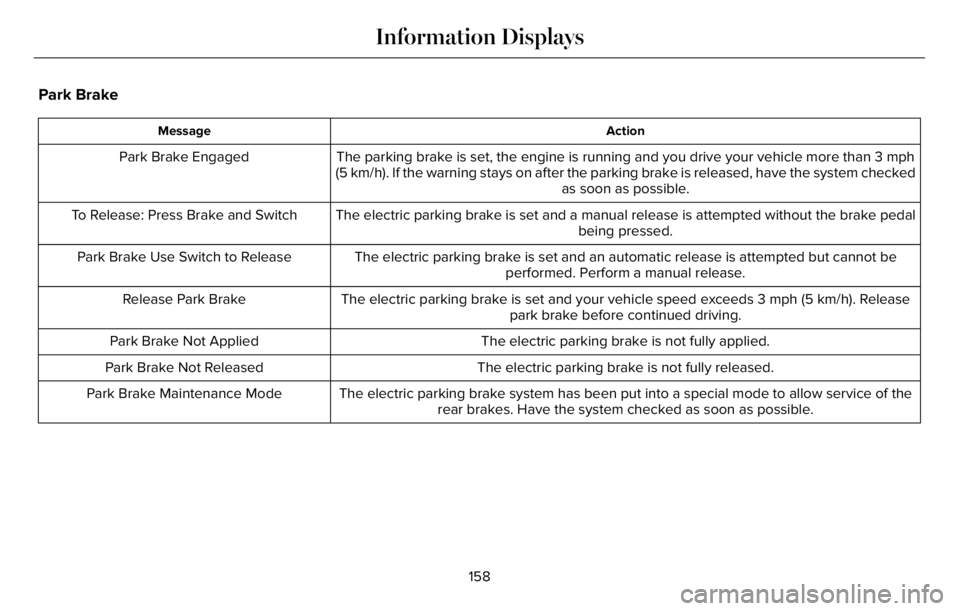
Park Brake
Action Message
The parking brake is set, the engine is running and you drive your vehicle more than 3 mph
(5 km/h). If the warning stays on after the parking brake is released, have the system checked
as soon as possible. Park Brake Engaged
The electric parking brake is set and a manual release is attempted without the brake pedal
being pressed. To Release: Press Brake and Switch
The electric parking brake is set and an automatic release is attempted but cannot be
performed. Perform a manual release. Park Brake Use Switch to Release
The electric parking brake is set and your vehicle speed exceeds 3 mph (5 km/h). Release
park brake before continued driving. Release Park Brake
The electric parking brake is not fully applied. Park Brake Not Applied
The electric parking brake is not fully released. Park Brake Not Released
The electric parking brake system has been put into a special mode to allow service of the
rear brakes. Have the system checked as soon as possible. Park Brake Maintenance Mode
158
Information Displays
Page 162 of 681
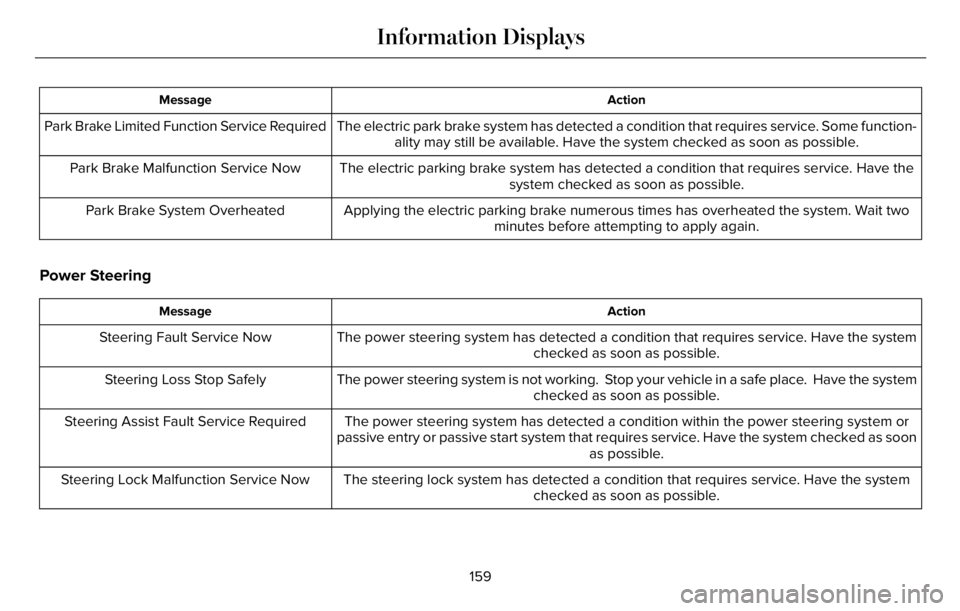
Action Message
The electric park brake system has detected a condition that requires service. Some function-
ality may still be available. Have the system checked as soon as possible. Park Brake Limited Function Service Required
The electric parking brake system has detected a condition that requires service. Have the
system checked as soon as possible. Park Brake Malfunction Service Now
Applying the electric parking brake numerous times has overheated the system. Wait two
minutes before attempting to apply again. Park Brake System Overheated
Power Steering
Action Message
The power steering system has detected a condition that requires service. Have the system
checked as soon as possible. Steering Fault Service Now
The power steering system is not working. Stop your vehicle in a safe place. Have the system
checked as soon as possible. Steering Loss Stop Safely
The power steering system has detected a condition within the power steering system or
passive entry or passive start system that requires service. Have the system checked as soon
as possible. Steering Assist Fault Service Required
The steering lock system has detected a condition that requires service. Have the system
checked as soon as possible. Steering Lock Malfunction Service Now
159
Information Displays
Page 163 of 681
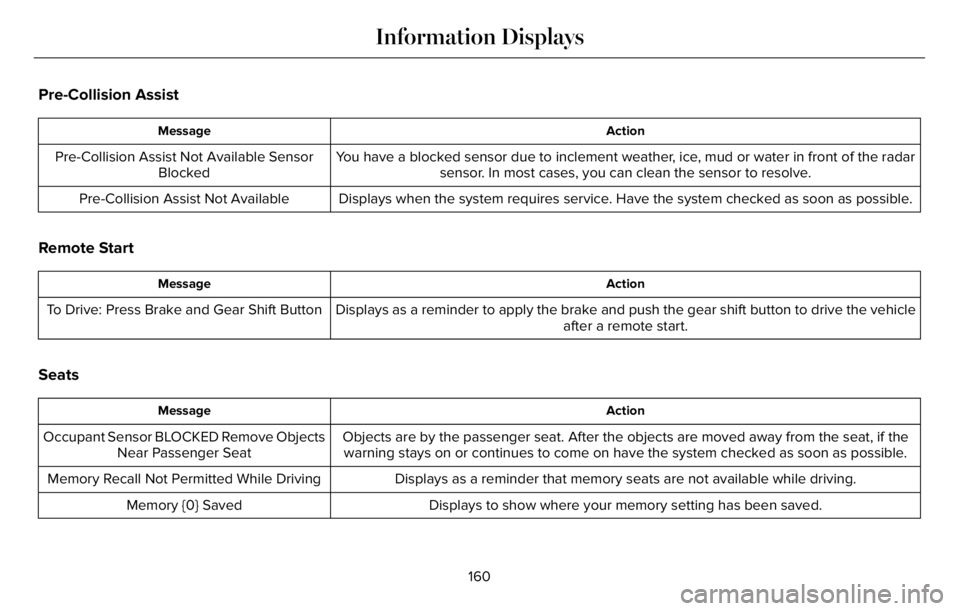
Pre-Collision Assist
Action Message
You have a blocked sensor due to inclement weather, ice, mud or water in front of the radar
sensor. In most cases, you can clean the sensor to resolve. Pre-Collision Assist Not Available Sensor
Blocked
Displays when the system requires service. Have the system checked as soon as possible. Pre-Collision Assist Not Available
Remote Start
Action Message
Displays as a reminder to apply the brake and push the gear shift button to drive the vehicle
after a remote start. To Drive: Press Brake and Gear Shift Button
Seats
Action Message
Objects are by the passenger seat. After the objects are moved away from the seat, if the
warning stays on or continues to come on have the system checked as soon as possible. Occupant Sensor BLOCKED Remove Objects
Near Passenger Seat
Displays as a reminder that memory seats are not available while driving. Memory Recall Not Permitted While Driving
Displays to show where your memory setting has been saved. Memory {0} Saved
160
Information Displays
Page 164 of 681
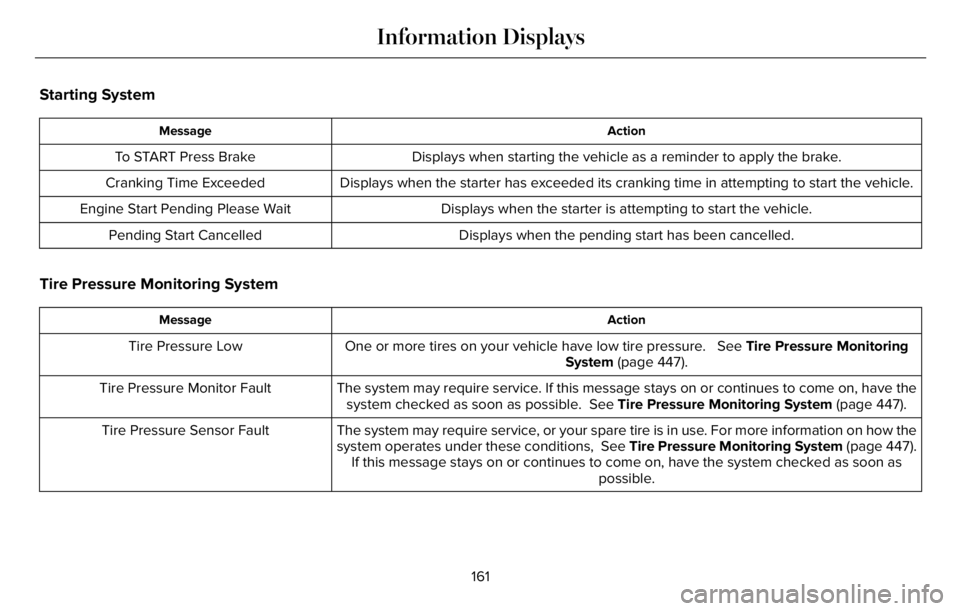
Starting System
Action Message
Displays when starting the vehicle as a reminder to apply the brake. To START Press Brake
Displays when the starter has exceeded its cranking time in attempting to start the vehicle. Cranking Time Exceeded
Displays when the starter is attempting to start the vehicle. Engine Start Pending Please Wait
Displays when the pending start has been cancelled. Pending Start Cancelled
Tire Pressure Monitoring System
Action Message
One or more tires on your vehicle have low tire pressure. See Tire Pressure Monitoring
System (page 447). Tire Pressure Low
The system may require service. If this message stays on or continues to come on, have the
system checked as soon as possible. See Tire Pressure Monitoring System (page 447). Tire Pressure Monitor Fault
The system may require service, or your spare tire is in use. For more information on how the
system operates under these conditions, See Tire Pressure Monitoring System (page 447).
If this message stays on or continues to come on, have the system checked as soon as
possible. Tire Pressure Sensor Fault
161
Information Displays