wheel LINCOLN AVIATOR 2023 Owner's Manual
[x] Cancel search | Manufacturer: LINCOLN, Model Year: 2023, Model line: AVIATOR, Model: LINCOLN AVIATOR 2023Pages: 681, PDF Size: 9.33 MB
Page 179 of 681
SITTING IN THE CORRECT
POSITION
WARNING: Sitting improperly, out of
position or with the seatback reclined too
far can take weight off the seat cushion
and affect the decision of the passenger
sensing system, resulting in serious injury
or death in the event of a crash. Always sit
upright against your seat back, with your
feet on the floor.
WARNING: Do not recline the seat
backrest too far as this can cause the
occupant to slide under the seatbelt,
resulting in personal injury in the event of
a crash.
WARNING: Do not place objects
higher than the top of the seat backrest.
Failure to follow this instruction could result
in personal injury or death in the event of
a sudden stop or crash.
E68595
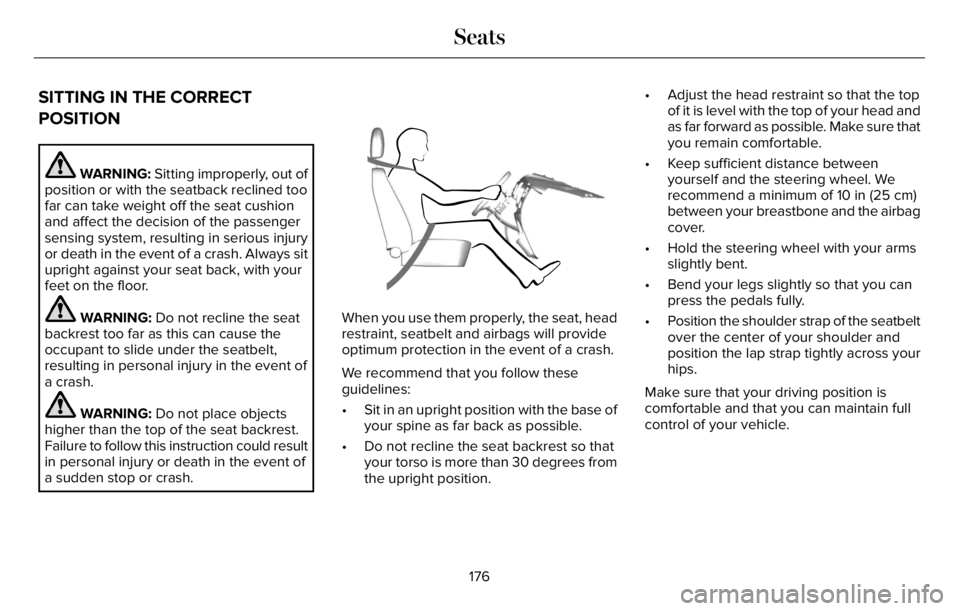
When you use them properly, the seat, head
restraint, seatbelt and airbags will provide
optimum protection in the event of a crash.
We recommend that you follow these
guidelines:
• Sit in an upright position with the base of
your spine as far back as possible.
• Do not recline the seat backrest so that
your torso is more than 30 degrees from
the upright position.• Adjust the head restraint so that the top
of it is level with the top of your head and
as far forward as possible. Make sure that
you remain comfortable.
• Keep sufficient distance between
yourself and the steering wheel. We
recommend a minimum of 10 in (25 cm)
between your breastbone and the airbag
cover.
• Hold the steering wheel with your arms
slightly bent.
• Bend your legs slightly so that you can
press the pedals fully.
• Position the shoulder strap of the seatbelt
over the center of your shoulder and
position the lap strap tightly across your
hips.
Make sure that your driving position is
comfortable and that you can maintain full
control of your vehicle.
176
Seats
Page 218 of 681
AUTO-START-STOP - EXCLUDING:
PLUG-IN HYBRID ELECTRIC
VEHICLE (PHEV)
The system helps reduce fuel consumption
by automatically stopping and restarting the
engine when your vehicle has stopped. The
engine restarts automatically when you
release the brake pedal.
In some situations, your vehicle may restart
automatically, for example:
• To maintain interior comfort.
• To recharge the battery.
Note:Power assist steering turns off when
the engine is off.
Note:If your vehicle is flex fuel capable,
Auto-Start-Stop will be inhibited for a short
time after a refuel event while the system is
verifying the fuel type being used.
WARNING: Apply the parking brake,
shift into park (P), switch the ignition off
and remove the key before you leave your
vehicle. Failure to follow this instruction
could result in personal injury or death.
WARNING: Apply the parking brake,
shift into park (P), switch the ignition off
and remove the key before you open the
hood or have any service or repair work
completed. If you do not switch the ignition
off, the engine could restart at any time.
Failure to follow this instruction could result
in personal injury or death.
WARNING: The system may require
the engine to automatically restart when
the auto-start-stop indicator illuminates
green or flashes amber. Failure to follow
this instruction could result in personal
injury.
The Auto-Start-Stop system status is
available at a glance within the information
display. See Information Displays (page
136).
Enabling Auto-Start-Stop
The system automatically enables every time
you start your vehicle if:
• Your vehicle exceeds an initial speed of
3 mph (5 km/h) after you have initially
started your vehicle.
• You have stopped your vehicle.
• Your foot is on the brake pedal.
• The driver door is closed.
• The interior compartment has cooled or
warmed to an acceptable level.
• The front windshield defroster is off.
• You have not turned the steering wheel
rapidly or you do not have it at a sharp
angle.
• The vehicle is not on a steep road grade.
• The battery is within optimal operating
conditions (battery state of charge and
temperature in range).
• The engine coolant is near operating
temperature.
• Elevation is below about 12,000 ft
(3,650 m).
• Ambient temperature is moderate.
215
Unique Driving Characteristics
Page 227 of 681
FUEL QUALITY
Choosing the Right Fuel
E161513E161513
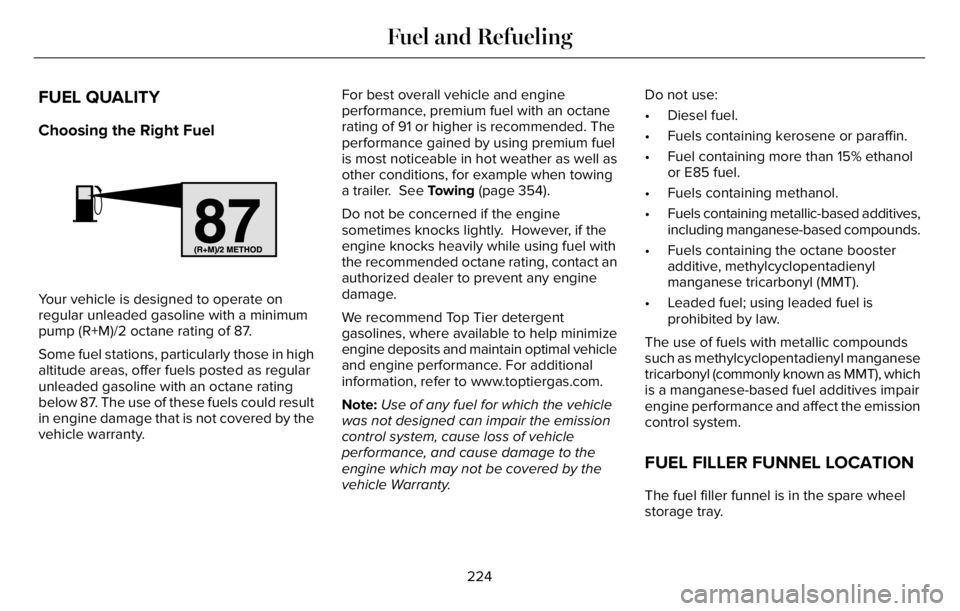
Your vehicle is designed to operate on
regular unleaded gasoline with a minimum
pump (R+M)/2 octane rating of 87.
Some fuel stations, particularly those in high
altitude areas, offer fuels posted as regular
unleaded gasoline with an octane rating
below 87. The use of these fuels could result
in engine damage that is not covered by the
vehicle warranty.For best overall vehicle and engine
performance, premium fuel with an octane
rating of 91 or higher is recommended. The
performance gained by using premium fuel
is most noticeable in hot weather as well as
other conditions, for example when towing
a trailer. See Towing (page 354).
Do not be concerned if the engine
sometimes knocks lightly. However, if the
engine knocks heavily while using fuel with
the recommended octane rating, contact an
authorized dealer to prevent any engine
damage.
We recommend Top Tier detergent
gasolines, where available to help minimize
engine deposits and maintain optimal vehicle
and engine performance. For additional
information, refer to www.toptiergas.com.
Note:Use of any fuel for which the vehicle
was not designed can impair the emission
control system, cause loss of vehicle
performance, and cause damage to the
engine which may not be covered by the
vehicle Warranty.Do not use:
• Diesel fuel.
• Fuels containing kerosene or paraffin.
• Fuel containing more than 15% ethanol
or E85 fuel.
• Fuels containing methanol.
• Fuels containing metallic-based additives,
including manganese-based compounds.
• Fuels containing the octane booster
additive, methylcyclopentadienyl
manganese tricarbonyl (MMT).
• Leaded fuel; using leaded fuel is
prohibited by law.
The use of fuels with metallic compounds
such as methylcyclopentadienyl manganese
tricarbonyl (commonly known as MMT), which
is a manganese-based fuel additives impair
engine performance and affect the emission
control system.
FUEL FILLER FUNNEL LOCATION
The fuel filler funnel is in the spare wheel
storage tray.
224
Fuel and Refueling
Page 236 of 681
E297793E297793
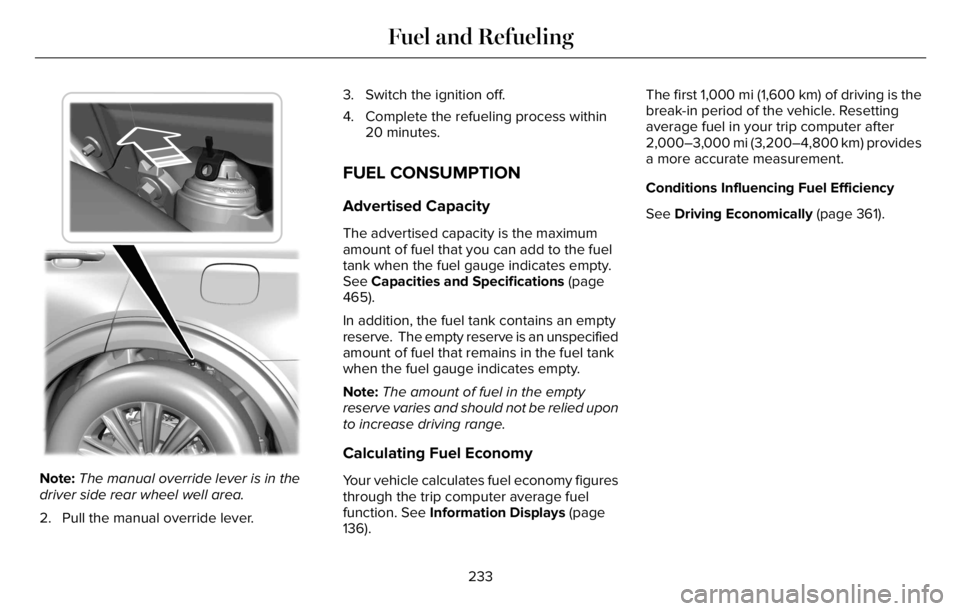
Note:The manual override lever is in the
driver side rear wheel well area.
2. Pull the manual override lever.3. Switch the ignition off.
4. Complete the refueling process within
20 minutes.
FUEL CONSUMPTION
Advertised Capacity
The advertised capacity is the maximum
amount of fuel that you can add to the fuel
tank when the fuel gauge indicates empty.
See Capacities and Specifications (page
465).
In addition, the fuel tank contains an empty
reserve. The empty reserve is an unspecified
amount of fuel that remains in the fuel tank
when the fuel gauge indicates empty.
Note:The amount of fuel in the empty
reserve varies and should not be relied upon
to increase driving range.
Calculating Fuel Economy
Your vehicle calculates fuel economy figures
through the trip computer average fuel
function. See Information Displays (page
136).The first 1,000 mi (1,600 km) of driving is the
break-in period of the vehicle. Resetting
average fuel in your trip computer after
2,000–3,000 mi (3,200–4,800 km) provides
a more accurate measurement.
Conditions Influencing Fuel Efficiency
See Driving Economically (page 361).
233
Fuel and Refueling
Page 244 of 681
Note:Make sure the electrical source meets
the requirements for the high-voltage
batteries to charge.
Make sure that the dual-voltage charging
cord is completely unwrapped before
charging. Always plug the cord into the AC
outlet before connecting the charged coupler
into the charge port on your vehicle.
Note:If the power indicator light is off after
plugging in the dual-voltage charging cord
and you cannot determine a charge status,
use a different outlet.
Note:Store the dual-voltage charging cord
in a clean dry place between the
temperature of -40–158°F (-40–70°C)
Note:For further information on the
dual-voltage charging cord, please refer to
the user manual provided with the
dual-voltage charging cord.Charge Port
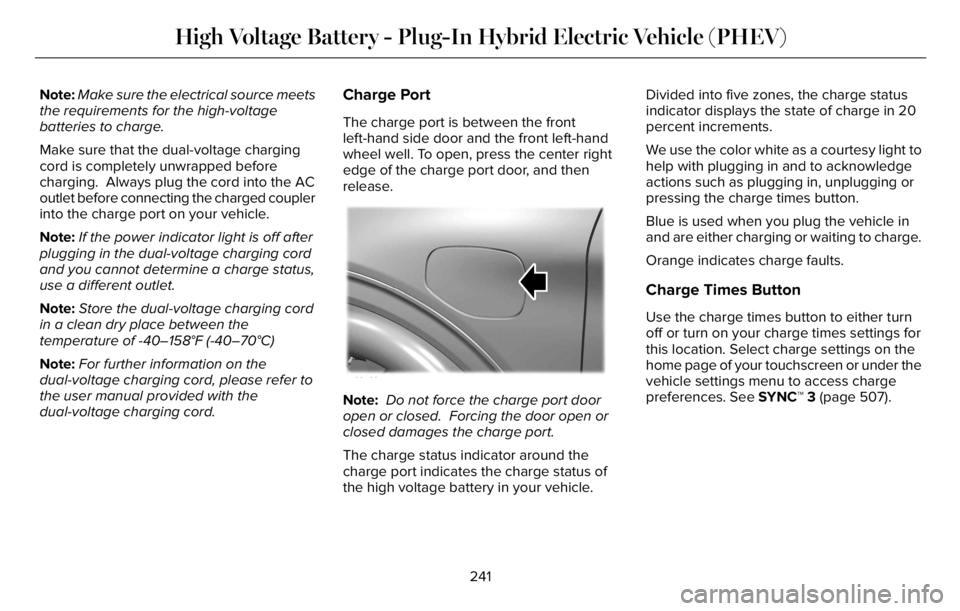
The charge port is between the front
left-hand side door and the front left-hand
wheel well. To open, press the center right
edge of the charge port door, and then
release.
E295258
Note: Do not force the charge port door
open or closed. Forcing the door open or
closed damages the charge port.
The charge status indicator around the
charge port indicates the charge status of
the high voltage battery in your vehicle.Divided into five zones, the charge status
indicator displays the state of charge in 20
percent increments.
We use the color white as a courtesy light to
help with plugging in and to acknowledge
actions such as plugging in, unplugging or
pressing the charge times button.
Blue is used when you plug the vehicle in
and are either charging or waiting to charge.
Orange indicates charge faults.
Charge Times Button
Use the charge times button to either turn
off or turn on your charge times settings for
this location. Select charge settings on the
home page of your touchscreen or under the
vehicle settings menu to access charge
preferences. See SYNC™ 3 (page 507).
241
High Voltage Battery - Plug-In Hybrid Electric Vehicle (PHEV)
Page 258 of 681
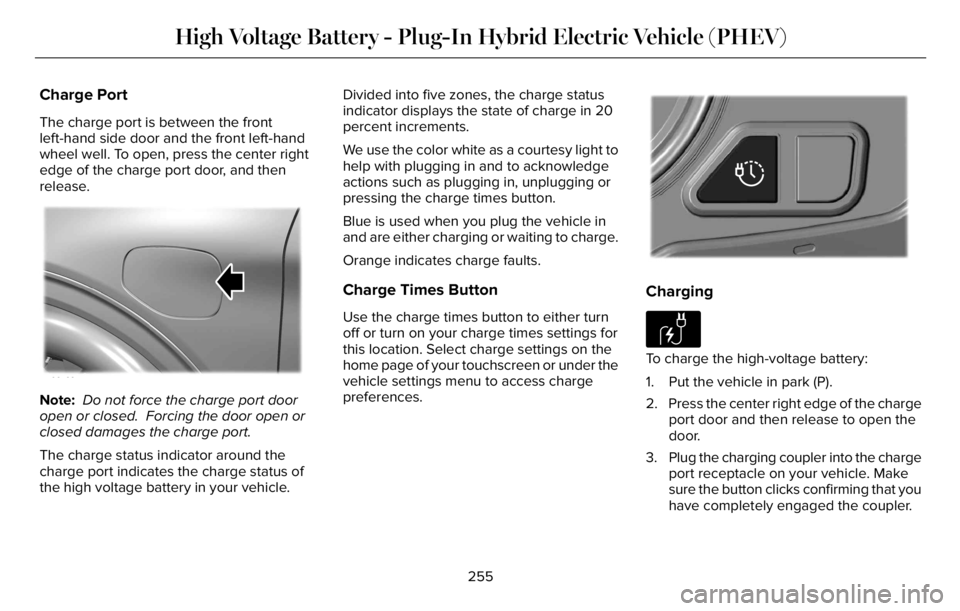
Charge Port
The charge port is between the front
left-hand side door and the front left-hand
wheel well. To open, press the center right
edge of the charge port door, and then
release.
E295258
Note: Do not force the charge port door
open or closed. Forcing the door open or
closed damages the charge port.
The charge status indicator around the
charge port indicates the charge status of
the high voltage battery in your vehicle.Divided into five zones, the charge status
indicator displays the state of charge in 20
percent increments.
We use the color white as a courtesy light to
help with plugging in and to acknowledge
actions such as plugging in, unplugging or
pressing the charge times button.
Blue is used when you plug the vehicle in
and are either charging or waiting to charge.
Orange indicates charge faults.
Charge Times Button
Use the charge times button to either turn
off or turn on your charge times settings for
this location. Select charge settings on the
home page of your touchscreen or under the
vehicle settings menu to access charge
preferences.
E301E301E301E301E301E301E30301300E301E3013011111111111111111111111111111
Charging
E306676To charge the high-voltage battery:
1. Put the vehicle in park (P).
2. Press the center right edge of the charge
port door and then release to open the
door.
3. Plug the charging coupler into the charge
port receptacle on your vehicle. Make
sure the button clicks confirming that you
have completely engaged the coupler.
255
High Voltage Battery - Plug-In Hybrid Electric Vehicle (PHEV)
Page 262 of 681
AUTOMATIC TRANSMISSION
WARNING: Apply the parking brake
and make sure your vehicle is in park (P).
Power the vehicle off and remove the keys
or remote control whenever you leave your
vehicle. Failure to follow this instruction
could result in personal injury or death.
WARNING: Do not apply the brake
pedal and accelerator pedal
simultaneously. Applying both pedals
simultaneously for more than a few
seconds will limit engine performance,
which may result in difficulty maintaining
speed in traffic and could lead to serious
injury.
Note:You cannot shift out of park (P) unless
the intelligent access key is inside your
vehicle.
Understanding Your Transmission
Selector Positions
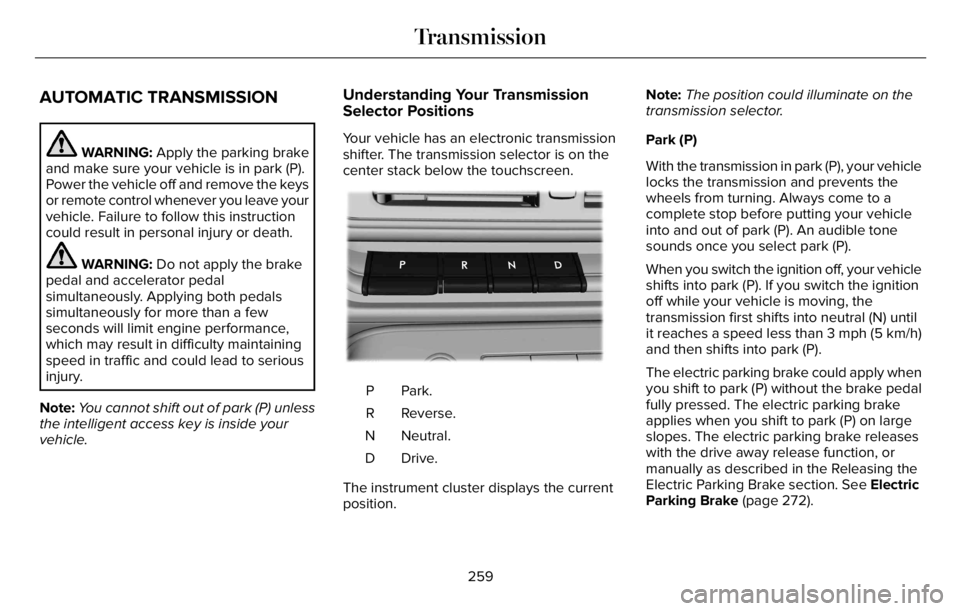
Your vehicle has an electronic transmission
shifter. The transmission selector is on the
center stack below the touchscreen.
E247220E247E247E24E247E247E247E24E24E22E2E22E2E2E2424E247E247E247E24447247247E2472E247E247E247E24E2247E247E247E247E22222222202202220220220222202022220220220
Park. P
Reverse. R
Neutral. N
Drive. D
The instrument cluster displays the current
position.Note:The position could illuminate on the
transmission selector.
Park (P)
With the transmission in park (P), your vehicle
locks the transmission and prevents the
wheels from turning. Always come to a
complete stop before putting your vehicle
into and out of park (P). An audible tone
sounds once you select park (P).
When you switch the ignition off, your vehicle
shifts into park (P). If you switch the ignition
off while your vehicle is moving, the
transmission first shifts into neutral (N) until
it reaches a speed less than 3 mph (5 km/h)
and then shifts into park (P).
The electric parking brake could apply when
you shift to park (P) without the brake pedal
fully pressed. The electric parking brake
applies when you shift to park (P) on large
slopes. The electric parking brake releases
with the drive away release function, or
manually as described in the Releasing the
Electric Parking Brake section. See Electric
Parking Brake (page 272).
259
Transmission
Page 264 of 681
Do not tow your vehicle in this mode. Failure
to follow these instructions could result in
vehicle damage not covered by the vehicle
warranty.
Entering Temporary Neutral Mode
1. Power your vehicle on.
2. Bring your vehicle to a complete stop.
3. Press and hold the brake pedal.
4. Shift into neutral (N).
Note:An instructional message appears.
5. Press the neutral (N) button.
Note:A confirmation message appears
when your vehicle enters the mode.
6. Release the brake pedal.
Note:Your vehicle is free to roll.
7. Switch your vehicle off.
Note:Do not tow your vehicle in this mode.
Note:The neutral (N) indicator on the
transmission selector may flash in this mode.
Exiting Temporary Neutral Mode
1. Press the brake pedal.2. Shift into park (P), or power your vehicle
on and shift into drive (D) or reverse (R).
Manually Shifting Gears
The instrument cluster displays the current
gear. The current gear flashes when your
vehicle cannot shift into the requested gear.
Your vehicle will not shift if the requested
gear raises or lowers the engine speed
beyond the limit.
Your vehicle could shift when you fully press
the accelerator or brake pedal.
Note:Prolonged driving with high engine
speed could cause vehicle damage not
covered by vehicle warranty.
Note:Drive modes could affect when the
vehicle shifts into the requested gear.
E144821
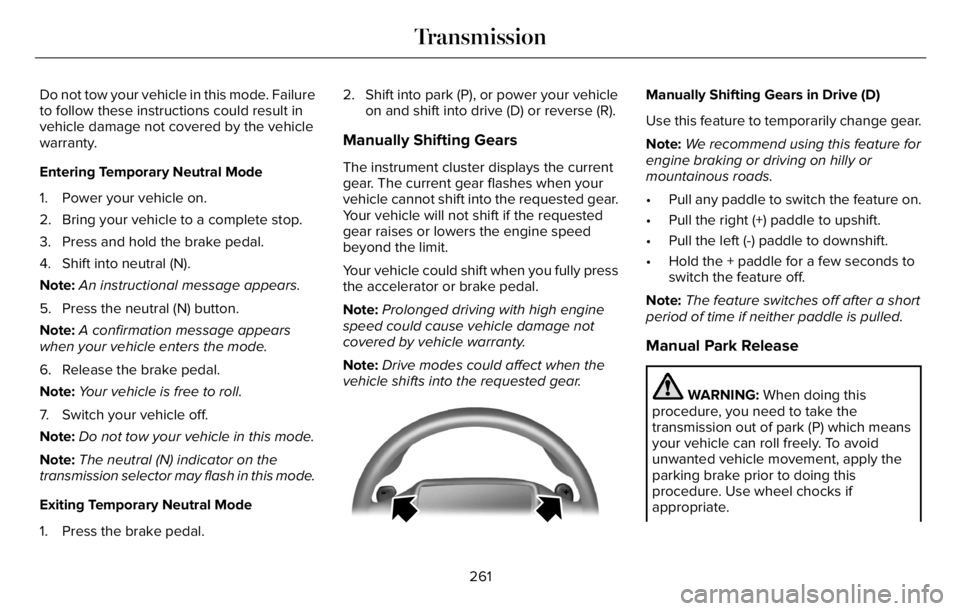
Manually Shifting Gears in Drive (D)
Use this feature to temporarily change gear.
Note:We recommend using this feature for
engine braking or driving on hilly or
mountainous roads.
• Pull any paddle to switch the feature on.
• Pull the right (+) paddle to upshift.
• Pull the left (-) paddle to downshift.
• Hold the + paddle for a few seconds to
switch the feature off.
Note:The feature switches off after a short
period of time if neither paddle is pulled.
Manual Park Release
WARNING: When doing this
procedure, you need to take the
transmission out of park (P) which means
your vehicle can roll freely. To avoid
unwanted vehicle movement, apply the
parking brake prior to doing this
procedure. Use wheel chocks if
appropriate.
261
Transmission
Page 267 of 681
USING ALL-WHEEL DRIVE
WARNING: Vehicles with a higher
center of gravity (utility and four-wheel
drive vehicles) handle differently than
vehicles with a lower center of gravity
(passenger cars). Avoid sharp turns,
excessive speed and abrupt steering in
these vehicles. Failure to drive cautiously
increases the risk of losing control of your
vehicle, vehicle rollover, personal injury
and death.
WARNING: Do not become
overconfident in the ability of all-wheel
drive vehicles. Although an all-wheel drive
vehicle may accelerate better than a
two-wheel drive vehicle in low traction
situations, it won't stop any faster than
two-wheel drive vehicles. Always drive at
a safe speed.The intelligent AWD system continuously
monitors vehicle conditions and adjusts the
power distribution between the front and
rear wheels. It combines transparent
all-surface operation with highly capable
all-wheel drive.
The AWD system is always active and
requires no driver input. It is capable of
handling all road conditions including street
and highway driving as well as off-road and
winter driving. You can optimize more AWD
control by selecting different drive modes.
See Selecting a Drive Mode (page 343).
Note:A warning message displays in the
information display when an AWD system
fault is present. See Information Messages
(page 142). A AWD system fault causes the
AWD system to default to rear-wheel drive
only mode. When this warning message
displays, have your vehicle serviced.Note:A warning message displays in the
information display if the AWD system
overheats. See Information Messages
(page 142). This condition could occur if you
operate your vehicle in extreme conditions
with excessive wheel slip, such as deep
sand. To resume normal AWD function as
soon as possible, stop the vehicle in a safe
location and stop the engine for at least 10
minutes. After you restart the engine and the
AWD system adequately cools, the warning
message turns off and normal AWD function
returns.Operating All-Wheel Drive (AWD)
Vehicles With Spare Tires
Do not use a different size spare tire other
than the tire provided. If the mini-spare tire
is installed, the AWD system will disable and
enter rear-wheel drive only mode to protect
driveline components. Some limited AWD
traction could be provided if the mini-spare
is installed on one of the front wheels. If you
are in driving conditions where limited AWD
traction is needed while the mini-spare is
installed, it is recommended the mini-spare
be installed on the front axle.
264
All-Wheel Drive (If Equipped)
Page 268 of 681
If the mini-spare is installed, this condition is
indicated by a warning in the information
display.
The slip response system could activate if
the mini spare is installed on the front
wheels. If the mini spare was installed on the
rear wheels the slip response system will
fully disable. In situations where there is a
wintery mix or an off road situation, and you
need to use a mini spare, you must install
the mini spare in the front tire position and
move a full size tire to the rear tire position
for the slip response system to function.
Operating ALL-Wheel Drive (AWD)
Vehicles with Mismatched Tires
WARNING: Only use replacement
tires and wheels that are the same size,
load index, speed rating, and type as those
originally provided for your vehicle. The
recommended tire and wheel sizes can be
found on the Tire Label on the driver side
door frame or the edge of the driver door.
If this information is not found in those
locations, or for additional options, contact
your authorized dealer. Use of any tire or
wheel not recommended, could affect the
safety and performance of your vehicle,
which could result in an increased risk of
loss of vehicle control, vehicle rollover,
personal injury and death.
Major dissimilar tire sizes between the front
and rear axles (for example, 17 inch low
profile tires on the front axle and 22 inch high
profile tires on the rear axle) could cause the
AWD system to stop functioning and default
to rear-wheel drive or damage the AWD
system.
For optimum AWD Performance, it is
recommended to follow the tire rotation
maintenance schedule. To avoid potential
AWD malfunction or AWD system damage,
it is recommended to replace all four tires
rather than mixing significantly worn tires
with new tires. For example, using 3 worn
tread tires and 1 new tread tire all of the same
original tire size/brand, can be tolerated by
the AWD system as long as the worn tires
still have usable tread depth.How Your Vehicle Differs from Other
Vehicles
Truck and utility vehicles can differ from
some other vehicles. Your vehicle could be
higher to allow it to travel over rough terrain
without getting hung up or damaging
underbody components.
The differences that make your vehicle so
versatile also make it handle differently than
an ordinary passenger car.
Maintain steering wheel control at all times,
especially in rough terrain. Since sudden
changes in terrain can result in abrupt
steering wheel motion, make sure you grip
the steering wheel from the outside. Do not
grip the spokes.
Drive cautiously to avoid vehicle damage
from concealed objects such as rocks and
stumps.
265
All-Wheel Drive (If Equipped)