change time LINCOLN AVIATOR 2023 Owner's Guide
[x] Cancel search | Manufacturer: LINCOLN, Model Year: 2023, Model line: AVIATOR, Model: LINCOLN AVIATOR 2023Pages: 681, PDF Size: 9.33 MB
Page 533 of 681
Website
http://hdradio.com/stations/feedback
HD Radio Technology manufactured under
license from iBiquity Digital Corporation and
foreign patents. HD Radio and the HD and
HD Radio logos are proprietary trademarks
of DTS. The vehicle manufacturer and DTS
are not responsible for the content sent using
HD Radio technology. Content may be
changed, added or deleted at any time at
the station owner's discretion.
CD (If Equipped)
Once you select this option, the system
returns you to the main audio screen.
The current audio information appears on
the screen.
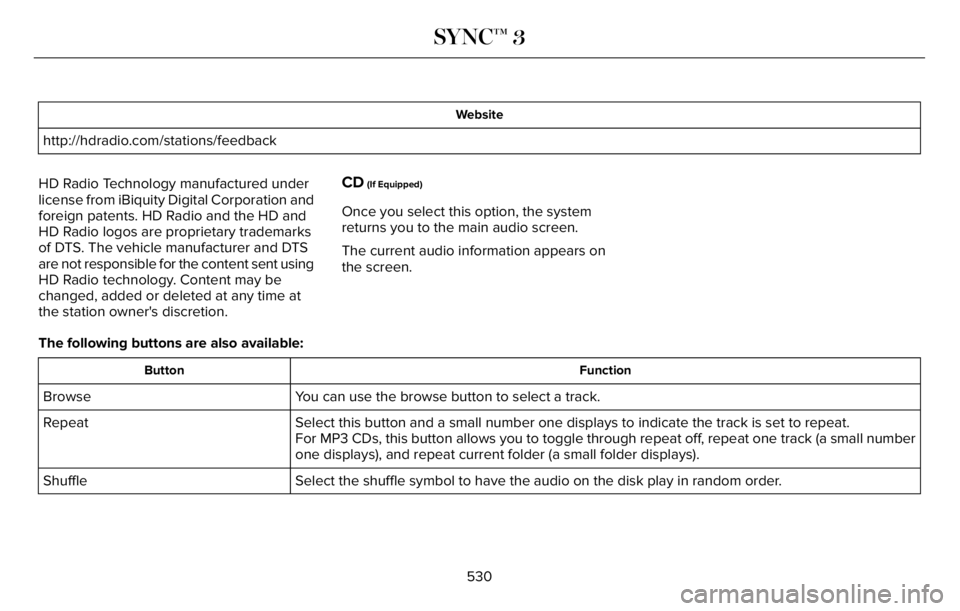
The following buttons are also available:
Function Button
You can use the browse button to select a track. Browse
Select this button and a small number one displays to indicate the track is set to repeat. Repeat
For MP3 CDs, this button allows you to toggle through repeat off, repeat one track (a small number
one displays), and repeat current folder (a small folder displays).
Select the shuffle symbol to have the audio on the disk play in random order. Shuffle
530
SYNC™ 3
Page 540 of 681
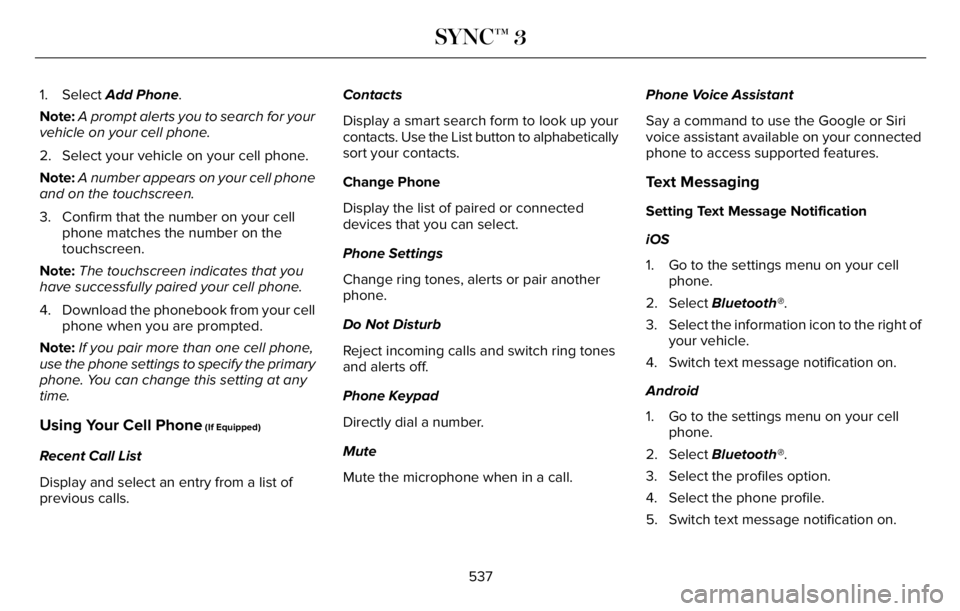
1. Select Add Phone.
Note:A prompt alerts you to search for your
vehicle on your cell phone.
2. Select your vehicle on your cell phone.
Note:A number appears on your cell phone
and on the touchscreen.
3. Confirm that the number on your cell
phone matches the number on the
touchscreen.
Note:The touchscreen indicates that you
have successfully paired your cell phone.
4. Download the phonebook from your cell
phone when you are prompted.
Note:If you pair more than one cell phone,
use the phone settings to specify the primary
phone. You can change this setting at any
time.
Using Your Cell Phone (If Equipped)
Recent Call List
Display and select an entry from a list of
previous calls.Contacts
Display a smart search form to look up your
contacts. Use the List button to alphabetically
sort your contacts.
Change Phone
Display the list of paired or connected
devices that you can select.
Phone Settings
Change ring tones, alerts or pair another
phone.
Do Not Disturb
Reject incoming calls and switch ring tones
and alerts off.
Phone Keypad
Directly dial a number.
Mute
Mute the microphone when in a call.Phone Voice Assistant
Say a command to use the Google or Siri
voice assistant available on your connected
phone to access supported features.
Text Messaging
Setting Text Message Notification
iOS
1. Go to the settings menu on your cell
phone.
2. Select Bluetooth®.
3. Select the information icon to the right of
your vehicle.
4. Switch text message notification on.
Android
1. Go to the settings menu on your cell
phone.
2. Select Bluetooth®.
3. Select the profiles option.
4. Select the phone profile.
5. Switch text message notification on.
537
SYNC™ 3
Page 545 of 681
Changing the Format of the Map
Display the map in one of the following
formats:
• A two-dimensional map with the direction
you are traveling toward the top of the
screen.
• A two-dimensional map with north toward
the top of the screen.
• A three-dimensional map with the
direction you are traveling toward the
front.
Zoom
Display more or less detail on the map.
Note:Use pinch gestures to zoom in and
out. Place two fingers on the screen and
move them apart to zoom in. Place two
fingers on the screen and bring them
together to zoom out.
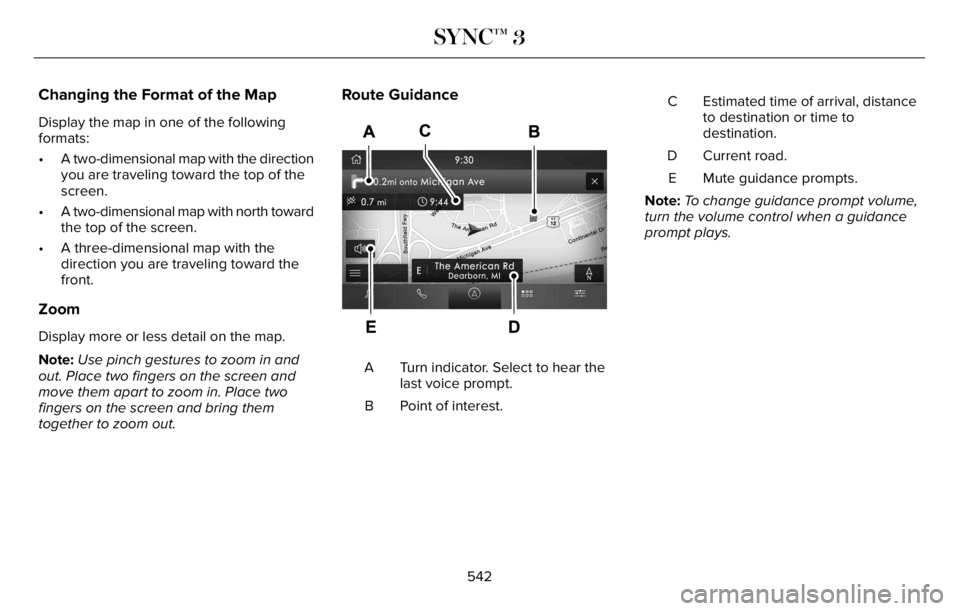
Route Guidance
E297859E297859
Turn indicator. Select to hear the
last voice prompt. A
Point of interest. BEstimated time of arrival, distance
to destination or time to
destination. C
Current road. D
Mute guidance prompts. E
Note:To change guidance prompt volume,
turn the volume control when a guidance
prompt plays.
542
SYNC™ 3
Page 556 of 681
When you start an app through the system
for the first time, you could be asked to grant
certain permissions. You can review and
change the permissions that you have
granted at any time when your vehicle is not
moving. We recommend that you check your
data plan before using your apps through
the system. Using them could result in
additional charges. We also recommend that
you check the app provider's terms and
conditions and privacy policy before using
their app. Make sure that you have an active
account for apps that you want to use
through the system. Some apps will work
with no setup. Others require you to
configure some personal settings before you
can use them.
Note:For more information about available
apps, visit catalog.ford.com.
Using Apps on an iOS Device
Select the apps option on the
feature bar.
1. If your device is connected via USB,
switch Apple CarPlay off. See Phone
(page 536).2. Connect your device to a USB port or
pair and connect using Bluetooth.
3. If prompted to enable CarPlay, select
Disable.
4. Start the apps on your device that you
want to use through SYNC.
Note:If you close the apps on your device,
you will not be able to use them through the
system.
5. Select the app that you want to use on
the touchscreen.
Note:Connect your device to a USB port if
you want to use a navigation app. When
using a navigation app, keep your device
unlocked and the app open.
Using Apps on an Android Device
Select the apps option on the
feature bar.
1. If your device is connected via USB,
switch Android Auto off. See Phone
(page 536).
2. Pair your device. See Phone (page 536).3. Start the apps on your device that you
want to use through SYNC.
Note:If you close the apps on your device,
you will not be able to use them through the
system.
4. Select Find Mobile Apps.
Note:The system searches and connects to
compatible apps that are running on your
device.
5. Select the app that you want to use on
the touchscreen.
Note:Mobile Apps on your device use the
USB port to establish a connection with
SYNC. Some devices may lose the ability to
play music over USB when Mobile Apps are
enabled.Using Mobile Navigation on an Android
Device
1. Connect your device to a USB port.
2. Switch Android Auto off. See Phone
(page 536).
3. Switch on Enable Mobile Apps via USB
in the Mobile Apps Settings tile.
553
SYNC™ 3
Page 581 of 681
There are several Lincoln Protect extended
service plans available in various time,
distance and deductible combinations. Each
plan is tailored to fit your own driving needs,
including reimbursement for towing and
rental. When you purchase Lincoln Protect
extended service plan, you receive added
peace-of-mind protection throughout
Canada, the United States and Mexico,
provided by a network of participating
authorized Lincoln dealers.
Note:Repairs performed outside of Canada,
the United States and Mexico are not eligible
for Lincoln Protect extended service plan
coverage.
This information is subject to change. For
more information, visit your local Lincoln of
Canada dealer or www.LincolnCanada.com
to find the Lincoln Protect extended service
plan that is right for you.
578
Lincoln Protect
Page 582 of 681
GENERAL MAINTENANCE
INFORMATION
Why Maintain Your Vehicle?
Carefully following the maintenance
schedule helps protect against major repair
expenses resulting from neglect or
inadequate maintenance and may help to
increase the value of your vehicle when you
sell or trade it. Keep all receipts for
completed maintenance with your vehicle.
We have established regular maintenance
intervals for your vehicle based upon
rigorous testing. It is important that you have
your vehicle serviced at the proper times.
These intervals serve two purposes: one is
to maintain the reliability of your vehicle and
the second is to keep your cost of owning
your vehicle down.
It is your responsibility to have all scheduled
maintenance performed and to make sure
that the materials used meet the
specifications identified in this owner's
manual. See Capacities and Specifications
(page 460).Failure to perform scheduled maintenance
invalidates warranty coverage on parts
affected by the lack of maintenance.
Why Maintain Your Vehicle at Your
Dealership?
Factory-Trained Technicians
Service technicians participate in extensive
factory-sponsored certification training to
help them become experts on the operation
of your vehicle. Ask your dealership about
the training and certification their technicians
have received.
Our Genuine Replacement Parts
Dealerships stock our genuine manufactured
or our authorized re-manufactured
replacement parts. These parts meet or
exceed our specifications. Parts installed at
your dealership carry a nationwide 24-month
or unlimited mile (kilometer) parts and labor
limited warranty.
If you do not use our authorized parts they
may not meet our specifications and
depending on the part, it could affect
emissions compliance.Convenience
Many dealerships have extended evening
and Saturday hours to make your service
visit more convenient and they offer one stop
shopping. They can perform any services
that are required on your vehicle, from
general maintenance to collision repairs.
Note:Not all dealers have extended hours
or body shops. Please contact your dealer
for details.
Protecting Your Investment
Maintenance is an investment that pays
dividends in the form of improved reliability,
durability and resale value. To maintain the
proper performance of your vehicle and its
emission control systems, make sure you
have scheduled maintenance performed at
the designated intervals.
Your vehicle has an Intelligent Oil-Life
Monitor system; a message appears in the
information display at the proper oil change
interval. This interval may be up to one year
or 10,000 mi (16,000 km), hybrid vehicles
may exceed 10,000 mi (16,000 km).
579
Scheduled Maintenance
Page 583 of 681
When the oil change message appears in
the information display, it is time for an oil
change. Make sure you perform the oil
change within two weeks or 500 mi (800 km)
of the message appearing. Make sure you
reset the Intelligent Oil-Life Monitor after
each oil change. See Oil Change Indicator
Reset (page 402).
If your information display resets prematurely
or becomes inoperative, you should perform
the oil change interval at six months or
5,000 mi (8,000 km) from your last oil
change. Never exceed one year or 10,000 mi
(16,000 km) between oil change intervals,
Your vehicle is very sophisticated and built
with multiple, complex performance systems.
Every manufacturer develops these systems
using different specifications and
performance features. That is why it is
important to rely upon your dealership to
properly diagnose and repair your vehicle.We have recommended maintenance
intervals for various parts and component
systems based upon engineering testing.
We rely upon this testing to determine the
most appropriate mileage for replacement
of oils and fluids to protect your vehicle at
the lowest overall cost to you and
recommends against maintenance schedules
that deviate from the scheduled maintenance
information.
We strongly recommend the use of only our
genuine manufactured or our authorized
re-manufactured replacement parts
engineered for your vehicle.
Additives and Chemicals
This owner's manual and our Workshop
Manual list the recommended additives and
chemicals for your vehicle. We do not
recommend using chemicals or additives not
approved by us as part of your vehicle’s
normal maintenance. Please consult your
warranty information.Oils, Fluids and Flushing
In many cases, fluid discoloration is a normal
operating characteristic and, by itself, does
not necessarily indicate a concern or that the
fluid needs to be changed. However, a
qualified expert, such as the factory-trained
technicians at your dealership, should
inspect discolored fluids that also show signs
of overheating or foreign material
contamination immediately.
Make sure to change your vehicle’s oils and
fluids at the specified intervals or in
conjunction with a repair. Flushing is a viable
way to change fluid for many vehicle
sub-systems during scheduled maintenance.
It is critical that systems are flushed only with
new fluid that is the same as that required
to fill and operate the system or using our
approved flushing chemical.
Owner Checks and Services
Make sure you perform the following basic
maintenance checks and inspections every
month or at six-month intervals.
580
Scheduled Maintenance
Page 586 of 681
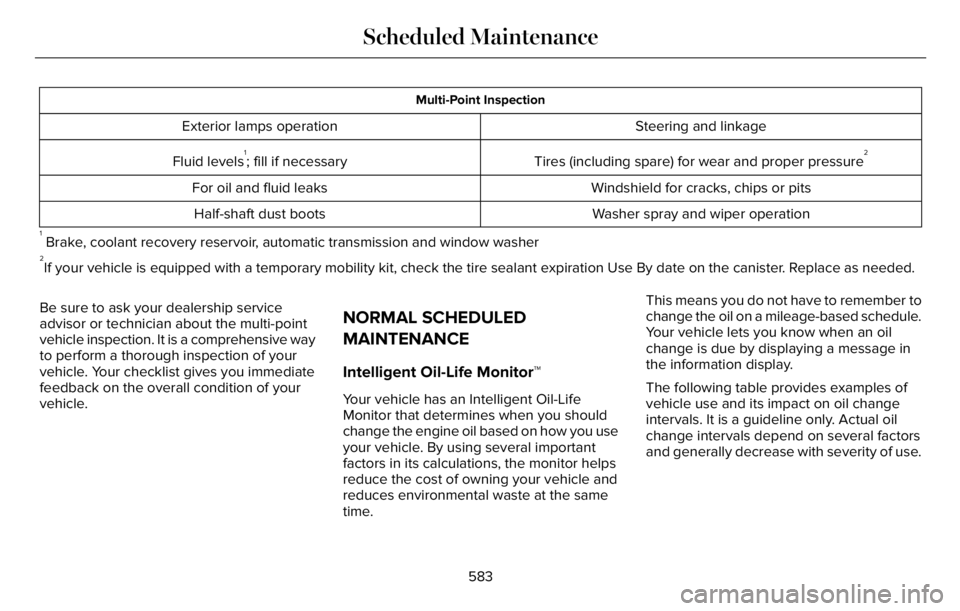
Multi-Point Inspection
Steering and linkage Exterior lamps operation
Tires (including spare) for wear and proper pressure
2Fluid levels1; fill if necessary
Windshield for cracks, chips or pits For oil and fluid leaks
Washer spray and wiper operation Half-shaft dust boots
1 Brake, coolant recovery reservoir, automatic transmission and window washer2If your vehicle is equipped with a temporary mobility kit, check the tire sealant expiration Use By date on the canister. Replace as needed.
Be sure to ask your dealership service
advisor or technician about the multi-point
vehicle inspection. It is a comprehensive way
to perform a thorough inspection of your
vehicle. Your checklist gives you immediate
feedback on the overall condition of your
vehicle.
NORMAL SCHEDULED
MAINTENANCE
Intelligent Oil-Life Monitor™
Your vehicle has an Intelligent Oil-Life
Monitor that determines when you should
change the engine oil based on how you use
your vehicle. By using several important
factors in its calculations, the monitor helps
reduce the cost of owning your vehicle and
reduces environmental waste at the same
time.This means you do not have to remember to
change the oil on a mileage-based schedule.
Your vehicle lets you know when an oil
change is due by displaying a message in
the information display.
The following table provides examples of
vehicle use and its impact on oil change
intervals. It is a guideline only. Actual oil
change intervals depend on several factors
and generally decrease with severity of use.
583
Scheduled Maintenance
Page 589 of 681
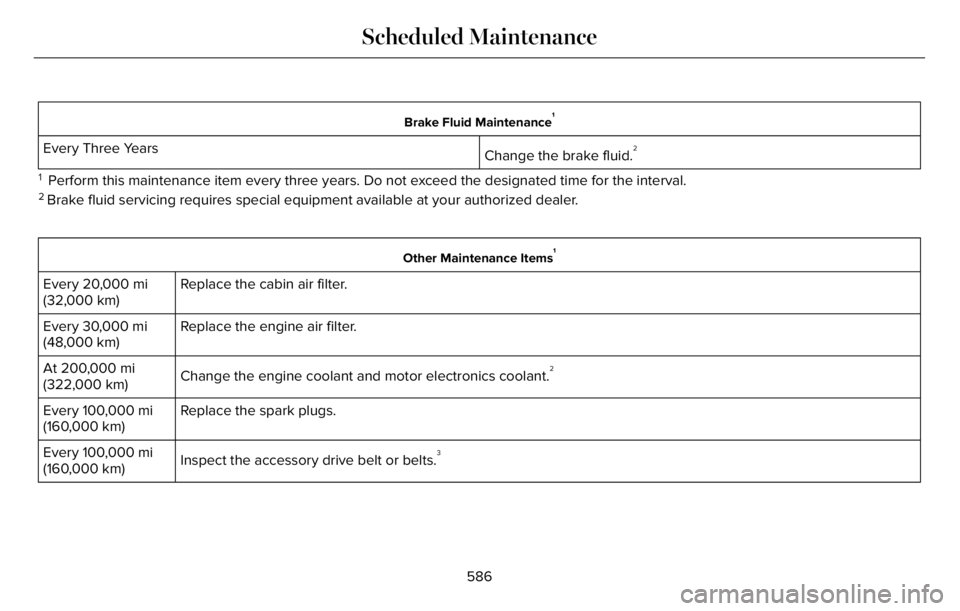
Brake Fluid Maintenance1
Change the brake fluid.2Every Three Years
1 Perform this maintenance item every three years. Do not exceed the designated time for the interval.2 Brake fluid servicing requires special equipment available at your authorized dealer.
Other Maintenance Items1
Replace the cabin air filter. Every 20,000 mi
(32,000 km)
Replace the engine air filter. Every 30,000 mi
(48,000 km)
Change the engine coolant and motor electronics coolant.
2At 200,000 mi
(322,000 km)
Replace the spark plugs. Every 100,000 mi
(160,000 km)
Inspect the accessory drive belt or belts.
3Every 100,000 mi
(160,000 km)
586
Scheduled Maintenance
Page 631 of 681
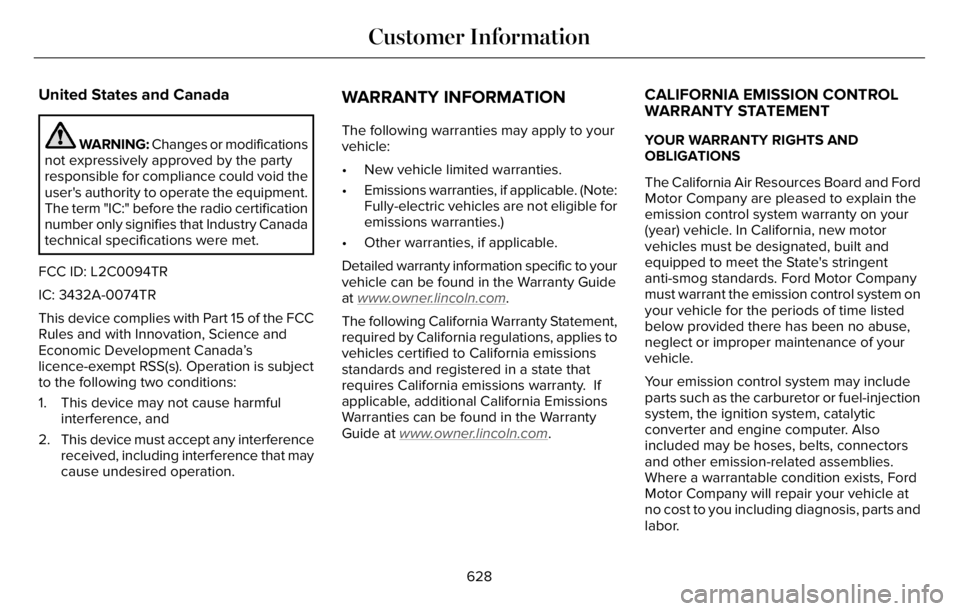
United States and Canada
WARNING: Changes or modifications
not expressively approved by the party
responsible for compliance could void the
user's authority to operate the equipment.
The term "IC:" before the radio certification
number only signifies that Industry Canada
technical specifications were met.
FCC ID: L2C0094TR
IC: 3432A-0074TR
This device complies with Part 15 of the FCC
Rules and with Innovation, Science and
Economic Development Canada’s
licence-exempt RSS(s). Operation is subject
to the following two conditions:
1. This device may not cause harmful
interference, and
2. This device must accept any interference
received, including interference that may
cause undesired operation.
WARRANTY INFORMATION
The following warranties may apply to your
vehicle:
• New vehicle limited warranties.
• Emissions warranties, if applicable. (Note:
Fully-electric vehicles are not eligible for
emissions warranties.)
• Other warranties, if applicable.
Detailed warranty information specific to your
vehicle can be found in the Warranty Guide
at www
.owner.lincoln.com.
The following California Warranty Statement,
required by California regulations, applies to
vehicles certified to California emissions
standards and registered in a state that
requires California emissions warranty. If
applicable, additional California Emissions
Warranties can be found in the Warranty
Guide at www
.owner.lincoln.com.
CALIFORNIA EMISSION CONTROL
WARRANTY STATEMENT
YOUR WARRANTY RIGHTS AND
OBLIGATIONS
The California Air Resources Board and Ford
Motor Company are pleased to explain the
emission control system warranty on your
(year) vehicle. In California, new motor
vehicles must be designated, built and
equipped to meet the State's stringent
anti-smog standards. Ford Motor Company
must warrant the emission control system on
your vehicle for the periods of time listed
below provided there has been no abuse,
neglect or improper maintenance of your
vehicle.
Your emission control system may include
parts such as the carburetor or fuel-injection
system, the ignition system, catalytic
converter and engine computer. Also
included may be hoses, belts, connectors
and other emission-related assemblies.
Where a warrantable condition exists, Ford
Motor Company will repair your vehicle at
no cost to you including diagnosis, parts and
labor.
628
Customer Information