key LINCOLN AVIATOR 2023 Repair Manual
[x] Cancel search | Manufacturer: LINCOLN, Model Year: 2023, Model line: AVIATOR, Model: LINCOLN AVIATOR 2023Pages: 681, PDF Size: 9.33 MB
Page 296 of 681
WARNING: Do not use the system
with accessories that extend beyond the
front or rear of your vehicle, for example a
trailer hitch, bike rack or side mirror
extensions such as telescoping mirrors or
towing mirrors. The system is not able to
make corrections for the additional length
of the accessories.
The system assists parking into and out of
parking spaces. Sensors are used to detect
parking spaces. The system then steers,
accelerates, brakes and shifts gear as
required to maneuver into or out of a parking
space.
Using Active Park Assist
E301E301111212
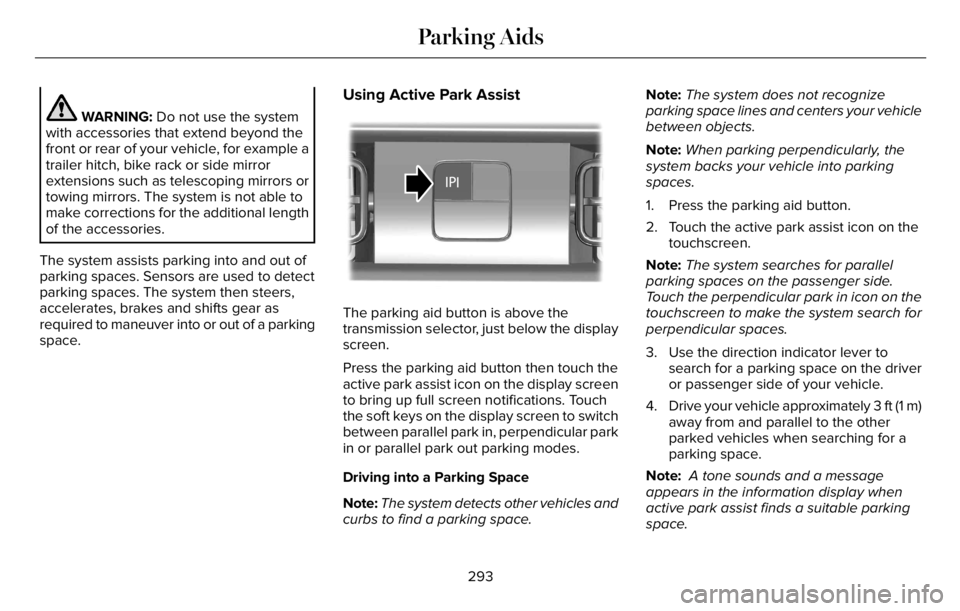
The parking aid button is above the
transmission selector, just below the display
screen.
Press the parking aid button then touch the
active park assist icon on the display screen
to bring up full screen notifications. Touch
the soft keys on the display screen to switch
between parallel park in, perpendicular park
in or parallel park out parking modes.
Driving into a Parking Space
Note:The system detects other vehicles and
curbs to find a parking space.Note:The system does not recognize
parking space lines and centers your vehicle
between objects.
Note:When parking perpendicularly, the
system backs your vehicle into parking
spaces.
1. Press the parking aid button.
2. Touch the active park assist icon on the
touchscreen.
Note:The system searches for parallel
parking spaces on the passenger side.
Touch the perpendicular park in icon on the
touchscreen to make the system search for
perpendicular spaces.
3. Use the direction indicator lever to
search for a parking space on the driver
or passenger side of your vehicle.
4. Drive your vehicle approximately 3 ft (1 m)
away from and parallel to the other
parked vehicles when searching for a
parking space.
Note: A tone sounds and a message
appears in the information display when
active park assist finds a suitable parking
space.
293
Parking Aids
Page 318 of 681
Note:There are instances where the system
can cancel without displaying a message in
the information display.
E281472
If your vehicle starts to slow down,
you must provide steering input to
the wheel and press and release
the button to regain full system performance.
Automatic cancellation can also occur if:
• The lane becomes too wide or too
narrow.
• The system cannot detect valid lane
markings.
• Lane markings are crossed.
Note:The system disables until the next key
cycle if your vehicle slows down due to driver
inactivity twice within a key cycle.
SWITCHING INTELLIGENT MODE
ON AND OFF
WARNING: You are responsible for
controlling your vehicle at all times. The
system is designed to be an aid and does
not relieve you of your responsibility to
drive with due care and attention. Failure
to follow this instruction could result in the
loss of control of your vehicle, personal
injury or death.
1. Press Settings on the touchscreen.
2. Press Driver Assistance.
3. Press Cruise Control.
4. Press Intelligent.
Changing the Set Speed with
Intelligent Adaptive Cruise Control
When intelligent mode is on, the system
adjusts the set speed to the speed limit
detected by the camera and the speed limit
information provided by the navigation
system.Note:The set speed adjusts when the
system detects a different maximum speed
limit.
Note:The speed limit information provided
by the navigation map data may be
inaccurate or out of date. See Navigation
(page 538).
Note:The system alerts you if the set speed
increases beyond the speed limit. See
Adaptive Cruise Control Indicators (page
312).
If the system does not detect a speed limit,
the vehicle speed remains at the current set
speed.
You can override the set speed at any time.
You may need to override or cancel the
system in certain situations such as inclement
weather or if an incorrect speed is set.
Note:The system may not detect and read
speed limit signs with conditional
information, for example, when a sign is
flashing, during specific time ranges, or when
children are present.
315
Adaptive Cruise Control (If Equipped)
Page 324 of 681
WARNING: The system may not
correctly operate if your vehicle is fitted
with a suspension kit not approved by us.
Note:The system works above 40 mph
(64 km/h).
Note:The system works as long as the
camera can detect one lane marking.
Note:When you select Aid or Alert and Aid
mode and the system detects no steering
activity for a short period, the system alerts
you to put your hands on the steering wheel.
The system may detect a light grip or touch
on the steering wheel as hands off driving.
Note:The system may not function if the
camera is blocked, or if the windshield is
damaged or dirty.
E249505
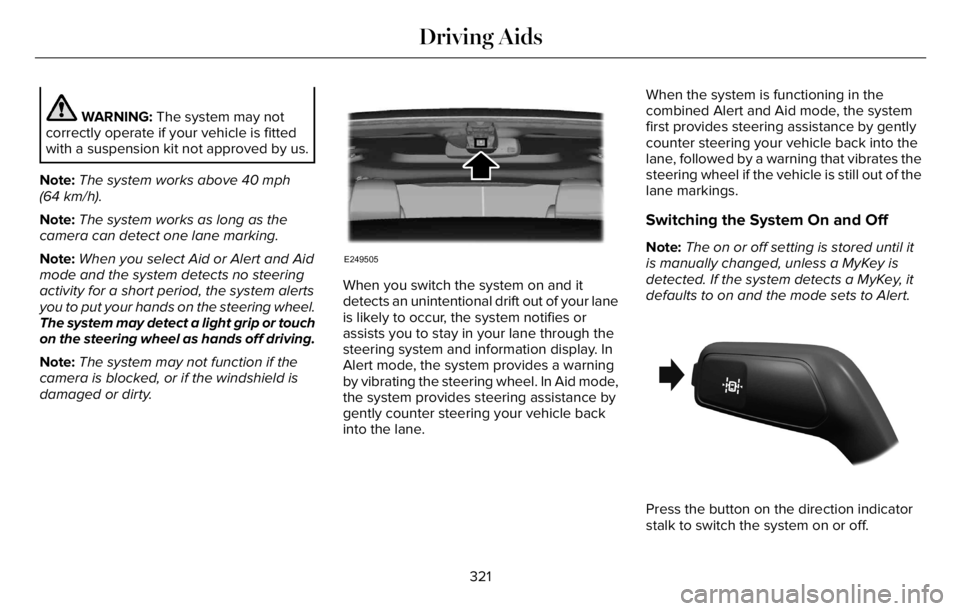
When you switch the system on and it
detects an unintentional drift out of your lane
is likely to occur, the system notifies or
assists you to stay in your lane through the
steering system and information display. In
Alert mode, the system provides a warning
by vibrating the steering wheel. In Aid mode,
the system provides steering assistance by
gently counter steering your vehicle back
into the lane.When the system is functioning in the
combined Alert and Aid mode, the system
first provides steering assistance by gently
counter steering your vehicle back into the
lane, followed by a warning that vibrates the
steering wheel if the vehicle is still out of the
lane markings.
Switching the System On and Off
Note:The on or off setting is stored until it
is manually changed, unless a MyKey is
detected. If the system detects a MyKey, it
defaults to on and the mode sets to Alert.
E288067
Press the button on the direction indicator
stalk to switch the system on or off.
321
Driving Aids
Page 333 of 681
Switching the System On and Off
You can switch the blind spot information
system with trailer tow off by not selecting a
trailer in the information display. See General
Information (page 136). In this case, the
system turns off as long as a trailer is
attached to your vehicle. As soon as you
disconnect the trailer, the blind spot
information system becomes active.
When you switch the system off, a warning
lamp illuminates and the alert indicators flash
twice.
Note:The system remembers the last trailer
setting when you start your vehicle.
You cannot switch off the blind spot
information system with trailer tow when
using MyKey, but you can still change the
trailer settings. See MyKey™ (page 78).To permanently switch the system off,
contact an authorized dealer.
CROSS TRAFFIC ALERT
WARNING: Do not use the cross
traffic alert system as a replacement for
using the interior and exterior mirrors or
looking over your shoulder before
reversing out of a parking space. The cross
traffic alert system is not a replacement for
careful driving.
WARNING: The system may not
operate properly during severe weather
conditions, for example snow, ice, heavy
rain and spray. Always drive with due care
and attention. Failure to take care may
result in a crash.The system alerts you of vehicles
approaching from the sides behind your
vehicle when you shift into reverse (R).
Using Cross Traffic Alert
The system detects vehicles that approach
at a speed between 4 mph (6 km/h) and
37 mph (60 km/h). Coverage decreases when
the sensors are partially, mostly or fully
obstructed. Slowly reversing helps increase
the coverage area and effectiveness.
The system turns on when you start the
engine and you shift into reverse (R). The
system turns off when you shift out of reverse
(R).
330
Driving Aids
Page 355 of 681
Special Loading Instructions for
Owners of Pick-up Trucks and Utility-
type Vehicles
WARNING: When loading the
roof racks, we recommend you evenly
distribute the load, as well as maintain
a low center of gravity. Loaded
vehicles, with higher centers of gravity,
may handle differently than unloaded
vehicles. Take extra precautions, such
as slower speeds and increased
stopping distance, when driving a
heavily loaded vehicle.
AIR SUSPENSION (IF EQUIPPED)
WARNING: If your vehicle has
self-leveling air suspension, you must
switch the system off before carrying out
any maintenance or repair. Failure to follow
this warning could result in serious
personal injury or death.The air suspension system automatically
adjusts to maintain a constant frame height,
allows for ease of vehicle loading, provides
improved vehicle ride, and increased driver
comfort.
You can adjust different ride settings through
the selectable drive modes. See Selecting
a Drive Mode (page 343).
Note:The air suspension system may not
operate properly if you exceed the load limit.
See Load Limit (page 348).
Note:When your vehicle is off, the air
compressor may run for a short time. This is
normal.
Switching the systems on or off
You can access the air suspension, liftgate
and easy entry features through the
information display menu settings. See
General Information (page 136).
Using the Service Mode
When the service mode is active, the air
suspension does not make any adjustments
while your vehicle is stationary.Note:Always switch the air suspension
service mode to on before servicing your
vehicle.
Using Cargo Loading
The air suspension cargo loading feature
lowers your vehicle for easier access when
the system detects the liftgate is opening.
When the liftgate is closed your vehicle
returns to its normal height after a short time.
Note:To preserve your vehicle battery, your
vehicle may only lower for cargo mode one
to two times per ignition cycle.
Using Easy Entry
The air suspension can lower your vehicle
to an easier access entry height when the
system detects the intelligent access key,
you press the unlock button, use the remote
start, or use Phone as a Key.
The leveling process stops when you open
a door or the target level is achieved.
Note:To stop the leveling process, press the
lock button on the intelligent access key.
352
Load Carrying
Page 367 of 681
ROADSIDE ASSISTANCE
Vehicles sold in the United States:
Getting Roadside Assistance
To fully assist you should you have a vehicle
concern, Lincoln offers a complimentary
roadside assistance program. This program
is separate from the New Vehicle Limited
Warranty.
The service is available:
• Throughout the life of the vehicle for
original owners.
• For six years or 70,000 mi (110,000 km)
(whichever comes first) for subsequent
owners.
Roadside Assistance covers:
• A flat tire change with a good spare
(except vehicles supplied with a tire
inflation kit).
• Battery jump start.
• Lock-out assistance (key replacement
cost is the client's responsibility).• Fuel delivery — independent service
contractors, if not prohibited by state,
local or municipal law shall deliver up to
2 gal (8 L) of gasoline fuel to a disabled
vehicle. Roadside Assistance limits fuel
delivery service to two no-charge
occurrences within a 12-month period.
• Winch out — available within 100 ft (30 m)
of a paved or county maintained road,
no recoveries.• Towing — independent service
contractors, if not prohibited by state,
local or municipal law shall tow Lincoln
eligible vehicles to the client's selling or
preferred dealer within 100 mi (160 km)
of the disablement location or to the
nearest Lincoln dealer. If a client requests
a tow to a selling or preferred dealer that
is more than 100 mi (160 km) from the
disablement location, the client is
responsible for any mileage costs in
excess of 100 mi (160 km).
• Roadside Assistance includes up to $200
for a towed trailer if the disabled eligible
vehicle requires service at the nearest
authorized dealer. If the towing vehicle
is operational but the trailer is not, then
the trailer does not qualify for any
roadside services.
Vehicles Sold in the United States:
Using Roadside Assistance
United States clients who require roadside
assistance, call 1-800-521-4140 or contact
Roadside Assistance using the Lincoln Way
mobile app.
364
Roadside Emergencies
Page 368 of 681
If you need to arrange roadside assistance
for yourself, Lincoln reimburses a reasonable
amount for towing to the nearest Lincoln
dealership within 100 mi (160 km). To obtain
reimbursement information, United States
clients, call 1-800-521-4140. Clients need to
submit their original receipts.
Vehicles Sold in Canada: Getting
Roadside Assistance
To fully assist you should you have a vehicle
concern, Lincoln offers a complimentary
roadside assistance program. This program
is eligible within Canada or the continental
United States.
The service is available 24 hours a day,
seven days a week.
This program is separate from the New
Vehicle Limited Warranty, beginning from
the original warranty start date and lasts the
life of the vehicle for the original owner.
Subsequent owners receive coverage that
is concurrent with the 6 years or 70,000 mi
(110,000 km) (whichever occurs first)
powertrain warranty coverage period.Note:Canadian roadside coverage and
benefits may differ from the U.S. coverage.
For complete program coverage details,
review your warranty guide, contact your
dealer, call us in Canada at 1-800-387-9333,
or visit our website at
www.lincolncanada.com.
If you purchased your vehicle in Canada and
require roadside assistance, please call
1-800-387-9333 or contact Roadside
Assistance using the Lincoln Way mobile
app.
Note:For quick reference, complete the
roadside assistance identification card found
in the glove compartment of your vehicle
and place it in your wallet.
HAZARD FLASHERS
Note:The hazard flashers operate when the
ignition is in any position, or if the key is not
in the ignition. If used when the vehicle is not
running, the battery loses charge. As a result,
there may be insufficient power to restart
your vehicle.
The flasher control is on the
instrument panel. Use your hazard
flashers when your vehicle is
creating a safety hazard for other motorists.
• Press the flasher control and all front and
rear direction indicators flash.
• Press the button again to switch them off.
FUEL SHUTOFF
WARNING: If your vehicle has been
involved in a crash, have the fuel system
checked. Failure to follow this instruction
could result in fire, personal injury or death.
Note:When you try to restart your vehicle
after a fuel shutoff, the vehicle makes sure
that various systems are safe to restart.
Once the vehicle determines the systems
are safe, then the vehicle allows you to
restart.
Note:In the event that your vehicle does not
restart after your third attempt, contact a
qualified technician.
365
Roadside Emergencies
Page 369 of 681
The fuel pump shutoff stops the flow of fuel
to the engine in the event of a moderate to
severe crash. Not every impact causes a
shutoff.
Should your vehicle shut off after a crash,
you may restart your vehicle.
If your vehicle has a key system:
1. Switch off the ignition.
2. Switch to start position.
3. Switch off the ignition.
4. Switch on the ignition to re-enable the
fuel pump.
5. If the vehicle does not start, repeat steps
1 through 4.
If your vehicle has a push button start
system:
1. Press START/STOP to switch off your
vehicle.
2. Press the brake pedal and START/STOP
to switch on your vehicle.
3. Remove your foot from the brake pedal
and press START/STOP to switch off
your vehicle.4. You can attempt to start the vehicle by
pressing the brake pedal and
START/STOP, or press START/STOP
without pressing the brake pedal.
5. If the vehicle does not start, repeat steps
1 through 4.
JUMP STARTING THE VEHICLE
WARNING: Batteries normally
produce explosive gases which can cause
personal injury. Therefore, do not allow
flames, sparks or lighted substances to
come near the battery. When working near
the battery, always shield your face and
protect your eyes. Always provide correct
ventilation.
WARNING: Keep batteries out of
reach of children. Batteries contain sulfuric
acid. Avoid contact with skin, eyes or
clothing. Shield your eyes when working
near the battery to protect against possible
splashing of acid solution. In case of acid
contact with skin or eyes, flush immediately
with water for a minimum of 15 minutes and
get prompt medical attention. If acid is
swallowed, call a physician immediately.
WARNING: Use only adequately
sized cables with insulated clamps.
Preparing Your Vehicle
Do not attempt to push-start your automatic
transmission vehicle.
Note:Attempting to push-start a vehicle with
an automatic transmission may cause
transmission damage.
Note:Use only a 12-volt supply to start your
vehicle.
366
Roadside Emergencies
Page 372 of 681
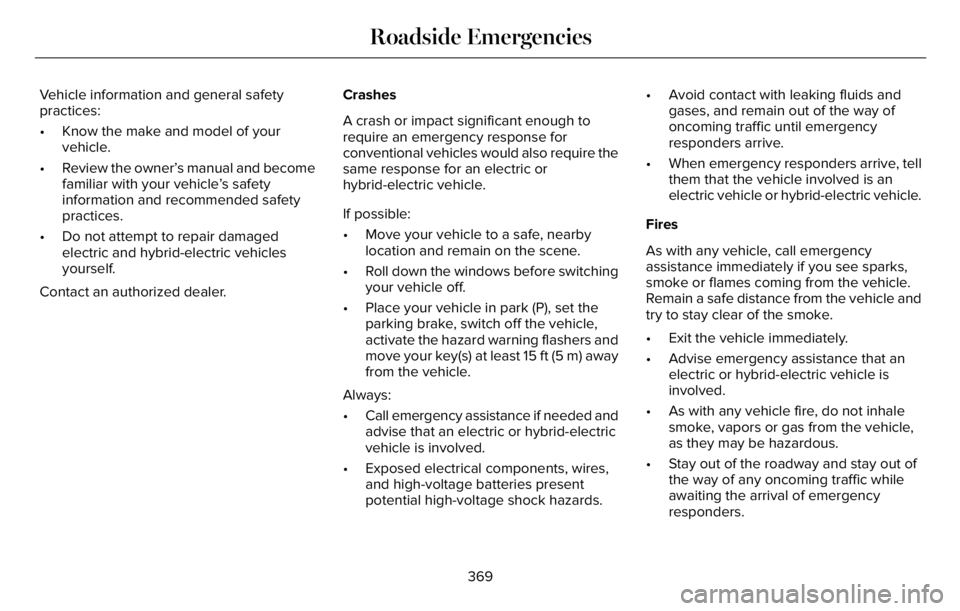
Vehicle information and general safety
practices:
• Know the make and model of your
vehicle.
• Review the owner’s manual and become
familiar with your vehicle’s safety
information and recommended safety
practices.
• Do not attempt to repair damaged
electric and hybrid-electric vehicles
yourself.
Contact an authorized dealer.Crashes
A crash or impact significant enough to
require an emergency response for
conventional vehicles would also require the
same response for an electric or
hybrid-electric vehicle.
If possible:
• Move your vehicle to a safe, nearby
location and remain on the scene.
• Roll down the windows before switching
your vehicle off.
• Place your vehicle in park (P), set the
parking brake, switch off the vehicle,
activate the hazard warning flashers and
move your key(s) at least 15 ft (5 m) away
from the vehicle.
Always:
• Call emergency assistance if needed and
advise that an electric or hybrid-electric
vehicle is involved.
• Exposed electrical components, wires,
and high-voltage batteries present
potential high-voltage shock hazards.• Avoid contact with leaking fluids and
gases, and remain out of the way of
oncoming traffic until emergency
responders arrive.
• When emergency responders arrive, tell
them that the vehicle involved is an
electric vehicle or hybrid-electric vehicle.
Fires
As with any vehicle, call emergency
assistance immediately if you see sparks,
smoke or flames coming from the vehicle.
Remain a safe distance from the vehicle and
try to stay clear of the smoke.
• Exit the vehicle immediately.
• Advise emergency assistance that an
electric or hybrid-electric vehicle is
involved.
• As with any vehicle fire, do not inhale
smoke, vapors or gas from the vehicle,
as they may be hazardous.
• Stay out of the roadway and stay out of
the way of any oncoming traffic while
awaiting the arrival of emergency
responders.
369
Roadside Emergencies
Page 395 of 681
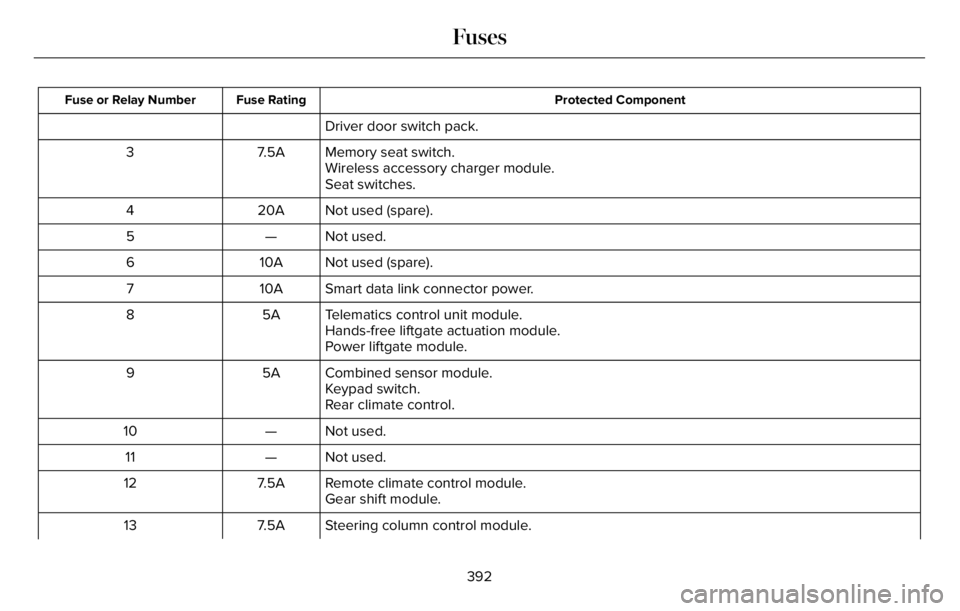
Protected Component Fuse Rating Fuse or Relay Number
Driver door switch pack.
Memory seat switch. 7.5A 3
Wireless accessory charger module.
Seat switches.
Not used (spare). 20A 4
Not used. — 5
Not used (spare). 10A 6
Smart data link connector power. 10A 7
Telematics control unit module. 5A 8
Hands-free liftgate actuation module.
Power liftgate module.
Combined sensor module. 5A 9
Keypad switch.
Rear climate control.
Not used. — 10
Not used. — 11
Remote climate control module. 7.5A 12
Gear shift module.
Steering column control module. 7.5A 13
392
Fuses