buttons LINCOLN CONTINENTAL 1996 Customer Assistance Guide
[x] Cancel search | Manufacturer: LINCOLN, Model Year: 1996, Model line: CONTINENTAL, Model: LINCOLN CONTINENTAL 1996Pages: 320, PDF Size: 1.8 MB
Page 164 of 320

Luxury Audio System
Using the Controls on Your New Radio
How to turn the radio on and off
Press the "VOL/PUSH ON" knob to turn the
radio on. Press again to turn it off.
How to adjust the volume
Turn the "VOL/PUSH ON" knob clockwise to
increase the volume and counter-clockwise to
decrease the volume.
NOTE: If the volume is set above a certain level
when the ignition is turned off, the volume level
will reset to a "nominal" listening level when the
ignition switch is turned back on. However, if the
radio is turned off with the "VOL/PUSH ON"
knob, the volume will not reset and will stay at
the same level when the radio is turned back on.Selecting the AM or FM frequency band
Push the "AM" or "FM1/FM2" button to select
the desired frequency band. Pushing the
"FM1/FM2" button more than once will
alternate between FM1 and FM2. These
functions are used with the station memory
buttons described under How to tune radio
stations.
HOW to tune radio stations
There -are four ways for you to tune in a
particular station. You can use the "TUNE",
"SEEK", 'SCAN”or memory buttons. Using the "TUNE" function
You can change the frequency up or down one
increment at a time by Pressing and releasing
either the left ()or-right () side of the
"TUNE" or "TUNE DISCS" button. To
change frequencies quickly, press and hold
down either the right or left side of the button.
161
Page 165 of 320

Manual tuning adjusts your radio to any
allowable broadcast frequency, whether or not a
station is present on that frequency. (See All
About Radio Frequencies in this section.) Using the "SEEK" function
Press the right *) side of the 'SEEK" button to
select the next listenable station up the
frequency band. Press the left (.4) side of the
button to select the next listenable station
down the frequency band. By holding the
button down, listenable stations can be passed
over to reach the desired station. Using the 'SCAN" function
Pressing the "SCAN" button will begin the
scan mode up the frequency band, stopping on
each listenable station for approximately five
seconds.
To stop the scan mode on the presently
sampled station, press the "SCAN" button again.
162 Setting the station MEMORY PRESET buttons
Your radio is equipped with 6 station
memory buttons. These buttons can be used
to select up to 6 preset AM stations and 12
FM stations (6 in FMI and 6 in FM2)
1Select a band, then select a frequency.
2.Press one of the memory buttons and hold
until the sound returns and the lamp above
the memory button lights up. That
memory button is now set.
3.Follow the above steps for each memory
preset button.
NOTE:Custom memory presets
can be recalled using the keyless entry
system. See Memory Profile System in
the Features chapter.
Page 166 of 320

Using the Automatic Memor.y Store feature
(“AUTOSET”)
If the memory buttons have been set, either by
using the Auto Memory Load feature or if you
have set them manually, the system is prepared to
let you use a convenient feature called
Automatic Memory Store.
With Auto Memory Store, you can continually
set strong stations into your memory buttons
without losing your originally set stations. Your
radio will automatically set your memory buttons
to the strong local stations.
Activate Auto Memory Store by pushing the
"AUTOSET" button once. Your radio will set
the first six strong stations of the band you are in
(AM, FMI or FM2) into the memory buttons.
The display will flash "AUTO" and display the
autoset icon "A" while the stations are being set
in the memory buttons.NOTE: If there are less than six strong
stations in the frequency band, the
remaining unfilled buttons will store the
last strong station detected on the band.
After all stations have been filled, the radio
will begin playing the station stored on
memory button 1.
To deactivate the Auto Memory Store mode and
return to the manually-set memory button stations,
simply push the "AUTOSET" button. Display will
show "AUTO" then "OFF". The next time Auto
Memory Store is activated on that band, the radio
will store the next set of six strong stations.
Adjusting the tone balance of your radio Increasing or decreasing bass and treble
response Push the "BASS/TREB" popout knob
to gain access to the bass and treble controls.
Bass control allows you to adjust the lower,
bass frequencies to your preference. The outer
ring of the "BASS/TREB" knob adjusts the
bass (turn clockwise to increase bass;
counterclockwise to decrease bass).
163
Page 172 of 320
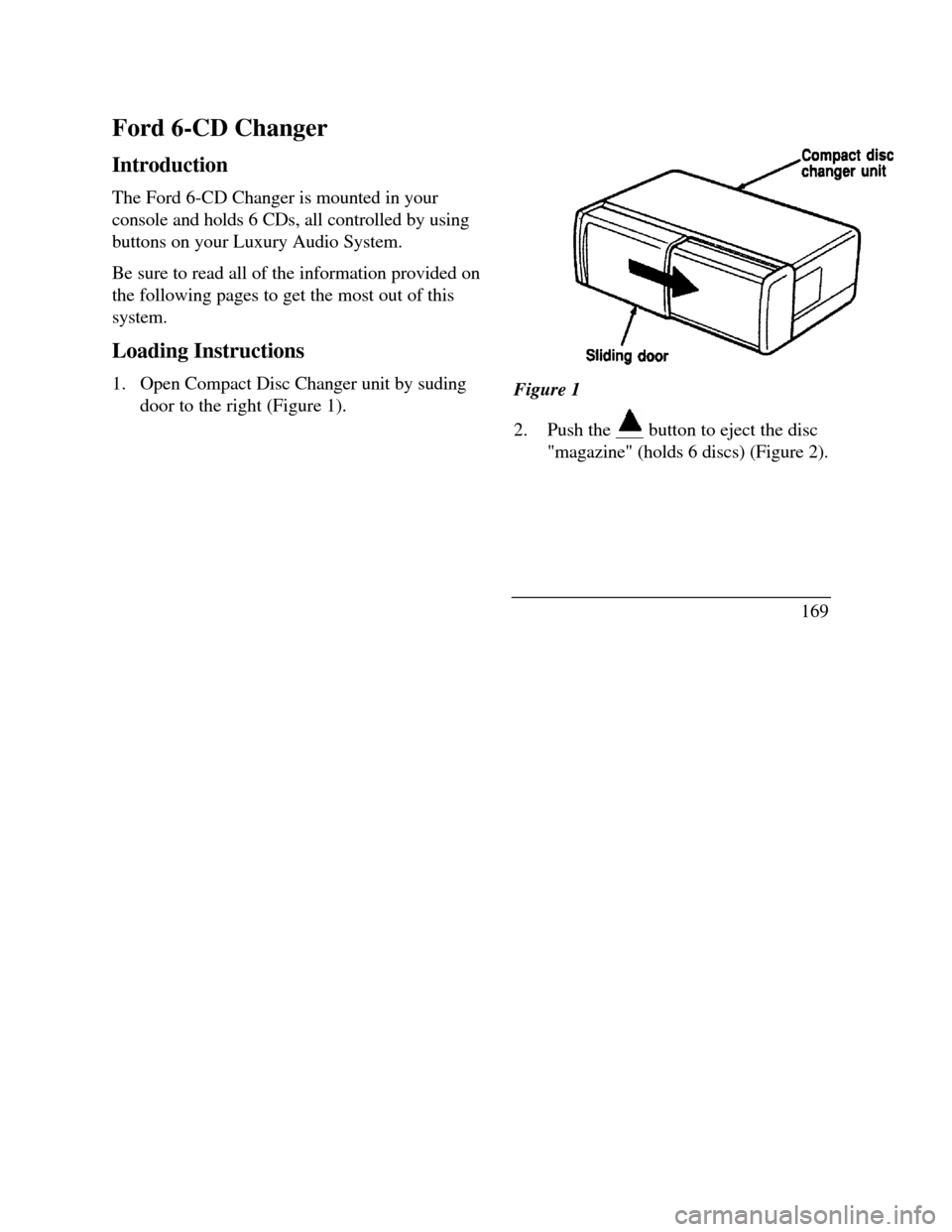
Ford 6-CD Changer
Introduction
The Ford 6-CD Changer is mounted in your
console and holds 6 CDs, all controlled by using
buttons on your Luxury Audio System.
Be sure to read all of the information provided on
the following pages to get the most out of this
system.
Loading Instructions
1. Open Compact Disc Changer unit by suding
door to the right (Figure 1).Figure 1
2.Push the button to eject the disc"magazine" (holds 6 discs) (Figure 2).
169
Page 215 of 320

Lincoln RESCU System
(If equipped)
The Lincoln RESCU buttons, located in the
overhead console, should be used in the event that
you require roadside assistance (out of gas, need a
tow, etc.) or emergency assistance (involved in an
accident, report a crime or fire, require medical
attention, etc.).
212See Lincoln RESCU System in the Features chapter
for more information.
Page 285 of 320

Bulb specifications
FunctionTrade numberExterior illuminationBackup lamp3156Cornering lamp3156Headlamp9007High-mount brakelamp912License plate lamp168Luggage compartment lamp912Side marker - front lamp916NA*Side marker - rear lamp194Turn signal and park lamp - front3457NA*Turn signal, stoplamp and tail lamp
- rear3157Redundant turn - rear3157Decklid reflector168Instrument panel lightsElectronic automatic temperature
control***Air bag readiness light37Anti-lock warning lamp37And-theft warning lamp37Ash receptacle1445Ash ttay - rear doors37Clock***FunctionTradenumberInstrument panel lights (continued)Cluster illumination***Cluster control button37Compact disc player**Glove compartment194Headlamp switch nomenclature37Message center control buttons***“PRN@D I" bulb (floor console)194Rear window defrost switchnomenclature37Radio**Warning lights (cluster)37Interior courtesy lampsCigar lighter (door mounted)1893Door mounted lamp (front and rear)214-2Illuminated visor mirror (passenger)74Overhead console-reading lamps (without
moon roof)211-2Passenger assist handle (rear seat)211-2Under instrument panel906*NA means Natural Amber.
**Refer bulb replacement to a Ford -authorized radio service
center.
***Refer bulb replacement to a Ford or Lincoln-Mercury
dealer.
283
Page 300 of 320
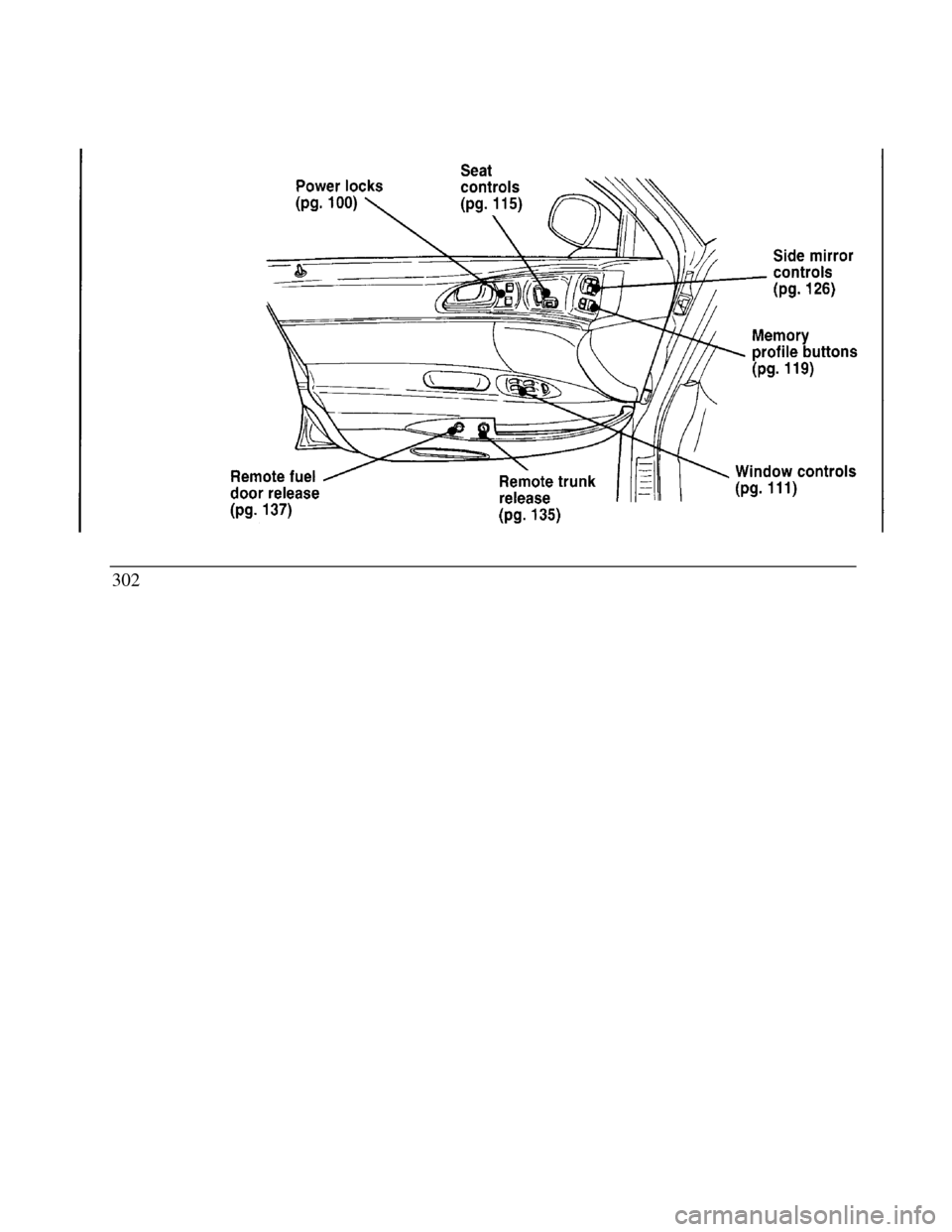
Remote fuel door release Seat controls Remote trunk release Side mirror controls Memory profile buttons power locks window controls302
Page 301 of 320
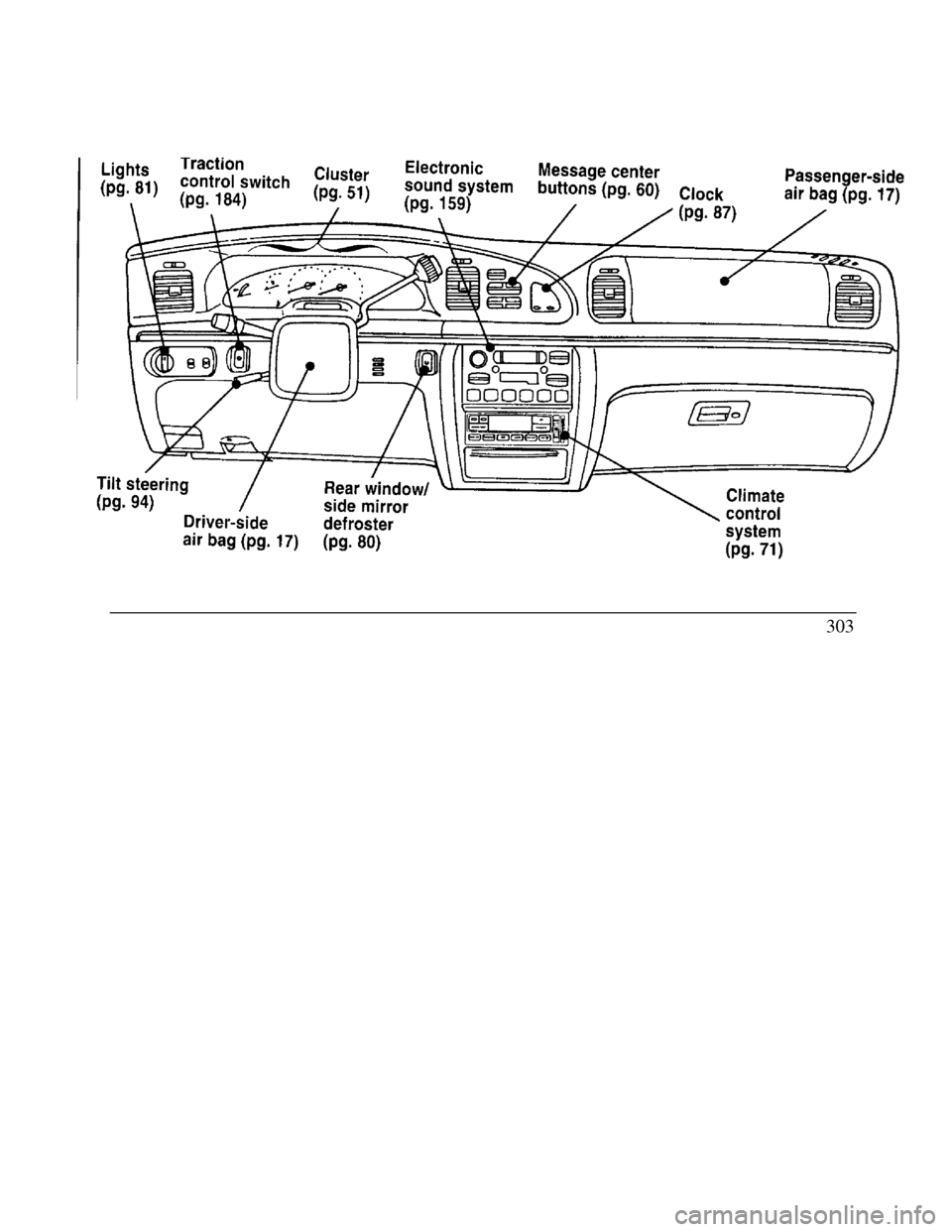
Lights Traction control Tilt steering Driver-side air bag Lights Traction Cluster Electronic sound system Tilt steering Rear window/ side mirror
Driver-side defroster air bag Message center buttons Clock Climate control system Passenger-side air bag303