door lock LINCOLN CONTINENTAL 1996 Customer Assistance Guide
[x] Cancel search | Manufacturer: LINCOLN, Model Year: 1996, Model line: CONTINENTAL, Model: LINCOLN CONTINENTAL 1996Pages: 320, PDF Size: 1.8 MB
Page 114 of 320

Triggering the alarm system
The armed system will be triggered if: any door is opened without disarming the
system (see previous paragraphs), or the trunk lock cylinder is removed, or
NOTE: You can open the trunk with your key
without setting off the alarm. the hood is opened.
Disarming a triggered system
The alarm can be disarmed by: unlocking a front door with the key using the keyless entry unlock code using the UNLOCK button of the remote entry
transmitterNOTE: The flashing lights and honking horn
will shut off automatically approximately
three minutes after the system is triggered.
It will trigger again if another intrusion
occurs. However, the engine will not be
allowed to start until the system is disarmed.
Windows
Using the Power Windows
Each door has a power control that opens and
closes the window on that door. The driver's
door has a master control panel that operates all
four windows.
Power windows can only be opened or closed
when the ignition is in the ON or ACC position
or during the ten minute delayed accessory
period after the ignition is turned off.
111
Page 115 of 320
/!\WARNINGDo not let children play with the powerwindows. They may seriously hurtthemselves. Make sure occupants areclear of the window(s) before closing.NOTE: Your vehicle is also equipped with a
delayed accessory timer. This allows some of your
accessories to remain on for up to 10 minutes after
the key is turned to the OFF position. The
accessory timer is cancelled if any door is opened
or the key is turned to the ON position.
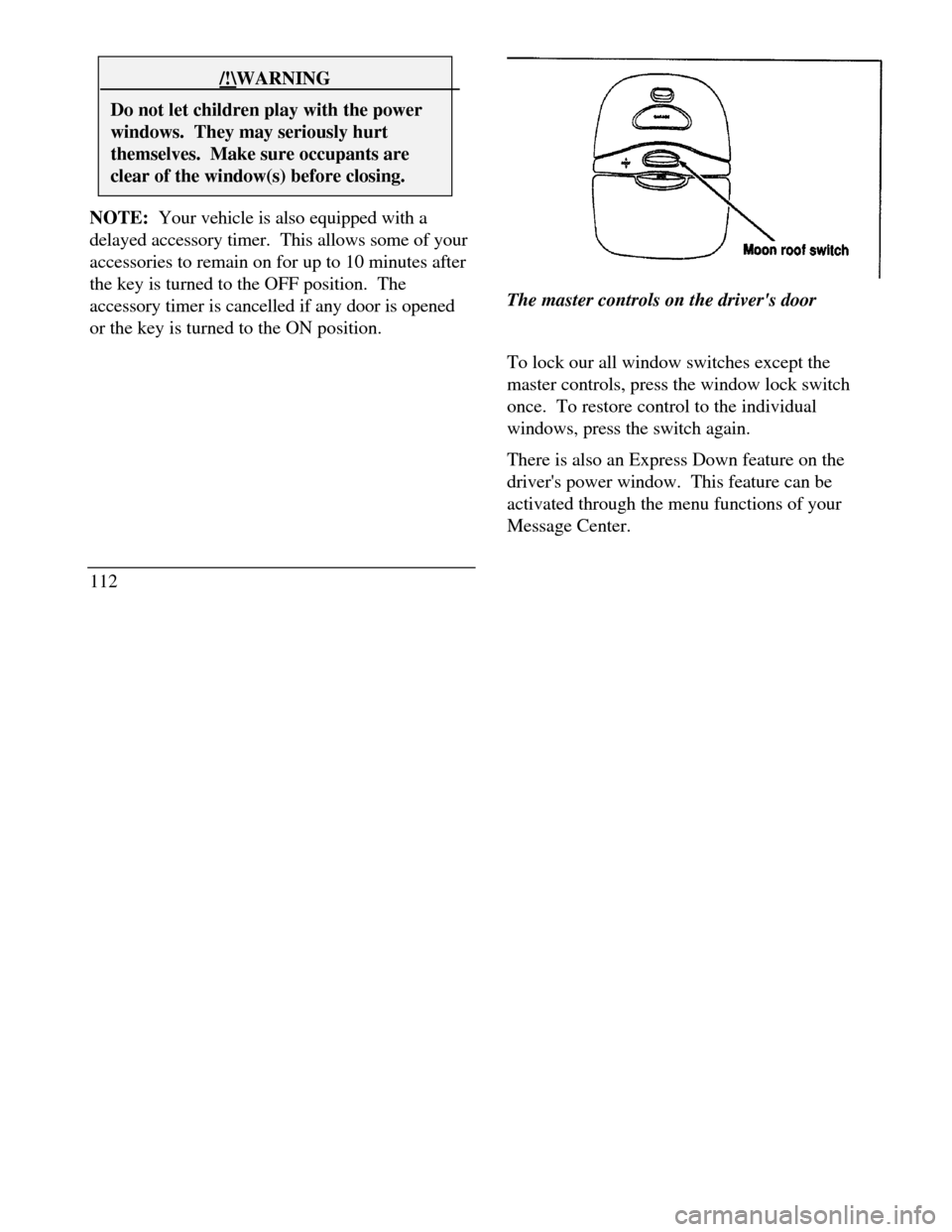
112The master controls on the driver's door
To lock our all window switches except the
master controls, press the window lock switch
once. To restore control to the individual
windows, press the switch again.
There is also an Express Down feature on the
driver's power window. This feature can be
activated through the menu functions of your
Message Center.
Page 122 of 320
Memory Profile System
The Personality Memory Feature customizes your
Continental for up to two (2) drivers. The
following features are automatically recalled when
unlocking the doors using the remote entry
transmitter, keyless entry keypad, or by pressing
the Memory 1 or Memory 2 switches on the
driver's door: All driver's seat positions except power lumbar
and head restraint. Both left and right outside mirror settings. Radio station presets including the last selected
station and band and 0 preset preferences on
FMI, FM2, and AM. Instrument panel dimming setting. Autolamp delay time-out setting. Ride/Steering menu setting. Feature Menu settingsThe Ride/Steering menu is located in the
Message Center. The RIDE display allows you
to adjust the suspension feel to FIRM,
NORMAL, or PLUSH.
Pressing the Ride/Steering menu switch again
brings the STEERING display. This allows you
to adjust steering effort to LOW, NORMAL, or
HIGH.
For more information on ride/steering options,
see Road Calibrated Suspension later in this
chapter.
Personality Memory also allows you to
customize settings from the Feature menu
located in the Message Center. The Feature
menu contains five (5) features that you can
enable or disable. The features are listed in the
order they appear in the Feature menu. EXPRESS WINDOW - for one tap down
operation of the driver's window.
119
Page 123 of 320

AUTO DOOR LOCKS - automatically locks all
doors when the driver shifts out of PARK, all
doors are closed, and the vehicle speed is at
least three mph (five km/h). HORN CHIRP - sounds an audible "chirp"
when you press the LOCK button on the remote
entry transmitter to verify that the doors have
been locked and the vehicle's anti-theft system
has been armed (if equipped). SEAT ACCESS - moves the driver's seat back
two (2) inches or to the end of the seat track
when the vehicle is turned off and the ignition
key is removed. Upon the driver entering the
vehicle and closing the door, the seat will move
forward to its previous position. REVERSE MIRROR - when the vehicle is
shifted to REVERSE, the outside rearview
mirrors tilt down. This provides an improved
view of the side of the vehicle and curb area
when backing up. When you shift out of
REVERSE, the mirrors return to their previous
positions.
120Recalling Personality Memory
All of these settings are automatically recalled
when the driver unlocks the door using the
remote entry transmitter, keyless entry keypad or
presses either Memory I or Memory 2 switch
inside the driver's door. The vehicle must be in
PARK or NEUTRAL to recall Personality
Memory settings.
Remote Entry
Pressing the UNLOCK button on the remote
entry transmitter unlocks the driver's door and
recalls all of the Personality Memory settings.
Two transmitters are delivered with the vehicle.
One is programmed to always recall Memory I
and the other will always recall Memory 2.
Personality Memory 1 or 2 is indicated on the
back of the transmitter.
Personality Memory recall from the remote
transmitter can be disabled. This is done by sliding
the switch on the back of the transmitter to OFF.
Personality Memory can still be recalled using
Page 124 of 320

keyless entry code or the Memory I or Memory 2
switches.
Keyless Entry
Up to three unique keyless entry codes can be
programmed by the customer. Two of the codes
can be assigned to recall Personality Memory I or
Memory 2. Each time the 5-digit code is entered on
the keypad, the driver's door will unlock and
Personality Memory 1 or Memory 2 will be
recalled.
NOTE: Please note that even though the driver's
Personality Memory may be recalled using remote
or keyless entry, the seats and mirrors will not
move to the driver's set positions until the driver's
door is opened.
Memory Switches
Pressing either the Memory I or Memory 2 switch
on the driver's door will also recall the Personality
Memory settings as selected, providing your
vehicle is in P (Park) or N (Neutral).Auto Save
Any change made by the driver to one of the
above Personality Memory settings will be
updated and saved automatically. The display,
SAVED TO DRIVER I or SAVED TO
DRIVER 2, will appear on the Message Center
for five (5) seconds as a confirmation of the
update to Personality Memory. If a radio preset
is changed the radio display will also show
SAVED.
If the driver does not use the remote entry
transmitter, or keyless entry keypad to unlock the
doors upon entering or does not press the
Memory I or Memory 2 switch, then any change
to one of the Personality Memory settings
(except radio presets) will not be automatically
saved. Instead the driver will be prompted by the
Message Center whether to save the settings to
Driver 1 or Driver 2.
121
Page 138 of 320
Trunk
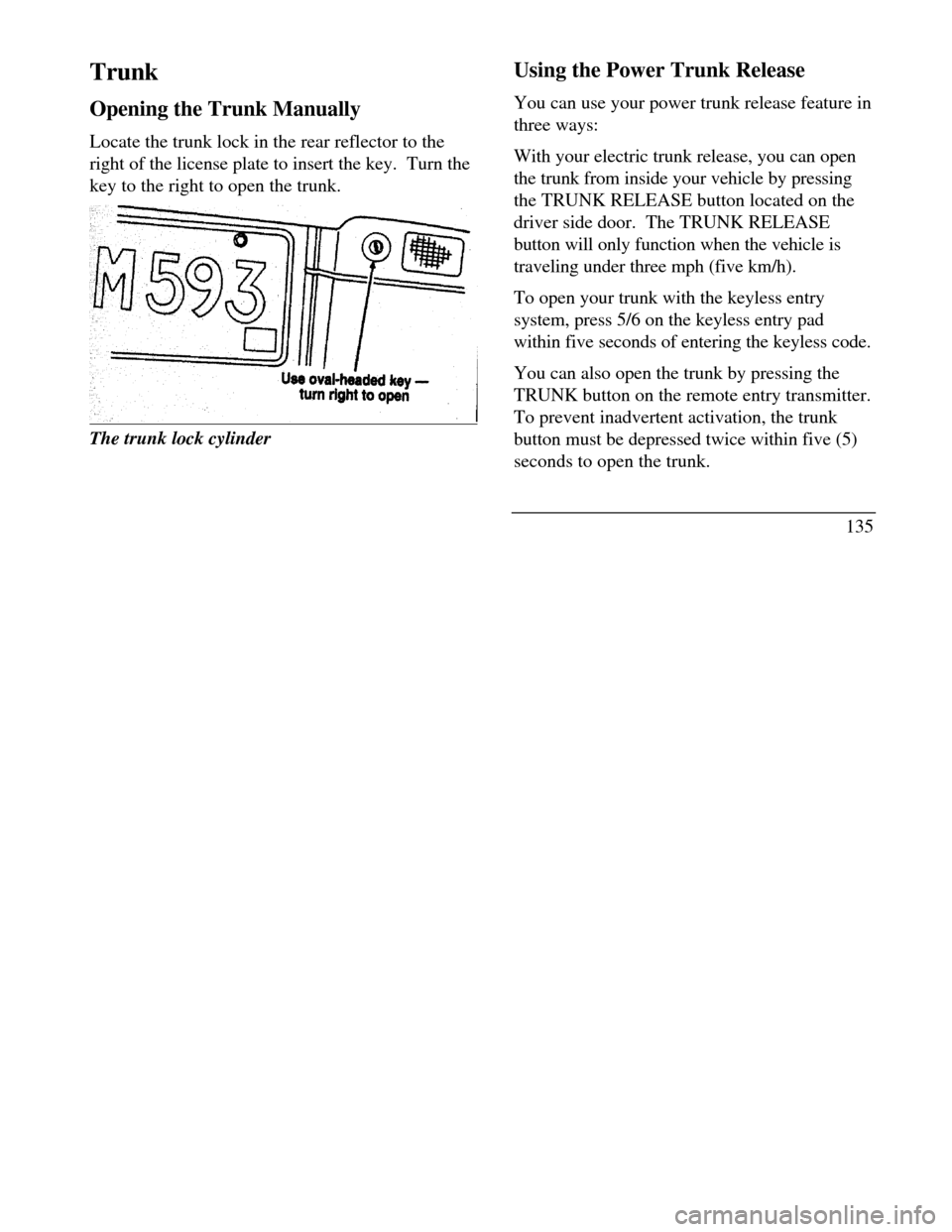
Opening the Trunk Manually
Locate the trunk lock in the rear reflector to the
right of the license plate to insert the key. Turn the
key to the right to open the trunk.The trunk lock cylinderUsing the Power Trunk Release
You can use your power trunk release feature in
three ways:
With your electric trunk release, you can open
the trunk from inside your vehicle by pressing
the TRUNK RELEASE button located on the
driver side door. The TRUNK RELEASE
button will only function when the vehicle is
traveling under three mph (five km/h).
To open your trunk with the keyless entry
system, press 5/6 on the keyless entry pad
within five seconds of entering the keyless code.
You can also open the trunk by pressing the
TRUNK button on the remote entry transmitter.
To prevent inadvertent activation, the trunk
button must be depressed twice within five (5)
seconds to open the trunk.
135
Page 140 of 320
To operate:
Grasp and squeeze the release handle to move the
cargo storage system rearward.
Place groceries, packages, etc. in the cargo storage
system.
Grasp and squeeze the release handle to move the
cargo storage system forward untfl it locks into
place.
NOTE:The cargo storage system has three
locking positions. Make sure the storage system is
securely locked in place.
Remote Control Fuel Filler Door Release
Button
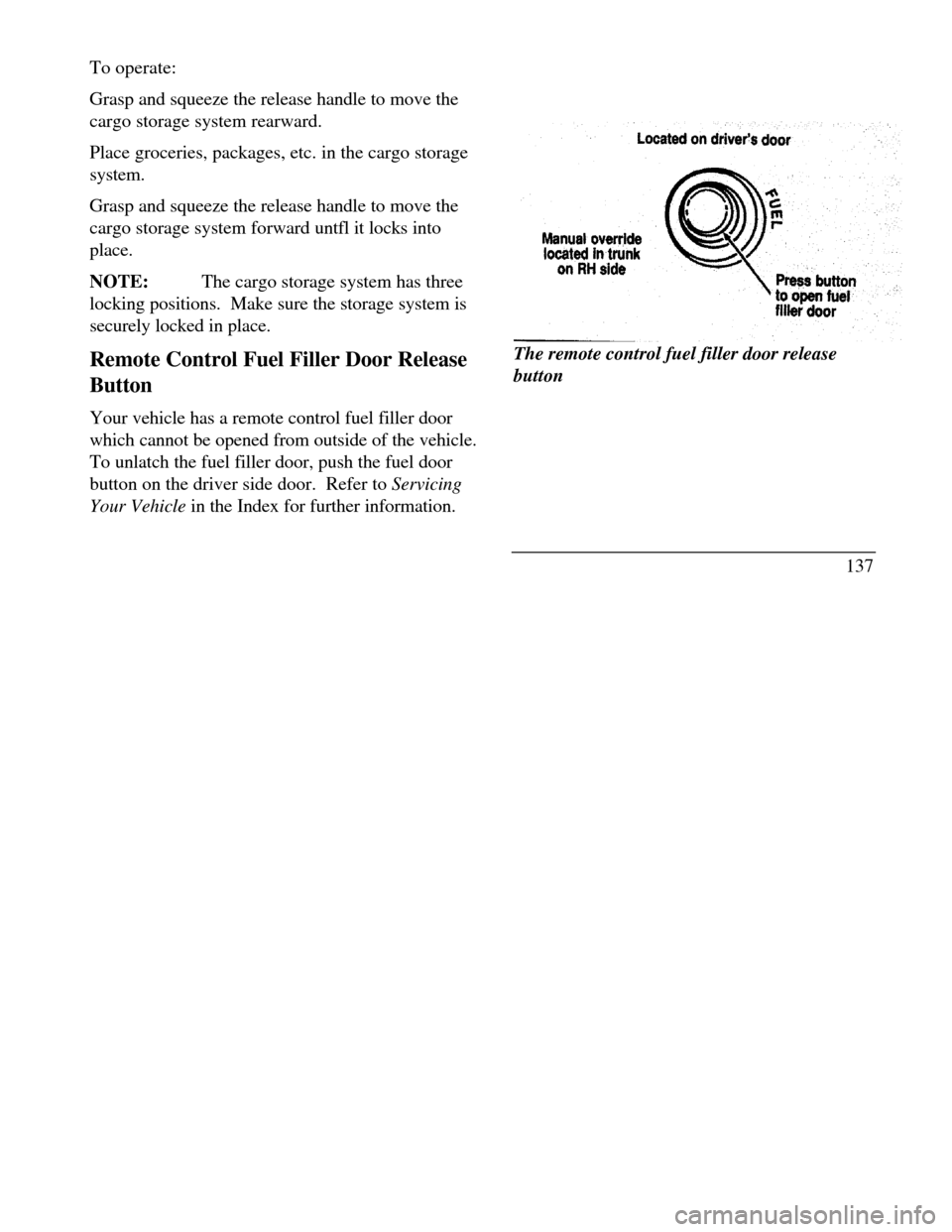
Your vehicle has a remote control fuel filler door
which cannot be opened from outside of the vehicle.
To unlatch the fuel filler door, push the fuel door
button on the driver side door. Refer to Servicing
Your Vehicle in the Index for further information.Located on driver's door Manual override
located in trunk on RH side
Press button to open fuel filler
doorThe remote control fuel filler door release
button
137
Page 195 of 320

/!\ WARNINGDo not spin the wheels at over 35 mph (55km/h). The tires may fail and injure apassenger or bystander.By moving the vehicle backward and forward, you
may gain enough momentum to move out of the
spot. Do not rock the vehicle for more than a few
minutes. This may overheat the engine, damage the
transaxle, or damage the tires. If you are still stuck
after a minute or two of rocking, call for a tow truck.
High water
Do not drive through flooded areas unless you are
sure that the water is below the bottom of the wheel
rims.
If you must drive through high water, drive slowly.
You may have limited traction or wet brakes, so
allow extra stopping distance because your vehicle
will not stop as quickly as usual.
192After you drive through the standing water,
apply your brakes gently several times as your
vehicle moves slowly. This helps to dry the
brakes.
Driving With a Heavy Load
There are limits to the amount of weight your
vehicle can carry or tow. The total weight of
your vehicle, plus the weight of the passengers
and cargo, should never be more than the
Gross Vehicle Weight Rating (GVWR). Also,
the weight that your vehicle carries over the
front axle and rear axle should never be more
than the Gross Axle Weight Rating (GAWR)
for the respective axle.
You can find your vehicle's GVWR and
GAWR on the Safety Compliance Certification
Label on the left front door lock facing or on
the door latch post pillar.
Page 241 of 320
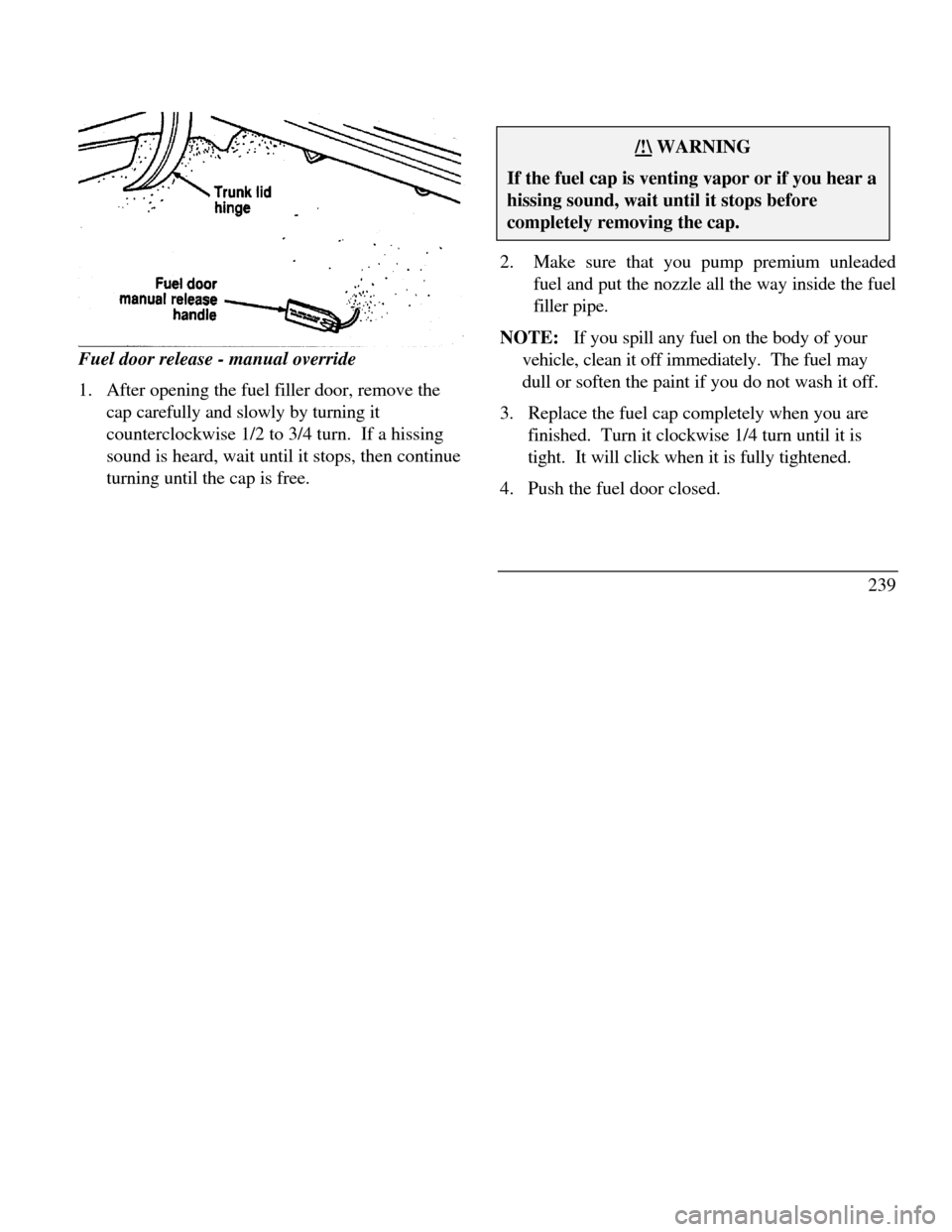
Fuel door release - manual override
1. After opening the fuel filler door, remove the
cap carefully and slowly by turning it
counterclockwise 1/2 to 3/4 turn. If a hissing
sound is heard, wait until it stops, then continue
turning until the cap is free./!\ WARNINGIf the fuel cap is venting vapor or if you hear ahissing sound, wait until it stops beforecompletely removing the cap.2.Make sure that you pump premium unleaded
fuel and put the nozzle all the way inside the fuel
filler pipe.
NOTE: If you spill any fuel on the body of your
vehicle, clean it off immediately. The fuel may
dull or soften the paint if you do not wash it off.
3. Replace the fuel cap completely when you are
finished. Turn it clockwise 1/4 turn until it is
tight. It will click when it is fully tightened.
4. Push the fuel door closed.
239
Page 271 of 320

The Instrument Panel Fuses
Fuse
Location Fuse Amp
RatingDescription110An And-theft indicator light
n PWM dimming output for
microphone illumination,
ashtray illumination (R & L
rear door),heated seat
switches, heated backlight
switch, EATC control panel,
message center switches, cigar
lighter, console shift
illumination, navigation
display module, and
navigation switches210An Luxury radio
n Clock (non-navigational)
n Cellular phone310An Multi-function switch410An Run/Accessory sensor
(luxury radio)
n Cellular phone
n Run/Accessory sensor
(LCM)
n Window switches
backlight RF, LR, RR) *
n CompassFuse
LocationFuse Amp
RatingDescription4 (cont.)10A
· E/C mirror
· Stand alone clock
· Door lock switches backlight510A
· Virtual image cluster
· Light sensor (Autolamp)
· Traction Assist OFF switch
· Airbag diagnostic
· Luxury radio FCU
· Run/Start sensor (LCM)65A
· SCP network715A
· Right front turn lamp
· Right turn indicator
· HI beam switch
· Right and left front side
marker lamps
· Right and left front park
lamps
· Right and left front tail
lamps
· Right rear stop/turn lamps830A
· Fuel filler
· Trunk solenoid
· Navigation system power269