Radio LINCOLN CONTINENTAL 1997 User Guide
[x] Cancel search | Manufacturer: LINCOLN, Model Year: 1997, Model line: CONTINENTAL, Model: LINCOLN CONTINENTAL 1997Pages: 321, PDF Size: 2.37 MB
Page 44 of 321

40Operating the ªSCANº functionPress the ªSCANº button to enter the scan mode.
The CD player will begin scanning the disc,
stopping on each listenable track for approximately
an eight second sampling. This continues until you
press the ªSCANº button a second time.Operating the Shuffle and Scan features
simultaneouslyBoth the shuffle and scan features can be activated
simultaneously. In this mode, the player will
randomly pick a selection and play the first eight
seconds. This process is continued until either the
ªSCANº button or ªSHUFFLEº button is pressed a
second time.How to stop CD playWhile in CD Changer mode, press the EJECT, AM
or FM1/FM2 button to stop CD play and resume
radio play. Also, loading a cassette into the cassette
deck will stop CD play and begin cassette play.
How to take care of and clean the CD
Changer and discsTo ensure the continued performance of your CD
Changer, carefully read the following precautions:q
Always handle a disc by the edge. Never touch
the playing surface.
q
Before playing, inspect all discs for any
contamination. If needed, clean discs with an
approved disc cleaner, such as the DiscwasherH
Compact Disc Cleaner or the Allsop 3H
Compact Disc Cleaner, by wiping from the
center out to the edges. Do not use a circular
motion to clean.
q
Do not clean discs with solvents such as
benzine, thinner, commercially available cleaners
or antistatic spray intended for analog records.
q
Do not expose the discs to direct sunlight or
heat sources for an extended period of time.
File:04fnasc.ex
Update:Mon Jun 17 14:15:17 1996
Page 46 of 321

42q
Different manufacturers of compact discs may
produce discs with different dimensions or
tolerances, some of which may not be within
industry standards or in accordance with the
CD format. Because of this, a new disc that is
free of dust and scratches could be defective
and may not play on your Ford Compact Disc
Player.
If play does not begin after the CD button is
pushed:
q
The radio is not on.
q
The unit is in the stop mode.
q
Moisture may have condensed on the lenses
within the unit. If this occurs, remove the disc
and wait approximately an hour until the
moisture evaporates.If the sound skips:
q
Badly scratched discs or extremely rough roads
will cause the sound to skip. Skipping will not
damage the disc player or scratch the discs.
Common Radio Reception
ConditionsSeveral conditions prevent FM reception from being
completely clear and noise-free, such as the
following:Distance/StrengthThe strength of the FM signal is directly related to
the distance the signal must travel. The listenable
range of an average FM signal is approximately 24
miles (40 km). Beyond this distance, the radio is
operating in a ªfringeº area and the signal becomes
weaker. Also, ªSignal Modulationº is used by some
stations to increase their ªloudnessº relative to other
stations. The difference in loudness can be a result
of signal modulation as well as signal strength.
File:04fnasc.ex
Update:Mon Jun 17 14:15:17 1996
Page 47 of 321

43
TerrainThe terrain (hilly, mountainous, tall buildings) of the
area over which the signal travels may prevent the
FM signal from being noise-free.
Repeated pops and hisses which are heard during
an otherwise clear broadcast can occur near the
station because of the ªline of sightº characteristic
of FM radio waves.
If there is a building or large structure between the
antenna and station, some of the signal ªbendsº
around the building, but certain spots receive almost
no signal. Moving out of the ªshadowº of the
structure will allow the station to return to normal.
When the radio waves are reflected off objects or
structures, the reflected signal cancels the normal
signal, causing the antenna to pick up noise and
distortion. Cancellation effects are most prominent
in metropolitan areas, but also can become quite
severe in hilly terrain and depressed roadways.To minimize these conditions, a stereo/mono blend
circuit has been incorporated into this system. This
feature automatically switches a weak stereo signal
to a clearer monaural signal, which improves the
quality of reception.
Several sources of static are normal conditions on
AM frequencies. These can be caused by power
lines, electric fences, traffic lights and
thunderstorms.
Another reception phenomenon isStrong Signal
Capture and Overload. This can occur when
listening to a weak station and when passing
another broadcast tower. The close station may
capture the more distant station, although the
displayed frequency does not change. While passing
the tower, the station may switch back and forth a
few times before returning to the original station.
File:04fnasc.ex
Update:Mon Jun 17 14:15:17 1996
Page 48 of 321

44When several broadcast towers are present
(common in metropolitan areas), several stations
may overload the receiver, resulting in considerable
station changing, mixing and distortion.
Automatic gain control circuitry for both AM and
FM bands has been incorporated into this system to
reduce strong signal capture and overload.All About Radio FrequenciesThe Federal Communications Commission (FCC)
and the Canadian Radio Telecommunications
Commission (CRTC) establish the frequencies that
AM and FM radio stations may use for their
broadcasts. The allowable frequencies are, AM: 530,
540...1600, 1610 kHz in 10 kHz steps; FM: 87.9,
88.1...107.7, 107.9 MHz in 0.2 MHz steps.
Not all frequencies will be assigned to a given area.
This radio will tune to each of these frequencies
using manual tune and no fine tuning is necessary
as radio stations may not use other frequencies.Some FM radio stations advertise a ªrounded-offº
frequency which is not the frequency they actually
broadcast on. For example, a radio station that is
assigned a frequency of 98.7 MHz may call itself
ªRadio 99º even though 99.0 MHz is not an
allowable FM broadcast frequency.
Important Warranty and Service
InformationAbout Your WarrantyYour sound system is warranted for four years or
50,000 miles (whichever occurs first). Consult your
vehicle warranty booklet for further information.Servicing Your Audio SystemAt Ford, we stand behind our audio systems with a
comprehensive service and repair program. If
anything should go wrong with your Ford audio
system, return to your dealer for service. There is a
nationwide network of qualified Ford authorized
repair centers to assist you.
File:04fnasc.ex
Update:Mon Jun 17 14:15:17 1996
Page 58 of 321

54NOTE:The outside temperature reading is most
accurate when the vehicle is moving. Higher
readings may be obtained when the vehicle is not
moving. The readings that you get may not agree
with temperatures given on the radio due to
differences in vehicle and station locations.Operating tipsThe following tips will help you to get the most
satisfaction from your Electronic Automatic
Temperature Control system.q
In humid weather, select DEFVbefore
starting your engine. This will help to prevent
windshield fogging. After a few minutes of
operation, switch to AUTOMATIC or an
override selection of your choice.
q
To prevent humidity buildup inside your
vehicle, always drive with the EATC System
turned on.
q
Do not put objects under the front seats that
interfere with the flow of air to the back seat
area.
q
Remove any snow, ice, or leaves from the air
intake area of your EATC System which could
block the air intake. The intake area is located
at the bottom of the windshield, under the
hood at the passenger side rear corner.
ServiceIf your EATC is not operating as described here,
take it to your dealer to have it checked. System
diagnostics are built in which will allow your dealer
to readily identify problems that might occur.Passenger Compartment Air FilterYour vehicle has an air filter that removes pollen
and road dust from outside air before it is directed
to the interior of the vehicle. For maintenance of
this filter, see theMaintenance and Carechapter.
File:05fncfc.ex
Update:Fri Sep 6 14:53:57 1996
Page 66 of 321
62NOTE:The combination of FIRM RIDE CONTROL
and LOW STEERING EFFORT is undesirable and
cannot be selected.IgnitionUnderstanding the Positions of the
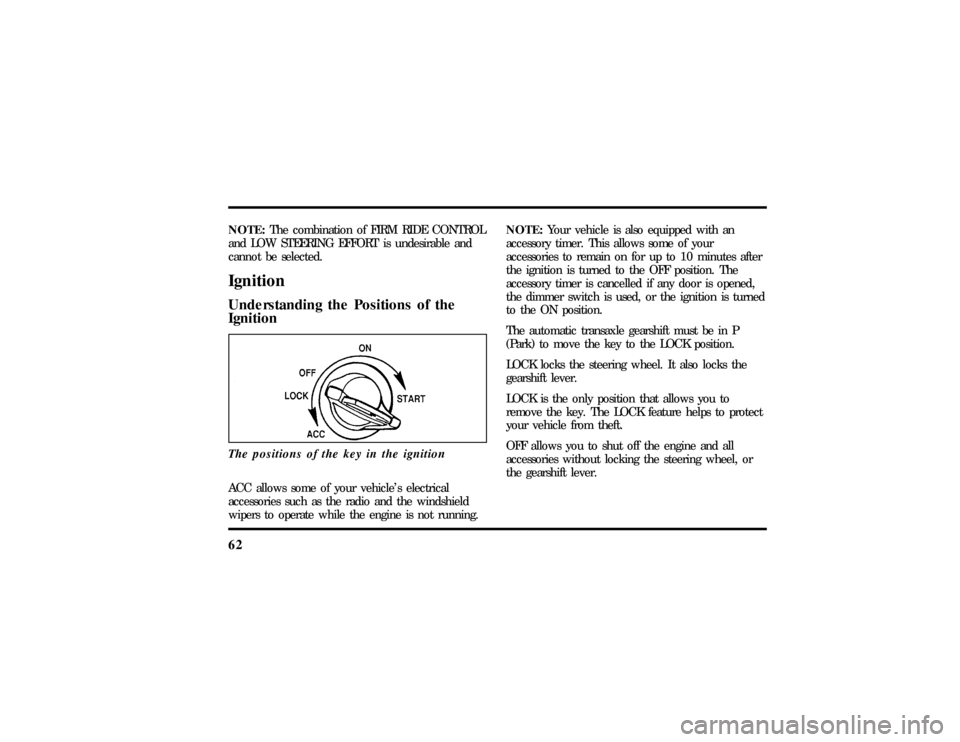
IgnitionThe positions of the key in the ignitionACC allows some of your vehicle's electrical
accessories such as the radio and the windshield
wipers to operate while the engine is not running.NOTE:Your vehicle is also equipped with an
accessory timer. This allows some of your
accessories to remain on for up to 10 minutes after
the ignition is turned to the OFF position. The
accessory timer is cancelled if any door is opened,
the dimmer switch is used, or the ignition is turned
to the ON position.
The automatic transaxle gearshift must be in P
(Park) to move the key to the LOCK position.
LOCK locks the steering wheel. It also locks the
gearshift lever.
LOCK is the only position that allows you to
remove the key. The LOCK feature helps to protect
your vehicle from theft.
OFF allows you to shut off the engine and all
accessories without locking the steering wheel, or
the gearshift lever.
File:05fncfc.ex
Update:Fri Sep 6 14:53:57 1996
Page 75 of 321

71
To change the position of the steering wheel, pull
the release lever on the column toward you. Tip
the steering wheel to the desired position. Release
the lever to lock the steering wheel in place.Speed ControlThe speed of the vehicle cannot be automatically
controlled until the vehicle speed is at or above 30
mph (48 km/h).
Use of radio transmitting equipment that is not
Federal Communications Commission (FCC) or in
Canada the Canadian Radio and
Telecommunications Commission (CRTC) approved
may cause the speed control to malfunction.Therefore, use only properly installed FCC (CRTC in
Canada) approved radio transmitting equipment in
your vehicle.
NOTE:Since your vehicle has an Automatic
Overdrive Transaxle, you may want to drive in D
(Drive) when driving in hilly terrain, at higher
altitudes, or when pulling a trailer. This will
improve speed control performance.
NOTE:Do not shift to N (Neutral) when using the
speed control. This will cause the engine to
overspeed.
File:05fncfc.ex
Update:Fri Sep 6 14:53:57 1996
Page 110 of 321

106To lock out all window switches except the master
controls, press the window lock switch once. To
restore control to the individual windows, press the
switch again.
There is also an Express Down feature on the
driver's power window. This feature can be
activated through the menu functions of your
Message Center.
To operate, briefly press the driver's window switch
to the down position. The window will then open
automatically. To stop automatic operation, briefly
press the switch again to either the up or down
position. More than a quick press of the switch
provides conventional power window operation.
Closing of the power window is conventional
operation only.
Memory Profile System
(If equipped)The Personality Memory Feature customizes your
Continental for up to two (2) drivers. The following
features are automatically recalled when unlocking
the doors using the remote entry transmitter,
keyless entry keypad, or by pressing the Memory 1
or Memory 2 switches on the driver's door:q
All driver's seat positions except power lumbar
and head restraint.
q
Both left and right outside mirror settings.
q
Radio station presets including the last selected
station and band and all preset preferences on
FM1, FM2, and AM.
q
Instrument panel dimming setting.
q
Autolamp delay time-out setting.
q
Ride/Steering menu setting.
q
Feature Menu settings
File:05fncfc.ex
Update:Fri Sep 6 14:53:57 1996
Page 113 of 321

109
NOTE:Please note that even though the driver's
Personality Memory may be recalled using remote
or keyless entry, the seats and mirrors will not
move to the driver's set positions until the driver's
door is opened.Memory SwitchesPressing either the Memory 1 or Memory 2 switch
on the driver's door will also recall the Personality
Memory settings as selected, providing your vehicle
is in P (Park) or N (Neutral).Auto SaveAny change made by the driver to one of the above
Personality Memory settings will be updated and
saved automatically. The display, SAVED TO
DRIVER 1 or SAVED TO DRIVER 2, will appear on
the Message Center for five (5) seconds as a
confirmation of the update to Personality Memory.
If a radio preset is changed the radio display will
also show SAVED.If the driver does not use the remote entry
transmitter, or keyless entry keypad to unlock the
doors upon entering or does not press the Memory
1 or Memory 2 switch, then any change to one of
the Personality Memory settings (except radio
presets) will not be automatically saved. Instead the
driver will be prompted by the Message Center
whether to save the settings to Driver 1 or Driver
2.
Pressing the SELECT switch will toggle between 1,
2 or no choice. If DRIVER 1 or DRIVER 2 is
selected, the display, SAVED TO DRIVER 1 or
SAVED TO DRIVER 2, will appear on the Message
Center to confirm the change has been
automatically saved with the Personality Memory. If
no choice is made by the driver, then the change
will not be automatically saved and there is no
effect on the Personality Memory.
Once this screen has been displayed, the driver will
not be asked again for the remainder of the drive.
File:05fncfc.ex
Update:Fri Sep 6 14:53:57 1996
Page 128 of 321

124Activating the remote personal alarmIf you wish to activate the remote personal alarm,
press the PANIC control. This will honk the horn
and flash the parking lamps and tail lamps for
approximately two minutes and forty-five seconds.
You can turn it OFF by pressing the PANIC control
again or by turning the ignition key to the RUN
position.Arming and Disarming the Alarm
SystemIf your vehicle is equipped with the factory installed
anti-theft system, the remote entry system will
automatically arm it when the doors are locked
with the remote entry LOCK control. The remote
entry UNLOCK control will disarm or reset a
triggered anti-theft alarm.
The remote entry system is designed to work with
the factory installed anti-theft system. It may not
work with other anti-theft systems.
Replacing the BatteriesThe remote entry transmitter is powered by two
coin type three-volt lithium 1616 batteries
(included) that should last for several years of
normal use. If you notice a significant decrease in
operating range, the batteries should be replaced.
Replacement batteries can be purchased at most
pharmacies, watch stores or at your Ford or
Lincoln-Mercury dealer.
NOTE:The operating range of the remote entry
system can also be affected by weather conditions
(such as very cold temperatures) or structures
around the vehicle (buildings, other vehicles, radio
and TV towers, etc.). Typical operating range will
allow you to be up to 33 feet (10 meters) away
from your vehicle.
The transmitter can be snapped apart to replace the
batteries by twisting a thin coin between the two
halves of the transmitter. DO NOT TAKE THE
FRONT PART OF THE TRANSMITTER APART.
File:05fncfc.ex
Update:Fri Sep 6 14:53:57 1996