reset LINCOLN CONTINENTAL 1997 User Guide
[x] Cancel search | Manufacturer: LINCOLN, Model Year: 1997, Model line: CONTINENTAL, Model: LINCOLN CONTINENTAL 1997Pages: 321, PDF Size: 2.37 MB
Page 113 of 321

109
NOTE:Please note that even though the driver's
Personality Memory may be recalled using remote
or keyless entry, the seats and mirrors will not
move to the driver's set positions until the driver's
door is opened.Memory SwitchesPressing either the Memory 1 or Memory 2 switch
on the driver's door will also recall the Personality
Memory settings as selected, providing your vehicle
is in P (Park) or N (Neutral).Auto SaveAny change made by the driver to one of the above
Personality Memory settings will be updated and
saved automatically. The display, SAVED TO
DRIVER 1 or SAVED TO DRIVER 2, will appear on
the Message Center for five (5) seconds as a
confirmation of the update to Personality Memory.
If a radio preset is changed the radio display will
also show SAVED.If the driver does not use the remote entry
transmitter, or keyless entry keypad to unlock the
doors upon entering or does not press the Memory
1 or Memory 2 switch, then any change to one of
the Personality Memory settings (except radio
presets) will not be automatically saved. Instead the
driver will be prompted by the Message Center
whether to save the settings to Driver 1 or Driver
2.
Pressing the SELECT switch will toggle between 1,
2 or no choice. If DRIVER 1 or DRIVER 2 is
selected, the display, SAVED TO DRIVER 1 or
SAVED TO DRIVER 2, will appear on the Message
Center to confirm the change has been
automatically saved with the Personality Memory. If
no choice is made by the driver, then the change
will not be automatically saved and there is no
effect on the Personality Memory.
Once this screen has been displayed, the driver will
not be asked again for the remainder of the drive.
File:05fncfc.ex
Update:Fri Sep 6 14:53:57 1996
Page 126 of 321

122The keyless entry system registers this new code.
To open your vehicle, you can now use either code.
To erase all of the personal entry codes and remote
entry transmitters programmed to a vehicle:
1. Enter the original permanent code.
2. Press 1/2 within five seconds of Step 1.
3. Press and hold 1/2 for two (2) seconds.
All of the vehicle doors will lock and then
unlock to confirm erasure.
Do not set a code that presents the numbers in
sequential order, such as 1/2, 3/4, 5/6, 7/8, 9/0.
Studies show that people who idly press the buttons
usually press a sequential pattern. Also, do not
select a code that uses the same button five times.
Thieves can easily figure out these types of codes.
Arming, disarming and resetting your
anti-theft system (If equipped) from the
keyless entry padIf your vehicle is equipped with the optional factory
installed anti-theft system, the keyless entry system
will arm it when you use the 7/8 and 9/0 keys to
lock the doors, and will disarm or reset a triggered
anti-theft alarm when you enter in the five digit
code to unlock the driver's door.Remote Entry SystemWith the remote entry system, you can lock and
unlock the vehicle doors and open the trunk
without using a key. The buttons for the system are
located on the two hand held transmitters that
came with your vehicle. The remote also has a
personal alarm feature.
The system will work with up to four transmitters.
Your vehicle came with two transmitters. Additional
transmitters can be ordered from your dealer.
File:05fncfc.ex
Update:Fri Sep 6 14:53:57 1996
Page 128 of 321

124Activating the remote personal alarmIf you wish to activate the remote personal alarm,
press the PANIC control. This will honk the horn
and flash the parking lamps and tail lamps for
approximately two minutes and forty-five seconds.
You can turn it OFF by pressing the PANIC control
again or by turning the ignition key to the RUN
position.Arming and Disarming the Alarm
SystemIf your vehicle is equipped with the factory installed
anti-theft system, the remote entry system will
automatically arm it when the doors are locked
with the remote entry LOCK control. The remote
entry UNLOCK control will disarm or reset a
triggered anti-theft alarm.
The remote entry system is designed to work with
the factory installed anti-theft system. It may not
work with other anti-theft systems.
Replacing the BatteriesThe remote entry transmitter is powered by two
coin type three-volt lithium 1616 batteries
(included) that should last for several years of
normal use. If you notice a significant decrease in
operating range, the batteries should be replaced.
Replacement batteries can be purchased at most
pharmacies, watch stores or at your Ford or
Lincoln-Mercury dealer.
NOTE:The operating range of the remote entry
system can also be affected by weather conditions
(such as very cold temperatures) or structures
around the vehicle (buildings, other vehicles, radio
and TV towers, etc.). Typical operating range will
allow you to be up to 33 feet (10 meters) away
from your vehicle.
The transmitter can be snapped apart to replace the
batteries by twisting a thin coin between the two
halves of the transmitter. DO NOT TAKE THE
FRONT PART OF THE TRANSMITTER APART.
File:05fncfc.ex
Update:Fri Sep 6 14:53:57 1996
Page 169 of 321

167
For a warm engine:
q
Do not hold the key in the START position for
more thanfive (5) secondsat a time. If the
engine does not start within five (5) seconds on
the first try, turn the key to the OFF position.
Wait a few seconds after the starter stops, then
try again.
Whenever you start your vehicle, release the key
as soon as the engine starts. Excessive cranking
could damage the starter.
After you start the engine, let it idle for a few
seconds. Keep your foot on the brake pedal and
put the gearshift lever in gear. Release the parking
brake. Slowly release the brake pedal and drive
away in the normal manner.
NOTE:Your vehicle has an interlock that
prevents you from shifting out of P (Park) unless
your foot is on the brake pedal.If the engine does not start after two attempts:
1. Turn the ignition key to the OFF position.
2. Press the accelerator all the way to the floor
and hold it.
3. Turn the ignition key to the START position.
4. Release the ignition key when the engine starts.
5. Release the accelerator gradually as the engine
speeds up.
If the engine still does not start, the fuel pump
shut-off switch may have been activated. For
directions on how to reset the switch seeFuel
Pump Shut-Off Switchin the index.
File:08fntoc.ex
Update:Mon Jun 17 14:19:30 1996
Page 192 of 321
191
Roadside EmergenciesHazard FlashersThe flashers work whether your vehicle is running
or not. The flashers work for up to two hours
when the battery is fully charged and in good
condition without draining the battery excessively. If
the flashers run for longer than two hours or if the
battery is not fully charged, the battery can be
drained.If the Engine Cranks but Does
Not Start or Does Not Start After
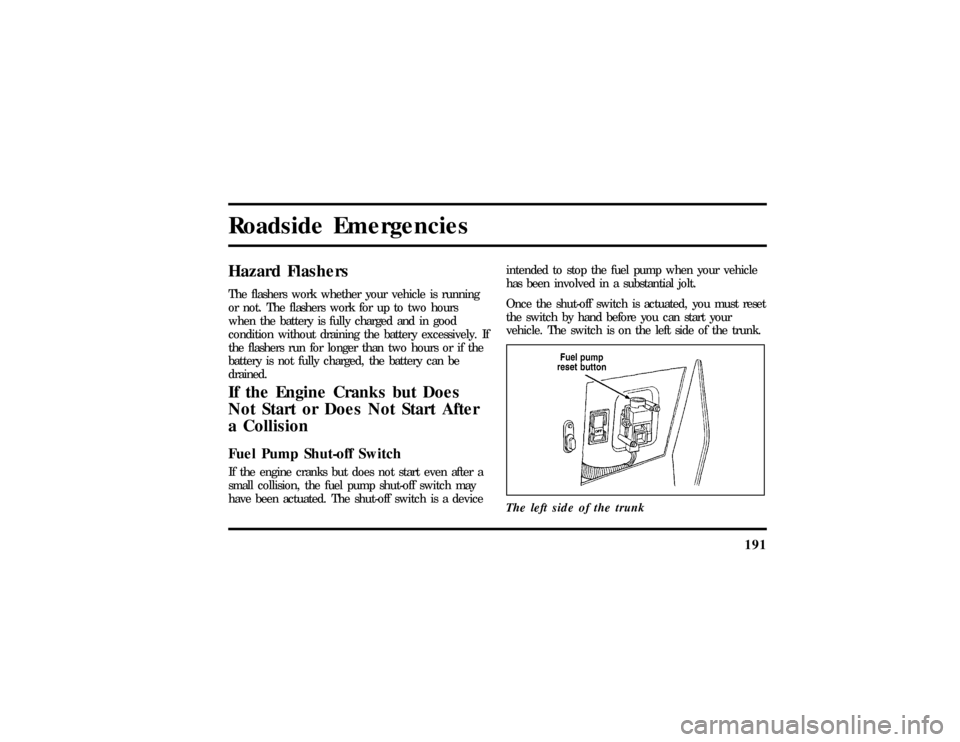
a CollisionFuel Pump Shut-off SwitchIf the engine cranks but does not start even after a
small collision, the fuel pump shut-off switch may
have been actuated. The shut-off switch is a deviceintended to stop the fuel pump when your vehicle
has been involved in a substantial jolt.
Once the shut-off switch is actuated, you must reset
the switch by hand before you can start your
vehicle. The switch is on the left side of the trunk.
The left side of the trunk
File:10fnerc.ex
Update:Fri Sep 6 08:49:57 1996
Page 193 of 321

192
WARNING
If yo useeor smel lfuel ,do no treset
Page 261 of 321

260Do not make any unauthorized changes to your
vehicle or engine. Changes that cause more
unburned fuel to reach the exhaust system can
increase the temperature of the engine or exhaust
system.
By law, anyone who manufactures, repairs, services,
sells, leases, trades vehicles, or supervises a fleet of
vehicles is not permitted to intentionally remove an
emission control device or prevent it from working.
In some of the United States and in Canada,
vehicle owners may be liable if their emission
control device is removed or is prevented from
working.
Do not drive your vehicle if it does not operate
properly. See your dealer if the engine runs on for
more than five seconds after you shut it off or if it
misfires, surges, stalls, or backfires.Information about your vehicle's emission control
system is on the Vehicle Emission Control
Information decal located on or near the engine.
This decal identifies engine displacement and gives
some tune-up specifications.
How to Prepare Your Vehicle for
Inspection/Maintenance (I/M) TestingIn some localities it may become a legal
requirement to pass an Inspection/Maintenance
(I/M) test of the On-Board Diagnostic (OBD) II
system. If the vehicle's powertrain system or its
battery has just been serviced, the OBD II system is
reset to a not ready for I/M testing condition. To
prepare for I/M testing, the law specifies that
additional mixed city and highway driving is
required to complete the check of the OBD II
system.
File:11fnmcc.ex
Update:Fri Sep 6 08:51:16 1996
Page 277 of 321

276Batteryq
Check and recharge as necessary.
q
Keep connections clean and covered with a
light coat of grease.
q
If storing your vehicle for more than 30 days
without recharging the battery, disconnect the
battery cables to ensure battery charge is
maintained for quick starting. NOTE: If battery
cables are disconnected, it will be necessary to
reset any memory features (eg. radio presets).
Brakesq
Make sure brakes and parking brake are fully
released.
Tiresq
Maintain recommended air pressures.
Miscellaneousq
Make sure all linkages, cables, levers and clevis
pins under vehicle are covered with grease to
prevent rust.
q
Move vehicles at least 25 feet (8 m) every 15
days to lubricate working parts and prevent
corrosion.
File:12fncsc.ex
Update:Mon Sep 9 10:15:52 1996