lock LINCOLN CONTINENTAL 1997 Owner's Manual
[x] Cancel search | Manufacturer: LINCOLN, Model Year: 1997, Model line: CONTINENTAL, Model: LINCOLN CONTINENTAL 1997Pages: 321, PDF Size: 2.37 MB
Page 111 of 321

107
The Ride/Steering menu is located in the Message
Center. The RIDE display allows you to adjust the
suspension feel to FIRM, NORMAL, or PLUSH.
Pressing the Ride/Steering menu switch again brings
the STEERING display. This allows you to adjust
steering effort to LOW, NORMAL, or HIGH.
For more information on ride/steering options, see
Road Calibrated Suspensionlater in this chapter.
Personality Memory also allows you to customize
settings from the Feature menu located in the
Message Center. The Feature menu contains five (5)
features that you can enable or disable. The features
are listed in the order they appear in the Feature
menu.
q
EXPRESS WINDOW - for one tap down
operation of the driver's window.
q
AUTO DOOR LOCKS - automatically locks all
doors when the driver shifts out of PARK, all
doors are closed, and the vehicle speed is at
least three mph (five km/h).
q
HORN CHIRP - sounds an audible ªchirpº
when you press the LOCK button on the
remote entry transmitter to verify that the doors
have been locked and the vehicle's anti-theft
system has been armed (if equipped).
q
SEAT ACCESS - moves the driver's seat back
two (2) inches or to the end of the seat track
when the vehicle is turned off and the ignition
key is removed. Upon the driver entering the
vehicle and closing the door, the seat will move
forward to its previous position.
File:05fncfc.ex
Update:Fri Sep 6 14:53:57 1996
Page 112 of 321

108q
REVERSE MIRROR - when the vehicle is shifted
to REVERSE, the outside rearview mirrors tilt
down. This provides an improved view of the
side of the vehicle and curb area when backing
up. When you shift out of REVERSE, the
mirrors return to their previous positions.
Recalling Personality MemoryAll of these settings are automatically recalled when
the driver unlocks the door using the remote entry
transmitter, keyless entry keypad or presses either
Memory 1 or Memory 2 switch inside the driver's
door. The vehicle must be in PARK or NEUTRAL to
recall Personality Memory settings.Remote EntryPressing the UNLOCK button on the remote entry
transmitter unlocks the driver's door and recalls all
of the Personality Memory settings. Two
transmitters are delivered with the vehicle. One is
programmed to always recall Memory 1 and theother will always recall Memory 2. Personality
Memory 1 or 2 is indicated on the back of the
transmitter.
Personality Memory recall from the remote
transmitter can be disabled. This is done by sliding
the switch on the back of the transmitter to OFF.
Personality Memory can still be recalled using
keyless entry code or the Memory 1 or Memory 2
switches.
Keyless EntryUp to three unique keyless entry codes can be
programmed by the customer. Two of the codes
can be assigned to recall Personality Memory 1 or
Memory 2. Each time the 5-digit code is entered on
the keypad, the driver's door will unlock and
Personality Memory 1 or Memory 2 will be
recalled.
File:05fncfc.ex
Update:Fri Sep 6 14:53:57 1996
Page 113 of 321

109
NOTE:Please note that even though the driver's
Personality Memory may be recalled using remote
or keyless entry, the seats and mirrors will not
move to the driver's set positions until the driver's
door is opened.Memory SwitchesPressing either the Memory 1 or Memory 2 switch
on the driver's door will also recall the Personality
Memory settings as selected, providing your vehicle
is in P (Park) or N (Neutral).Auto SaveAny change made by the driver to one of the above
Personality Memory settings will be updated and
saved automatically. The display, SAVED TO
DRIVER 1 or SAVED TO DRIVER 2, will appear on
the Message Center for five (5) seconds as a
confirmation of the update to Personality Memory.
If a radio preset is changed the radio display will
also show SAVED.If the driver does not use the remote entry
transmitter, or keyless entry keypad to unlock the
doors upon entering or does not press the Memory
1 or Memory 2 switch, then any change to one of
the Personality Memory settings (except radio
presets) will not be automatically saved. Instead the
driver will be prompted by the Message Center
whether to save the settings to Driver 1 or Driver
2.
Pressing the SELECT switch will toggle between 1,
2 or no choice. If DRIVER 1 or DRIVER 2 is
selected, the display, SAVED TO DRIVER 1 or
SAVED TO DRIVER 2, will appear on the Message
Center to confirm the change has been
automatically saved with the Personality Memory. If
no choice is made by the driver, then the change
will not be automatically saved and there is no
effect on the Personality Memory.
Once this screen has been displayed, the driver will
not be asked again for the remainder of the drive.
File:05fncfc.ex
Update:Fri Sep 6 14:53:57 1996
Page 120 of 321
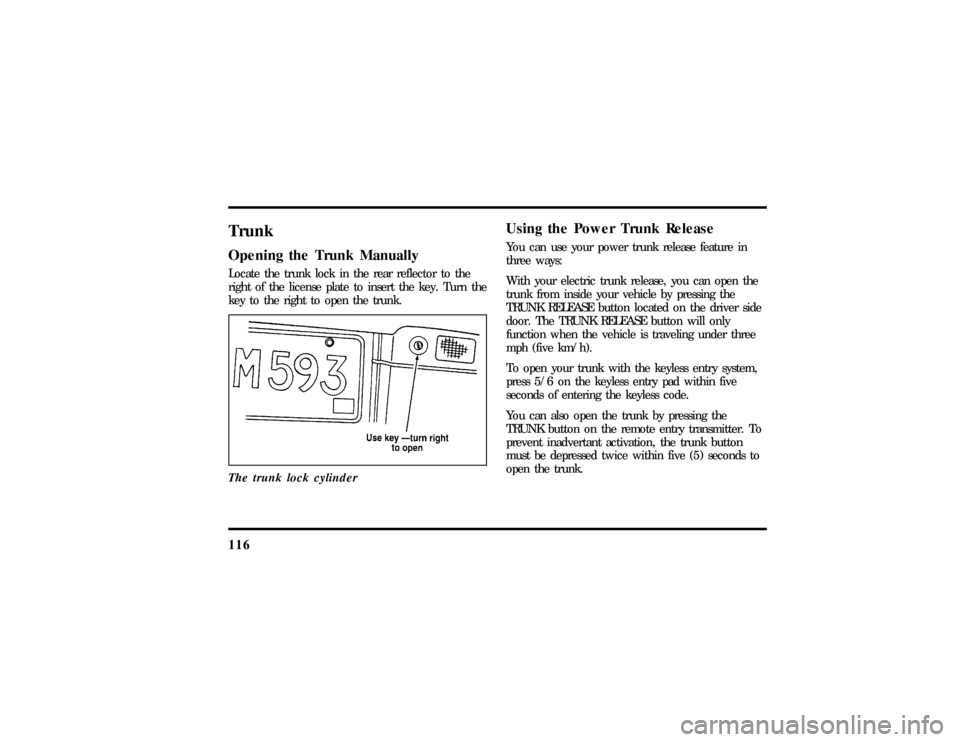
116TrunkOpening the Trunk ManuallyLocate the trunk lock in the rear reflector to the
right of the license plate to insert the key. Turn the
key to the right to open the trunk.
The trunk lock cylinder
Using the Power Trunk ReleaseYou can use your power trunk release feature in
three ways:
With your electric trunk release, you can open the
trunk from inside your vehicle by pressing the
TRUNK RELEASE button located on the driver side
door. The TRUNK RELEASE button will only
function when the vehicle is traveling under three
mph (five km/h).
To open your trunk with the keyless entry system,
press 5/6 on the keyless entry pad within five
seconds of entering the keyless code.
You can also open the trunk by pressing the
TRUNK button on the remote entry transmitter. To
prevent inadvertant activation, the trunk button
must be depressed twice within five (5) seconds to
open the trunk.
File:05fncfc.ex
Update:Fri Sep 6 14:53:57 1996
Page 122 of 321
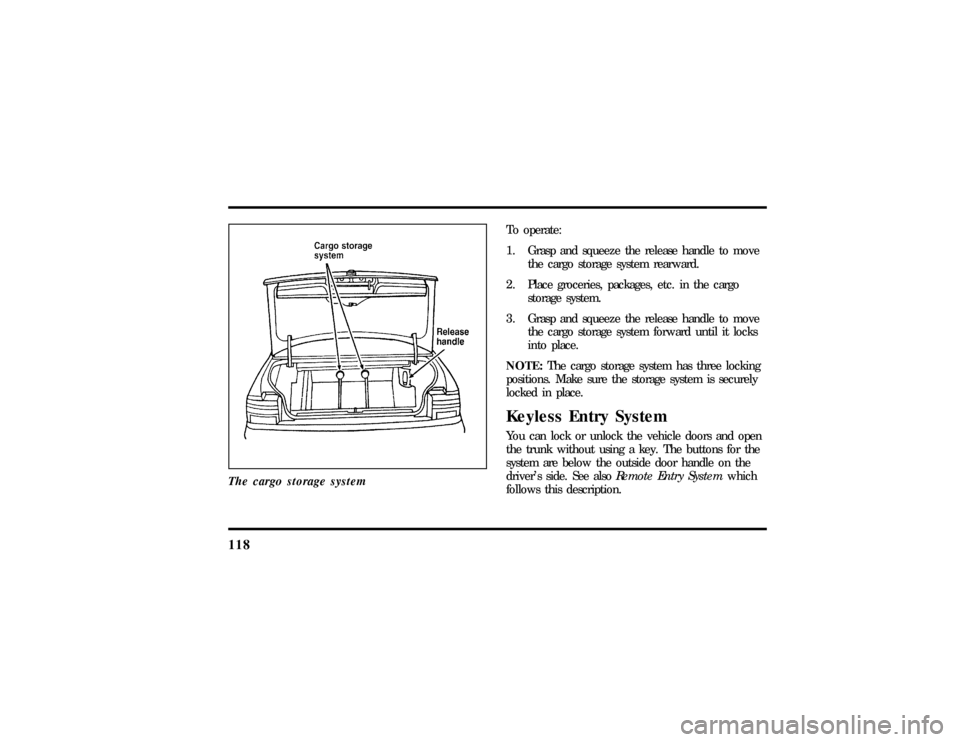
118The cargo storage system
To operate:
1. Grasp and squeeze the release handle to move
the cargo storage system rearward.
2. Place groceries, packages, etc. in the cargo
storage system.
3. Grasp and squeeze the release handle to move
the cargo storage system forward until it locks
into place.
NOTE:The cargo storage system has three locking
positions. Make sure the storage system is securely
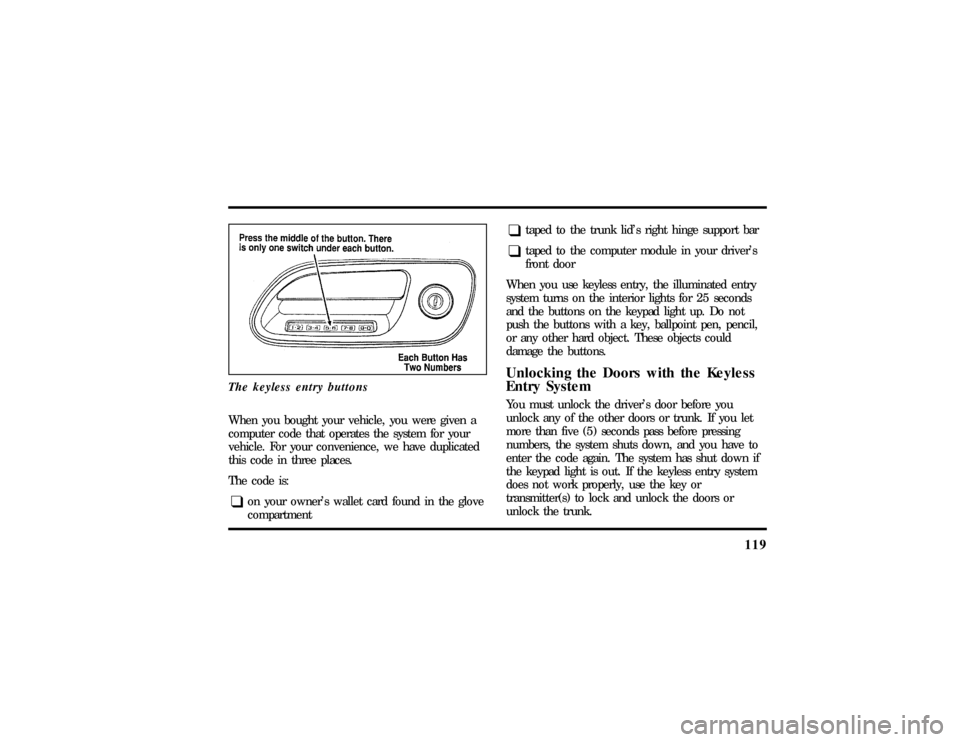
locked in place.Keyless Entry SystemYou can lock or unlock the vehicle doors and open
the trunk without using a key. The buttons for the
system are below the outside door handle on the
driver's side. See alsoRemote Entry Systemwhich
follows this description.
File:05fncfc.ex
Update:Fri Sep 6 14:53:57 1996
Page 123 of 321
119
The keyless entry buttonsWhen you bought your vehicle, you were given a
computer code that operates the system for your
vehicle. For your convenience, we have duplicated
this code in three places.
The code is:q
on your owner's wallet card found in the glove
compartment
q
taped to the trunk lid's right hinge support bar
q
taped to the computer module in your driver's
front door
When you use keyless entry, the illuminated entry
system turns on the interior lights for 25 seconds
and the buttons on the keypad light up. Do not
push the buttons with a key, ballpoint pen, pencil,
or any other hard object. These objects could
damage the buttons.
Unlocking the Doors with the Keyless
Entry SystemYou must unlock the driver's door before you
unlock any of the other doors or trunk. If you let
more than five (5) seconds pass before pressing
numbers, the system shuts down, and you have to
enter the code again. The system has shut down if
the keypad light is out. If the keyless entry system
does not work properly, use the key or
transmitter(s) to lock and unlock the doors or
unlock the trunk.
File:05fncfc.ex
Update:Fri Sep 6 14:53:57 1996
Page 124 of 321

1201. To unlock the driver's door, enter the factory
code or your personal code. All codes have five
(5) numbers. After you press the fifth number,
the driver's door unlocks.
2. To unlock all passenger doors, press the 3/4
button within five (5) seconds of unlocking the
driver's door or trunk, or re-enter the code to
open the driver's door, then press 3/4.
3. To unlock the trunk, press the 5/6 button
within five seconds of unlocking the driver's or
passenger's doors, or re-enter the code to open
the driver's door, then press 5/6.
As long as the driver's door has been unlocked first,
you can open the passenger door or the trunk in
any order.
Locking the Doors with the Keyless
Entry SystemAlong with unlocking your doors, you can use the
keyless entry system to lock the doors.
To lock all of the vehicle's doors at the same time,
press 7/8 and 9/0 at the same time. It is not
necessary to first enter the keypad code. This will
also arm your anti-theft system (if equipped).AutolockThe Autolock feature will automatically lock all the
doors when:q
the vehicle's doors are fully closed
q
the ignition key is turned to the ON position
q
someone is sitting in the driver's seat or a
heavy object is placed on it
q
the vehicle is in a forward gear, and
q
you exceed three mph (five km/h).
File:05fncfc.ex
Update:Fri Sep 6 14:53:57 1996
Page 125 of 321

121
The Autolock feature will repeat when:q
the ignition key remains in the ON position
q
someone remains sitting in the driver's seat or a
heavy object is on the seat
q
a door is opened and then closed
q
the vehicle is in a forward gear, and
q
you exceed three mph (five km/h).
If you do not want to use the Autolock feature, it
can be deactivated by using the Feature Menu in
the Message Center.
Programming Your Own Entry CodeYou can program up to three personal codes to
unlock your vehicle. These codes do not replace the
permanent code that the dealership gave you. Use
your personal code in the same manner as you
would your original code.To program your own code:
1. Select five digits for your personal code.
2. Enter the factory code that the dealership gave
you.
3. Within five (5) seconds, press 1/2.
4. Within five (5) seconds of pressing 1/2, enter
your personal code, pressing each digit within
five (5) seconds of the previous digit.
5. Enter a sixth digit to indicate which Personality
should be recalled by this personal code.
1/2 Recall Personality 1
3/4 Recall Personality 2
9/0 No recall
All of the vehicle doors will lock and then
unlock to confirm programming of the new
code.
File:05fncfc.ex
Update:Fri Sep 6 14:53:57 1996
Page 126 of 321

122The keyless entry system registers this new code.
To open your vehicle, you can now use either code.
To erase all of the personal entry codes and remote
entry transmitters programmed to a vehicle:
1. Enter the original permanent code.
2. Press 1/2 within five seconds of Step 1.
3. Press and hold 1/2 for two (2) seconds.
All of the vehicle doors will lock and then
unlock to confirm erasure.
Do not set a code that presents the numbers in
sequential order, such as 1/2, 3/4, 5/6, 7/8, 9/0.
Studies show that people who idly press the buttons
usually press a sequential pattern. Also, do not
select a code that uses the same button five times.
Thieves can easily figure out these types of codes.
Arming, disarming and resetting your
anti-theft system (If equipped) from the
keyless entry padIf your vehicle is equipped with the optional factory
installed anti-theft system, the keyless entry system
will arm it when you use the 7/8 and 9/0 keys to
lock the doors, and will disarm or reset a triggered
anti-theft alarm when you enter in the five digit
code to unlock the driver's door.Remote Entry SystemWith the remote entry system, you can lock and
unlock the vehicle doors and open the trunk
without using a key. The buttons for the system are
located on the two hand held transmitters that
came with your vehicle. The remote also has a
personal alarm feature.
The system will work with up to four transmitters.
Your vehicle came with two transmitters. Additional
transmitters can be ordered from your dealer.
File:05fncfc.ex
Update:Fri Sep 6 14:53:57 1996
Page 127 of 321
123
The personal alarm feature operates only with the
ignition off. The LOCK, UNLOCK and TRUNK
features work whenever your vehicle is in Park or
Neutral.
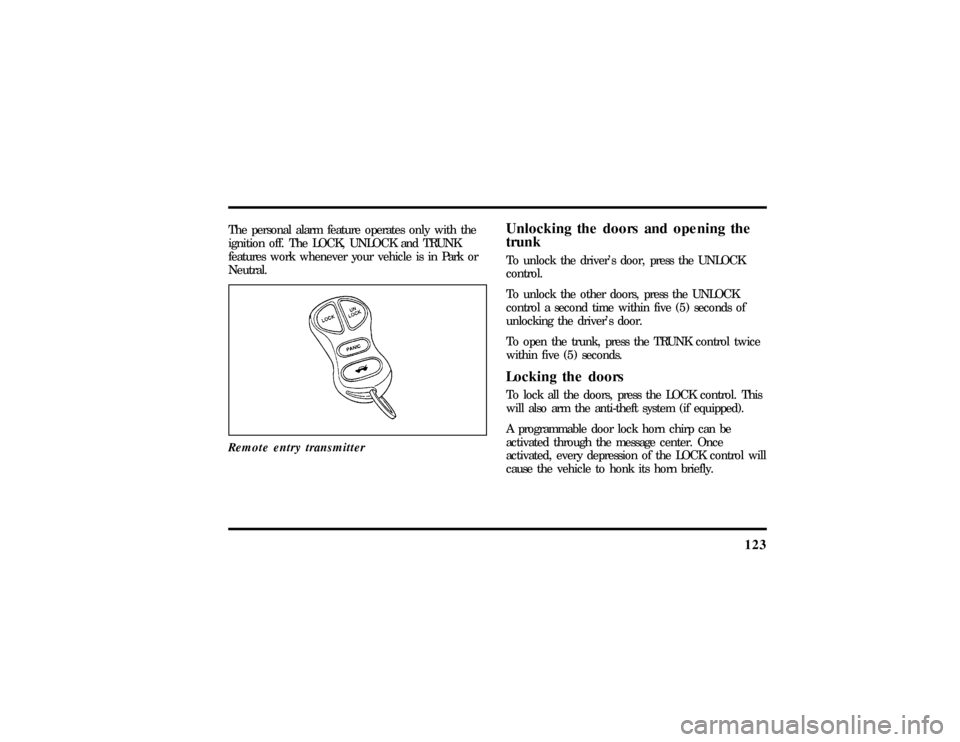
Remote entry transmitter
Unlocking the doors and opening the
trunkTo unlock the driver's door, press the UNLOCK
control.
To unlock the other doors, press the UNLOCK
control a second time within five (5) seconds of
unlocking the driver's door.
To open the trunk, press the TRUNK control twice
within five (5) seconds.Locking the doorsTo lock all the doors, press the LOCK control. This
will also arm the anti-theft system (if equipped).
A programmable door lock horn chirp can be
activated through the message center. Once
activated, every depression of the LOCK control will
cause the vehicle to honk its horn briefly.
File:05fncfc.ex
Update:Fri Sep 6 14:53:57 1996