seats LINCOLN CONTINENTAL 1997 Owners Manual
[x] Cancel search | Manufacturer: LINCOLN, Model Year: 1997, Model line: CONTINENTAL, Model: LINCOLN CONTINENTAL 1997Pages: 321, PDF Size: 2.37 MB
Page 58 of 321

54NOTE:The outside temperature reading is most
accurate when the vehicle is moving. Higher
readings may be obtained when the vehicle is not
moving. The readings that you get may not agree
with temperatures given on the radio due to
differences in vehicle and station locations.Operating tipsThe following tips will help you to get the most
satisfaction from your Electronic Automatic
Temperature Control system.q
In humid weather, select DEFVbefore
starting your engine. This will help to prevent
windshield fogging. After a few minutes of
operation, switch to AUTOMATIC or an
override selection of your choice.
q
To prevent humidity buildup inside your
vehicle, always drive with the EATC System
turned on.
q
Do not put objects under the front seats that
interfere with the flow of air to the back seat
area.
q
Remove any snow, ice, or leaves from the air
intake area of your EATC System which could
block the air intake. The intake area is located
at the bottom of the windshield, under the
hood at the passenger side rear corner.
ServiceIf your EATC is not operating as described here,
take it to your dealer to have it checked. System
diagnostics are built in which will allow your dealer
to readily identify problems that might occur.Passenger Compartment Air FilterYour vehicle has an air filter that removes pollen
and road dust from outside air before it is directed
to the interior of the vehicle. For maintenance of
this filter, see theMaintenance and Carechapter.
File:05fncfc.ex
Update:Fri Sep 6 14:53:57 1996
Page 113 of 321

109
NOTE:Please note that even though the driver's
Personality Memory may be recalled using remote
or keyless entry, the seats and mirrors will not
move to the driver's set positions until the driver's
door is opened.Memory SwitchesPressing either the Memory 1 or Memory 2 switch
on the driver's door will also recall the Personality
Memory settings as selected, providing your vehicle
is in P (Park) or N (Neutral).Auto SaveAny change made by the driver to one of the above
Personality Memory settings will be updated and
saved automatically. The display, SAVED TO
DRIVER 1 or SAVED TO DRIVER 2, will appear on
the Message Center for five (5) seconds as a
confirmation of the update to Personality Memory.
If a radio preset is changed the radio display will
also show SAVED.If the driver does not use the remote entry
transmitter, or keyless entry keypad to unlock the
doors upon entering or does not press the Memory
1 or Memory 2 switch, then any change to one of
the Personality Memory settings (except radio
presets) will not be automatically saved. Instead the
driver will be prompted by the Message Center
whether to save the settings to Driver 1 or Driver
2.
Pressing the SELECT switch will toggle between 1,
2 or no choice. If DRIVER 1 or DRIVER 2 is
selected, the display, SAVED TO DRIVER 1 or
SAVED TO DRIVER 2, will appear on the Message
Center to confirm the change has been
automatically saved with the Personality Memory. If
no choice is made by the driver, then the change
will not be automatically saved and there is no
effect on the Personality Memory.
Once this screen has been displayed, the driver will
not be asked again for the remainder of the drive.
File:05fncfc.ex
Update:Fri Sep 6 14:53:57 1996
Page 134 of 321
131
Seating and Safety RestraintsSeatsHead RestraintsIf you use them properly, head restraints will help
protect your head and neck in a collision.
A head restraint should be placed as high as
possible behind your head without interfering with
your vision.
You can adjust the head restraints for your comfort
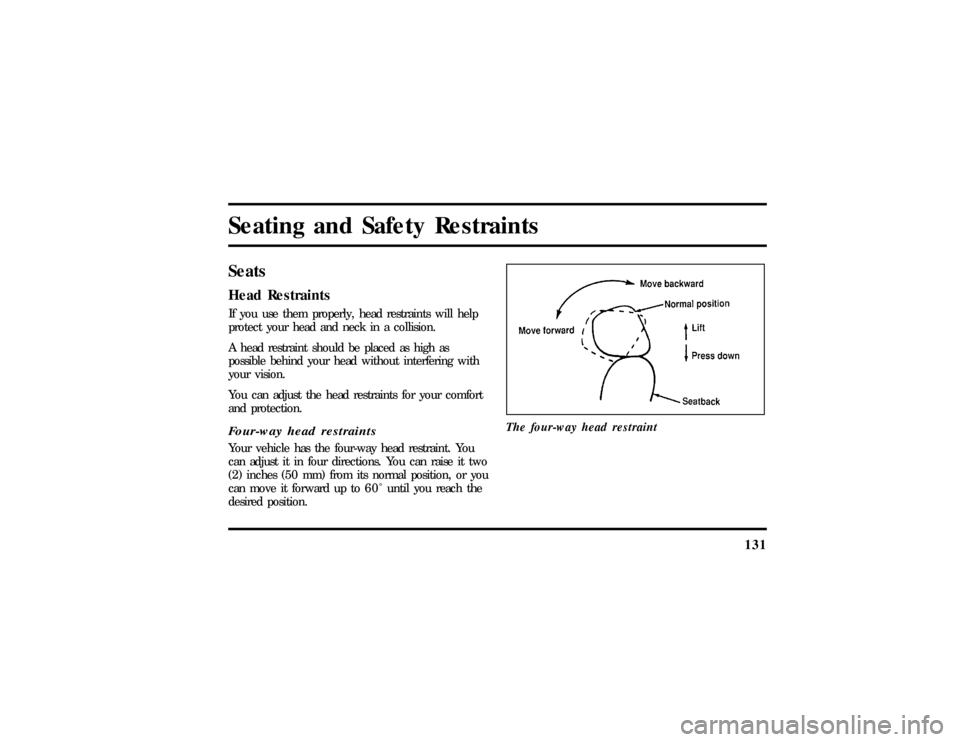
and protection.Four-way head restraintsYour vehicle has the four-way head restraint. You
can adjust it in four directions. You can raise it two
(2) inches (50 mm) from its normal position, or you
can move it forward up to 6 0 Ê until you reach the
desired position.The four-way head restraint
File:06fnssc.ex
Update:Mon Jun 17 14:19:23 1996
Page 135 of 321

132
Adjustingth e Seats
WARNING
Neve radjus tth edriver' ssea tor
WARNING
Alway sdriv ean drid ewit hyour
WARNING
Do no tpil ecarg ohighe rtha nthe
Page 136 of 321
133
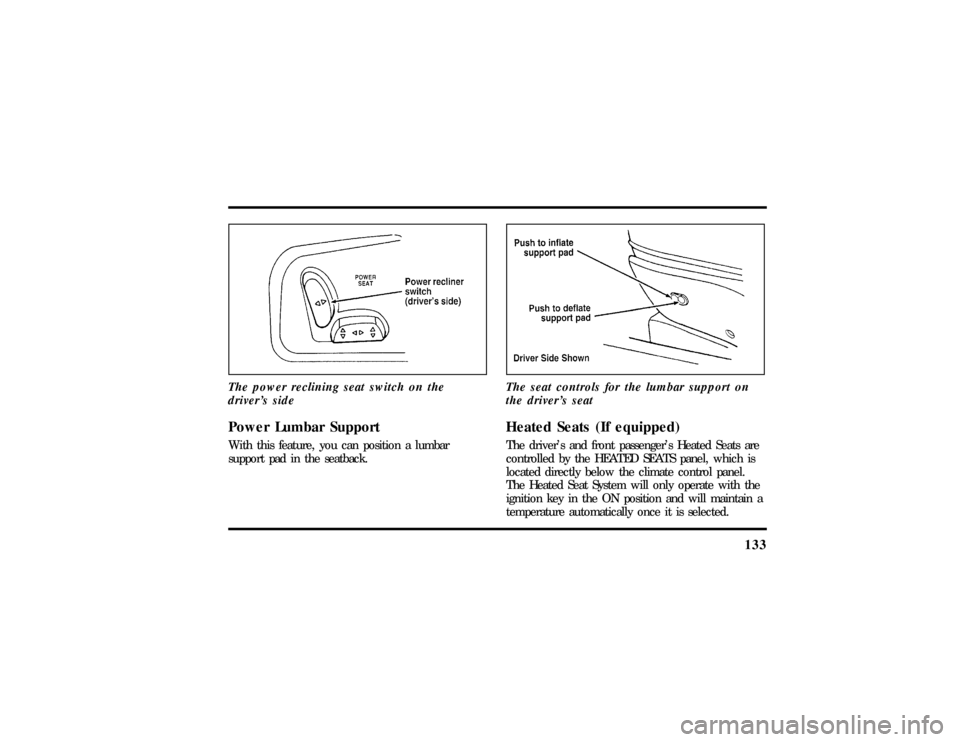
The power reclining seat switch on the
driver's sidePower Lumbar SupportWith this feature, you can position a lumbar
support pad in the seatback.The seat controls for the lumbar support on
the driver's seat
Heated Seats (If equipped)The driver's and front passenger's Heated Seats are
controlled by the HEATED SEATS panel, which is
located directly below the climate control panel.
The Heated Seat System will only operate with the
ignition key in the ON position and will maintain a
temperature automatically once it is selected.
File:06fnssc.ex
Update:Mon Jun 17 14:19:23 1996
Page 153 of 321

150
WARNING
Whenusin gforward-facin gchil dseats
WARNING
If yo udo no tproperl ysecur eth esafety
WARNING
Carefull yfollo wallof the
WARNING
Alway skee pthebuckl ereleas ebutton
Page 154 of 321
151
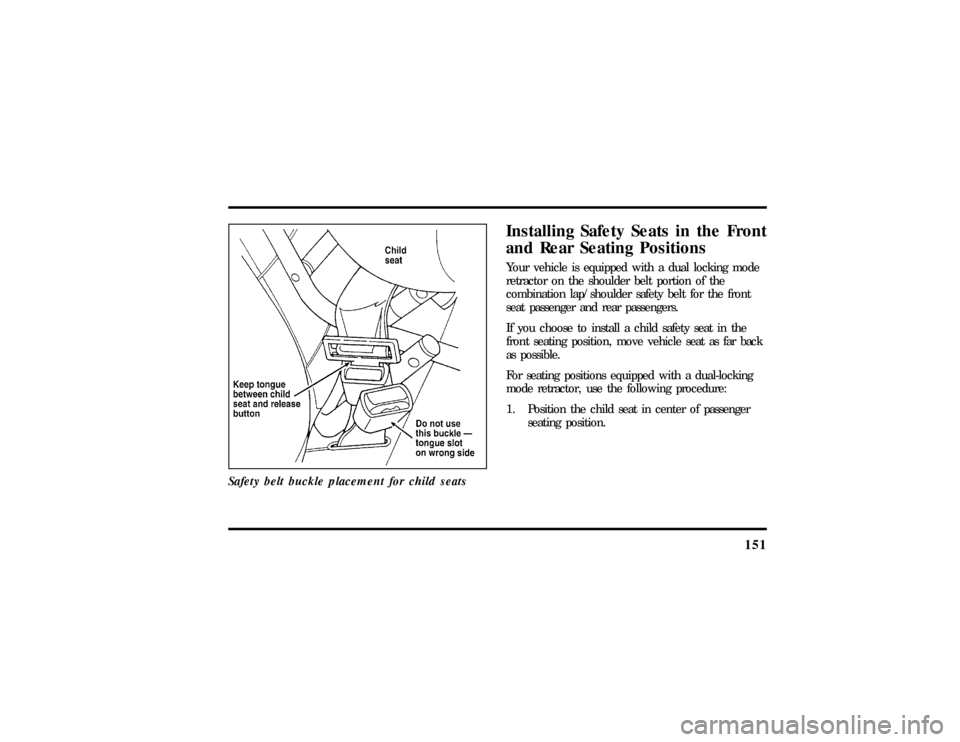
Safety belt buckle placement for child seats
Installing Safety Seats in the Front
and Rear Seating PositionsYour vehicle is equipped with a dual locking mode
retractor on the shoulder belt portion of the
combination lap/shoulder safety belt for the front
seat passenger and rear passengers.
If you choose to install a child safety seat in the
front seating position, move vehicle seat as far back
as possible.
For seating positions equipped with a dual-locking
mode retractor, use the following procedure:
1. Position the child seat in center of passenger
seating position.
File:06fnssc.ex
Update:Mon Jun 17 14:19:23 1996
Page 164 of 321
161
Tether anchorage hardwareAll vehicles include a tether anchor installed at the
rear center seating position for use with child safety
seats. Attachment holes (at each rear outboard
seating position) have been provided in your vehicle
to attach anchor hardware, if required. Additional
kits can be obtained and installed at no charge from
any Ford or Lincoln-Mercury dealer.Tether strap anchorage locations (rear
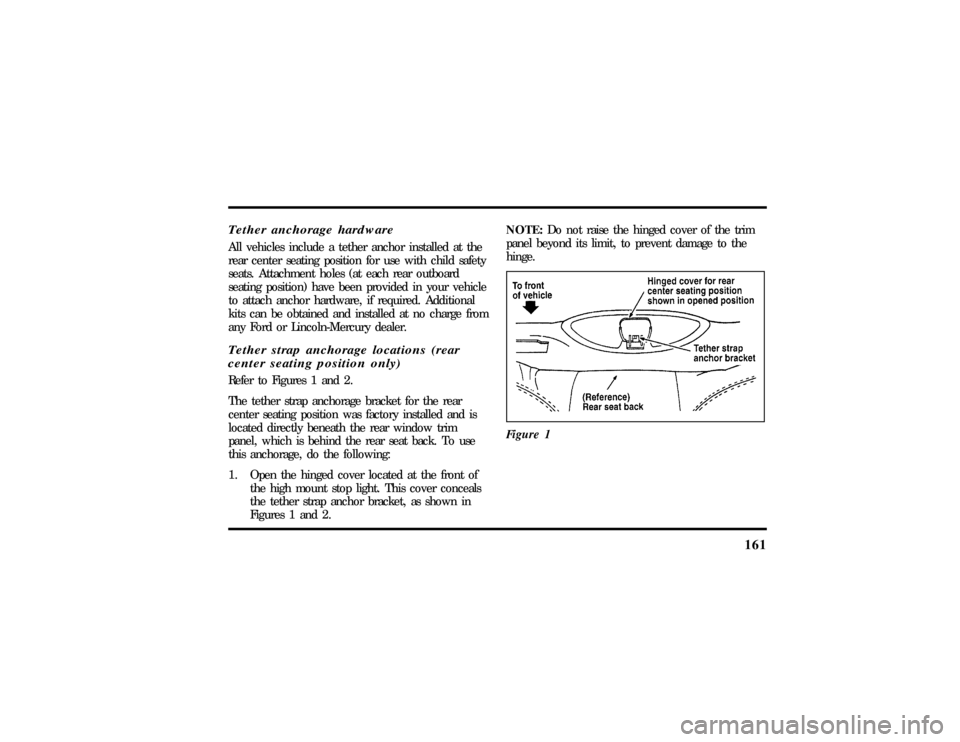
center seating position only)Refer to Figures 1 and 2.
The tether strap anchorage bracket for the rear
center seating position was factory installed and is
located directly beneath the rear window trim
panel, which is behind the rear seat back. To use
this anchorage, do the following:
1. Open the hinged cover located at the front of
the high mount stop light. This cover conceals
the tether strap anchor bracket, as shown in
Figures 1 and 2.NOTE:Do not raise the hinged cover of the trim
panel beyond its limit, to prevent damage to the
hinge.
Figure 1
File:06fnssc.ex
Update:Mon Jun 17 14:19:23 1996
Page 271 of 321

270Cleaning the SeatsLeatherFor routine cleaning, wipe the surface with a soft,
damp cloth. For more thorough cleaning, wipe the
surface with a leather and vinyl cleaner or a mild
soap.
Wipe the surface with a damp, soft cloth, then dry
and buff with a dry, soft cloth.FabricRemove dust and loose dirt with a whisk broom or
a vacuum cleaner. Remove fresh spots immediately.
Follow the directions that come with the cleaner.
NOTE:Before using any cleaner, test it on a small,
hidden area of fabric. If the fabric's color or texture
is adversely affected by a particular cleaner, do not
use it.
Cleaning the WheelsWash the wheels with the same detergent you use
to wash your vehicle's body. Do not use acid-based
wheel cleaners, steel wool, abrasives, fuel, or strong
detergents. These substances will damage protective
coatings. Use tar and road oil remover to remove
grease and tar.
NOTE:Before going to a car wash, find out if the
brushes are abrasive.
If you have whitewall tires that are difficult to clean
with regular detergent, use whitewall tire cleaner.
Follow the directions on the container and rinse the
tires with plenty of clean water.
File:11fnmcc.ex
Update:Fri Sep 6 08:51:16 1996
Page 304 of 321

306Index
A
ABS warning light (see Anti-lock
brake system)............ 11
Accessory position on the ignition.... 62
Accident damage............ 220
Air bag supplemental restraint system . . . 143
and child safety seats......... 149
description..........143, 145
driver air bag.........143, 145
indicator light............ 15
operation.............. 145
passenger air bag........... 145
service and information labels..... 145
tone generator............ 147
Air cleaner filter
location............... 224
specifications............ 271
Air conditioning, electronic automatic
temperature control system...... 45Air suspension
air leveling disabled warning,
message center........... 20
description............. 175
Alarm, activating remote personal..... 124
Aluminum wheels........... 250
Antenna, radio (see Electronic
sound system).......... 25,31
Antifreeze (see Engine coolant)...... 231
Anti-lock brake system (ABS)
description............. 171
noise................ 171
see also Brake............ 171
warning light............ 11
Anti-theft lug nuts and key........ 210
Anti-theft system
arming the system.......... 127
description..........126, 127
File:fnixc.ex
Update:Tue Sep 17 08:28:54 1996