warning LINCOLN CONTINENTAL 2017 Owners Manual
[x] Cancel search | Manufacturer: LINCOLN, Model Year: 2017, Model line: CONTINENTAL, Model: LINCOLN CONTINENTAL 2017Pages: 584, PDF Size: 6.13 MB
Page 415 of 584
Before making the call:
•
SYNC provides a short window of time
(about 10 seconds) to cancel the call. If
you fail to cancel the call, SYNC attempts
to dial 911.
• SYNC says the following, or a similar
message: "SYNC will attempt to call 911,
to cancel the call, press Cancel on your
screen or press and hold the phone
button on your steering wheel."
If you do not cancel the call, and SYNC
makes a successful call, a pre-recorded
message plays for the 911 operator, and then
the occupant(s) in your vehicle is able to talk
with the operator. Be prepared to provide
your name, phone number and location
immediately, because not all 911 systems are
capable of receiving this information
electronically. 911 Assist May Not Work If
•
Your cellular phone or 911 Assist
hardware sustains damage in a crash.
• The vehicle's battery or the SYNC system
has no power.
• The phone(s) thrown from your vehicle
are the ones paired and connected to
the system.
911 Assist Privacy Notice
When you switch on 911 Assist, it may
disclose to emergency services that your
vehicle has been in a crash involving the
deployment of an airbag or activation of the
fuel pump shut-off. Certain versions or
updates to 911 Assist may also be capable
of electronically or verbally disclosing to 911
operators your vehicle location or other
details about your vehicle or crash to assist
911 operators to provide the most appropriate
emergency services. If you do not want to
disclose this information, do not switch the
feature on. Safety Information WARNING
Driving while distracted can result in
loss of vehicle control, crash and injury.
We strongly recommend that you use
extreme caution when using any device that
may take your focus off the road. Your
primary responsibility is the safe operation
of your vehicle. We recommend against the
use of any hand-held device while driving
and encourage the use of voice-operated
systems when possible. Make sure you are
aware of all applicable local laws that may
affect the use of electronic devices while
driving. •
Do not attempt to service or repair the
system. Have an authorized dealer check
your vehicle.
• Do not operate playing devices if the
power cords or cables are broken, split
or damaged. Place cords and cables out
of the way, so they do not interfere with
the operation of pedals, seats,
compartments or safe driving abilities.
412
Continental (CPL) Canada/United States of America, enUSA, First Printing SYNC™ 3
Page 451 of 584
PHONE
WARNING
Driving while distracted can result in
loss of vehicle control, crash and injury.
We strongly recommend that you use
extreme caution when using any device that
may take your focus off the road. Your
primary responsibility is the safe operation
of your vehicle. We recommend against the
use of any hand-held device while driving
and encourage the use of voice-operated
systems when possible. Make sure you are
aware of all applicable local laws that may
affect the use of electronic devices while
driving. Hands-free calling is one of the main features
of the system. Once you pair your cell phone,
you can access many options using the
touchscreen or voice commands. While the
system supports a variety of features, many
are dependent on your cell phone
’s
functionality. Pairing Your Cell Phone for the First
Time
Pair your Bluetooth-enabled phone with the
system before using the functions in
hands-free mode.
Switch on Bluetooth on your device to begin
pairing. See your phone
’s manual if
necessary.
To add a phone, select: Menu Item
Add Phone
1. Follow the on-screen instructions.
2. A prompt alerts you to search for the system on your phone.
3. Select your vehicle's make and model as
it displays on your phone.
4. Confirm that the six-digit number appearing on your phone matches the
six-digit number on the touchscreen.
5. The touchscreen indicates when the pairing is successful. 6. Your phone may prompt you to give the
system permission to access information.
To check your phone ’s compatibility, see
your phone ’s manual or visit the website.
Alternatively, to add a phone, select: Menu Item
Add Phone
Then select:
Discover Other Bluetooth Devices
1. Follow the on-screen instructions.
2. Select your phone's name when it appears on the touchscreen.
3. Confirm that the six-digit number appearing on your phone matches the
six-digit number on the touchscreen.
4. The touchscreen indicates when the pairing is successful.
5. Your phone may prompt you to give the system permission to access information.
To check your phone ’s compatibility, see
your phone ’s manual or visit the website.
448
Continental (CPL) Canada/United States of America, enUSA, First Printing SYNC™ 3
Page 471 of 584
SiriusXM Traffic and Travel Link (If
Equipped) WARNING
Driving while distracted can result in
loss of vehicle control, crash and injury.
We strongly recommend that you use
extreme caution when using any device that
may take your focus off the road. Your
primary responsibility is the safe operation
of your vehicle. We recommend against the
use of any hand-held device while driving
and encourage the use of voice-operated
systems when possible. Make sure you are
aware of all applicable local laws that may
affect the use of electronic devices while
driving. Note:
SiriusXM Traffic and Travel Link may
not be available in all markets.
Note: In order to use SiriusXM Traffic and
Travel Link, your vehicle must have
navigation.
Note: A paid subscription is required to
access and use these features. Go to
www.siriusxm.com/travellink for more
information.
Note: Visit www.siriusxm.com/traffic and click
on Coverage map and details for a complete
listing of all traffic areas covered by SiriusXM
Traffic and Travel Link. Note:
Neither Sirius nor Ford is responsible
for any errors or inaccuracies in the SiriusXM
Traffic and Travel Link services or its use in
vehicles.
When you subscribe to SiriusXM Traffic and
Travel Link, it can help you locate the best
gas prices, find movie listings, get current
traffic alerts, view the current weather map,
get accurate ski conditions and see scores
to current sports games. Action and Description
Menu Item
Touch these buttons to identify traffic incidents on your route, near your vehicle ’s current location
or near any of your favorite places, if programmed.
Traffic on Route
Traffic Nearby
Touch this button to view fuel prices at stations close to your vehicle ’s location or on an active
navigation route.
Fuel Prices
Touch this button to view nearby movie theaters and their show times, if \
available.
Movie Listings
468
Continental (CPL) Canada/United States of America, enUSA, First Printing SYNC™ 3
Page 479 of 584
Action and Description
Menu Item
Text Messaging
You can then select: No sound plays when a message comes to your phone.
No Alert (Silence)
You can select one of the three available notification sounds.
When enabled, a voice prompt alerts you when you receive a new message.
Voice Readout
You can enable and disable the following options as well: Action and Description
Menu Item
When enabled, vehicle audio (such as radio or apps) is muted for the d\
uration of the phone call even when
the phone call is in privacy.
Mute Audio in Privacy
When enabled, an alert displays that your phone is roaming when you atte\
mpt to place a call.
Roaming Warning
When enabled, a message displays when the battery on your phone is runni\
ng low.
Low Battery Notification
911 Assist
Note: This service is only available in the
United States and Canada. Select this button to modify the on or off
setting for this feature. If the mobile phone
’s
contacts have been downloaded, you can
adjust the following option:
476
Continental (CPL) Canada/United States of America, enUSA, First Printing SYNC™ 3
Page 514 of 584
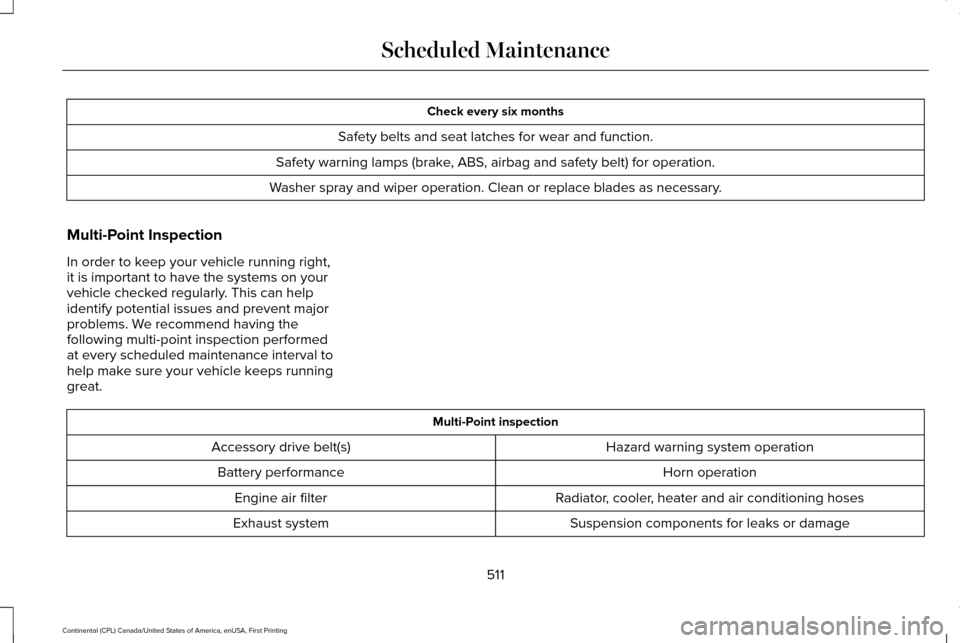
Check every six months
Safety belts and seat latches for wear and function.
Safety warning lamps (brake, ABS, airbag and safety belt) for operation.
Washer spray and wiper operation. Clean or replace blades as necessary.
Multi-Point Inspection
In order to keep your vehicle running right,
it is important to have the systems on your
vehicle checked regularly. This can help
identify potential issues and prevent major
problems. We recommend having the
following multi-point inspection performed
at every scheduled maintenance interval to
help make sure your vehicle keeps running
great. Multi-Point inspection
Hazard warning system operation
Accessory drive belt(s)
Horn operation
Battery performance
Radiator, cooler, heater and air conditioning hoses
Engine air filter
Suspension components for leaks or damage
Exhaust system
511
Continental (CPL) Canada/United States of America, enUSA, First Printing Scheduled Maintenance
Page 560 of 584
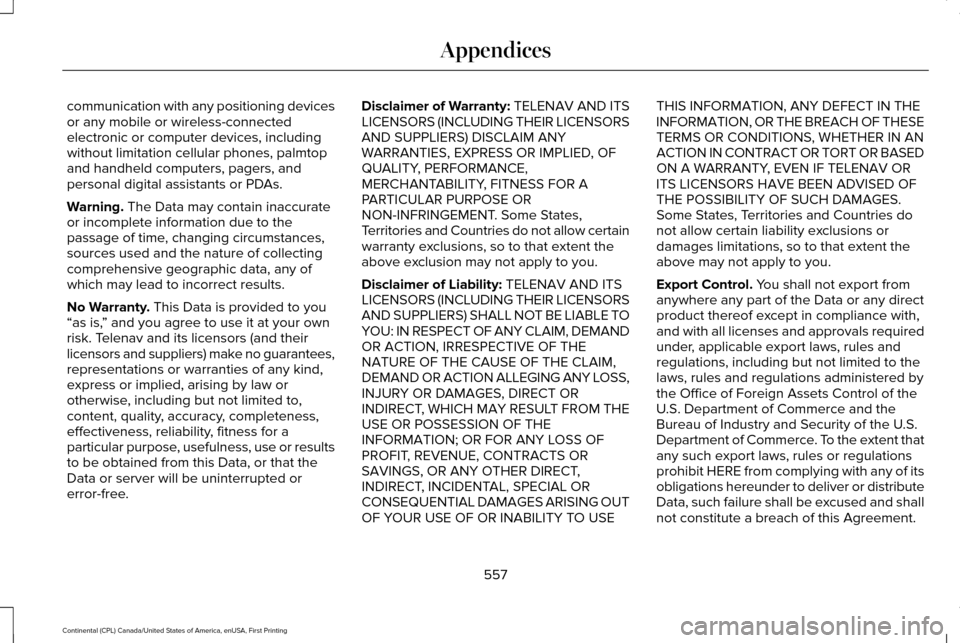
communication with any positioning devices
or any mobile or wireless-connected
electronic or computer devices, including
without limitation cellular phones, palmtop
and handheld computers, pagers, and
personal digital assistants or PDAs.
Warning. The Data may contain inaccurate
or incomplete information due to the
passage of time, changing circumstances,
sources used and the nature of collecting
comprehensive geographic data, any of
which may lead to incorrect results.
No Warranty.
This Data is provided to you
“as is, ” and you agree to use it at your own
risk. Telenav and its licensors (and their
licensors and suppliers) make no guarantees,
representations or warranties of any kind,
express or implied, arising by law or
otherwise, including but not limited to,
content, quality, accuracy, completeness,
effectiveness, reliability, fitness for a
particular purpose, usefulness, use or results
to be obtained from this Data, or that the
Data or server will be uninterrupted or
error-free. Disclaimer of Warranty: TELENAV AND ITS
LICENSORS (INCLUDING THEIR LICENSORS
AND SUPPLIERS) DISCLAIM ANY
WARRANTIES, EXPRESS OR IMPLIED, OF
QUALITY, PERFORMANCE,
MERCHANTABILITY, FITNESS FOR A
PARTICULAR PURPOSE OR
NON-INFRINGEMENT. Some States,
Territories and Countries do not allow certain
warranty exclusions, so to that extent the
above exclusion may not apply to you.
Disclaimer of Liability:
TELENAV AND ITS
LICENSORS (INCLUDING THEIR LICENSORS
AND SUPPLIERS) SHALL NOT BE LIABLE TO
YOU: IN RESPECT OF ANY CLAIM, DEMAND
OR ACTION, IRRESPECTIVE OF THE
NATURE OF THE CAUSE OF THE CLAIM,
DEMAND OR ACTION ALLEGING ANY LOSS,
INJURY OR DAMAGES, DIRECT OR
INDIRECT, WHICH MAY RESULT FROM THE
USE OR POSSESSION OF THE
INFORMATION; OR FOR ANY LOSS OF
PROFIT, REVENUE, CONTRACTS OR
SAVINGS, OR ANY OTHER DIRECT,
INDIRECT, INCIDENTAL, SPECIAL OR
CONSEQUENTIAL DAMAGES ARISING OUT
OF YOUR USE OF OR INABILITY TO USE THIS INFORMATION, ANY DEFECT IN THE
INFORMATION, OR THE BREACH OF THESE
TERMS OR CONDITIONS, WHETHER IN AN
ACTION IN CONTRACT OR TORT OR BASED
ON A WARRANTY, EVEN IF TELENAV OR
ITS LICENSORS HAVE BEEN ADVISED OF
THE POSSIBILITY OF SUCH DAMAGES.
Some States, Territories and Countries do
not allow certain liability exclusions or
damages limitations, so to that extent the
above may not apply to you.
Export Control. You shall not export from
anywhere any part of the Data or any direct
product thereof except in compliance with,
and with all licenses and approvals required
under, applicable export laws, rules and
regulations, including but not limited to the
laws, rules and regulations administered by
the Office of Foreign Assets Control of the
U.S. Department of Commerce and the
Bureau of Industry and Security of the U.S.
Department of Commerce. To the extent that
any such export laws, rules or regulations
prohibit HERE from complying with any of its
obligations hereunder to deliver or distribute
Data, such failure shall be excused and shall
not constitute a breach of this Agreement.
557
Continental (CPL) Canada/United States of America, enUSA, First Printing Appendices
Page 571 of 584
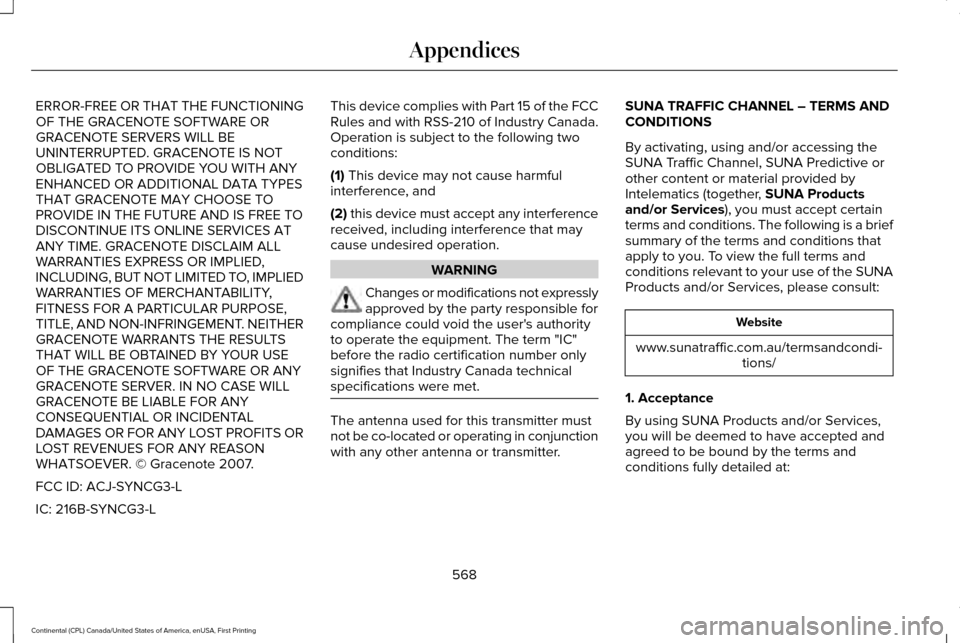
ERROR-FREE OR THAT THE FUNCTIONING
OF THE GRACENOTE SOFTWARE OR
GRACENOTE SERVERS WILL BE
UNINTERRUPTED. GRACENOTE IS NOT
OBLIGATED TO PROVIDE YOU WITH ANY
ENHANCED OR ADDITIONAL DATA TYPES
THAT GRACENOTE MAY CHOOSE TO
PROVIDE IN THE FUTURE AND IS FREE TO
DISCONTINUE ITS ONLINE SERVICES AT
ANY TIME. GRACENOTE DISCLAIM ALL
WARRANTIES EXPRESS OR IMPLIED,
INCLUDING, BUT NOT LIMITED TO, IMPLIED
WARRANTIES OF MERCHANTABILITY,
FITNESS FOR A PARTICULAR PURPOSE,
TITLE, AND NON-INFRINGEMENT. NEITHER
GRACENOTE WARRANTS THE RESULTS
THAT WILL BE OBTAINED BY YOUR USE
OF THE GRACENOTE SOFTWARE OR ANY
GRACENOTE SERVER. IN NO CASE WILL
GRACENOTE BE LIABLE FOR ANY
CONSEQUENTIAL OR INCIDENTAL
DAMAGES OR FOR ANY LOST PROFITS OR
LOST REVENUES FOR ANY REASON
WHATSOEVER. © Gracenote 2007.
FCC ID: ACJ-SYNCG3-L
IC: 216B-SYNCG3-L
This device complies with Part 15 of the FCC
Rules and with RSS-210 of Industry Canada.
Operation is subject to the following two
conditions:
(1) This device may not cause harmful
interference, and
(2)
this device must accept any interference
received, including interference that may
cause undesired operation. WARNING
Changes or modifications not expressly
approved by the party responsible for
compliance could void the user's authority
to operate the equipment. The term "IC"
before the radio certification number only
signifies that Industry Canada technical
specifications were met. The antenna used for this transmitter must
not be co-located or operating in conjunction
with any other antenna or transmitter.SUNA TRAFFIC CHANNEL – TERMS AND
CONDITIONS
By activating, using and/or accessing the
SUNA Traffic Channel, SUNA Predictive or
other content or material provided by
Intelematics (together,
SUNA Products
and/or Services), you must accept certain
terms and conditions. The following is a brief
summary of the terms and conditions that
apply to you. To view the full terms and
conditions relevant to your use of the SUNA
Products and/or Services, please consult: Website
www.sunatraffic.com.au/termsandcondi- tions/
1. Acceptance
By using SUNA Products and/or Services,
you will be deemed to have accepted and
agreed to be bound by the terms and
conditions fully detailed at:
568
Continental (CPL) Canada/United States of America, enUSA, First Printing Appendices
Page 573 of 584
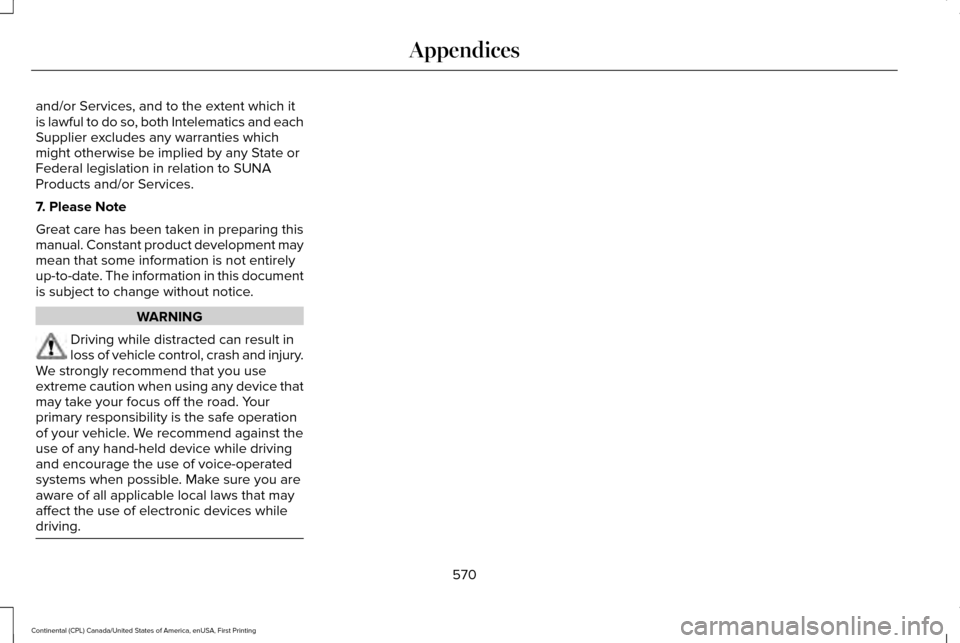
and/or Services, and to the extent which it
is lawful to do so, both Intelematics and each
Supplier excludes any warranties which
might otherwise be implied by any State or
Federal legislation in relation to SUNA
Products and/or Services.
7. Please Note
Great care has been taken in preparing this
manual. Constant product development may
mean that some information is not entirely
up-to-date. The information in this document
is subject to change without notice.
WARNING
Driving while distracted can result in
loss of vehicle control, crash and injury.
We strongly recommend that you use
extreme caution when using any device that
may take your focus off the road. Your
primary responsibility is the safe operation
of your vehicle. We recommend against the
use of any hand-held device while driving
and encourage the use of voice-operated
systems when possible. Make sure you are
aware of all applicable local laws that may
affect the use of electronic devices while
driving. 570
Continental (CPL) Canada/United States of America, enUSA, First Printing Appendices
Page 574 of 584
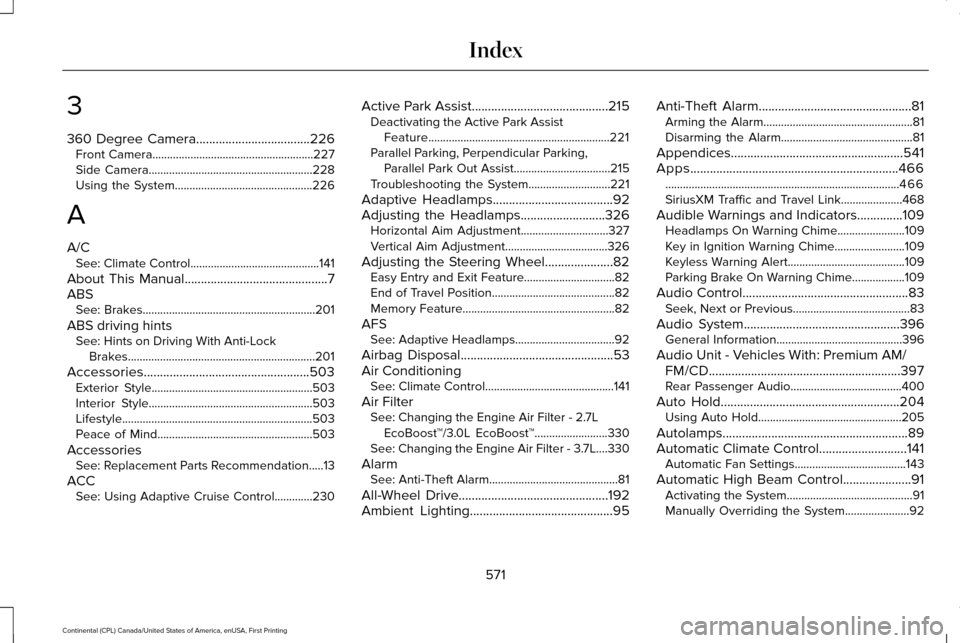
3
360 Degree Camera...................................226
Front Camera.......................................................227
Side Camera........................................................228
Using the System...............................................226
A
A/C See: Climate Control............................................141
About This Manual............................................7
ABS See: Brakes...........................................................201
ABS driving hints See: Hints on Driving With Anti-Lock
Brakes................................................................201
Accessories...................................................503 Exterior Style.......................................................503
Interior Style........................................................503
Lifestyle.................................................................503
Peace of Mind.....................................................503
Accessories See: Replacement Parts Recommendation.....13
ACC See: Using Adaptive Cruise Control.............230 Active Park Assist
..........................................215
Deactivating the Active Park Assist
Feature..............................................................221
Parallel Parking, Perpendicular Parking, Parallel Park Out Assist.................................215
Troubleshooting the System............................221
Adaptive Headlamps
.....................................92
Adjusting the Headlamps..........................326
Horizontal Aim Adjustment..............................327
Vertical Aim Adjustment...................................326
Adjusting the Steering Wheel.....................82 Easy Entry and Exit Feature...............................
82
End of Travel Position..........................................82
Memory Feature....................................................82
AFS See: Adaptive Headlamps..................................92
Airbag Disposal
...............................................53
Air Conditioning See: Climate Control............................................141
Air Filter See: Changing the Engine Air Filter - 2.7L
EcoBoost™/3.0L EcoBoost™.........................330
See: Changing the Engine Air Filter - 3.7L....330
Alarm See: Anti-Theft Alarm............................................81
All-Wheel Drive
..............................................192
Ambient Lighting............................................95 Anti-Theft Alarm
...............................................81
Arming the Alarm...................................................81
Disarming the Alarm.............................................81
Appendices.....................................................541
Apps
................................................................466
........................................................................\
........466
SiriusXM Traffic and Travel Link.....................468
Audible Warnings and Indicators
..............109
Headlamps On Warning Chime.......................109
Key in Ignition Warning Chime........................109
Keyless Warning Alert........................................109
Parking Brake On Warning Chime..................
109
Audio Control
...................................................83
Seek, Next or Previous........................................83
Audio System................................................396 General Information...........................................396
Audio Unit - Vehicles With: Premium AM/ FM/CD
...........................................................397
Rear Passenger Audio......................................400
Auto Hold
.......................................................204
Using Auto Hold.................................................205
Autolamps.........................................................89
Automatic Climate Control...........................141 Automatic Fan Settings......................................
143
Automatic High Beam Control.....................91 Activating the System...........................................91
Manually Overriding the System......................92
571
Continental (CPL) Canada/United States of America, enUSA, First Printing Index
Page 578 of 584
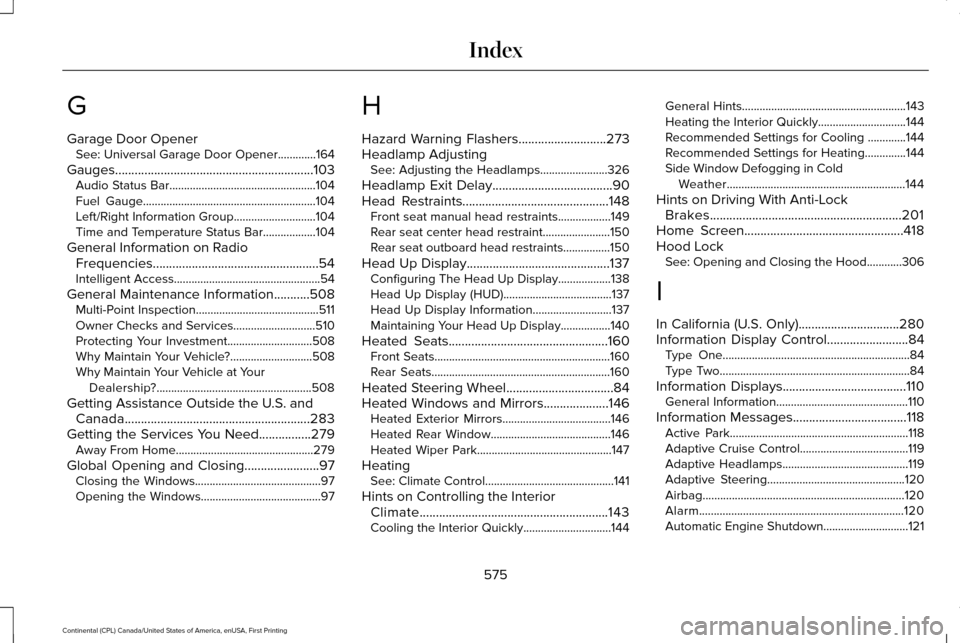
G
Garage Door Opener
See: Universal Garage Door Opener.............164
Gauges.............................................................103 Audio Status Bar..................................................104
Fuel Gauge...........................................................104
Left/Right Information Group............................104
Time and Temperature Status Bar..................104
General Information on Radio Frequencies...................................................54
Intelligent Access..................................................54
General Maintenance Information...........508 Multi-Point Inspection..........................................511
Owner Checks and Services............................
510
Protecting Your Investment.............................508
Why Maintain Your Vehicle?............................508
Why Maintain Your Vehicle at Your Dealership?.....................................................508
Getting Assistance Outside the U.S. and Canada.........................................................283
Getting the Services You Need
................279
Away From Home...............................................279
Global Opening and Closing.......................97 Closing the Windows...........................................97
Opening the Windows.........................................97 H
Hazard Warning Flashers...........................273
Headlamp Adjusting
See: Adjusting the Headlamps.......................326
Headlamp Exit Delay.....................................90
Head Restraints.............................................148 Front seat manual head restraints..................
149
Rear seat center head restraint.......................150
Rear seat outboard head restraints................150
Head Up Display............................................137 Configuring The Head Up Display..................138
Head Up Display (HUD).....................................137
Head Up Display Information...........................137
Maintaining Your Head Up Display.................140
Heated Seats.................................................160 Front Seats............................................................160
Rear Seats.............................................................160
Heated Steering Wheel.................................84
Heated Windows and Mirrors....................146 Heated Exterior Mirrors.....................................146
Heated Rear Window.........................................146
Heated Wiper Park..............................................147
Heating See: Climate Control............................................141
Hints on Controlling the Interior Climate..........................................................143
Cooling the Interior Quickly..............................144 General Hints........................................................143
Heating the Interior Quickly..............................144
Recommended Settings for Cooling .............144
Recommended Settings for Heating..............144
Side Window Defogging in Cold
Weather.............................................................144
Hints on Driving With Anti-Lock Brakes...........................................................201
Home Screen.................................................418
Hood Lock See: Opening and Closing the Hood............306
I
In California (U.S. Only)
...............................280
Information Display Control.........................84 Type One................................................................84
Type Two.................................................................84
Information Displays......................................110 General Information.............................................110
Information Messages
...................................118
Active Park.............................................................118
Adaptive Cruise Control.....................................119
Adaptive Headlamps...........................................119
Adaptive Steering...............................................120
Airbag.....................................................................120
Alarm......................................................................120
Automatic Engine Shutdown.............................
121
575
Continental (CPL) Canada/United States of America, enUSA, First Printing Index