Fuel LINCOLN CONTINENTAL 2017 User Guide
[x] Cancel search | Manufacturer: LINCOLN, Model Year: 2017, Model line: CONTINENTAL, Model: LINCOLN CONTINENTAL 2017Pages: 584, PDF Size: 6.13 MB
Page 111 of 584
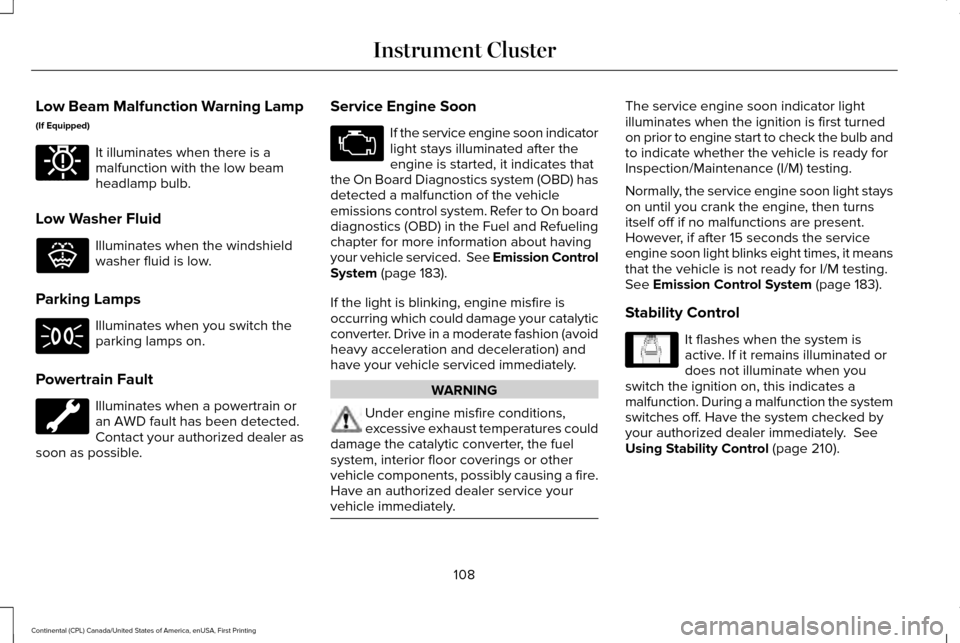
Low Beam Malfunction Warning Lamp
(If Equipped)
It illuminates when there is a
malfunction with the low beam
headlamp bulb.
Low Washer Fluid Illuminates when the windshield
washer fluid is low.
Parking Lamps Illuminates when you switch the
parking lamps on.
Powertrain Fault Illuminates when a powertrain or
an AWD fault has been detected.
Contact your authorized dealer as
soon as possible. Service Engine Soon If the service engine soon indicator
light stays illuminated after the
engine is started, it indicates that
the On Board Diagnostics system (OBD) has
detected a malfunction of the vehicle
emissions control system. Refer to On board
diagnostics (OBD) in the Fuel and Refueling
chapter for more information about having
your vehicle serviced. See Emission Control
System (page 183).
If the light is blinking, engine misfire is
occurring which could damage your catalytic
converter. Drive in a moderate fashion (avoid
heavy acceleration and deceleration) and
have your vehicle serviced immediately. WARNING
Under engine misfire conditions,
excessive exhaust temperatures could
damage the catalytic converter, the fuel
system, interior floor coverings or other
vehicle components, possibly causing a fire.
Have an authorized dealer service your
vehicle immediately. The service engine soon indicator light
illuminates when the ignition is first turned
on prior to engine start to check the bulb and
to indicate whether the vehicle is ready for
Inspection/Maintenance (I/M) testing.
Normally, the service engine soon light stays
on until you crank the engine, then turns
itself off if no malfunctions are present.
However, if after 15 seconds the service
engine soon light blinks eight times, it means
that the vehicle is not ready for I/M testing.
See Emission Control System (page 183).
Stability Control It flashes when the system is
active. If it remains illuminated or
does not illuminate when you
switch the ignition on, this indicates a
malfunction. During a malfunction the system
switches off. Have the system checked by
your authorized dealer immediately.
See
Using Stability Control (page 210).
108
Continental (CPL) Canada/United States of America, enUSA, First Printing Instrument ClusterE181350 E132353 E138639
Page 115 of 584
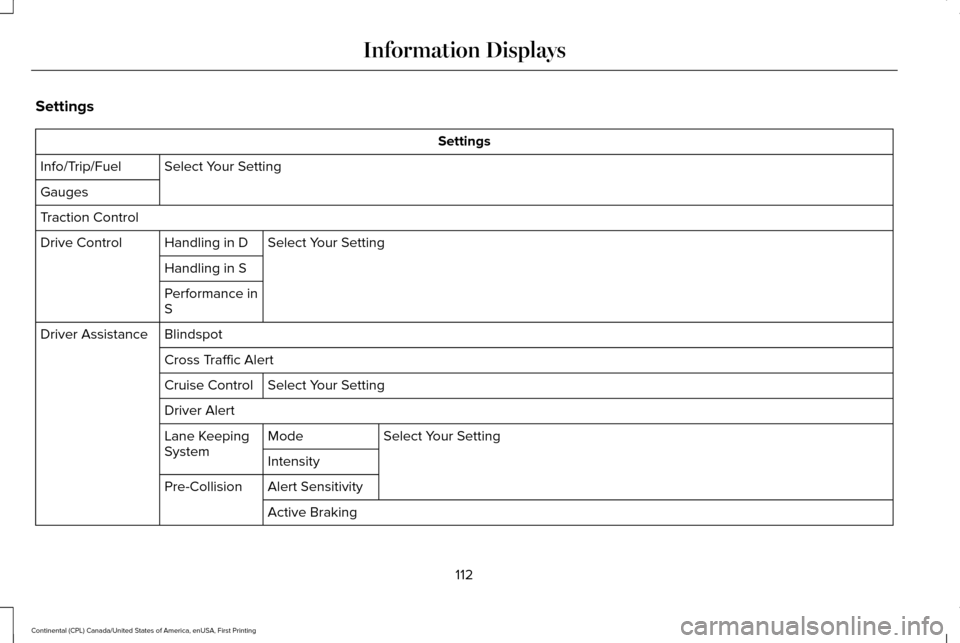
Settings
Settings
Select Your Setting
Info/Trip/Fuel
Gauges
Traction Control
Select Your Setting
Handling in D
Drive Control
Handling in S
Performance in
S
Blindspot
Driver Assistance
Cross Traffic AlertSelect Your Setting
Cruise Control
Driver Alert
Select Your Setting
Mode
Lane Keeping
System
Intensity
Alert Sensitivity
Pre-Collision
Active Braking
112
Continental (CPL) Canada/United States of America, enUSA, First Printing Information Displays
Page 118 of 584
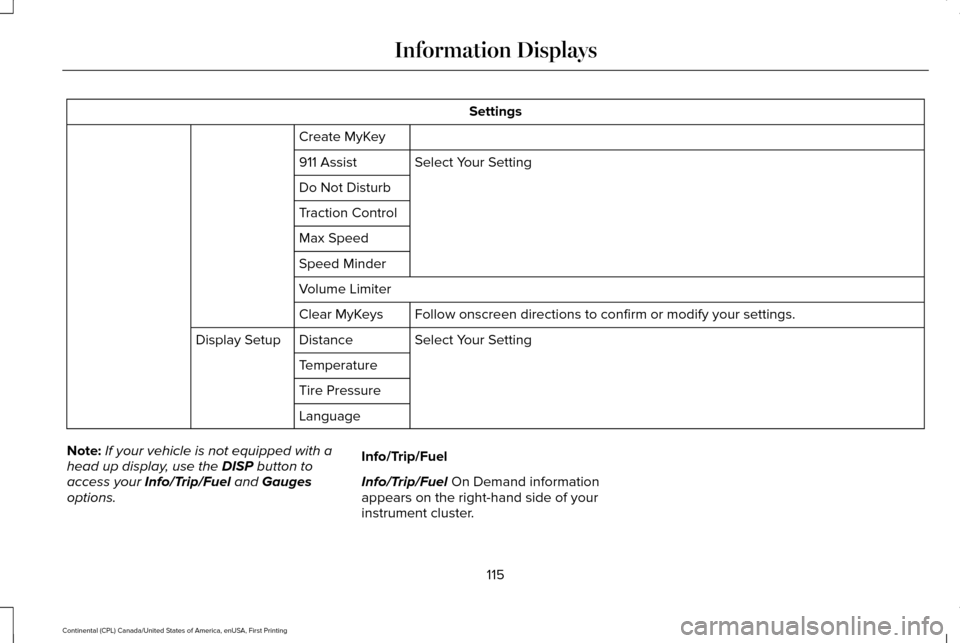
Settings
Create MyKey Select Your Setting
911 Assist
Do Not Disturb
Traction Control
Max Speed
Speed Minder
Volume Limiter
Follow onscreen directions to confirm or modify your settings.
Clear MyKeys
Select Your Setting
Distance
Display Setup
Temperature
Tire Pressure
Language
Note: If your vehicle is not equipped with a
head up display, use the DISP button to
access your Info/Trip/Fuel and Gauges
options. Info/Trip/Fuel
Info/Trip/Fuel On Demand information
appears on the right-hand side of your
instrument cluster.
115
Continental (CPL) Canada/United States of America, enUSA, First Printing Information Displays
Page 119 of 584
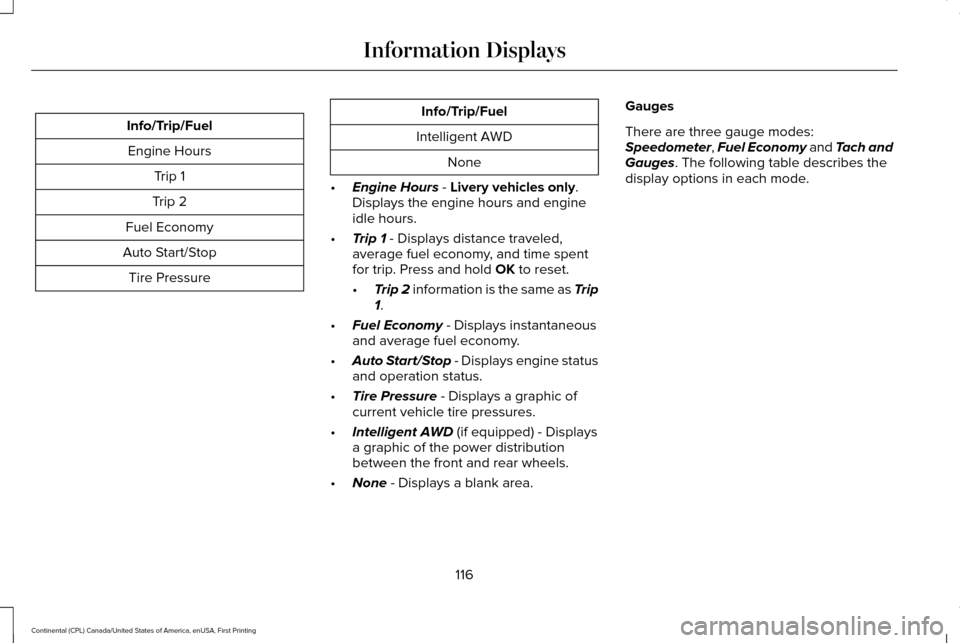
Info/Trip/Fuel
Engine Hours Trip 1
Trip 2
Fuel Economy
Auto Start/Stop Tire Pressure Info/Trip/Fuel
Intelligent AWD None
• Engine Hours - Livery vehicles only.
Displays the engine hours and engine
idle hours.
• Trip 1
- Displays distance traveled,
average fuel economy, and time spent
for trip. Press and hold
OK to reset.
• Trip 2
information is the same as Trip
1.
• Fuel Economy
- Displays instantaneous
and average fuel economy.
• Auto Start/Stop
- Displays engine status
and operation status.
• Tire Pressure
- Displays a graphic of
current vehicle tire pressures.
• Intelligent AWD
(if equipped) - Displays
a graphic of the power distribution
between the front and rear wheels.
• None
- Displays a blank area. Gauges
There are three gauge modes:
Speedometer
, Fuel Economy and Tach and
Gauges. The following table describes the
display options in each mode.
116
Continental (CPL) Canada/United States of America, enUSA, First Printing Information Displays
Page 120 of 584
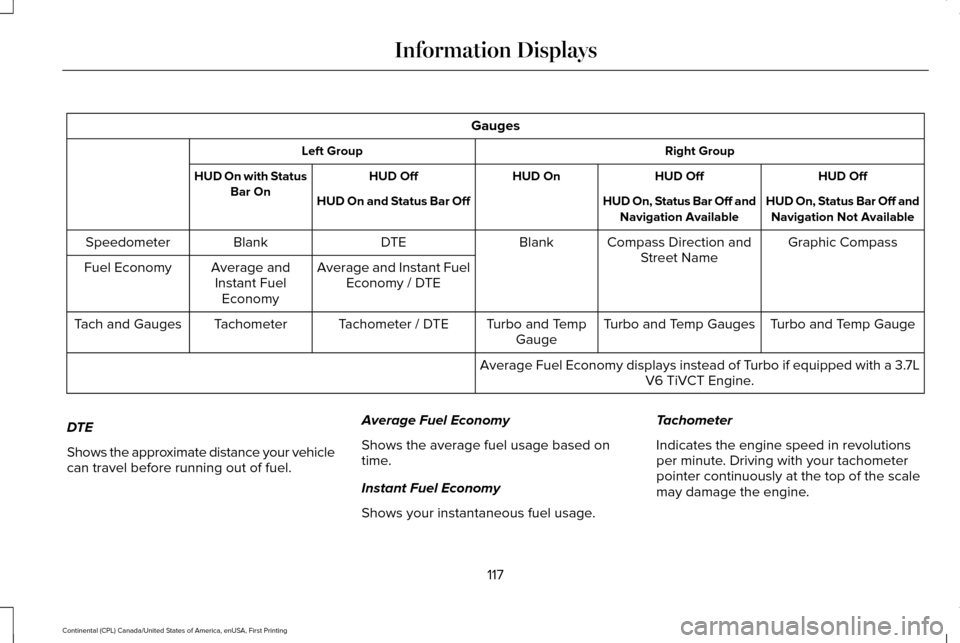
Gauges
Right Group
Left Group
HUD Off
HUD Off
HUD On
HUD Off
HUD On with Status
Bar On HUD On, Status Bar Off and
Navigation Not Available
HUD On, Status Bar Off and
Navigation Available
HUD On and Status Bar Off
Graphic Compass
Compass Direction and
Street Name
Blank
DTE
Blank
Speedometer
Average and Instant FuelEconomy / DTE
Average and
Instant Fuel Economy
Fuel Economy
Turbo and Temp Gauge
Turbo and Temp Gauges
Turbo and Temp
Gauge
Tachometer / DTE
Tachometer
Tach and Gauges
Average Fuel Economy displays instead of Turbo if equipped with a 3.7LV6 TiVCT Engine.
DTE
Shows the approximate distance your vehicle
can travel before running out of fuel. Average Fuel Economy
Shows the average fuel usage based on
time.
Instant Fuel Economy
Shows your instantaneous fuel usage.Tachometer
Indicates the engine speed in revolutions
per minute. Driving with your tachometer
pointer continuously at the top of the scale
may damage the engine.
117
Continental (CPL) Canada/United States of America, enUSA, First Printing Information Displays
Page 124 of 584
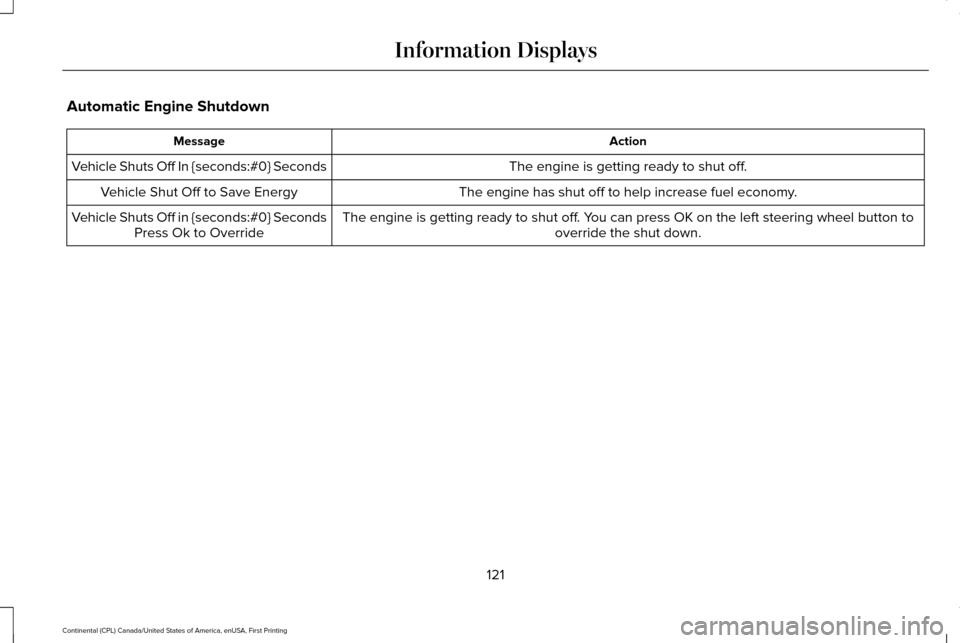
Automatic Engine Shutdown
Action
Message
The engine is getting ready to shut off.
Vehicle Shuts Off In {seconds:#0} Seconds
The engine has shut off to help increase fuel economy.
Vehicle Shut Off to Save Energy
The engine is getting ready to shut off. You can press OK on the left steering wheel button tooverride the shut down.
Vehicle Shuts Off in {seconds:#0} Seconds
Press Ok to Override
121
Continental (CPL) Canada/United States of America, enUSA, First Printing Information Displays
Page 129 of 584
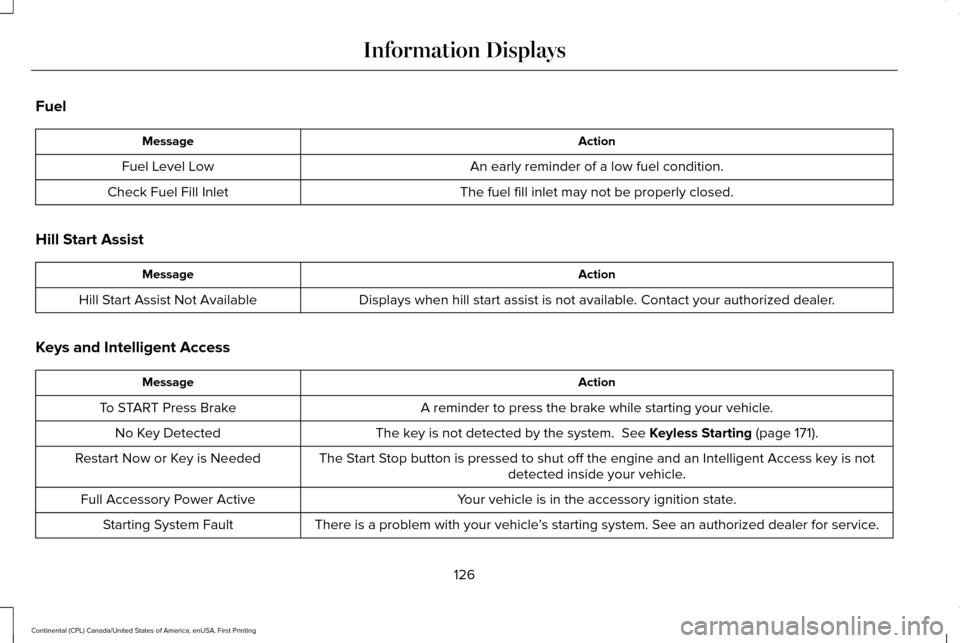
Fuel
Action
Message
An early reminder of a low fuel condition.
Fuel Level Low
The fuel fill inlet may not be properly closed.
Check Fuel Fill Inlet
Hill Start Assist Action
Message
Displays when hill start assist is not available. Contact your authorized dealer.
Hill Start Assist Not Available
Keys and Intelligent Access Action
Message
A reminder to press the brake while starting your vehicle.
To START Press Brake
The key is not detected by the system. See Keyless Starting (page 171).
No Key Detected
The Start Stop button is pressed to shut off the engine and an Intelligent Access k\
ey is notdetected inside your vehicle.
Restart Now or Key is Needed
Your vehicle is in the accessory ignition state.
Full Accessory Power Active
There is a problem with your vehicle’s starting system. See an authorized dealer for service.
Starting System Fault
126
Continental (CPL) Canada/United States of America, enUSA, First Printing Information Displays
Page 141 of 584
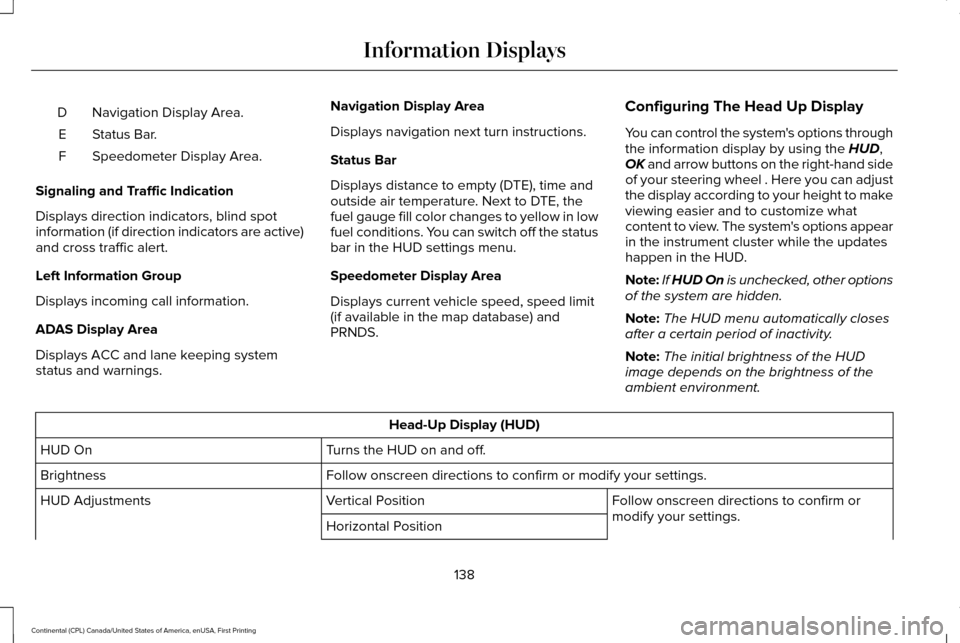
Navigation Display Area.
D
Status Bar.
E
Speedometer Display Area.
F
Signaling and Traffic Indication
Displays direction indicators, blind spot
information (if direction indicators are active)
and cross traffic alert.
Left Information Group
Displays incoming call information.
ADAS Display Area
Displays ACC and lane keeping system
status and warnings. Navigation Display Area
Displays navigation next turn instructions.
Status Bar
Displays distance to empty (DTE), time and
outside air temperature. Next to DTE, the
fuel gauge fill color changes to yellow in low
fuel conditions. You can switch off the status
bar in the HUD settings menu.
Speedometer Display Area
Displays current vehicle speed, speed limit
(if available in the map database) and
PRNDS.
Configuring The Head Up Display
You can control the system's options through
the information display by using the HUD,
OK and arrow buttons on the right-hand side
of your steering wheel . Here you can adjust
the display according to your height to make
viewing easier and to customize what
content to view. The system's options appear
in the instrument cluster while the updates
happen in the HUD.
Note: If HUD On is unchecked, other options
of the system are hidden.
Note: The HUD menu automatically closes
after a certain period of inactivity.
Note: The initial brightness of the HUD
image depends on the brightness of the
ambient environment. Head-Up Display (HUD)
Turns the HUD on and off.
HUD On
Follow onscreen directions to confirm or modify your settings.
Brightness
Follow onscreen directions to confirm or
modify your settings.
Vertical Position
HUD Adjustments
Horizontal Position
138
Continental (CPL) Canada/United States of America, enUSA, First Printing Information Displays
Page 142 of 584

Image Rotation
Fuel Info / Time / Temp
HUD Content
Select Your Setting
Cruise and Lane Control
Note: When you save a memory preset position, your current HUD settings are al\
so")
Head-Up Display (HUD)
Image Rotation
Fuel Info / Time / Temp
HUD Content
Select Your Setting
Cruise and Lane Control
Note: When you save a memory preset position, your current HUD settings are al\
so saved to that memory preset position. See Memory
Function (page 156).
139
Continental (CPL) Canada/United States of America, enUSA, First Printing Information Displays
Page 149 of 584

Temperature control: Controls the temperature of the air circulated in the rear of your vehi\
cle. Turn to increase or decrease the
temperature.
E
Ventilated seats:
Press to switch the ventilated seats on and off. See Seats (page 148).
F
Power:
Press to switch the rear system on and off.
G
Note:
The rear climate system turns off automatically whenever max defrost is\
switched on, and turns back on when max defrost
is switched off. You can manually switch on the rear system with max defrost on.
Rear control lock:
When illuminated, you can only operate the rear passenger settings thro\
ugh the front controls.
H
Note:
The indicator briefly illuminates if you try to use the rear climate sy\
stem when the controls are locked.
HEATED WINDOWS AND MIRRORS
Note: Make sure the engine is running
before operating the heated windows.
Note: Depending on your remote start
settings, the heated windows, mirrors and
wipers may remain on after remote starting
the vehicle. Heated Rear Window Press the button to clear the
heated rear window of thin ice and
fog. The heated rear window will
automatically turn off after a short period of
time. Press the button again to switch it off.
Note: An indicator on the button illuminates
when active.
Note: Do not use razor blades or other
sharp objects to clean or remove decals from
the inside of the heated rear window. The
vehicle warranty does not cover damage
caused to the heated rear window grid lines. Heated Exterior Mirrors
(If Equipped)
When you switch the heated rear window
on, the heated exterior mirrors will
automatically turn on.
Note: Do not remove ice from the mirrors
with a scraper or adjust the mirror glass
when it is frozen in place.
Note: Do not clean the mirror housing or
glass with harsh abrasives, fuel or other
petroleum-based cleaning products.
146
Continental (CPL) Canada/United States of America, enUSA, First Printing Climate ControlE184884