USB port LINCOLN CONTINENTAL 2017 User Guide
[x] Cancel search | Manufacturer: LINCOLN, Model Year: 2017, Model line: CONTINENTAL, Model: LINCOLN CONTINENTAL 2017Pages: 584, PDF Size: 6.13 MB
Page 494 of 584
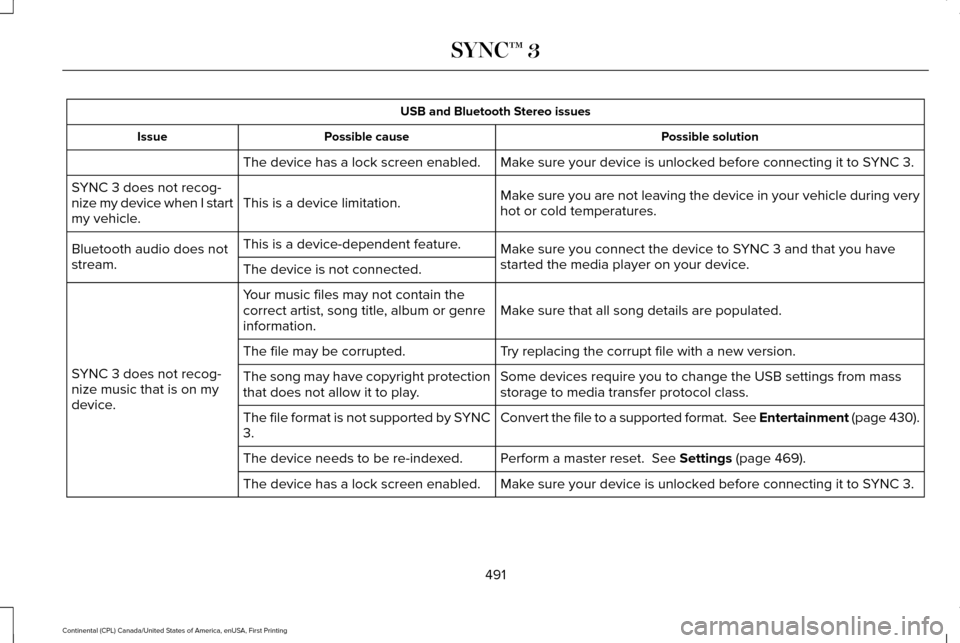
USB and Bluetooth Stereo issues
Possible solution
Possible cause
Issue
Make sure your device is unlocked before connecting it to SYNC 3.
The device has a lock screen enabled.
Make sure you are not leaving the device in your vehicle during very
hot or cold temperatures.
This is a device limitation.
SYNC 3 does not recog-
nize my device when I start
my vehicle.
Make sure you connect the device to SYNC 3 and that you have
started the media player on your device.
This is a device-dependent feature.
Bluetooth audio does not
stream. The device is not connected.
Make sure that all song details are populated.
Your music files may not contain the
correct artist, song title, album or genre
information.
SYNC 3 does not recog-
nize music that is on my
device. Try replacing the corrupt file with a new version.
The file may be corrupted.
Some devices require you to change the USB settings from mass
storage to media transfer protocol class.
The song may have copyright protection
that does not allow it to play.
Convert the file to a supported format. See Entertainment (page 430).
The file format is not supported by SYNC
3.
Perform a master reset.
See Settings (page 469).
The device needs to be re-indexed.
Make sure your device is unlocked before connecting it to SYNC 3.
The device has a lock screen enabled.
491
Continental (CPL) Canada/United States of America, enUSA, First Printing SYNC™ 3
Page 498 of 584
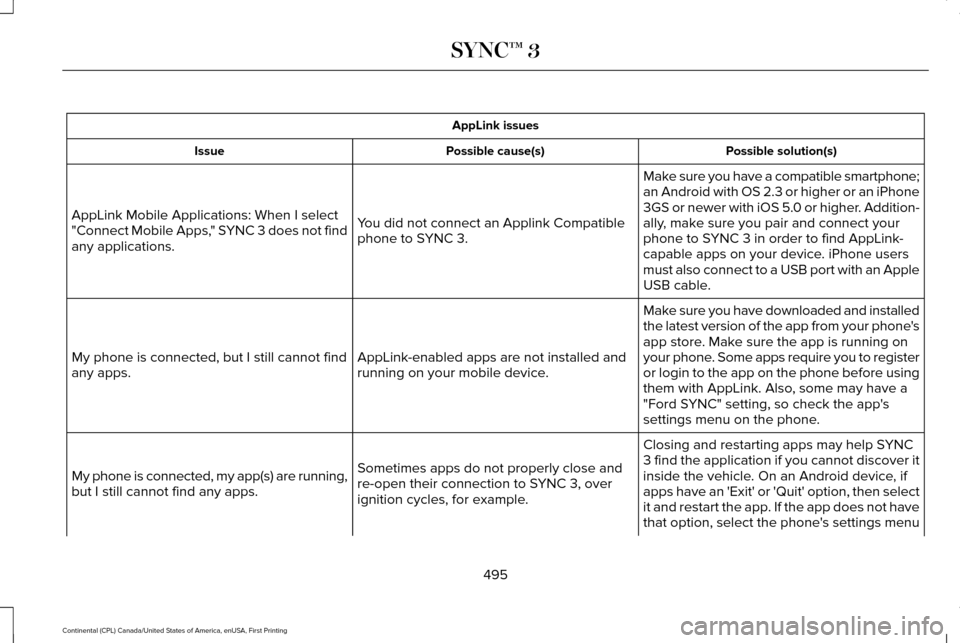
AppLink issues
Possible solution(s)
Possible cause(s)
Issue
Make sure you have a compatible smartphone;
an Android with OS 2.3 or higher or an iPhone
3GS or newer with iOS 5.0 or higher. Addition-
ally, make sure you pair and connect your
phone to SYNC 3 in order to find AppLink-
capable apps on your device. iPhone users
must also connect to a USB port with an Apple
USB cable.
You did not connect an Applink Compatible
phone to SYNC 3.
AppLink Mobile Applications: When I select
"Connect Mobile Apps," SYNC 3 does not find
any applications.
Make sure you have downloaded and installed
the latest version of the app from your phone's
app store. Make sure the app is running on
your phone. Some apps require you to register
or login to the app on the phone before using
them with AppLink. Also, some may have a
"Ford SYNC" setting, so check the app's
settings menu on the phone.
AppLink-enabled apps are not installed and
running on your mobile device.
My phone is connected, but I still cannot find
any apps.
Closing and restarting apps may help SYNC
3 find the application if you cannot discover it
inside the vehicle. On an Android device, if
apps have an 'Exit' or 'Quit' option, then select
it and restart the app. If the app does not have
that option, select the phone's settings menu
Sometimes apps do not properly close and
re-open their connection to SYNC 3, over
ignition cycles, for example.
My phone is connected, my app(s) are running,
but I still cannot find any apps.
495
Continental (CPL) Canada/United States of America, enUSA, First Printing SYNC™ 3
Page 500 of 584
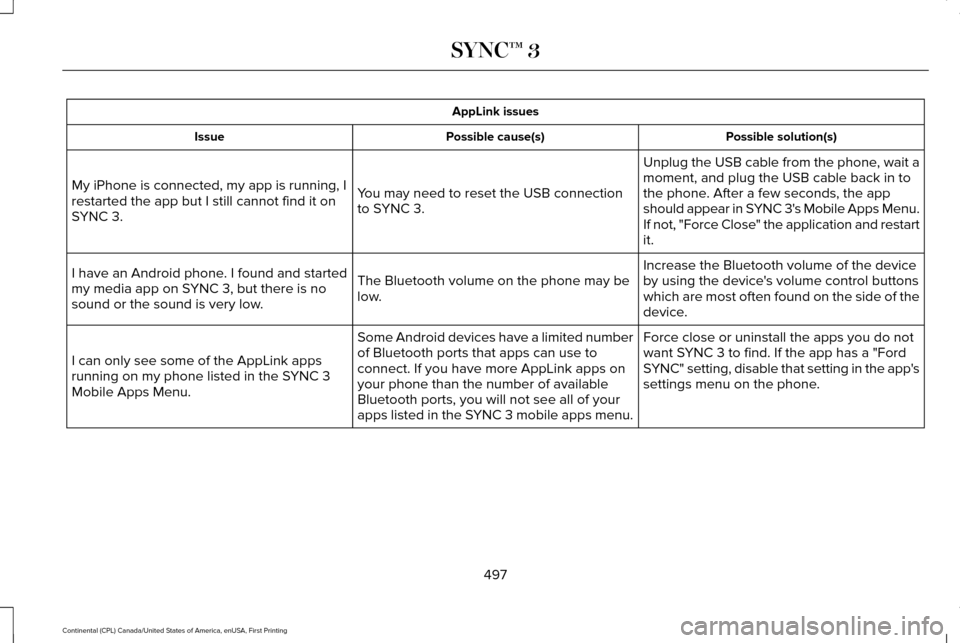
AppLink issues
Possible solution(s)
Possible cause(s)
Issue
Unplug the USB cable from the phone, wait a
moment, and plug the USB cable back in to
the phone. After a few seconds, the app
should appear in SYNC 3's Mobile Apps Menu.
If not, "Force Close" the application and restart
it.
You may need to reset the USB connection
to SYNC 3.
My iPhone is connected, my app is running, I
restarted the app but I still cannot find it on
SYNC 3.
Increase the Bluetooth volume of the device
by using the device's volume control buttons
which are most often found on the side of the
device.
The Bluetooth volume on the phone may be
low.
I have an Android phone. I found and started
my media app on SYNC 3, but there is no
sound or the sound is very low.
Force close or uninstall the apps you do not
want SYNC 3 to find. If the app has a "Ford
SYNC" setting, disable that setting in the app's
settings menu on the phone.
Some Android devices have a limited number
of Bluetooth ports that apps can use to
connect. If you have more AppLink apps on
your phone than the number of available
Bluetooth ports, you will not see all of your
apps listed in the SYNC 3 mobile apps menu.
I can only see some of the AppLink apps
running on my phone listed in the SYNC 3
Mobile Apps Menu.
497
Continental (CPL) Canada/United States of America, enUSA, First Printing SYNC™ 3
Page 504 of 584
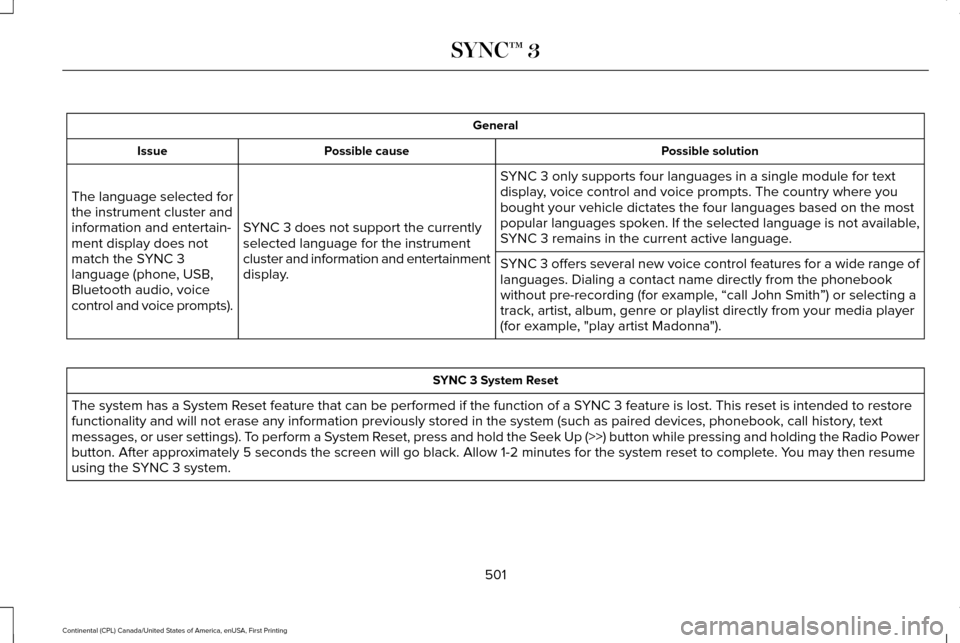
General
Possible solution
Possible cause
Issue
SYNC 3 only supports four languages in a single module for text
display, voice control and voice prompts. The country where you
bought your vehicle dictates the four languages based on the most
popular languages spoken. If the selected language is not available,
SYNC 3 remains in the current active language.
SYNC 3 does not support the currently
selected language for the instrument
cluster and information and entertainment
display.
The language selected for
the instrument cluster and
information and entertain-
ment display does not
match the SYNC 3
language (phone, USB,
Bluetooth audio, voice
control and voice prompts).
SYNC 3 offers several new voice control features for a wide range of
languages. Dialing a contact name directly from the phonebook
without pre-recording (for example, “call John Smith
”) or selecting a
track, artist, album, genre or playlist directly from your media player
(for example, "play artist Madonna"). SYNC 3 System Reset
The system has a System Reset feature that can be performed if the function of a SYNC 3 feature is lost. This reset is intended to restore
functionality and will not erase any information previously stored in th\
e system (such as paired devices, phonebook, call history , text
messages, or user settings). To perform a System Reset, press and hold the Seek Up (>>) button while pressing and holdin\
g the Radio Power
button. After approximately 5 seconds the screen will go black. Allow 1-2 minutes for the s\
ystem reset to complete. You may then resume
using the SYNC 3 system.
501
Continental (CPL) Canada/United States of America, enUSA, First Printing SYNC™ 3
Page 577 of 584
Coolant Change...................................................317
Engine Coolant Temperature
Management....................................................318
Fail-Safe Cooling..................................................317
Recycled Coolant................................................316
Severe Climates...................................................317
Engine Immobilizer See: Passive Anti-Theft System........................79
Engine Oil Check...........................................312 Adding Engine Oil...............................................313
Engine Oil Dipstick - 2.7L EcoBoost™.......312
Engine Oil Dipstick - 3.0L EcoBoost™.......312
Engine Oil Dipstick - 3.7L............................312
Engine Specifications - 2.7L EcoBoost™ ....................................................368
Drivebelt Routing................................................368
Engine Specifications - 3.0L EcoBoost™....................................................369
Drivebelt Routing................................................370
Engine Specifications - 3.7L
........................371
Drivebelt Routing.................................................371
Entertainment................................................430 AM/FM Radio.......................................................432
Apps.......................................................................443
Bluetooth Stereo or USB...................................441
CD (If equipped)..................................................440
HD Radio ™ Information (If Available)..............436
SIRIUS® Satellite Radio (If Activated).............432 Sources..................................................................431
Supported Media Players, Formats and
Metadata Information....................................443
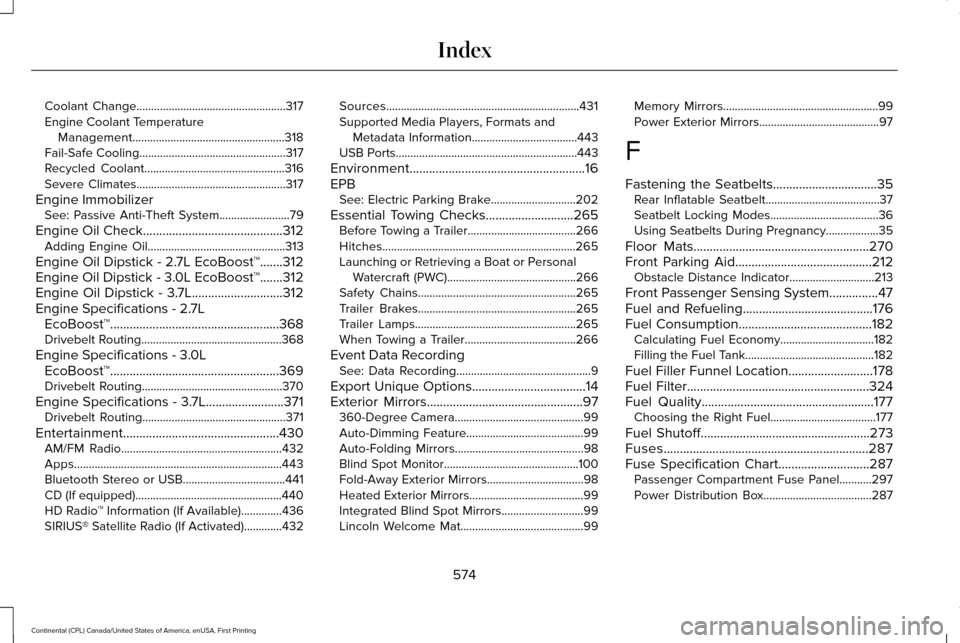
USB Ports..............................................................443
Environment......................................................16
EPB See: Electric Parking Brake.............................202
Essential Towing Checks
...........................265
Before Towing a Trailer.....................................266
Hitches..................................................................265
Launching or Retrieving a Boat or Personal
Watercraft (PWC)............................................266
Safety Chains......................................................265
Trailer Brakes......................................................265
Trailer Lamps.......................................................265
When Towing a Trailer......................................266
Event Data Recording See: Data Recording..............................................9
Export Unique Options...................................14
Exterior Mirrors
................................................97
360-Degree Camera............................................99
Auto-Dimming Feature........................................99
Auto-Folding Mirrors............................................98
Blind Spot Monitor..............................................100
Fold-Away Exterior Mirrors.................................98
Heated Exterior Mirrors.......................................99
Integrated Blind Spot Mirrors............................99
Lincoln Welcome Mat..........................................99 Memory Mirrors.....................................................99
Power Exterior Mirrors.........................................97
F
Fastening the Seatbelts................................35 Rear Inflatable Seatbelt.......................................37
Seatbelt Locking Modes.....................................36
Using Seatbelts During Pregnancy..................35
Floor Mats
......................................................270
Front Parking Aid..........................................212
Obstacle Distance Indicator.............................213
Front Passenger Sensing System...............47
Fuel and Refueling
........................................176
Fuel Consumption.........................................182
Calculating Fuel Economy................................182
Filling the Fuel Tank............................................182
Fuel Filler Funnel Location..........................178
Fuel Filter
........................................................324
Fuel Quality.....................................................177 Choosing the Right Fuel....................................177
Fuel Shutoff
....................................................273
Fuses...............................................................287
Fuse Specification Chart............................287 Passenger Compartment Fuse Panel...........297
Power Distribution Box.....................................287
574
Continental (CPL) Canada/United States of America, enUSA, First Printing Index
Page 583 of 584
The Better Business Bureau (BBB) Auto
Line Program (U.S. Only)...........................281
Tire Care..........................................................341 Glossary of Tire Terminology..........................342
Important Information About Low-Profile
Tires....................................................................341
Information About Uniform Tire Quality Grading..............................................................341
Information Contained on the Tire Sidewall............................................................343
Temperature A B C.............................................342
Traction AA A B C...............................................342
Treadwear..............................................................341
Tire Pressure Monitoring System.............356 Changing Tires With a Tire Pressure
Monitoring System.........................................357
Understanding Your Tire Pressure Monitoring System .............................................................358
Tires See: Wheels and Tires.......................................341
Towing a Trailer.............................................263
Load Placement..................................................263
Towing the Vehicle on Four Wheels........267 Emergency Towing.............................................267
Recreational Towing..........................................267
Towing.............................................................263
Traction Control
............................................207
Principle of Operation.......................................207 Transmission Code Designation...............377
Transmission...................................................187
Transmission
See: Transmission................................................187
Transporting the Vehicle.............................277
U
Under Hood Overview - 2.7L EcoBoost™/ 3.7L
................................................................308
Under Hood Overview - 3.0L EcoBoost™.....................................................310
Universal Garage Door Opener
................164
HomeLink Wireless Control System...............164
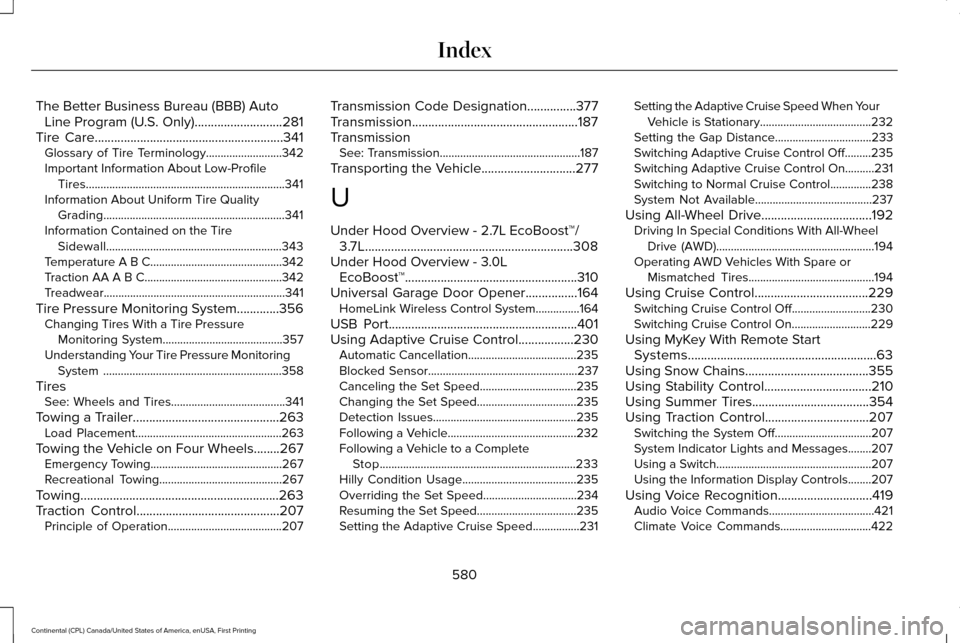
USB Port
..........................................................401
Using Adaptive Cruise Control.................230
Automatic Cancellation.....................................235
Blocked Sensor...................................................237
Canceling the Set Speed.................................235
Changing the Set Speed..................................235
Detection Issues.................................................235
Following a Vehicle............................................232
Following a Vehicle to a Complete
Stop...................................................................233
Hilly Condition Usage.......................................235
Overriding the Set Speed................................234
Resuming the Set Speed..................................235
Setting the Adaptive Cruise Speed................231 Setting the Adaptive Cruise Speed When Your
Vehicle is Stationary......................................232
Setting the Gap Distance.................................
233
Switching Adaptive Cruise Control Off.........235
Switching Adaptive Cruise Control On..........231
Switching to Normal Cruise Control..............238
System Not Available........................................237
Using All-Wheel Drive
..................................192
Driving In Special Conditions With All-Wheel
Drive (AWD)......................................................194
Operating AWD Vehicles With Spare or Mismatched Tires...........................................194
Using Cruise Control...................................229 Switching Cruise Control Off...........................230
Switching Cruise Control On...........................229
Using MyKey With Remote Start Systems..........................................................63
Using Snow Chains......................................355
Using Stability Control
.................................210
Using Summer Tires....................................354
Using Traction Control................................207 Switching the System Off.................................207
System Indicator Lights and Messages........207
Using a Switch.....................................................207
Using the Information Display Controls........
207
Using Voice Recognition.............................419 Audio Voice Commands....................................421
Climate Voice Commands...............................
422
580
Continental (CPL) Canada/United States of America, enUSA, First Printing Index