center console LINCOLN CONTINENTAL 2017 User Guide
[x] Cancel search | Manufacturer: LINCOLN, Model Year: 2017, Model line: CONTINENTAL, Model: LINCOLN CONTINENTAL 2017Pages: 584, PDF Size: 6.13 MB
Page 404 of 584

DISPLAY: Press to switch the display on and off.
A
Seek, Fast Forward and Reverse:
In radio mode, press either button to scroll through the presets from the front radio\
. To select a
radio station, press and hold to move quickly forward or backward throug\
h the radio stations. In CD or USB mode, press to select
the next or previous track. Press and hold to move quickly forward or ba\
ckward through the selected media source.
B
Volume:
Turn to adjust the volume.
C
SOURCE:
Press to access different media modes, for example AM, FM, CD, and USB.
D
USB PORT
(If Equipped) WARNING
Driving while distracted can result in
loss of vehicle control, crash and injury.
We strongly recommend that you use
extreme caution when using any device that
may take your focus off the road. Your
primary responsibility is the safe operation
of your vehicle. We recommend against the
use of any hand-held device while driving
and encourage the use of voice-operated
systems when possible. Make sure you are
aware of all applicable local laws that may
affect the use of electronic devices while
driving. The USB port allows you to plug in media
playing devices, memory sticks and charge
devices (if supported). See your SYNC
information.MEDIA HUB
You can locate the media hub inside the
center console or on the instrument panel.
See your SYNC information.
401
Continental (CPL) Canada/United States of America, enUSA, First Printing Audio SystemE205592 E211463
Page 446 of 584
USB Ports
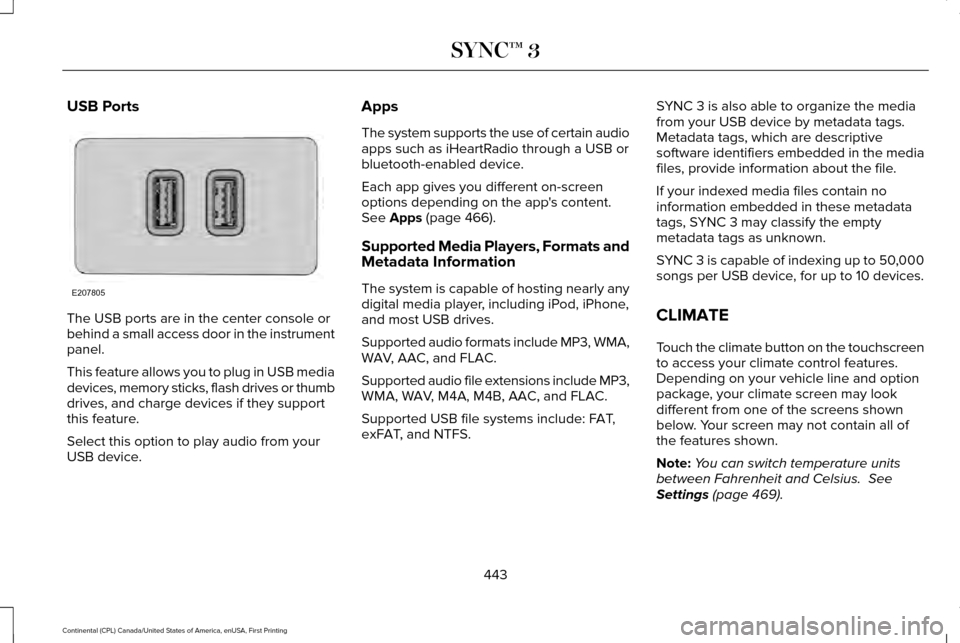
The USB ports are in the center console or
behind a small access door in the instrument
panel.
This feature allows you to plug in USB media
devices, memory sticks, flash drives or thumb
drives, and charge devices if they support
this feature.
Select this option to play audio from your
USB device. Apps
The system supports the use of certain audio
apps such as iHeartRadio through a USB or
bluetooth-enabled device.
Each app gives you different on-screen
options depending on the app's content.
See Apps (page 466).
Supported Media Players, Formats and
Metadata Information
The system is capable of hosting nearly any
digital media player, including iPod, iPhone,
and most USB drives.
Supported audio formats include MP3, WMA,
WAV, AAC, and FLAC.
Supported audio file extensions include MP3,
WMA, WAV, M4A, M4B, AAC, and FLAC.
Supported USB file systems include: FAT,
exFAT, and NTFS. SYNC 3 is also able to organize the media
from your USB device by metadata tags.
Metadata tags, which are descriptive
software identifiers embedded in the media
files, provide information about the file.
If your indexed media files contain no
information embedded in these metadata
tags, SYNC 3 may classify the empty
metadata tags as unknown.
SYNC 3 is capable of indexing up to 50,000
songs per USB device, for up to 10 devices.
CLIMATE
Touch the climate button on the touchscreen
to access your climate control features.
Depending on your vehicle line and option
package, your climate screen may look
different from one of the screens shown
below. Your screen may not contain all of
the features shown.
Note:
You can switch temperature units
between Fahrenheit and Celsius.
See
Settings (page 469).
443
Continental (CPL) Canada/United States of America, enUSA, First Printing SYNC™ 3E207805
Page 575 of 584
Automatic Transmission...............................187
Automatic Transmission Adaptive
Learning.............................................................191
Brake-Shift Interlock Override.........................
190
If Your Vehicle Gets Stuck In Mud or Snow...................................................................191
Push Button Shift Transmission.......................187
SelectShift™ Automatic Transmission.............189
Understanding the Shift Positions of your Automatic Transmission................................
187
Automatic Transmission Fluid Check
.......319
6F50/6F55 Transmission..................................319
Autowipers.......................................................85
Auxiliary Power Points.................................168 110 Volt AC Power Point.....................................168
12 Volt DC Power Point......................................168
Locations...............................................................168
AWD See: All-Wheel Drive...........................................192
B
Battery See: Changing the 12V Battery.......................
324
Blind Spot Information System.................245 Switching the System Off and On..................247
System Errors......................................................247
Using the System...............................................245 Bonnet Lock
See: Opening and Closing the Hood............306
Booster Seats
..................................................28
Types of Booster Seats.......................................29
Brake Fluid Check........................................323
Brakes..............................................................201 General Information............................................201
Breaking-In....................................................269
Bulb Specification Chart
.............................328
C
Cabin Air Filter................................................147
California Proposition 65
...............................12
Capacities and Specifications - 2.7L EcoBoost™....................................................378
Specifications......................................................379
Capacities and Specifications - 3.0L EcoBoost™....................................................384
Specifications......................................................385
Capacities and Specifications - 3.7L........389 Specifications.......................................................391
Capacities and Specifications
...................368
Car Wash See: Cleaning the Exterior...............................333
Center Console
..............................................170
Changing a Bulb...........................................327
Front Direction Indicator...................................328 High-Intensity Discharge Headlamps...........327
LED Lamps...........................................................328
Changing a Fuse..........................................303 Fuses.....................................................................303
Changing a Road Wheel............................360 Dissimilar Spare Wheel and Tire Assembly
Information......................................................360
Stowing the flat tire ...........................................364
Tire Change Procedure....................................362
Changing the 12V Battery
..........................324
Changing the Engine Air Filter - 2.7L EcoBoost™/3.0L EcoBoost™
.....................330
Changing the Engine Air Filter - 3.7L......330
Changing the Wiper Blades
......................325
Changing the Windshield Wiper Blades......326
Checking MyKey System Status.................62 MyKey Distance....................................................62
Number of Admin Keys.......................................63
Number of MyKeys...............................................62
Checking the Wiper Blades.......................325
Child Restraint and Seatbelt Maintenance...................................................41
Child Restraint Positioning
............................31
Child Safety.......................................................17
General Information...............................................17
Child Safety Locks..........................................32
Child Seats........................................................19
Cleaning Leather Seats...............................337
572
Continental (CPL) Canada/United States of America, enUSA, First Printing Index
Page 580 of 584
Illuminated Exit......................................................70
Locking and Unlocking the Doors From
Inside...................................................................68
Opening the Luggage Compartment..............70
Remote Control.....................................................67
Smart Unlocks for Intelligent Access Keys.....................................................................69
Unlocking the Driver Door with the Key Blade...................................................................69
Lug Nuts See: Changing a Road Wheel.........................360
M
Maintenance..................................................306 General Information...........................................306
Media Hub.......................................................401
Memory Function..........................................156
Easy Entry and Exit Feature..............................157
Linking a PreSet Position to your Remote
Control or Intelligent Access Key Fob.......157
Saving a PreSet Position...................................
156
Message Center See: Information Displays..................................110
Mirrors See: Heated Windows and Mirrors.................146
See: Windows and Mirrors.................................96
Mobile Communications Equipment
...........14 Moonroof.........................................................102
Bounce-Back........................................................102
Opening and Closing the Moonroof..............102
Motorcraft Parts - 2.7L EcoBoost™............372
Motorcraft Parts - 3.0L EcoBoost™............373
Motorcraft Parts - 3.7L
.................................374
MyKey Troubleshooting................................63
MyKey™..............................................................60 Principle of Operation.........................................60
N
Navigation......................................................456 cityseeker.............................................................465
Destination Mode...............................................457
Map Mode............................................................456
Navigation Map Updates.................................465
Navigation Menu................................................462
SiriusXM Traffic and Travel Link.....................465
Waypoints.............................................................464
Normal Scheduled Maintenance..............512 Intelligent Oil-Life Monitor™..............................512
Normal Maintenance Intervals.........................514
O
Oil Change Indicator Reset.........................314 Oil Check
See: Engine Oil Check.......................................312
Opening and Closing the Hood...............306 Closing the Hood...............................................307
Opening the Hood.............................................306
Opening the Doors..........................................71
Front Doors..............................................................71
Rear Doors...............................................................71
Ordering Additional Owner's Literature
.....................................................284
Obtaining a French Owner’ s Manual............284
Overhead Console
........................................170
P
Parking Aids.....................................................211 Principle of Operation.........................................211
Passive Anti-Theft System............................79 SecuriLock®............................................................79
PATS See: Passive Anti-Theft System........................79
Perchlorate........................................................12
Personal Safety System ™
..............................43
How Does the Personal Safety System
Work?...................................................................43
Phone..............................................................448 During a Phone Call...........................................453
Making Calls........................................................452
577
Continental (CPL) Canada/United States of America, enUSA, First Printing Index