service indicator LINCOLN CONTINENTAL 2017 User Guide
[x] Cancel search | Manufacturer: LINCOLN, Model Year: 2017, Model line: CONTINENTAL, Model: LINCOLN CONTINENTAL 2017Pages: 584, PDF Size: 6.13 MB
Page 210 of 584
PRINCIPLE OF OPERATION
The traction control system helps avoid drive
wheel spin and loss of traction.
If your vehicle begins to slide, the system
applies the brakes to individual wheels and,
when needed, reduces engine power at the
same time. If the wheels spin when
accelerating on slippery or loose surfaces,
the system reduces engine power in order
to increase traction.
USING TRACTION CONTROL WARNING
The stability and traction control light
illuminates steadily if the system
detects a failure. Make sure you did not
manually disable the traction control system
using the information display controls or the
switch. If the stability control and traction
control light is still illuminating steadily, have
the system serviced by an authorized dealer
immediately. Operating your vehicle with the
traction control disabled could lead to an
increased risk of loss of vehicle control,
vehicle rollover, personal injury and death. The system automatically turns on each time
you switch the ignition on.
If your vehicle is stuck in mud or snow,
switching traction control off may be
beneficial as this allows the wheels to spin.
Note:
When you switch traction control off,
stability control remains fully active. Switching the System Off
When you switch the system off or on, a
message appears in the information display
showing system status.
You can switch the system off by either using
the information display controls or the switch.
Using the Information Display Controls
You can switch this feature off or on in the
information display. See General Information
(page 110).
Using a Switch
(If Equipped)
Use the traction control switch on the
instrument panel to switch the system off or
on.
System Indicator Lights and Messages The stability and traction control
light:
207
Continental (CPL) Canada/United States of America, enUSA, First Printing Traction ControlE138639
Page 254 of 584
•
Driving in reverse faster than 7 mph
(12 km/h).
• Backing out of an angled parking spot.
False Alerts
Note: If your vehicle has a tow bar with a
factory equipped trailer tow module and it
is towing a trailer, the sensors will
automatically turn the Cross Traffic Alert off.
If your vehicle has a tow bar but no factory
equipped trailer tow module, it is
recommended to turn the Cross Traffic Alert
off manually. Operating Cross Traffic Alert
with a trailer attached will cause poor Cross
Traffic Alert performance.
There may be certain instances when there
is a false alert by the Cross Traffic Alert
system that illuminates the alert indicator
with no vehicle in the coverage zone. Some
amount of false alerts are normal; they are
temporary and self-correct. System Errors
If Cross Traffic Alert senses a problem with
the left or right sensor a message will appear
in the information display.
See Information
Messages (page 118).
Switching the System Off and On
You can temporarily switch Cross Traffic Alert
off in the information display.
See General
Information (page 110). When you switch
Cross Traffic Alert off, you will not receive
alerts and the information display will display
a system off message.
Note: The Cross Traffic Alert switches on
whenever the ignition is switched on and
ready to provide appropriate alerts when
the transmission is in reverse (R). Cross
Traffic Alert will not remember the last
selected on or off setting.
You can also have Cross Traffic Alert
switched off permanently at an authorized
dealer. Once switched off permanently, the
system can only be switched back on at an
authorized dealer. STEERING
Electric Power Steering WARNINGS
The electric power steering system has
diagnostic checks that continuously
monitor the system. If a fault is detected, a
message displays in the information display.
Stop your vehicle as soon as it is safe to do
so. Switch the ignition off. After at least 10
seconds, switch the ignition on and watch
the information display for a steering system
warning message. If a steering system
warning message returns, have the system
checked by an authorized dealer. If the system detects an error, you may
not feel a difference in the steering,
however a serious condition may exist.
Obtain immediate service from an authorized
dealer, failure to do so may result in loss of
steering control. Your vehicle has an electric power steering
system. There is no fluid reservoir. No
maintenance is required.
251
Continental (CPL) Canada/United States of America, enUSA, First Printing Driving Aids
Page 276 of 584
Vehicles Sold in Canada: Getting
Roadside Assistance
To fully assist you should you have a vehicle
concern, Lincoln Motor Company offers a
complimentary roadside assistance program.
This program is eligible within Canada or the
continental United States.
This program is separate from the New
Vehicle Limited Warranty, but the coverage
is concurrent with the powertrain coverage
period of your vehicle.
Canadian customers who require roadside
assistance, call 1-800-387-5333.
Vehicles Sold in Canada: Using
Roadside Assistance
Complete the roadside assistance
identification card and place it in your wallet
for quick reference.
In Canada, this card is found in the Warranty
Guide in the glove compartment of your
vehicle.
Vehicles Sold in Canada: Roadside
Assistance Program Coverage
The service is available 24 hours a day,
seven days a week.
Canadian roadside coverage and benefits
may differ from the U.S. coverage.
For complete program coverage details
review your warranty guide, contact your
dealer, call us in Canada at 1-800-387-9333,
or visit our website at
www.lincolncanada.com.
HAZARD WARNING FLASHERS
Note:
If used when the vehicle is not running,
the battery will lose charge. There may be
insufficient power to restart your vehicle. The hazard warning button is
located on the instrument panel.
Use it when your vehicle is
creating a safety hazard for other motorists. •
Press the button to turn on the hazard
warning function, and the front and rear
direction indicators will flash.
• Press the button again to turn them off.
FUEL SHUTOFF WARNING
Failure to inspect and, if necessary,
repair fuel leaks after a collision may
increase the risk of fire and serious injury.
Ford Motor Company recommends that the
fuel system be inspected by an authorized
dealer after any collision. In the event of a moderate to severe
collision, this vehicle includes a fuel pump
shutoff feature that stops the flow of fuel to
the engine. Not every impact will cause a
shutoff.
273
Continental (CPL) Canada/United States of America, enUSA, First Printing Roadside Emergencies
Page 280 of 584
2. Remove the jumper cable on the
negative (-) terminal of the booster
vehicle battery.
3. Remove the jumper cable from the positive (+) terminal of the booster vehicle
battery.
4. Remove the jumper cable from the positive (+) terminal of the disabled
vehicle battery.
5. Allow the engine to idle for at least one minute.
POST-CRASH ALERT SYSTEM
The system flashes the direction indicators
and sounds the horn (intermittently) in the
event of a serious impact that deploys an
airbag (front, side, side curtain or Safety
Canopy) or the safety belt pretensioners.
The horn and indicators will turn off when:
• You press the hazard control button.
• You press the panic button on the remote
entry transmitter (if equipped).
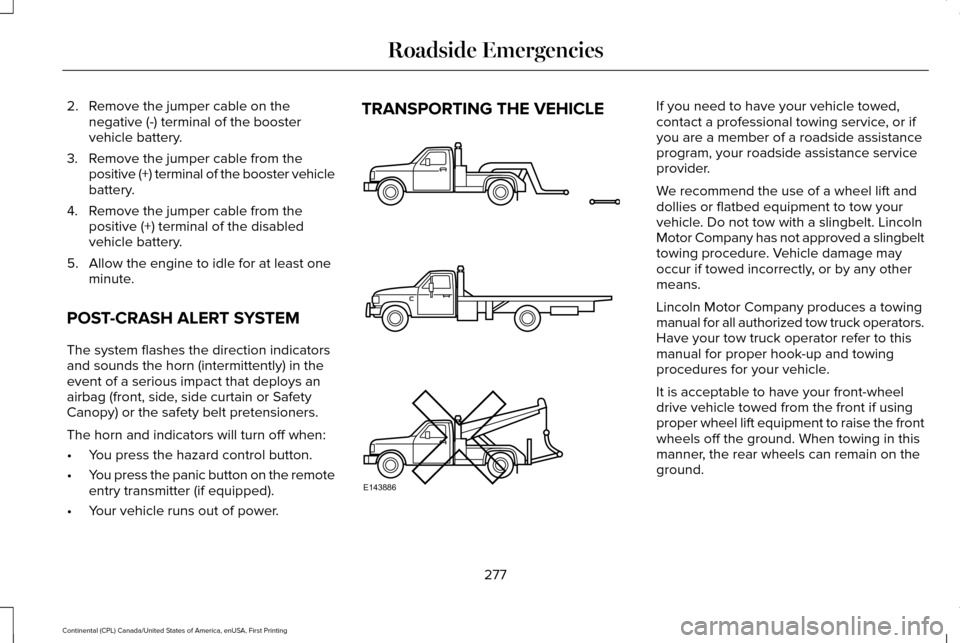
• Your vehicle runs out of power. TRANSPORTING THE VEHICLE If you need to have your vehicle towed,
contact a professional towing service, or if
you are a member of a roadside assistance
program, your roadside assistance service
provider.
We recommend the use of a wheel lift and
dollies or flatbed equipment to tow your
vehicle. Do not tow with a slingbelt. Lincoln
Motor Company has not approved a slingbelt
towing procedure. Vehicle damage may
occur if towed incorrectly, or by any other
means.
Lincoln Motor Company produces a towing
manual for all authorized tow truck operators.
Have your tow truck operator refer to this
manual for proper hook-up and towing
procedures for your vehicle.
It is acceptable to have your front-wheel
drive vehicle towed from the front if using
proper wheel lift equipment to raise the front
wheels off the ground. When towing in this
manner, the rear wheels can remain on the
ground.
277
Continental (CPL) Canada/United States of America, enUSA, First Printing Roadside EmergenciesE143886
Page 331 of 584
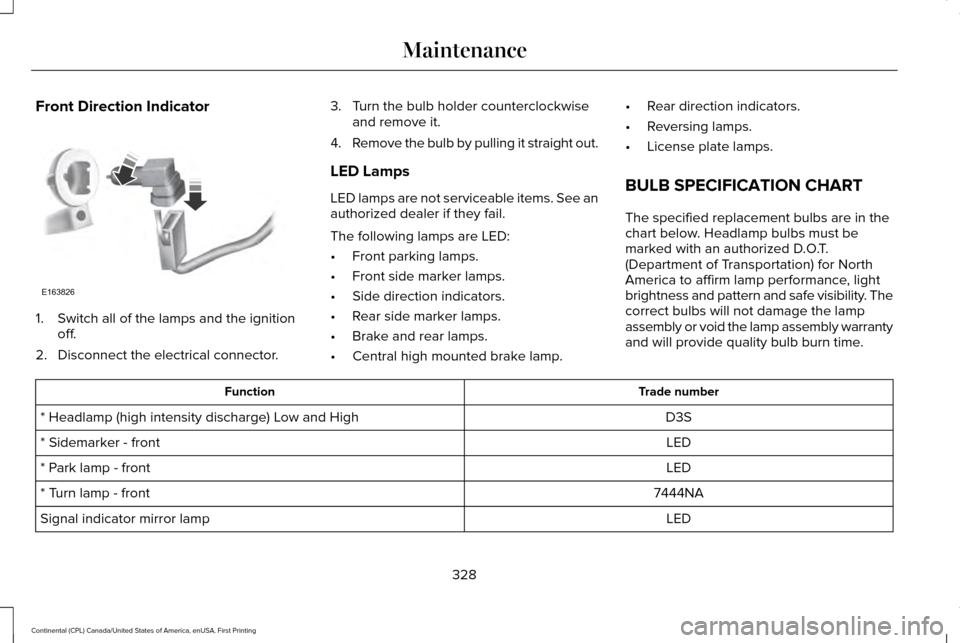
Front Direction Indicator
1. Switch all of the lamps and the ignition
off.
2. Disconnect the electrical connector. 3. Turn the bulb holder counterclockwise
and remove it.
4. Remove the bulb by pulling it straight out.
LED Lamps
LED lamps are not serviceable items. See an
authorized dealer if they fail.
The following lamps are LED:
• Front parking lamps.
• Front side marker lamps.
• Side direction indicators.
• Rear side marker lamps.
• Brake and rear lamps.
• Central high mounted brake lamp. •
Rear direction indicators.
• Reversing lamps.
• License plate lamps.
BULB SPECIFICATION CHART
The specified replacement bulbs are in the
chart below. Headlamp bulbs must be
marked with an authorized D.O.T.
(Department of Transportation) for North
America to affirm lamp performance, light
brightness and pattern and safe visibility. The
correct bulbs will not damage the lamp
assembly or void the lamp assembly warranty
and will provide quality bulb burn time. Trade number
Function
D3S
* Headlamp (high intensity discharge) Low and High
LED
* Sidemarker - front
LED
* Park lamp - front
7444NA
* Turn lamp - front
LED
Signal indicator mirror lamp
328
Continental (CPL) Canada/United States of America, enUSA, First Printing MaintenanceE163826
Page 360 of 584
Your vehicle has also been equipped with a
TPMS malfunction indicator to indicate when
the system is not operating properly. The
TPMS malfunction indicator is combined with
the low tire pressure telltale. When the
system detects a malfunction, the telltale will
flash for approximately one minute and then
remain continuously illuminated. This
sequence will continue upon subsequent
vehicle start-ups as long as the malfunction
exists.
When the malfunction indicator is illuminated,
the system may not be able to detect or
signal low tire pressure as intended. TPMS
malfunctions may occur for a variety of
reasons, including the installation of
replacement or alternate tires or wheels on
the vehicle that prevent the TPMS from
functioning properly. Always check the TPMS
malfunction telltale after replacing one or
more tires or wheels on your vehicle to
ensure that the replacement or alternate tires
and wheels allow the TPMS to continue to
function properly.
This device complies with Part 15 of the FCC
Rules and with Industry Canada
license-exempt RSS standard(s). Operation
is subject to the following two conditions:
•
This device may not cause harmful
interference.
• This device must accept any interference
received, including interference that may
cause undesired operation.
Changing Tires With a Tire Pressure
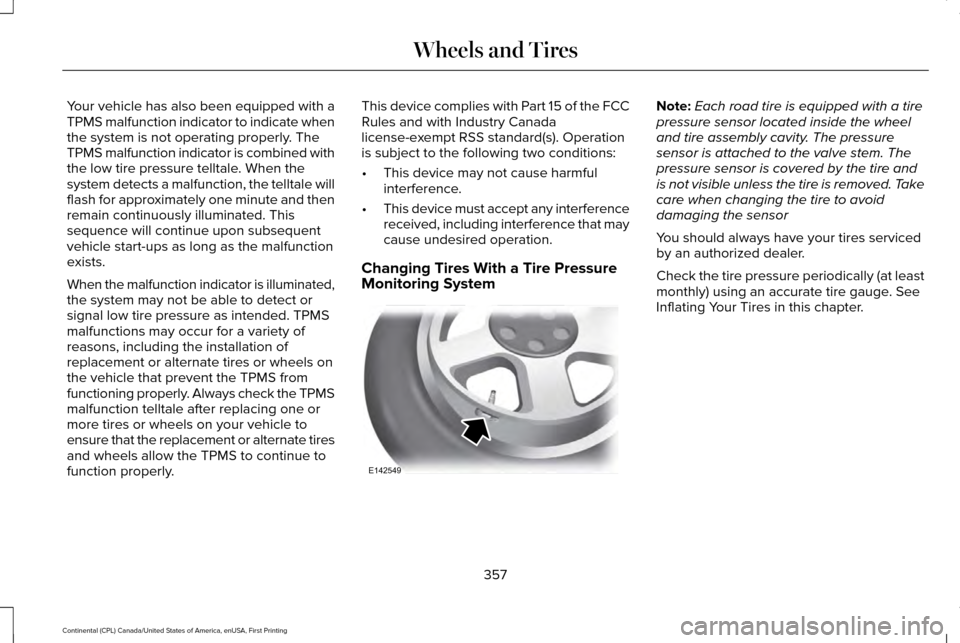
Monitoring System Note:
Each road tire is equipped with a tire
pressure sensor located inside the wheel
and tire assembly cavity. The pressure
sensor is attached to the valve stem. The
pressure sensor is covered by the tire and
is not visible unless the tire is removed. Take
care when changing the tire to avoid
damaging the sensor
You should always have your tires serviced
by an authorized dealer.
Check the tire pressure periodically (at least
monthly) using an accurate tire gauge. See
Inflating Your Tires in this chapter.
357
Continental (CPL) Canada/United States of America, enUSA, First Printing Wheels and TiresE142549
Page 363 of 584
When Inflating Your Tires
When putting air into your tires (such as at a
gas station or in your garage), the tire
pressure monitoring system may not respond
immediately to the air added to your tires.
It may take up to two minutes of driving over
20 mph (32 km/h) for the light to turn off after
you have filled your tires to the
recommended inflation pressure
How Temperature Affects Your Tire
Pressure
The tire pressure monitoring system monitors
tire pressure in each pneumatic tire. While
driving in a normal manner, a typical
passenger tire inflation pressure may
increase about 2–4 psi (14–28 kPa) from a
cold start situation. If the vehicle is stationary
overnight with the outside temperature
significantly lower than the daytime
temperature, the tire pressure may decrease
about
3 psi (21 kPa) for a drop of 30°F (17°C)
in ambient temperature. This lower pressure
value may be detected by the tire pressure
monitoring system as being significantly
lower than the recommended inflation pressure and activate the system warning
light for low tire pressure. If the low tire
pressure warning light is on, visually check
each tire to verify that no tire is flat. If one or
more tires are flat, repair as necessary.
Check the air pressure in the road tires. If
any tire is under-inflated, carefully drive the
vehicle to the nearest location where air can
be added to the tires. Inflate all the tires to
the recommended inflation pressure.
CHANGING A ROAD WHEEL
WARNINGS
Do not use tire sealants as they may
damage the tire pressure monitoring
system. If the tire pressure monitor sensor
becomes damaged it may not function.
Note:
The tire pressure monitoring system
indicator light will illuminate when the spare
tire is in use. To restore the full function of
the monitoring system, all road wheels
equipped with tire pressure monitoring
sensors must be mounted on the vehicle. If you get a flat tire while driving, do not apply
the brake heavily. Instead, gradually
decrease your speed. Hold the steering
wheel firmly and slowly move to a safe place
on the side of the road.
Have a flat serviced by an authorized dealer
in order to prevent damage to the tire
pressure monitoring system sensors.
See
Tire Pressure Monitoring System (page 356).
Replace the spare tire with a road tire as
soon as possible. During repairing or
replacing of the flat tire, have an authorized
dealer inspect the tire pressure monitoring
system sensor for damage.
Dissimilar Spare Wheel and Tire
Assembly Information WARNING
Failure to follow these guidelines could
result in an increased risk of loss of
vehicle control, injury or death. 360
Continental (CPL) Canada/United States of America, enUSA, First Printing Wheels and Tires
Page 435 of 584
AM/FM Radio
Tuning a Station
You can use the tune or seek controls on the
radio bezel to select a station.
To tune a station using the touchscreen,
select:
Menu item
Direct Tune
A pop up appears, allowing you to type in
the frequency of a station. You can only enter
a valid station for the source you are
currently listening to.
You can press the backspace button to
delete the previously entered number. Once you have entered the station's call
numbers, you can select: Action and description
Menu item
Press to begin
playing the station
you have entered.
Enter
Press to exit without
changing the station.
Cancel
Presets
To set a new preset, tune to the station and
then press and hold one of the memory
preset buttons. The audio mutes briefly while
the system saves the station and then
returns.
There are two preset banks available for AM
and three banks for FM. To access additional
presets, tap the preset button. The indicator
on the preset button shows which bank of
presets you are currently viewing. SIRIUS® Satellite Radio (If Activated)
Note:
This feature may not be available in
all markets and requires an active
subscription. SIRIUS satellite radio is a subscription-based
satellite radio service that broadcasts a
variety of music, sports, news, weather, traffic
and entertainment programming. Your
factory-installed SIRIUS satellite radio system
includes hardware and a limited subscription
term that begins on the date of sale or lease
of your vehicle. See an authorized dealer for
availability.
432
Continental (CPL) Canada/United States of America, enUSA, First Printing SYNC™ 3E142593
Page 576 of 584
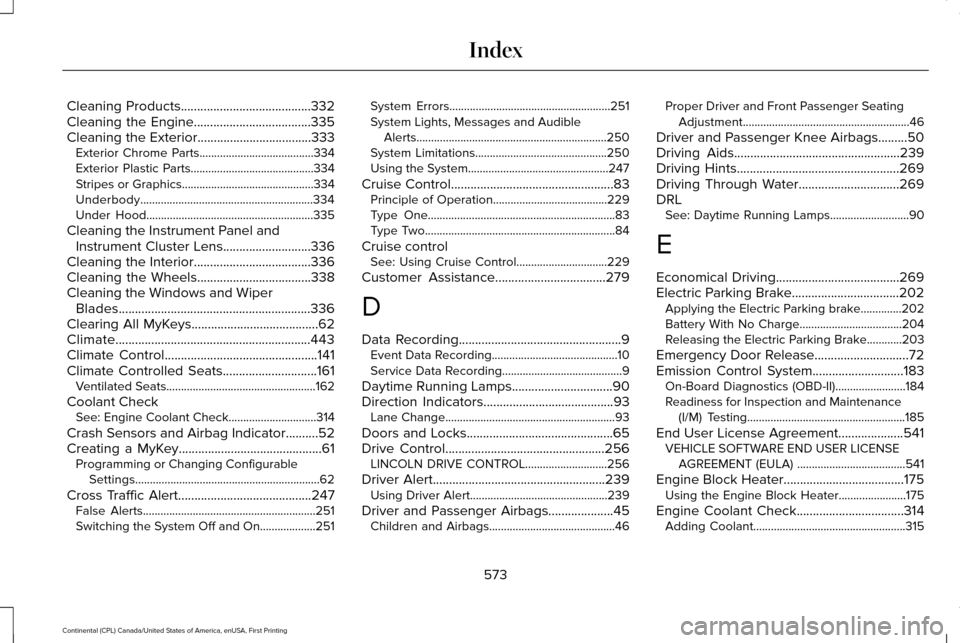
Cleaning Products........................................332
Cleaning the Engine....................................335
Cleaning the Exterior...................................333
Exterior Chrome Parts.......................................334
Exterior Plastic Parts..........................................334
Stripes or Graphics.............................................334
Underbody...........................................................334
Under Hood.........................................................335
Cleaning the Instrument Panel and Instrument Cluster Lens...........................336
Cleaning the Interior....................................336
Cleaning the Wheels...................................338
Cleaning the Windows and Wiper Blades...........................................................336
Clearing All MyKeys
.......................................62
Climate............................................................443
Climate Control
...............................................141
Climate Controlled Seats.............................161
Ventilated Seats...................................................162
Coolant Check See: Engine Coolant Check..............................314
Crash Sensors and Airbag Indicator
..........52
Creating a MyKey............................................61 Programming or Changing Configurable
Settings...............................................................62
Cross Traffic Alert
.........................................247
False Alerts...........................................................251
Switching the System Off and On...................251 System Errors.......................................................251
System Lights, Messages and Audible
Alerts.................................................................250
System Limitations.............................................250
Using the System................................................247
Cruise Control..................................................83 Principle of Operation.......................................229
Type One................................................................83
Type Two.................................................................84
Cruise control See: Using Cruise Control...............................
229
Customer Assistance..................................279
D
Data Recording
..................................................9
Event Data Recording...........................................10
Service Data Recording.........................................9
Daytime Running Lamps...............................90
Direction Indicators
........................................93
Lane Change..........................................................93
Doors and Locks.............................................65
Drive Control
.................................................256
LINCOLN DRIVE CONTROL............................256
Driver Alert.....................................................239 Using Driver Alert...............................................239
Driver and Passenger Airbags....................45 Children and Airbags...........................................46 Proper Driver and Front Passenger Seating
Adjustment.........................................................46
Driver and Passenger Knee Airbags.........50
Driving Aids
...................................................239
Driving Hints..................................................269
Driving Through Water...............................269
DRL See: Daytime Running Lamps...........................90
E
Economical Driving
......................................269
Electric Parking Brake.................................202 Applying the Electric Parking brake..............202
Battery With No Charge...................................204
Releasing the Electric Parking Brake............203
Emergency Door Release.............................72
Emission Control System
............................183
On-Board Diagnostics (OBD-II)........................184
Readiness for Inspection and Maintenance
(I/M) Testing......................................................185
End User License Agreement
....................541
VEHICLE SOFTWARE END USER LICENSE
AGREEMENT (EULA) .....................................541
Engine Block Heater
.....................................175
Using the Engine Block Heater.......................175
Engine Coolant Check.................................314 Adding Coolant....................................................315
573
Continental (CPL) Canada/United States of America, enUSA, First Printing Index
Page 579 of 584

AWD........................................................................\
122
Battery and Charging System..........................123
Blind Spot Information and Cross Traffic Alert
System...............................................................124
Doors and Locks..................................................124
Driver Alert............................................................125
Fuel........................................................................\
.126
Hill Start Assist.....................................................126
Keys and Intelligent Access.............................126
Lane Keeping System........................................128
Maintenance.........................................................128
MyKey.....................................................................130
Park Aid...................................................................131
Park Brake..............................................................131
Power Steering....................................................132
Pre-Collision Assist.............................................133
Remote Start.........................................................133
Seats.......................................................................133
Stability Control....................................................134
Starting System ...................................................134
Tire Pressure Monitoring System....................135
Transmission.........................................................135
Installing Child Restraints..............................19
Inflatable Seatbelts...............................................22
Standard Seatbelts...............................................20
Using Lap and Shoulder Belts............................19
Using Lower Anchors and Tethers for
CHildren (LATCH).............................................25 Using Tether Straps..............................................27
Instrument Cluster
.........................................103
Instrument Lighting Dimmer........................90
Interior Lamps
..................................................93
Front Interior Lamp...............................................93
Rear Interior Lamp................................................95
Interior Luggage Compartment Release............................................................77
Interior Mirror
.................................................100
Auto-Dimming Mirror..........................................100
Introduction
.........................................................7
J
Jump Starting the Vehicle..........................274 Connecting the Jumper Cables......................275
Jump Starting......................................................276
Preparing Your Vehicle......................................274
Removing the Jumper Cables.........................276
K
Keyless Entry
....................................................75
SECURICODE™ Keyless Entry Keypad.............75
Keyless Starting..............................................171 Ignition Modes.......................................................171
Keys and Remote Controls
...........................54 L
Lane Keeping System
.................................240
Switching the System On and Off..................240
Lighting Control...............................................88 Headlamp Flasher................................................89
Headlamp High Beam.........................................89
Lighting..............................................................88 General Information.............................................88
Lincoln Automotive Financial Services......12
Lincoln Protect
..............................................505
Lincoln Protect (CANADA ONLY)...................506
Lincoln Protect Extended Service Plans (U.S.
Only)..................................................................505
Load Carrying
................................................258
Load Limit.......................................................258 Special Loading Instructions for Owners of
Pick-up Trucks and Utility-type
Vehicles............................................................262
Vehicle Loading - with and without a Trailer................................................................258
Locking and Unlocking
.................................65
Activating Intelligent Access.............................65
Battery Saver..........................................................70
Door Lock Indicator..............................................65
Door Lock Switch Inhibitor.................................65
Emergency Locking.............................................68
Illuminated Entry...................................................70
576
Continental (CPL) Canada/United States of America, enUSA, First Printing Index