engine LINCOLN CONTINENTAL 2017 Owner's Manual
[x] Cancel search | Manufacturer: LINCOLN, Model Year: 2017, Model line: CONTINENTAL, Model: LINCOLN CONTINENTAL 2017Pages: 584, PDF Size: 6.13 MB
Page 131 of 584

Lane Keeping System
Action
Message
The system has malfunctioned. Contact an authorized dealer as soon as po\
ssible.
Lane Keeping Sys. Malfunction Service
Required
The system has detected a condition that has caused the system to be tem\
porarily unavailable.
Front Camera Temporarily Not Available
The system has detected a condition that requires the windshield to be c\
leaned to operateproperly.
Front Camera Low Visibility Clean Screen
The system has malfunctioned. Contact an authorized dealer as soon as po\
ssible.
Front Camera Malfunction Service
Required
The system requests the driver to keep their hands on the steering wheel.
Keep Hands on Steering Wheel
Maintenance Action
Message
Stop your vehicle as soon as safely possible, turn off the engine. Check the oil level. If the warningstays on or continues to come on with your engine running, contact an au\
thorized dealer as soon as possible.
Low Engine Oil Pressure
The engine oil life remaining is 10% or less. See Engine Oil Check (page 312).
Change Engine Oil Soon
The oil life left reaches 0%.
See Engine Oil Check (page 312).
Oil Change Required
128
Continental (CPL) Canada/United States of America, enUSA, First Printing Information Displays
Page 132 of 584
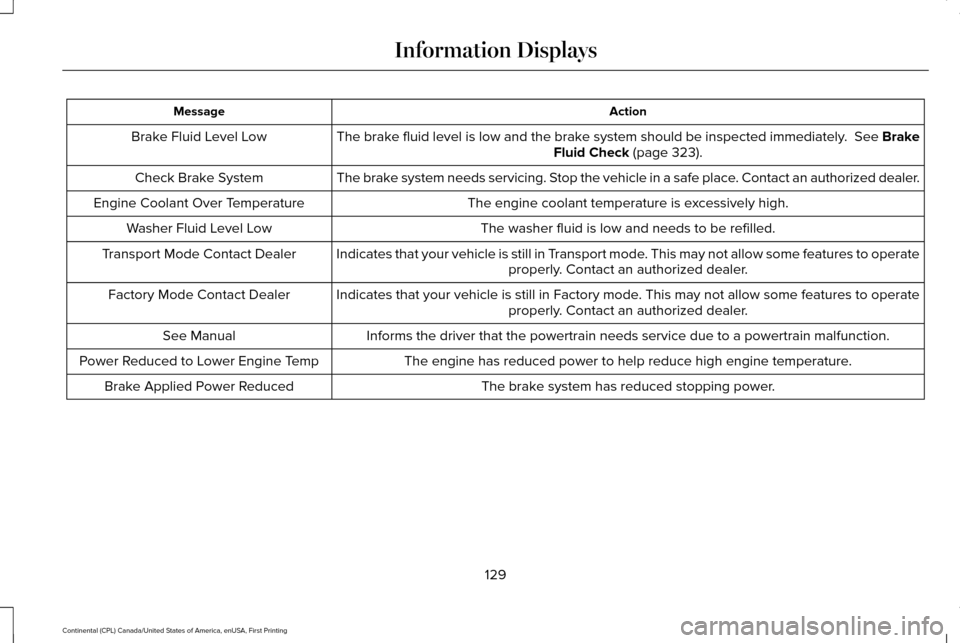
Action
Message
The brake fluid level is low and the brake system should be inspected immediately. See Brake
Fluid Check (page 323).
Brake Fluid Level Low
The brake system needs servicing. Stop the vehicle in a safe place. Contact an authorized dealer.
Check Brake System
The engine coolant temperature is excessively high.
Engine Coolant Over Temperature
The washer fluid is low and needs to be refilled.
Washer Fluid Level Low
Indicates that your vehicle is still in Transport mode. This may not allow some features to operateproperly. Contact an authorized dealer.
Transport Mode Contact Dealer
Indicates that your vehicle is still in Factory mode. This may not allow some features to operateproperly. Contact an authorized dealer.
Factory Mode Contact Dealer
Informs the driver that the powertrain needs service due to a powertrain\
malfunction.
See Manual
The engine has reduced power to help reduce high engine temperature.
Power Reduced to Lower Engine Temp
The brake system has reduced stopping power.
Brake Applied Power Reduced
129
Continental (CPL) Canada/United States of America, enUSA, First Printing Information Displays
Page 134 of 584
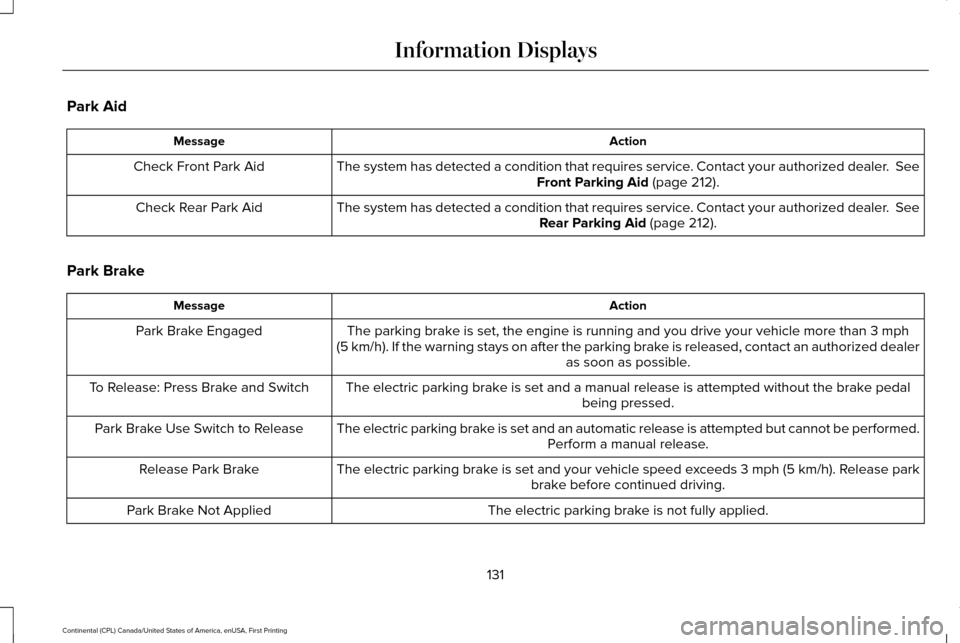
Park Aid
Action
Message
The system has detected a condition that requires service. Contact your authorized dealer. See
Front Parking Aid (page 212).
Check Front Park Aid
The system has detected a condition that requires service. Contact your authorized dealer.
See
Rear Parking Aid (page 212).
Check Rear Park Aid
Park Brake Action
Message
The parking brake is set, the engine is running and you drive your vehicle more than
3 mph
(5 km/h). If the warning stays on after the parking brake is released, contact an authorized dealer as soon as possible.
Park Brake Engaged
The electric parking brake is set and a manual release is attempted without the brake pedal being pressed.
To Release: Press Brake and Switch
The electric parking brake is set and an automatic release is attempted but cannot be performed.Perform a manual release.
Park Brake Use Switch to Release
The electric parking brake is set and your vehicle speed exceeds 3 mph (5 km/h)
. Release park
brake before continued driving.
Release Park Brake
The electric parking brake is not fully applied.
Park Brake Not Applied
131
Continental (CPL) Canada/United States of America, enUSA, First Printing Information Displays
Page 137 of 584

Stability Control
Action
Message
Displayed when the system has detected a condition that requires service\
. Contact yourauthorized dealer as soon as possible.
Service AdvanceTrac
The traction control has been disabled or enabled by the driver.
AdvanceTrac Off On
Starting System Action
Message
Displays when starting the vehicle as a reminder to apply the brake.
To START Press Brake
Displays when the starter has exceeded its cranking time in attempting to start the vehicle.
Cranking Time Exceeded
Displays when the starter is attempting to start the vehicle.
Engine Start Pending Please Wait
Displays when the pending start has been cancelled.
Pending Start Cancelled
134
Continental (CPL) Canada/United States of America, enUSA, First Printing Information Displays
Page 138 of 584
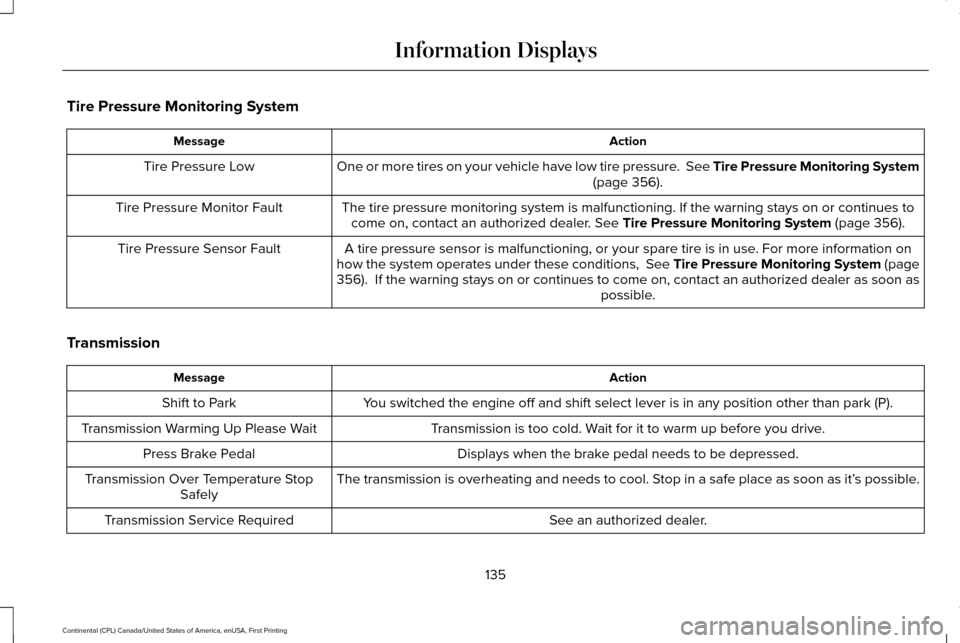
Tire Pressure Monitoring System
Action
Message
One or more tires on your vehicle have low tire pressure. See Tire Pressure Monitoring System (page 356).
Tire Pressure Low
The tire pressure monitoring system is malfunctioning. If the warning st\
ays on or continues tocome on, contact an authorized dealer.
See Tire Pressure Monitoring System (page 356).
Tire Pressure Monitor Fault
A tire pressure sensor is malfunctioning, or your spare tire is in use. For more information on
how the system operates under these conditions, See Tire Pressure Monitoring System (page
356
). If the warning stays on or continues to come on, contact an authori\
zed dealer as soon as possible.
Tire Pressure Sensor Fault
Transmission Action
Message
You switched the engine off and shift select lever is in any position oth\
er than park (P).
Shift to Park
Transmission is too cold. Wait for it to warm up before you drive.
Transmission Warming Up Please Wait
Displays when the brake pedal needs to be depressed.
Press Brake Pedal
The transmission is overheating and needs to cool. Stop in a safe place as soon as it’ s possible.
Transmission Over Temperature Stop
Safely
See an authorized dealer.
Transmission Service Required
135
Continental (CPL) Canada/United States of America, enUSA, First Printing Information Displays
Page 147 of 584
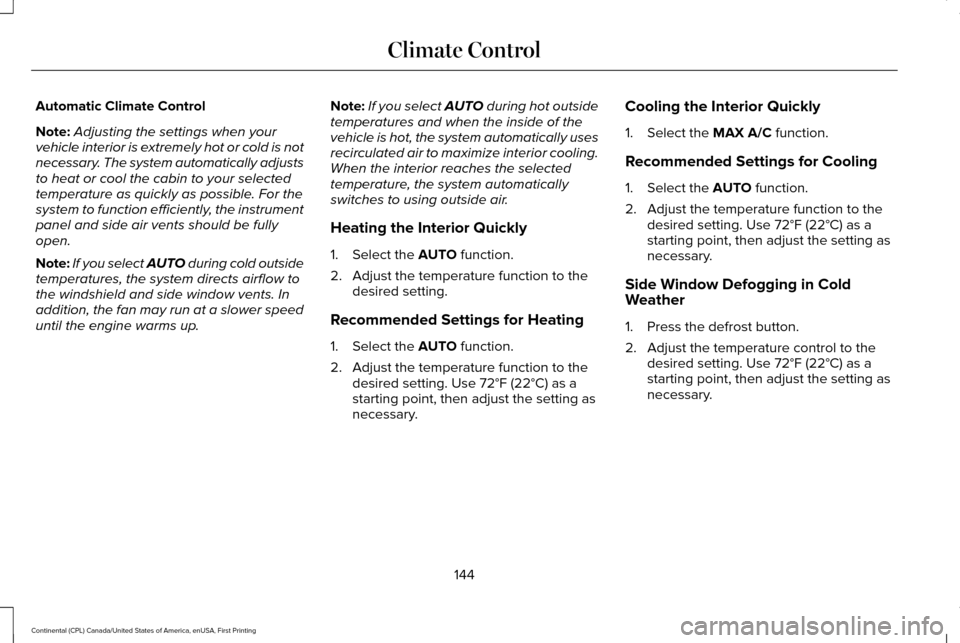
Automatic Climate Control
Note:
Adjusting the settings when your
vehicle interior is extremely hot or cold is not
necessary. The system automatically adjusts
to heat or cool the cabin to your selected
temperature as quickly as possible. For the
system to function efficiently, the instrument
panel and side air vents should be fully
open.
Note: If you select AUTO during cold outside
temperatures, the system directs airflow to
the windshield and side window vents. In
addition, the fan may run at a slower speed
until the engine warms up. Note:
If you select AUTO during hot outside
temperatures and when the inside of the
vehicle is hot, the system automatically uses
recirculated air to maximize interior cooling.
When the interior reaches the selected
temperature, the system automatically
switches to using outside air.
Heating the Interior Quickly
1. Select the AUTO function.
2. Adjust the temperature function to the desired setting.
Recommended Settings for Heating
1. Select the
AUTO function.
2. Adjust the temperature function to the desired setting. Use 72°F (22°C) as a
starting point, then adjust the setting as
necessary. Cooling the Interior Quickly
1. Select the
MAX A/C function.
Recommended Settings for Cooling
1. Select the
AUTO function.
2. Adjust the temperature function to the desired setting. Use 72°F (22°C) as a
starting point, then adjust the setting as
necessary.
Side Window Defogging in Cold
Weather
1. Press the defrost button.
2. Adjust the temperature control to the desired setting. Use 72°F (22°C) as a
starting point, then adjust the setting as
necessary.
144
Continental (CPL) Canada/United States of America, enUSA, First Printing Climate Control
Page 149 of 584

Temperature control: Controls the temperature of the air circulated in the rear of your vehi\
cle. Turn to increase or decrease the
temperature.
E
Ventilated seats:
Press to switch the ventilated seats on and off. See Seats (page 148).
F
Power:
Press to switch the rear system on and off.
G
Note:
The rear climate system turns off automatically whenever max defrost is\
switched on, and turns back on when max defrost
is switched off. You can manually switch on the rear system with max defrost on.
Rear control lock:
When illuminated, you can only operate the rear passenger settings thro\
ugh the front controls.
H
Note:
The indicator briefly illuminates if you try to use the rear climate sy\
stem when the controls are locked.
HEATED WINDOWS AND MIRRORS
Note: Make sure the engine is running
before operating the heated windows.
Note: Depending on your remote start
settings, the heated windows, mirrors and
wipers may remain on after remote starting
the vehicle. Heated Rear Window Press the button to clear the
heated rear window of thin ice and
fog. The heated rear window will
automatically turn off after a short period of
time. Press the button again to switch it off.
Note: An indicator on the button illuminates
when active.
Note: Do not use razor blades or other
sharp objects to clean or remove decals from
the inside of the heated rear window. The
vehicle warranty does not cover damage
caused to the heated rear window grid lines. Heated Exterior Mirrors
(If Equipped)
When you switch the heated rear window
on, the heated exterior mirrors will
automatically turn on.
Note: Do not remove ice from the mirrors
with a scraper or adjust the mirror glass
when it is frozen in place.
Note: Do not clean the mirror housing or
glass with harsh abrasives, fuel or other
petroleum-based cleaning products.
146
Continental (CPL) Canada/United States of America, enUSA, First Printing Climate ControlE184884
Page 157 of 584
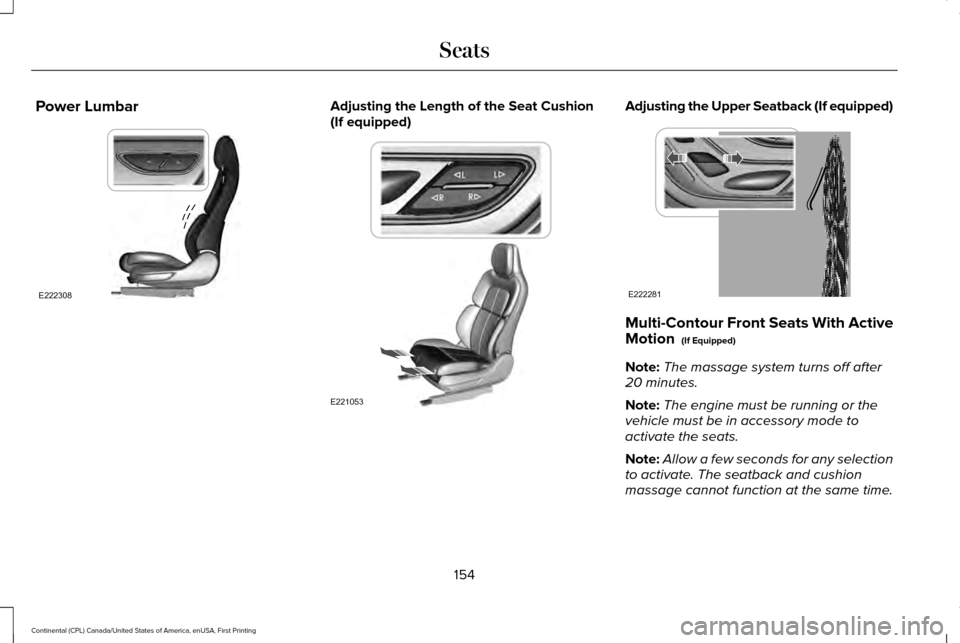
Power Lumbar Adjusting the Length of the Seat Cushion
(If equipped) Adjusting the Upper Seatback (If equipped)
Multi-Contour Front Seats With Active
Motion (If Equipped)
Note: The massage system turns off after
20 minutes.
Note: The engine must be running or the
vehicle must be in accessory mode to
activate the seats.
Note: Allow a few seconds for any selection
to activate. The seatback and cushion
massage cannot function at the same time.
154
Continental (CPL) Canada/United States of America, enUSA, First Printing SeatsE222308 E221053 E222281
Page 163 of 584
HEATED SEATS (If Equipped)
Front Seats WARNING
People who are unable to feel pain to
their skin because of advanced age,
chronic illness, diabetes, spinal cord injury,
medication, alcohol use, exhaustion or other
physical conditions, must exercise care when
using the heated seat. The heated seat may
cause burns even at low temperatures,
especially if used for long periods of time.
Do not place anything on the seat that
insulates against heat, such as a blanket or
cushion. This may cause the heated seat to
overheat. Do not puncture the seat with pins,
needles or other pointed objects. This may
damage the heating element which may
cause the heated seat to overheat. An
overheated seat may cause serious personal
injury. Do not do the following:
•
Place heavy objects on the seat.
• Operate the heated seat if water or any
other liquid spills on the seat. Allow the
seat to dry thoroughly.
• Operate the heated seats unless the
engine is running. Doing so can cause
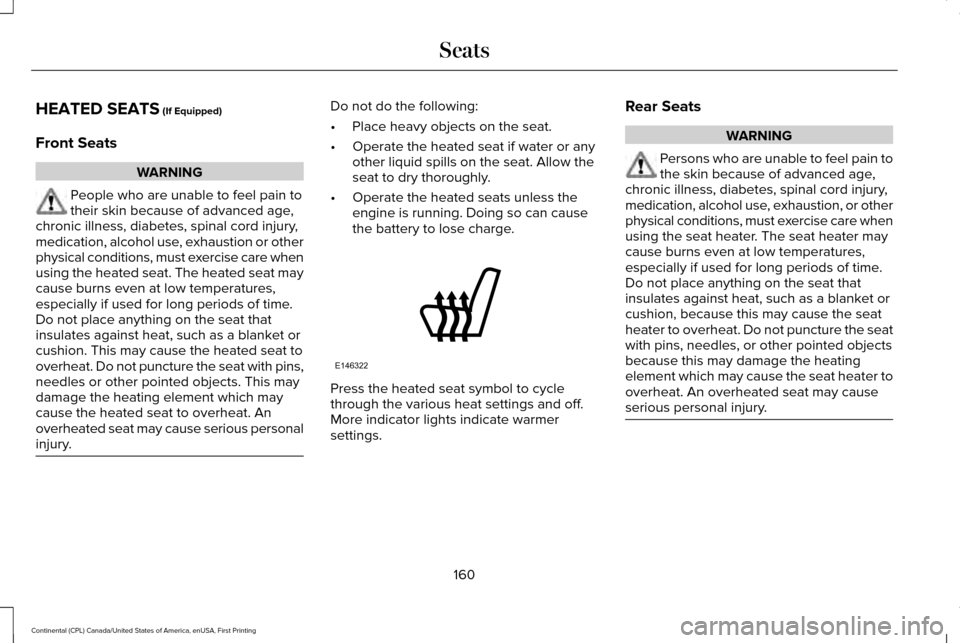
the battery to lose charge. Press the heated seat symbol to cycle
through the various heat settings and off.
More indicator lights indicate warmer
settings.Rear Seats WARNING
Persons who are unable to feel pain to
the skin because of advanced age,
chronic illness, diabetes, spinal cord injury,
medication, alcohol use, exhaustion, or other
physical conditions, must exercise care when
using the seat heater. The seat heater may
cause burns even at low temperatures,
especially if used for long periods of time.
Do not place anything on the seat that
insulates against heat, such as a blanket or
cushion, because this may cause the seat
heater to overheat. Do not puncture the seat
with pins, needles, or other pointed objects
because this may damage the heating
element which may cause the seat heater to
overheat. An overheated seat may cause
serious personal injury. 160
Continental (CPL) Canada/United States of America, enUSA, First Printing SeatsE146322
Page 164 of 584
Do not do the following:
•
Place heavy objects on the seat.
• Operate the seat heater if water or any
other liquid is spilled on the seat. Allow
the seat to dry thoroughly.
• Operate the heated seats unless the
engine is running. Doing so can cause
the battery to lose charge.
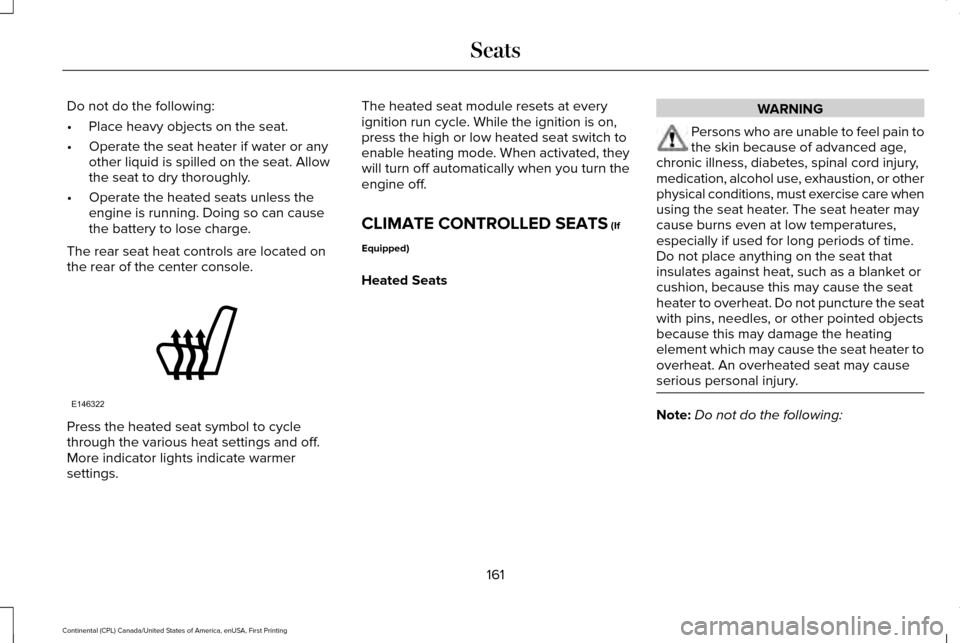
The rear seat heat controls are located on
the rear of the center console. Press the heated seat symbol to cycle
through the various heat settings and off.
More indicator lights indicate warmer
settings. The heated seat module resets at every
ignition run cycle. While the ignition is on,
press the high or low heated seat switch to
enable heating mode. When activated, they
will turn off automatically when you turn the
engine off.
CLIMATE CONTROLLED SEATS (If
Equipped)
Heated Seats WARNING
Persons who are unable to feel pain to
the skin because of advanced age,
chronic illness, diabetes, spinal cord injury,
medication, alcohol use, exhaustion, or other
physical conditions, must exercise care when
using the seat heater. The seat heater may
cause burns even at low temperatures,
especially if used for long periods of time.
Do not place anything on the seat that
insulates against heat, such as a blanket or
cushion, because this may cause the seat
heater to overheat. Do not puncture the seat
with pins, needles, or other pointed objects
because this may damage the heating
element which may cause the seat heater to
overheat. An overheated seat may cause
serious personal injury. Note:
Do not do the following:
161
Continental (CPL) Canada/United States of America, enUSA, First Printing SeatsE146322