warning LINCOLN CONTINENTAL 2018 Owners Manual
[x] Cancel search | Manufacturer: LINCOLN, Model Year: 2018, Model line: CONTINENTAL, Model: LINCOLN CONTINENTAL 2018Pages: 615, PDF Size: 5.31 MB
Page 426 of 615
Before making the call:
•SYNC provides a short window of time(about 10 seconds) to cancel the call. Ifyou fail to cancel the call, SYNC attemptsto dial 911.
•SYNC says the following, or a similarmessage: "SYNC will attempt to call 911,to cancel the call, press Cancel on yourscreen or press and hold the phonebutton on your steering wheel."
If you do not cancel the call, and SYNCmakes a successful call, a pre-recordedmessage plays for the 911 operator, and thenthe occupant(s) in your vehicle is able to talkwith the operator. Be prepared to provideyour name, phone number and locationimmediately, because not all 911 systems arecapable of receiving this informationelectronically.
911 Assist May Not Work If
•Your cellular phone or 911 Assisthardware sustains damage in a crash.
•The vehicle's battery or the SYNC systemhas no power.
•The phone(s) thrown from your vehicleare the ones paired and connected tothe system.
911 Assist Privacy Notice
When you switch on 911 Assist, it maydisclose to emergency services that yourvehicle has been in a crash involving thedeployment of an airbag or activation of thefuel pump shut-off. Certain versions orupdates to 911 Assist may also be capableof electronically or verbally disclosing to 911operators your vehicle location or otherdetails about your vehicle or crash to assist911 operators to provide the most appropriateemergency services. If you do not want todisclose this information, do not switch thefeature on.
Safety Information
WARNING: Driving while distractedcan result in loss of vehicle control, crashand injury. We strongly recommend that youuse extreme caution when using any devicethat may take your focus off the road. Yourprimary responsibility is the safe operationof your vehicle. We recommend against theuse of any hand-held device while drivingand encourage the use of voice-operatedsystems when possible. Make sure you areaware of all applicable local laws that mayaffect the use of electronic devices whiledriving.
•Do not attempt to service or repair thesystem. Have an authorized dealercheck your vehicle.
•Do not operate playing devices if thepower cords or cables are broken, splitor damaged. Place cords and cables outof the way, so they do not interfere withthe operation of pedals, seats,compartments or safe driving abilities.
423
Continental (CPL) Canada/United States of America, enUSA, Edition date: 201706, Second-Printing
SYNC™ 3
Page 461 of 615
Defrost: A pop-up appears on thescreen to display the defrostoptions.
MAX Defrost: Touch the button tomaximize defrosting. Air flowsthrough the windshield vents, thefan automatically adjusts to thehighest speed and the driver andpassenger temperatures are set toHI. You can use this setting todefog or clear a thin covering ofice from the windshield. Theheated rear window alsoautomatically turns on when youselect MAX Defrost.
Defrost: Distributes air through thewindshield defroster vents anddemister vents.
Heated rear window:Turns theheated rear window on and off.See Heated Windows and Mirrors(page 151).
Panel: Distributes air through theinstrument panel vents.
Floor: Distributes air through thedemister vents, floor vents and rearseat floor vents.
Driver temperature: Touch up ordown to adjust the temperature.I
PHONE
WARNING: Driving while distractedcan result in loss of vehicle control, crashand injury. We strongly recommend that youuse extreme caution when using any devicethat may take your focus off the road. Yourprimary responsibility is the safe operationof your vehicle. We recommend against theuse of any hand-held device while drivingand encourage the use of voice-operatedsystems when possible. Make sure you areaware of all applicable local laws that mayaffect the use of electronic devices whiledriving.
Hands-free calling is one of the main featuresof the system. Once you pair your cell phone,you can access many options using thetouchscreen or voice commands. While thesystem supports a variety of features, manyare dependent on your cell phone’sfunctionality.
Pairing Your Cell Phone for the FirstTime
Pair your Bluetooth enabled phone with thesystem before using the functions inhands-free mode.
Switch on Bluetooth on your device to beginpairing. See your phone’s manual ifnecessary.
To add a phone, select:
Menu Item
Add Phone
1. Follow the on-screen instructions.
2. A prompt alerts you to search for thesystem on your phone.
458
Continental (CPL) Canada/United States of America, enUSA, Edition date: 201706, Second-Printing
SYNC™ 3
Page 481 of 615
Action and Descrip-tionMenu Item
SYNC 3 will searchand connect tocompatible app(s)running on yourmobile device.
Find Mobile Apps
Enabling SYNC 3 Mobile Apps
In order to enable mobile apps, SYNC 3requires user consent to send and receiveapp authorization information and updatesusing the data plan associated with theconnected device.
The connected device sends data to Lincolnin the United States. The information isencrypted and includes your VIN, SYNC 3module number, odometer, usage statisticsand debugging information. We retain thisdata for only as long as necessary to providethis service, troubleshoot, and improveproducts and services and to offer youproducts and services that may interest youwhere allowed by law.
Note:You must enable mobile apps for eachconnected device the first time you select amobile app using the system.
Note:Lincoln reserves the right to limitfunctionality or deactivate mobile apps atany time.
Note: Standard data rates apply. Lincoln isnot responsible for any additional chargesyou may receive from your service provider,when your vehicle sends or receives datathrough the connected device. This includesany additional charges incurred due todriving in areas when roaming out of a homenetwork.
You can enable and disable apps throughsettings. See Settings (page 480).
App Permissions
The system organizes the app permissionsinto groups. You can individually grant thesegroup permissions.You can change apermission group status any time when notdriving, by using the settings menu. Whilein the settings menu, you can also see thedata included in each group.
When you launch an app using SYNC 3, thesystem may ask you to grant certainpermissions, for example Vehicle information,Driving characteristics, GPS and Speed,and/or Push notifications. You can enable allgroups or none of them during the initial apppermissions prompts. The settings menuoffers individual group permission control.
Note:You are only prompted to grantpermissions the first time you use an appwith SYNC 3.
Note:If you disable group permissions, appswill still be enabled to work with SYNC 3unless you deactivate All Apps in the settingsmenu.
SiriusXM Traffic and Travel Link (If
Equipped)
WARNING: Driving while distractedcan result in loss of vehicle control, crashand injury. We strongly recommend that youuse extreme caution when using any devicethat may take your focus off the road. Yourprimary responsibility is the safe operation
478
Continental (CPL) Canada/United States of America, enUSA, Edition date: 201706, Second-Printing
SYNC™ 3
Page 490 of 615
Action and DescriptionMenu Item
Text Messaging
You can then select:
No sound plays when a message comes to your phone.No Alert (Silence)
You can select one of the three available notification sounds.
When enabled, a voice prompt alerts you when you receive a new message.Voice Readout
You can enable and disable the following options as well:
Action and DescriptionMenu Item
When enabled, vehicle audio (such as radio or apps) is muted for the duration of the phone call even whenthe phone call is in privacy.Mute Audio in Privacy
When enabled, an alert displays that your phone is roaming when you attempt to place a call.Roaming Warning
When enabled, a message displays when the battery on your phone is running low.Low Battery Notification
487
Continental (CPL) Canada/United States of America, enUSA, Edition date: 201706, Second-Printing
SYNC™ 3
Page 529 of 615
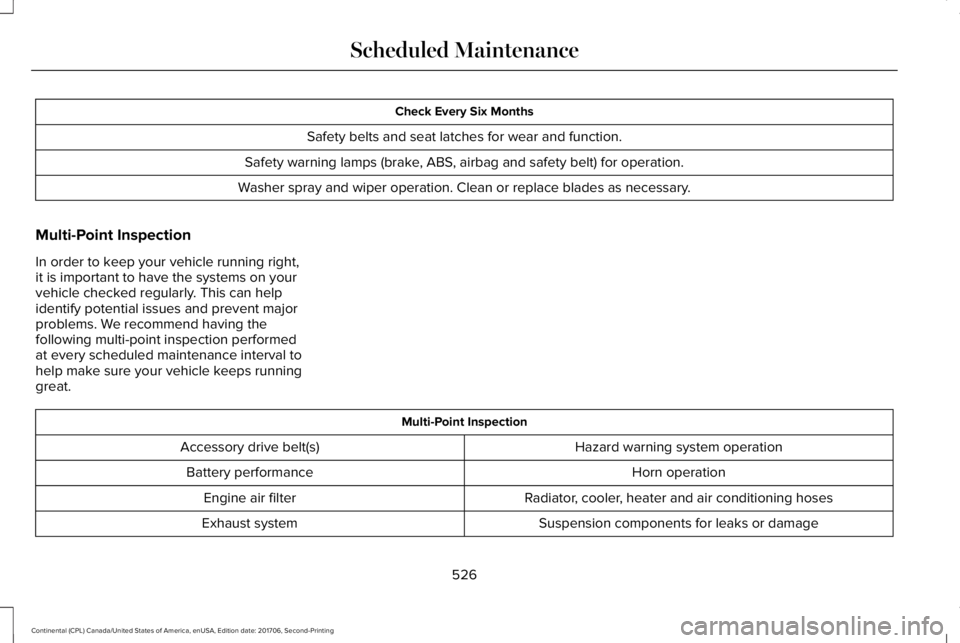
Check Every Six Months
Safety belts and seat latches for wear and function.
Safety warning lamps (brake, ABS, airbag and safety belt) for operation.
Washer spray and wiper operation. Clean or replace blades as necessary.
Multi-Point Inspection
In order to keep your vehicle running right,it is important to have the systems on yourvehicle checked regularly. This can helpidentify potential issues and prevent majorproblems. We recommend having thefollowing multi-point inspection performedat every scheduled maintenance interval tohelp make sure your vehicle keeps runninggreat.
Multi-Point Inspection
Hazard warning system operationAccessory drive belt(s)
Horn operationBattery performance
Radiator, cooler, heater and air conditioning hosesEngine air filter
Suspension components for leaks or damageExhaust system
526
Continental (CPL) Canada/United States of America, enUSA, Edition date: 201706, Second-Printing
Scheduled Maintenance
Page 558 of 615
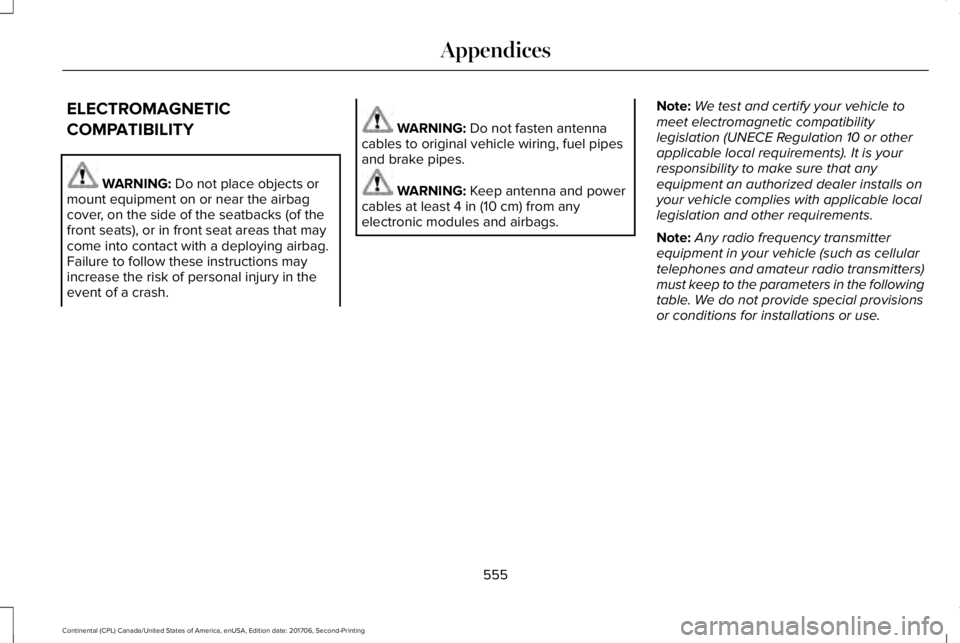
ELECTROMAGNETIC
COMPATIBILITY
WARNING: Do not place objects ormount equipment on or near the airbagcover, on the side of the seatbacks (of thefront seats), or in front seat areas that maycome into contact with a deploying airbag.Failure to follow these instructions mayincrease the risk of personal injury in theevent of a crash.
WARNING: Do not fasten antennacables to original vehicle wiring, fuel pipesand brake pipes.
WARNING: Keep antenna and powercables at least 4 in (10 cm) from anyelectronic modules and airbags.
Note:We test and certify your vehicle tomeet electromagnetic compatibilitylegislation (UNECE Regulation 10 or otherapplicable local requirements). It is yourresponsibility to make sure that anyequipment an authorized dealer installs onyour vehicle complies with applicable locallegislation and other requirements.
Note:Any radio frequency transmitterequipment in your vehicle (such as cellulartelephones and amateur radio transmitters)must keep to the parameters in the followingtable. We do not provide special provisionsor conditions for installations or use.
555
Continental (CPL) Canada/United States of America, enUSA, Edition date: 201706, Second-Printing
Appendices
Page 579 of 615
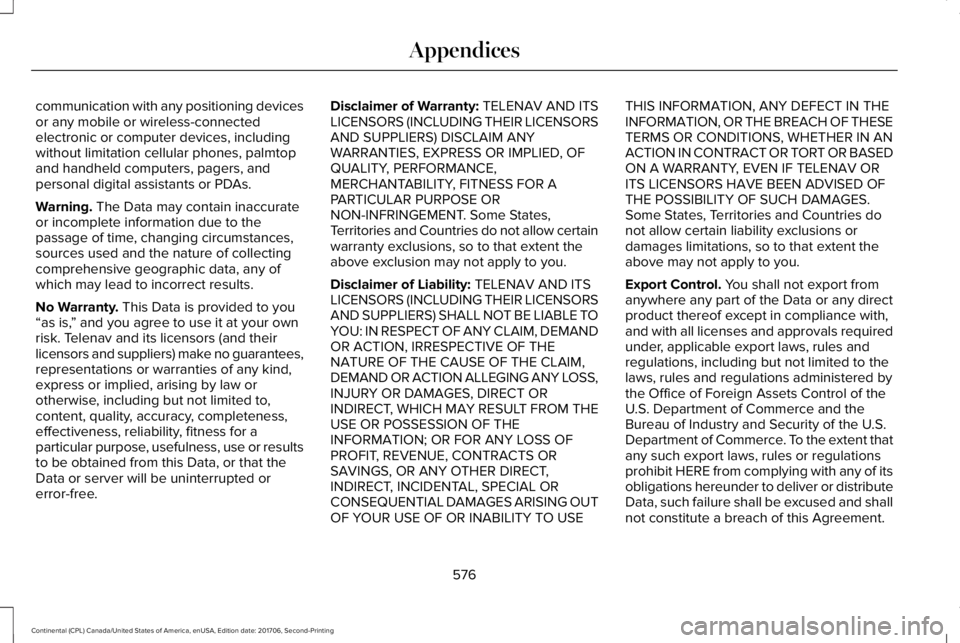
communication with any positioning devicesor any mobile or wireless-connectedelectronic or computer devices, includingwithout limitation cellular phones, palmtopand handheld computers, pagers, andpersonal digital assistants or PDAs.
Warning. The Data may contain inaccurateor incomplete information due to thepassage of time, changing circumstances,sources used and the nature of collectingcomprehensive geographic data, any ofwhich may lead to incorrect results.
No Warranty. This Data is provided to you“as is,” and you agree to use it at your ownrisk. Telenav and its licensors (and theirlicensors and suppliers) make no guarantees,representations or warranties of any kind,express or implied, arising by law orotherwise, including but not limited to,content, quality, accuracy, completeness,effectiveness, reliability, fitness for aparticular purpose, usefulness, use or resultsto be obtained from this Data, or that theData or server will be uninterrupted orerror-free.
Disclaimer of Warranty: TELENAV AND ITSLICENSORS (INCLUDING THEIR LICENSORSAND SUPPLIERS) DISCLAIM ANYWARRANTIES, EXPRESS OR IMPLIED, OFQUALITY, PERFORMANCE,MERCHANTABILITY, FITNESS FOR APARTICULAR PURPOSE ORNON-INFRINGEMENT. Some States,Territories and Countries do not allow certainwarranty exclusions, so to that extent theabove exclusion may not apply to you.
Disclaimer of Liability: TELENAV AND ITSLICENSORS (INCLUDING THEIR LICENSORSAND SUPPLIERS) SHALL NOT BE LIABLE TOYOU: IN RESPECT OF ANY CLAIM, DEMANDOR ACTION, IRRESPECTIVE OF THENATURE OF THE CAUSE OF THE CLAIM,DEMAND OR ACTION ALLEGING ANY LOSS,INJURY OR DAMAGES, DIRECT ORINDIRECT, WHICH MAY RESULT FROM THEUSE OR POSSESSION OF THEINFORMATION; OR FOR ANY LOSS OFPROFIT, REVENUE, CONTRACTS ORSAVINGS, OR ANY OTHER DIRECT,INDIRECT, INCIDENTAL, SPECIAL ORCONSEQUENTIAL DAMAGES ARISING OUTOF YOUR USE OF OR INABILITY TO USE
THIS INFORMATION, ANY DEFECT IN THEINFORMATION, OR THE BREACH OF THESETERMS OR CONDITIONS, WHETHER IN ANACTION IN CONTRACT OR TORT OR BASEDON A WARRANTY, EVEN IF TELENAV ORITS LICENSORS HAVE BEEN ADVISED OFTHE POSSIBILITY OF SUCH DAMAGES.Some States, Territories and Countries donot allow certain liability exclusions ordamages limitations, so to that extent theabove may not apply to you.
Export Control. You shall not export fromanywhere any part of the Data or any directproduct thereof except in compliance with,and with all licenses and approvals requiredunder, applicable export laws, rules andregulations, including but not limited to thelaws, rules and regulations administered bythe Office of Foreign Assets Control of theU.S. Department of Commerce and theBureau of Industry and Security of the U.S.Department of Commerce. To the extent thatany such export laws, rules or regulationsprohibit HERE from complying with any of itsobligations hereunder to deliver or distributeData, such failure shall be excused and shallnot constitute a breach of this Agreement.
576
Continental (CPL) Canada/United States of America, enUSA, Edition date: 201706, Second-Printing
Appendices
Page 591 of 615
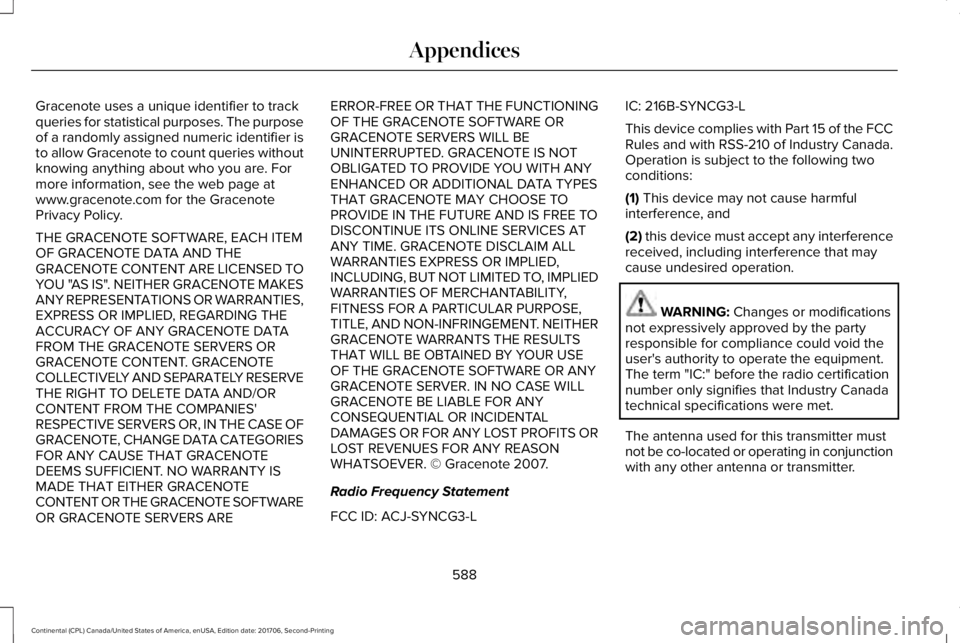
Gracenote uses a unique identifier to trackqueries for statistical purposes. The purposeof a randomly assigned numeric identifier isto allow Gracenote to count queries withoutknowing anything about who you are. Formore information, see the web page atwww.gracenote.com for the GracenotePrivacy Policy.
THE GRACENOTE SOFTWARE, EACH ITEMOF GRACENOTE DATA AND THEGRACENOTE CONTENT ARE LICENSED TOYOU "AS IS". NEITHER GRACENOTE MAKESANY REPRESENTATIONS OR WARRANTIES,EXPRESS OR IMPLIED, REGARDING THEACCURACY OF ANY GRACENOTE DATAFROM THE GRACENOTE SERVERS ORGRACENOTE CONTENT. GRACENOTECOLLECTIVELY AND SEPARATELY RESERVETHE RIGHT TO DELETE DATA AND/ORCONTENT FROM THE COMPANIES'RESPECTIVE SERVERS OR, IN THE CASE OFGRACENOTE, CHANGE DATA CATEGORIESFOR ANY CAUSE THAT GRACENOTEDEEMS SUFFICIENT. NO WARRANTY ISMADE THAT EITHER GRACENOTECONTENT OR THE GRACENOTE SOFTWAREOR GRACENOTE SERVERS ARE
ERROR-FREE OR THAT THE FUNCTIONINGOF THE GRACENOTE SOFTWARE ORGRACENOTE SERVERS WILL BEUNINTERRUPTED. GRACENOTE IS NOTOBLIGATED TO PROVIDE YOU WITH ANYENHANCED OR ADDITIONAL DATA TYPESTHAT GRACENOTE MAY CHOOSE TOPROVIDE IN THE FUTURE AND IS FREE TODISCONTINUE ITS ONLINE SERVICES ATANY TIME. GRACENOTE DISCLAIM ALLWARRANTIES EXPRESS OR IMPLIED,INCLUDING, BUT NOT LIMITED TO, IMPLIEDWARRANTIES OF MERCHANTABILITY,FITNESS FOR A PARTICULAR PURPOSE,TITLE, AND NON-INFRINGEMENT. NEITHERGRACENOTE WARRANTS THE RESULTSTHAT WILL BE OBTAINED BY YOUR USEOF THE GRACENOTE SOFTWARE OR ANYGRACENOTE SERVER. IN NO CASE WILLGRACENOTE BE LIABLE FOR ANYCONSEQUENTIAL OR INCIDENTALDAMAGES OR FOR ANY LOST PROFITS ORLOST REVENUES FOR ANY REASONWHATSOEVER. © Gracenote 2007.
Radio Frequency Statement
FCC ID: ACJ-SYNCG3-L
IC: 216B-SYNCG3-L
This device complies with Part 15 of the FCCRules and with RSS-210 of Industry Canada.Operation is subject to the following twoconditions:
(1) This device may not cause harmfulinterference, and
(2) this device must accept any interferencereceived, including interference that maycause undesired operation.
WARNING: Changes or modificationsnot expressively approved by the partyresponsible for compliance could void theuser's authority to operate the equipment.The term "IC:" before the radio certificationnumber only signifies that Industry Canadatechnical specifications were met.
The antenna used for this transmitter mustnot be co-located or operating in conjunctionwith any other antenna or transmitter.
588
Continental (CPL) Canada/United States of America, enUSA, Edition date: 201706, Second-Printing
Appendices
Page 604 of 615
3
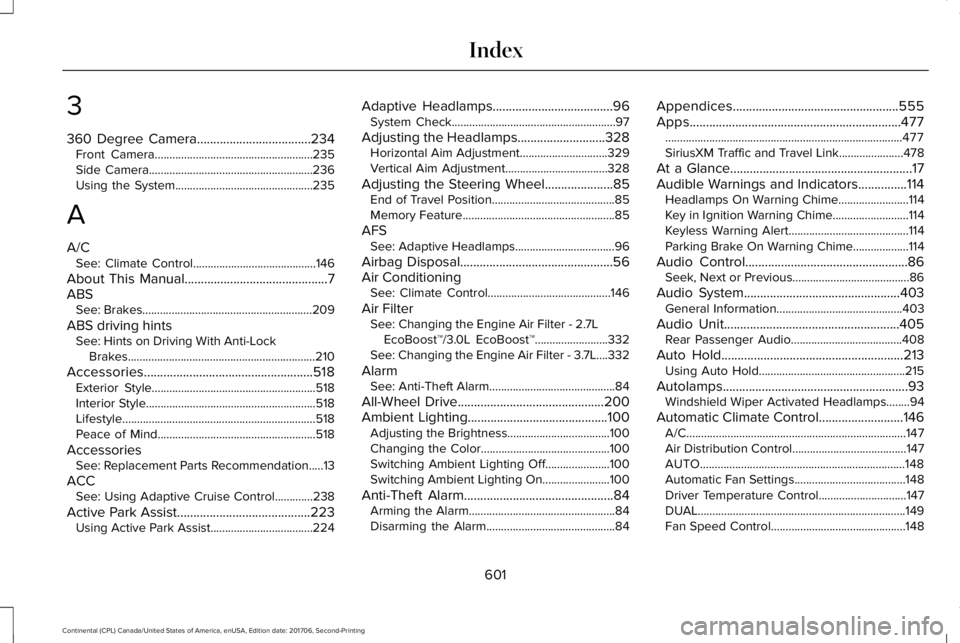
360 Degree Camera...................................234Front Camera......................................................235Side Camera........................................................236Using the System...............................................235
A
A/CSee: Climate Control..........................................146
About This Manual............................................7ABSSee: Brakes..........................................................209
ABS driving hintsSee: Hints on Driving With Anti-LockBrakes................................................................210
Accessories....................................................518Exterior Style........................................................518Interior Style..........................................................518Lifestyle..................................................................518Peace of Mind......................................................518
AccessoriesSee: Replacement Parts Recommendation.....13
ACCSee: Using Adaptive Cruise Control.............238
Active Park Assist.........................................223Using Active Park Assist...................................224
Adaptive Headlamps.....................................96System Check........................................................97
Adjusting the Headlamps...........................328Horizontal Aim Adjustment..............................329Vertical Aim Adjustment...................................328
Adjusting the Steering Wheel.....................85End of Travel Position..........................................85Memory Feature....................................................85
AFSSee: Adaptive Headlamps..................................96
Airbag Disposal...............................................56Air ConditioningSee: Climate Control..........................................146
Air FilterSee: Changing the Engine Air Filter - 2.7LEcoBoost™/3.0L EcoBoost™.........................332See: Changing the Engine Air Filter - 3.7L....332
AlarmSee: Anti-Theft Alarm...........................................84
All-Wheel Drive.............................................200Ambient Lighting...........................................100Adjusting the Brightness...................................100Changing the Color............................................100Switching Ambient Lighting Off......................100Switching Ambient Lighting On.......................100
Anti-Theft Alarm..............................................84Arming the Alarm..................................................84Disarming the Alarm............................................84
Appendices...................................................555Apps.................................................................477.................................................................................477SiriusXM Traffic and Travel Link......................478
At a Glance........................................................17Audible Warnings and Indicators...............114Headlamps On Warning Chime........................114Key in Ignition Warning Chime..........................114Keyless Warning Alert.........................................114Parking Brake On Warning Chime...................114
Audio Control..................................................86Seek, Next or Previous........................................86
Audio System................................................403General Information...........................................403
Audio Unit......................................................405Rear Passenger Audio......................................408
Auto Hold........................................................213Using Auto Hold..................................................215
Autolamps.........................................................93Windshield Wiper Activated Headlamps........94
Automatic Climate Control..........................146A/C...........................................................................147Air Distribution Control.......................................147AUTO......................................................................148Automatic Fan Settings......................................148Driver Temperature Control..............................147DUAL.......................................................................149Fan Speed Control..............................................148
601
Continental (CPL) Canada/United States of America, enUSA, Edition date: 201706, Second-Printing
Index
Page 612 of 615
R
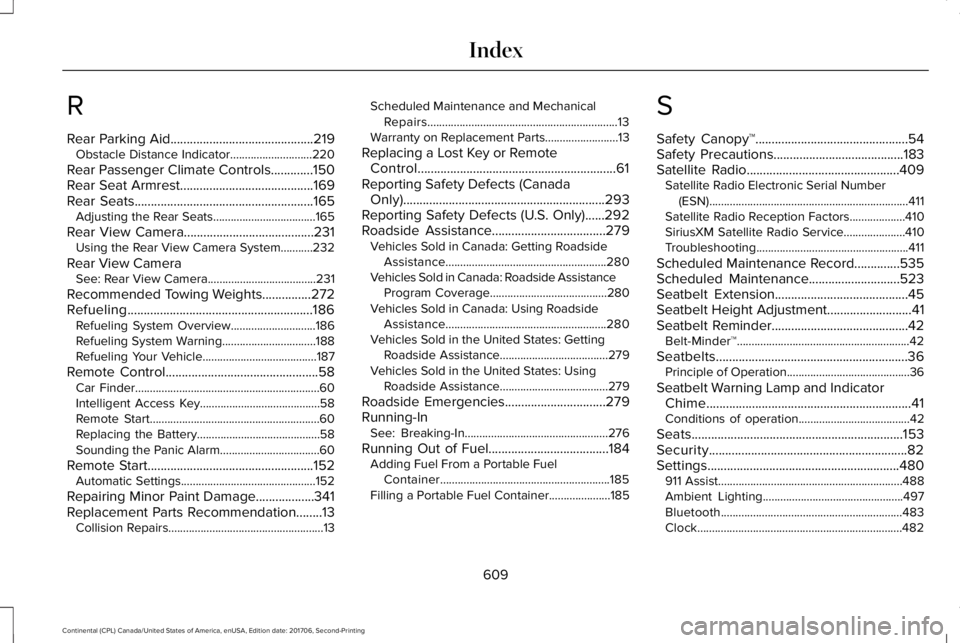
Rear Parking Aid............................................219Obstacle Distance Indicator............................220
Rear Passenger Climate Controls.............150Rear Seat Armrest.........................................169Rear Seats.......................................................165Adjusting the Rear Seats...................................165
Rear View Camera........................................231Using the Rear View Camera System...........232
Rear View CameraSee: Rear View Camera.....................................231
Recommended Towing Weights...............272Refueling.........................................................186Refueling System Overview.............................186Refueling System Warning................................188Refueling Your Vehicle.......................................187
Remote Control...............................................58Car Finder...............................................................60Intelligent Access Key.........................................58Remote Start..........................................................60Replacing the Battery..........................................58Sounding the Panic Alarm..................................60
Remote Start...................................................152Automatic Settings..............................................152
Repairing Minor Paint Damage..................341Replacement Parts Recommendation........13Collision Repairs.....................................................13
Scheduled Maintenance and MechanicalRepairs.................................................................13Warranty on Replacement Parts.........................13
Replacing a Lost Key or RemoteControl.............................................................61Reporting Safety Defects (CanadaOnly)..............................................................293Reporting Safety Defects (U.S. Only)......292Roadside Assistance...................................279Vehicles Sold in Canada: Getting RoadsideAssistance.......................................................280Vehicles Sold in Canada: Roadside AssistanceProgram Coverage........................................280Vehicles Sold in Canada: Using RoadsideAssistance.......................................................280Vehicles Sold in the United States: GettingRoadside Assistance.....................................279Vehicles Sold in the United States: UsingRoadside Assistance.....................................279
Roadside Emergencies...............................279Running-InSee: Breaking-In.................................................276
Running Out of Fuel.....................................184Adding Fuel From a Portable FuelContainer..........................................................185Filling a Portable Fuel Container.....................185
S
Safety Canopy™...............................................54Safety Precautions........................................183Satellite Radio...............................................409Satellite Radio Electronic Serial Number(ESN)....................................................................411Satellite Radio Reception Factors...................410SiriusXM Satellite Radio Service.....................410Troubleshooting....................................................411
Scheduled Maintenance Record..............535Scheduled Maintenance............................523Seatbelt Extension.........................................45Seatbelt Height Adjustment..........................41Seatbelt Reminder..........................................42Belt-Minder™...........................................................42
Seatbelts...........................................................36Principle of Operation..........................................36
Seatbelt Warning Lamp and IndicatorChime...............................................................41Conditions of operation......................................42
Seats.................................................................153Security.............................................................82Settings...........................................................480911 Assist...............................................................488Ambient Lighting................................................497Bluetooth..............................................................483Clock......................................................................482
609
Continental (CPL) Canada/United States of America, enUSA, Edition date: 201706, Second-Printing
Index