USB port LINCOLN CONTINENTAL 2018 User Guide
[x] Cancel search | Manufacturer: LINCOLN, Model Year: 2018, Model line: CONTINENTAL, Model: LINCOLN CONTINENTAL 2018Pages: 615, PDF Size: 5.31 MB
Page 507 of 615
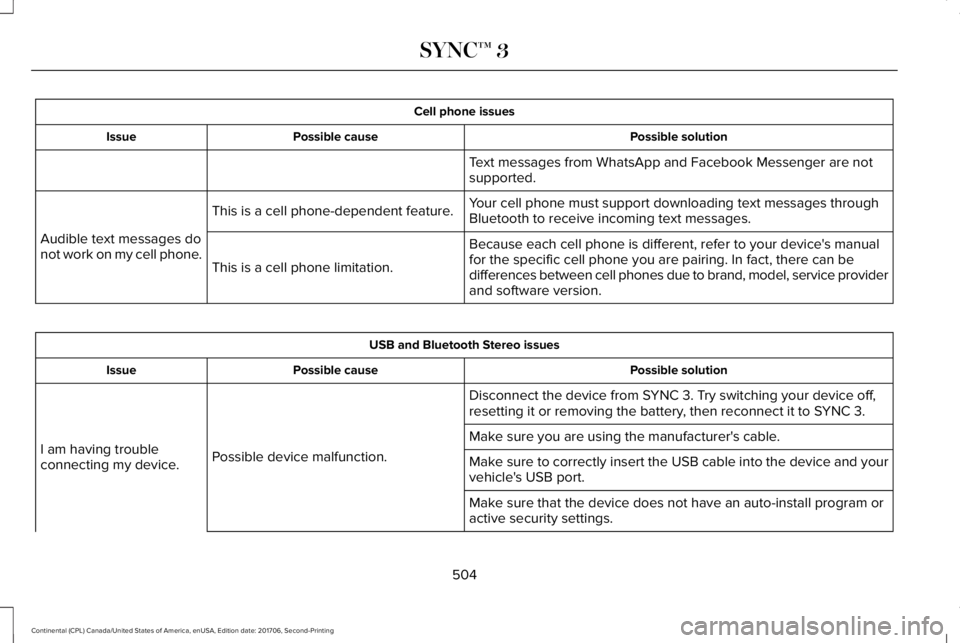
Cell phone issues
Possible solutionPossible causeIssue
Text messages from WhatsApp and Facebook Messenger are notsupported.
Your cell phone must support downloading text messages throughBluetooth to receive incoming text messages.This is a cell phone-dependent feature.
Audible text messages donot work on my cell phone.Because each cell phone is different, refer to your device's manualfor the specific cell phone you are pairing. In fact, there can bedifferences between cell phones due to brand, model, service providerand software version.
This is a cell phone limitation.
USB and Bluetooth Stereo issues
Possible solutionPossible causeIssue
Disconnect the device from SYNC 3. Try switching your device off,resetting it or removing the battery, then reconnect it to SYNC 3.
Possible device malfunction.I am having troubleconnecting my device.
Make sure you are using the manufacturer's cable.
Make sure to correctly insert the USB cable into the device and yourvehicle's USB port.
Make sure that the device does not have an auto-install program oractive security settings.
504
Continental (CPL) Canada/United States of America, enUSA, Edition date: 201706, Second-Printing
SYNC™ 3
Page 508 of 615
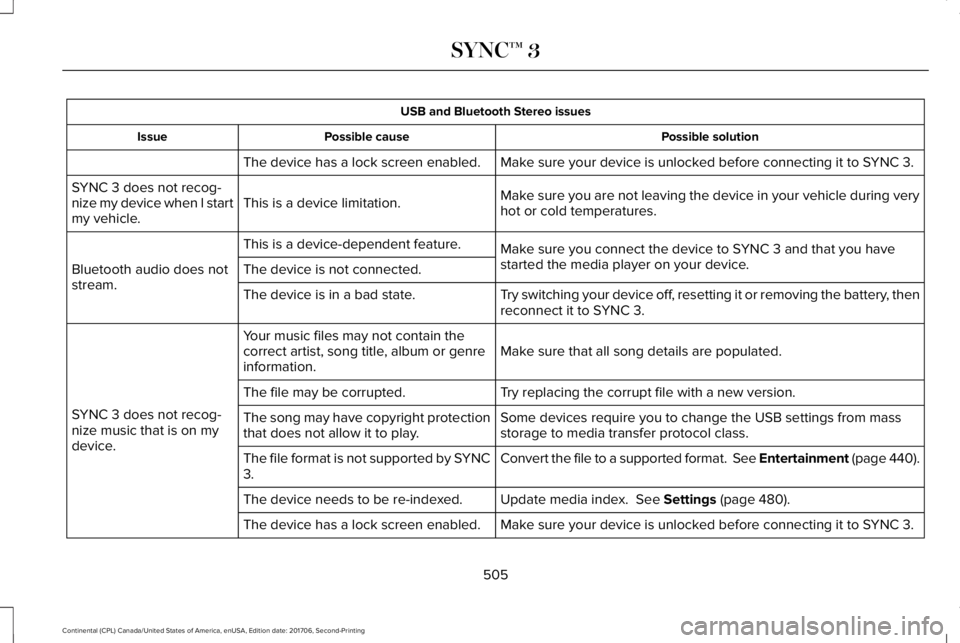
USB and Bluetooth Stereo issues
Possible solutionPossible causeIssue
Make sure your device is unlocked before connecting it to SYNC 3.The device has a lock screen enabled.
Make sure you are not leaving the device in your vehicle during veryhot or cold temperatures.This is a device limitation.SYNC 3 does not recog-nize my device when I startmy vehicle.
Make sure you connect the device to SYNC 3 and that you havestarted the media player on your device.
This is a device-dependent feature.
Bluetooth audio does notstream.The device is not connected.
Try switching your device off, resetting it or removing the battery, thenreconnect it to SYNC 3.The device is in a bad state.
Make sure that all song details are populated.Your music files may not contain thecorrect artist, song title, album or genreinformation.
SYNC 3 does not recog-nize music that is on mydevice.
Try replacing the corrupt file with a new version.The file may be corrupted.
Some devices require you to change the USB settings from massstorage to media transfer protocol class.The song may have copyright protectionthat does not allow it to play.
Convert the file to a supported format. See Entertainment (page 440).The file format is not supported by SYNC3.
Update media index. See Settings (page 480).The device needs to be re-indexed.
Make sure your device is unlocked before connecting it to SYNC 3.The device has a lock screen enabled.
505
Continental (CPL) Canada/United States of America, enUSA, Edition date: 201706, Second-Printing
SYNC™ 3
Page 512 of 615
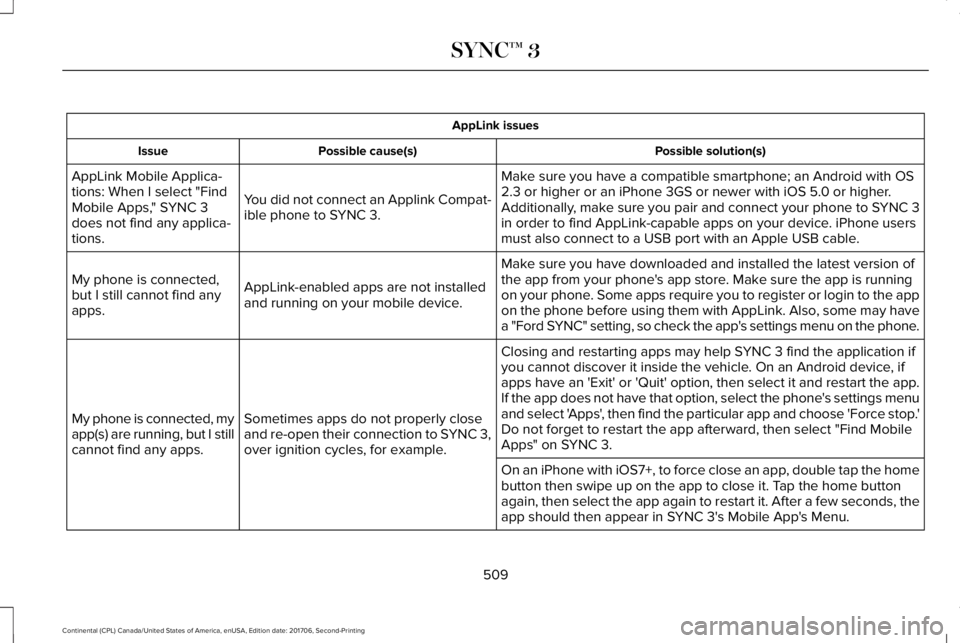
AppLink issues
Possible solution(s)Possible cause(s)Issue
Make sure you have a compatible smartphone; an Android with OS2.3 or higher or an iPhone 3GS or newer with iOS 5.0 or higher.Additionally, make sure you pair and connect your phone to SYNC 3in order to find AppLink-capable apps on your device. iPhone usersmust also connect to a USB port with an Apple USB cable.
You did not connect an Applink Compat-ible phone to SYNC 3.
AppLink Mobile Applica-tions: When I select "FindMobile Apps," SYNC 3does not find any applica-tions.
Make sure you have downloaded and installed the latest version ofthe app from your phone's app store. Make sure the app is runningon your phone. Some apps require you to register or login to the appon the phone before using them with AppLink. Also, some may havea "Ford SYNC" setting, so check the app's settings menu on the phone.
AppLink-enabled apps are not installedand running on your mobile device.
My phone is connected,but I still cannot find anyapps.
Closing and restarting apps may help SYNC 3 find the application ifyou cannot discover it inside the vehicle. On an Android device, ifapps have an 'Exit' or 'Quit' option, then select it and restart the app.If the app does not have that option, select the phone's settings menuand select 'Apps', then find the particular app and choose 'Force stop.'Do not forget to restart the app afterward, then select "Find MobileApps" on SYNC 3.
Sometimes apps do not properly closeand re-open their connection to SYNC 3,over ignition cycles, for example.
My phone is connected, myapp(s) are running, but I stillcannot find any apps.
On an iPhone with iOS7+, to force close an app, double tap the homebutton then swipe up on the app to close it. Tap the home buttonagain, then select the app again to restart it. After a few seconds, theapp should then appear in SYNC 3's Mobile App's Menu.
509
Continental (CPL) Canada/United States of America, enUSA, Edition date: 201706, Second-Printing
SYNC™ 3
Page 513 of 615
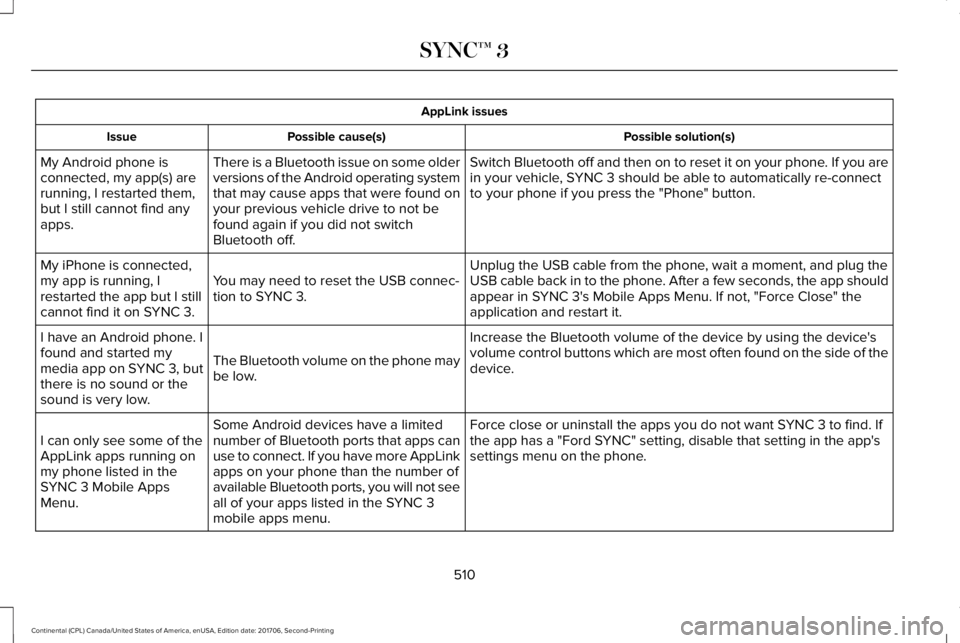
AppLink issues
Possible solution(s)Possible cause(s)Issue
Switch Bluetooth off and then on to reset it on your phone. If you arein your vehicle, SYNC 3 should be able to automatically re-connectto your phone if you press the "Phone" button.
There is a Bluetooth issue on some olderversions of the Android operating systemthat may cause apps that were found onyour previous vehicle drive to not befound again if you did not switchBluetooth off.
My Android phone isconnected, my app(s) arerunning, I restarted them,but I still cannot find anyapps.
Unplug the USB cable from the phone, wait a moment, and plug theUSB cable back in to the phone. After a few seconds, the app shouldappear in SYNC 3's Mobile Apps Menu. If not, "Force Close" theapplication and restart it.
You may need to reset the USB connec-tion to SYNC 3.
My iPhone is connected,my app is running, Irestarted the app but I stillcannot find it on SYNC 3.
Increase the Bluetooth volume of the device by using the device'svolume control buttons which are most often found on the side of thedevice.The Bluetooth volume on the phone maybe low.
I have an Android phone. Ifound and started mymedia app on SYNC 3, butthere is no sound or thesound is very low.
Force close or uninstall the apps you do not want SYNC 3 to find. Ifthe app has a "Ford SYNC" setting, disable that setting in the app'ssettings menu on the phone.
Some Android devices have a limitednumber of Bluetooth ports that apps canuse to connect. If you have more AppLinkapps on your phone than the number ofavailable Bluetooth ports, you will not seeall of your apps listed in the SYNC 3mobile apps menu.
I can only see some of theAppLink apps running onmy phone listed in theSYNC 3 Mobile AppsMenu.
510
Continental (CPL) Canada/United States of America, enUSA, Edition date: 201706, Second-Printing
SYNC™ 3
Page 519 of 615
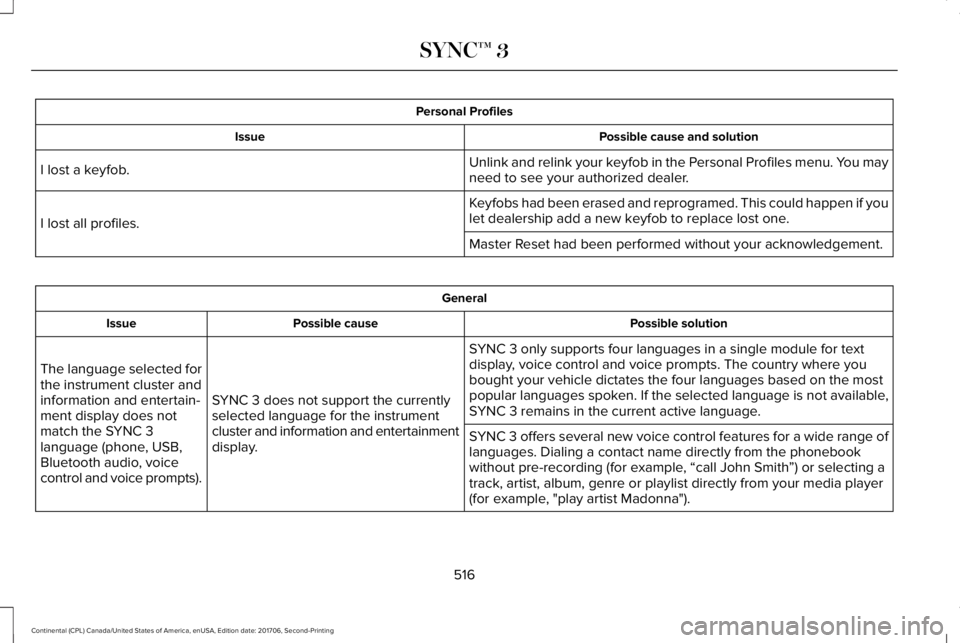
Personal Profiles
Possible cause and solutionIssue
Unlink and relink your keyfob in the Personal Profiles menu. You mayneed to see your authorized dealer.I lost a keyfob.
Keyfobs had been erased and reprogramed. This could happen if youlet dealership add a new keyfob to replace lost one.I lost all profiles.
Master Reset had been performed without your acknowledgement.
General
Possible solutionPossible causeIssue
SYNC 3 only supports four languages in a single module for textdisplay, voice control and voice prompts. The country where youbought your vehicle dictates the four languages based on the mostpopular languages spoken. If the selected language is not available,SYNC 3 remains in the current active language.SYNC 3 does not support the currentlyselected language for the instrumentcluster and information and entertainmentdisplay.
The language selected forthe instrument cluster andinformation and entertain-ment display does notmatch the SYNC 3language (phone, USB,Bluetooth audio, voicecontrol and voice prompts).
SYNC 3 offers several new voice control features for a wide range oflanguages. Dialing a contact name directly from the phonebookwithout pre-recording (for example, “call John Smith”) or selecting atrack, artist, album, genre or playlist directly from your media player(for example, "play artist Madonna").
516
Continental (CPL) Canada/United States of America, enUSA, Edition date: 201706, Second-Printing
SYNC™ 3
Page 607 of 615
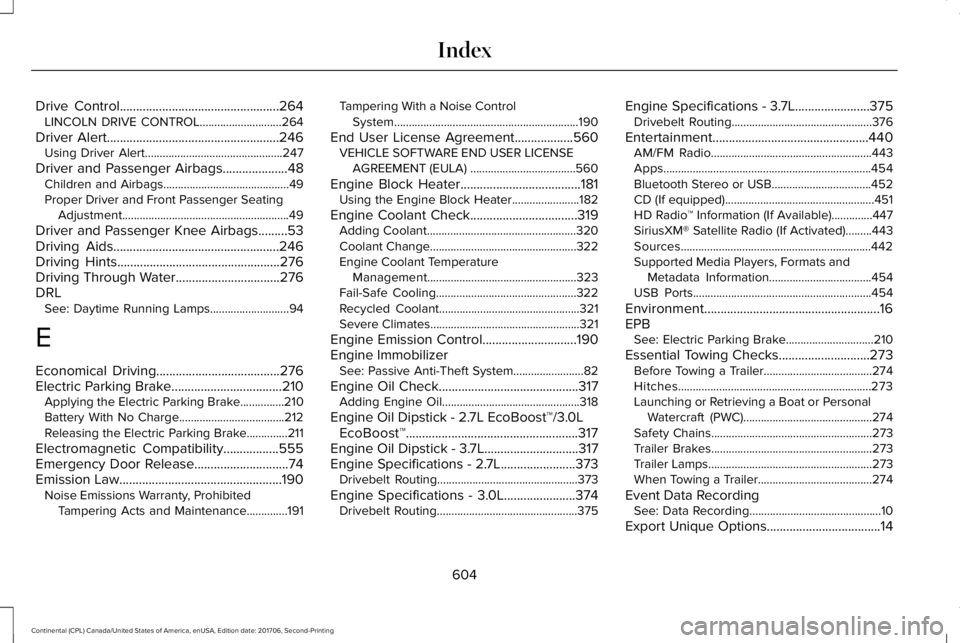
Drive Control.................................................264LINCOLN DRIVE CONTROL............................264
Driver Alert.....................................................246Using Driver Alert...............................................247
Driver and Passenger Airbags....................48Children and Airbags...........................................49Proper Driver and Front Passenger SeatingAdjustment.........................................................49
Driver and Passenger Knee Airbags.........53Driving Aids...................................................246Driving Hints..................................................276Driving Through Water................................276DRLSee: Daytime Running Lamps...........................94
E
Economical Driving......................................276Electric Parking Brake..................................210Applying the Electric Parking Brake...............210Battery With No Charge....................................212Releasing the Electric Parking Brake..............211
Electromagnetic Compatibility.................555Emergency Door Release.............................74Emission Law..................................................190Noise Emissions Warranty, ProhibitedTampering Acts and Maintenance..............191
Tampering With a Noise ControlSystem...............................................................190
End User License Agreement..................560VEHICLE SOFTWARE END USER LICENSEAGREEMENT (EULA) ....................................560
Engine Block Heater.....................................181Using the Engine Block Heater.......................182
Engine Coolant Check.................................319Adding Coolant...................................................320Coolant Change..................................................322Engine Coolant TemperatureManagement...................................................323Fail-Safe Cooling................................................322Recycled Coolant................................................321Severe Climates...................................................321
Engine Emission Control.............................190Engine ImmobilizerSee: Passive Anti-Theft System........................82
Engine Oil Check...........................................317Adding Engine Oil...............................................318
Engine Oil Dipstick - 2.7L EcoBoost™/3.0LEcoBoost™.....................................................317Engine Oil Dipstick - 3.7L.............................317Engine Specifications - 2.7L.......................373Drivebelt Routing................................................373
Engine Specifications - 3.0L......................374Drivebelt Routing................................................375
Engine Specifications - 3.7L.......................375Drivebelt Routing................................................376
Entertainment................................................440AM/FM Radio.......................................................443Apps.......................................................................454Bluetooth Stereo or USB..................................452CD (If equipped)...................................................451HD Radio™ Information (If Available)..............447SiriusXM® Satellite Radio (If Activated).........443Sources.................................................................442Supported Media Players, Formats andMetadata Information...................................454USB Ports.............................................................454
Environment......................................................16EPBSee: Electric Parking Brake..............................210
Essential Towing Checks............................273Before Towing a Trailer.....................................274Hitches..................................................................273Launching or Retrieving a Boat or PersonalWatercraft (PWC)............................................274Safety Chains.......................................................273Trailer Brakes.......................................................273Trailer Lamps........................................................273When Towing a Trailer.......................................274
Event Data RecordingSee: Data Recording.............................................10
Export Unique Options...................................14
604
Continental (CPL) Canada/United States of America, enUSA, Edition date: 201706, Second-Printing
Index
Page 614 of 615
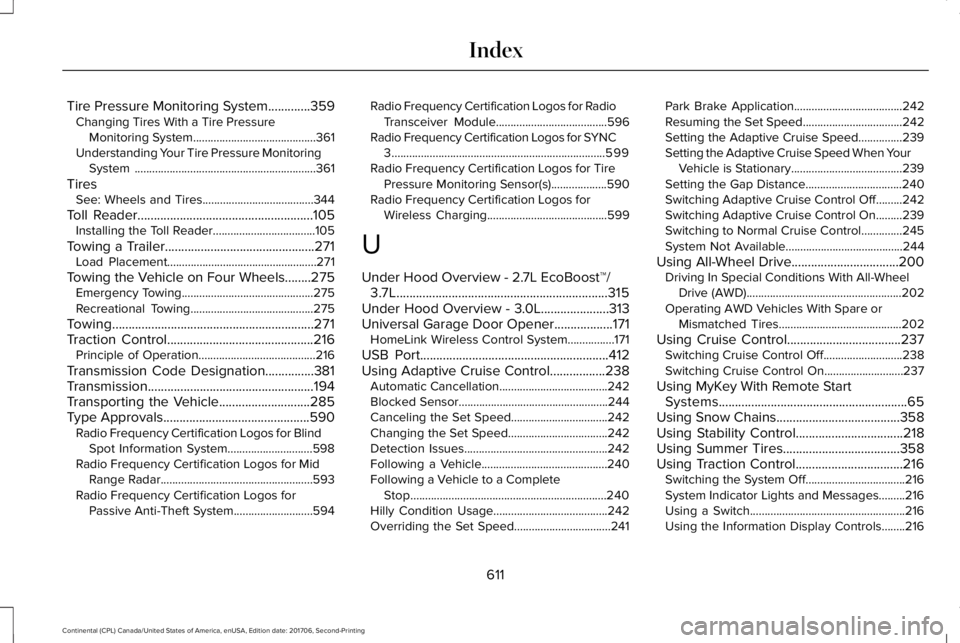
Tire Pressure Monitoring System.............359Changing Tires With a Tire PressureMonitoring System..........................................361Understanding Your Tire Pressure MonitoringSystem ..............................................................361
TiresSee: Wheels and Tires......................................344
Toll Reader......................................................105Installing the Toll Reader...................................105
Towing a Trailer..............................................271Load Placement...................................................271
Towing the Vehicle on Four Wheels........275Emergency Towing.............................................275Recreational Towing..........................................275
Towing..............................................................271Traction Control.............................................216Principle of Operation........................................216
Transmission Code Designation...............381Transmission...................................................194Transporting the Vehicle............................285Type Approvals.............................................590Radio Frequency Certification Logos for BlindSpot Information System.............................598Radio Frequency Certification Logos for MidRange Radar....................................................593Radio Frequency Certification Logos forPassive Anti-Theft System...........................594
Radio Frequency Certification Logos for RadioTransceiver Module......................................596Radio Frequency Certification Logos for SYNC3.........................................................................599Radio Frequency Certification Logos for TirePressure Monitoring Sensor(s)...................590Radio Frequency Certification Logos forWireless Charging.........................................599
U
Under Hood Overview - 2.7L EcoBoost™/3.7L.................................................................315Under Hood Overview - 3.0L.....................313Universal Garage Door Opener..................171HomeLink Wireless Control System................171
USB Port..........................................................412Using Adaptive Cruise Control.................238Automatic Cancellation.....................................242Blocked Sensor...................................................244Canceling the Set Speed.................................242Changing the Set Speed..................................242Detection Issues.................................................242Following a Vehicle...........................................240Following a Vehicle to a CompleteStop...................................................................240Hilly Condition Usage.......................................242Overriding the Set Speed.................................241
Park Brake Application.....................................242Resuming the Set Speed..................................242Setting the Adaptive Cruise Speed...............239Setting the Adaptive Cruise Speed When YourVehicle is Stationary......................................239Setting the Gap Distance.................................240Switching Adaptive Cruise Control Off.........242Switching Adaptive Cruise Control On.........239Switching to Normal Cruise Control..............245System Not Available........................................244
Using All-Wheel Drive.................................200Driving In Special Conditions With All-WheelDrive (AWD).....................................................202Operating AWD Vehicles With Spare orMismatched Tires..........................................202
Using Cruise Control...................................237Switching Cruise Control Off...........................238Switching Cruise Control On...........................237
Using MyKey With Remote StartSystems..........................................................65Using Snow Chains......................................358Using Stability Control.................................218Using Summer Tires....................................358Using Traction Control.................................216Switching the System Off..................................216System Indicator Lights and Messages.........216Using a Switch.....................................................216Using the Information Display Controls........216
611
Continental (CPL) Canada/United States of America, enUSA, Edition date: 201706, Second-Printing
Index