battery LINCOLN CONTINENTAL 2018 User Guide
[x] Cancel search | Manufacturer: LINCOLN, Model Year: 2018, Model line: CONTINENTAL, Model: LINCOLN CONTINENTAL 2018Pages: 615, PDF Size: 5.31 MB
Page 81 of 615
1.Move your foot under and away from therear bumper detection area in asingle-kick motion. Do not move yourfoot sideways or the sensors may notdetect the motion.
2. The decklid opens or closes.
Note:Allow the power system to open thedecklid. Manually pushing or pulling thedecklid may activate the system’s obstacledetection feature and stop the poweroperation or reverse its direction.
Note: Splashing water may cause thehands-free decklid to open. Keep theintelligent access key away from the rearbumper detection area when washing yourvehicle.
SOFT CLOSING DOOR
Gently close the door until it fully latches.The system automatically closes the door,making sure it is fully secure.
Note:The system does not work if thevehicle battery charge is low.
Note:The system is limited to 25 cyclesbetween each ignition cycle. This is toprevent the vehicle battery from losingcharge.
Note:You can override soft close by fullyclosing the door manually.
KEYLESS ENTRY
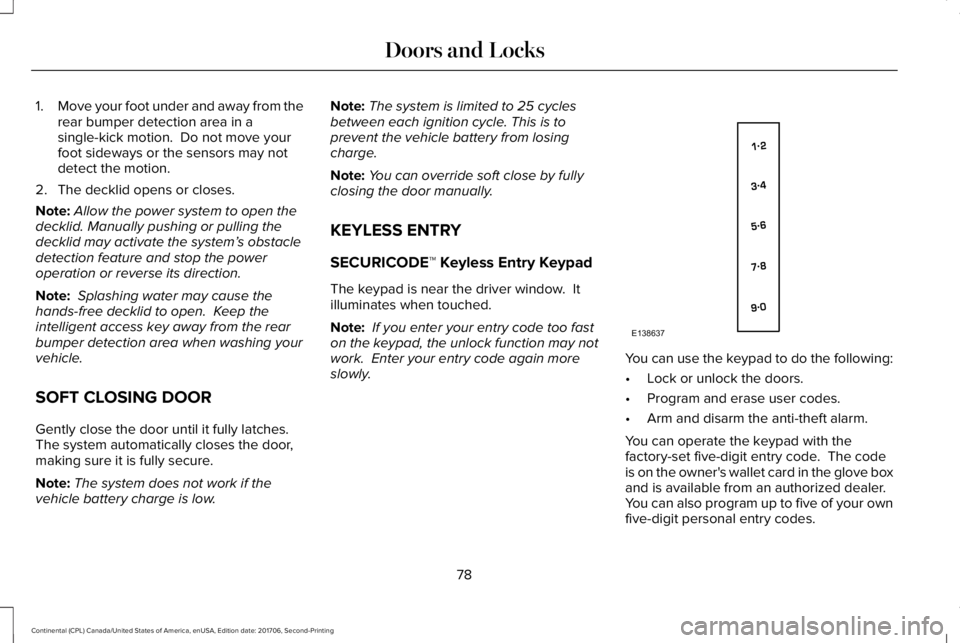
SECURICODE™ Keyless Entry Keypad
The keypad is near the driver window. Itilluminates when touched.
Note: If you enter your entry code too faston the keypad, the unlock function may notwork. Enter your entry code again moreslowly.You can use the keypad to do the following:
•Lock or unlock the doors.
•Program and erase user codes.
•Arm and disarm the anti-theft alarm.
You can operate the keypad with thefactory-set five-digit entry code. The codeis on the owner's wallet card in the glove boxand is available from an authorized dealer. You can also program up to five of your ownfive-digit personal entry codes.
78
Continental (CPL) Canada/United States of America, enUSA, Edition date: 201706, Second-Printing
Doors and LocksE138637
Page 97 of 615
Windshield Wiper Activated Headlamps
When you switch the autolamps on, theheadlamps turn on within 10 seconds ofswitching the wipers on. They turn offapproximately 60 seconds after you switchthe windshield wipers off.
The headlamps do not turn on with thewipers:
•During a single wipe.
•When using the windshield washers.
•If the wipers are in intermittent mode.
Note:If you switch the autolamps and theautowipers on, the headlamps turn on whenthe windshield wipers continuously operate.
INSTRUMENT LIGHTING DIMMER
Note:If you disconnect and connect thebattery, or fully discharge and charge thebattery, the illuminated components switchto the maximum setting.
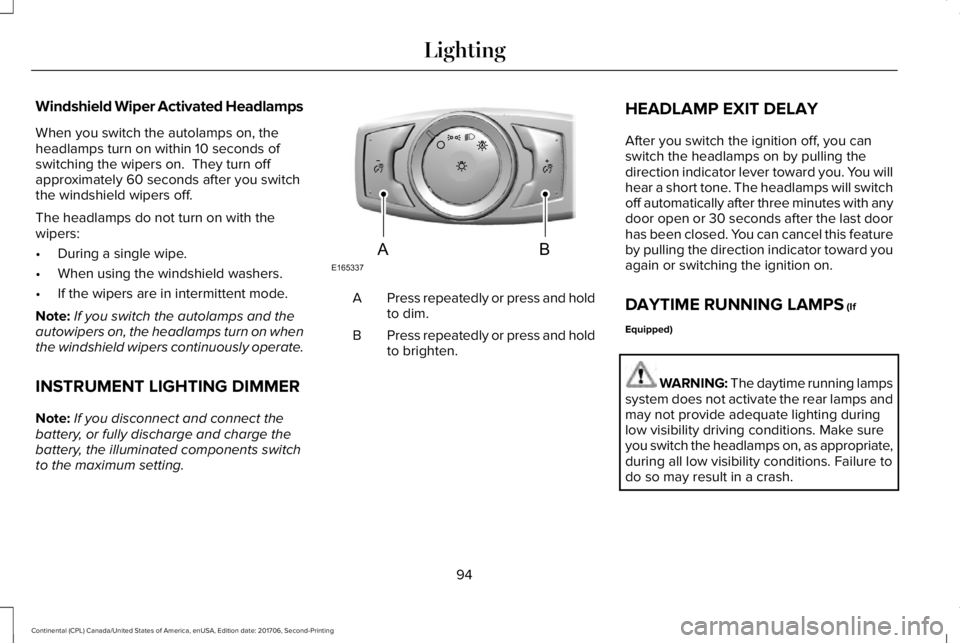
Press repeatedly or press and holdto dim.A
Press repeatedly or press and holdto brighten.B
HEADLAMP EXIT DELAY
After you switch the ignition off, you canswitch the headlamps on by pulling thedirection indicator lever toward you. You willhear a short tone. The headlamps will switchoff automatically after three minutes with anydoor open or 30 seconds after the last doorhas been closed. You can cancel this featureby pulling the direction indicator toward youagain or switching the ignition on.
DAYTIME RUNNING LAMPS (If
Equipped)
WARNING: The daytime running lampssystem does not activate the rear lamps andmay not provide adequate lighting duringlow visibility driving conditions. Make sureyou switch the headlamps on, as appropriate,during all low visibility conditions. Failure todo so may result in a crash.
94
Continental (CPL) Canada/United States of America, enUSA, Edition date: 201706, Second-Printing
LightingE165337AB
Page 114 of 615
Adaptive Steering Off (yellow, solid): Theadaptive steering system is off. It is possiblethat the steering wheel may not be straightwhen you drive straight ahead. If thismessage persists, see an authorized dealer.
Adaptive Steering Loss (red, solid): Theadaptive steering system integrity cannot beverified. Do not drive the vehicle and contactan authorized dealer immediately. SeeSteering (page 259).
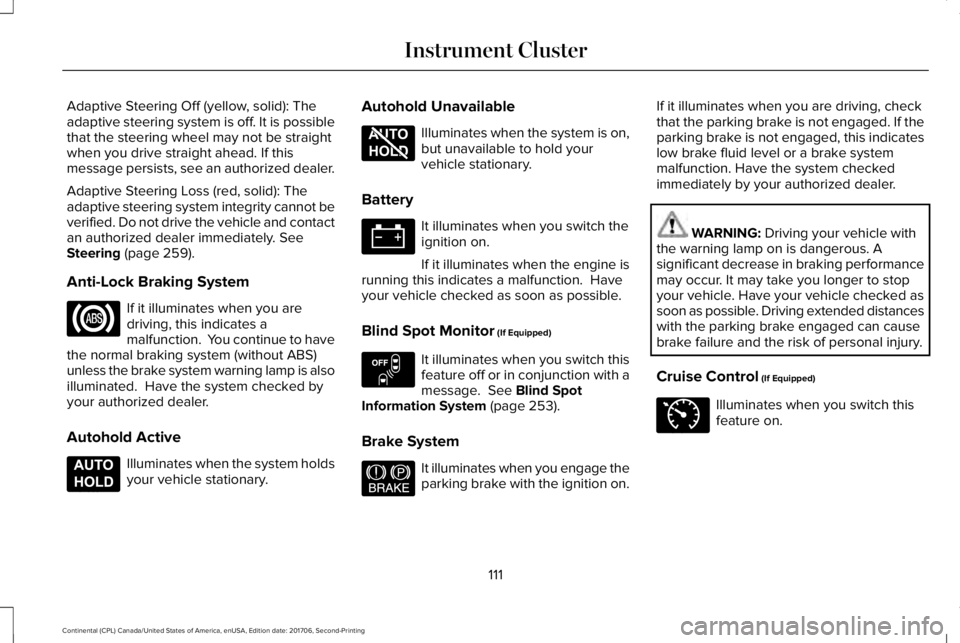
Anti-Lock Braking System
If it illuminates when you aredriving, this indicates amalfunction. You continue to havethe normal braking system (without ABS)unless the brake system warning lamp is alsoilluminated. Have the system checked byyour authorized dealer.
Autohold Active
Illuminates when the system holdsyour vehicle stationary.
Autohold Unavailable
Illuminates when the system is on,but unavailable to hold yourvehicle stationary.
Battery
It illuminates when you switch theignition on.
If it illuminates when the engine isrunning this indicates a malfunction. Haveyour vehicle checked as soon as possible.
Blind Spot Monitor (If Equipped)
It illuminates when you switch thisfeature off or in conjunction with amessage. See Blind SpotInformation System (page 253).
Brake System
It illuminates when you engage theparking brake with the ignition on.
If it illuminates when you are driving, checkthat the parking brake is not engaged. If theparking brake is not engaged, this indicateslow brake fluid level or a brake systemmalfunction. Have the system checkedimmediately by your authorized dealer.
WARNING: Driving your vehicle withthe warning lamp on is dangerous. Asignificant decrease in braking performancemay occur. It may take you longer to stopyour vehicle. Have your vehicle checked assoon as possible. Driving extended distanceswith the parking brake engaged can causebrake failure and the risk of personal injury.
Cruise Control (If Equipped)
Illuminates when you switch thisfeature on.
111
Continental (CPL) Canada/United States of America, enUSA, Edition date: 201706, Second-Printing
Instrument Cluster E197933 E197934 E151262 E144522 E71340
Page 115 of 615
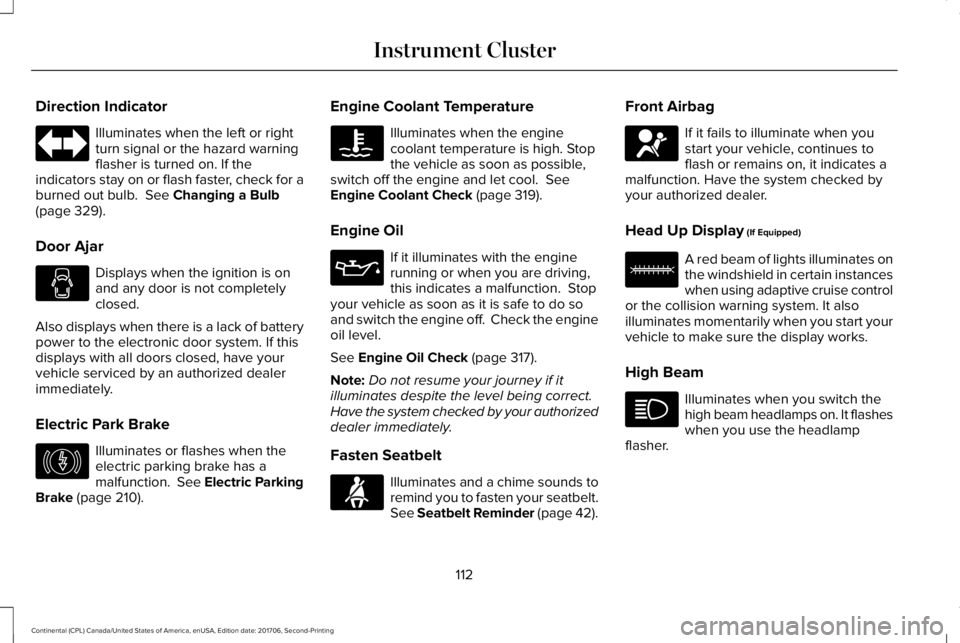
Direction Indicator
Illuminates when the left or rightturn signal or the hazard warningflasher is turned on. If theindicators stay on or flash faster, check for aburned out bulb. See Changing a Bulb(page 329).
Door Ajar
Displays when the ignition is onand any door is not completelyclosed.
Also displays when there is a lack of batterypower to the electronic door system. If thisdisplays with all doors closed, have yourvehicle serviced by an authorized dealerimmediately.
Electric Park Brake
Illuminates or flashes when theelectric parking brake has amalfunction. See Electric ParkingBrake (page 210).
Engine Coolant Temperature
Illuminates when the enginecoolant temperature is high. Stopthe vehicle as soon as possible,switch off the engine and let cool. SeeEngine Coolant Check (page 319).
Engine Oil
If it illuminates with the enginerunning or when you are driving,this indicates a malfunction. Stopyour vehicle as soon as it is safe to do soand switch the engine off. Check the engineoil level.
See Engine Oil Check (page 317).
Note:Do not resume your journey if itilluminates despite the level being correct.Have the system checked by your authorizeddealer immediately.
Fasten Seatbelt
Illuminates and a chime sounds toremind you to fasten your seatbelt.See Seatbelt Reminder (page 42).
Front Airbag
If it fails to illuminate when youstart your vehicle, continues toflash or remains on, it indicates amalfunction. Have the system checked byyour authorized dealer.
Head Up Display (If Equipped)
A red beam of lights illuminates onthe windshield in certain instanceswhen using adaptive cruise controlor the collision warning system. It alsoilluminates momentarily when you start yourvehicle to make sure the display works.
High Beam
Illuminates when you switch thehigh beam headlamps on. It flasheswhen you use the headlampflasher.
112
Continental (CPL) Canada/United States of America, enUSA, Edition date: 201706, Second-Printing
Instrument Cluster E146190 E71880 E67017 E156133
Page 130 of 615
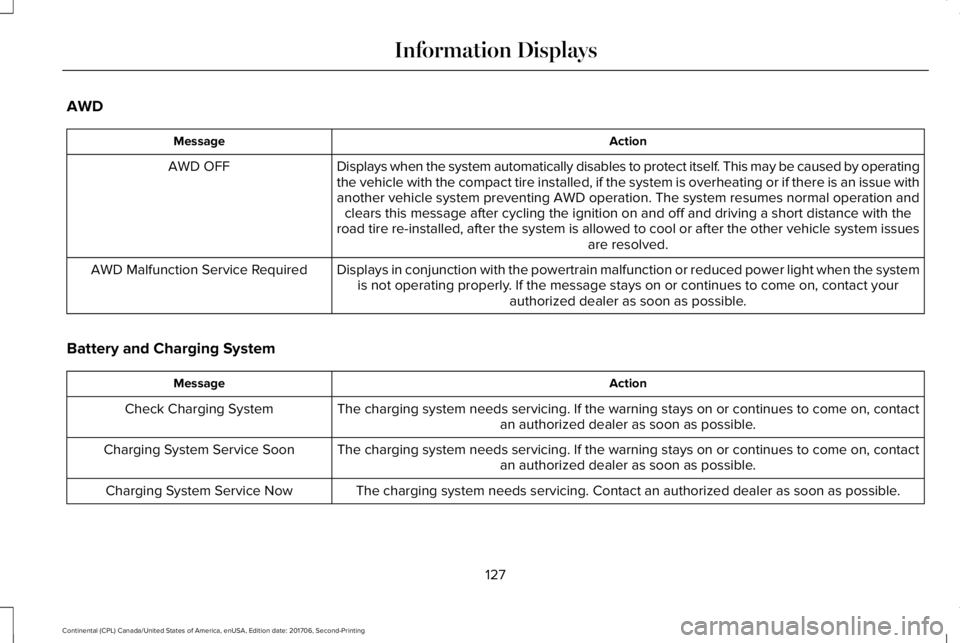
AWD
ActionMessage
Displays when the system automatically disables to protect itself. This may be caused by operatingthe vehicle with the compact tire installed, if the system is overheating or if there is an issue withanother vehicle system preventing AWD operation. The system resumes normal operation andclears this message after cycling the ignition on and off and driving a short distance with theroad tire re-installed, after the system is allowed to cool or after the other vehicle system issuesare resolved.
AWD OFF
Displays in conjunction with the powertrain malfunction or reduced power light when the systemis not operating properly. If the message stays on or continues to come on, contact yourauthorized dealer as soon as possible.
AWD Malfunction Service Required
Battery and Charging System
ActionMessage
The charging system needs servicing. If the warning stays on or continues to come on, contactan authorized dealer as soon as possible.Check Charging System
The charging system needs servicing. If the warning stays on or continues to come on, contactan authorized dealer as soon as possible.Charging System Service Soon
The charging system needs servicing. Contact an authorized dealer as soon as possible.Charging System Service Now
127
Continental (CPL) Canada/United States of America, enUSA, Edition date: 201706, Second-Printing
Information Displays
Page 131 of 615
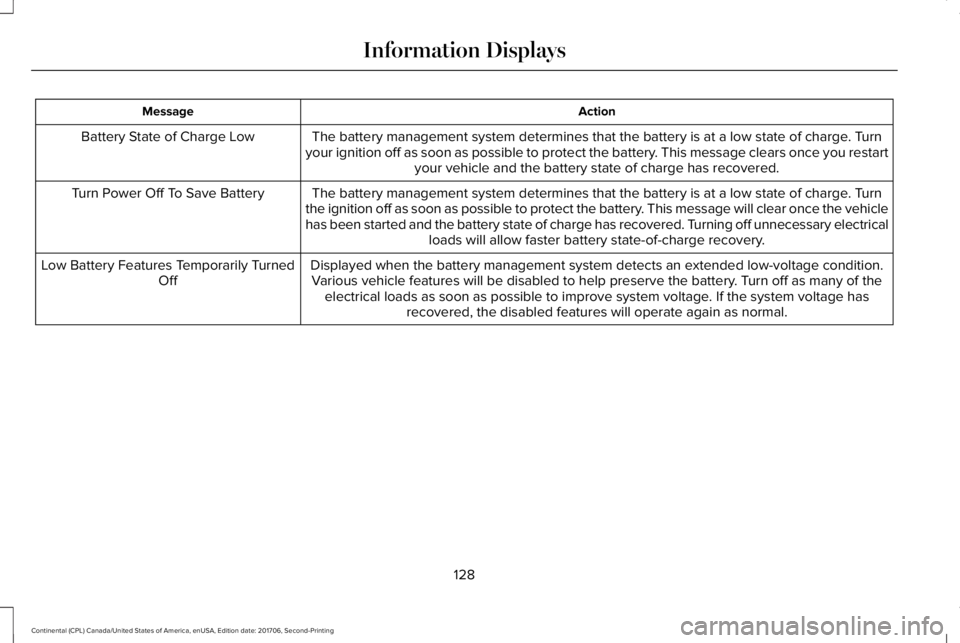
ActionMessage
The battery management system determines that the battery is at a low state of charge. Turnyour ignition off as soon as possible to protect the battery. This message clears once you restartyour vehicle and the battery state of charge has recovered.
Battery State of Charge Low
The battery management system determines that the battery is at a low state of charge. Turnthe ignition off as soon as possible to protect the battery. This message will clear once the vehiclehas been started and the battery state of charge has recovered. Turning off unnecessary electricalloads will allow faster battery state-of-charge recovery.
Turn Power Off To Save Battery
Displayed when the battery management system detects an extended low-voltage condition.Various vehicle features will be disabled to help preserve the battery. Turn off as many of theelectrical loads as soon as possible to improve system voltage. If the system voltage hasrecovered, the disabled features will operate again as normal.
Low Battery Features Temporarily TurnedOff
128
Continental (CPL) Canada/United States of America, enUSA, Edition date: 201706, Second-Printing
Information Displays
Page 135 of 615
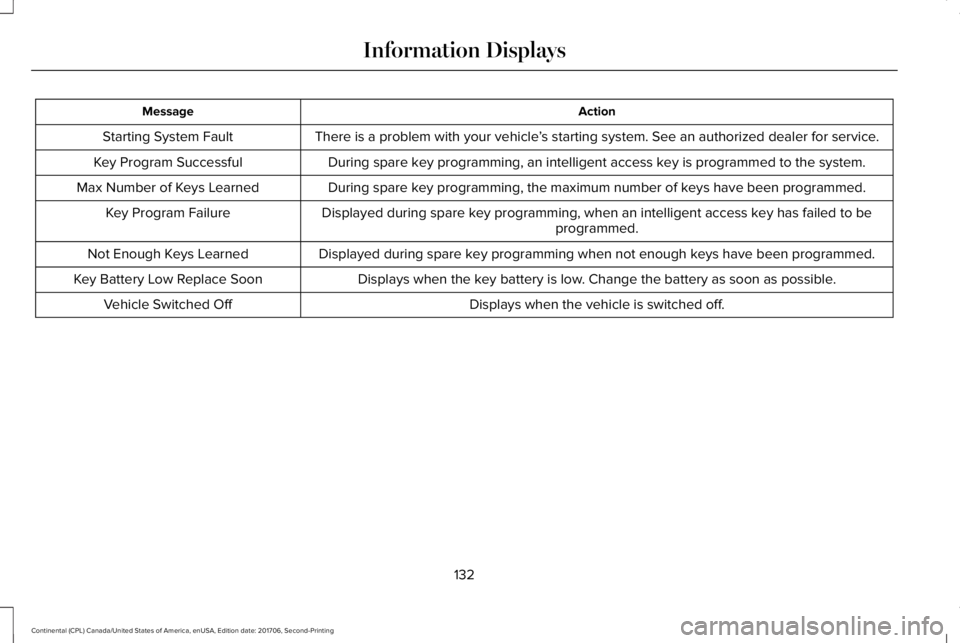
ActionMessage
There is a problem with your vehicle’s starting system. See an authorized dealer for service.Starting System Fault
During spare key programming, an intelligent access key is programmed to the system.Key Program Successful
During spare key programming, the maximum number of keys have been programmed.Max Number of Keys Learned
Displayed during spare key programming, when an intelligent access key has failed to beprogrammed.Key Program Failure
Displayed during spare key programming when not enough keys have been programmed.Not Enough Keys Learned
Displays when the key battery is low. Change the battery as soon as possible.Key Battery Low Replace Soon
Displays when the vehicle is switched off.Vehicle Switched Off
132
Continental (CPL) Canada/United States of America, enUSA, Edition date: 201706, Second-Printing
Information Displays
Page 144 of 615
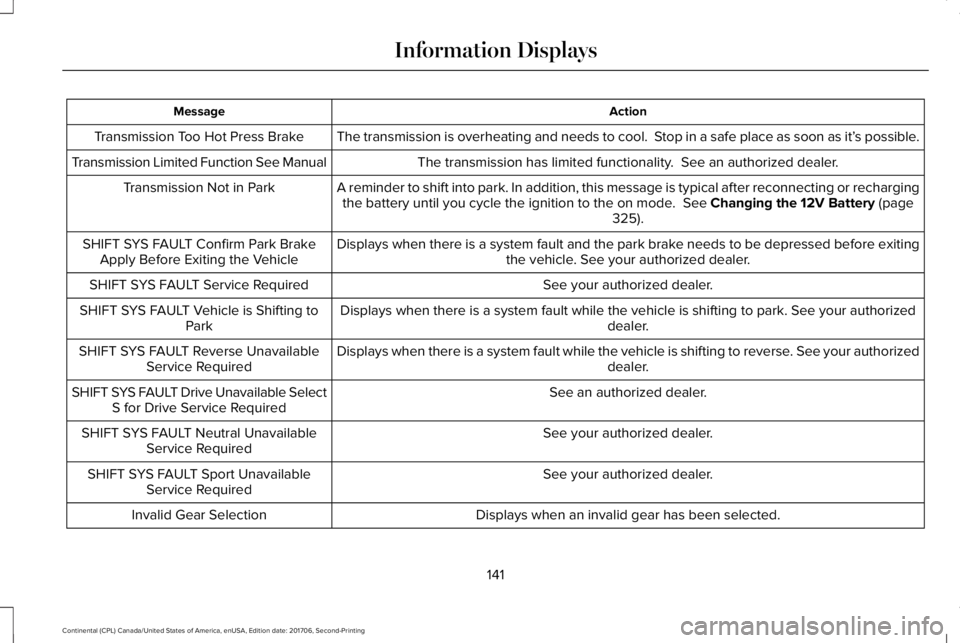
ActionMessage
The transmission is overheating and needs to cool. Stop in a safe place as soon as it’s possible.Transmission Too Hot Press Brake
The transmission has limited functionality. See an authorized dealer.Transmission Limited Function See Manual
A reminder to shift into park. In addition, this message is typical after reconnecting or rechargingthe battery until you cycle the ignition to the on mode. See Changing the 12V Battery (page325).
Transmission Not in Park
Displays when there is a system fault and the park brake needs to be depressed before exitingthe vehicle. See your authorized dealer.SHIFT SYS FAULT Confirm Park BrakeApply Before Exiting the Vehicle
See your authorized dealer.SHIFT SYS FAULT Service Required
Displays when there is a system fault while the vehicle is shifting to park. See your authorizeddealer.SHIFT SYS FAULT Vehicle is Shifting toPark
Displays when there is a system fault while the vehicle is shifting to reverse. See your authorizeddealer.SHIFT SYS FAULT Reverse UnavailableService Required
See an authorized dealer.SHIFT SYS FAULT Drive Unavailable SelectS for Drive Service Required
See your authorized dealer.SHIFT SYS FAULT Neutral UnavailableService Required
See your authorized dealer.SHIFT SYS FAULT Sport UnavailableService Required
Displays when an invalid gear has been selected.Invalid Gear Selection
141
Continental (CPL) Canada/United States of America, enUSA, Edition date: 201706, Second-Printing
Information Displays
Page 170 of 615
temperatures, especially if used for longperiods of time. Do not place anything onthe seat that insulates against heat, such asa blanket or cushion. This may cause theheated seat to overheat. Do not puncturethe seat with pins, needles or other pointedobjects. This may damage the heatingelement which may cause the heated seatto overheat. An overheated seat may causeserious personal injury.
Do not do the following:
•Place heavy objects on the seat.
•Operate the heated seat if water or anyother liquid spills on the seat. Allow theseat to dry thoroughly.
•Operate the heated seats unless theengine is running. Doing so can causethe battery to lose charge.
Press the heated seat symbol to cyclethrough the various heat settings and off.More indicator lights indicate warmersettings.
Rear Seats
WARNING: Persons who are unableto feel pain to the skin because of advancedage, chronic illness, diabetes, spinal cordinjury, medication, alcohol use, exhaustion,or other physical conditions, must exercisecare when using the seat heater. The seatheater may cause burns even at lowtemperatures, especially if used for longperiods of time. Do not place anything onthe seat that insulates against heat, such asa blanket or cushion, because this may cause
the seat heater to overheat. Do not puncturethe seat with pins, needles, or other pointedobjects because this may damage theheating element which may cause the seatheater to overheat. An overheated seat maycause serious personal injury.
Do not do the following:
•Place heavy objects on the seat.
•Operate the seat heater if water or anyother liquid is spilled on the seat. Allowthe seat to dry thoroughly.
•Operate the heated seats unless theengine is running. Doing so can causethe battery to lose charge.
The rear seat heat controls are located onthe rear of the center console.
167
Continental (CPL) Canada/United States of America, enUSA, Edition date: 201706, Second-Printing
SeatsE146322 E146322
Page 174 of 615
HomeLink Wireless Control System
WARNING: Make sure that the garagedoor and security device are free fromobstruction when you are programming. Donot program the system with the vehicle inthe garage.
WARNING: Do not use the system withany garage door opener that does not havethe safety stop and reverse feature asrequired by U.S. Federal Safety Standards(this includes any garage door openermanufactured before April 1, 1982). A garagedoor opener which cannot detect an object,signaling the door to stop and reverse, doesnot meet current federal safety standards.Using a garage door opener without thesefeatures increases the risk of serious injuryor death.
Note:Make sure you keep the originalremote control transmitter for use in othervehicles as well as for future systemprogramming.
Note:We recommend that upon the sale orlease termination of your vehicle, you erasethe programmed function buttons for securityreasons. See Erasing the Function ButtonCodes later in this section.
Note:You can program a maximum of threedevices. To change or replace any of thethree devices after it has been initiallyprogrammed, you must first erase the currentsettings. See Erasing the Function ButtonCodes.
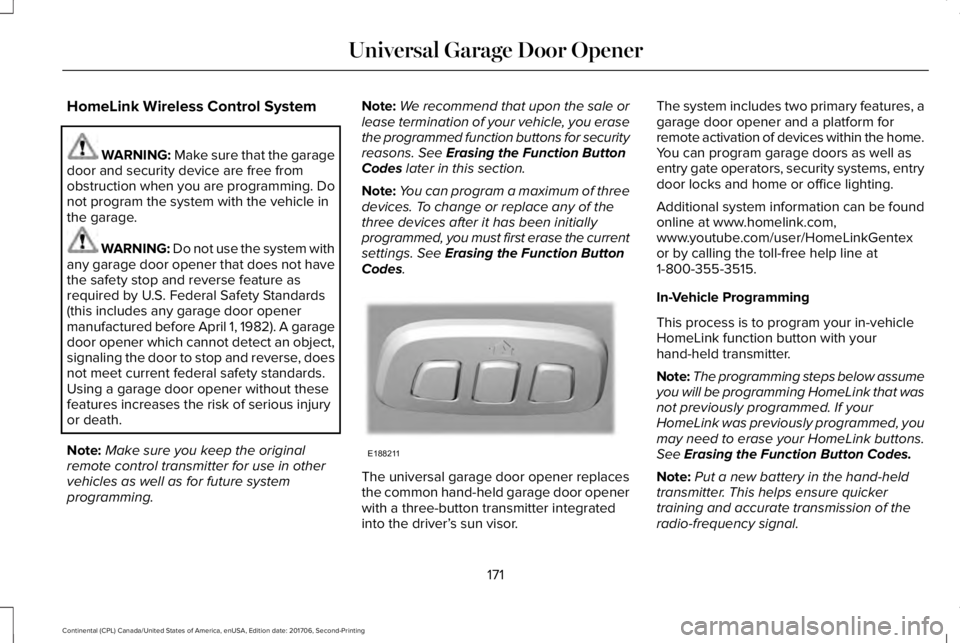
The universal garage door opener replacesthe common hand-held garage door openerwith a three-button transmitter integratedinto the driver’s sun visor.
The system includes two primary features, agarage door opener and a platform forremote activation of devices within the home.You can program garage doors as well asentry gate operators, security systems, entrydoor locks and home or office lighting.
Additional system information can be foundonline at www.homelink.com,www.youtube.com/user/HomeLinkGentexor by calling the toll-free help line at1-800-355-3515.
In-Vehicle Programming
This process is to program your in-vehicleHomeLink function button with yourhand-held transmitter.
Note:The programming steps below assumeyou will be programming HomeLink that wasnot previously programmed. If yourHomeLink was previously programmed, youmay need to erase your HomeLink buttons.See Erasing the Function Button Codes.
Note:Put a new battery in the hand-heldtransmitter. This helps ensure quickertraining and accurate transmission of theradio-frequency signal.
171
Continental (CPL) Canada/United States of America, enUSA, Edition date: 201706, Second-Printing
Universal Garage Door OpenerE188211