child lock LINCOLN CONTINENTAL 2018 User Guide
[x] Cancel search | Manufacturer: LINCOLN, Model Year: 2018, Model line: CONTINENTAL, Model: LINCOLN CONTINENTAL 2018Pages: 615, PDF Size: 5.31 MB
Page 41 of 615
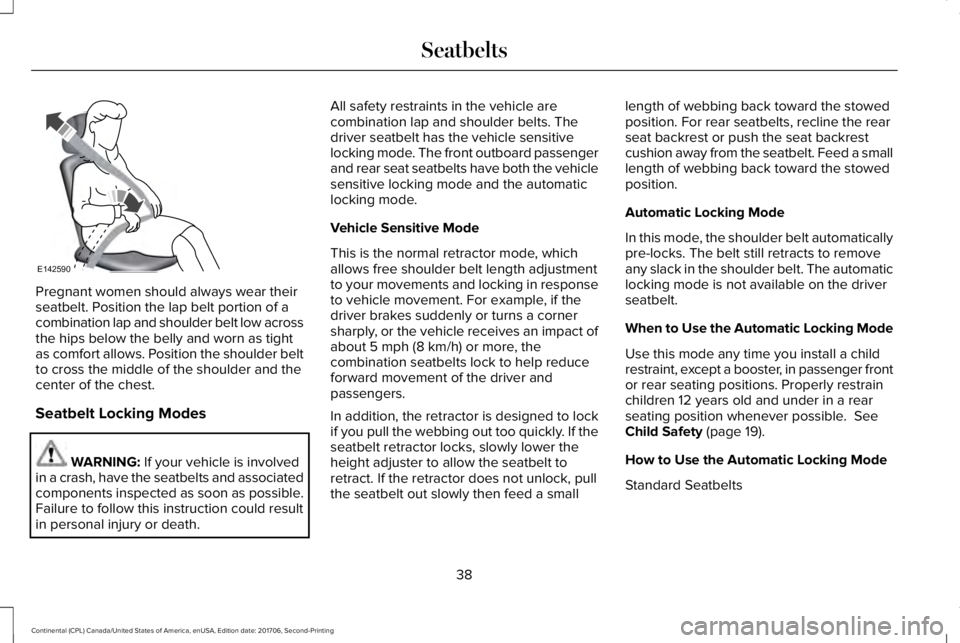
Pregnant women should always wear theirseatbelt. Position the lap belt portion of acombination lap and shoulder belt low acrossthe hips below the belly and worn as tightas comfort allows. Position the shoulder beltto cross the middle of the shoulder and thecenter of the chest.
Seatbelt Locking Modes
WARNING: If your vehicle is involvedin a crash, have the seatbelts and associatedcomponents inspected as soon as possible.Failure to follow this instruction could resultin personal injury or death.
All safety restraints in the vehicle arecombination lap and shoulder belts. Thedriver seatbelt has the vehicle sensitivelocking mode. The front outboard passengerand rear seat seatbelts have both the vehiclesensitive locking mode and the automaticlocking mode.
Vehicle Sensitive Mode
This is the normal retractor mode, whichallows free shoulder belt length adjustmentto your movements and locking in responseto vehicle movement. For example, if thedriver brakes suddenly or turns a cornersharply, or the vehicle receives an impact ofabout 5 mph (8 km/h) or more, thecombination seatbelts lock to help reduceforward movement of the driver andpassengers.
In addition, the retractor is designed to lockif you pull the webbing out too quickly. If theseatbelt retractor locks, slowly lower theheight adjuster to allow the seatbelt toretract. If the retractor does not unlock, pullthe seatbelt out slowly then feed a small
length of webbing back toward the stowedposition. For rear seatbelts, recline the rearseat backrest or push the seat backrestcushion away from the seatbelt. Feed a smalllength of webbing back toward the stowedposition.
Automatic Locking Mode
In this mode, the shoulder belt automaticallypre-locks. The belt still retracts to removeany slack in the shoulder belt. The automaticlocking mode is not available on the driverseatbelt.
When to Use the Automatic Locking Mode
Use this mode any time you install a childrestraint, except a booster, in passenger frontor rear seating positions. Properly restrainchildren 12 years old and under in a rearseating position whenever possible. SeeChild Safety (page 19).
How to Use the Automatic Locking Mode
Standard Seatbelts
38
Continental (CPL) Canada/United States of America, enUSA, Edition date: 201706, Second-Printing
SeatbeltsE142590
Page 43 of 615
Note:The rear inflatable seatbelts arecompatible with most infant and child safetycar seats and belt positioning booster seatswhen properly installed. This is because theyare designed to fill with a cooled gas at alower pressure and at a slower rate thantraditional airbags. After inflation, theshoulder portion of the seatbelt remains coolto the touch.
The rear inflatable seatbelt consists of thefollowing:
•An inflatable bag in the shoulder seatbeltwebbing.
•Lap seatbelt webbing with automaticlocking mode.
•The same warning light, electroniccontrol and diagnostic unit as used forthe front seatbelts.
•Impact sensors in various parts of thevehicle.
How does the rear inflatable seatbeltsystem work?
WARNING: If a supplementary restraintsystem component has deployed, it will notfunction again. Have the system andassociated components inspected as soonas possible. Failure to follow this instructioncould result in personal injury or death.
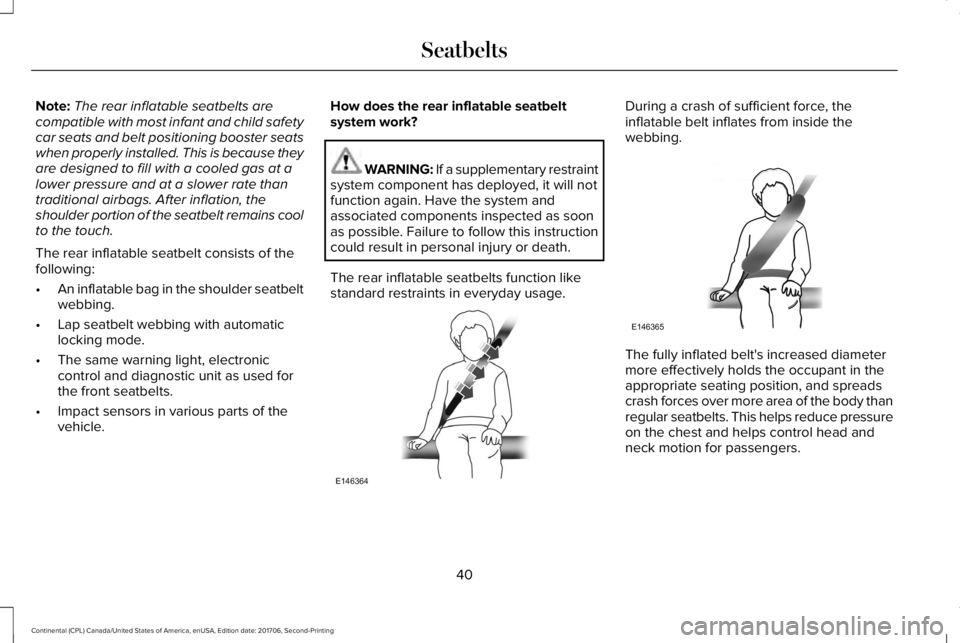
The rear inflatable seatbelts function likestandard restraints in everyday usage.
During a crash of sufficient force, theinflatable belt inflates from inside thewebbing.
The fully inflated belt's increased diametermore effectively holds the occupant in theappropriate seating position, and spreadscrash forces over more area of the body thanregular seatbelts. This helps reduce pressureon the chest and helps control head andneck motion for passengers.
40
Continental (CPL) Canada/United States of America, enUSA, Edition date: 201706, Second-Printing
SeatbeltsE146364 E146365
Page 78 of 615
WARNING: Keep keys out of the reachof children. Do not allow children to operateor play near an open or moving powerdecklid. You should supervise the operationof the power decklid at all times.
Note:Do not drive with the decklid openunless you switch off the power feature.Make sure you fully close the decklid beforeyou drive your vehicle.
You can switch the power decklid feature onor off in the information display. See GeneralInformation (page 115). The remote controland instrument panel button still operatesthe decklid regardless of the setting.
Opening and Closing the PowerDecklid
WARNING: Make sure all persons areclear of the power decklid area before usingthe power decklid control.
Note:You can reverse the decklidmovement. Press the instrument panel ordecklid button again, or press the remotecontrol button twice.
Note:Do not push or pull on the powerdecklid while it is under operation, as thismay cause damage to your vehicle.
The decklid only operates with thetransmission in park (P).
If the decklid starts to close after it has fullyopened, this indicates there may beexcessive weight on the decklid or a possiblestrut failure. A repetitive tone sounds andthe decklid closes under control. Removeany excessive weight from the decklid. If thedecklid continues to close after opening,have the system checked by an authorizeddealer.
From Inside Your Vehicle
Press the button on the instrumentpanel.
With the Remote Control
Press the button twice within threeseconds.
75
Continental (CPL) Canada/United States of America, enUSA, Edition date: 201706, Second-Printing
Doors and LocksE159323 E138630
Page 83 of 615
Note:All doors unlock if the two-stageunlocking feature is turned off. See Lockingand Unlocking (page 67).
INTERIOR LUGGAGE
COMPARTMENT RELEASE
WARNING: Keep vehicle doors andluggage compartment locked and keep keysand remote transmitters out of a child’sreach. Unsupervised children could lockthemselves in the trunk and risk injury.Children should be taught not to play invehicles.
WARNING: Do not leave children oranimals unattended in the vehicle. On hotdays, the temperature in the trunk or vehicleinterior can rise very quickly. Exposure ofpeople or animals to these hightemperatures for even a short time can causedeath or serious heat-related injuries,including brain damage. Small children areparticularly at risk.
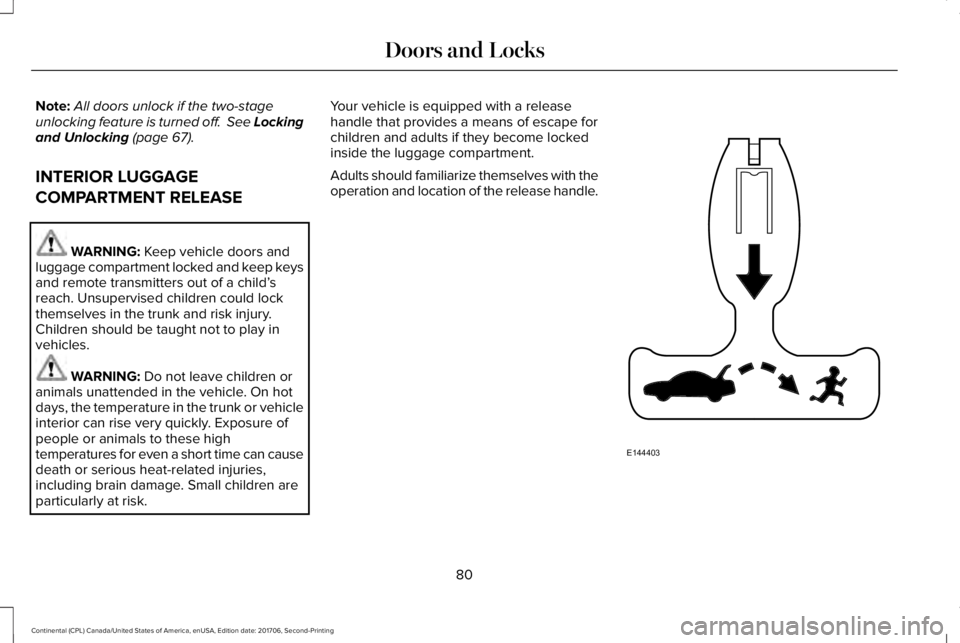
Your vehicle is equipped with a releasehandle that provides a means of escape forchildren and adults if they become lockedinside the luggage compartment.
Adults should familiarize themselves with theoperation and location of the release handle.
80
Continental (CPL) Canada/United States of America, enUSA, Edition date: 201706, Second-Printing
Doors and LocksE144403
Page 105 of 615
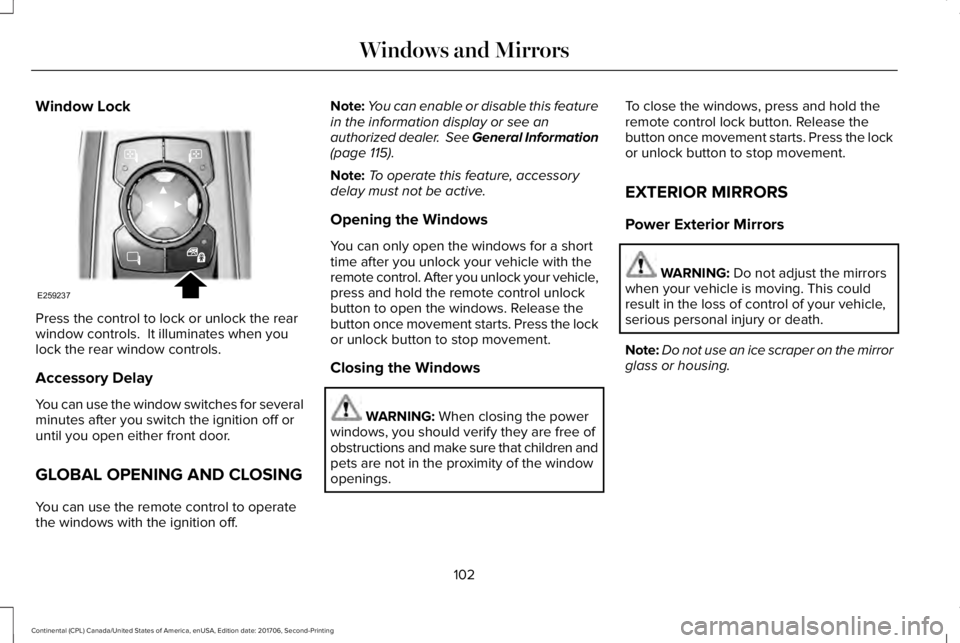
Window Lock
Press the control to lock or unlock the rearwindow controls. It illuminates when youlock the rear window controls.
Accessory Delay
You can use the window switches for severalminutes after you switch the ignition off oruntil you open either front door.
GLOBAL OPENING AND CLOSING
You can use the remote control to operatethe windows with the ignition off.
Note:You can enable or disable this featurein the information display or see anauthorized dealer. See General Information(page 115).
Note:To operate this feature, accessorydelay must not be active.
Opening the Windows
You can only open the windows for a shorttime after you unlock your vehicle with theremote control. After you unlock your vehicle,press and hold the remote control unlockbutton to open the windows. Release thebutton once movement starts. Press the lockor unlock button to stop movement.
Closing the Windows
WARNING: When closing the powerwindows, you should verify they are free ofobstructions and make sure that children andpets are not in the proximity of the windowopenings.
To close the windows, press and hold theremote control lock button. Release thebutton once movement starts. Press the lockor unlock button to stop movement.
EXTERIOR MIRRORS
Power Exterior Mirrors
WARNING: Do not adjust the mirrorswhen your vehicle is moving. This couldresult in the loss of control of your vehicle,serious personal injury or death.
Note:Do not use an ice scraper on the mirrorglass or housing.
102
Continental (CPL) Canada/United States of America, enUSA, Edition date: 201706, Second-Printing
Windows and MirrorsE259237
Page 132 of 615
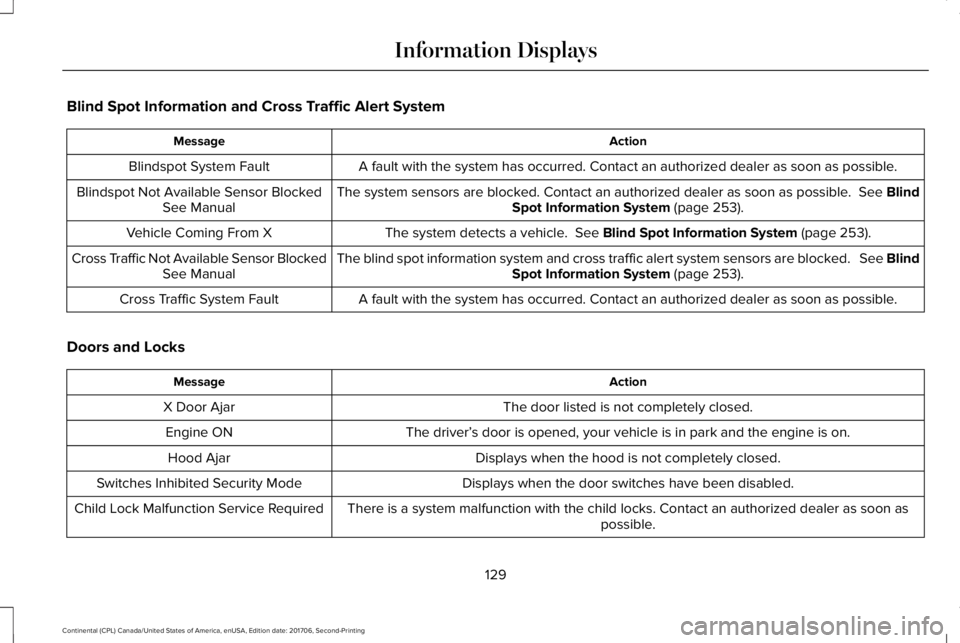
Blind Spot Information and Cross Traffic Alert System
ActionMessage
A fault with the system has occurred. Contact an authorized dealer as soon as possible.Blindspot System Fault
The system sensors are blocked. Contact an authorized dealer as soon as possible. See BlindSpot Information System (page 253).Blindspot Not Available Sensor BlockedSee Manual
The system detects a vehicle. See Blind Spot Information System (page 253).Vehicle Coming From X
The blind spot information system and cross traffic alert system sensors are blocked. See BlindSpot Information System (page 253).Cross Traffic Not Available Sensor BlockedSee Manual
A fault with the system has occurred. Contact an authorized dealer as soon as possible.Cross Traffic System Fault
Doors and Locks
ActionMessage
The door listed is not completely closed.X Door Ajar
The driver’s door is opened, your vehicle is in park and the engine is on.Engine ON
Displays when the hood is not completely closed.Hood Ajar
Displays when the door switches have been disabled.Switches Inhibited Security Mode
There is a system malfunction with the child locks. Contact an authorized dealer as soon aspossible.Child Lock Malfunction Service Required
129
Continental (CPL) Canada/United States of America, enUSA, Edition date: 201706, Second-Printing
Information Displays
Page 133 of 615
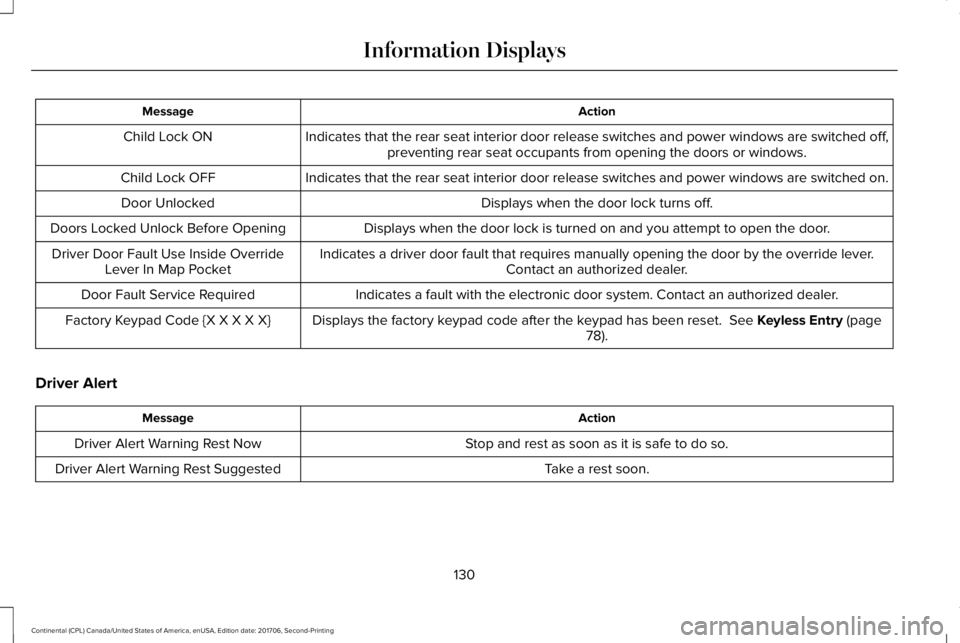
ActionMessage
Indicates that the rear seat interior door release switches and power windows are switched off,preventing rear seat occupants from opening the doors or windows.Child Lock ON
Indicates that the rear seat interior door release switches and power windows are switched on.Child Lock OFF
Displays when the door lock turns off.Door Unlocked
Displays when the door lock is turned on and you attempt to open the door.Doors Locked Unlock Before Opening
Indicates a driver door fault that requires manually opening the door by the override lever.Contact an authorized dealer.Driver Door Fault Use Inside OverrideLever In Map Pocket
Indicates a fault with the electronic door system. Contact an authorized dealer.Door Fault Service Required
Displays the factory keypad code after the keypad has been reset. See Keyless Entry (page78).Factory Keypad Code {X X X X X}
Driver Alert
ActionMessage
Stop and rest as soon as it is safe to do so.Driver Alert Warning Rest Now
Take a rest soon.Driver Alert Warning Rest Suggested
130
Continental (CPL) Canada/United States of America, enUSA, Edition date: 201706, Second-Printing
Information Displays
Page 329 of 615
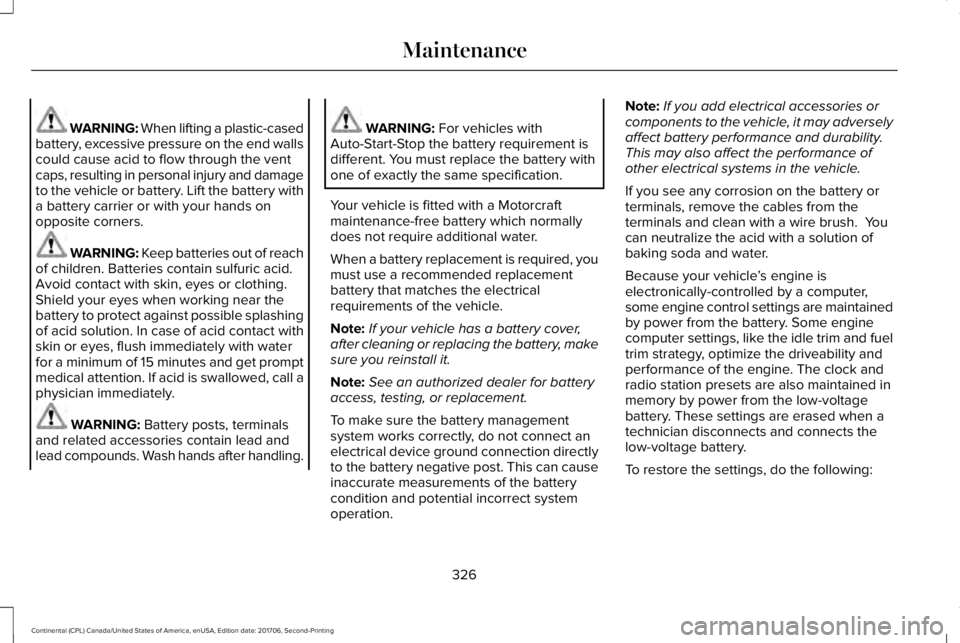
WARNING: When lifting a plastic-casedbattery, excessive pressure on the end wallscould cause acid to flow through the ventcaps, resulting in personal injury and damageto the vehicle or battery. Lift the battery witha battery carrier or with your hands onopposite corners.
WARNING: Keep batteries out of reachof children. Batteries contain sulfuric acid.Avoid contact with skin, eyes or clothing.Shield your eyes when working near thebattery to protect against possible splashingof acid solution. In case of acid contact withskin or eyes, flush immediately with waterfor a minimum of 15 minutes and get promptmedical attention. If acid is swallowed, call aphysician immediately.
WARNING: Battery posts, terminalsand related accessories contain lead andlead compounds. Wash hands after handling.
WARNING: For vehicles withAuto-Start-Stop the battery requirement isdifferent. You must replace the battery withone of exactly the same specification.
Your vehicle is fitted with a Motorcraftmaintenance-free battery which normallydoes not require additional water.
When a battery replacement is required, youmust use a recommended replacementbattery that matches the electricalrequirements of the vehicle.
Note:If your vehicle has a battery cover,after cleaning or replacing the battery, makesure you reinstall it.
Note:See an authorized dealer for batteryaccess, testing, or replacement.
To make sure the battery managementsystem works correctly, do not connect anelectrical device ground connection directlyto the battery negative post. This can causeinaccurate measurements of the batterycondition and potential incorrect systemoperation.
Note:If you add electrical accessories orcomponents to the vehicle, it may adverselyaffect battery performance and durability.This may also affect the performance ofother electrical systems in the vehicle.
If you see any corrosion on the battery orterminals, remove the cables from theterminals and clean with a wire brush. Youcan neutralize the acid with a solution ofbaking soda and water.
Because your vehicle’s engine iselectronically-controlled by a computer,some engine control settings are maintainedby power from the battery. Some enginecomputer settings, like the idle trim and fueltrim strategy, optimize the driveability andperformance of the engine. The clock andradio station presets are also maintained inmemory by power from the low-voltagebattery. These settings are erased when atechnician disconnects and connects thelow-voltage battery.
To restore the settings, do the following:
326
Continental (CPL) Canada/United States of America, enUSA, Edition date: 201706, Second-Printing
Maintenance
Page 606 of 615
Changing a Fuse..........................................309Fuses.....................................................................309
Changing a Road Wheel.............................364Dissimilar Spare Wheel and Tire AssemblyInformation......................................................365Stowing the flat tire ...........................................369Tire Change Procedure....................................366
Changing the 12V Battery..........................325Changing the Engine Air Filter - 2.7LEcoBoost™/3.0L EcoBoost™.....................332Changing the Engine Air Filter - 3.7L......332Changing the Wiper Blades.......................327Changing the Windshield Wiper Blades......328
Checking MyKey System Status.................64MyKey Distance.....................................................64Number of Admin Keys.......................................65Number of MyKeys...............................................64
Checking the Wiper Blades.......................327Child Restraint and SeatbeltMaintenance..................................................44Child Restraint Positioning...........................33Child Safety.......................................................19General Information..............................................19
Child Safety Locks..........................................34Child Seats........................................................21Cleaning Leather Seats...............................341Cleaning Products........................................334Materials................................................................334
Cleaning the Engine....................................337Cleaning the Exterior...................................335Cleaning the Headlamps..................................335Exterior Chrome Parts.......................................336Exterior Plastic Parts..........................................336Stripes or Graphics............................................336Underbody...........................................................336Under Hood.........................................................336
Cleaning the Instrument Panel andInstrument Cluster Lens...........................340Cleaning the Interior....................................338Cleaning Black Label or PresidentialInterior...............................................................338
Cleaning the Wheels....................................341Cleaning the Windows and WiperBlades...........................................................337Clearing All MyKeys.......................................64Climate............................................................454Climate Control..............................................146Climate Controlled Seats............................168Ventilated Seats...................................................168
Coolant CheckSee: Engine Coolant Check..............................319
Crash Sensors and Airbag Indicator..........55Creating a MyKey...........................................63Programming/Changing ConfigurableSettings...............................................................64
Cross Traffic Alert.........................................255Blocked Sensors................................................258Switching the System Off and On..................258System Errors......................................................258System Lights, Messages and AudibleAlerts.................................................................258System Limitations.............................................258Using the Cross Traffic Alert System............255
Cruise Control.................................................86Principle of Operation.......................................237Type One................................................................86Type Two.................................................................87
Cruise controlSee: Using Cruise Control................................237
Customer Assistance..................................286
D
Data Recording................................................10Event Data Recording...........................................10Service Data Recording.......................................10
Daytime Running Lamps...............................94Type One - Conventional(Non-Configurable)..........................................95Type Two - Configurable....................................95
Direction Indicators........................................97Indicating a Lane Change...................................97
Doors and Locks.............................................67
603
Continental (CPL) Canada/United States of America, enUSA, Edition date: 201706, Second-Printing
Index
Page 607 of 615
Drive Control.................................................264LINCOLN DRIVE CONTROL............................264
Driver Alert.....................................................246Using Driver Alert...............................................247
Driver and Passenger Airbags....................48Children and Airbags...........................................49Proper Driver and Front Passenger SeatingAdjustment.........................................................49
Driver and Passenger Knee Airbags.........53Driving Aids...................................................246Driving Hints..................................................276Driving Through Water................................276DRLSee: Daytime Running Lamps...........................94
E
Economical Driving......................................276Electric Parking Brake..................................210Applying the Electric Parking Brake...............210Battery With No Charge....................................212Releasing the Electric Parking Brake..............211
Electromagnetic Compatibility.................555Emergency Door Release.............................74Emission Law..................................................190Noise Emissions Warranty, ProhibitedTampering Acts and Maintenance..............191
Tampering With a Noise ControlSystem...............................................................190
End User License Agreement..................560VEHICLE SOFTWARE END USER LICENSEAGREEMENT (EULA) ....................................560
Engine Block Heater.....................................181Using the Engine Block Heater.......................182
Engine Coolant Check.................................319Adding Coolant...................................................320Coolant Change..................................................322Engine Coolant TemperatureManagement...................................................323Fail-Safe Cooling................................................322Recycled Coolant................................................321Severe Climates...................................................321
Engine Emission Control.............................190Engine ImmobilizerSee: Passive Anti-Theft System........................82
Engine Oil Check...........................................317Adding Engine Oil...............................................318
Engine Oil Dipstick - 2.7L EcoBoost™/3.0LEcoBoost™.....................................................317Engine Oil Dipstick - 3.7L.............................317Engine Specifications - 2.7L.......................373Drivebelt Routing................................................373
Engine Specifications - 3.0L......................374Drivebelt Routing................................................375
Engine Specifications - 3.7L.......................375Drivebelt Routing................................................376
Entertainment................................................440AM/FM Radio.......................................................443Apps.......................................................................454Bluetooth Stereo or USB..................................452CD (If equipped)...................................................451HD Radio™ Information (If Available)..............447SiriusXM® Satellite Radio (If Activated).........443Sources.................................................................442Supported Media Players, Formats andMetadata Information...................................454USB Ports.............................................................454
Environment......................................................16EPBSee: Electric Parking Brake..............................210
Essential Towing Checks............................273Before Towing a Trailer.....................................274Hitches..................................................................273Launching or Retrieving a Boat or PersonalWatercraft (PWC)............................................274Safety Chains.......................................................273Trailer Brakes.......................................................273Trailer Lamps........................................................273When Towing a Trailer.......................................274
Event Data RecordingSee: Data Recording.............................................10
Export Unique Options...................................14
604
Continental (CPL) Canada/United States of America, enUSA, Edition date: 201706, Second-Printing
Index