key LINCOLN CONTINENTAL 2018 User Guide
[x] Cancel search | Manufacturer: LINCOLN, Model Year: 2018, Model line: CONTINENTAL, Model: LINCOLN CONTINENTAL 2018Pages: 615, PDF Size: 5.31 MB
Page 66 of 615
Note:Not every feature applies to everyvehicle in every market. When they areavailable for your vehicle, then they appearin your information display, providing choicesto switch them on or off, or to select a morespecific setting.
•Various vehicle speed limits so theMyKey driver cannot exceed certainspeeds. The information display showswarnings followed by an audible tonewhen the MyKey driver reaches the setspeed. You cannot override the setspeed by fully depressing the acceleratorpedal.
WARNING: Do not set MyKeymaximum speed limit to a limit that willprevent the driver from maintaining a safespeed considering posted speed limits andprevailing road conditions. The driver isalways responsible to drive in accordancewith local laws and prevailing conditions.Failure to do so could result in accident orinjury.
•Various vehicle speed reminders soMyKey drivers know when their vehiclespeed approaches the limits. Warningsappear in your information display and atone sounds when the MyKey driversexceed the set vehicle speed.
•The audio system's maximum volumelimits to 45% so MyKey drivers canconcentrate on the road. A messageappears in the information display whenMyKey drivers attempt to exceed thelimited volume. MyKey also disables theautomatic volume control. Note: If yourvehicle includes an AM/FM radio or avery basic audio system, then the radiomay not limit.
•Always on setting. This setting forcescertain features to remain on and activefor MyKey drivers. For example, E911 oremergency assistance and the do notdisturb features stay on even if a MyKeydriver uses the feature's control to switchit off. When you select, you will not beable to turn off Advance Trac or tractioncontrol (if your vehicle has this feature).
CREATING A MYKEY
Use the information display to create aMyKey:
1. Insert the key you want to program intothe ignition. See Starting a GasolineEngine (page 179). If your vehicle isequipped with a push-button start, placethe remote control into the backup slot.See Passive Anti-Theft System (page82).
2. Switch the ignition on.
3.Access the main menu in the informationdisplay and then scroll through themenus to change the settings of yourMyKey. From the MyKey menu select theoption Create MyKey. See InformationDisplays (page 115).
4.When prompted, hold the OK button untilyou see a message informing you to labelthis key as a MyKey. The programmedrestrictions apply when you key off, openand close the driver door and restart yourvehicle with the programmed key ortransmitter.
63
Continental (CPL) Canada/United States of America, enUSA, Edition date: 201706, Second-Printing
MyKey™
Page 67 of 615

MyKey is successfully created. Make sureyou label it so you can distinguish it from theadmin keys.
You can also program configurable settingsfor the key(s). See Programming/ChangingConfigurable Settings.
Programming/Changing ConfigurableSettings
Use the information display to access yourconfigurable MyKey settings.
1. Switch the ignition on using the key orthe transmitter you want to program.
2.Access the main menu in the informationdisplay and then scroll through themenus to change the settings of yourMyKey. See Information Displays (page115).
3. Follow the instructions in the display.
Note:You can clear or change your MyKeysettings at any time during the same keycycle as you created the MyKey. Once youhave switched the vehicle off, however, youwill need an admin key to change or clearyour MyKey settings.
CLEARING ALL MYKEYS
When you clear your MyKeys, you removeall restrictions and return all MyKeys to theiroriginal admin key status at once. To clearall MyKeys of all MyKey settings, use theinformation display.
1. Switch the ignition on using an adminkey.
2.Access the main menu in the informationdisplay and then scroll through themenus to begin clearing your MyKeyprogramming. See Information Displays(page 115).
3. Follow the instructions in the display.
4. A confirmation message appears in thedisplay after you finish clearing yourMyKeys.
Note:When you clear your MyKeys, youremove all restrictions and return all MyKeysto their original admin key status. You cannotremove the MyKey restrictions individually.
CHECKING MYKEY SYSTEM
STATUS
You can find information about yourprogrammed MyKeys by using theinformation display. See InformationDisplays (page 115).
MyKey Distance
Tracks the distance when drivers use aMyKey. The only way to delete theaccumulated distance is by using an adminkey to clear all MyKeys. If the distance doesnot accumulate as expected, then theintended user is not using the MyKey, or anadmin key user recently cleared and thenrecreated a MyKey.
Number of MyKeys
Indicates the number of MyKeysprogrammed to your vehicle. Use this featureto detect how many MyKeys you have foryour vehicle and determine when all MyKeyshave been deleted.
64
Continental (CPL) Canada/United States of America, enUSA, Edition date: 201706, Second-Printing
MyKey™
Page 68 of 615
Number of Admin Keys
Indicates how many admin keys areprogrammed to your vehicle. Use this featureto determine how many admin keys you havefor your vehicle, and detect if an additionalMyKey has been programmed.
USING MYKEY WITH REMOTE
START SYSTEMS
MyKey is not compatible with nonFord-approved, aftermarket remote startsystems. If you choose to install a remotestart system, see an authorized dealer for aFord-approved remote start system.
MYKEY TROUBLESHOOTING
Potential causesCondition
· The key or transmitter used to start the vehicle does not have adminprivileges.I cannot create a MyKey.
· Vehicles with keyless start: Make sure you place the transmitter intothe backup slot. See Passive Anti-Theft System (page 82).· The key or transmitter used to start the vehicle is the only admin key.There always has to be at least one admin key.· SecuriLock passive anti-theft system is disabled or in unlimited mode.
· The key or transmitter used to start the vehicle does not have adminprivileges.I cannot program the configurable settings.
65
Continental (CPL) Canada/United States of America, enUSA, Edition date: 201706, Second-Printing
MyKey™
Page 69 of 615
Potential causesCondition
· There are no MyKeys programmed to the vehicle. See Creating aMyKey (page 63).
· The key or transmitter used to start the vehicle does not have adminprivileges.I cannot clear the MyKeys.
· No MyKeys are created. See Creating a MyKey (page 63).
· Purchase a new key or transmitter from your authorized dealer.I lost the only admin key.
· Program a spare key or transmitter. You may need to see yourauthorized dealer. See Passive Anti-Theft System (page 82).I lost a key.
· The MyKey user is not using the MyKey.MyKey distances do not accumulate.· An admin key holder cleared the MyKeys and created new MyKeys.· The key system has been reset.
66
Continental (CPL) Canada/United States of America, enUSA, Edition date: 201706, Second-Printing
MyKey™
Page 70 of 615
LOCKING AND UNLOCKING
Your vehicle has an intelligent electronicallycontrolled door system that is in constantcommunication with overall vehicle systems.
When you lock your vehicle using the lockswitch on each door interior trim panel, orby using the keyless entry keypad or the locksensor on each door exterior trim panel, theexterior door handle switches do not releasethe doors. This helps to secure your vehicleand prevent unauthorized entry. Also, whenyour vehicle reaches a speed greater than12 mph (20 km/h) the exterior door handleswitches do not release the doors.
If the airbags deploy or the fuel pump shutoffswitch activates, all interior and exteriorunlock switches do not unlock your door forsix seconds. This helps to secure the doorsin the event of a crash. After six seconds, allswitches reset and you can open the doorsusing the interior and exterior unlatchswitches.
Door Lock Indicator
An LED on each front door window trimilluminates when you lock the doors. Itremains on for 2 to 5 seconds after youswitch the ignition off.
Door Lock Switch Inhibitor
When you electronically lock your vehicle,the door lock switches and the interiorluggage compartment release switch do notoperate after 20 seconds. You must unlockyour vehicle with the remote control orkeyless entry keypad, or switch the ignitionon, to restore function to these switches. You can switch this feature on or off in theinformation display. See GeneralInformation (page 115).
Activating Intelligent Access
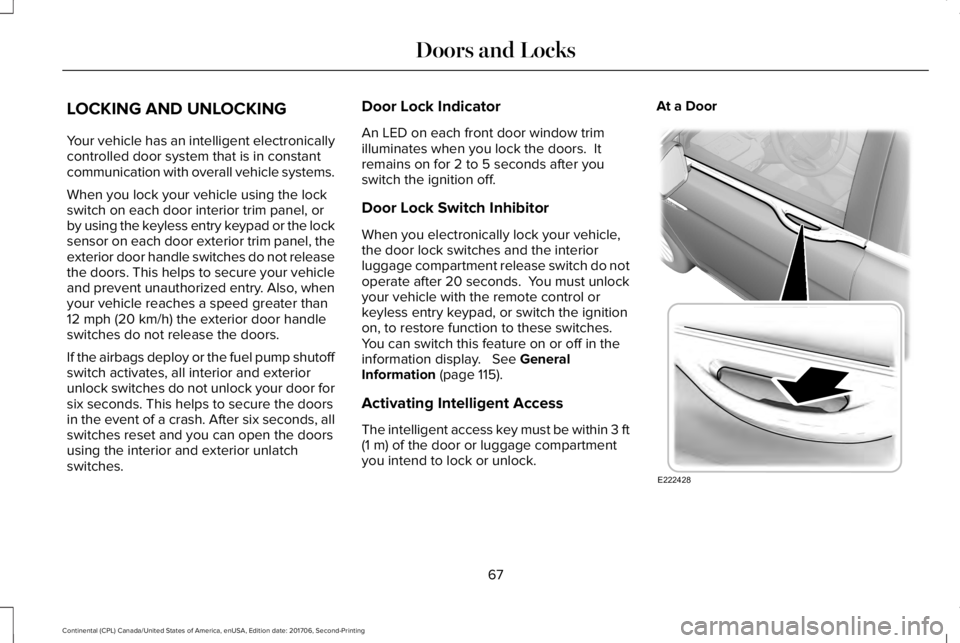
The intelligent access key must be within 3 ft(1 m) of the door or luggage compartmentyou intend to lock or unlock.
At a Door
67
Continental (CPL) Canada/United States of America, enUSA, Edition date: 201706, Second-Printing
Doors and LocksE222428
Page 71 of 615
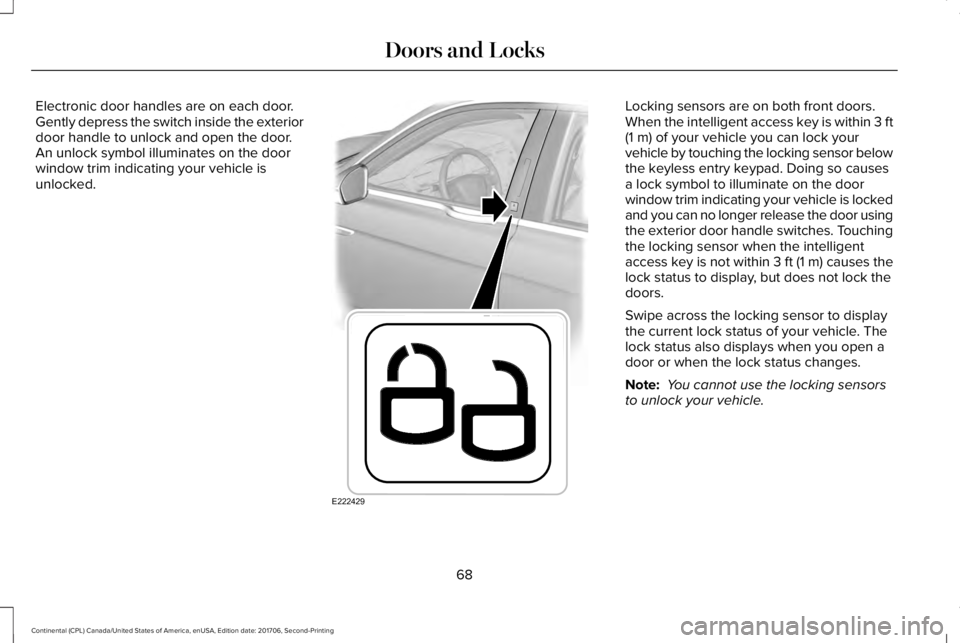
Electronic door handles are on each door.Gently depress the switch inside the exteriordoor handle to unlock and open the door.An unlock symbol illuminates on the doorwindow trim indicating your vehicle isunlocked.
Locking sensors are on both front doors.When the intelligent access key is within 3 ft(1 m) of your vehicle you can lock yourvehicle by touching the locking sensor belowthe keyless entry keypad. Doing so causesa lock symbol to illuminate on the doorwindow trim indicating your vehicle is lockedand you can no longer release the door usingthe exterior door handle switches. Touchingthe locking sensor when the intelligentaccess key is not within 3 ft (1 m) causes thelock status to display, but does not lock thedoors.
Swipe across the locking sensor to displaythe current lock status of your vehicle. Thelock status also displays when you open adoor or when the lock status changes.
Note: You cannot use the locking sensorsto unlock your vehicle.
68
Continental (CPL) Canada/United States of America, enUSA, Edition date: 201706, Second-Printing
Doors and LocksE222429
Page 72 of 615
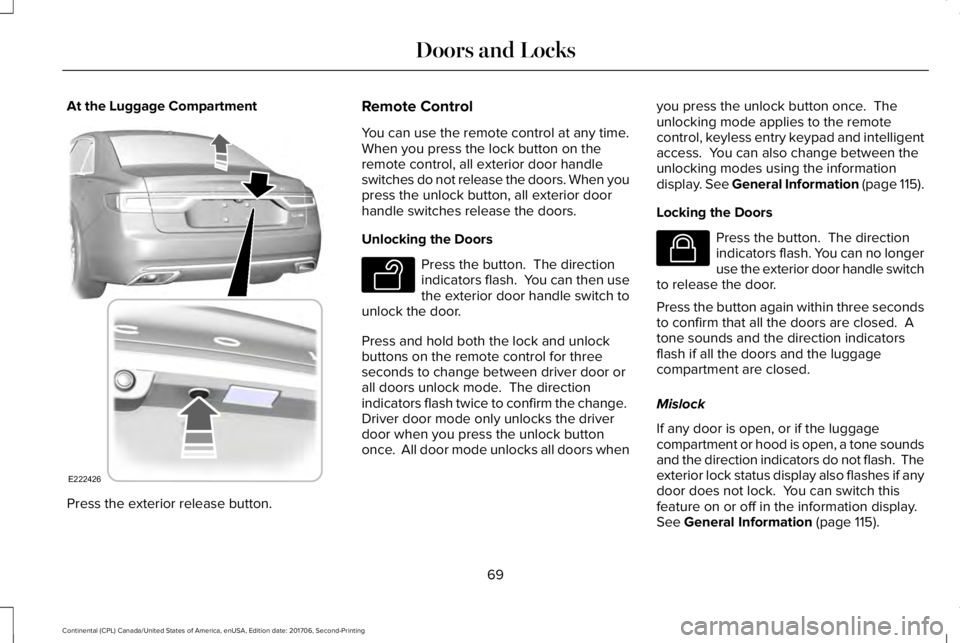
At the Luggage Compartment
Press the exterior release button.
Remote Control
You can use the remote control at any time.When you press the lock button on theremote control, all exterior door handleswitches do not release the doors. When youpress the unlock button, all exterior doorhandle switches release the doors.
Unlocking the Doors
Press the button. The directionindicators flash. You can then usethe exterior door handle switch tounlock the door.
Press and hold both the lock and unlockbuttons on the remote control for threeseconds to change between driver door orall doors unlock mode. The directionindicators flash twice to confirm the change. Driver door mode only unlocks the driverdoor when you press the unlock buttononce. All door mode unlocks all doors when
you press the unlock button once. Theunlocking mode applies to the remotecontrol, keyless entry keypad and intelligentaccess. You can also change between theunlocking modes using the informationdisplay. See General Information (page 115).
Locking the Doors
Press the button. The directionindicators flash. You can no longeruse the exterior door handle switchto release the door.
Press the button again within three secondsto confirm that all the doors are closed. Atone sounds and the direction indicatorsflash if all the doors and the luggagecompartment are closed.
Mislock
If any door is open, or if the luggagecompartment or hood is open, a tone soundsand the direction indicators do not flash. Theexterior lock status display also flashes if anydoor does not lock. You can switch thisfeature on or off in the information display. See General Information (page 115).
69
Continental (CPL) Canada/United States of America, enUSA, Edition date: 201706, Second-Printing
Doors and LocksE222426 E138629 E138623
Page 73 of 615
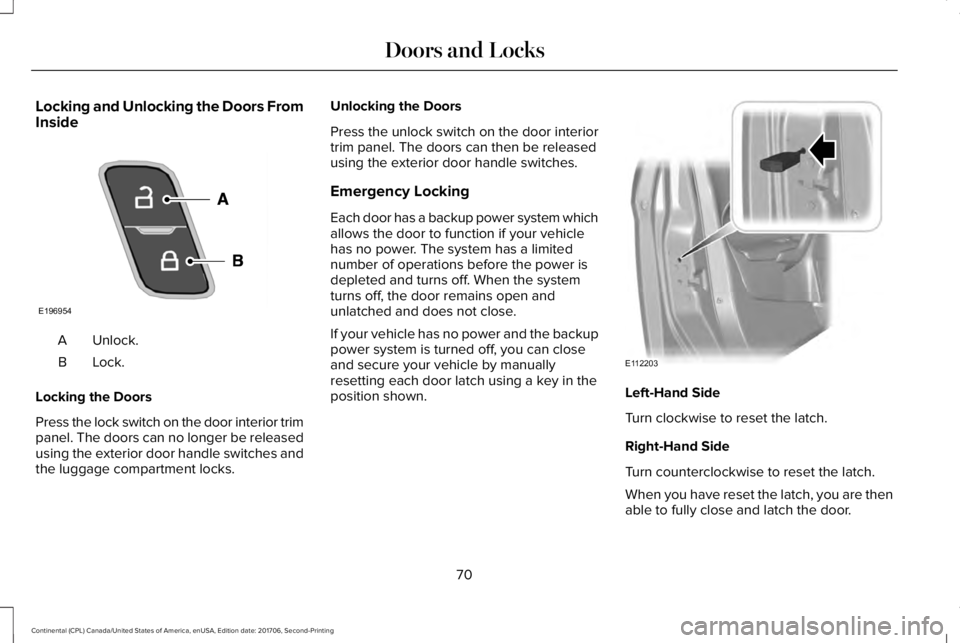
Locking and Unlocking the Doors FromInside
Unlock.A
Lock.B
Locking the Doors
Press the lock switch on the door interior trimpanel. The doors can no longer be releasedusing the exterior door handle switches andthe luggage compartment locks.
Unlocking the Doors
Press the unlock switch on the door interiortrim panel. The doors can then be releasedusing the exterior door handle switches.
Emergency Locking
Each door has a backup power system whichallows the door to function if your vehiclehas no power. The system has a limitednumber of operations before the power isdepleted and turns off. When the systemturns off, the door remains open andunlatched and does not close.
If your vehicle has no power and the backuppower system is turned off, you can closeand secure your vehicle by manuallyresetting each door latch using a key in theposition shown.Left-Hand Side
Turn clockwise to reset the latch.
Right-Hand Side
Turn counterclockwise to reset the latch.
When you have reset the latch, you are thenable to fully close and latch the door.
70
Continental (CPL) Canada/United States of America, enUSA, Edition date: 201706, Second-Printing
Doors and LocksE196954 E112203
Page 74 of 615
Note:You cannot open the door again untilthe vehicle battery is fully charged andoperational.
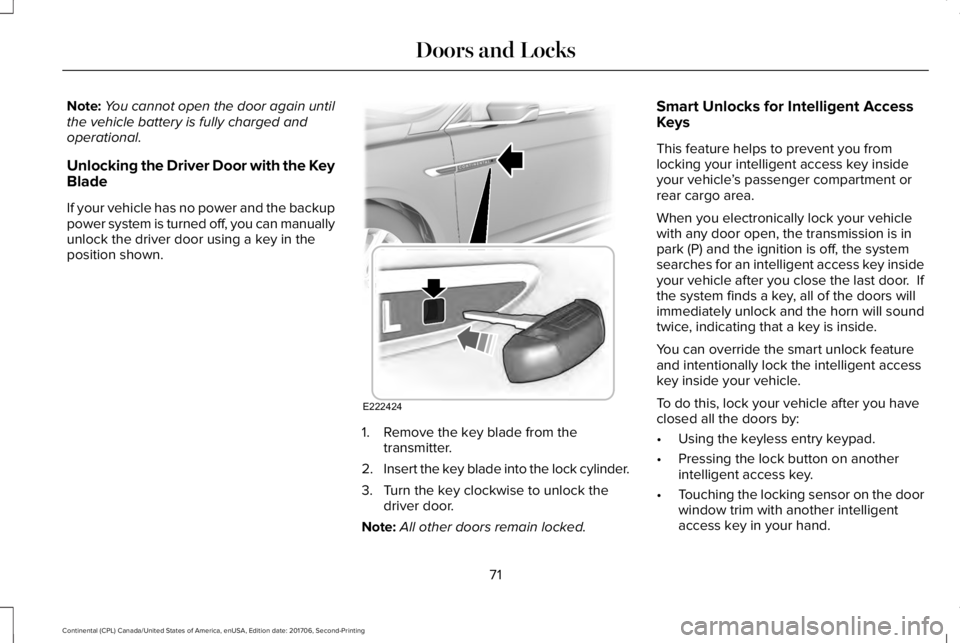
Unlocking the Driver Door with the KeyBlade
If your vehicle has no power and the backuppower system is turned off, you can manuallyunlock the driver door using a key in theposition shown.
1. Remove the key blade from thetransmitter.
2.Insert the key blade into the lock cylinder.
3. Turn the key clockwise to unlock thedriver door.
Note:All other doors remain locked.
Smart Unlocks for Intelligent AccessKeys
This feature helps to prevent you fromlocking your intelligent access key insideyour vehicle’s passenger compartment orrear cargo area.
When you electronically lock your vehiclewith any door open, the transmission is inpark (P) and the ignition is off, the systemsearches for an intelligent access key insideyour vehicle after you close the last door. Ifthe system finds a key, all of the doors willimmediately unlock and the horn will soundtwice, indicating that a key is inside.
You can override the smart unlock featureand intentionally lock the intelligent accesskey inside your vehicle.
To do this, lock your vehicle after you haveclosed all the doors by:
•Using the keyless entry keypad.
•Pressing the lock button on anotherintelligent access key.
•Touching the locking sensor on the doorwindow trim with another intelligentaccess key in your hand.
71
Continental (CPL) Canada/United States of America, enUSA, Edition date: 201706, Second-Printing
Doors and LocksE222424
Page 76 of 615
Battery Saver
If you leave the courtesy lamps, interiorlamps or headlamps on, the battery savershuts them off 10 minutes after you switchthe ignition off.
Battery Saver for Intelligent Access Keys
If you leave the ignition switched on, it shutsoff when it detects a certain amount ofbattery drain, or after 45 minutes.
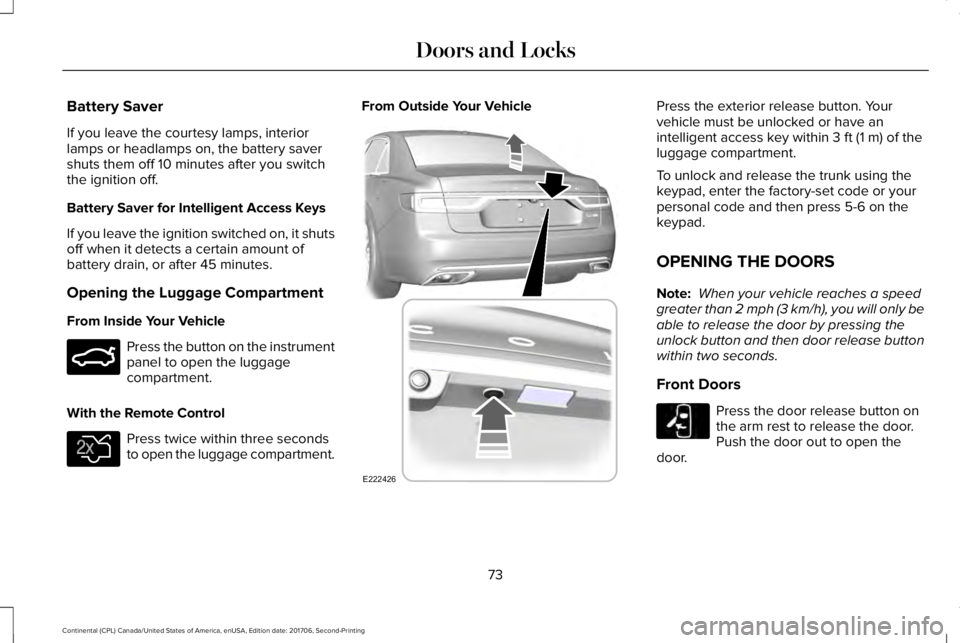
Opening the Luggage Compartment
From Inside Your Vehicle
Press the button on the instrumentpanel to open the luggagecompartment.
With the Remote Control
Press twice within three secondsto open the luggage compartment.
From Outside Your VehiclePress the exterior release button. Yourvehicle must be unlocked or have anintelligent access key within 3 ft (1 m) of theluggage compartment.
To unlock and release the trunk using thekeypad, enter the factory-set code or yourpersonal code and then press 5-6 on thekeypad.
OPENING THE DOORS
Note: When your vehicle reaches a speedgreater than 2 mph (3 km/h), you will only beable to release the door by pressing theunlock button and then door release buttonwithin two seconds.
Front Doors
Press the door release button onthe arm rest to release the door.Push the door out to open thedoor.
73
Continental (CPL) Canada/United States of America, enUSA, Edition date: 201706, Second-Printing
Doors and LocksE159323 E138630 E222426 E232417