remote control LINCOLN CONTINENTAL 2018 User Guide
[x] Cancel search | Manufacturer: LINCOLN, Model Year: 2018, Model line: CONTINENTAL, Model: LINCOLN CONTINENTAL 2018Pages: 615, PDF Size: 5.31 MB
Page 70 of 615
LOCKING AND UNLOCKING
Your vehicle has an intelligent electronicallycontrolled door system that is in constantcommunication with overall vehicle systems.
When you lock your vehicle using the lockswitch on each door interior trim panel, orby using the keyless entry keypad or the locksensor on each door exterior trim panel, theexterior door handle switches do not releasethe doors. This helps to secure your vehicleand prevent unauthorized entry. Also, whenyour vehicle reaches a speed greater than12 mph (20 km/h) the exterior door handleswitches do not release the doors.
If the airbags deploy or the fuel pump shutoffswitch activates, all interior and exteriorunlock switches do not unlock your door forsix seconds. This helps to secure the doorsin the event of a crash. After six seconds, allswitches reset and you can open the doorsusing the interior and exterior unlatchswitches.
Door Lock Indicator
An LED on each front door window trimilluminates when you lock the doors. Itremains on for 2 to 5 seconds after youswitch the ignition off.
Door Lock Switch Inhibitor
When you electronically lock your vehicle,the door lock switches and the interiorluggage compartment release switch do notoperate after 20 seconds. You must unlockyour vehicle with the remote control orkeyless entry keypad, or switch the ignitionon, to restore function to these switches. You can switch this feature on or off in theinformation display. See GeneralInformation (page 115).
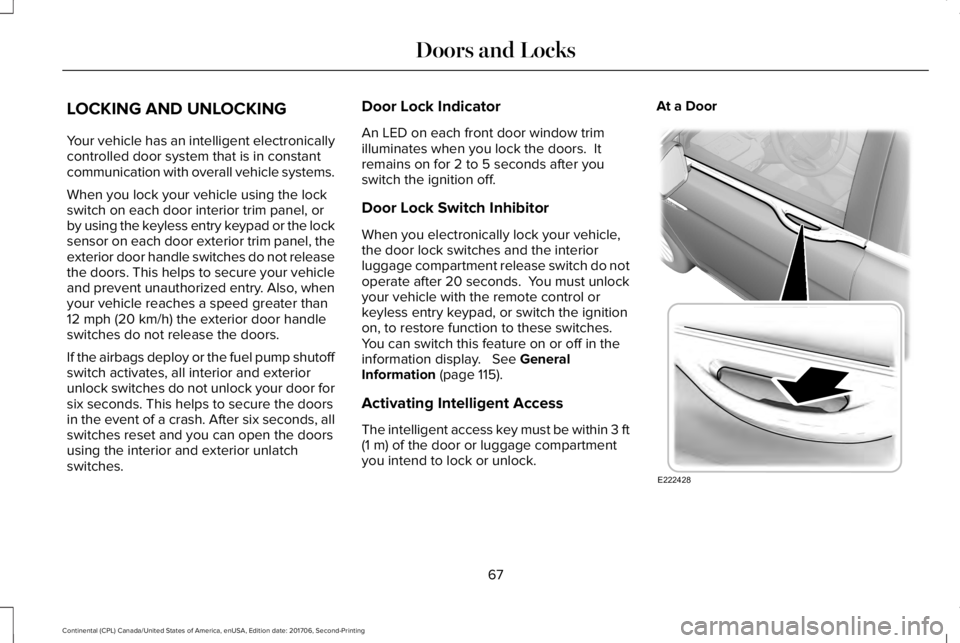
Activating Intelligent Access
The intelligent access key must be within 3 ft(1 m) of the door or luggage compartmentyou intend to lock or unlock.
At a Door
67
Continental (CPL) Canada/United States of America, enUSA, Edition date: 201706, Second-Printing
Doors and LocksE222428
Page 72 of 615
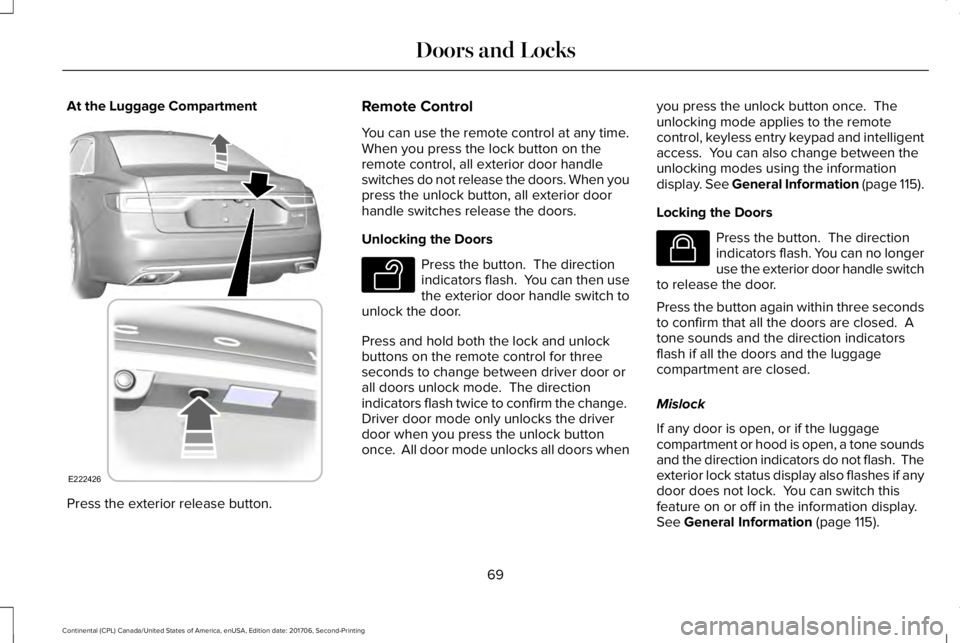
At the Luggage Compartment
Press the exterior release button.
Remote Control
You can use the remote control at any time.When you press the lock button on theremote control, all exterior door handleswitches do not release the doors. When youpress the unlock button, all exterior doorhandle switches release the doors.
Unlocking the Doors
Press the button. The directionindicators flash. You can then usethe exterior door handle switch tounlock the door.
Press and hold both the lock and unlockbuttons on the remote control for threeseconds to change between driver door orall doors unlock mode. The directionindicators flash twice to confirm the change. Driver door mode only unlocks the driverdoor when you press the unlock buttononce. All door mode unlocks all doors when
you press the unlock button once. Theunlocking mode applies to the remotecontrol, keyless entry keypad and intelligentaccess. You can also change between theunlocking modes using the informationdisplay. See General Information (page 115).
Locking the Doors
Press the button. The directionindicators flash. You can no longeruse the exterior door handle switchto release the door.
Press the button again within three secondsto confirm that all the doors are closed. Atone sounds and the direction indicatorsflash if all the doors and the luggagecompartment are closed.
Mislock
If any door is open, or if the luggagecompartment or hood is open, a tone soundsand the direction indicators do not flash. Theexterior lock status display also flashes if anydoor does not lock. You can switch thisfeature on or off in the information display. See General Information (page 115).
69
Continental (CPL) Canada/United States of America, enUSA, Edition date: 201706, Second-Printing
Doors and LocksE222426 E138629 E138623
Page 75 of 615
When you open one of the front doors andlock your vehicle using the power door lockcontrol, all doors will lock then unlock if:
•The ignition is on.
•The ignition is off and the transmissionis not in park (P).
Autolock (If Equipped)
Autolock locks all the doors when:
•All doors are closed.
•The ignition is on.
•You shift into any gear putting yourvehicle in motion.
•Your vehicle reaches a speed greaterthan 12 mph (20 km/h).
Autolock repeats when:
•You open then close any door while theignition is on and your vehicle speed is9 mph (15 km/h) or lower.
•Your vehicle reaches a speed greaterthan 12 mph (20 km/h).
Autounlock
Autounlock unlocks all the doors when:
•The ignition is on, all the doors areclosed, and your vehicle has beenmoving at a speed greater than 12 mph(20 km/h).
•Your vehicle comes to a stop and youswitch the ignition off or to the accessoryposition.
•You open the driver door within 10minutes of switching the ignition off or toaccessory.
Note:The doors do not autounlock if youelectronically lock your vehicle after youswitch the ignition off and before you openthe driver door.
Enabling or Disabling Autounlock
You can enable or disable the autounlockfeature in the information display or anauthorized dealer can do it for you. SeeGeneral Information (page 115).
Illuminated Entry
The interior lamps and some exterior lampsilluminate when you unlock the doors withthe remote control.
The illuminated entry system turns off thelights if:
•The ignition is on.
•You press the remote control lock button.
•After 25 seconds of illumination.
The lights do not turn off if:
•You turn them on with the lamp control.
•Any door is open.
Illuminated Exit
The interior lamps and some exterior lampsilluminate when all doors are closed and youswitch the ignition off.
The lamps turn off if all the doors remainclosed and:
•25 seconds have elapsed.
•You press the push button ignitionswitch.
72
Continental (CPL) Canada/United States of America, enUSA, Edition date: 201706, Second-Printing
Doors and Locks
Page 76 of 615
Battery Saver
If you leave the courtesy lamps, interiorlamps or headlamps on, the battery savershuts them off 10 minutes after you switchthe ignition off.
Battery Saver for Intelligent Access Keys
If you leave the ignition switched on, it shutsoff when it detects a certain amount ofbattery drain, or after 45 minutes.
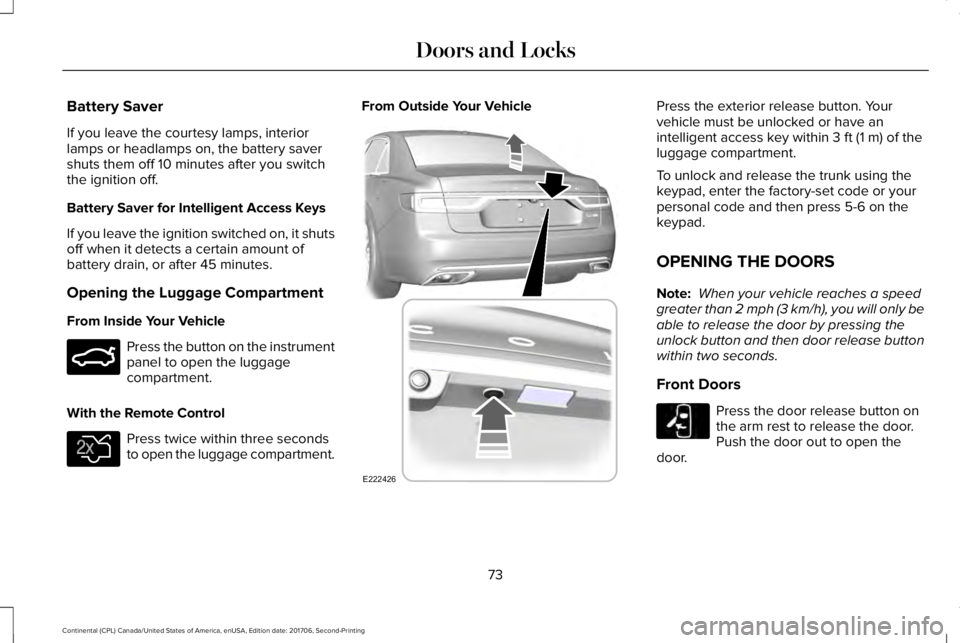
Opening the Luggage Compartment
From Inside Your Vehicle
Press the button on the instrumentpanel to open the luggagecompartment.
With the Remote Control
Press twice within three secondsto open the luggage compartment.
From Outside Your VehiclePress the exterior release button. Yourvehicle must be unlocked or have anintelligent access key within 3 ft (1 m) of theluggage compartment.
To unlock and release the trunk using thekeypad, enter the factory-set code or yourpersonal code and then press 5-6 on thekeypad.
OPENING THE DOORS
Note: When your vehicle reaches a speedgreater than 2 mph (3 km/h), you will only beable to release the door by pressing theunlock button and then door release buttonwithin two seconds.
Front Doors
Press the door release button onthe arm rest to release the door.Push the door out to open thedoor.
73
Continental (CPL) Canada/United States of America, enUSA, Edition date: 201706, Second-Printing
Doors and LocksE159323 E138630 E222426 E232417
Page 78 of 615
WARNING: Keep keys out of the reachof children. Do not allow children to operateor play near an open or moving powerdecklid. You should supervise the operationof the power decklid at all times.
Note:Do not drive with the decklid openunless you switch off the power feature.Make sure you fully close the decklid beforeyou drive your vehicle.
You can switch the power decklid feature onor off in the information display. See GeneralInformation (page 115). The remote controland instrument panel button still operatesthe decklid regardless of the setting.
Opening and Closing the PowerDecklid
WARNING: Make sure all persons areclear of the power decklid area before usingthe power decklid control.
Note:You can reverse the decklidmovement. Press the instrument panel ordecklid button again, or press the remotecontrol button twice.
Note:Do not push or pull on the powerdecklid while it is under operation, as thismay cause damage to your vehicle.
The decklid only operates with thetransmission in park (P).
If the decklid starts to close after it has fullyopened, this indicates there may beexcessive weight on the decklid or a possiblestrut failure. A repetitive tone sounds andthe decklid closes under control. Removeany excessive weight from the decklid. If thedecklid continues to close after opening,have the system checked by an authorizeddealer.
From Inside Your Vehicle
Press the button on the instrumentpanel.
With the Remote Control
Press the button twice within threeseconds.
75
Continental (CPL) Canada/United States of America, enUSA, Edition date: 201706, Second-Printing
Doors and LocksE159323 E138630
Page 80 of 615
Stopping the Decklid Movement
Note:Do not apply sudden excessive forceto the decklid while it is in motion. This coulddamage the power decklid and itscomponents.
You can stop the decklid movement by doingany of the following:
•Pressing the decklid control button.
•Pressing the remote control button twice.
•Pressing the button on the instrumentpanel.
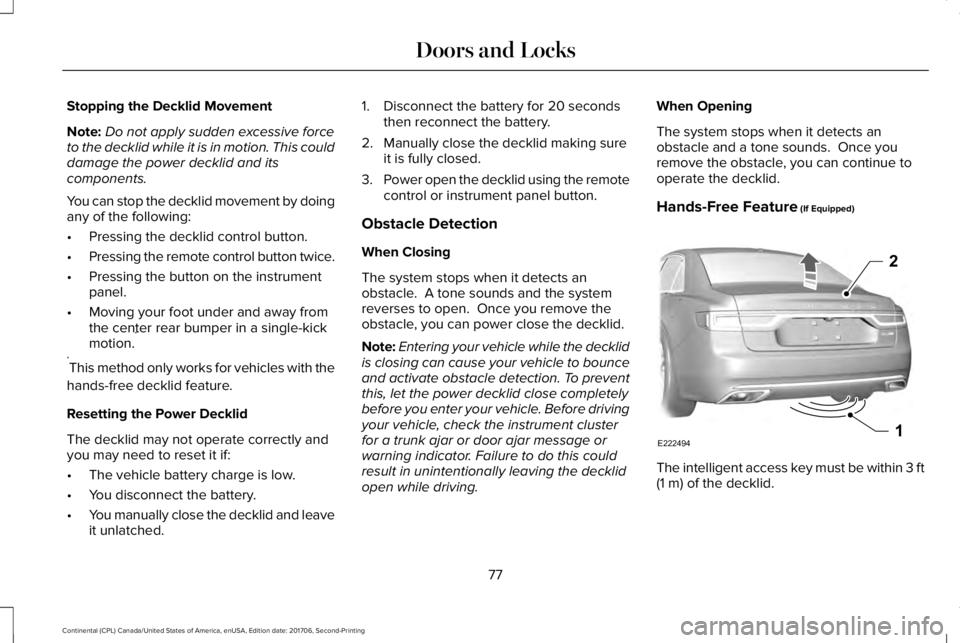
•Moving your foot under and away fromthe center rear bumper in a single-kickmotion.*
*This method only works for vehicles with the
hands-free decklid feature.
Resetting the Power Decklid
The decklid may not operate correctly andyou may need to reset it if:
•The vehicle battery charge is low.
•You disconnect the battery.
•You manually close the decklid and leaveit unlatched.
1. Disconnect the battery for 20 secondsthen reconnect the battery.
2. Manually close the decklid making sureit is fully closed.
3.Power open the decklid using the remotecontrol or instrument panel button.
Obstacle Detection
When Closing
The system stops when it detects anobstacle. A tone sounds and the systemreverses to open. Once you remove theobstacle, you can power close the decklid.
Note:Entering your vehicle while the decklidis closing can cause your vehicle to bounceand activate obstacle detection. To preventthis, let the power decklid close completelybefore you enter your vehicle. Before drivingyour vehicle, check the instrument clusterfor a trunk ajar or door ajar message orwarning indicator. Failure to do this couldresult in unintentionally leaving the decklidopen while driving.
When Opening
The system stops when it detects anobstacle and a tone sounds. Once youremove the obstacle, you can continue tooperate the decklid.
Hands-Free Feature (If Equipped)
The intelligent access key must be within 3 ft(1 m) of the decklid.
77
Continental (CPL) Canada/United States of America, enUSA, Edition date: 201706, Second-Printing
Doors and LocksE222494
2
1
Page 82 of 615
Programming a Personal Entry Code
1. Enter the factory-set five-digit code.
2. Press 1·2 on the keypad within fiveseconds.
3. Enter your personal five-digit code. Youmust enter each number within fiveseconds of each other.
4.Press 1·2 on the keypad to save personalcode 1.
The doors lock then unlock to confirm thatprogramming was successful.
To program additional personal entry codes,repeat steps 1 through 3, then for step 4:
•Press 3·4 to save personal code 2.
•Press 5·6 to save personal code 3.
•Press 7·8 to save personal code 4.
•Press 9·0 to save personal code 5.
Hints:
•Do not set a code that uses five of thesame number.
•Do not use five numbers in sequentialorder.
•The factory-set code works even if youhave set your own personal code.
Erasing a Personal Code
1. Enter the factory-set five-digit code.
2. Press and release 1·2 on the keypadwithin five seconds.
3. Press and hold 1·2 for two seconds. Youmust do this within five seconds ofcompleting step 2.
All personal codes erase and only thefactory-set five-digit code works.
Anti-Scan Feature
The keypad goes into an anti-scan mode ifyou enter the wrong code seven times. Thismode turns off the keypad for one minuteand the keypad lamp flashes.
The anti-scan feature turns off after any ofthe following occur:
•One minute of keypad inactivity.
•You press the unlock button on theremote control.
•You switch your vehicle on.
•You unlock the vehicle using intelligentaccess.
Locking and Unlocking the Doors
Locking All Doors
Press and hold 7·8 and 9·0 on the keypadsimultaneously with the driver door closed.You do not need to enter a code first.
Unlocking All Doors
Enter the factory-set code or your personalcode, then press 3·4 on the keypad withinfive seconds.
Unlocking Only the Driver Door
Enter the factory-set or your personalfive-digit code. You must press each numberwithin five seconds of each other. Theinterior lamps illuminate.
79
Continental (CPL) Canada/United States of America, enUSA, Edition date: 201706, Second-Printing
Doors and Locks
Page 85 of 615
PASSIVE ANTI-THEFT SYSTEM
Note: The system is not compatible withnon-Lincoln aftermarket remote startsystems. Use of these systems may result inengine starting problems and a loss ofsecurity protection.
Note: Metallic objects, electronic devicesor a second coded key on the same keychain may result in vehicle starting problems,especially if they are too close to the keywhen starting your vehicle. Prevent theseobjects from touching the coded key whenstarting your vehicle. Switch the ignition off,move all objects on the key chain away fromthe coded key and restart your vehicle if aproblem occurs.
Note: Do not leave a duplicate coded keyin your vehicle. Always take your keys andlock all doors when leaving your vehicle.
SecuriLock®
The system helps prevent the engine fromstarting unless you use a coded keyprogrammed to your vehicle. Using thewrong key may prevent your vehicle fromstarting. A message may appear in theinformation display.
If you are unable to start your vehicle with acoded key, it is not operating correctly. Amessage may appear in the informationdisplay.
Automatic Arming
The system arms when you switch theignition off.
Automatic Disarming
The system disarms when you switch theignition on with a coded key.
Replacement Keys
Note: Your vehicle comes with two keys.
The intelligent access key functions as aprogrammed key that operates the driverdoor lock and turns on the intelligent accesswith push button start system, as well as aremote control.
If your programmed transmitters are lost orstolen and you do not have an extra codedkey, you will need to have your vehicletowed to an authorized dealer. You need toerase the key codes from your vehicle andprogram new coded keys.
Store a spare intelligent access key awayfrom your vehicle in a safe place. You canpurchase replacement keys or remotecontrols from an authorized dealer.
Programming a Spare Intelligent AccessKey
Note:You can program a maximum of fourkeys to your vehicle.
You must have two previously programmedintelligent access keys inside your vehicleand the new unprogrammed intelligentaccess key readily accessible. You canpurchase replacement keys or remotecontrols from an authorized dealer.
82
Continental (CPL) Canada/United States of America, enUSA, Edition date: 201706, Second-Printing
Security
Page 86 of 615
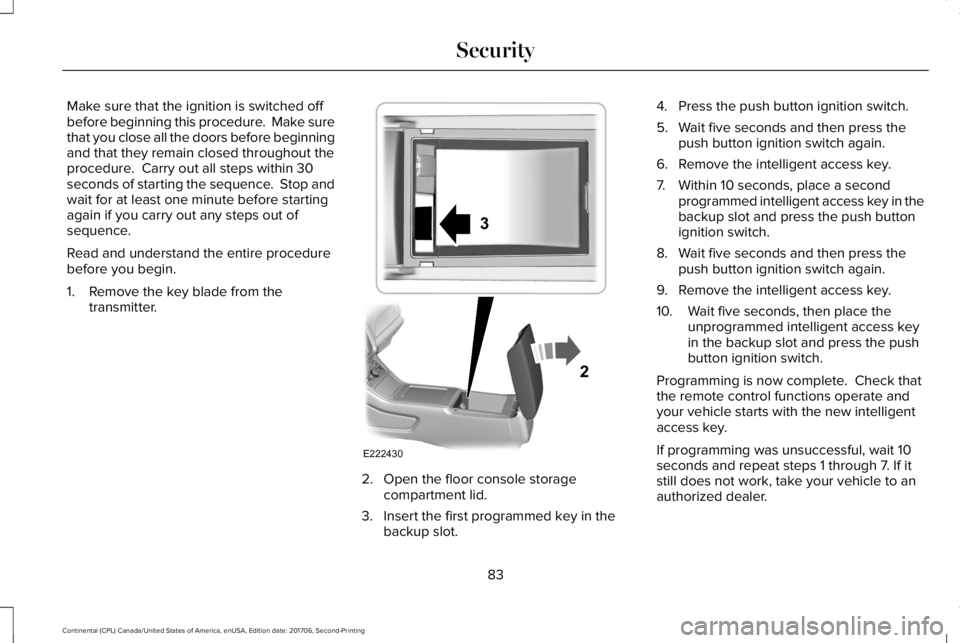
Make sure that the ignition is switched offbefore beginning this procedure. Make surethat you close all the doors before beginningand that they remain closed throughout theprocedure. Carry out all steps within 30seconds of starting the sequence. Stop andwait for at least one minute before startingagain if you carry out any steps out ofsequence.
Read and understand the entire procedurebefore you begin.
1. Remove the key blade from thetransmitter.
2. Open the floor console storagecompartment lid.
3. Insert the first programmed key in thebackup slot.
4. Press the push button ignition switch.
5. Wait five seconds and then press thepush button ignition switch again.
6. Remove the intelligent access key.
7. Within 10 seconds, place a secondprogrammed intelligent access key in thebackup slot and press the push buttonignition switch.
8. Wait five seconds and then press thepush button ignition switch again.
9. Remove the intelligent access key.
10. Wait five seconds, then place theunprogrammed intelligent access keyin the backup slot and press the pushbutton ignition switch.
Programming is now complete. Check thatthe remote control functions operate andyour vehicle starts with the new intelligentaccess key.
If programming was unsuccessful, wait 10seconds and repeat steps 1 through 7. If itstill does not work, take your vehicle to anauthorized dealer.
83
Continental (CPL) Canada/United States of America, enUSA, Edition date: 201706, Second-Printing
SecurityE222430
2
3
Page 87 of 615
ANTI-THEFT ALARM
The system will warn you of an unauthorizedentry to your vehicle. It will be triggered ifany door, the luggage compartment or thehood is opened without using the key,remote control or keyless entry keypad.
The direction indicators will flash and thehorn will sound if unauthorized entry isattempted while the alarm is armed.
Take all remote controls to an authorizeddealer if there is any potential alarm problemwith your vehicle.
Arming the Alarm
The alarm is ready to arm when there is nota key in your vehicle. Electronically lock yourvehicle to arm the alarm.
Disarming the Alarm
Disarm the alarm by any of the followingactions:
•Unlock the doors or luggagecompartment with the remote control orkeyless entry keypad.
•Switch your vehicle on or start yourvehicle.
•Use a key in the driver door to unlockyour vehicle, then switch your vehicle onwithin 12 seconds.
Note:Pressing the panic button on theremote control will stop the horn and signalindicators, but will not disarm the system.
84
Continental (CPL) Canada/United States of America, enUSA, Edition date: 201706, Second-Printing
Security