traction control LINCOLN CONTINENTAL 2018 User Guide
[x] Cancel search | Manufacturer: LINCOLN, Model Year: 2018, Model line: CONTINENTAL, Model: LINCOLN CONTINENTAL 2018Pages: 615, PDF Size: 5.31 MB
Page 220 of 615
PRINCIPLE OF OPERATION
WARNING: Vehicle modificationsinvolving braking system, aftermarket roofracks, suspension, steering system, tireconstruction and wheel and tire size maychange the handling characteristics of yourvehicle and may adversely affect theperformance of the electronic stability controlsystem. In addition, installing any stereoloudspeakers may interfere with andadversely affect the electronic stabilitycontrol system. Install any aftermarket stereoloudspeaker as far as possible from the frontcenter console, the tunnel, and the frontseats in order to minimize the risk ofinterfering with the electronic stability controlsensors. Reducing the effectiveness of theelectronic stability control system could leadto an increased risk of loss of vehicle control,vehicle rollover, personal injury and death.
WARNING: Remember that evenadvanced technology cannot defy the lawsof physics. It’s always possible to lose controlof a vehicle due to inappropriate driver inputfor the conditions. Aggressive driving on anyroad condition can cause you to lose controlof your vehicle increasing the risk of personalinjury or property damage. Activation of theelectronic stability control system is anindication that at least some of the tires haveexceeded their ability to grip the road; thiscould reduce the operator’s ability to controlthe vehicle potentially resulting in a loss ofvehicle control, vehicle rollover, personalinjury and death. If your electronic stabilitycontrol system activates, SLOW DOWN.
The system automatically turns on each timeyou switch the ignition on.
If a fault occurs in either the stability controlor the traction control system, you mayexperience the following conditions:
•The stability and traction control lightilluminates steadily.
•The stability control and traction controlsystems do not enhance your vehicle'sability to maintain traction of the wheels.
•The adaptive steering system (ifequipped) automatically changes thesteering function to a fixed steering ratio.See Steering (page 259).
If a driving condition activates either thestability control or the traction control systemyou may experience the following conditions:
•The stability and traction control lightflashes.
•Your vehicle slows down.
•Reduced engine power.
•A vibration in the brake pedal.
•The brake pedal is stiffer than usual.
•If the driving condition is severe and yourfoot is not on the brake, the brake pedalmay move as the system applies higherbrake force.
217
Continental (CPL) Canada/United States of America, enUSA, Edition date: 201706, Second-Printing
Stability Control
Page 221 of 615
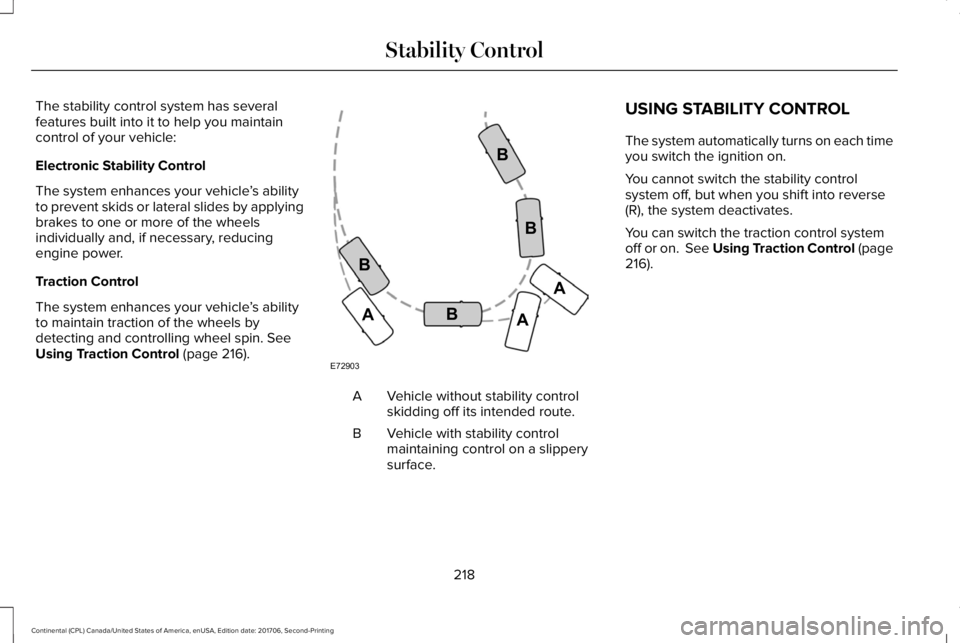
The stability control system has severalfeatures built into it to help you maintaincontrol of your vehicle:
Electronic Stability Control
The system enhances your vehicle’s abilityto prevent skids or lateral slides by applyingbrakes to one or more of the wheelsindividually and, if necessary, reducingengine power.
Traction Control
The system enhances your vehicle’s abilityto maintain traction of the wheels bydetecting and controlling wheel spin. SeeUsing Traction Control (page 216).
Vehicle without stability controlskidding off its intended route.A
Vehicle with stability controlmaintaining control on a slipperysurface.
B
USING STABILITY CONTROL
The system automatically turns on each timeyou switch the ignition on.
You cannot switch the stability controlsystem off, but when you shift into reverse(R), the system deactivates.
You can switch the traction control systemoff or on. See Using Traction Control (page216).
218
Continental (CPL) Canada/United States of America, enUSA, Edition date: 201706, Second-Printing
Stability ControlE72903A
AA
B
BB
B
Page 226 of 615
If the transmission is in neutral (N), the sidesensing system provides visual distanceindication only when your vehicle is movingbelow a speed of 5 mph (8 km/h) and thereis a front or rear parking aid obstacledetected, and the side obstacle is within24 in (60 cm) from the side of your vehicle.When you stop your vehicle the visualdistance indication stops after four seconds.
If the side sensing system is not available,the side distance indicator blocks do notappear.
The side sensing system is not availableunder the following condition:
•If you switch the traction control systemoff.
The side sensing system may not beavailable until you have driven approximatelythe length of your vehicle in order for thesystem to reinitialize if:
•You switch the ignition on, off and backon.
•Your vehicle remains stationary for overtwo minutes.
•The anti-lock brake system is activated.
•The traction control system is activated.
•When the steering wheel angleinformation is not available, the sidesensing system is not available. Thevehicle must be driven at least 492 ft(150 m) above 19 mph (30 km/h) torecover the steering wheel angleinformation.
ACTIVE PARK ASSIST (If Equipped)
WARNING: You must remain in yourvehicle when the system turns on. At alltimes, you are responsible for controllingyour vehicle, supervising the system andintervening, if required. Failure to take caremay result in the loss of control of yourvehicle, serious personal injury or death.
WARNING: The sensors may not detectobjects in heavy rain or other conditions thatcause interference.
WARNING: Active park assist does notapply the brakes under any circumstances.
WARNING: You are responsible forcontrolling your vehicle at all times. Thesystem is designed to be an aid and doesnot relieve you of your responsibility to drivewith due care and attention. Failure to followthis instruction could result in the loss ofcontrol of your vehicle, personal injury ordeath.
Active park assist is a multi-step process andmay require you to shift the transmissionmultiple times. Follow the onscreeninstructions until the parking maneuver iscomplete.
If you are uncomfortable with the proximityto any vehicle or object, you may choose tooverride the system by grabbing the steeringwheel, or by taking full control of your vehicleafter pressing the active park assist button.
Keep your hands, hair, clothing and anyloose items clear of the steering wheel whenusing active park assist.
The sensors are on the front and rearbumpers.
223
Continental (CPL) Canada/United States of America, enUSA, Edition date: 201706, Second-Printing
Parking Aids
Page 229 of 615
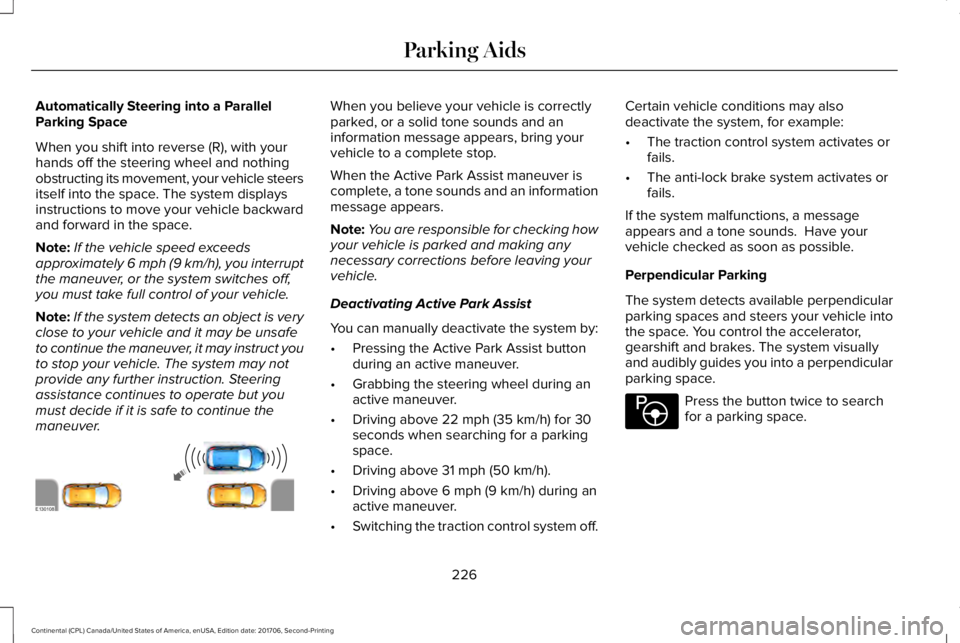
Automatically Steering into a ParallelParking Space
When you shift into reverse (R), with yourhands off the steering wheel and nothingobstructing its movement, your vehicle steersitself into the space. The system displaysinstructions to move your vehicle backwardand forward in the space.
Note:If the vehicle speed exceedsapproximately 6 mph (9 km/h), you interruptthe maneuver, or the system switches off,you must take full control of your vehicle.
Note:If the system detects an object is veryclose to your vehicle and it may be unsafeto continue the maneuver, it may instruct youto stop your vehicle. The system may notprovide any further instruction. Steeringassistance continues to operate but youmust decide if it is safe to continue themaneuver.
When you believe your vehicle is correctlyparked, or a solid tone sounds and aninformation message appears, bring yourvehicle to a complete stop.
When the Active Park Assist maneuver iscomplete, a tone sounds and an informationmessage appears.
Note:You are responsible for checking howyour vehicle is parked and making anynecessary corrections before leaving yourvehicle.
Deactivating Active Park Assist
You can manually deactivate the system by:
•Pressing the Active Park Assist buttonduring an active maneuver.
•Grabbing the steering wheel during anactive maneuver.
•Driving above 22 mph (35 km/h) for 30seconds when searching for a parkingspace.
•Driving above 31 mph (50 km/h).
•Driving above 6 mph (9 km/h) during anactive maneuver.
•Switching the traction control system off.
Certain vehicle conditions may alsodeactivate the system, for example:
•The traction control system activates orfails.
•The anti-lock brake system activates orfails.
If the system malfunctions, a messageappears and a tone sounds. Have yourvehicle checked as soon as possible.
Perpendicular Parking
The system detects available perpendicularparking spaces and steers your vehicle intothe space. You control the accelerator,gearshift and brakes. The system visuallyand audibly guides you into a perpendicularparking space.
Press the button twice to searchfor a parking space.
226
Continental (CPL) Canada/United States of America, enUSA, Edition date: 201706, Second-Printing
Parking AidsE130108 E146186
Page 231 of 615
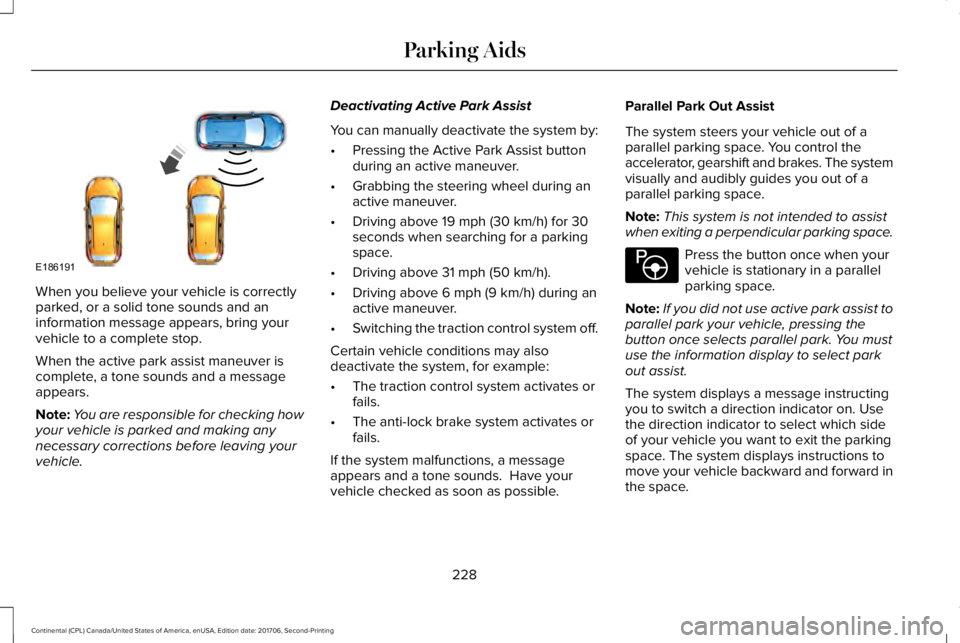
When you believe your vehicle is correctlyparked, or a solid tone sounds and aninformation message appears, bring yourvehicle to a complete stop.
When the active park assist maneuver iscomplete, a tone sounds and a messageappears.
Note:You are responsible for checking howyour vehicle is parked and making anynecessary corrections before leaving yourvehicle.
Deactivating Active Park Assist
You can manually deactivate the system by:
•Pressing the Active Park Assist buttonduring an active maneuver.
•Grabbing the steering wheel during anactive maneuver.
•Driving above 19 mph (30 km/h) for 30seconds when searching for a parkingspace.
•Driving above 31 mph (50 km/h).
•Driving above 6 mph (9 km/h) during anactive maneuver.
•Switching the traction control system off.
Certain vehicle conditions may alsodeactivate the system, for example:
•The traction control system activates orfails.
•The anti-lock brake system activates orfails.
If the system malfunctions, a messageappears and a tone sounds. Have yourvehicle checked as soon as possible.
Parallel Park Out Assist
The system steers your vehicle out of aparallel parking space. You control theaccelerator, gearshift and brakes. The systemvisually and audibly guides you out of aparallel parking space.
Note:This system is not intended to assistwhen exiting a perpendicular parking space.
Press the button once when yourvehicle is stationary in a parallelparking space.
Note:If you did not use active park assist toparallel park your vehicle, pressing thebutton once selects parallel park. You mustuse the information display to select parkout assist.
The system displays a message instructingyou to switch a direction indicator on. Usethe direction indicator to select which sideof your vehicle you want to exit the parkingspace. The system displays instructions tomove your vehicle backward and forward inthe space.
228
Continental (CPL) Canada/United States of America, enUSA, Edition date: 201706, Second-Printing
Parking AidsE186191 E146186
Page 232 of 615
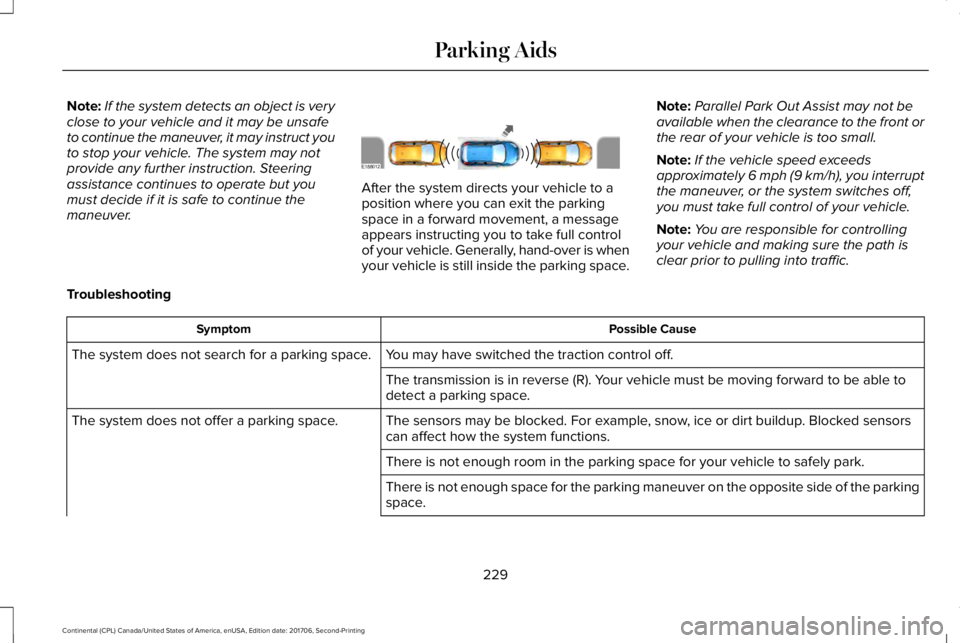
Note:If the system detects an object is veryclose to your vehicle and it may be unsafeto continue the maneuver, it may instruct youto stop your vehicle. The system may notprovide any further instruction. Steeringassistance continues to operate but youmust decide if it is safe to continue themaneuver.
After the system directs your vehicle to aposition where you can exit the parkingspace in a forward movement, a messageappears instructing you to take full controlof your vehicle. Generally, hand-over is whenyour vehicle is still inside the parking space.
Note:Parallel Park Out Assist may not beavailable when the clearance to the front orthe rear of your vehicle is too small.
Note:If the vehicle speed exceedsapproximately 6 mph (9 km/h), you interruptthe maneuver, or the system switches off,you must take full control of your vehicle.
Note:You are responsible for controllingyour vehicle and making sure the path isclear prior to pulling into traffic.
Troubleshooting
Possible CauseSymptom
You may have switched the traction control off.The system does not search for a parking space.
The transmission is in reverse (R). Your vehicle must be moving forward to be able todetect a parking space.
The sensors may be blocked. For example, snow, ice or dirt buildup. Blocked sensorscan affect how the system functions.The system does not offer a parking space.
There is not enough room in the parking space for your vehicle to safely park.
There is not enough space for the parking maneuver on the opposite side of the parkingspace.
229
Continental (CPL) Canada/United States of America, enUSA, Edition date: 201706, Second-Printing
Parking AidsE188012
Page 245 of 615
Changing the Set Speed
•Press RES+ or SET- to change the setspeed in small increments.
•Press the accelerator or brake pedal untilyou reach the desired speed. Press RES+or SET-.
•Press and hold RES+ or SET- to changethe set speed in large increments.Release the control when you reach thedesired speed.
The system may apply the brakes to slowthe vehicle to the new set speed. The setspeed displays continuously in theinformation display when the system isactive.
Canceling the Set Speed
Press CAN or tap the brake pedal. The setspeed does not erase.
Resuming the Set Speed
Note:Only use resume if you are aware ofthe set speed and intend to return to it.
Press RES+. Your vehicle speed returns tothe previously set speed and gap setting. The set speed displays continuously in theinformation display when the system isactive.
Automatic Cancellation
Automatic cancellation can also occur if:
•The tires lose traction.
•You apply the parking brake.
Park Brake Application
Automatic parking brake application andcancellation occurs if:
•You unbuckle the seatbelt and open thedoor after you stop the vehicle.
•You hold the vehicle at a stopcontinuously for more than three minutes.
Hilly Condition Usage
Note:An audible alarm sounds and thesystem shuts down if it applies brakes for anextended period of time. This allows thebrakes to cool. The system functionsnormally again after the brakes cool.
Select a lower gear when the system isactive in situations such as prolongeddownhill driving on steep grades, forexample in mountainous areas. The systemneeds additional engine braking in thesesituations to reduce the load on the vehicle’sregular brake system to prevent it fromoverheating.
Switching Adaptive Cruise Control Off
Note:You erase the set speed and gapsetting when you switch the system off.
Press OFF when the system is in standbymode, or switch the ignition off.
Detection Issues
WARNING: On rare occasions,detection issues can occur due to the roadinfrastructures, for example bridges, tunnelsand safety barriers. In these cases, thesystem may brake late or unexpectedly. Atall times, you are responsible for controllingyour vehicle, supervising the system andintervening, if required.
242
Continental (CPL) Canada/United States of America, enUSA, Edition date: 201706, Second-Printing
Cruise Control
Page 267 of 615
Note:If something hits the front end of yourvehicle or damage occurs, the radar sensingzone may change. This could cause missedor false vehicle detections. Contact anauthorized dealer to have the radar checkedfor proper coverage and operation.
Note:If your vehicle detects excessive heatat the camera or a potential misalignmentcondition, a message may display in theinformation display indicating temporarysensor unavailability. This messagedeactivates automatically when operationalconditions are correct. For example, whenthe ambient temperature around the sensordecreases or the sensor automaticallyrecalibrates.
DRIVE CONTROL
LINCOLN DRIVE CONTROL
The system delivers a driving experiencethrough a suite of sophisticated electronicvehicle systems. These systems continuouslymonitor your driving inputs and the roadconditions to optimize ride comfort, steering,handling, powertrain response and sound.
You can preset your preferences for thesesystems within the information display. Thesystem responds to your preferences basedon what gear position you select. Thisprovides a single location to control multiplesystems performance settings.
Lincoln Drive Control consists of thefollowing systems:
•Continuously controlled dampingdynamically adjusts the shock absorbersstiffness in real time to match the roadsurface and driver inputs. This systemcontinuously monitors your vehicle’smotion (roll, pitch, bounce), suspensionposition, load, speed, road conditions,and steering to adjust the suspensiondamping for optimal vehicle control.
•Electronically power-assisted steeringadjusts steering effort and feel based onyour vehicle speed and your inputs.
•Adaptive steering optimizes yourvehicle's steering response based onyour steering wheel input, changes invehicle speed and other conditions.
•Active noise control utilizes your vehicleelectronics to enhance the acousticexperience.
•Electronic stability control and tractioncontrol maintain your vehicle control inadverse conditions or high performancedriving.
•Electronic throttle control enhances thepowertrain response to your inputs.
Using Lincoln Drive Control
You can configure which of the Drive Controlmodes are active when your vehicle is indrive (D) or in sport (S). The configurationremains active until modified from the mainmenu on the information display.
264
Continental (CPL) Canada/United States of America, enUSA, Edition date: 201706, Second-Printing
Driving Aids
Page 280 of 615
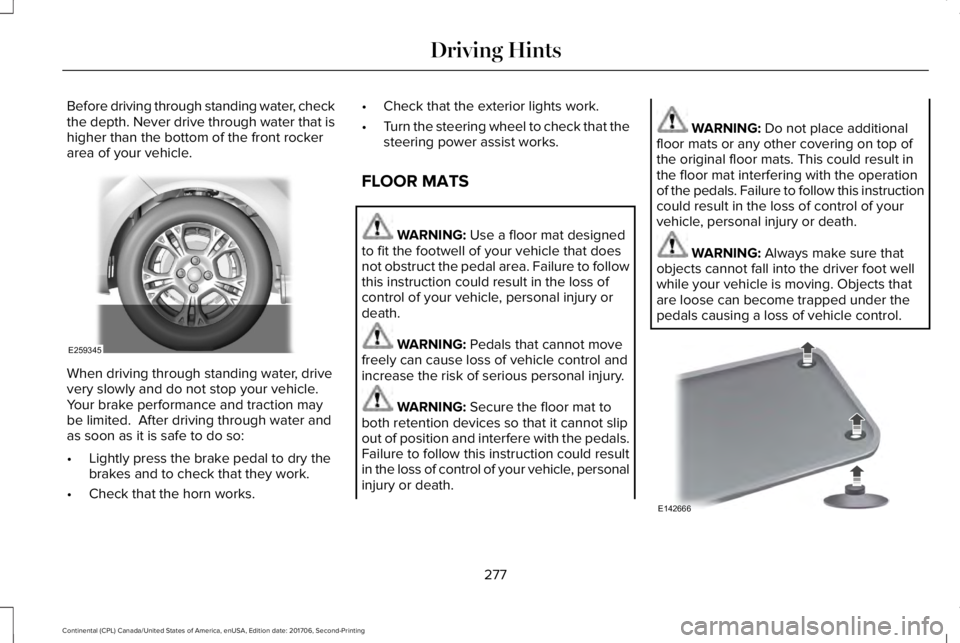
Before driving through standing water, checkthe depth. Never drive through water that ishigher than the bottom of the front rockerarea of your vehicle.
When driving through standing water, drivevery slowly and do not stop your vehicle. Your brake performance and traction maybe limited. After driving through water andas soon as it is safe to do so:
•Lightly press the brake pedal to dry thebrakes and to check that they work.
•Check that the horn works.
•Check that the exterior lights work.
•Turn the steering wheel to check that thesteering power assist works.
FLOOR MATS
WARNING: Use a floor mat designedto fit the footwell of your vehicle that doesnot obstruct the pedal area. Failure to followthis instruction could result in the loss ofcontrol of your vehicle, personal injury ordeath.
WARNING: Pedals that cannot movefreely can cause loss of vehicle control andincrease the risk of serious personal injury.
WARNING: Secure the floor mat toboth retention devices so that it cannot slipout of position and interfere with the pedals.Failure to follow this instruction could resultin the loss of control of your vehicle, personalinjury or death.
WARNING: Do not place additionalfloor mats or any other covering on top ofthe original floor mats. This could result inthe floor mat interfering with the operationof the pedals. Failure to follow this instructioncould result in the loss of control of yourvehicle, personal injury or death.
WARNING: Always make sure thatobjects cannot fall into the driver foot wellwhile your vehicle is moving. Objects thatare loose can become trapped under thepedals causing a loss of vehicle control.
277
Continental (CPL) Canada/United States of America, enUSA, Edition date: 201706, Second-Printing
Driving HintsE259345 E142666
Page 348 of 615
Tire Quality Grades apply to newpneumatic passenger car tires. They donot apply to deep tread, winter-typesnow tires, space-saver or temporaryuse spare tires, light truck or LT typetires, tires with nominal rim diameters of10 to 12 inches or limited production tiresas defined in Title 49 Code of FederalRegulations Part 575.104 ©)(2).
U.S. Department of Transportation Tirequality grades: The U.S. Department ofTransportation requires Ford MotorCompany to give you the followinginformation about tire grades exactly asthe government has written it.
Treadwear
The treadwear grade is a comparative
rating based on the wear rate of the tirewhen tested under controlled conditionson a specified government test course.For example, a tire graded 150 wouldwear 1 ½ times as well on thegovernment course as a tire graded 100.The relative performance of tires
depends upon the actual conditions oftheir use, however, and may departsignificantly from the norm due tovariations in driving habits, servicepractices, and differences in roadcharacteristics and climate.
Traction AA A B C
WARNING: The traction gradeassigned to this tire is based onstraight-ahead braking traction tests, anddoes not include acceleration, cornering,hydroplaning or peak tractioncharacteristics.
The traction grades, from highest tolowest are AA, A, B, and C. The gradesrepresent the tire’s ability to stop on wetpavement as measured under controlledconditions on specified government testsurfaces of asphalt and concrete. A tiremarked C may have poor tractionperformance.
Temperature A B C
WARNING: The temperature gradefor this tire is established for a tire thatis properly inflated and not overloaded.Excessive speed, underinflation, orexcessive loading, either separately orin combination, can cause heat buildupand possible tire failure.
The temperature grades are A (thehighest), B and C, representing the tire’sresistance to the generation of heat andits ability to dissipate heat when testedunder controlled conditions on aspecified indoor laboratory test wheel.Sustained high temperature can causethe material of the tire to degenerateand reduce tire life, and excessivetemperature can lead to sudden tirefailure. The grade C corresponds to alevel of performance which all
345
Continental (CPL) Canada/United States of America, enUSA, Edition date: 201706, Second-Printing
Wheels and Tires