lights LINCOLN CONTINENTAL 2018 Owner's Manual
[x] Cancel search | Manufacturer: LINCOLN, Model Year: 2018, Model line: CONTINENTAL, Model: LINCOLN CONTINENTAL 2018Pages: 615, PDF Size: 5.31 MB
Page 277 of 615
Trailer lamps are required on most towedvehicles. Make sure all running lights, brakelights, turn signals and hazard lights areworking.
Before Towing a Trailer
Practice turning, stopping and backing up toget the feel of your vehicle-trailercombination before starting on a trip. Whenturning, make wider turns so the trailerwheels clear curbs and other obstacles.
When Towing a Trailer
•Do not drive faster than 70 mph(113 km/h) during the first 500 mi(800 km).
•Do not make full-throttle starts.
•Check your hitch, electrical connectionsand trailer wheel lug nuts thoroughly afteryou have traveled 50 mi (80 km).
•When stopped in congested or heavytraffic during hot weather, place thetransmission in park (P) to aid engine andtransmission cooling and to help A/Cperformance.
•Turn off the speed control with heavyloads or in hilly terrain. The speed controlmay turn off automatically when you aretowing on long, steep grades.
•Shift to a lower gear when driving downa long or steep hill. Do not apply thebrakes continuously, as they mayoverheat and become less effective.
•If your transmission is equipped with aGrade Assist or Tow/Haul feature, usethis feature when towing. This providesengine braking and helps eliminateexcessive transmission shifting foroptimum fuel economy and transmissioncooling.
•Allow more distance for stopping with atrailer attached. Anticipate stops andbrake gradually.
•Avoid parking on a grade. However, ifyou must park on a grade:
1. Turn the steering wheel to point yourvehicle tires away from traffic flow.
2. Set your vehicle parking brake.
3. Place the transmission in park (P).
4. Place wheel chocks in front and back ofthe trailer wheels. Chocks are notincluded with your vehicle.
Launching or Retrieving a Boat orPersonal Watercraft (PWC)
Note:Disconnect the wiring to the trailerbefore backing the trailer into the water.
Note:Reconnect the wiring to the trailerafter removing the trailer from the water.
When backing down a ramp during boatlaunching or retrieval:
•Do not allow the static water level to riseabove the bottom edge of the rearbumper.
•Do not allow waves to break higher than6 in (15 cm) above the bottom edge ofthe rear bumper.
Exceeding these limits may allow water toenter vehicle components:
•Causing internal damage to thecomponents.
•Affecting driveability, emissions, andreliability.
274
Continental (CPL) Canada/United States of America, enUSA, Edition date: 201706, Second-Printing
Towing
Page 280 of 615
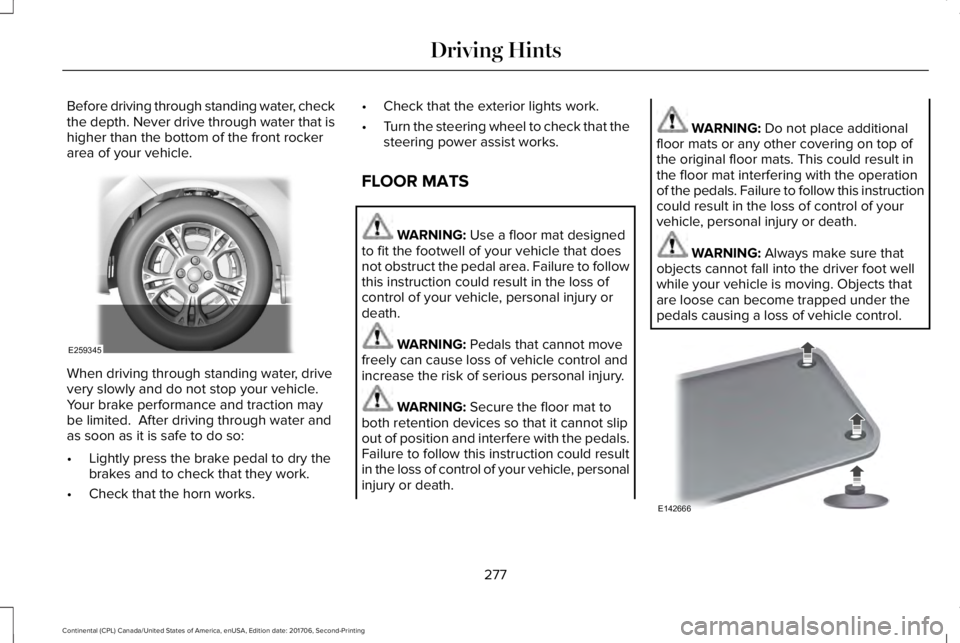
Before driving through standing water, checkthe depth. Never drive through water that ishigher than the bottom of the front rockerarea of your vehicle.
When driving through standing water, drivevery slowly and do not stop your vehicle. Your brake performance and traction maybe limited. After driving through water andas soon as it is safe to do so:
•Lightly press the brake pedal to dry thebrakes and to check that they work.
•Check that the horn works.
•Check that the exterior lights work.
•Turn the steering wheel to check that thesteering power assist works.
FLOOR MATS
WARNING: Use a floor mat designedto fit the footwell of your vehicle that doesnot obstruct the pedal area. Failure to followthis instruction could result in the loss ofcontrol of your vehicle, personal injury ordeath.
WARNING: Pedals that cannot movefreely can cause loss of vehicle control andincrease the risk of serious personal injury.
WARNING: Secure the floor mat toboth retention devices so that it cannot slipout of position and interfere with the pedals.Failure to follow this instruction could resultin the loss of control of your vehicle, personalinjury or death.
WARNING: Do not place additionalfloor mats or any other covering on top ofthe original floor mats. This could result inthe floor mat interfering with the operationof the pedals. Failure to follow this instructioncould result in the loss of control of yourvehicle, personal injury or death.
WARNING: Always make sure thatobjects cannot fall into the driver foot wellwhile your vehicle is moving. Objects thatare loose can become trapped under thepedals causing a loss of vehicle control.
277
Continental (CPL) Canada/United States of America, enUSA, Edition date: 201706, Second-Printing
Driving HintsE259345 E142666
Page 334 of 615
Trade numberFunction
LEDApproach lamp
LED* Tail and brake lamp
LED* Turn lamp - rear
LED* Backup lamp
LEDLicense plate lamp
LED* High-mount brake lamp
LED* Interior lamps
* To replace these lamps, see an authorized dealer.
To replace instrument panel lights, see an authorized dealer.
331
Continental (CPL) Canada/United States of America, enUSA, Edition date: 201706, Second-Printing
Maintenance
Page 459 of 615
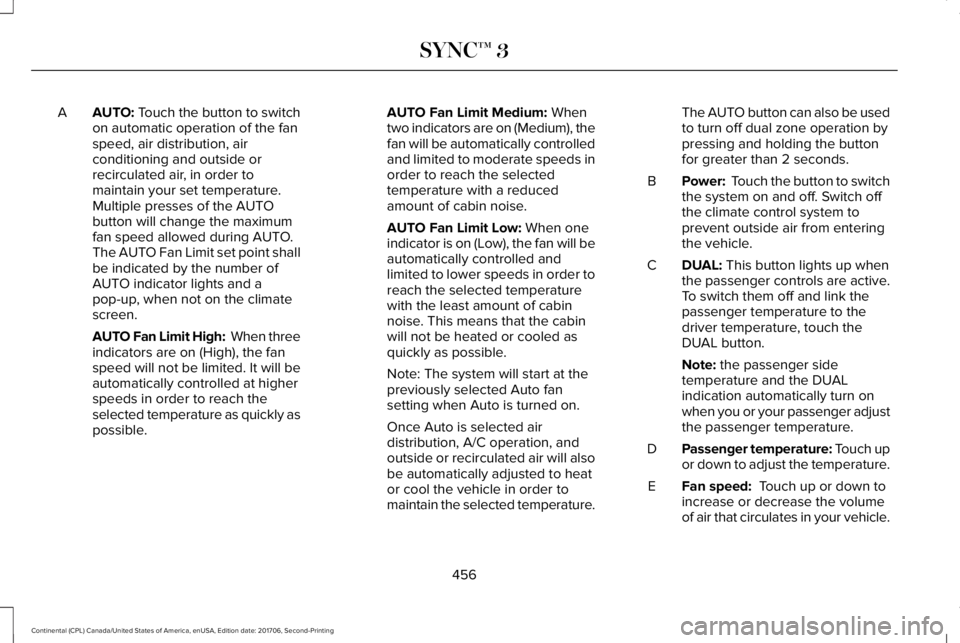
AUTO: Touch the button to switchon automatic operation of the fanspeed, air distribution, airconditioning and outside orrecirculated air, in order tomaintain your set temperature.
A
Multiple presses of the AUTObutton will change the maximumfan speed allowed during AUTO.The AUTO Fan Limit set point shallbe indicated by the number ofAUTO indicator lights and apop-up, when not on the climatescreen.
AUTO Fan Limit High: When threeindicators are on (High), the fanspeed will not be limited. It will beautomatically controlled at higherspeeds in order to reach theselected temperature as quickly aspossible.
AUTO Fan Limit Medium: Whentwo indicators are on (Medium), thefan will be automatically controlledand limited to moderate speeds inorder to reach the selectedtemperature with a reducedamount of cabin noise.
AUTO Fan Limit Low: When oneindicator is on (Low), the fan will beautomatically controlled andlimited to lower speeds in order toreach the selected temperaturewith the least amount of cabinnoise. This means that the cabinwill not be heated or cooled asquickly as possible.
Note: The system will start at thepreviously selected Auto fansetting when Auto is turned on.
Once Auto is selected airdistribution, A/C operation, andoutside or recirculated air will alsobe automatically adjusted to heator cool the vehicle in order tomaintain the selected temperature.
The AUTO button can also be usedto turn off dual zone operation bypressing and holding the buttonfor greater than 2 seconds.
Power: Touch the button to switchthe system on and off. Switch offthe climate control system toprevent outside air from enteringthe vehicle.
B
DUAL: This button lights up whenthe passenger controls are active.To switch them off and link thepassenger temperature to thedriver temperature, touch theDUAL button.
C
Note: the passenger sidetemperature and the DUALindication automatically turn onwhen you or your passenger adjustthe passenger temperature.
Passenger temperature: Touch upor down to adjust the temperature.D
Fan speed: Touch up or down toincrease or decrease the volumeof air that circulates in your vehicle.
E
456
Continental (CPL) Canada/United States of America, enUSA, Edition date: 201706, Second-Printing
SYNC™ 3
Page 470 of 615
Mute: Press to mute the audionavigation guidance. Press thebutton again to un-mute theguidance.
Points of Interest (POI) groupingicon: You can choose up to threePOI icons to display on the map. Ifthe chosen POIs are located closetogether or are at the same location a box isused to display a single category icon
instead of repeating the same icon, in orderto reduce clutter. When you select the boxon the map, a pop-up appears indicating howmany POIs are in this location. Select the popup to see a list of the available POIs. You canscroll through and select POIs from this list.
If your vehicle is low on charge or fuel,station icons automatically display on themap.
If you have subscribed to SiriusXM Trafficand Travel Link (where available), traffic flowwill be indicated on the map by green (clear),yellow (slowing), and red (stopped) roadhighlights. Traffic flow is indicated where theinformation is available and varies across theUS.
You can choose to display traffic icons onthe map representing twelve different typesof incidents. See Settings (page 480).
You can set a destination by hovering abovea location and selecting:
Button
Start
Destination Mode
To set a destination, press:
DescriptionMenu Item
Destination
Enter a navigation destination in any of the following formats:
Street AddressSearch
467
Continental (CPL) Canada/United States of America, enUSA, Edition date: 201706, Second-Printing
SYNC™ 3E251780 E251779 E207754
Page 528 of 615
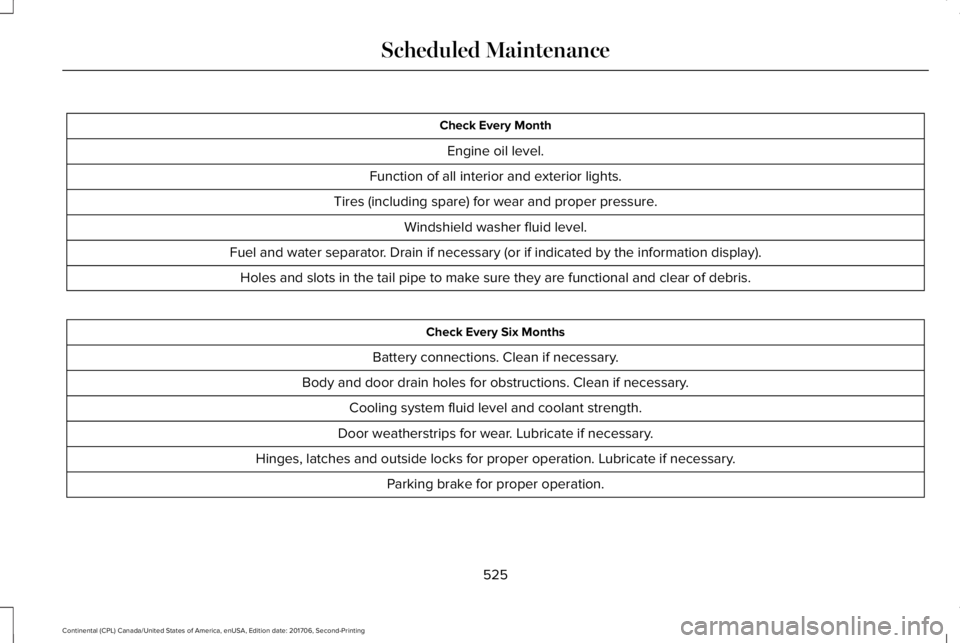
Check Every Month
Engine oil level.
Function of all interior and exterior lights.
Tires (including spare) for wear and proper pressure.
Windshield washer fluid level.
Fuel and water separator. Drain if necessary (or if indicated by the information display).
Holes and slots in the tail pipe to make sure they are functional and clear of debris.
Check Every Six Months
Battery connections. Clean if necessary.
Body and door drain holes for obstructions. Clean if necessary.
Cooling system fluid level and coolant strength.
Door weatherstrips for wear. Lubricate if necessary.
Hinges, latches and outside locks for proper operation. Lubricate if necessary.
Parking brake for proper operation.
525
Continental (CPL) Canada/United States of America, enUSA, Edition date: 201706, Second-Printing
Scheduled Maintenance
Page 606 of 615
Changing a Fuse..........................................309Fuses.....................................................................309
Changing a Road Wheel.............................364Dissimilar Spare Wheel and Tire AssemblyInformation......................................................365Stowing the flat tire ...........................................369Tire Change Procedure....................................366
Changing the 12V Battery..........................325Changing the Engine Air Filter - 2.7LEcoBoost™/3.0L EcoBoost™.....................332Changing the Engine Air Filter - 3.7L......332Changing the Wiper Blades.......................327Changing the Windshield Wiper Blades......328
Checking MyKey System Status.................64MyKey Distance.....................................................64Number of Admin Keys.......................................65Number of MyKeys...............................................64
Checking the Wiper Blades.......................327Child Restraint and SeatbeltMaintenance..................................................44Child Restraint Positioning...........................33Child Safety.......................................................19General Information..............................................19
Child Safety Locks..........................................34Child Seats........................................................21Cleaning Leather Seats...............................341Cleaning Products........................................334Materials................................................................334
Cleaning the Engine....................................337Cleaning the Exterior...................................335Cleaning the Headlamps..................................335Exterior Chrome Parts.......................................336Exterior Plastic Parts..........................................336Stripes or Graphics............................................336Underbody...........................................................336Under Hood.........................................................336
Cleaning the Instrument Panel andInstrument Cluster Lens...........................340Cleaning the Interior....................................338Cleaning Black Label or PresidentialInterior...............................................................338
Cleaning the Wheels....................................341Cleaning the Windows and WiperBlades...........................................................337Clearing All MyKeys.......................................64Climate............................................................454Climate Control..............................................146Climate Controlled Seats............................168Ventilated Seats...................................................168
Coolant CheckSee: Engine Coolant Check..............................319
Crash Sensors and Airbag Indicator..........55Creating a MyKey...........................................63Programming/Changing ConfigurableSettings...............................................................64
Cross Traffic Alert.........................................255Blocked Sensors................................................258Switching the System Off and On..................258System Errors......................................................258System Lights, Messages and AudibleAlerts.................................................................258System Limitations.............................................258Using the Cross Traffic Alert System............255
Cruise Control.................................................86Principle of Operation.......................................237Type One................................................................86Type Two.................................................................87
Cruise controlSee: Using Cruise Control................................237
Customer Assistance..................................286
D
Data Recording................................................10Event Data Recording...........................................10Service Data Recording.......................................10
Daytime Running Lamps...............................94Type One - Conventional(Non-Configurable)..........................................95Type Two - Configurable....................................95
Direction Indicators........................................97Indicating a Lane Change...................................97
Doors and Locks.............................................67
603
Continental (CPL) Canada/United States of America, enUSA, Edition date: 201706, Second-Printing
Index
Page 614 of 615
Tire Pressure Monitoring System.............359Changing Tires With a Tire PressureMonitoring System..........................................361Understanding Your Tire Pressure MonitoringSystem ..............................................................361
TiresSee: Wheels and Tires......................................344
Toll Reader......................................................105Installing the Toll Reader...................................105
Towing a Trailer..............................................271Load Placement...................................................271
Towing the Vehicle on Four Wheels........275Emergency Towing.............................................275Recreational Towing..........................................275
Towing..............................................................271Traction Control.............................................216Principle of Operation........................................216
Transmission Code Designation...............381Transmission...................................................194Transporting the Vehicle............................285Type Approvals.............................................590Radio Frequency Certification Logos for BlindSpot Information System.............................598Radio Frequency Certification Logos for MidRange Radar....................................................593Radio Frequency Certification Logos forPassive Anti-Theft System...........................594
Radio Frequency Certification Logos for RadioTransceiver Module......................................596Radio Frequency Certification Logos for SYNC3.........................................................................599Radio Frequency Certification Logos for TirePressure Monitoring Sensor(s)...................590Radio Frequency Certification Logos forWireless Charging.........................................599
U
Under Hood Overview - 2.7L EcoBoost™/3.7L.................................................................315Under Hood Overview - 3.0L.....................313Universal Garage Door Opener..................171HomeLink Wireless Control System................171
USB Port..........................................................412Using Adaptive Cruise Control.................238Automatic Cancellation.....................................242Blocked Sensor...................................................244Canceling the Set Speed.................................242Changing the Set Speed..................................242Detection Issues.................................................242Following a Vehicle...........................................240Following a Vehicle to a CompleteStop...................................................................240Hilly Condition Usage.......................................242Overriding the Set Speed.................................241
Park Brake Application.....................................242Resuming the Set Speed..................................242Setting the Adaptive Cruise Speed...............239Setting the Adaptive Cruise Speed When YourVehicle is Stationary......................................239Setting the Gap Distance.................................240Switching Adaptive Cruise Control Off.........242Switching Adaptive Cruise Control On.........239Switching to Normal Cruise Control..............245System Not Available........................................244
Using All-Wheel Drive.................................200Driving In Special Conditions With All-WheelDrive (AWD).....................................................202Operating AWD Vehicles With Spare orMismatched Tires..........................................202
Using Cruise Control...................................237Switching Cruise Control Off...........................238Switching Cruise Control On...........................237
Using MyKey With Remote StartSystems..........................................................65Using Snow Chains......................................358Using Stability Control.................................218Using Summer Tires....................................358Using Traction Control.................................216Switching the System Off..................................216System Indicator Lights and Messages.........216Using a Switch.....................................................216Using the Information Display Controls........216
611
Continental (CPL) Canada/United States of America, enUSA, Edition date: 201706, Second-Printing
Index