radio LINCOLN CONTINENTAL 2018 Owner's Manual
[x] Cancel search | Manufacturer: LINCOLN, Model Year: 2018, Model line: CONTINENTAL, Model: LINCOLN CONTINENTAL 2018Pages: 615, PDF Size: 5.31 MB
Page 413 of 615
Satellite Radio Reception Factors
Potential satellite radio reception issues
For optimal reception performance, keep the antenna clear of snow and ice build-up and keep luggage andother material as far away from the antenna as possible.Antenna obstructions
Hills, mountains, tall buildings, bridges, tunnels, freeway overpasses, parking garages, dense tree foliage andthunderstorms can interfere with your reception.Terrain
When you pass a ground-based broadcast-repeating tower, a stronger signal may overtake a weaker one andthe audio system may mute.Station overload
Your display may show ACQUIRING . . . to indicate the interference and the audio system may mute.Satellite radio signal interfer-ence
SiriusXM Satellite Radio Service
Note:SiriusXM reserves the unrestrictedright to change, rearrange, add or deleteprogramming including canceling, movingor adding particular channels, and its prices,at any time, with or without notice to you.Ford Motor Company shall not beresponsible for any such programmingchanges.
SiriusXM satellite radio is asubscription-based satellite radio service thatbroadcasts a variety of music, sports, news,weather, traffic and entertainmentprogramming. Your factory-installed SiriusXMsatellite radio system includes hardware anda limited subscription term, which begins onthe date of sale or lease of your vehicle. Seean authorized dealer for availability.
410
Continental (CPL) Canada/United States of America, enUSA, Edition date: 201706, Second-Printing
Audio SystemE208625
Page 414 of 615
For more information on extendedsubscription terms (a service fee is required),the online media player and a complete listof SiriusXM satellite radio channels, andother features, please visit www.siriusxm.com
in the United States, www.siriusxm.ca inCanada, or call SiriusXM at 1-888-539-7474.Satellite Radio Electronic SerialNumber (ESN)
You need your ESN to activate, modify ortrack your satellite radio account. When insatellite radio mode, tune to channel 0.
Troubleshooting
ActionConditionMessage
No action required. This message shoulddisappear shortly.Radio requires more than two seconds toproduce audio for the selected channel.Acquiring…
If this message does not clear shortly, or withan ignition key cycle, your receiver may havea fault. See an authorized dealer for service.
There is an internal module or system failurepresent.Satellite antenna fault
SIRIUS system failure
Tune to another channel or choose anotherpreset.The channel is no longer available.Invalid Channel
Contact SiriusXM at 1-888-539-7474 tosubscribe to the channel, or tune to anotherchannel.
Your subscription does not include thischannel.Unsubscribed Channel
The signal is blocked. When you move into anopen area, the signal should return.The signal is lost from the SiriusXM satelliteor SiriusXM tower to your vehicle antenna.No Signal
No action required. The process may take upto three minutes.Update of channel programming in progress.Updating…
411
Continental (CPL) Canada/United States of America, enUSA, Edition date: 201706, Second-Printing
Audio System
Page 421 of 615
Messages may also appear in the status barto provide you with notifications. You canselect the message to view the associatedfeature.
Feature Bar
FunctionsFeature Bar Item
Allows you to control the media playing in your vehicle. You cancontrol all audio features including AM, FM and satellite radio, CDs,and media streaming over a Bluetooth device or through a USBconnection.
Audio
Allows you to adjust the temperature, fan speed and airflow withinthe vehicle.Climate
Allows you to make calls, receive calls, and access the phonebookof your connected device.Phone
Allows you to see your vehicle's location on a virtual road map, getdriving directions to your destination and find points of interest alongyour route.
Navigation
(If equipped)
Connect and control SYNC 3 compatible apps running on your iPhoneor android device. Also, access built-in additional features such asSiriusXM Traffic and Travel Link (if equipped).
Apps
You can customize your system with various settings for the touch-screen display, feature preferences, and how you want to interactwith your vehicle.
Settings
418
Continental (CPL) Canada/United States of America, enUSA, Edition date: 201706, Second-Printing
SYNC™ 3
Page 423 of 615
InformationOption
If you are on a call, the call information is displayed on the information display.
If you are receiving a call, you can accept it by selecting OK on the right-hand steering wheel controls.
* Depending on your vehicle options, all of these choices may not display.
Use the OK and arrow buttons on the rightside of your steering wheel to scroll throughthe available modes. The available optionsdepend on the cluster screen.
The selection menu expands and differentoptions appear.
•Press the up and down arrows to scrollthrough the modes.
•Press the right arrow to enter the mode,use the left arrow to exit the mode.
•Press the up and down arrows to makeadjustments within the chosen mode.
•Press OK to confirm your selection.
Note:If your vehicle is not equipped withnavigation, compass appears in the displayinstead of navigation. If you press the rightarrow to go into the compass menu, you cansee the compass graphic. The compassdisplays the direction in which the vehicle istraveling, not true direction (for example, ifthe vehicle is traveling west, the middle ofthe compass graphic displays west; northdisplays to the left of west though its truedirection is to the right of west).
Using the Steering Wheel Controls
Depending on your vehicle and optionpackage, you can use different controls onyour steering wheel to interact with thetouchscreen system in different ways.
VOL: Control the volume of audio output.
Mute: Mute the audio output.
Voice: Press to start a voice session. Pressagain to stop the voice prompt andimmediately begin speaking. Press and holdto end a voice session.
SEEK NEXT:
•While in radio mode, press to seekbetween memory presets.
•While in USB, Bluetooth Audio or CDmode, press to seek between songs orpress and hold to fast seek.
SEEK PREVIOUS:
•While in radio mode, press to seekbetween memory presets.
•While in USB, Bluetooth Audio or CDmode, press to seek between songs orpress and hold to fast seek.
PHONE ACCEPT: Press to answer a call orswitch between calls.
420
Continental (CPL) Canada/United States of America, enUSA, Edition date: 201706, Second-Printing
SYNC™ 3
Page 435 of 615
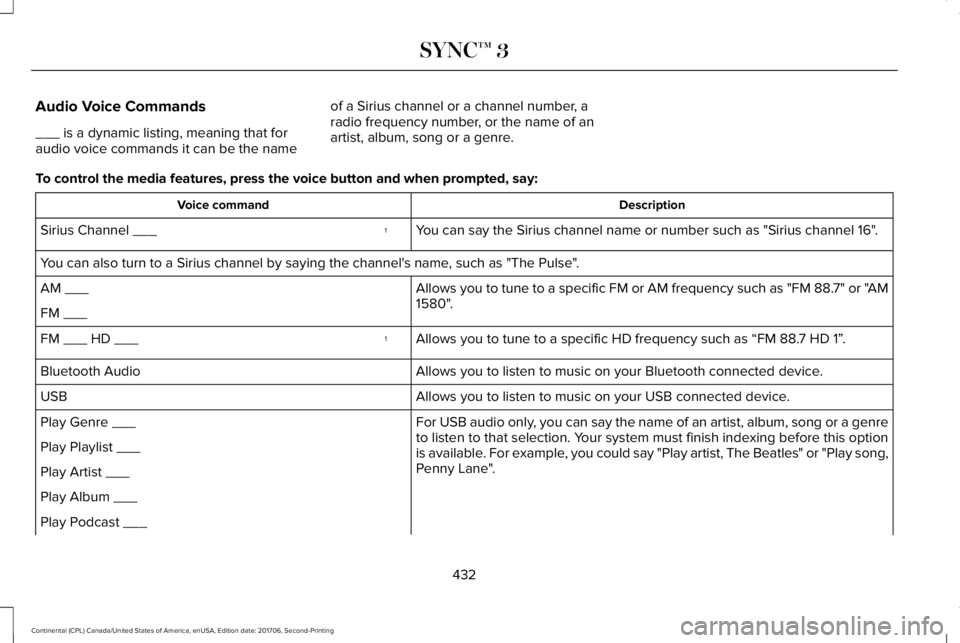
Audio Voice Commands
___ is a dynamic listing, meaning that foraudio voice commands it can be the name
of a Sirius channel or a channel number, aradio frequency number, or the name of anartist, album, song or a genre.
To control the media features, press the voice button and when prompted, say:
DescriptionVoice command
You can say the Sirius channel name or number such as "Sirius channel 16".1Sirius Channel ___
You can also turn to a Sirius channel by saying the channel's name, such as "The Pulse".
Allows you to tune to a specific FM or AM frequency such as "FM 88.7" or "AM1580".AM ___
FM ___
Allows you to tune to a specific HD frequency such as “FM 88.7 HD 1”.1FM ___ HD ___
Allows you to listen to music on your Bluetooth connected device.Bluetooth Audio
Allows you to listen to music on your USB connected device.USB
For USB audio only, you can say the name of an artist, album, song or a genreto listen to that selection. Your system must finish indexing before this optionis available. For example, you could say "Play artist, The Beatles" or "Play song,Penny Lane".
Play Genre ___
Play Playlist ___
Play Artist ___
Play Album ___
Play Podcast ___
432
Continental (CPL) Canada/United States of America, enUSA, Edition date: 201706, Second-Printing
SYNC™ 3
Page 446 of 615
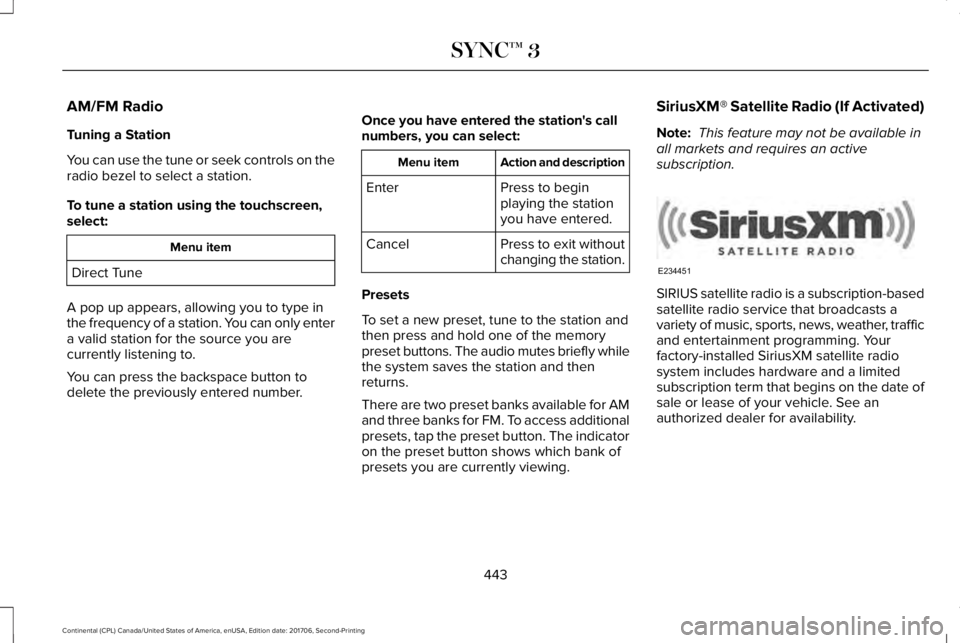
AM/FM Radio
Tuning a Station
You can use the tune or seek controls on theradio bezel to select a station.
To tune a station using the touchscreen,select:
Menu item
Direct Tune
A pop up appears, allowing you to type inthe frequency of a station. You can only entera valid station for the source you arecurrently listening to.
You can press the backspace button todelete the previously entered number.
Once you have entered the station's callnumbers, you can select:
Action and descriptionMenu item
Press to beginplaying the stationyou have entered.
Enter
Press to exit withoutchanging the station.Cancel
Presets
To set a new preset, tune to the station andthen press and hold one of the memorypreset buttons. The audio mutes briefly whilethe system saves the station and thenreturns.
There are two preset banks available for AMand three banks for FM. To access additionalpresets, tap the preset button. The indicatoron the preset button shows which bank ofpresets you are currently viewing.
SiriusXM® Satellite Radio (If Activated)
Note: This feature may not be available inall markets and requires an activesubscription.
SIRIUS satellite radio is a subscription-basedsatellite radio service that broadcasts avariety of music, sports, news, weather, trafficand entertainment programming. Yourfactory-installed SiriusXM satellite radiosystem includes hardware and a limitedsubscription term that begins on the date ofsale or lease of your vehicle. See anauthorized dealer for availability.
443
Continental (CPL) Canada/United States of America, enUSA, Edition date: 201706, Second-Printing
SYNC™ 3E234451
Page 447 of 615
For more information on extendedsubscription terms (a service fee is required),the online media player and a list of SiriusXMsatellite radio channels, and other features,please visit www.siriusxm.com in the UnitedStates, www.siriusxm.ca in Canada, or callSiriusXM at 1-888-539-7474.
Note:SiriusXM reserves the unrestrictedright to change, rearrange, add or deleteprogramming. This includes canceling,moving or adding particular channels, andits prices, at any time, with or without noticeto you. Ford Motor Company shall not beresponsible for any such programmingchanges.
Note:This receiver includes the eCosreal-time operating system. eCos ispublished under the eCos License.
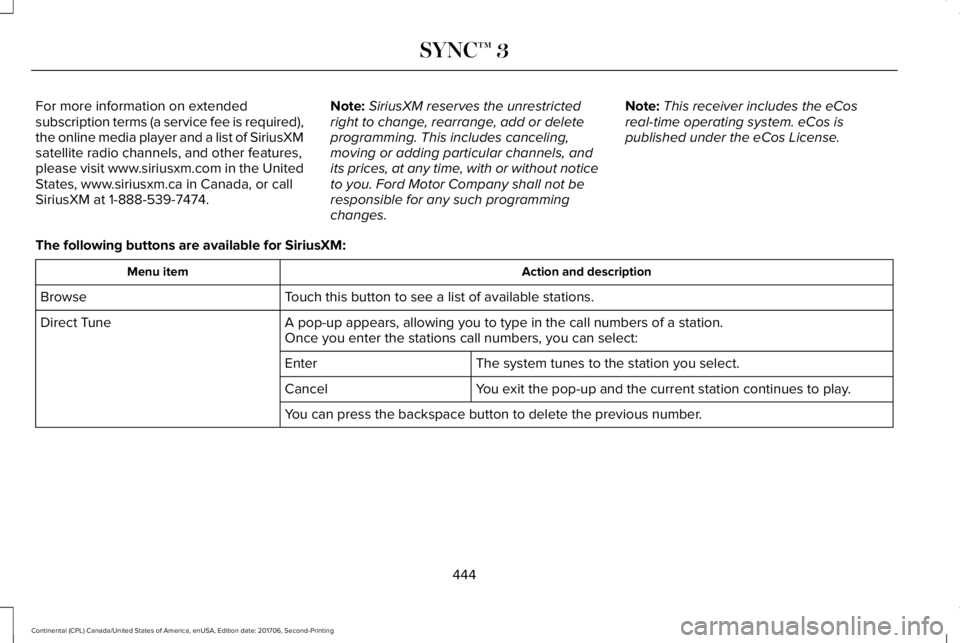
The following buttons are available for SiriusXM:
Action and descriptionMenu item
Touch this button to see a list of available stations.Browse
A pop-up appears, allowing you to type in the call numbers of a station.Direct TuneOnce you enter the stations call numbers, you can select:
The system tunes to the station you select.Enter
You exit the pop-up and the current station continues to play.Cancel
You can press the backspace button to delete the previous number.
444
Continental (CPL) Canada/United States of America, enUSA, Edition date: 201706, Second-Printing
SYNC™ 3
Page 448 of 615
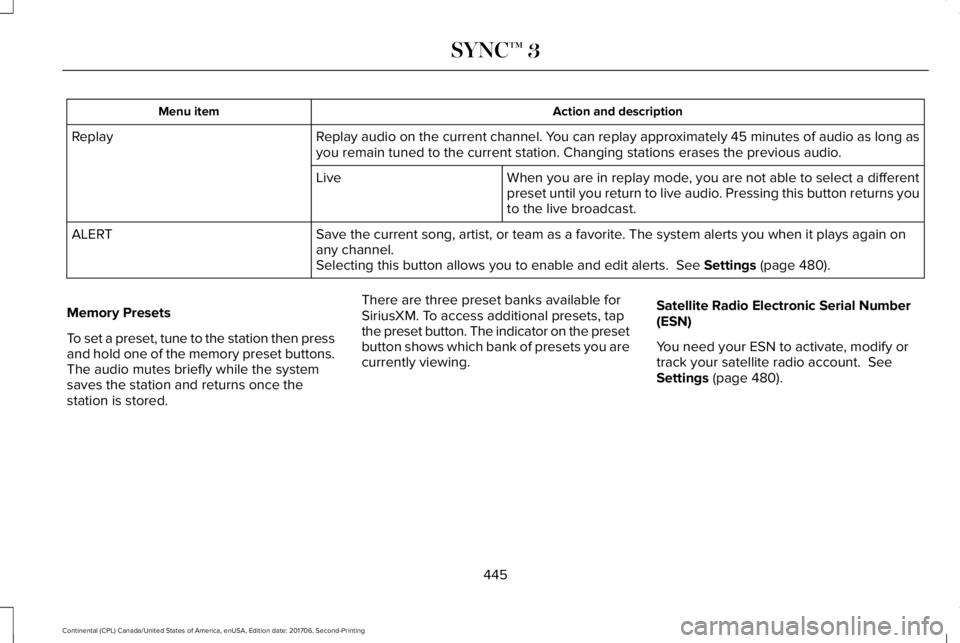
Action and descriptionMenu item
Replay audio on the current channel. You can replay approximately 45 minutes of audio as long asyou remain tuned to the current station. Changing stations erases the previous audio.Replay
When you are in replay mode, you are not able to select a differentpreset until you return to live audio. Pressing this button returns youto the live broadcast.
Live
Save the current song, artist, or team as a favorite. The system alerts you when it plays again onany channel.ALERT
Selecting this button allows you to enable and edit alerts. See Settings (page 480).
Memory Presets
To set a preset, tune to the station then pressand hold one of the memory preset buttons.The audio mutes briefly while the systemsaves the station and returns once thestation is stored.
There are three preset banks available forSiriusXM. To access additional presets, tapthe preset button. The indicator on the presetbutton shows which bank of presets you arecurrently viewing.
Satellite Radio Electronic Serial Number(ESN)
You need your ESN to activate, modify ortrack your satellite radio account. SeeSettings (page 480).
445
Continental (CPL) Canada/United States of America, enUSA, Edition date: 201706, Second-Printing
SYNC™ 3
Page 449 of 615
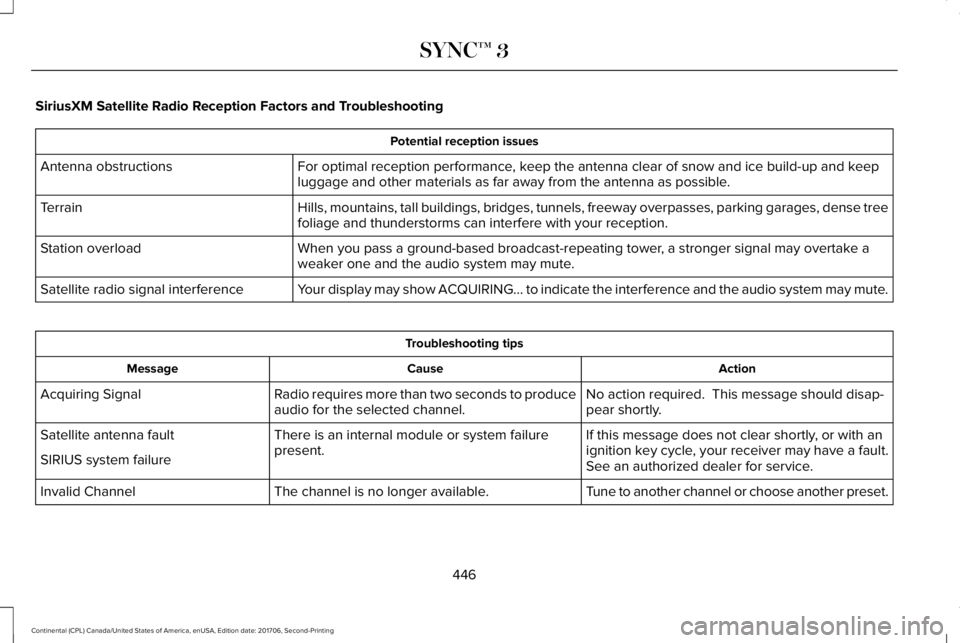
SiriusXM Satellite Radio Reception Factors and Troubleshooting
Potential reception issues
For optimal reception performance, keep the antenna clear of snow and ice build-up and keepluggage and other materials as far away from the antenna as possible.Antenna obstructions
Hills, mountains, tall buildings, bridges, tunnels, freeway overpasses, parking garages, dense treefoliage and thunderstorms can interfere with your reception.Terrain
When you pass a ground-based broadcast-repeating tower, a stronger signal may overtake aweaker one and the audio system may mute.Station overload
Your display may show ACQUIRING... to indicate the interference and the audio system may mute.Satellite radio signal interference
Troubleshooting tips
ActionCauseMessage
No action required. This message should disap-pear shortly.Radio requires more than two seconds to produceaudio for the selected channel.Acquiring Signal
If this message does not clear shortly, or with anignition key cycle, your receiver may have a fault.See an authorized dealer for service.
There is an internal module or system failurepresent.Satellite antenna fault
SIRIUS system failure
Tune to another channel or choose another preset.The channel is no longer available.Invalid Channel
446
Continental (CPL) Canada/United States of America, enUSA, Edition date: 201706, Second-Printing
SYNC™ 3
Page 450 of 615
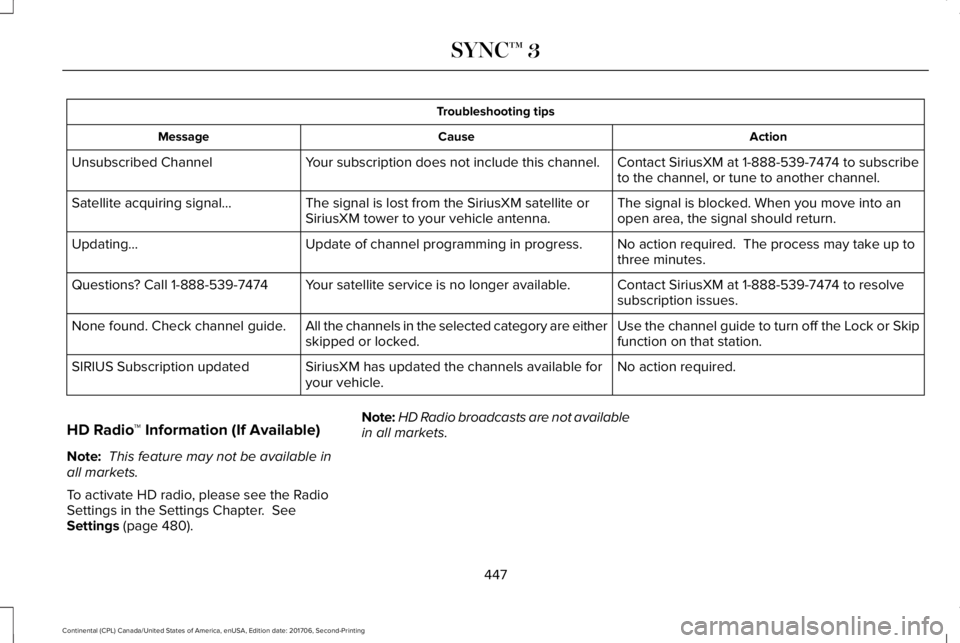
Troubleshooting tips
ActionCauseMessage
Contact SiriusXM at 1-888-539-7474 to subscribeto the channel, or tune to another channel.Your subscription does not include this channel.Unsubscribed Channel
The signal is blocked. When you move into anopen area, the signal should return.The signal is lost from the SiriusXM satellite orSiriusXM tower to your vehicle antenna.Satellite acquiring signal…
No action required. The process may take up tothree minutes.Update of channel programming in progress.Updating…
Contact SiriusXM at 1-888-539-7474 to resolvesubscription issues.Your satellite service is no longer available.Questions? Call 1-888-539-7474
Use the channel guide to turn off the Lock or Skipfunction on that station.All the channels in the selected category are eitherskipped or locked.None found. Check channel guide.
No action required.SiriusXM has updated the channels available foryour vehicle.SIRIUS Subscription updated
HD Radio™ Information (If Available)
Note: This feature may not be available inall markets.
To activate HD radio, please see the RadioSettings in the Settings Chapter. SeeSettings (page 480).
Note:HD Radio broadcasts are not availablein all markets.
447
Continental (CPL) Canada/United States of America, enUSA, Edition date: 201706, Second-Printing
SYNC™ 3