seats LINCOLN CONTINENTAL 2018 Owner's Manual
[x] Cancel search | Manufacturer: LINCOLN, Model Year: 2018, Model line: CONTINENTAL, Model: LINCOLN CONTINENTAL 2018Pages: 615, PDF Size: 5.31 MB
Page 58 of 615
· Crash sensors and monitoringsystem with a readiness indicator.See Crash Sensors and AirbagIndicator (page 55).
Properly restrain children 12 years old andunder in the rear seats. The Safety Canopywill not interfere with children restrainedusing a properly installed child or boosterseat because it is designed to inflatedownward from the headliner above thedoors along the side window opening.
The design and development of the SafetyCanopy included recommended testingprocedures that were developed by a groupof automotive safety experts known as theSide Airbag Technical Working Group. Theserecommended testing procedures helpreduce the risk of injuries related to thedeployment of side airbags (including theSafety Canopy).
CRASH SENSORS AND AIRBAG
INDICATOR
WARNING: Modifying or addingequipment to the front end of the vehicle(including frame, bumper, front end bodystructure and tow hooks) may affect theperformance of the airbag system, increasingthe risk of injury. Do not modify the front endof the vehicle.
Your vehicle has a collection of crash andoccupant sensors which provide informationto the restraints control module. Therestraints control module deploys (activates)the front seatbelt system, the adaptivecollapsible steering column, driver airbag,passenger airbag, knee airbag(s), seatmounted side airbags, Safety Canopy andoptional rear inflatable seatbelts. Based onthe type of crash, the restraints controlmodule will deploy the appropriate safetydevices.
The restraints control module also monitorsthe readiness of the above safety devicesplus the crash and occupant sensors. Thereadiness of the safety system is indicatedby a warning indicator light in the instrumentcluster or a backup tone (if equipped).Routine maintenance of the airbag is notrequired.
A difficulty with the system is indicated byone or more of the following:
The readiness light will notilluminate immediately after theignition is turned on.
•The readiness light will either flash orstay lit.
•A series of five beeps will be heard (Ifequipped). The tone pattern will repeatperiodically until the problem, the lightor both are repaired.
If any of these things happen, evenintermittently, have the supplementalrestraint system serviced at an authorizeddealer immediately. Unless serviced, thesystem may not function properly in theevent of a crash.
55
Continental (CPL) Canada/United States of America, enUSA, Edition date: 201706, Second-Printing
Supplementary Restraints SystemE67017 E67017
Page 77 of 615
Rear Doors
Press the unlock switch on thedoor and then press the doorrelease button on the arm rest torelease the door. The first press unlocks thedoor and the second press unlatches thedoor. Push the door out to open the door.
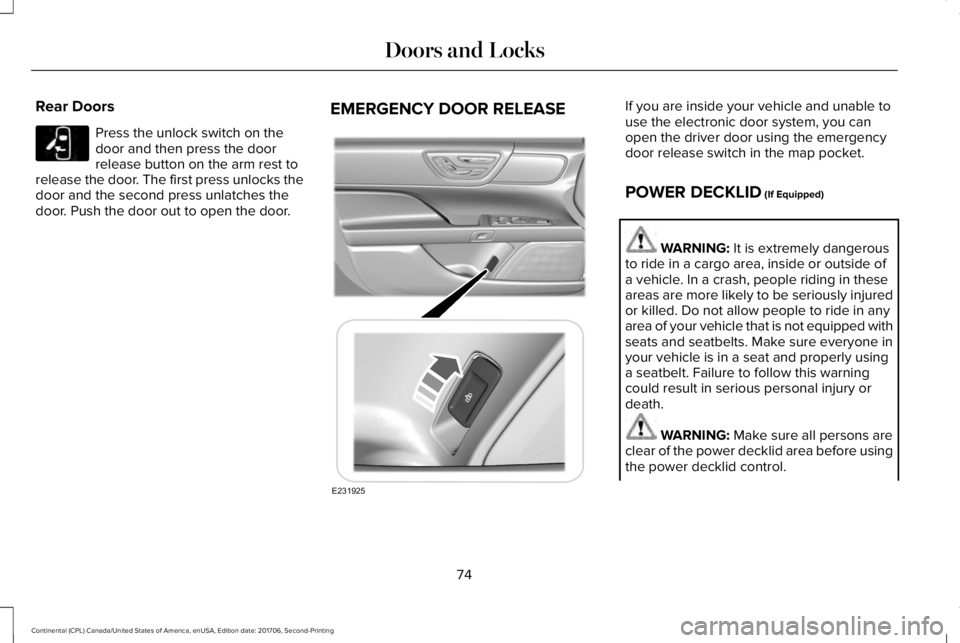
EMERGENCY DOOR RELEASEIf you are inside your vehicle and unable touse the electronic door system, you canopen the driver door using the emergencydoor release switch in the map pocket.
POWER DECKLID (If Equipped)
WARNING: It is extremely dangerousto ride in a cargo area, inside or outside ofa vehicle. In a crash, people riding in theseareas are more likely to be seriously injuredor killed. Do not allow people to ride in anyarea of your vehicle that is not equipped withseats and seatbelts. Make sure everyone inyour vehicle is in a seat and properly usinga seatbelt. Failure to follow this warningcould result in serious personal injury ordeath.
WARNING: Make sure all persons areclear of the power decklid area before usingthe power decklid control.
74
Continental (CPL) Canada/United States of America, enUSA, Edition date: 201706, Second-Printing
Doors and LocksE232417 E231925
Page 122 of 615
Settings
Select Your SettingRemoteUnlock
Switch Inhibit
Follow onscreen directions to confirm or modify your settings.Oil Life Reset
Select Your SettingPower Decklid
Select Your SettingClimateControlRemote Start
Seats andWheel
Duration
System
Follow onscreen directions to confirm or modify your settings.Tire Monitor
Remote OpenWindows
Remote Close
Courtesy WipeWipers
Rain Sensing
Follow onscreen directions to confirm or modify your settings.MyKey StatusMyKey
119
Continental (CPL) Canada/United States of America, enUSA, Edition date: 201706, Second-Printing
Information Displays
Page 141 of 615
Pre-Collision Assist
ActionMessage
You have a blocked sensor due to bad weather, ice, mud or water in front of the radar sensor.You can typically clean the sensor to resolve.Pre-Collision Assist Not Available SensorBlocked
A fault with the system has occurred. Contact an authorized dealer as soon as possible.Pre-Collision Assist Not Available
Remote Start
ActionMessage
Displays as a reminder to apply the brake and push the gear shift button to drive the vehicleafter a remote start.To Drive: Press Brake and Gear ShiftButton
Seats
ActionMessage
Displays as a reminder that memory seats are not available while driving.Memory Recall Not Permitted While Driving
Displays to show where your memory setting has been saved.Memory {0} Saved
138
Continental (CPL) Canada/United States of America, enUSA, Edition date: 201706, Second-Printing
Information Displays
Page 150 of 615
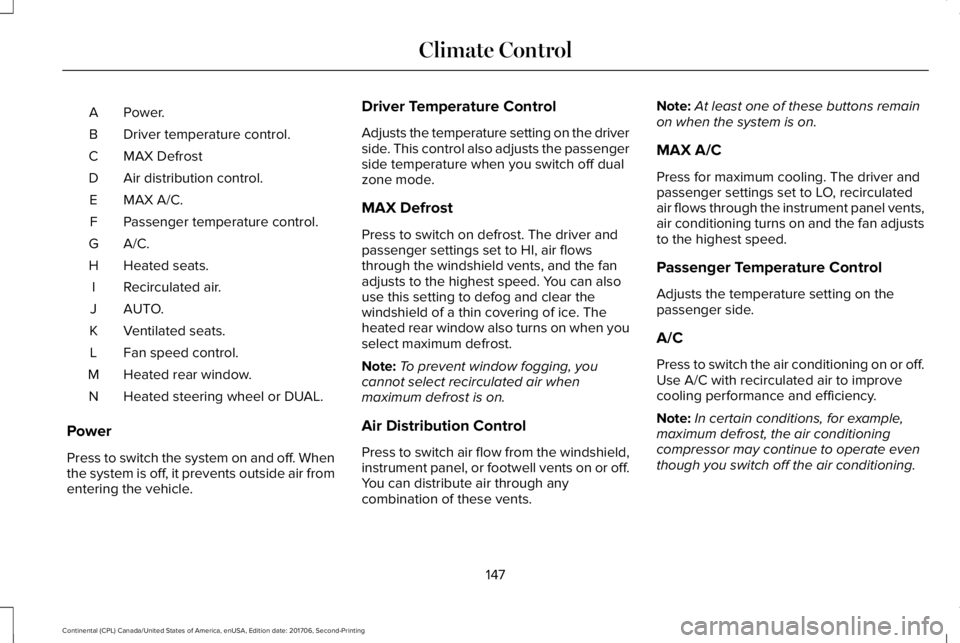
Power.A
Driver temperature control.B
MAX DefrostC
Air distribution control.D
MAX A/C.E
Passenger temperature control.F
A/C.G
Heated seats.H
Recirculated air.I
AUTO.J
Ventilated seats.K
Fan speed control.L
Heated rear window.M
Heated steering wheel or DUAL.N
Power
Press to switch the system on and off. Whenthe system is off, it prevents outside air fromentering the vehicle.
Driver Temperature Control
Adjusts the temperature setting on the driverside. This control also adjusts the passengerside temperature when you switch off dualzone mode.
MAX Defrost
Press to switch on defrost. The driver andpassenger settings set to HI, air flowsthrough the windshield vents, and the fanadjusts to the highest speed. You can alsouse this setting to defog and clear thewindshield of a thin covering of ice. Theheated rear window also turns on when youselect maximum defrost.
Note:To prevent window fogging, youcannot select recirculated air whenmaximum defrost is on.
Air Distribution Control
Press to switch air flow from the windshield,instrument panel, or footwell vents on or off.You can distribute air through anycombination of these vents.
Note:At least one of these buttons remainon when the system is on.
MAX A/C
Press for maximum cooling. The driver andpassenger settings set to LO, recirculatedair flows through the instrument panel vents,air conditioning turns on and the fan adjuststo the highest speed.
Passenger Temperature Control
Adjusts the temperature setting on thepassenger side.
A/C
Press to switch the air conditioning on or off.Use A/C with recirculated air to improvecooling performance and efficiency.
Note:In certain conditions, for example,maximum defrost, the air conditioningcompressor may continue to operate eventhough you switch off the air conditioning.
147
Continental (CPL) Canada/United States of America, enUSA, Edition date: 201706, Second-Printing
Climate Control
Page 151 of 615
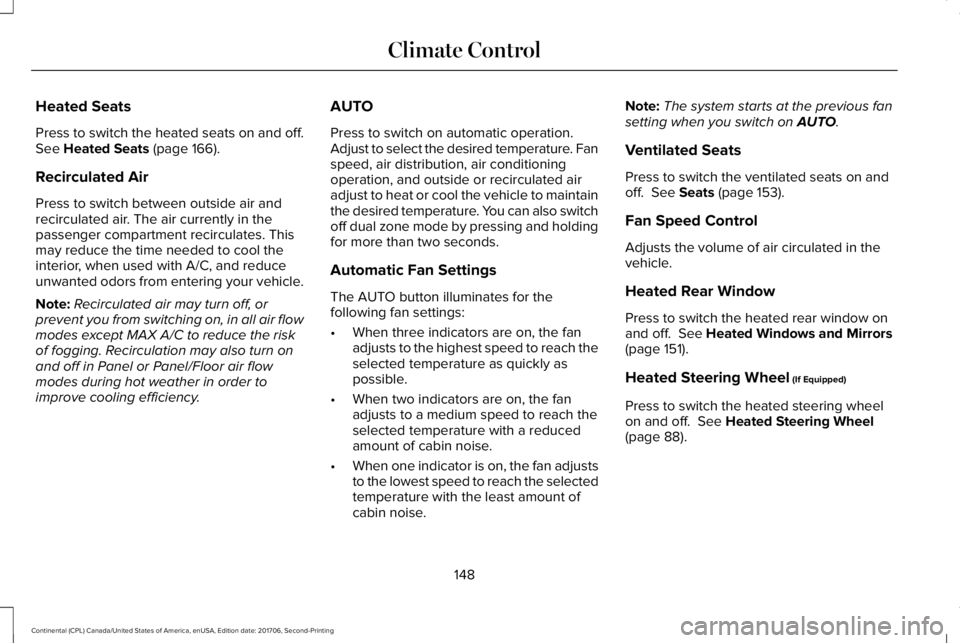
Heated Seats
Press to switch the heated seats on and off.See Heated Seats (page 166).
Recirculated Air
Press to switch between outside air andrecirculated air. The air currently in thepassenger compartment recirculates. Thismay reduce the time needed to cool theinterior, when used with A/C, and reduceunwanted odors from entering your vehicle.
Note:Recirculated air may turn off, orprevent you from switching on, in all air flowmodes except MAX A/C to reduce the riskof fogging. Recirculation may also turn onand off in Panel or Panel/Floor air flowmodes during hot weather in order toimprove cooling efficiency.
AUTO
Press to switch on automatic operation.Adjust to select the desired temperature. Fanspeed, air distribution, air conditioningoperation, and outside or recirculated airadjust to heat or cool the vehicle to maintainthe desired temperature. You can also switchoff dual zone mode by pressing and holdingfor more than two seconds.
Automatic Fan Settings
The AUTO button illuminates for thefollowing fan settings:
•When three indicators are on, the fanadjusts to the highest speed to reach theselected temperature as quickly aspossible.
•When two indicators are on, the fanadjusts to a medium speed to reach theselected temperature with a reducedamount of cabin noise.
•When one indicator is on, the fan adjuststo the lowest speed to reach the selectedtemperature with the least amount ofcabin noise.
Note:The system starts at the previous fansetting when you switch on AUTO.
Ventilated Seats
Press to switch the ventilated seats on andoff. See Seats (page 153).
Fan Speed Control
Adjusts the volume of air circulated in thevehicle.
Heated Rear Window
Press to switch the heated rear window onand off. See Heated Windows and Mirrors(page 151).
Heated Steering Wheel (If Equipped)
Press to switch the heated steering wheelon and off. See Heated Steering Wheel(page 88).
148
Continental (CPL) Canada/United States of America, enUSA, Edition date: 201706, Second-Printing
Climate Control
Page 152 of 615
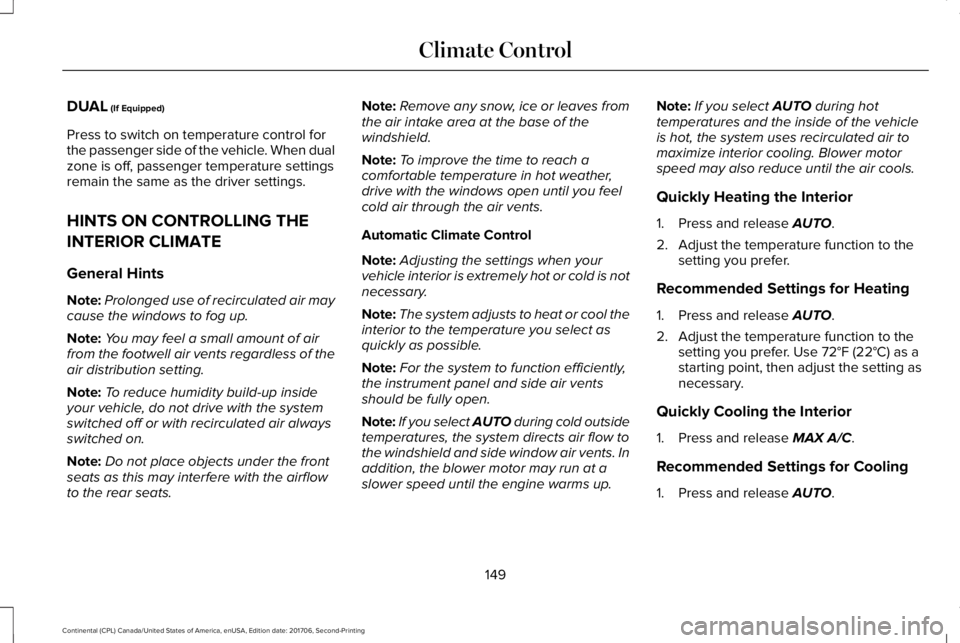
DUAL (If Equipped)
Press to switch on temperature control forthe passenger side of the vehicle. When dualzone is off, passenger temperature settingsremain the same as the driver settings.
HINTS ON CONTROLLING THE
INTERIOR CLIMATE
General Hints
Note:Prolonged use of recirculated air maycause the windows to fog up.
Note:You may feel a small amount of airfrom the footwell air vents regardless of theair distribution setting.
Note:To reduce humidity build-up insideyour vehicle, do not drive with the systemswitched off or with recirculated air alwaysswitched on.
Note:Do not place objects under the frontseats as this may interfere with the airflowto the rear seats.
Note:Remove any snow, ice or leaves fromthe air intake area at the base of thewindshield.
Note:To improve the time to reach acomfortable temperature in hot weather,drive with the windows open until you feelcold air through the air vents.
Automatic Climate Control
Note:Adjusting the settings when yourvehicle interior is extremely hot or cold is notnecessary.
Note:The system adjusts to heat or cool theinterior to the temperature you select asquickly as possible.
Note:For the system to function efficiently,the instrument panel and side air ventsshould be fully open.
Note:If you select AUTO during cold outsidetemperatures, the system directs air flow tothe windshield and side window air vents. Inaddition, the blower motor may run at aslower speed until the engine warms up.
Note:If you select AUTO during hottemperatures and the inside of the vehicleis hot, the system uses recirculated air tomaximize interior cooling. Blower motorspeed may also reduce until the air cools.
Quickly Heating the Interior
1. Press and release AUTO.
2. Adjust the temperature function to thesetting you prefer.
Recommended Settings for Heating
1. Press and release AUTO.
2. Adjust the temperature function to thesetting you prefer. Use 72°F (22°C) as astarting point, then adjust the setting asnecessary.
Quickly Cooling the Interior
1. Press and release MAX A/C.
Recommended Settings for Cooling
1. Press and release AUTO.
149
Continental (CPL) Canada/United States of America, enUSA, Edition date: 201706, Second-Printing
Climate Control
Page 154 of 615
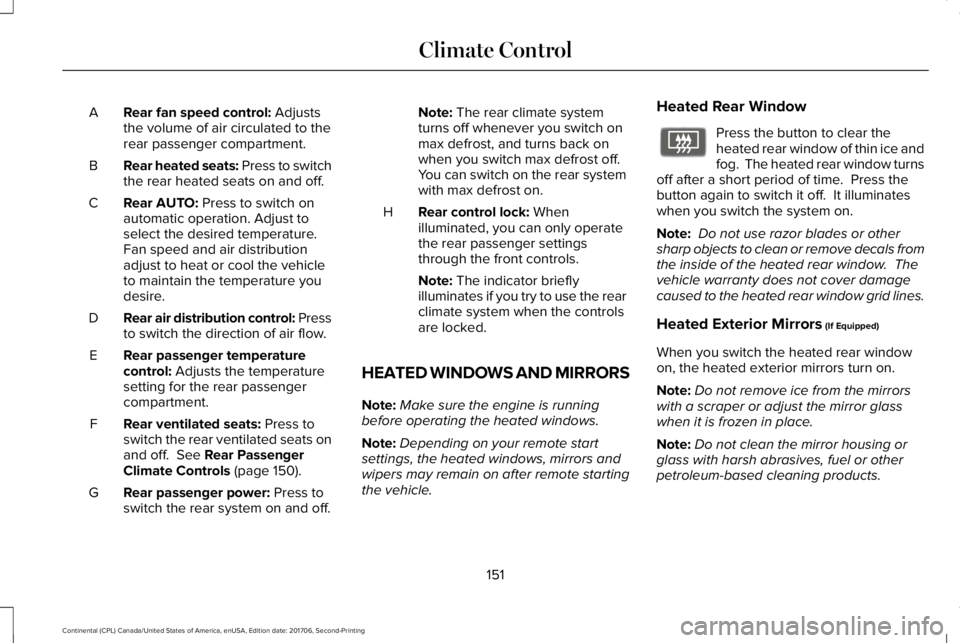
Rear fan speed control: Adjuststhe volume of air circulated to therear passenger compartment.
A
Rear heated seats: Press to switchthe rear heated seats on and off.B
Rear AUTO: Press to switch onautomatic operation. Adjust toselect the desired temperature.Fan speed and air distributionadjust to heat or cool the vehicleto maintain the temperature youdesire.
C
Rear air distribution control: Pressto switch the direction of air flow.D
Rear passenger temperaturecontrol: Adjusts the temperaturesetting for the rear passengercompartment.
E
Rear ventilated seats: Press toswitch the rear ventilated seats onand off. See Rear PassengerClimate Controls (page 150).
F
Rear passenger power: Press toswitch the rear system on and off.G
Note: The rear climate systemturns off whenever you switch onmax defrost, and turns back onwhen you switch max defrost off.You can switch on the rear systemwith max defrost on.
Rear control lock: Whenilluminated, you can only operatethe rear passenger settingsthrough the front controls.
H
Note: The indicator brieflyilluminates if you try to use the rearclimate system when the controlsare locked.
HEATED WINDOWS AND MIRRORS
Note:Make sure the engine is runningbefore operating the heated windows.
Note:Depending on your remote startsettings, the heated windows, mirrors andwipers may remain on after remote startingthe vehicle.
Heated Rear Window
Press the button to clear theheated rear window of thin ice andfog. The heated rear window turnsoff after a short period of time. Press thebutton again to switch it off. It illuminateswhen you switch the system on.
Note: Do not use razor blades or othersharp objects to clean or remove decals fromthe inside of the heated rear window. Thevehicle warranty does not cover damagecaused to the heated rear window grid lines.
Heated Exterior Mirrors (If Equipped)
When you switch the heated rear windowon, the heated exterior mirrors turn on.
Note:Do not remove ice from the mirrorswith a scraper or adjust the mirror glasswhen it is frozen in place.
Note:Do not clean the mirror housing orglass with harsh abrasives, fuel or otherpetroleum-based cleaning products.
151
Continental (CPL) Canada/United States of America, enUSA, Edition date: 201706, Second-Printing
Climate ControlE72507
Page 155 of 615
Windshield Wiper De-icer (If Equipped)
The windshield wiper de-icer turns on in lowtemperatures or when you manually switchthe heated rear window on.
CABIN AIR FILTER
Your vehicle is equipped with a cabin airfilter, which gives you and your passengersthe following benefits:
•It improves your driving comfort byreducing particle and odor concentration.
•It improves the interior compartmentcleanliness.
•It protects the climate controlcomponents from particle deposits.
You can locate the cabin air filter behind theglove box.
Note:Make sure you have a cabin air filterinstalled at all times. This prevents foreignobjects from entering the system. Runningthe system without a filter in place couldresult in degradation or damage to thesystem.
Replace the filter at regular intervals. SeeScheduled Maintenance (page 523).
For additional cabin air filter information, orto replace the filter, see a qualifiedtechnician.
REMOTE START
The system adjusts the interior temperaturedepending on your chosen settings duringremote start.
You cannot adjust the climate control settingduring remote start operation. When youswitch the ignition on, the climate controlsystem returns to the previous settings. Youcan now make adjustments.
Some features may remain on if they turn onduring remote start:
•Driver heated seat.
•Driver ventilated seat.
•Heated steering wheel.
•Heated mirrors.
•Heated rear window.
•Windshield wiper de-icer.
Note:If the passenger heated or ventilatedseats are on when you switch the vehicleoff, they default to the driver setting whenyou switch the vehicle on.
You can adjust the default remote startsettings using the information displaycontrols. See Information Displays (page115).
Automatic Settings
In hot weather, the system sets to 72°F(22°C). The ventilated seats set to high (ifavailable, and if you select AUTO in theinformation display).
In moderate weather, the system heats orcools (based on pre-selected settings). Therear defroster, heated mirrors and heated orventilated seats do not turn on.
In cold weather, the system sets to 72°F(22°C). The heated seats and heated steeringwheel set to high (if available, and if youselect AUTO in the information display). Therear defroster and heated mirrors turn on.
152
Continental (CPL) Canada/United States of America, enUSA, Edition date: 201706, Second-Printing
Climate Control
Page 156 of 615
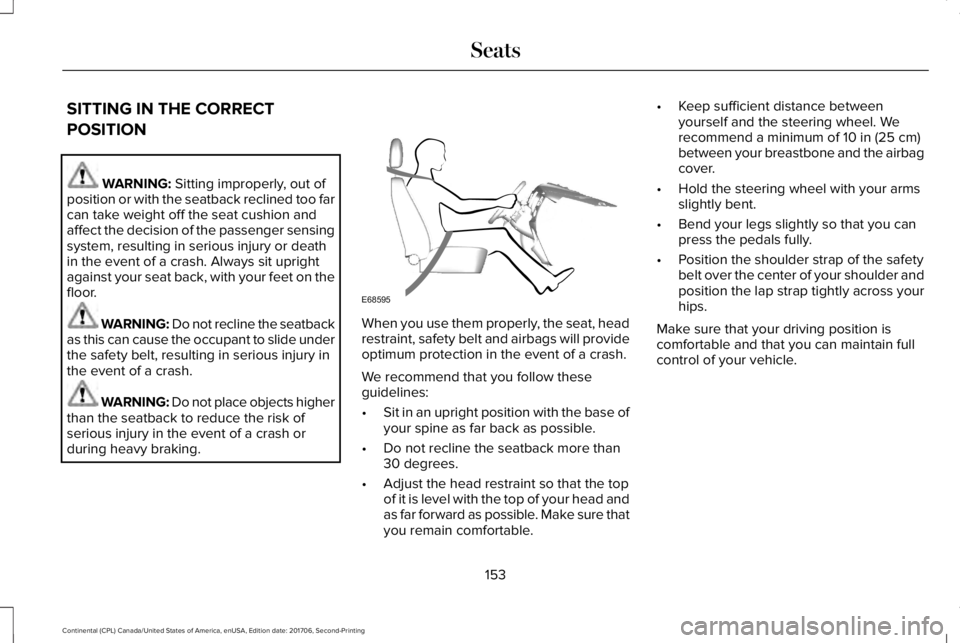
SITTING IN THE CORRECT
POSITION
WARNING: Sitting improperly, out ofposition or with the seatback reclined too farcan take weight off the seat cushion andaffect the decision of the passenger sensingsystem, resulting in serious injury or deathin the event of a crash. Always sit uprightagainst your seat back, with your feet on thefloor.
WARNING: Do not recline the seatbackas this can cause the occupant to slide underthe safety belt, resulting in serious injury inthe event of a crash.
WARNING: Do not place objects higherthan the seatback to reduce the risk ofserious injury in the event of a crash orduring heavy braking.
When you use them properly, the seat, headrestraint, safety belt and airbags will provideoptimum protection in the event of a crash.
We recommend that you follow theseguidelines:
•Sit in an upright position with the base ofyour spine as far back as possible.
•Do not recline the seatback more than30 degrees.
•Adjust the head restraint so that the topof it is level with the top of your head andas far forward as possible. Make sure thatyou remain comfortable.
•Keep sufficient distance betweenyourself and the steering wheel. Werecommend a minimum of 10 in (25 cm)between your breastbone and the airbagcover.
•Hold the steering wheel with your armsslightly bent.
•Bend your legs slightly so that you canpress the pedals fully.
•Position the shoulder strap of the safetybelt over the center of your shoulder andposition the lap strap tightly across yourhips.
Make sure that your driving position iscomfortable and that you can maintain fullcontrol of your vehicle.
153
Continental (CPL) Canada/United States of America, enUSA, Edition date: 201706, Second-Printing
SeatsE68595