warning light LINCOLN CONTINENTAL 2018 Owner's Manual
[x] Cancel search | Manufacturer: LINCOLN, Model Year: 2018, Model line: CONTINENTAL, Model: LINCOLN CONTINENTAL 2018Pages: 615, PDF Size: 5.31 MB
Page 118 of 615
GENERAL INFORMATION
WARNING: Driving while distractedcan result in loss of vehicle control, crashand injury. We strongly recommend that youuse extreme caution when using any devicethat may take your focus off the road. Yourprimary responsibility is the safe operationof your vehicle. We recommend against theuse of any hand-held device while drivingand encourage the use of voice-operatedsystems when possible. Make sure you areaware of all applicable local laws that mayaffect the use of electronic devices whiledriving.
You can control various systems on yourvehicle using the quick action menu (QAM)buttons on the right-hand side of the steeringwheel. The information display provides thecorresponding information.
Note:Some options may appear slightlydifferent or not at all if the items are optional.
Note:Some MyKey menu options onlyappear if MyKey is enabled and at least oneMyKey is programmed.
Note:Speedometer, driving aid information,and distance to empty information (ifenabled) moves to the left information groupwhen a menu is opened.
This icon gives you the ability toswitch a feature on or off. A checkin the box indicates the feature isenabled, and unchecked indicates thefeature is disabled.
115
Continental (CPL) Canada/United States of America, enUSA, Edition date: 201706, Second-Printing
Information DisplaysE204495
Page 130 of 615
AWD
ActionMessage
Displays when the system automatically disables to protect itself. This may be caused by operatingthe vehicle with the compact tire installed, if the system is overheating or if there is an issue withanother vehicle system preventing AWD operation. The system resumes normal operation andclears this message after cycling the ignition on and off and driving a short distance with theroad tire re-installed, after the system is allowed to cool or after the other vehicle system issuesare resolved.
AWD OFF
Displays in conjunction with the powertrain malfunction or reduced power light when the systemis not operating properly. If the message stays on or continues to come on, contact yourauthorized dealer as soon as possible.
AWD Malfunction Service Required
Battery and Charging System
ActionMessage
The charging system needs servicing. If the warning stays on or continues to come on, contactan authorized dealer as soon as possible.Check Charging System
The charging system needs servicing. If the warning stays on or continues to come on, contactan authorized dealer as soon as possible.Charging System Service Soon
The charging system needs servicing. Contact an authorized dealer as soon as possible.Charging System Service Now
127
Continental (CPL) Canada/United States of America, enUSA, Edition date: 201706, Second-Printing
Information Displays
Page 146 of 615
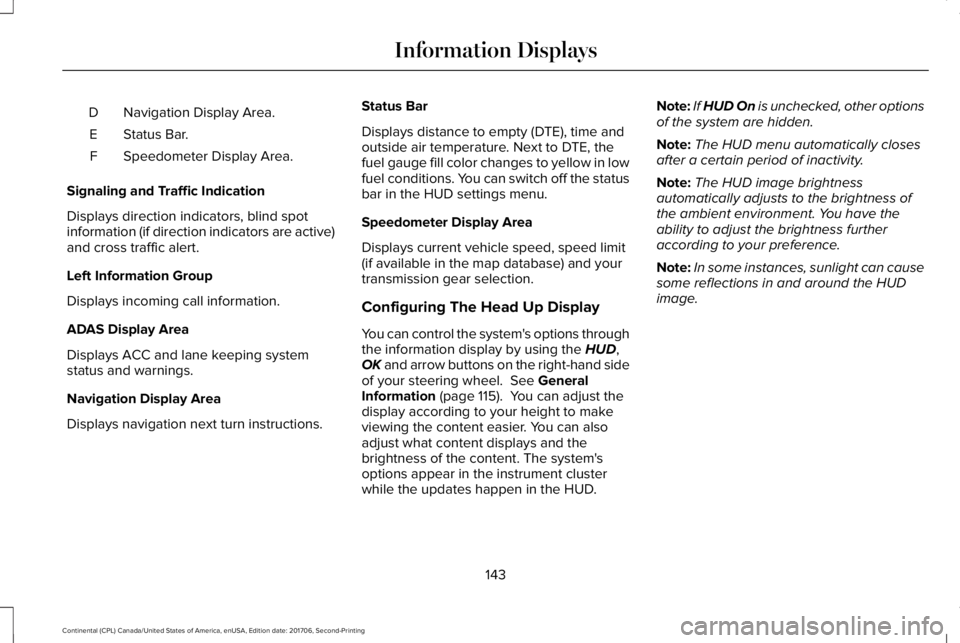
Navigation Display Area.D
Status Bar.E
Speedometer Display Area.F
Signaling and Traffic Indication
Displays direction indicators, blind spotinformation (if direction indicators are active)and cross traffic alert.
Left Information Group
Displays incoming call information.
ADAS Display Area
Displays ACC and lane keeping systemstatus and warnings.
Navigation Display Area
Displays navigation next turn instructions.
Status Bar
Displays distance to empty (DTE), time andoutside air temperature. Next to DTE, thefuel gauge fill color changes to yellow in lowfuel conditions. You can switch off the statusbar in the HUD settings menu.
Speedometer Display Area
Displays current vehicle speed, speed limit(if available in the map database) and yourtransmission gear selection.
Configuring The Head Up Display
You can control the system's options throughthe information display by using the HUD,OK and arrow buttons on the right-hand sideof your steering wheel. See GeneralInformation (page 115). You can adjust thedisplay according to your height to makeviewing the content easier. You can alsoadjust what content displays and thebrightness of the content. The system'soptions appear in the instrument clusterwhile the updates happen in the HUD.
Note:If HUD On is unchecked, other optionsof the system are hidden.
Note:The HUD menu automatically closesafter a certain period of inactivity.
Note:The HUD image brightnessautomatically adjusts to the brightness ofthe ambient environment. You have theability to adjust the brightness furtheraccording to your preference.
Note:In some instances, sunlight can causesome reflections in and around the HUDimage.
143
Continental (CPL) Canada/United States of America, enUSA, Edition date: 201706, Second-Printing
Information Displays
Page 156 of 615
SITTING IN THE CORRECT
POSITION
WARNING: Sitting improperly, out ofposition or with the seatback reclined too farcan take weight off the seat cushion andaffect the decision of the passenger sensingsystem, resulting in serious injury or deathin the event of a crash. Always sit uprightagainst your seat back, with your feet on thefloor.
WARNING: Do not recline the seatbackas this can cause the occupant to slide underthe safety belt, resulting in serious injury inthe event of a crash.
WARNING: Do not place objects higherthan the seatback to reduce the risk ofserious injury in the event of a crash orduring heavy braking.
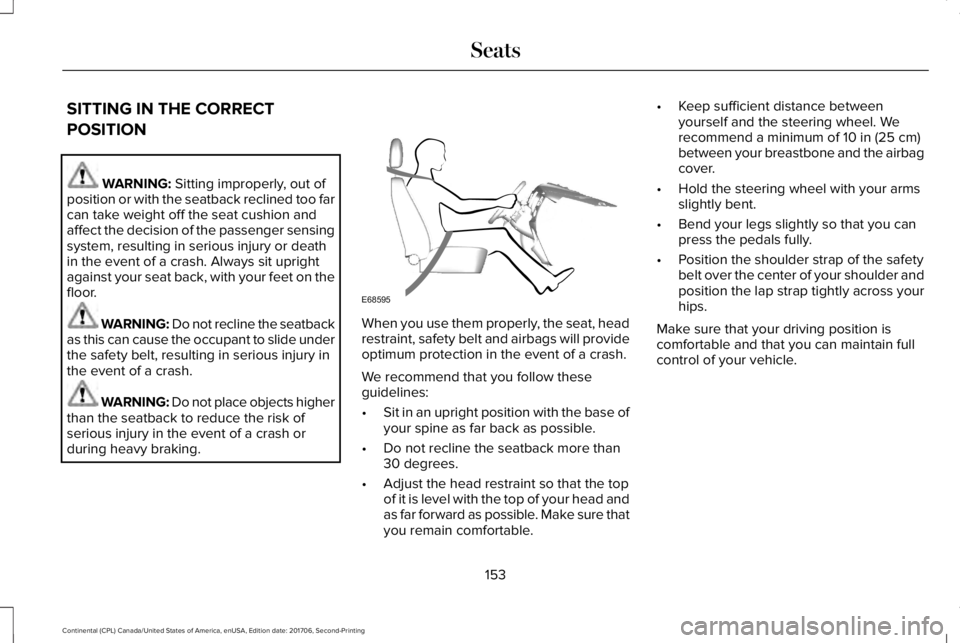
When you use them properly, the seat, headrestraint, safety belt and airbags will provideoptimum protection in the event of a crash.
We recommend that you follow theseguidelines:
•Sit in an upright position with the base ofyour spine as far back as possible.
•Do not recline the seatback more than30 degrees.
•Adjust the head restraint so that the topof it is level with the top of your head andas far forward as possible. Make sure thatyou remain comfortable.
•Keep sufficient distance betweenyourself and the steering wheel. Werecommend a minimum of 10 in (25 cm)between your breastbone and the airbagcover.
•Hold the steering wheel with your armsslightly bent.
•Bend your legs slightly so that you canpress the pedals fully.
•Position the shoulder strap of the safetybelt over the center of your shoulder andposition the lap strap tightly across yourhips.
Make sure that your driving position iscomfortable and that you can maintain fullcontrol of your vehicle.
153
Continental (CPL) Canada/United States of America, enUSA, Edition date: 201706, Second-Printing
SeatsE68595
Page 170 of 615
temperatures, especially if used for longperiods of time. Do not place anything onthe seat that insulates against heat, such asa blanket or cushion. This may cause theheated seat to overheat. Do not puncturethe seat with pins, needles or other pointedobjects. This may damage the heatingelement which may cause the heated seatto overheat. An overheated seat may causeserious personal injury.
Do not do the following:
•Place heavy objects on the seat.
•Operate the heated seat if water or anyother liquid spills on the seat. Allow theseat to dry thoroughly.
•Operate the heated seats unless theengine is running. Doing so can causethe battery to lose charge.
Press the heated seat symbol to cyclethrough the various heat settings and off.More indicator lights indicate warmersettings.
Rear Seats
WARNING: Persons who are unableto feel pain to the skin because of advancedage, chronic illness, diabetes, spinal cordinjury, medication, alcohol use, exhaustion,or other physical conditions, must exercisecare when using the seat heater. The seatheater may cause burns even at lowtemperatures, especially if used for longperiods of time. Do not place anything onthe seat that insulates against heat, such asa blanket or cushion, because this may cause
the seat heater to overheat. Do not puncturethe seat with pins, needles, or other pointedobjects because this may damage theheating element which may cause the seatheater to overheat. An overheated seat maycause serious personal injury.
Do not do the following:
•Place heavy objects on the seat.
•Operate the seat heater if water or anyother liquid is spilled on the seat. Allowthe seat to dry thoroughly.
•Operate the heated seats unless theengine is running. Doing so can causethe battery to lose charge.
The rear seat heat controls are located onthe rear of the center console.
167
Continental (CPL) Canada/United States of America, enUSA, Edition date: 201706, Second-Printing
SeatsE146322 E146322
Page 171 of 615
Press the heated seat symbol to cyclethrough the various heat settings and off.More indicator lights indicate warmersettings.
The heated seat module resets at everyignition run cycle. While the ignition is on,press the high or low heated seat switch toenable heating mode. When activated, theywill turn off automatically when you turn theengine off.
CLIMATE CONTROLLED SEATS (If
Equipped)
Heated Seats
WARNING: People who are unable tofeel pain to their skin because of advancedage, chronic illness, diabetes, spinal cordinjury, medication, alcohol use, exhaustionor other physical conditions, must usecaution when using the heated seat. Theheated seat may cause burns even at lowtemperatures, especially if used for longperiods of time. Do not place anything on
the seat that may block the heat, such as ablanket or cushion. This can cause theheated seat to overheat. Do not puncturethe seat with pins, needles or other pointedobjects. This damages the heating elementand can cause the heated seat to overheat.An overheated seat may cause seriouspersonal injury.
Note:The heated seats switch on during aremote start if they are enabled through theinformation displays. See GeneralInformation (page 115).
Note:The heated seats may also switch onwhen you start your vehicle if they were onwhen you previously switched your vehicleoff.
Note:Do not do the following:
•Place heavy objects on the seat.
•Operate the seat heater if water or anyother liquid spills on the seat. Allow theseat to dry thoroughly.
Press this symbol to cycle through thevarious heat settings and off. More indicatorlights indicate warmer settings.
Ventilated Seats
Note:The ventilated seats switch on duringa remote start if they are enabled throughthe information displays. See GeneralInformation (page 115).
Note:The ventilated seats may also switchon when you start your vehicle if they wereon when you previously switched yourvehicle off.
Note:Do not do the following:
168
Continental (CPL) Canada/United States of America, enUSA, Edition date: 201706, Second-Printing
SeatsE146322
Page 174 of 615
HomeLink Wireless Control System
WARNING: Make sure that the garagedoor and security device are free fromobstruction when you are programming. Donot program the system with the vehicle inthe garage.
WARNING: Do not use the system withany garage door opener that does not havethe safety stop and reverse feature asrequired by U.S. Federal Safety Standards(this includes any garage door openermanufactured before April 1, 1982). A garagedoor opener which cannot detect an object,signaling the door to stop and reverse, doesnot meet current federal safety standards.Using a garage door opener without thesefeatures increases the risk of serious injuryor death.
Note:Make sure you keep the originalremote control transmitter for use in othervehicles as well as for future systemprogramming.
Note:We recommend that upon the sale orlease termination of your vehicle, you erasethe programmed function buttons for securityreasons. See Erasing the Function ButtonCodes later in this section.
Note:You can program a maximum of threedevices. To change or replace any of thethree devices after it has been initiallyprogrammed, you must first erase the currentsettings. See Erasing the Function ButtonCodes.
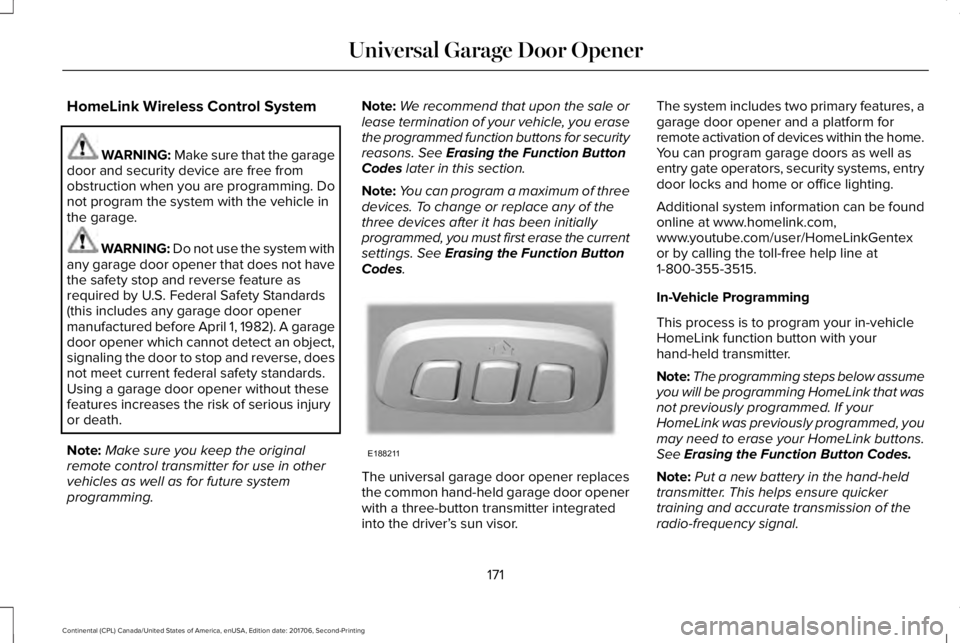
The universal garage door opener replacesthe common hand-held garage door openerwith a three-button transmitter integratedinto the driver’s sun visor.
The system includes two primary features, agarage door opener and a platform forremote activation of devices within the home.You can program garage doors as well asentry gate operators, security systems, entrydoor locks and home or office lighting.
Additional system information can be foundonline at www.homelink.com,www.youtube.com/user/HomeLinkGentexor by calling the toll-free help line at1-800-355-3515.
In-Vehicle Programming
This process is to program your in-vehicleHomeLink function button with yourhand-held transmitter.
Note:The programming steps below assumeyou will be programming HomeLink that wasnot previously programmed. If yourHomeLink was previously programmed, youmay need to erase your HomeLink buttons.See Erasing the Function Button Codes.
Note:Put a new battery in the hand-heldtransmitter. This helps ensure quickertraining and accurate transmission of theradio-frequency signal.
171
Continental (CPL) Canada/United States of America, enUSA, Edition date: 201706, Second-Printing
Universal Garage Door OpenerE188211
Page 178 of 615
12 Volt DC Power Point
WARNING: Do not plug optionalelectrical accessories into the cigar lightersocket. Incorrect use of the cigar lighter cancause damage not covered by the vehiclewarranty, and can result in fire or seriousinjury.
Note:When you switch the ignition on, youcan use the socket to power 12 voltappliances with a maximum current ratingof 15 amps.
If the power supply does not work after youswitch the ignition off, switch the ignition on.Note:Do not hang any accessory from theaccessory plug.
Note:Do not use the power point over thevehicle capacity of 12 volt DC 180 watts ora fuse may blow.
Note:Always keep the power point capsclosed when not in use.
Do not insert objects other than an accessoryplug into the power point. This damages thepower point and may blow the fuse.
Run the vehicle for full capacity use of thepower point.
To prevent the battery from running out ofcharge:
•Do not use the power point longer thannecessary when the vehicle is notrunning.
•Do not leave devices plugged inovernight or when you park your vehiclefor extended periods.
Locations
Power points may be in the followinglocations:
•On the instrument panel.
•Inside the center console.
•On the rear of the center console.
110 Volt AC Power Point (If Equipped)
WARNING: Do not keep electricaldevices plugged in the power pointwhenever the device is not in use. Do notuse any extension cord with the 110 volt ACpower point, since it will defeat the safetyprotection design. Doing so may cause thepower point to overload due to poweringmultiple devices that can reach beyond the150 watt load limit and could result in fire orserious injury.
Note:The power point turns off when youswitch the ignition off, or when the batteryvoltage drops below 11 volts.
You can use the power point for electricdevices that require up to 150 watts. It is onthe rear of the center console.
175
Continental (CPL) Canada/United States of America, enUSA, Edition date: 201706, Second-Printing
Auxiliary Power Points
Page 191 of 615
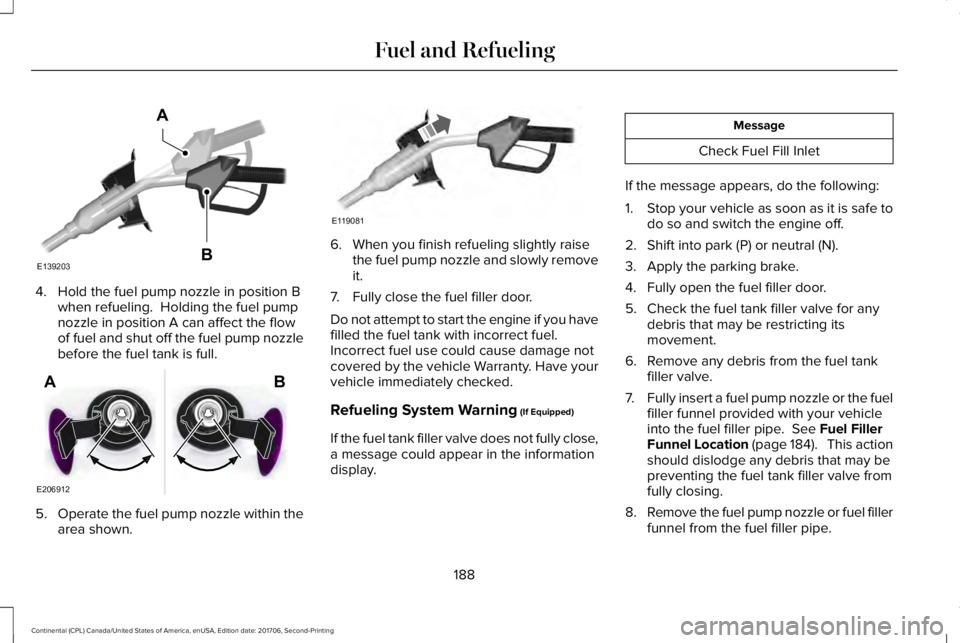
4. Hold the fuel pump nozzle in position Bwhen refueling. Holding the fuel pumpnozzle in position A can affect the flowof fuel and shut off the fuel pump nozzlebefore the fuel tank is full.
5.Operate the fuel pump nozzle within thearea shown.
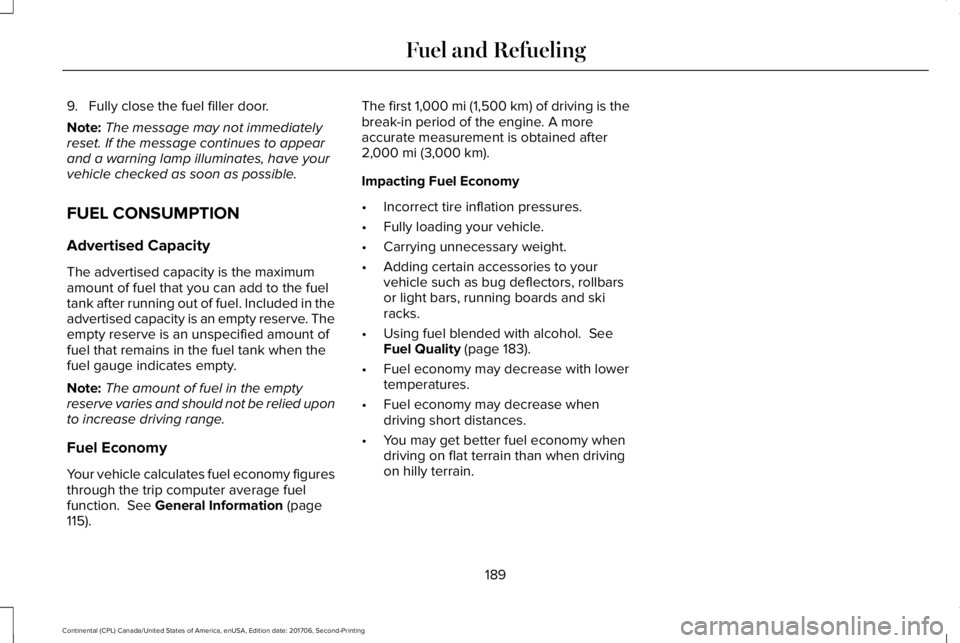
6. When you finish refueling slightly raisethe fuel pump nozzle and slowly removeit.
7. Fully close the fuel filler door.
Do not attempt to start the engine if you havefilled the fuel tank with incorrect fuel.Incorrect fuel use could cause damage notcovered by the vehicle Warranty. Have yourvehicle immediately checked.
Refueling System Warning (If Equipped)
If the fuel tank filler valve does not fully close,a message could appear in the informationdisplay.
Message
Check Fuel Fill Inlet
If the message appears, do the following:
1.Stop your vehicle as soon as it is safe todo so and switch the engine off.
2. Shift into park (P) or neutral (N).
3. Apply the parking brake.
4. Fully open the fuel filler door.
5. Check the fuel tank filler valve for anydebris that may be restricting itsmovement.
6. Remove any debris from the fuel tankfiller valve.
7.Fully insert a fuel pump nozzle or the fuelfiller funnel provided with your vehicleinto the fuel filler pipe. See Fuel FillerFunnel Location (page 184). This actionshould dislodge any debris that may bepreventing the fuel tank filler valve fromfully closing.
8.Remove the fuel pump nozzle or fuel fillerfunnel from the fuel filler pipe.
188
Continental (CPL) Canada/United States of America, enUSA, Edition date: 201706, Second-Printing
Fuel and RefuelingE139203
A
B E206912
AB E119081
Page 192 of 615
9. Fully close the fuel filler door.
Note:The message may not immediatelyreset. If the message continues to appearand a warning lamp illuminates, have yourvehicle checked as soon as possible.
FUEL CONSUMPTION
Advertised Capacity
The advertised capacity is the maximumamount of fuel that you can add to the fueltank after running out of fuel. Included in theadvertised capacity is an empty reserve. Theempty reserve is an unspecified amount offuel that remains in the fuel tank when thefuel gauge indicates empty.
Note:The amount of fuel in the emptyreserve varies and should not be relied uponto increase driving range.
Fuel Economy
Your vehicle calculates fuel economy figuresthrough the trip computer average fuelfunction. See General Information (page115).
The first 1,000 mi (1,500 km) of driving is thebreak-in period of the engine. A moreaccurate measurement is obtained after2,000 mi (3,000 km).
Impacting Fuel Economy
•Incorrect tire inflation pressures.
•Fully loading your vehicle.
•Carrying unnecessary weight.
•Adding certain accessories to yourvehicle such as bug deflectors, rollbarsor light bars, running boards and skiracks.
•Using fuel blended with alcohol. SeeFuel Quality (page 183).
•Fuel economy may decrease with lowertemperatures.
•Fuel economy may decrease whendriving short distances.
•You may get better fuel economy whendriving on flat terrain than when drivingon hilly terrain.
189
Continental (CPL) Canada/United States of America, enUSA, Edition date: 201706, Second-Printing
Fuel and Refueling