alarm LINCOLN CONTINENTAL 2018 Owners Manual
[x] Cancel search | Manufacturer: LINCOLN, Model Year: 2018, Model line: CONTINENTAL, Model: LINCOLN CONTINENTAL 2018Pages: 615, PDF Size: 5.31 MB
Page 5 of 615
Opening the Doors........................................73
Emergency Door Release............................74
Power Decklid.................................................74
Soft Closing Door..........................................78
Keyless Entry...................................................78
Interior Luggage Compartment Release........................................................................80
Security
Passive Anti-Theft System...........................82
Anti-Theft Alarm.............................................84
Steering Wheel
Adjusting the Steering Wheel....................85
Audio Control.................................................86
Voice Control..................................................86
Cruise Control................................................86
Information Display Control........................87
Heated Steering Wheel...............................88
Wipers and Washers
Windshield Wipers........................................89
Autowipers......................................................89
Windshield Washers.....................................90
Lighting
General Information......................................92
Lighting Control.............................................92
Autolamps.......................................................93
Instrument Lighting Dimmer.......................94
Headlamp Exit Delay....................................94
Daytime Running Lamps..............................94
Automatic High Beam Control...................95
Adaptive Headlamps....................................96
Direction Indicators.......................................97
Welcome Lighting..........................................97
Interior Lamps.................................................98
Ambient Lighting..........................................100
Windows and Mirrors
Power Windows.............................................101
Global Opening and Closing....................102
Exterior Mirrors.............................................102
Interior Mirror................................................105
Toll Reader.....................................................105
Sun Visors......................................................106
Sun Shades...................................................106
Moonroof........................................................107
Instrument Cluster
Gauges...........................................................109
Warning Lamps and Indicators..................110
Audible Warnings and Indicators..............114
Information Displays
General Information......................................115
Information Messages................................123
Head Up Display..........................................142
Climate Control
Automatic Climate Control........................146
Hints on Controlling the Interior Climate.......................................................................149
Rear Passenger Climate Controls............150
Heated Windows and Mirrors....................151
Cabin Air Filter..............................................152
Remote Start..................................................152
2
Continental (CPL) Canada/United States of America, enUSA, Edition date: 201706, Second-Printing
Table of Contents
Page 12 of 615
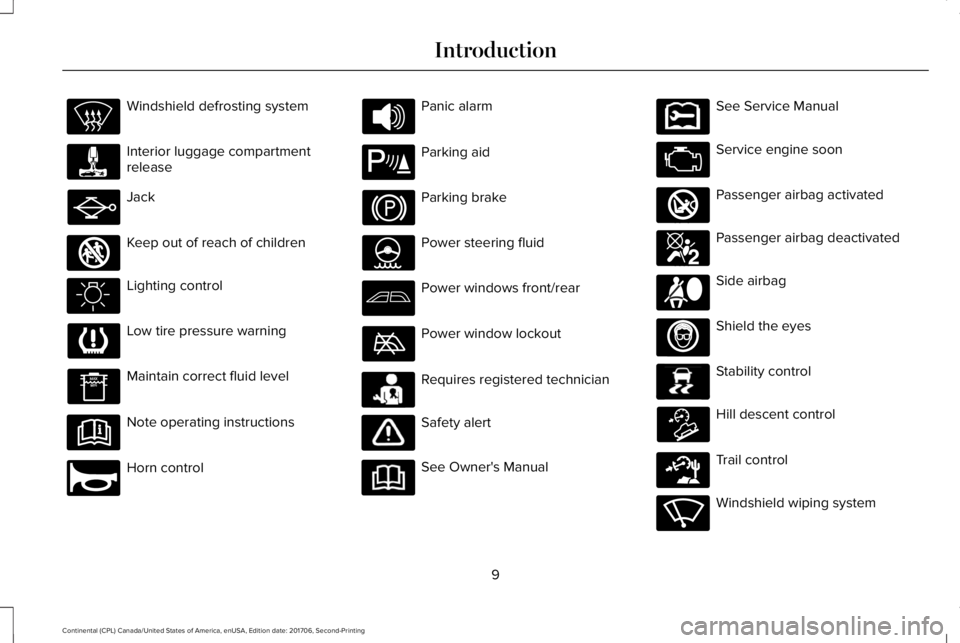
Windshield defrosting system
Interior luggage compartmentrelease
Jack
Keep out of reach of children
Lighting control
Low tire pressure warning
Maintain correct fluid level
Note operating instructions
Horn control
Panic alarm
Parking aid
Parking brake
Power steering fluid
Power windows front/rear
Power window lockout
Requires registered technician
Safety alert
See Owner's Manual
See Service Manual
Service engine soon
Passenger airbag activated
Passenger airbag deactivated
Side airbag
Shield the eyes
Stability control
Hill descent control
Trail control
Windshield wiping system
9
Continental (CPL) Canada/United States of America, enUSA, Edition date: 201706, Second-Printing
Introduction E161353 E270945 E139213 E231159 E231158 E270849 E270850 E167012 E138639 E163957 E271982 E270969
Page 60 of 615
GENERAL INFORMATION ON
RADIO FREQUENCIES
This device complies with Part 15 of the FCCRules and with Licence exempt RSSStandards of Industry Canada. Operation issubject to the following two conditions:
•This device may not cause harmfulinterference, and
•This device must accept any interferencereceived, including interference that maycause undesired operation.
WARNING: Changes or modificationsnot expressively approved by the partyresponsible for compliance could void theuser's authority to operate the equipment.The term "IC:" before the radio certificationnumber only signifies that Industry Canadatechnical specifications were met.
The typical operating range for yourtransmitter is approximately 33 ft (10 m).Vehicles with the remote start feature willhave a greater range. One of the followingcould cause a decrease in operating range:
•weather conditions
•nearby radio towers
•structures around the vehicle
•other vehicles parked next to yourvehicle
Other short-distance radio transmitters, suchas amateur radios, medical equipment,wireless headphones, remote controls andalarm systems may operate on the samefrequency as your remote control. If othertransmitters are operating on thosefrequencies, you may not be able to use yourremote control. Using your remote controlnear some types of electronic equipment,such as USB devices, computers or cellphones can interfere with remote operation.Operating your remote control near metal ormetallic-finished purses, bags or clothing caninterfere with remote operation. You can lockand unlock the doors with the key.
Note:Make sure to lock your vehicle beforeleaving it unattended.
Note:If you are in range, the remote controlwill operate if you press any buttonunintentionally.
Intelligent Access
The system uses a radio frequency signal tocommunicate with your vehicle and authorizeyour vehicle to unlock when one of thefollowing conditions are met:
•You touch the inside of any exterior doorhandle within 3 ft (1 m) proximity of anintelligent access key.
•You press the luggage compartmentbutton.
•You press a button on the transmitter.
If excessive radio frequency interference ispresent in the area or if the transmitterbattery is low, you may need to mechanicallyunlock your door. You can use themechanical key blade in your intelligentaccess key to open the driver door in thissituation. See Remote Control (page 58).
57
Continental (CPL) Canada/United States of America, enUSA, Edition date: 201706, Second-Printing
Keys and Remote Controls
Page 63 of 615
5. Reinstall the battery cover and the keyblade.
Car Finder
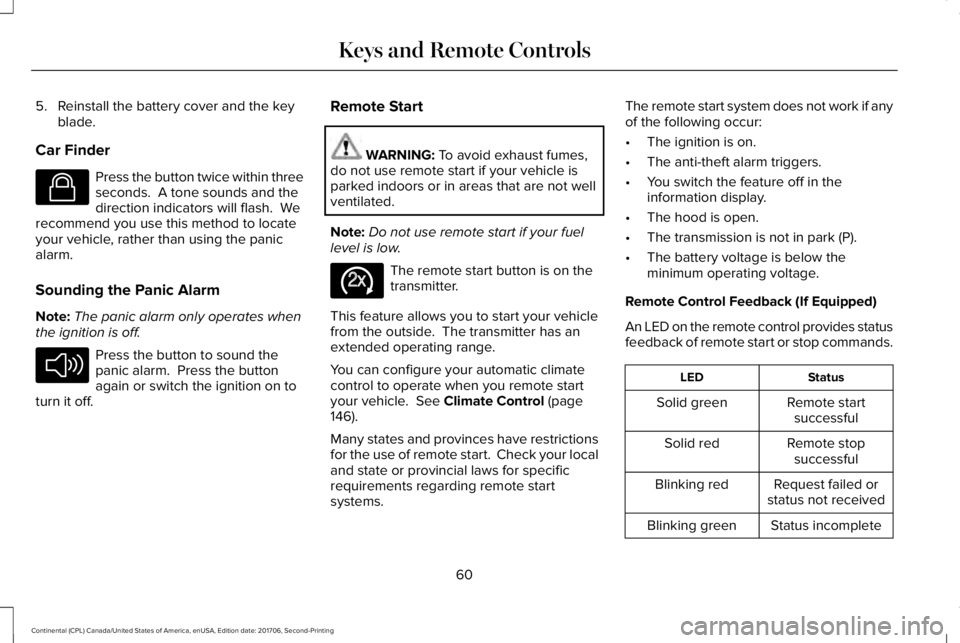
Press the button twice within threeseconds. A tone sounds and thedirection indicators will flash. Werecommend you use this method to locateyour vehicle, rather than using the panicalarm.
Sounding the Panic Alarm
Note:The panic alarm only operates whenthe ignition is off.
Press the button to sound thepanic alarm. Press the buttonagain or switch the ignition on toturn it off.
Remote Start
WARNING: To avoid exhaust fumes,do not use remote start if your vehicle isparked indoors or in areas that are not wellventilated.
Note:Do not use remote start if your fuellevel is low.
The remote start button is on thetransmitter.
This feature allows you to start your vehiclefrom the outside. The transmitter has anextended operating range.
You can configure your automatic climatecontrol to operate when you remote startyour vehicle. See Climate Control (page146).
Many states and provinces have restrictionsfor the use of remote start. Check your localand state or provincial laws for specificrequirements regarding remote startsystems.
The remote start system does not work if anyof the following occur:
•The ignition is on.
•The anti-theft alarm triggers.
•You switch the feature off in theinformation display.
•The hood is open.
•The transmission is not in park (P).
•The battery voltage is below theminimum operating voltage.
Remote Control Feedback (If Equipped)
An LED on the remote control provides statusfeedback of remote start or stop commands.
StatusLED
Remote startsuccessfulSolid green
Remote stopsuccessfulSolid red
Request failed orstatus not receivedBlinking red
Status incompleteBlinking green
60
Continental (CPL) Canada/United States of America, enUSA, Edition date: 201706, Second-Printing
Keys and Remote ControlsE138623 E138624 E138625
Page 81 of 615
1.Move your foot under and away from therear bumper detection area in asingle-kick motion. Do not move yourfoot sideways or the sensors may notdetect the motion.
2. The decklid opens or closes.
Note:Allow the power system to open thedecklid. Manually pushing or pulling thedecklid may activate the system’s obstacledetection feature and stop the poweroperation or reverse its direction.
Note: Splashing water may cause thehands-free decklid to open. Keep theintelligent access key away from the rearbumper detection area when washing yourvehicle.
SOFT CLOSING DOOR
Gently close the door until it fully latches.The system automatically closes the door,making sure it is fully secure.
Note:The system does not work if thevehicle battery charge is low.
Note:The system is limited to 25 cyclesbetween each ignition cycle. This is toprevent the vehicle battery from losingcharge.
Note:You can override soft close by fullyclosing the door manually.
KEYLESS ENTRY
SECURICODE™ Keyless Entry Keypad
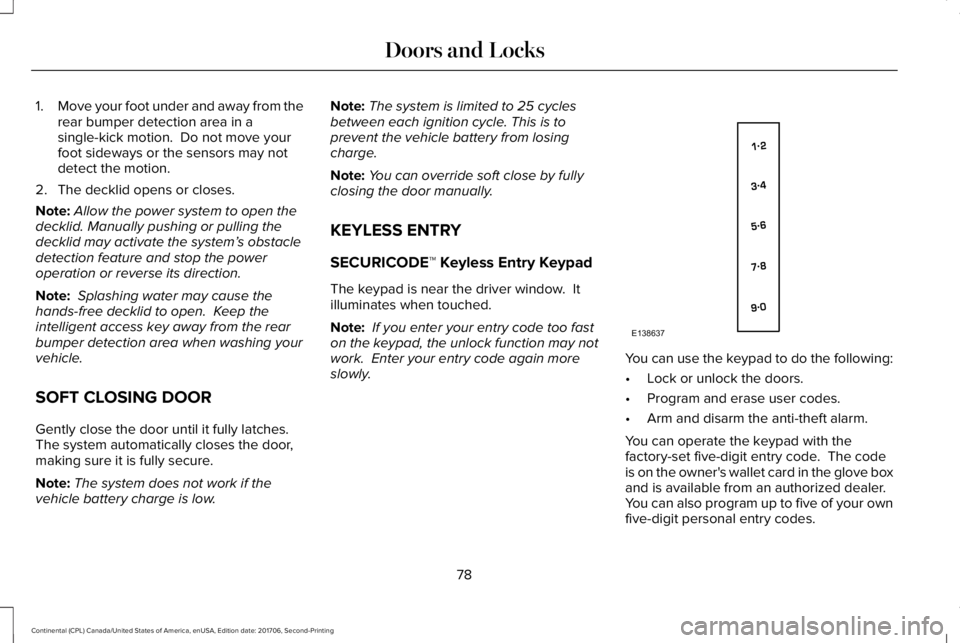
The keypad is near the driver window. Itilluminates when touched.
Note: If you enter your entry code too faston the keypad, the unlock function may notwork. Enter your entry code again moreslowly.You can use the keypad to do the following:
•Lock or unlock the doors.
•Program and erase user codes.
•Arm and disarm the anti-theft alarm.
You can operate the keypad with thefactory-set five-digit entry code. The codeis on the owner's wallet card in the glove boxand is available from an authorized dealer. You can also program up to five of your ownfive-digit personal entry codes.
78
Continental (CPL) Canada/United States of America, enUSA, Edition date: 201706, Second-Printing
Doors and LocksE138637
Page 87 of 615
ANTI-THEFT ALARM
The system will warn you of an unauthorizedentry to your vehicle. It will be triggered ifany door, the luggage compartment or thehood is opened without using the key,remote control or keyless entry keypad.
The direction indicators will flash and thehorn will sound if unauthorized entry isattempted while the alarm is armed.
Take all remote controls to an authorizeddealer if there is any potential alarm problemwith your vehicle.
Arming the Alarm
The alarm is ready to arm when there is nota key in your vehicle. Electronically lock yourvehicle to arm the alarm.
Disarming the Alarm
Disarm the alarm by any of the followingactions:
•Unlock the doors or luggagecompartment with the remote control orkeyless entry keypad.
•Switch your vehicle on or start yourvehicle.
•Use a key in the driver door to unlockyour vehicle, then switch your vehicle onwithin 12 seconds.
Note:Pressing the panic button on theremote control will stop the horn and signalindicators, but will not disarm the system.
84
Continental (CPL) Canada/United States of America, enUSA, Edition date: 201706, Second-Printing
Security
Page 121 of 615
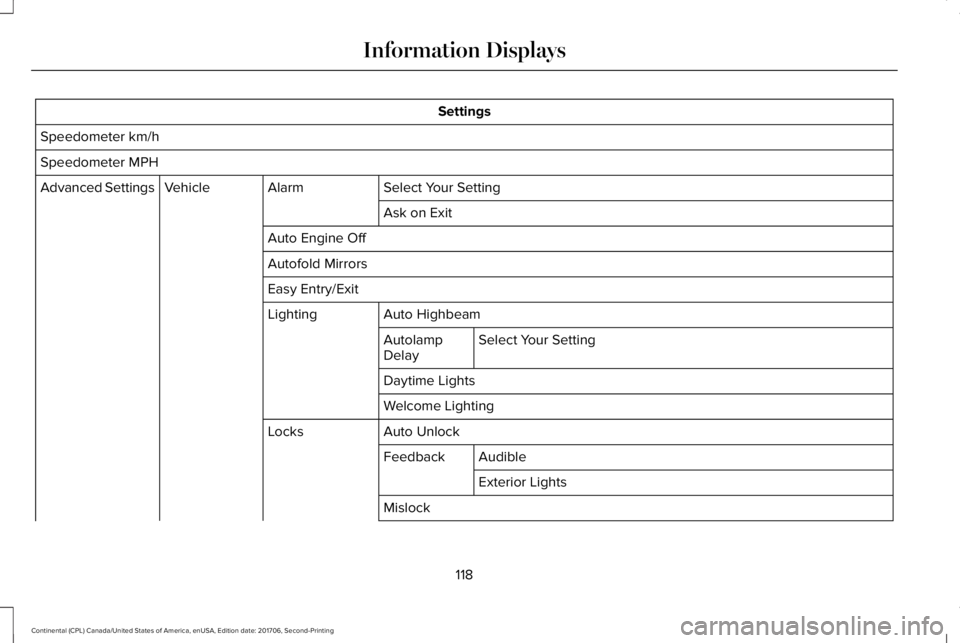
Settings
Speedometer km/h
Speedometer MPH
Select Your SettingAlarmVehicleAdvanced Settings
Ask on Exit
Auto Engine Off
Autofold Mirrors
Easy Entry/Exit
Auto HighbeamLighting
Select Your SettingAutolampDelay
Daytime Lights
Welcome Lighting
Auto UnlockLocks
AudibleFeedback
Exterior Lights
Mislock
118
Continental (CPL) Canada/United States of America, enUSA, Edition date: 201706, Second-Printing
Information Displays
Page 129 of 615
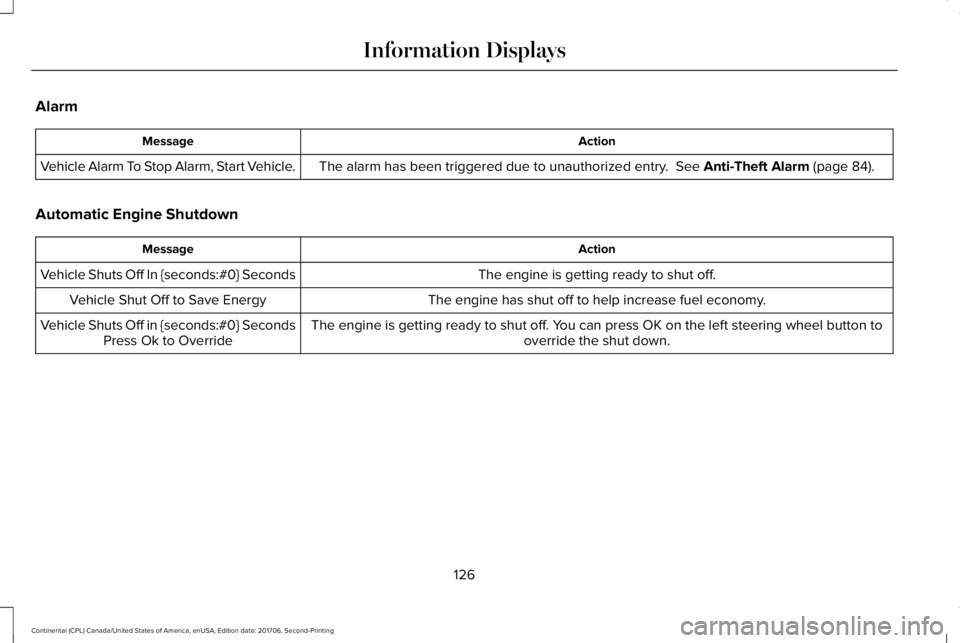
Alarm
ActionMessage
The alarm has been triggered due to unauthorized entry. See Anti-Theft Alarm (page 84).Vehicle Alarm To Stop Alarm, Start Vehicle.
Automatic Engine Shutdown
ActionMessage
The engine is getting ready to shut off.Vehicle Shuts Off In {seconds:#0} Seconds
The engine has shut off to help increase fuel economy.Vehicle Shut Off to Save Energy
The engine is getting ready to shut off. You can press OK on the left steering wheel button tooverride the shut down.Vehicle Shuts Off in {seconds:#0} SecondsPress Ok to Override
126
Continental (CPL) Canada/United States of America, enUSA, Edition date: 201706, Second-Printing
Information Displays
Page 245 of 615
Changing the Set Speed
•Press RES+ or SET- to change the setspeed in small increments.
•Press the accelerator or brake pedal untilyou reach the desired speed. Press RES+or SET-.
•Press and hold RES+ or SET- to changethe set speed in large increments.Release the control when you reach thedesired speed.
The system may apply the brakes to slowthe vehicle to the new set speed. The setspeed displays continuously in theinformation display when the system isactive.
Canceling the Set Speed
Press CAN or tap the brake pedal. The setspeed does not erase.
Resuming the Set Speed
Note:Only use resume if you are aware ofthe set speed and intend to return to it.
Press RES+. Your vehicle speed returns tothe previously set speed and gap setting. The set speed displays continuously in theinformation display when the system isactive.
Automatic Cancellation
Automatic cancellation can also occur if:
•The tires lose traction.
•You apply the parking brake.
Park Brake Application
Automatic parking brake application andcancellation occurs if:
•You unbuckle the seatbelt and open thedoor after you stop the vehicle.
•You hold the vehicle at a stopcontinuously for more than three minutes.
Hilly Condition Usage
Note:An audible alarm sounds and thesystem shuts down if it applies brakes for anextended period of time. This allows thebrakes to cool. The system functionsnormally again after the brakes cool.
Select a lower gear when the system isactive in situations such as prolongeddownhill driving on steep grades, forexample in mountainous areas. The systemneeds additional engine braking in thesesituations to reduce the load on the vehicle’sregular brake system to prevent it fromoverheating.
Switching Adaptive Cruise Control Off
Note:You erase the set speed and gapsetting when you switch the system off.
Press OFF when the system is in standbymode, or switch the ignition off.
Detection Issues
WARNING: On rare occasions,detection issues can occur due to the roadinfrastructures, for example bridges, tunnelsand safety barriers. In these cases, thesystem may brake late or unexpectedly. Atall times, you are responsible for controllingyour vehicle, supervising the system andintervening, if required.
242
Continental (CPL) Canada/United States of America, enUSA, Edition date: 201706, Second-Printing
Cruise Control
Page 522 of 615
For maximum vehicle performance, keep thefollowing information in mind when addingaccessories or equipment to your vehicle:
•When adding accessories, equipment,passengers and luggage to your vehicle,do not exceed the total weight capacityof the vehicle or of the front or rear axle(GVWR or GAWR as indicated on theSafety Compliance Certification label). Consult an authorized dealer for specificweight information.
•The Federal CommunicationsCommission (FCC) and Canadian RadioTelecommunications Commission (CRTC)regulate the use of mobilecommunications systems that areequipped with radio transmitters, forexample two-way radios, telephones andtheft alarms. Any such equipmentinstalled in your vehicle should complywith the Federal CommunicationsCommission (FCC) and Canadian RadioTelecommunications Commission (CRTC)regulations and should be installed onlyby an authorized dealer.
•Mobile communications systems mayharm the operation of your vehicle,particularly if their manufacturer did notdesign them specifically for automotiveuse.
•If you or an authorized Lincoln dealer addany non-Lincoln electrical or electronicaccessories or components to yourvehicle, you may adversely affect batteryperformance and durability. In addition,you may also adversely affect theperformance of other electrical systemsin the vehicle.
519
Continental (CPL) Canada/United States of America, enUSA, Edition date: 201706, Second-Printing
Accessories