display LINCOLN CONTINENTAL 2018 Owners Manual
[x] Cancel search | Manufacturer: LINCOLN, Model Year: 2018, Model line: CONTINENTAL, Model: LINCOLN CONTINENTAL 2018Pages: 615, PDF Size: 5.31 MB
Page 5 of 615
Opening the Doors........................................73
Emergency Door Release............................74
Power Decklid.................................................74
Soft Closing Door..........................................78
Keyless Entry...................................................78
Interior Luggage Compartment Release........................................................................80
Security
Passive Anti-Theft System...........................82
Anti-Theft Alarm.............................................84
Steering Wheel
Adjusting the Steering Wheel....................85
Audio Control.................................................86
Voice Control..................................................86
Cruise Control................................................86
Information Display Control........................87
Heated Steering Wheel...............................88
Wipers and Washers
Windshield Wipers........................................89
Autowipers......................................................89
Windshield Washers.....................................90
Lighting
General Information......................................92
Lighting Control.............................................92
Autolamps.......................................................93
Instrument Lighting Dimmer.......................94
Headlamp Exit Delay....................................94
Daytime Running Lamps..............................94
Automatic High Beam Control...................95
Adaptive Headlamps....................................96
Direction Indicators.......................................97
Welcome Lighting..........................................97
Interior Lamps.................................................98
Ambient Lighting..........................................100
Windows and Mirrors
Power Windows.............................................101
Global Opening and Closing....................102
Exterior Mirrors.............................................102
Interior Mirror................................................105
Toll Reader.....................................................105
Sun Visors......................................................106
Sun Shades...................................................106
Moonroof........................................................107
Instrument Cluster
Gauges...........................................................109
Warning Lamps and Indicators..................110
Audible Warnings and Indicators..............114
Information Displays
General Information......................................115
Information Messages................................123
Head Up Display..........................................142
Climate Control
Automatic Climate Control........................146
Hints on Controlling the Interior Climate.......................................................................149
Rear Passenger Climate Controls............150
Heated Windows and Mirrors....................151
Cabin Air Filter..............................................152
Remote Start..................................................152
2
Continental (CPL) Canada/United States of America, enUSA, Edition date: 201706, Second-Printing
Table of Contents
Page 21 of 615
Direction indicators. See DirectionIndicators (page 97).A
Instrument cluster. See InstrumentCluster (page 109).B
Wiper lever. See WindshieldWipers (page 89).C
Start button. See Keyless Starting(page 178).D
Hazard warning flasher switch.See Hazard Flashers (page 280).E
Information and entertainmentdisplay.F
Parking aid switch. See ParkingAids (page 219).G
Climate controls. See ClimateControl (page 146).H
Heated rear window switch. SeeHeated Windows and Mirrors(page 151).
I
Audio unit.J
Voice control. See Voice Control(page 86).K
Information display controls. SeeInformation Display Control (page87).
L
Horn.M
Cruise control switches. SeeUsing Adaptive Cruise Control(page 238).
N
Steering wheel adjustment. SeeAdjusting the Steering Wheel(page 85).
O
Audio controls. See Audio Control(page 86).P
Lighting control. See LightingControl (page 92).Q
Parking brake. See ElectricParking Brake (page 210).R
18
Continental (CPL) Canada/United States of America, enUSA, Edition date: 201706, Second-Printing
At a Glance
Page 62 of 615
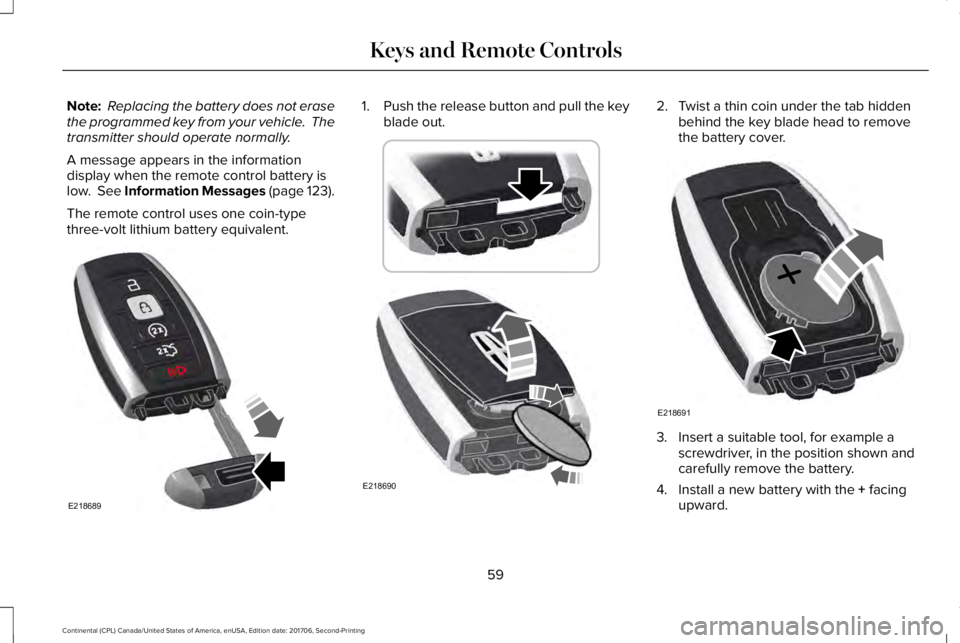
Note: Replacing the battery does not erasethe programmed key from your vehicle. Thetransmitter should operate normally.
A message appears in the informationdisplay when the remote control battery islow. See Information Messages (page 123).
The remote control uses one coin-typethree-volt lithium battery equivalent.
1.Push the release button and pull the keyblade out.2. Twist a thin coin under the tab hiddenbehind the key blade head to removethe battery cover.
3. Insert a suitable tool, for example ascrewdriver, in the position shown andcarefully remove the battery.
4. Install a new battery with the + facingupward.
59
Continental (CPL) Canada/United States of America, enUSA, Edition date: 201706, Second-Printing
Keys and Remote ControlsE218689 E218690 E218691
Page 63 of 615
5. Reinstall the battery cover and the keyblade.
Car Finder
Press the button twice within threeseconds. A tone sounds and thedirection indicators will flash. Werecommend you use this method to locateyour vehicle, rather than using the panicalarm.
Sounding the Panic Alarm
Note:The panic alarm only operates whenthe ignition is off.
Press the button to sound thepanic alarm. Press the buttonagain or switch the ignition on toturn it off.
Remote Start
WARNING: To avoid exhaust fumes,do not use remote start if your vehicle isparked indoors or in areas that are not wellventilated.
Note:Do not use remote start if your fuellevel is low.
The remote start button is on thetransmitter.
This feature allows you to start your vehiclefrom the outside. The transmitter has anextended operating range.
You can configure your automatic climatecontrol to operate when you remote startyour vehicle. See Climate Control (page146).
Many states and provinces have restrictionsfor the use of remote start. Check your localand state or provincial laws for specificrequirements regarding remote startsystems.
The remote start system does not work if anyof the following occur:
•The ignition is on.
•The anti-theft alarm triggers.
•You switch the feature off in theinformation display.
•The hood is open.
•The transmission is not in park (P).
•The battery voltage is below theminimum operating voltage.
Remote Control Feedback (If Equipped)
An LED on the remote control provides statusfeedback of remote start or stop commands.
StatusLED
Remote startsuccessfulSolid green
Remote stopsuccessfulSolid red
Request failed orstatus not receivedBlinking red
Status incompleteBlinking green
60
Continental (CPL) Canada/United States of America, enUSA, Edition date: 201706, Second-Printing
Keys and Remote ControlsE138623 E138624 E138625
Page 64 of 615
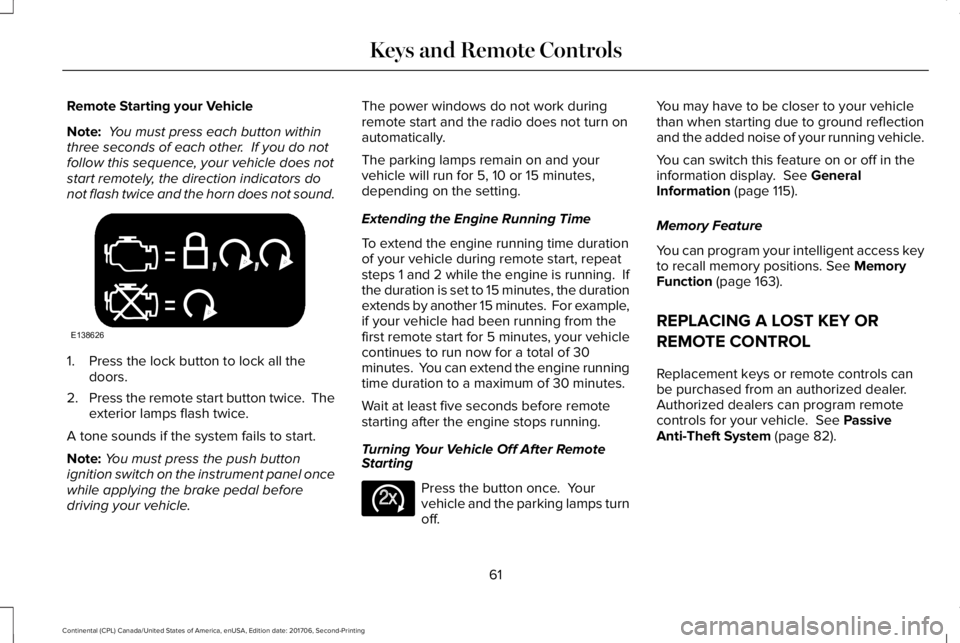
Remote Starting your Vehicle
Note: You must press each button withinthree seconds of each other. If you do notfollow this sequence, your vehicle does notstart remotely, the direction indicators donot flash twice and the horn does not sound.
1. Press the lock button to lock all thedoors.
2.Press the remote start button twice. Theexterior lamps flash twice.
A tone sounds if the system fails to start.
Note:You must press the push buttonignition switch on the instrument panel oncewhile applying the brake pedal beforedriving your vehicle.
The power windows do not work duringremote start and the radio does not turn onautomatically.
The parking lamps remain on and yourvehicle will run for 5, 10 or 15 minutes,depending on the setting.
Extending the Engine Running Time
To extend the engine running time durationof your vehicle during remote start, repeatsteps 1 and 2 while the engine is running. Ifthe duration is set to 15 minutes, the durationextends by another 15 minutes. For example,if your vehicle had been running from thefirst remote start for 5 minutes, your vehiclecontinues to run now for a total of 30minutes. You can extend the engine runningtime duration to a maximum of 30 minutes.
Wait at least five seconds before remotestarting after the engine stops running.
Turning Your Vehicle Off After RemoteStarting
Press the button once. Yourvehicle and the parking lamps turnoff.
You may have to be closer to your vehiclethan when starting due to ground reflectionand the added noise of your running vehicle.
You can switch this feature on or off in theinformation display. See GeneralInformation (page 115).
Memory Feature
You can program your intelligent access keyto recall memory positions. See MemoryFunction (page 163).
REPLACING A LOST KEY OR
REMOTE CONTROL
Replacement keys or remote controls canbe purchased from an authorized dealer.Authorized dealers can program remotecontrols for your vehicle. See PassiveAnti-Theft System (page 82).
61
Continental (CPL) Canada/United States of America, enUSA, Edition date: 201706, Second-Printing
Keys and Remote ControlsE138626 E138625
Page 65 of 615
PRINCIPLE OF OPERATION
MyKey allows you to program keys withrestricted driving modes to promote gooddriving habits. You can program therestrictions to all keys except one. Any keysthat you did not program are administratorkeys or admin keys.
You can use admin keys to:
•Create a MyKey with certain vehiclerestrictions.
•Program certain MyKey settings.
•Clear all MyKey restrictions.
After you program a MyKey, you can viewthe following information through theinformation display:
•The total number of admin keys andMyKeys for your vehicle.
•The total distance a MyKey drivertraveled with your vehicle.
Note:Every MyKey receives the samerestrictions and settings. You cannotprogram them individually.
Note:For vehicles equipped with apush-button start switch: When both a MyKeyand an admin key are present when youstart your vehicle, the system recognizes theadmin key only.
Standard Settings
Not every vehicle includes the features listedbelow. If your vehicle has this equipment,then you cannot change the followingsettings when using a MyKey:
•Seatbelt reminder or Belt-Minder™. MyKeymutes the audio system until drivers, andin some instances, passengers, fastentheir seatbelts. Note: If your vehicleincludes an AM/FM radio or a very basicaudio system, then the radio may notmute.
•Earlier low-fuel warning. The low-fuelwarning activates earlier for MyKeydrivers, giving them more time to refuel.
•Certain driver alerts, stability systems orparking aids turn on automatically whenyou use the MyKey system. For example,Blind Spot Information System (BLIS),cross traffic alert, lane departure warningor forward collision warning. Note: MyKeydrivers may be able to turn the lanedeparture warning feature off, but thisfeature turns back on automatically withevery new key cycle.
•Restricted touchscreen operation in somemarkets. For example, MyKey mayprevent manual navigation destinationinput while the vehicle is in any gearother than park (P) or when the vehiclereaches a certain rate of speed.
•Satellite radio adult content restrictions,if this feature is available in your market.
Optional Settings
You can configure certain vehicle featuresettings when you first create a MyKey. Youcan also change the settings afterward withan admin key.
62
Continental (CPL) Canada/United States of America, enUSA, Edition date: 201706, Second-Printing
MyKey™
Page 66 of 615
Note:Not every feature applies to everyvehicle in every market. When they areavailable for your vehicle, then they appearin your information display, providing choicesto switch them on or off, or to select a morespecific setting.
•Various vehicle speed limits so theMyKey driver cannot exceed certainspeeds. The information display showswarnings followed by an audible tonewhen the MyKey driver reaches the setspeed. You cannot override the setspeed by fully depressing the acceleratorpedal.
WARNING: Do not set MyKeymaximum speed limit to a limit that willprevent the driver from maintaining a safespeed considering posted speed limits andprevailing road conditions. The driver isalways responsible to drive in accordancewith local laws and prevailing conditions.Failure to do so could result in accident orinjury.
•Various vehicle speed reminders soMyKey drivers know when their vehiclespeed approaches the limits. Warningsappear in your information display and atone sounds when the MyKey driversexceed the set vehicle speed.
•The audio system's maximum volumelimits to 45% so MyKey drivers canconcentrate on the road. A messageappears in the information display whenMyKey drivers attempt to exceed thelimited volume. MyKey also disables theautomatic volume control. Note: If yourvehicle includes an AM/FM radio or avery basic audio system, then the radiomay not limit.
•Always on setting. This setting forcescertain features to remain on and activefor MyKey drivers. For example, E911 oremergency assistance and the do notdisturb features stay on even if a MyKeydriver uses the feature's control to switchit off. When you select, you will not beable to turn off Advance Trac or tractioncontrol (if your vehicle has this feature).
CREATING A MYKEY
Use the information display to create aMyKey:
1. Insert the key you want to program intothe ignition. See Starting a GasolineEngine (page 179). If your vehicle isequipped with a push-button start, placethe remote control into the backup slot.See Passive Anti-Theft System (page82).
2. Switch the ignition on.
3.Access the main menu in the informationdisplay and then scroll through themenus to change the settings of yourMyKey. From the MyKey menu select theoption Create MyKey. See InformationDisplays (page 115).
4.When prompted, hold the OK button untilyou see a message informing you to labelthis key as a MyKey. The programmedrestrictions apply when you key off, openand close the driver door and restart yourvehicle with the programmed key ortransmitter.
63
Continental (CPL) Canada/United States of America, enUSA, Edition date: 201706, Second-Printing
MyKey™
Page 67 of 615

MyKey is successfully created. Make sureyou label it so you can distinguish it from theadmin keys.
You can also program configurable settingsfor the key(s). See Programming/ChangingConfigurable Settings.
Programming/Changing ConfigurableSettings
Use the information display to access yourconfigurable MyKey settings.
1. Switch the ignition on using the key orthe transmitter you want to program.
2.Access the main menu in the informationdisplay and then scroll through themenus to change the settings of yourMyKey. See Information Displays (page115).
3. Follow the instructions in the display.
Note:You can clear or change your MyKeysettings at any time during the same keycycle as you created the MyKey. Once youhave switched the vehicle off, however, youwill need an admin key to change or clearyour MyKey settings.
CLEARING ALL MYKEYS
When you clear your MyKeys, you removeall restrictions and return all MyKeys to theiroriginal admin key status at once. To clearall MyKeys of all MyKey settings, use theinformation display.
1. Switch the ignition on using an adminkey.
2.Access the main menu in the informationdisplay and then scroll through themenus to begin clearing your MyKeyprogramming. See Information Displays(page 115).
3. Follow the instructions in the display.
4. A confirmation message appears in thedisplay after you finish clearing yourMyKeys.
Note:When you clear your MyKeys, youremove all restrictions and return all MyKeysto their original admin key status. You cannotremove the MyKey restrictions individually.
CHECKING MYKEY SYSTEM
STATUS
You can find information about yourprogrammed MyKeys by using theinformation display. See InformationDisplays (page 115).
MyKey Distance
Tracks the distance when drivers use aMyKey. The only way to delete theaccumulated distance is by using an adminkey to clear all MyKeys. If the distance doesnot accumulate as expected, then theintended user is not using the MyKey, or anadmin key user recently cleared and thenrecreated a MyKey.
Number of MyKeys
Indicates the number of MyKeysprogrammed to your vehicle. Use this featureto detect how many MyKeys you have foryour vehicle and determine when all MyKeyshave been deleted.
64
Continental (CPL) Canada/United States of America, enUSA, Edition date: 201706, Second-Printing
MyKey™
Page 70 of 615
LOCKING AND UNLOCKING
Your vehicle has an intelligent electronicallycontrolled door system that is in constantcommunication with overall vehicle systems.
When you lock your vehicle using the lockswitch on each door interior trim panel, orby using the keyless entry keypad or the locksensor on each door exterior trim panel, theexterior door handle switches do not releasethe doors. This helps to secure your vehicleand prevent unauthorized entry. Also, whenyour vehicle reaches a speed greater than12 mph (20 km/h) the exterior door handleswitches do not release the doors.
If the airbags deploy or the fuel pump shutoffswitch activates, all interior and exteriorunlock switches do not unlock your door forsix seconds. This helps to secure the doorsin the event of a crash. After six seconds, allswitches reset and you can open the doorsusing the interior and exterior unlatchswitches.
Door Lock Indicator
An LED on each front door window trimilluminates when you lock the doors. Itremains on for 2 to 5 seconds after youswitch the ignition off.
Door Lock Switch Inhibitor
When you electronically lock your vehicle,the door lock switches and the interiorluggage compartment release switch do notoperate after 20 seconds. You must unlockyour vehicle with the remote control orkeyless entry keypad, or switch the ignitionon, to restore function to these switches. You can switch this feature on or off in theinformation display. See GeneralInformation (page 115).
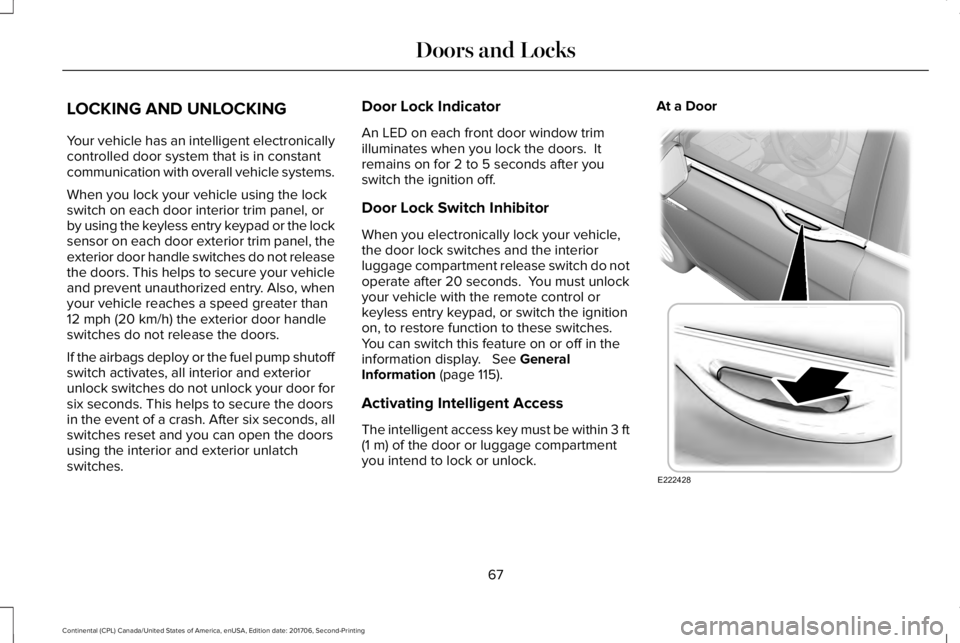
Activating Intelligent Access
The intelligent access key must be within 3 ft(1 m) of the door or luggage compartmentyou intend to lock or unlock.
At a Door
67
Continental (CPL) Canada/United States of America, enUSA, Edition date: 201706, Second-Printing
Doors and LocksE222428
Page 71 of 615
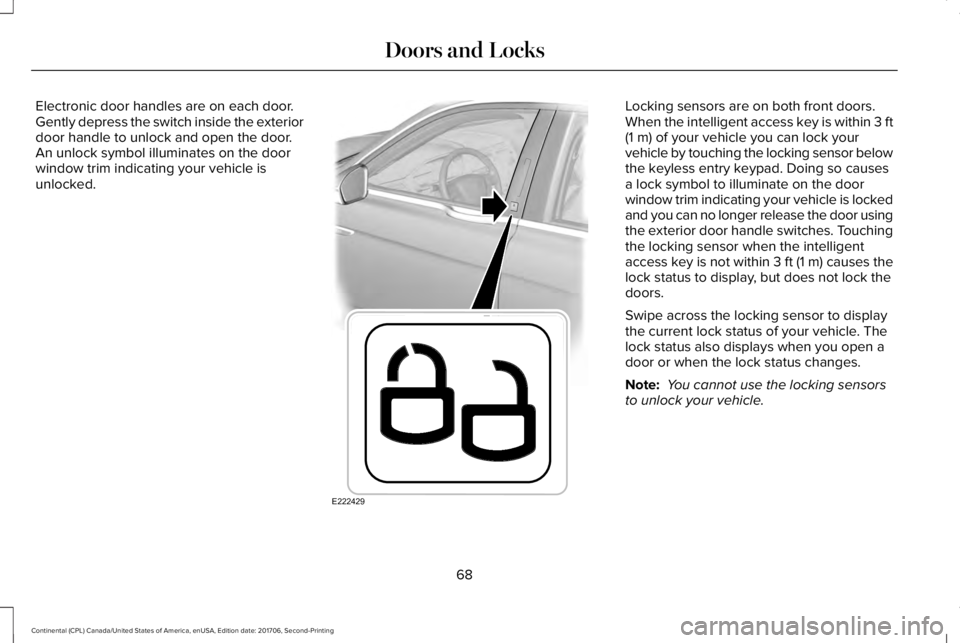
Electronic door handles are on each door.Gently depress the switch inside the exteriordoor handle to unlock and open the door.An unlock symbol illuminates on the doorwindow trim indicating your vehicle isunlocked.
Locking sensors are on both front doors.When the intelligent access key is within 3 ft(1 m) of your vehicle you can lock yourvehicle by touching the locking sensor belowthe keyless entry keypad. Doing so causesa lock symbol to illuminate on the doorwindow trim indicating your vehicle is lockedand you can no longer release the door usingthe exterior door handle switches. Touchingthe locking sensor when the intelligentaccess key is not within 3 ft (1 m) causes thelock status to display, but does not lock thedoors.
Swipe across the locking sensor to displaythe current lock status of your vehicle. Thelock status also displays when you open adoor or when the lock status changes.
Note: You cannot use the locking sensorsto unlock your vehicle.
68
Continental (CPL) Canada/United States of America, enUSA, Edition date: 201706, Second-Printing
Doors and LocksE222429