service reset LINCOLN CONTINENTAL 2018 Owners Manual
[x] Cancel search | Manufacturer: LINCOLN, Model Year: 2018, Model line: CONTINENTAL, Model: LINCOLN CONTINENTAL 2018Pages: 615, PDF Size: 5.31 MB
Page 7 of 615
360 Degree Camera..................................234
Cruise Control
Principle of Operation................................237
Using Cruise Control..................................237
Using Adaptive Cruise Control................238
Driving Aids
Driver Alert....................................................246
Lane Keeping System................................247
Blind Spot Information System................253
Cross Traffic Alert........................................255
Steering.........................................................259
Pre-Collision Assist.....................................260
Drive Control................................................264
Load Carrying
Load Limit......................................................266
Towing
Towing a Trailer.............................................271
Recommended Towing Weights.............272
Essential Towing Checks...........................273
Towing the Vehicle on Four Wheels......275
Driving Hints
Breaking-In....................................................276
Economical Driving.....................................276
Driving Through Water...............................276
Floor Mats......................................................277
Roadside Emergencies
Roadside Assistance..................................279
Hazard Flashers..........................................280
Fuel Shutoff..................................................280
Jump Starting the Vehicle..........................281
Post-Crash Alert System...........................284
Transporting the Vehicle...........................285
Customer Assistance
Getting the Services You Need...............286
In California (U.S. Only)..............................287
The Better Business Bureau (BBB) AutoLine Program (U.S. Only).......................288
Utilizing the Mediation/Arbitration Program(Canada Only)..........................................289
Getting Assistance Outside the U.S. andCanada......................................................290
Ordering Additional Owner's Literature......................................................................292
Reporting Safety Defects (U.S. Only)......292
Reporting Safety Defects (Canada Only)......................................................................293
Fuses
Fuse Specification Chart...........................294
Changing a Fuse.........................................309
Maintenance
General Information.....................................312
Opening and Closing the Hood...............312
Under Hood Overview - 3.0L....................313
Under Hood Overview - 2.7L EcoBoost™/3.7L..............................................................315
Engine Oil Dipstick - 2.7L EcoBoost™/3.0LEcoBoost™..................................................317
Engine Oil Dipstick - 3.7L............................317
Engine Oil Check..........................................317
Oil Change Indicator Reset.......................318
Engine Coolant Check................................319
4
Continental (CPL) Canada/United States of America, enUSA, Edition date: 201706, Second-Printing
Table of Contents
Page 133 of 615
ActionMessage
Indicates that the rear seat interior door release switches and power windows are switched off,preventing rear seat occupants from opening the doors or windows.Child Lock ON
Indicates that the rear seat interior door release switches and power windows are switched on.Child Lock OFF
Displays when the door lock turns off.Door Unlocked
Displays when the door lock is turned on and you attempt to open the door.Doors Locked Unlock Before Opening
Indicates a driver door fault that requires manually opening the door by the override lever.Contact an authorized dealer.Driver Door Fault Use Inside OverrideLever In Map Pocket
Indicates a fault with the electronic door system. Contact an authorized dealer.Door Fault Service Required
Displays the factory keypad code after the keypad has been reset. See Keyless Entry (page78).Factory Keypad Code {X X X X X}
Driver Alert
ActionMessage
Stop and rest as soon as it is safe to do so.Driver Alert Warning Rest Now
Take a rest soon.Driver Alert Warning Rest Suggested
130
Continental (CPL) Canada/United States of America, enUSA, Edition date: 201706, Second-Printing
Information Displays
Page 414 of 615
For more information on extendedsubscription terms (a service fee is required),the online media player and a complete listof SiriusXM satellite radio channels, andother features, please visit www.siriusxm.com
in the United States, www.siriusxm.ca inCanada, or call SiriusXM at 1-888-539-7474.Satellite Radio Electronic SerialNumber (ESN)
You need your ESN to activate, modify ortrack your satellite radio account. When insatellite radio mode, tune to channel 0.
Troubleshooting
ActionConditionMessage
No action required. This message shoulddisappear shortly.Radio requires more than two seconds toproduce audio for the selected channel.Acquiring…
If this message does not clear shortly, or withan ignition key cycle, your receiver may havea fault. See an authorized dealer for service.
There is an internal module or system failurepresent.Satellite antenna fault
SIRIUS system failure
Tune to another channel or choose anotherpreset.The channel is no longer available.Invalid Channel
Contact SiriusXM at 1-888-539-7474 tosubscribe to the channel, or tune to anotherchannel.
Your subscription does not include thischannel.Unsubscribed Channel
The signal is blocked. When you move into anopen area, the signal should return.The signal is lost from the SiriusXM satelliteor SiriusXM tower to your vehicle antenna.No Signal
No action required. The process may take upto three minutes.Update of channel programming in progress.Updating…
411
Continental (CPL) Canada/United States of America, enUSA, Edition date: 201706, Second-Printing
Audio System
Page 424 of 615
PHONE REJECT: Press to end a call or rejectan incoming call.
Note:On some models, SEEK NEXT may becombined with PHONE REJECT and SEEKPREVIOUS may be combined with PHONEACCEPT.
M: Touch the control repeatedly to switchbetween media sources (modes).
See Steering Wheel (page 85).
Using Your Bezel Controls
Depending on your vehicle and optionpackage, you may also have these controlson your instrument panel:
•Power: Switch the audio system on andoff.
•VOL: Control the volume of playingaudio.
•Seek and Tune: Use as you normallywould in audio modes.
•Eject: Eject a CD from the audio system.
•SOURCE or MEDIA: Press repeatedly toadvance through available media modes.
•SOUND: Press to access the Soundmenu where you can adjust sound andother audio settings.
•1-6: Press and hold to store or press toselect an AM, FM or SIRIUS memorypreset. See Audio System (page 403).
•DISP: Switch the display on or off. Youcan also touch the screen to switch thedisplay back on.
•Temperature, fan and climate controlbuttons: Control the temperature, fanspeed or settings of the climate controlsystem. See Climate Control (page 146).
911 Assist
WARNING: Unless the 911 Assistsetting is set on before a crash, the systemwill not dial for help which could delayresponse time, potentially increasing the riskof serious injury or death after a crash.
WARNING: Do not wait for 911 Assistto make an emergency call if you can do ityourself. Dial emergency servicesimmediately to avoid delayed response timewhich could increase the risk of serious injuryor death after a crash. If you do not hear 911Assist within five seconds of the crash, thesystem or phone may be damaged ornon-functional.
WARNING: Always place your phonein a secure location in your vehicle so it doesnot become a projectile or get damaged ina crash. Failure to do so may cause seriousinjury to someone or damage the phonewhich could prevent 911 Assist from workingproperly.
Note:The SYNC 911 Assist feature must beset on before the incident.
Note:The SYNC 911 Assist feature onlyoperates in the U.S., Canada or in a territoryin which 911 is the emergency number.
421
Continental (CPL) Canada/United States of America, enUSA, Edition date: 201706, Second-Printing
SYNC™ 3
Page 446 of 615
AM/FM Radio
Tuning a Station
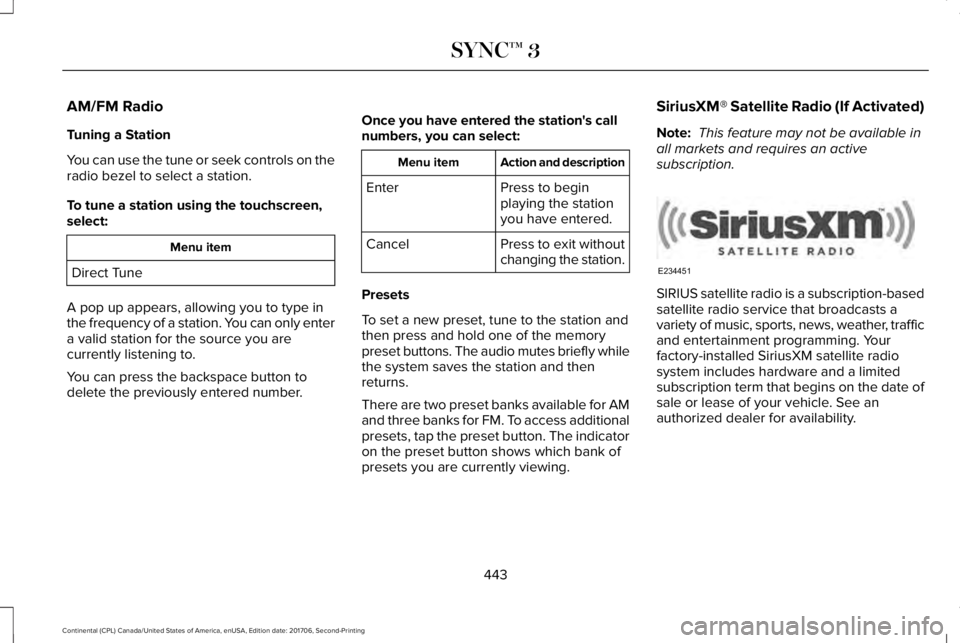
You can use the tune or seek controls on theradio bezel to select a station.
To tune a station using the touchscreen,select:
Menu item
Direct Tune
A pop up appears, allowing you to type inthe frequency of a station. You can only entera valid station for the source you arecurrently listening to.
You can press the backspace button todelete the previously entered number.
Once you have entered the station's callnumbers, you can select:
Action and descriptionMenu item
Press to beginplaying the stationyou have entered.
Enter
Press to exit withoutchanging the station.Cancel
Presets
To set a new preset, tune to the station andthen press and hold one of the memorypreset buttons. The audio mutes briefly whilethe system saves the station and thenreturns.
There are two preset banks available for AMand three banks for FM. To access additionalpresets, tap the preset button. The indicatoron the preset button shows which bank ofpresets you are currently viewing.
SiriusXM® Satellite Radio (If Activated)
Note: This feature may not be available inall markets and requires an activesubscription.
SIRIUS satellite radio is a subscription-basedsatellite radio service that broadcasts avariety of music, sports, news, weather, trafficand entertainment programming. Yourfactory-installed SiriusXM satellite radiosystem includes hardware and a limitedsubscription term that begins on the date ofsale or lease of your vehicle. See anauthorized dealer for availability.
443
Continental (CPL) Canada/United States of America, enUSA, Edition date: 201706, Second-Printing
SYNC™ 3E234451
Page 449 of 615
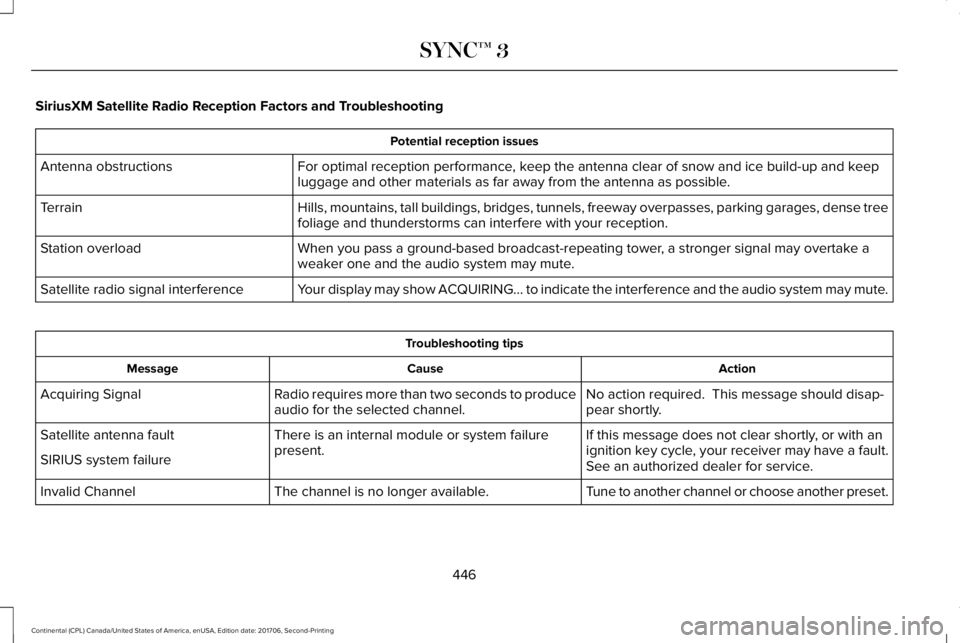
SiriusXM Satellite Radio Reception Factors and Troubleshooting
Potential reception issues
For optimal reception performance, keep the antenna clear of snow and ice build-up and keepluggage and other materials as far away from the antenna as possible.Antenna obstructions
Hills, mountains, tall buildings, bridges, tunnels, freeway overpasses, parking garages, dense treefoliage and thunderstorms can interfere with your reception.Terrain
When you pass a ground-based broadcast-repeating tower, a stronger signal may overtake aweaker one and the audio system may mute.Station overload
Your display may show ACQUIRING... to indicate the interference and the audio system may mute.Satellite radio signal interference
Troubleshooting tips
ActionCauseMessage
No action required. This message should disap-pear shortly.Radio requires more than two seconds to produceaudio for the selected channel.Acquiring Signal
If this message does not clear shortly, or with anignition key cycle, your receiver may have a fault.See an authorized dealer for service.
There is an internal module or system failurepresent.Satellite antenna fault
SIRIUS system failure
Tune to another channel or choose another preset.The channel is no longer available.Invalid Channel
446
Continental (CPL) Canada/United States of America, enUSA, Edition date: 201706, Second-Printing
SYNC™ 3
Page 453 of 615
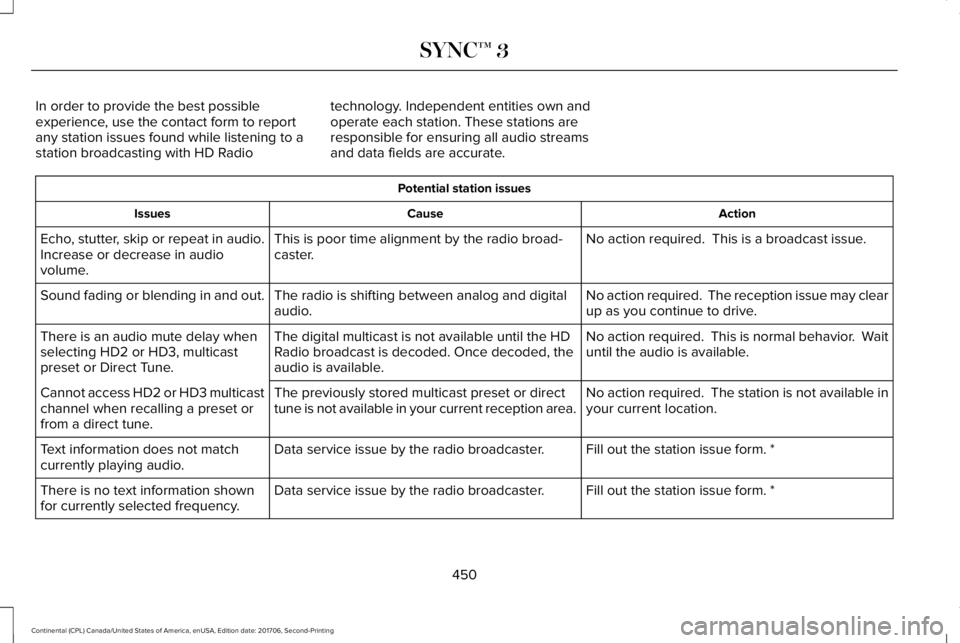
In order to provide the best possibleexperience, use the contact form to reportany station issues found while listening to astation broadcasting with HD Radio
technology. Independent entities own andoperate each station. These stations areresponsible for ensuring all audio streamsand data fields are accurate.
Potential station issues
ActionCauseIssues
No action required. This is a broadcast issue.This is poor time alignment by the radio broad-caster.Echo, stutter, skip or repeat in audio.Increase or decrease in audiovolume.
No action required. The reception issue may clearup as you continue to drive.The radio is shifting between analog and digitalaudio.Sound fading or blending in and out.
No action required. This is normal behavior. Waituntil the audio is available.The digital multicast is not available until the HDRadio broadcast is decoded. Once decoded, theaudio is available.
There is an audio mute delay whenselecting HD2 or HD3, multicastpreset or Direct Tune.
No action required. The station is not available inyour current location.The previously stored multicast preset or directtune is not available in your current reception area.Cannot access HD2 or HD3 multicastchannel when recalling a preset orfrom a direct tune.
Fill out the station issue form. *Data service issue by the radio broadcaster.Text information does not matchcurrently playing audio.
Fill out the station issue form. *Data service issue by the radio broadcaster.There is no text information shownfor currently selected frequency.
450
Continental (CPL) Canada/United States of America, enUSA, Edition date: 201706, Second-Printing
SYNC™ 3
Page 507 of 615
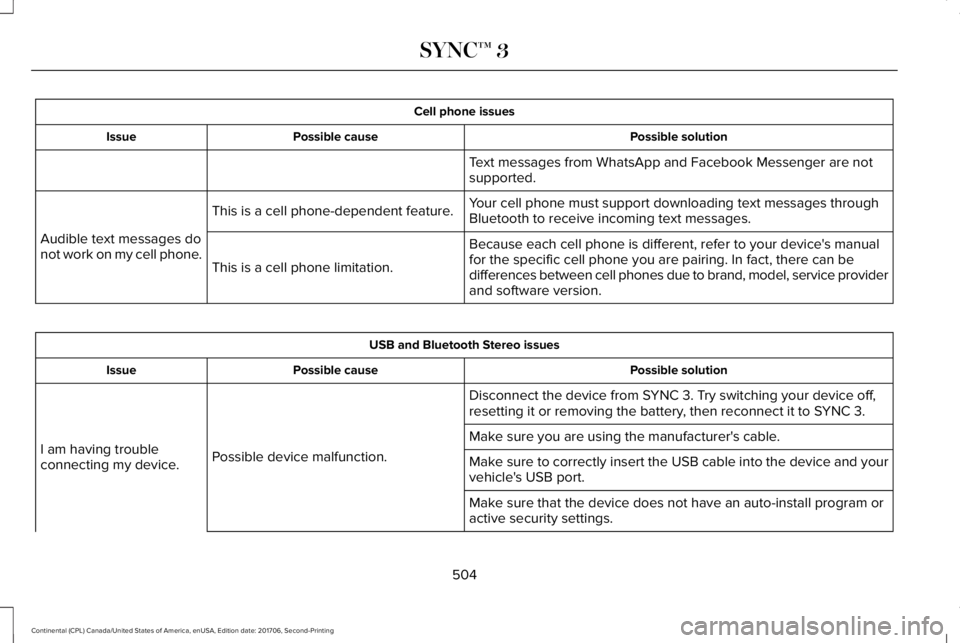
Cell phone issues
Possible solutionPossible causeIssue
Text messages from WhatsApp and Facebook Messenger are notsupported.
Your cell phone must support downloading text messages throughBluetooth to receive incoming text messages.This is a cell phone-dependent feature.
Audible text messages donot work on my cell phone.Because each cell phone is different, refer to your device's manualfor the specific cell phone you are pairing. In fact, there can bedifferences between cell phones due to brand, model, service providerand software version.
This is a cell phone limitation.
USB and Bluetooth Stereo issues
Possible solutionPossible causeIssue
Disconnect the device from SYNC 3. Try switching your device off,resetting it or removing the battery, then reconnect it to SYNC 3.
Possible device malfunction.I am having troubleconnecting my device.
Make sure you are using the manufacturer's cable.
Make sure to correctly insert the USB cable into the device and yourvehicle's USB port.
Make sure that the device does not have an auto-install program oractive security settings.
504
Continental (CPL) Canada/United States of America, enUSA, Edition date: 201706, Second-Printing
SYNC™ 3
Page 527 of 615
Your vehicle is equipped with the IntelligentOil-Life Monitor system, which displays amessage in the information display at theproper oil change interval. This interval maybe up to one year or 10,000 mi (16,000 km).
When the oil change message appears inthe information display, it is time for an oilchange. Make sure you perform the oilchange within two weeks or 500 mi (800 km)of the message appearing. Make sure youreset the Intelligent Oil-Life Monitor aftereach oil change. See Oil Change IndicatorReset (page 318).
If your information display resets prematurelyor becomes inoperative, you should performthe oil change interval at six months or5,000 mi (8,000 km) from your last oilchange. Never exceed one year or 10,000 mi(16,000 km) between oil change intervals.
Your vehicle is very sophisticated and builtwith multiple, complex, performance systems.Every manufacturer develops these systemsusing different specifications andperformance features. That is why it isimportant to rely upon your dealership toproperly diagnose and repair your vehicle.
Ford Motor Company has recommendedmaintenance intervals for various parts andcomponent systems based upon engineeringtesting. Ford Motor Company relies upon thistesting to determine the most appropriatemileage for replacement of oils and fluids toprotect your vehicle at the lowest overall costto you and recommends againstmaintenance schedules that deviate fromthe scheduled maintenance information.
We strongly recommend the use of onlygenuine Ford, Motorcraft or Ford-authorizedre-manufactured replacement partsengineered for your vehicle.
Additives and Chemicals
This owner's manual and the Ford WorkshopManual list the recommended additives andchemicals for your vehicle. We do notrecommend using chemicals or additives notapproved by us as part of your vehicle’snormal maintenance. Please consult yourwarranty information.
Oils, Fluids and Flushing
In many cases, fluid discoloration is a normaloperating characteristic and, by itself, doesnot necessarily indicate a concern or that thefluid needs to be changed. However, aqualified expert, such as the factory-trainedtechnicians at your dealership, shouldinspect discolored fluids that also show signsof overheating or foreign materialcontamination immediately.
Make sure to change your vehicle’s oils andfluids at the specified intervals or inconjunction with a repair. Flushing is a viableway to change fluid for many vehiclesub-systems during scheduled maintenance.It is critical that systems are flushed only withnew fluid that is the same as that requiredto fill and operate the system or using aFord-approved flushing chemical.
Owner Checks and Services
Make sure you perform the following basicmaintenance checks and inspections everymonth or at six-month intervals.
524
Continental (CPL) Canada/United States of America, enUSA, Edition date: 201706, Second-Printing
Scheduled Maintenance
Page 532 of 615
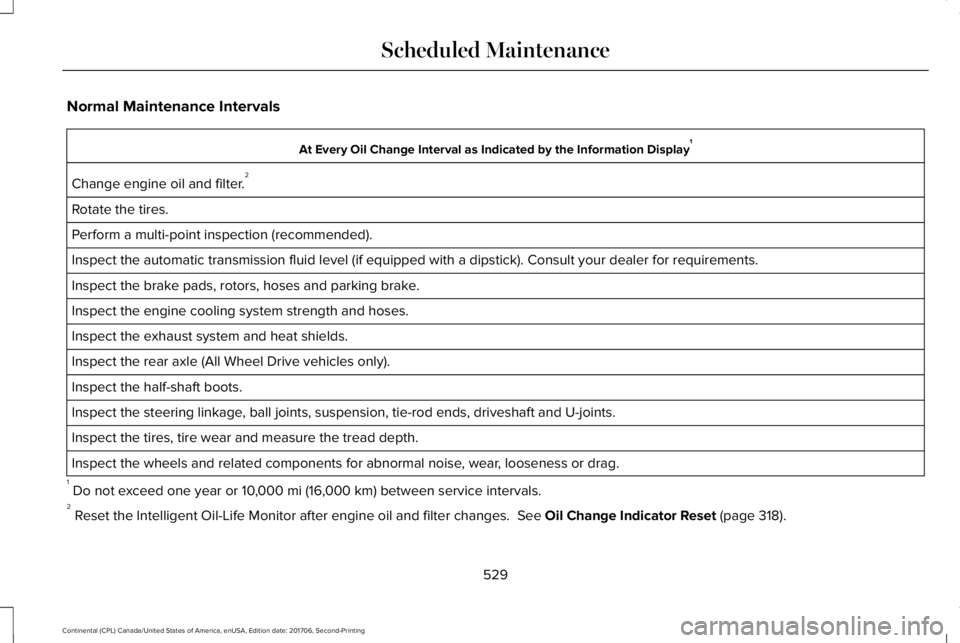
Normal Maintenance Intervals
At Every Oil Change Interval as Indicated by the Information Display1
Change engine oil and filter.2
Rotate the tires.
Perform a multi-point inspection (recommended).
Inspect the automatic transmission fluid level (if equipped with a dipstick). Consult your dealer for requirements.
Inspect the brake pads, rotors, hoses and parking brake.
Inspect the engine cooling system strength and hoses.
Inspect the exhaust system and heat shields.
Inspect the rear axle (All Wheel Drive vehicles only).
Inspect the half-shaft boots.
Inspect the steering linkage, ball joints, suspension, tie-rod ends, driveshaft and U-joints.
Inspect the tires, tire wear and measure the tread depth.
Inspect the wheels and related components for abnormal noise, wear, looseness or drag.
1 Do not exceed one year or 10,000 mi (16,000 km) between service intervals.2 Reset the Intelligent Oil-Life Monitor after engine oil and filter changes. See Oil Change Indicator Reset (page 318).
529
Continental (CPL) Canada/United States of America, enUSA, Edition date: 201706, Second-Printing
Scheduled Maintenance