wipers LINCOLN CONTINENTAL 2018 Owners Manual
[x] Cancel search | Manufacturer: LINCOLN, Model Year: 2018, Model line: CONTINENTAL, Model: LINCOLN CONTINENTAL 2018Pages: 615, PDF Size: 5.31 MB
Page 5 of 615
Opening the Doors........................................73
Emergency Door Release............................74
Power Decklid.................................................74
Soft Closing Door..........................................78
Keyless Entry...................................................78
Interior Luggage Compartment Release........................................................................80
Security
Passive Anti-Theft System...........................82
Anti-Theft Alarm.............................................84
Steering Wheel
Adjusting the Steering Wheel....................85
Audio Control.................................................86
Voice Control..................................................86
Cruise Control................................................86
Information Display Control........................87
Heated Steering Wheel...............................88
Wipers and Washers
Windshield Wipers........................................89
Autowipers......................................................89
Windshield Washers.....................................90
Lighting
General Information......................................92
Lighting Control.............................................92
Autolamps.......................................................93
Instrument Lighting Dimmer.......................94
Headlamp Exit Delay....................................94
Daytime Running Lamps..............................94
Automatic High Beam Control...................95
Adaptive Headlamps....................................96
Direction Indicators.......................................97
Welcome Lighting..........................................97
Interior Lamps.................................................98
Ambient Lighting..........................................100
Windows and Mirrors
Power Windows.............................................101
Global Opening and Closing....................102
Exterior Mirrors.............................................102
Interior Mirror................................................105
Toll Reader.....................................................105
Sun Visors......................................................106
Sun Shades...................................................106
Moonroof........................................................107
Instrument Cluster
Gauges...........................................................109
Warning Lamps and Indicators..................110
Audible Warnings and Indicators..............114
Information Displays
General Information......................................115
Information Messages................................123
Head Up Display..........................................142
Climate Control
Automatic Climate Control........................146
Hints on Controlling the Interior Climate.......................................................................149
Rear Passenger Climate Controls............150
Heated Windows and Mirrors....................151
Cabin Air Filter..............................................152
Remote Start..................................................152
2
Continental (CPL) Canada/United States of America, enUSA, Edition date: 201706, Second-Printing
Table of Contents
Page 21 of 615
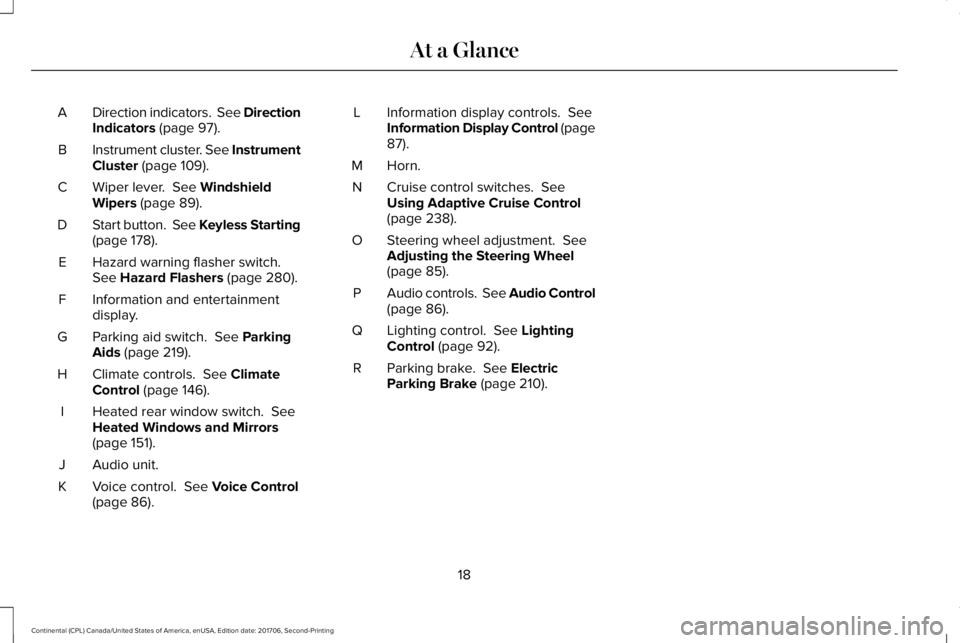
Direction indicators. See DirectionIndicators (page 97).A
Instrument cluster. See InstrumentCluster (page 109).B
Wiper lever. See WindshieldWipers (page 89).C
Start button. See Keyless Starting(page 178).D
Hazard warning flasher switch.See Hazard Flashers (page 280).E
Information and entertainmentdisplay.F
Parking aid switch. See ParkingAids (page 219).G
Climate controls. See ClimateControl (page 146).H
Heated rear window switch. SeeHeated Windows and Mirrors(page 151).
I
Audio unit.J
Voice control. See Voice Control(page 86).K
Information display controls. SeeInformation Display Control (page87).
L
Horn.M
Cruise control switches. SeeUsing Adaptive Cruise Control(page 238).
N
Steering wheel adjustment. SeeAdjusting the Steering Wheel(page 85).
O
Audio controls. See Audio Control(page 86).P
Lighting control. See LightingControl (page 92).Q
Parking brake. See ElectricParking Brake (page 210).R
18
Continental (CPL) Canada/United States of America, enUSA, Edition date: 201706, Second-Printing
At a Glance
Page 92 of 615
WINDSHIELD WIPERS
Note:Fully defrost the windshield before youswitch the windshield wipers on.
Note:Make sure you switch the windshieldwipers off before entering a car wash.
Note: If streaks or smears appear on thewindshield, clean the windshield and thewiper blades. If that does not resolve theissue, install new wiper blades.
Note: Do not operate the wipers on a drywindshield. This may scratch the glass,damage the wiper blades or cause the wipermotor to burn out.
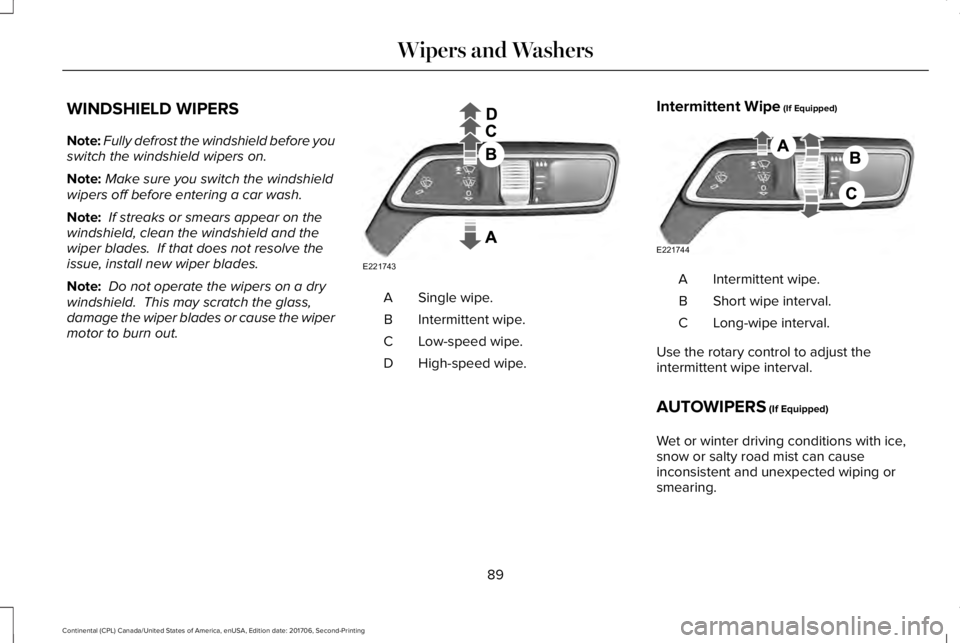
Single wipe.A
Intermittent wipe.B
Low-speed wipe.C
High-speed wipe.D
Intermittent Wipe (If Equipped)
Intermittent wipe.A
Short wipe interval.B
Long-wipe interval.C
Use the rotary control to adjust theintermittent wipe interval.
AUTOWIPERS (If Equipped)
Wet or winter driving conditions with ice,snow or salty road mist can causeinconsistent and unexpected wiping orsmearing.
89
Continental (CPL) Canada/United States of America, enUSA, Edition date: 201706, Second-Printing
Wipers and WashersE221743 E221744
Page 93 of 615
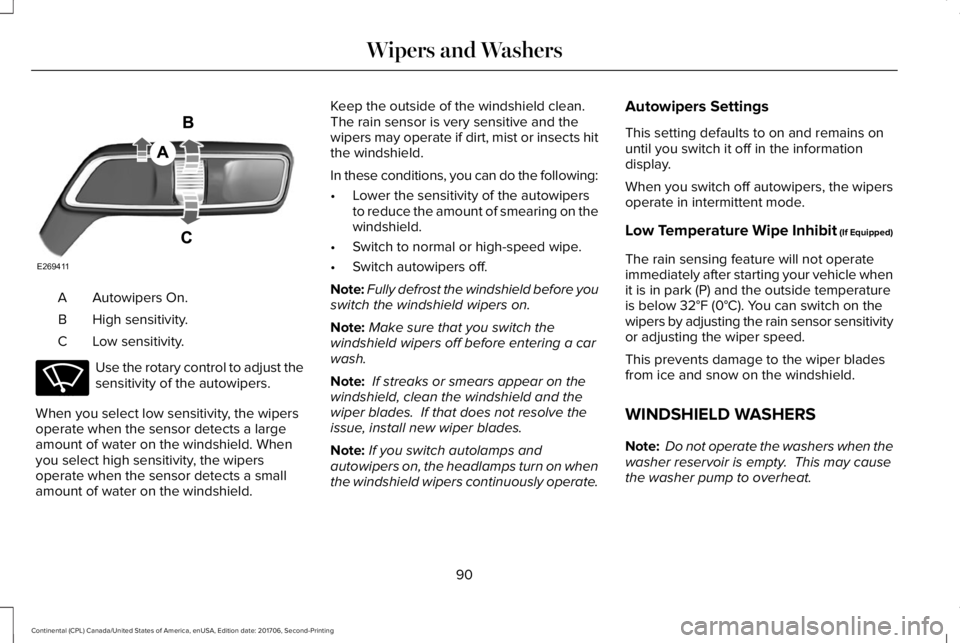
Autowipers On.A
High sensitivity.B
Low sensitivity.C
Use the rotary control to adjust thesensitivity of the autowipers.
When you select low sensitivity, the wipersoperate when the sensor detects a largeamount of water on the windshield. Whenyou select high sensitivity, the wipersoperate when the sensor detects a smallamount of water on the windshield.
Keep the outside of the windshield clean. The rain sensor is very sensitive and thewipers may operate if dirt, mist or insects hitthe windshield.
In these conditions, you can do the following:
•Lower the sensitivity of the autowipersto reduce the amount of smearing on thewindshield.
•Switch to normal or high-speed wipe.
•Switch autowipers off.
Note:Fully defrost the windshield before youswitch the windshield wipers on.
Note:Make sure that you switch thewindshield wipers off before entering a carwash.
Note: If streaks or smears appear on thewindshield, clean the windshield and thewiper blades. If that does not resolve theissue, install new wiper blades.
Note:If you switch autolamps andautowipers on, the headlamps turn on whenthe windshield wipers continuously operate.
Autowipers Settings
This setting defaults to on and remains onuntil you switch it off in the informationdisplay.
When you switch off autowipers, the wipersoperate in intermittent mode.
Low Temperature Wipe Inhibit (If Equipped)
The rain sensing feature will not operateimmediately after starting your vehicle whenit is in park (P) and the outside temperatureis below 32°F (0°C). You can switch on thewipers by adjusting the rain sensor sensitivityor adjusting the wiper speed.
This prevents damage to the wiper bladesfrom ice and snow on the windshield.
WINDSHIELD WASHERS
Note: Do not operate the washers when thewasher reservoir is empty. This may causethe washer pump to overheat.
90
Continental (CPL) Canada/United States of America, enUSA, Edition date: 201706, Second-Printing
Wipers and WashersE269411 E270969
Page 94 of 615
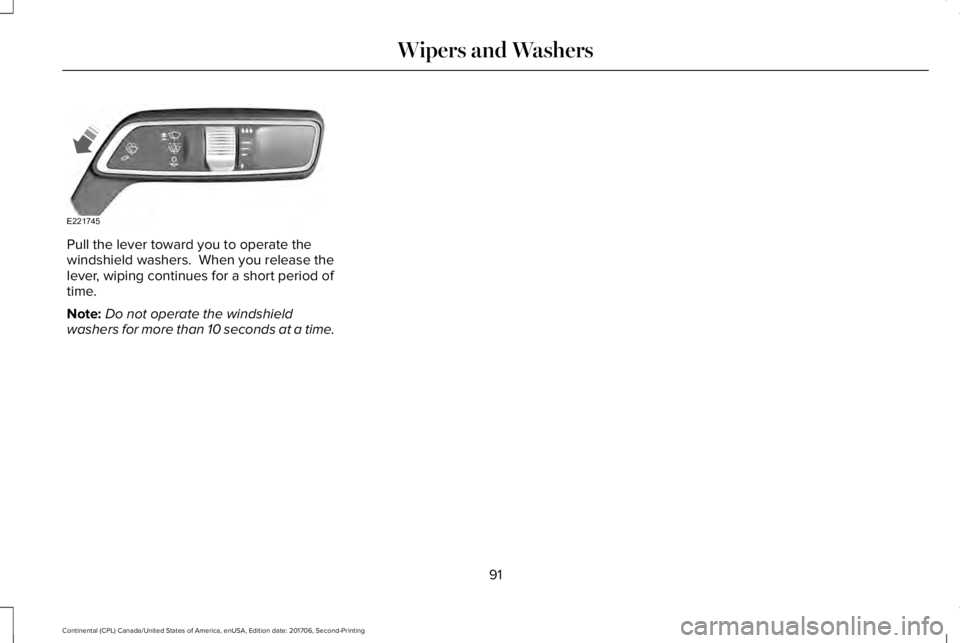
Pull the lever toward you to operate thewindshield washers. When you release thelever, wiping continues for a short period oftime.
Note:Do not operate the windshieldwashers for more than 10 seconds at a time.
91
Continental (CPL) Canada/United States of America, enUSA, Edition date: 201706, Second-Printing
Wipers and WashersE221745
Page 96 of 615
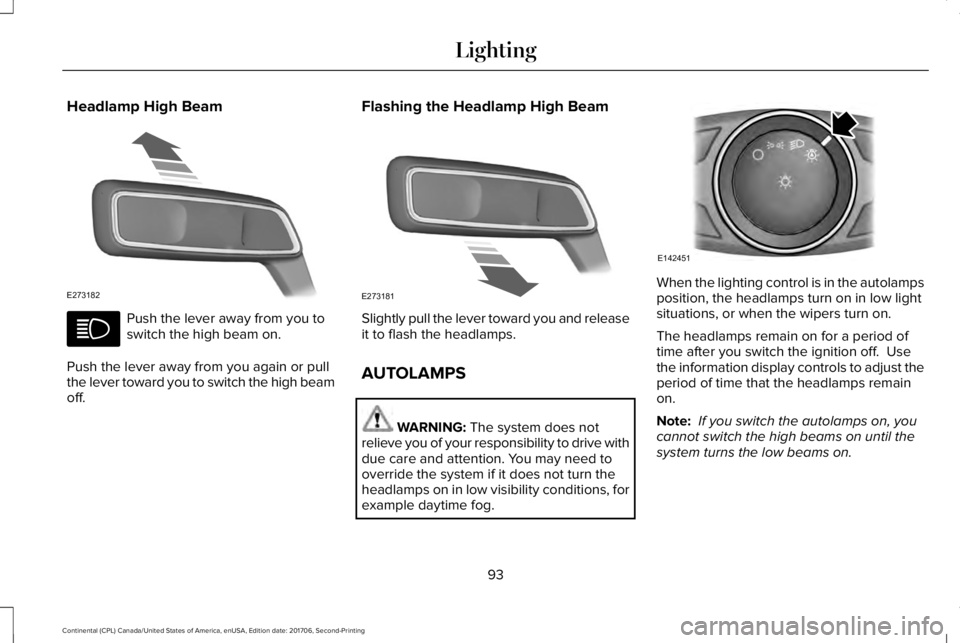
Headlamp High Beam
Push the lever away from you toswitch the high beam on.
Push the lever away from you again or pullthe lever toward you to switch the high beamoff.
Flashing the Headlamp High Beam
Slightly pull the lever toward you and releaseit to flash the headlamps.
AUTOLAMPS
WARNING: The system does notrelieve you of your responsibility to drive withdue care and attention. You may need tooverride the system if it does not turn theheadlamps on in low visibility conditions, forexample daytime fog.
When the lighting control is in the autolampsposition, the headlamps turn on in low lightsituations, or when the wipers turn on.
The headlamps remain on for a period oftime after you switch the ignition off. Usethe information display controls to adjust theperiod of time that the headlamps remainon.
Note: If you switch the autolamps on, youcannot switch the high beams on until thesystem turns the low beams on.
93
Continental (CPL) Canada/United States of America, enUSA, Edition date: 201706, Second-Printing
LightingE273182 E273181 E142451
Page 97 of 615
Windshield Wiper Activated Headlamps
When you switch the autolamps on, theheadlamps turn on within 10 seconds ofswitching the wipers on. They turn offapproximately 60 seconds after you switchthe windshield wipers off.
The headlamps do not turn on with thewipers:
•During a single wipe.
•When using the windshield washers.
•If the wipers are in intermittent mode.
Note:If you switch the autolamps and theautowipers on, the headlamps turn on whenthe windshield wipers continuously operate.
INSTRUMENT LIGHTING DIMMER
Note:If you disconnect and connect thebattery, or fully discharge and charge thebattery, the illuminated components switchto the maximum setting.
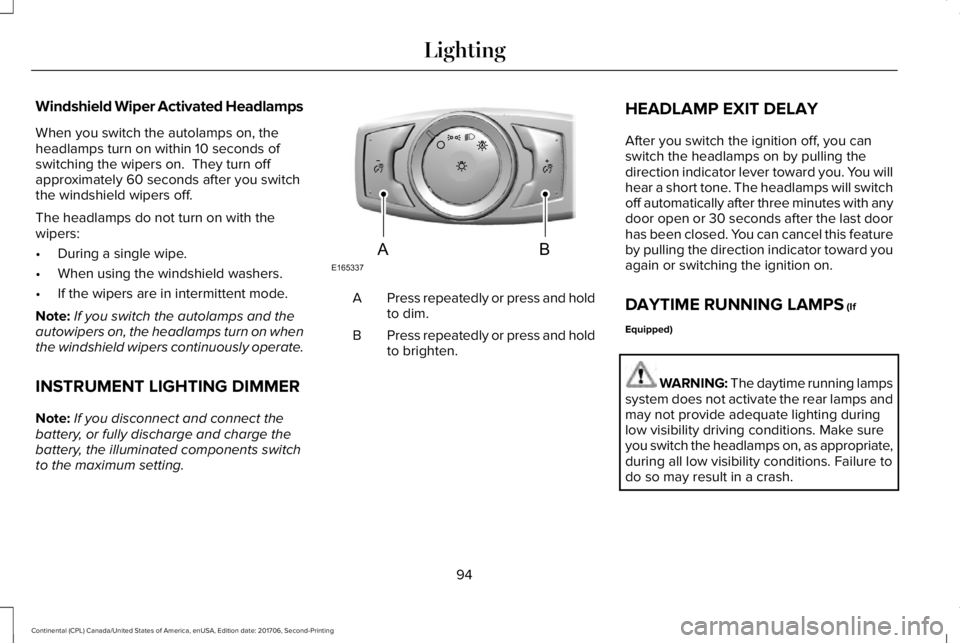
Press repeatedly or press and holdto dim.A
Press repeatedly or press and holdto brighten.B
HEADLAMP EXIT DELAY
After you switch the ignition off, you canswitch the headlamps on by pulling thedirection indicator lever toward you. You willhear a short tone. The headlamps will switchoff automatically after three minutes with anydoor open or 30 seconds after the last doorhas been closed. You can cancel this featureby pulling the direction indicator toward youagain or switching the ignition on.
DAYTIME RUNNING LAMPS (If
Equipped)
WARNING: The daytime running lampssystem does not activate the rear lamps andmay not provide adequate lighting duringlow visibility driving conditions. Make sureyou switch the headlamps on, as appropriate,during all low visibility conditions. Failure todo so may result in a crash.
94
Continental (CPL) Canada/United States of America, enUSA, Edition date: 201706, Second-Printing
LightingE165337AB
Page 122 of 615
Settings
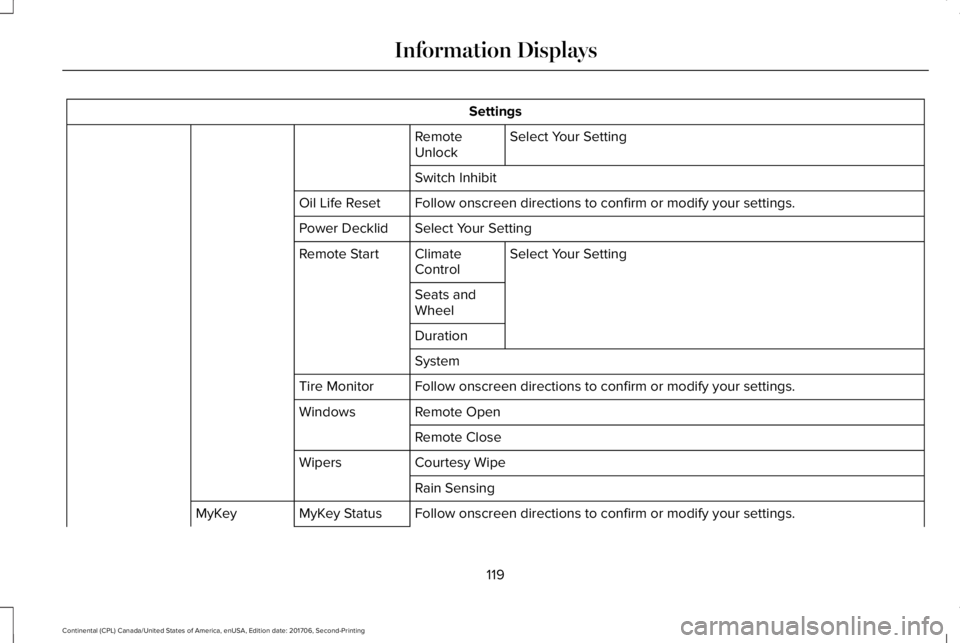
Select Your SettingRemoteUnlock
Switch Inhibit
Follow onscreen directions to confirm or modify your settings.Oil Life Reset
Select Your SettingPower Decklid
Select Your SettingClimateControlRemote Start
Seats andWheel
Duration
System
Follow onscreen directions to confirm or modify your settings.Tire Monitor
Remote OpenWindows
Remote Close
Courtesy WipeWipers
Rain Sensing
Follow onscreen directions to confirm or modify your settings.MyKey StatusMyKey
119
Continental (CPL) Canada/United States of America, enUSA, Edition date: 201706, Second-Printing
Information Displays
Page 154 of 615
Rear fan speed control: Adjuststhe volume of air circulated to therear passenger compartment.
A
Rear heated seats: Press to switchthe rear heated seats on and off.B
Rear AUTO: Press to switch onautomatic operation. Adjust toselect the desired temperature.Fan speed and air distributionadjust to heat or cool the vehicleto maintain the temperature youdesire.
C
Rear air distribution control: Pressto switch the direction of air flow.D
Rear passenger temperaturecontrol: Adjusts the temperaturesetting for the rear passengercompartment.
E
Rear ventilated seats: Press toswitch the rear ventilated seats onand off. See Rear PassengerClimate Controls (page 150).
F
Rear passenger power: Press toswitch the rear system on and off.G
Note: The rear climate systemturns off whenever you switch onmax defrost, and turns back onwhen you switch max defrost off.You can switch on the rear systemwith max defrost on.
Rear control lock: Whenilluminated, you can only operatethe rear passenger settingsthrough the front controls.
H
Note: The indicator brieflyilluminates if you try to use the rearclimate system when the controlsare locked.
HEATED WINDOWS AND MIRRORS
Note:Make sure the engine is runningbefore operating the heated windows.
Note:Depending on your remote startsettings, the heated windows, mirrors andwipers may remain on after remote startingthe vehicle.
Heated Rear Window
Press the button to clear theheated rear window of thin ice andfog. The heated rear window turnsoff after a short period of time. Press thebutton again to switch it off. It illuminateswhen you switch the system on.
Note: Do not use razor blades or othersharp objects to clean or remove decals fromthe inside of the heated rear window. Thevehicle warranty does not cover damagecaused to the heated rear window grid lines.
Heated Exterior Mirrors (If Equipped)
When you switch the heated rear windowon, the heated exterior mirrors turn on.
Note:Do not remove ice from the mirrorswith a scraper or adjust the mirror glasswhen it is frozen in place.
Note:Do not clean the mirror housing orglass with harsh abrasives, fuel or otherpetroleum-based cleaning products.
151
Continental (CPL) Canada/United States of America, enUSA, Edition date: 201706, Second-Printing
Climate ControlE72507
Page 340 of 615
•Do not allow wax to come in contact withany non-body (low-gloss black) coloredtrim. The wax will discolor or stain theparts over time.
•Roof racks.
•Bumpers.
•Grained door handles.
•Side moldings.
•Mirror housings.
•Windshield cowl area.
•Do not apply wax to glass areas.
•After waxing, your car's paint should feelsmooth, and be free of streaks andsmudges.
CLEANING THE ENGINE
Engines are more efficient when they areclean because grease and dirt buildup keepthe engine warmer than normal.
When washing:
•Take care when using a power washerto clean the engine. The high-pressurefluid could penetrate the sealed partsand cause damage.
•Do not spray a hot engine with cold waterto avoid cracking the engine block orother engine components.
•Spray Motorcraft Engine Shampoo andDegreaser on all parts that requirecleaning and pressure rinse clean. InCanada, use Motorcraft Engine Shampoo.
•Never wash or rinse the engine while itis hot or running; water in the runningengine may cause internal damage.
•Never wash or rinse any ignition coil,spark plug wire or spark plug well, or thearea in and around these locations.
•Cover the battery, power distribution box,and air filter assembly to prevent waterdamage when cleaning the engine.
CLEANING THE WINDOWS AND
WIPER BLADES
Car wash chemicals and environmentalfallout can result in windshield and wiperblade contamination. Dirty windshield andwipers will result in poor windshield wiperoperation. Keep the windshield and wiperblades clean to maintain windshield wiperperformance.
To clean the windshield and wiper blades:
•Clean the windshield with a non-abrasiveglass cleaner. When cleaning the interiorof the windshield, avoid getting any glasscleaner on the instrument panel or doorpanels. Wipe any glass cleaner off thesesurfaces immediately.
•For windshields contaminated with treesap, chemicals, wax or bugs, clean theentire windshield using steel wool (nogreater than 0000 grade) in a circularmotion and rinse with water.
•Clean the wiper blades with isopropylrubbing alcohol or windshield washerconcentrate.
337
Continental (CPL) Canada/United States of America, enUSA, Edition date: 201706, Second-Printing
Vehicle Care