Door LINCOLN CONTINENTAL 2019 Owners Manual
[x] Cancel search | Manufacturer: LINCOLN, Model Year: 2019, Model line: CONTINENTAL, Model: LINCOLN CONTINENTAL 2019Pages: 627, PDF Size: 6.39 MB
Page 383 of 627
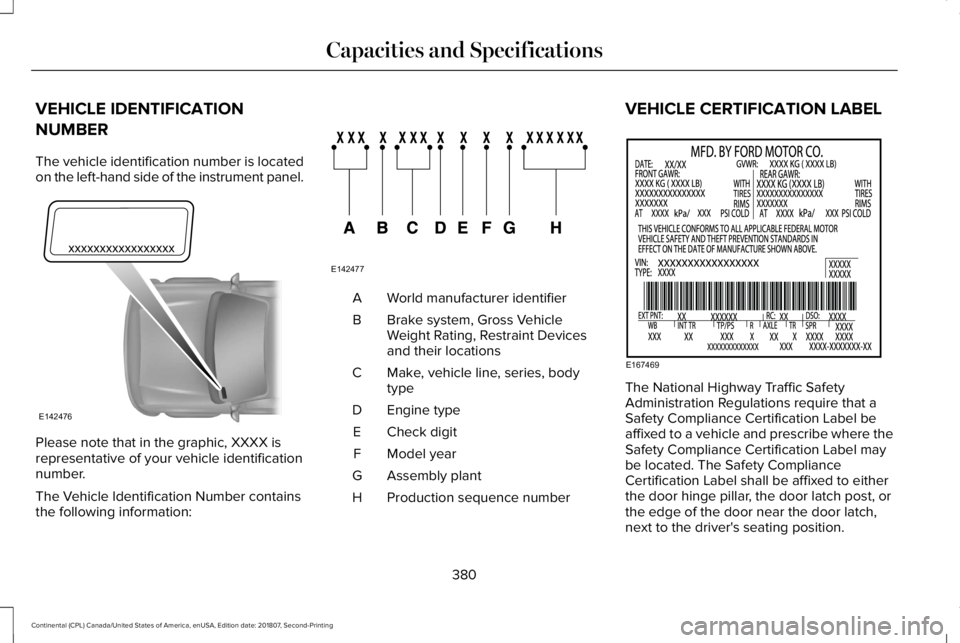
VEHICLE IDENTIFICATION
NUMBER
The vehicle identification number is located
on the left-hand side of the instrument panel.
Please note that in the graphic, XXXX is
representative of your vehicle identification
number.
The Vehicle Identification Number contains
the following information: World manufacturer identifier
A
Brake system, Gross Vehicle
Weight Rating, Restraint Devices
and their locations
B
Make, vehicle line, series, body
type
C
Engine type
D
Check digit
E
Model year
F
Assembly plant
G
Production sequence number
H VEHICLE CERTIFICATION LABEL
The National Highway Traffic Safety
Administration Regulations require that a
Safety Compliance Certification Label be
affixed to a vehicle and prescribe where the
Safety Compliance Certification Label may
be located. The Safety Compliance
Certification Label shall be affixed to either
the door hinge pillar, the door latch post, or
the edge of the door near the door latch,
next to the driver's seating position.
380
Continental (CPL) Canada/United States of America, enUSA, Edition date: 201807, Second-Printing Capacities and SpecificationsE142476 E142477 E167469
Page 423 of 627

Action and Description
Menu Item
Item
This bar displays icons and messages pertaining to current system activi\
ties including climate
settings, voice commands and phone functions such as text messages.
Status Bar
A
This button is available on the main screens. Pressing it takes you to the home screen view.
Home
B
This shows the current time. You can set the clock manually or have it controlled by the vehicle's
GPS location. See Settings (page 485).
Clock
C
This displays the current outside temperature.
Outside Temperature
D
You can touch any of the buttons on this bar to select a feature.
Feature Bar
E
The touchscreen allows you quick access to
all of your comfort, navigation,
communication and entertainment options.
Using the status and feature bar you can
quickly select the feature you want to use. Note:
Your system is equipped with a feature
that allows you to access and control audio
features for 10 minutes after you switch the
ignition off (and no doors open). The Status Bar
Additional icons also display in the status bar
depending on market, vehicle options and
current operation. If a feature is not active,
the icon does not display. Certain icons may
move to the left or right depending on what
options are active.
420
Continental (CPL) Canada/United States of America, enUSA, Edition date: 201807, Second-Printing SYNC™ 3
Page 462 of 627
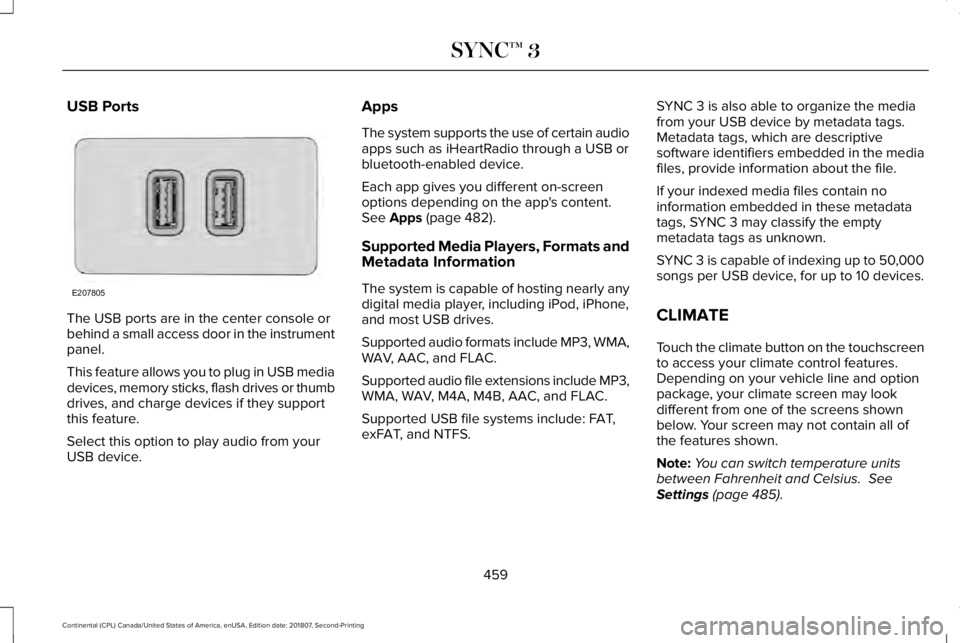
USB Ports
The USB ports are in the center console or
behind a small access door in the instrument
panel.
This feature allows you to plug in USB media
devices, memory sticks, flash drives or thumb
drives, and charge devices if they support
this feature.
Select this option to play audio from your
USB device. Apps
The system supports the use of certain audio
apps such as iHeartRadio through a USB or
bluetooth-enabled device.
Each app gives you different on-screen
options depending on the app's content.
See Apps (page 482).
Supported Media Players, Formats and
Metadata Information
The system is capable of hosting nearly any
digital media player, including iPod, iPhone,
and most USB drives.
Supported audio formats include MP3, WMA,
WAV, AAC, and FLAC.
Supported audio file extensions include MP3,
WMA, WAV, M4A, M4B, AAC, and FLAC.
Supported USB file systems include: FAT,
exFAT, and NTFS. SYNC 3 is also able to organize the media
from your USB device by metadata tags.
Metadata tags, which are descriptive
software identifiers embedded in the media
files, provide information about the file.
If your indexed media files contain no
information embedded in these metadata
tags, SYNC 3 may classify the empty
metadata tags as unknown.
SYNC 3 is capable of indexing up to 50,000
songs per USB device, for up to 10 devices.
CLIMATE
Touch the climate button on the touchscreen
to access your climate control features.
Depending on your vehicle line and option
package, your climate screen may look
different from one of the screens shown
below. Your screen may not contain all of
the features shown.
Note:
You can switch temperature units
between Fahrenheit and Celsius.
See
Settings (page 485).
459
Continental (CPL) Canada/United States of America, enUSA, Edition date: 201807, Second-Printing SYNC™ 3E207805
Page 476 of 627
Description
Menu Item
(number, street, city, state)
For example "12 Mainstreet Dearborn MI"
Partial Address
(number, street) if searching in current state
(number, street and zip code (or postal code in Canada)) if searching out of\
state
You can enter unique addresses that contain door number prefixes with or without the prefix. For example,
you could enter "6N340 Fairway Lane" or "340 Fairway Lane".
City
(name or zip code)
Point of Interest
(name or category)
Intersection
(street 1 / street 2)
(street 1 and street 2)
(street 1 & street 2)
(street 1 @ street 2)
(street 1 at street 2)
Latitude and Longitude
(##.###### , ##.######)
473
Continental (CPL) Canada/United States of America, enUSA, Edition date: 201807, Second-Printing SYNC™ 3
Page 505 of 627
Note:
The Vehicle Wi-Fi Hotspot (Vehicle
Hotspot) may be operational while ignition
is On and may remain operational while the
ignition is Off.
Note: Vehicle Hotspot services are provided
by the vehicle network carrier, subject to
your vehicle network carrier agreement,
coverage and availability.
Note: It is the account owner’ s responsibility
to remove the vehicle from the vehicle
network carrier account when ownership of
the vehicle is transferred. If the owner would
like to remove the vehicle from the account
for any reason, please contact your vehicle
network carrier for more information. Note:
Data, such as the Vehicle Identification
Number (VIN), SIM Card ID, and data plan
usage, is shared between us and the vehicle
network carrier to provide the Vehicle
Hotspot service in accordance with your
vehicle network carrier agreement, coverage
and availability, and may be used to enable
a seamless transition from an old to new
embedded modem and to confirm any
updates are successfully delivered.
Note: For your convenience data usage may
be available for monitoring under Settings
but may not reflect actual or current usage.
The vehicle network carrier is responsible
for providing information about your account.
Please contact the vehicle network carrier
for more information.
Note: We may need to update operating
system software on your vehicle, including
security updates and bug fixes, to keep
connected services current, like Vehicle
Hotspot, without prior notice to you. Ambient Lighting (If Equipped)
Tap a color once to active ambient lighting.
This sets the color to the highest intensity.
You can drag the colors up and down to
increase or decrease the intensity.
To switch ambient lighting off, press the
active color once or drag the active color all
the way down to zero intensity.
Vehicle
Note: Your vehicle may not have all of these
features.
You can select the following features to
update their settings.
Door Keypad Code
Select this button to add or erase a personal
door keypad code. To add or erase a
personal code, you first need to enter the
five-digit factory set code. You can find this
code on the owner's wallet card in the glove
box or from your authorized dealer.
502
Continental (CPL) Canada/United States of America, enUSA, Edition date: 201807, Second-Printing SYNC™ 3
Page 509 of 627
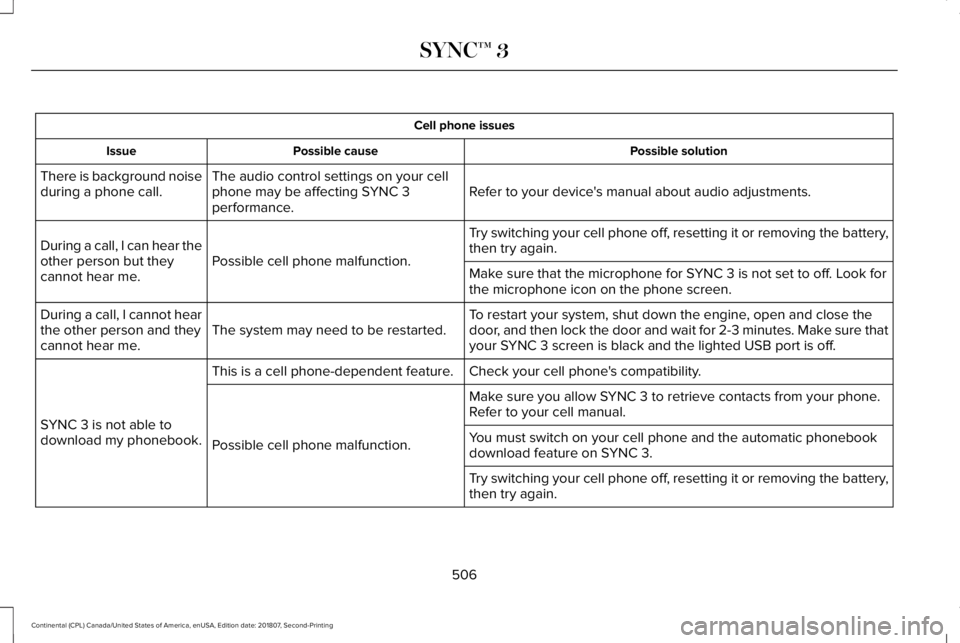
Cell phone issues
Possible solution
Possible cause
Issue
Refer to your device's manual about audio adjustments.
The audio control settings on your cell
phone may be affecting SYNC 3
performance.
There is background noise
during a phone call.
Try switching your cell phone off, resetting it or removing the battery,
then try again.
Possible cell phone malfunction.
During a call, I can hear the
other person but they
cannot hear me.
Make sure that the microphone for SYNC 3 is not set to off. Look for
the microphone icon on the phone screen.
To restart your system, shut down the engine, open and close the
door, and then lock the door and wait for 2-3 minutes. Make sure that
your SYNC 3 screen is black and the lighted USB port is off.
The system may need to be restarted.
During a call, I cannot hear
the other person and they
cannot hear me.
Check your cell phone's compatibility.
This is a cell phone-dependent feature.
SYNC 3 is not able to
download my phonebook. Make sure you allow SYNC 3 to retrieve contacts from your phone.
Refer to your cell manual.
Possible cell phone malfunction. You must switch on your cell phone and the automatic phonebook
download feature on SYNC 3.
Try switching your cell phone off, resetting it or removing the battery,
then try again.
506
Continental (CPL) Canada/United States of America, enUSA, Edition date: 201807, Second-Printing SYNC™ 3
Page 515 of 627
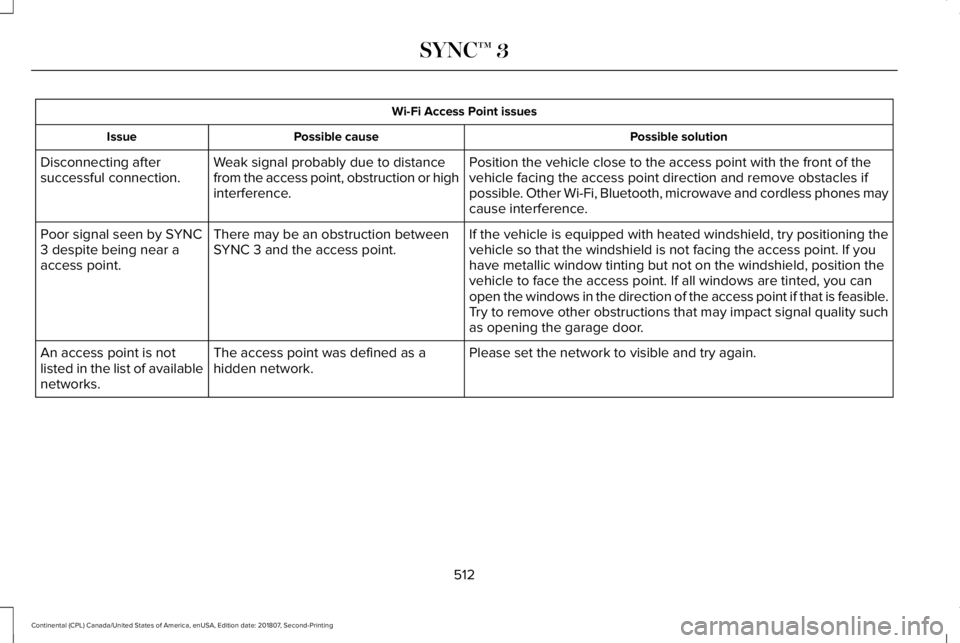
Wi-Fi Access Point issues
Possible solution
Possible cause
Issue
Position the vehicle close to the access point with the front of the
vehicle facing the access point direction and remove obstacles if
possible. Other Wi-Fi, Bluetooth, microwave and cordless phones may
cause interference.
Weak signal probably due to distance
from the access point, obstruction or high
interference.
Disconnecting after
successful connection.
If the vehicle is equipped with heated windshield, try positioning the
vehicle so that the windshield is not facing the access point. If you
have metallic window tinting but not on the windshield, position the
vehicle to face the access point. If all windows are tinted, you can
open the windows in the direction of the access point if that is feasibl\
e.
There may be an obstruction between
SYNC 3 and the access point.
Poor signal seen by SYNC
3 despite being near a
access point.
Try to remove other obstructions that may impact signal quality such
as opening the garage door.
Please set the network to visible and try again.
The access point was defined as a
hidden network.
An access point is not
listed in the list of available
networks.
512
Continental (CPL) Canada/United States of America, enUSA, Edition date: 201807, Second-Printing SYNC™ 3
Page 533 of 627
Make sure to change your vehicle
’s oils and
fluids at the specified intervals or in
conjunction with a repair. Flushing is a viable
way to change fluid for many vehicle
sub-systems during scheduled maintenance. It is critical that systems are flushed only with
new fluid that is the same as that required
to fill and operate the system or using a
Ford-approved flushing chemical.
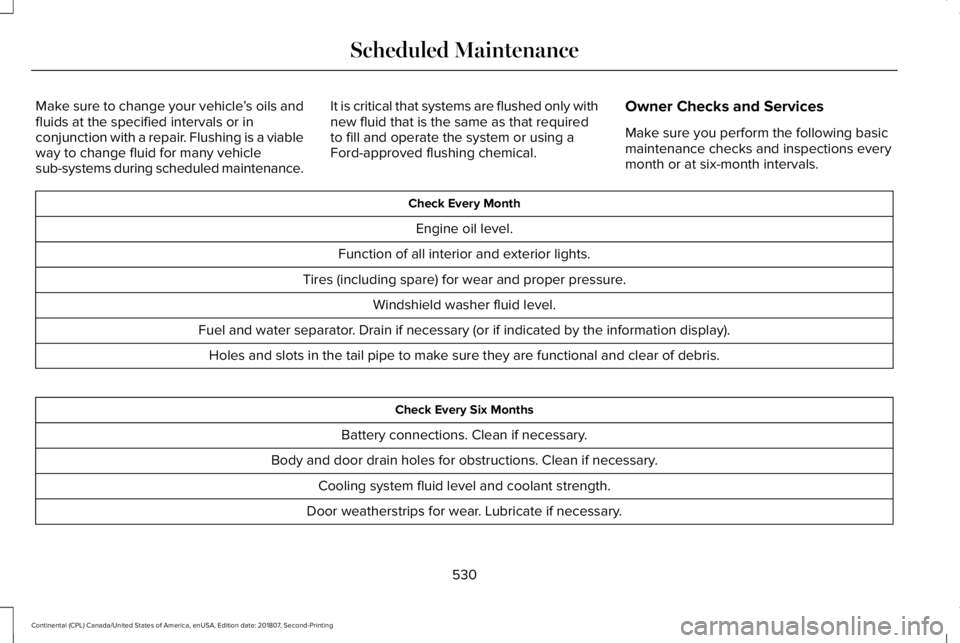
Owner Checks and Services
Make sure you perform the following basic
maintenance checks and inspections every
month or at six-month intervals. Check Every Month
Engine oil level.
Function of all interior and exterior lights.
Tires (including spare) for wear and proper pressure. Windshield washer fluid level.
Fuel and water separator. Drain if necessary (or if indicated by the information display). Holes and slots in the tail pipe to make sure they are functional and clear of debris. Check Every Six Months
Battery connections. Clean if necessary.
Body and door drain holes for obstructions. Clean if necessary. Cooling system fluid level and coolant strength.
Door weatherstrips for wear. Lubricate if necessary.
530
Continental (CPL) Canada/United States of America, enUSA, Edition date: 201807, Second-Printing Scheduled Maintenance
Page 617 of 627
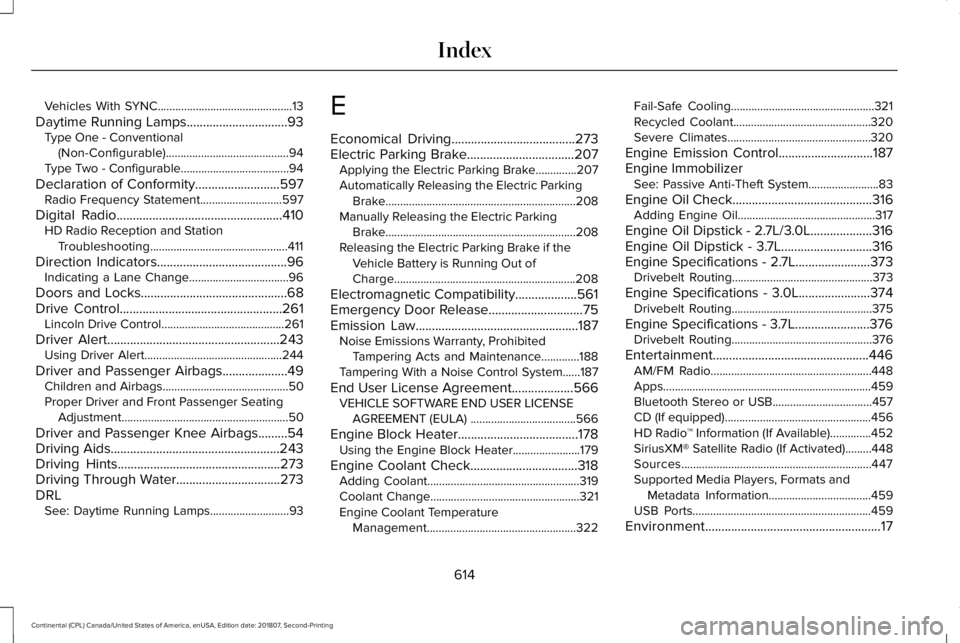
Vehicles With SYNC..............................................13
Daytime Running Lamps...............................93 Type One - Conventional
(Non-Configurable)..........................................94
Type Two - Configurable.....................................94
Declaration of Conformity..........................597
Radio Frequency Statement............................597
Digital Radio
...................................................410
HD Radio Reception and Station
Troubleshooting...............................................411
Direction Indicators
........................................96
Indicating a Lane Change..................................96
Doors and Locks.............................................68
Drive Control
..................................................261
Lincoln Drive Control..........................................261
Driver Alert
.....................................................243
Using Driver Alert...............................................244
Driver and Passenger Airbags....................49 Children and Airbags...........................................50
Proper Driver and Front Passenger Seating
Adjustment .........................................................50
Driver and Passenger Knee Airbags.........54
Driving Aids
....................................................243
Driving Hints..................................................273
Driving Through Water................................273
DRL See: Daytime Running Lamps...........................93 E
Economical Driving
......................................273
Electric Parking Brake.................................207 Applying the Electric Parking Brake..............207
Automatically Releasing the Electric Parking
Brake.................................................................208
Manually Releasing the Electric Parking Brake.................................................................208
Releasing the Electric Parking Brake if the Vehicle Battery is Running Out of
Charge..............................................................208
Electromagnetic Compatibility
...................561
Emergency Door Release.............................75
Emission Law..................................................187 Noise Emissions Warranty, Prohibited
Tampering Acts and Maintenance.............188
Tampering With a Noise Control System......187
End User License Agreement...................566 VEHICLE SOFTWARE END USER LICENSE
AGREEMENT (EULA) ....................................566
Engine Block Heater
.....................................178
Using the Engine Block Heater.......................179
Engine Coolant Check.................................318 Adding Coolant....................................................319
Coolant Change...................................................321
Engine Coolant Temperature
Management...................................................322 Fail-Safe Cooling.................................................321
Recycled Coolant...............................................320
Severe Climates.................................................320
Engine Emission Control.............................187
Engine Immobilizer See: Passive Anti-Theft System........................83
Engine Oil Check...........................................316 Adding Engine Oil...............................................317
Engine Oil Dipstick - 2.7L/3.0L...................316
Engine Oil Dipstick - 3.7L............................316
Engine Specifications - 2.7L.......................373 Drivebelt Routing................................................373
Engine Specifications - 3.0L......................374 Drivebelt Routing................................................375
Engine Specifications - 3.7L.......................376 Drivebelt Routing................................................376
Entertainment................................................446 AM/FM Radio.......................................................448
Apps.......................................................................459
Bluetooth Stereo or USB..................................457
CD (If equipped)..................................................456
HD Radio ™ Information (If Available)..............452
SiriusXM® Satellite Radio (If Activated).........448
Sources.................................................................447
Supported Media Players, Formats and Metadata Information...................................459
USB Ports.............................................................459
Environment......................................................17
614
Continental (CPL) Canada/United States of America, enUSA, Edition date: 201807, Second-Printing Index
Page 618 of 627
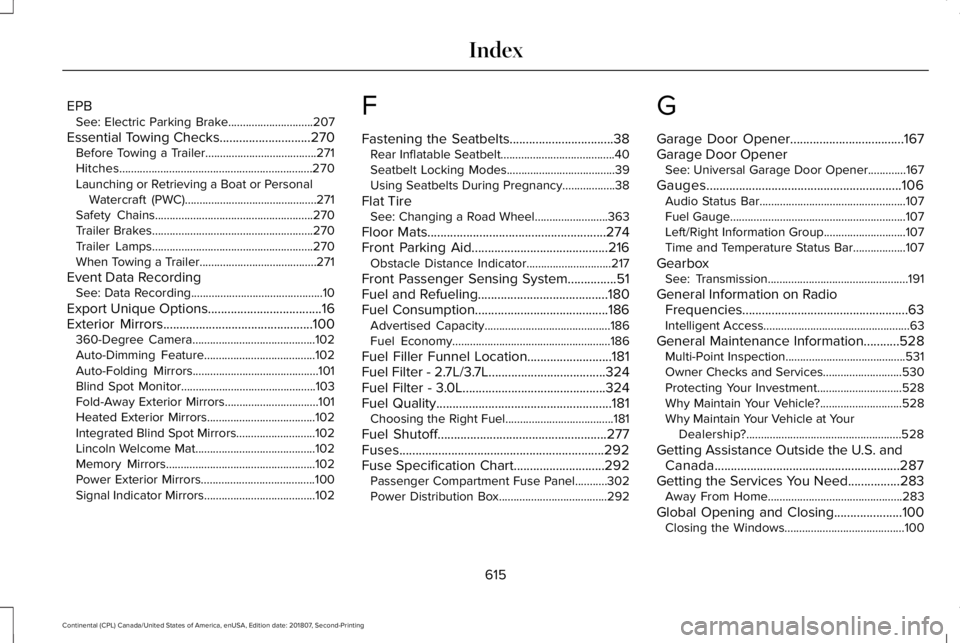
EPB
See: Electric Parking Brake.............................207
Essential Towing Checks............................270 Before Towing a Trailer......................................271
Hitches..................................................................270
Launching or Retrieving a Boat or Personal
Watercraft (PWC).............................................271
Safety Chains......................................................270
Trailer Brakes.......................................................270
Trailer Lamps.......................................................270
When Towing a Trailer........................................271
Event Data Recording See: Data Recording.............................................10
Export Unique Options...................................16
Exterior Mirrors..............................................100
360-Degree Camera..........................................102
Auto-Dimming Feature......................................102
Auto-Folding Mirrors...........................................101
Blind Spot Monitor..............................................103
Fold-Away Exterior Mirrors................................101
Heated Exterior Mirrors.....................................102
Integrated Blind Spot Mirrors...........................102
Lincoln Welcome Mat.........................................102
Memory Mirrors...................................................102
Power Exterior Mirrors.......................................100
Signal Indicator Mirrors......................................102 F
Fastening the Seatbelts................................38
Rear Inflatable Seatbelt.......................................40
Seatbelt Locking Modes.....................................39
Using Seatbelts During Pregnancy..................38
Flat Tire See: Changing a Road Wheel.........................363
Floor Mats
.......................................................274
Front Parking Aid..........................................216 Obstacle Distance Indicator.............................217
Front Passenger Sensing System
...............51
Fuel and Refueling........................................180
Fuel Consumption.........................................186 Advertised Capacity...........................................186
Fuel Economy......................................................186
Fuel Filler Funnel Location..........................181
Fuel Filter - 2.7L/3.7L....................................324
Fuel Filter - 3.0L............................................324
Fuel Quality......................................................181 Choosing the Right Fuel.....................................181
Fuel Shutoff....................................................277
Fuses...............................................................292
Fuse Specification Chart............................292 Passenger Compartment Fuse Panel...........302
Power Distribution Box.....................................292 G
Garage Door Opener...................................167
Garage Door Opener
See: Universal Garage Door Opener.............167
Gauges............................................................106 Audio Status Bar..................................................107
Fuel Gauge............................................................107
Left/Right Information Group............................107
Time and Temperature Status Bar..................107
Gearbox See: Transmission................................................191
General Information on Radio Frequencies...................................................63
Intelligent Access..................................................63
General Maintenance Information...........528 Multi-Point Inspection.........................................531
Owner Checks and Services...........................530
Protecting Your Investment.............................528
Why Maintain Your Vehicle?............................528
Why Maintain Your Vehicle at Your
Dealership?.....................................................528
Getting Assistance Outside the U.S. and Canada.........................................................287
Getting the Services You Need................283 Away From Home..............................................283
Global Opening and Closing.....................100 Closing the Windows.........................................100
615
Continental (CPL) Canada/United States of America, enUSA, Edition date: 201807, Second-Printing Index