light LINCOLN CONTINENTAL 2019 Owners Manual
[x] Cancel search | Manufacturer: LINCOLN, Model Year: 2019, Model line: CONTINENTAL, Model: LINCOLN CONTINENTAL 2019Pages: 627, PDF Size: 6.39 MB
Page 505 of 627
Note:
The Vehicle Wi-Fi Hotspot (Vehicle
Hotspot) may be operational while ignition
is On and may remain operational while the
ignition is Off.
Note: Vehicle Hotspot services are provided
by the vehicle network carrier, subject to
your vehicle network carrier agreement,
coverage and availability.
Note: It is the account owner’ s responsibility
to remove the vehicle from the vehicle
network carrier account when ownership of
the vehicle is transferred. If the owner would
like to remove the vehicle from the account
for any reason, please contact your vehicle
network carrier for more information. Note:
Data, such as the Vehicle Identification
Number (VIN), SIM Card ID, and data plan
usage, is shared between us and the vehicle
network carrier to provide the Vehicle
Hotspot service in accordance with your
vehicle network carrier agreement, coverage
and availability, and may be used to enable
a seamless transition from an old to new
embedded modem and to confirm any
updates are successfully delivered.
Note: For your convenience data usage may
be available for monitoring under Settings
but may not reflect actual or current usage.
The vehicle network carrier is responsible
for providing information about your account.
Please contact the vehicle network carrier
for more information.
Note: We may need to update operating
system software on your vehicle, including
security updates and bug fixes, to keep
connected services current, like Vehicle
Hotspot, without prior notice to you. Ambient Lighting (If Equipped)
Tap a color once to active ambient lighting.
This sets the color to the highest intensity.
You can drag the colors up and down to
increase or decrease the intensity.
To switch ambient lighting off, press the
active color once or drag the active color all
the way down to zero intensity.
Vehicle
Note: Your vehicle may not have all of these
features.
You can select the following features to
update their settings.
Door Keypad Code
Select this button to add or erase a personal
door keypad code. To add or erase a
personal code, you first need to enter the
five-digit factory set code. You can find this
code on the owner's wallet card in the glove
box or from your authorized dealer.
502
Continental (CPL) Canada/United States of America, enUSA, Edition date: 201807, Second-Printing SYNC™ 3
Page 507 of 627
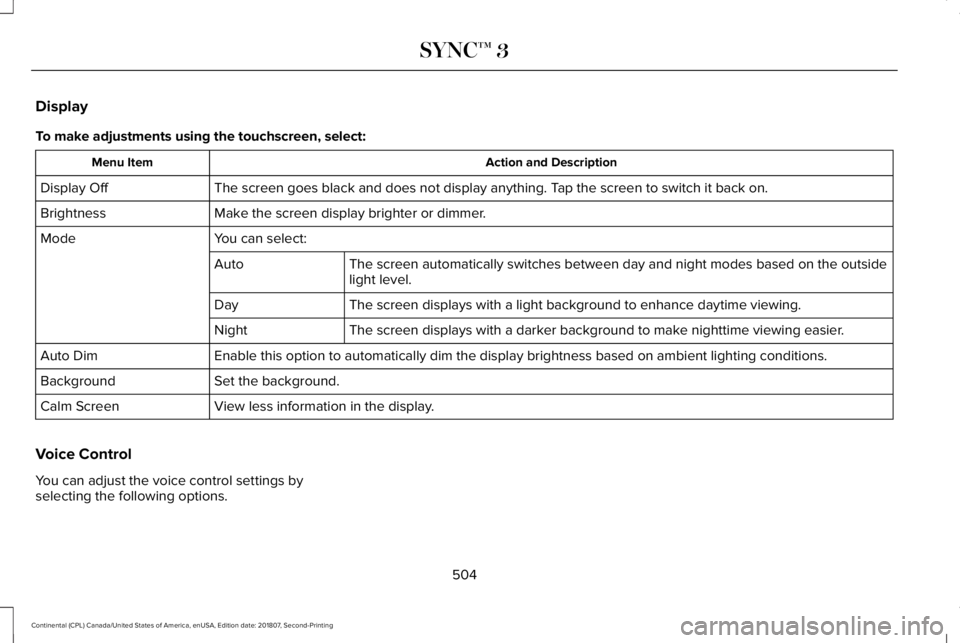
Display
To make adjustments using the touchscreen, select:
Action and Description
Menu Item
The screen goes black and does not display anything. Tap the screen to switch it back on.
Display Off
Make the screen display brighter or dimmer.
Brightness
You can select:
Mode
The screen automatically switches between day and night modes based on t\
he outside
light level.
Auto
The screen displays with a light background to enhance daytime viewing.
Day
The screen displays with a darker background to make nighttime viewing easier.
Night
Enable this option to automatically dim the display brightness based on \
ambient lighting conditions.
Auto Dim
Set the background.
Background
View less information in the display.
Calm Screen
Voice Control
You can adjust the voice control settings by
selecting the following options.
504
Continental (CPL) Canada/United States of America, enUSA, Edition date: 201807, Second-Printing SYNC™ 3
Page 509 of 627
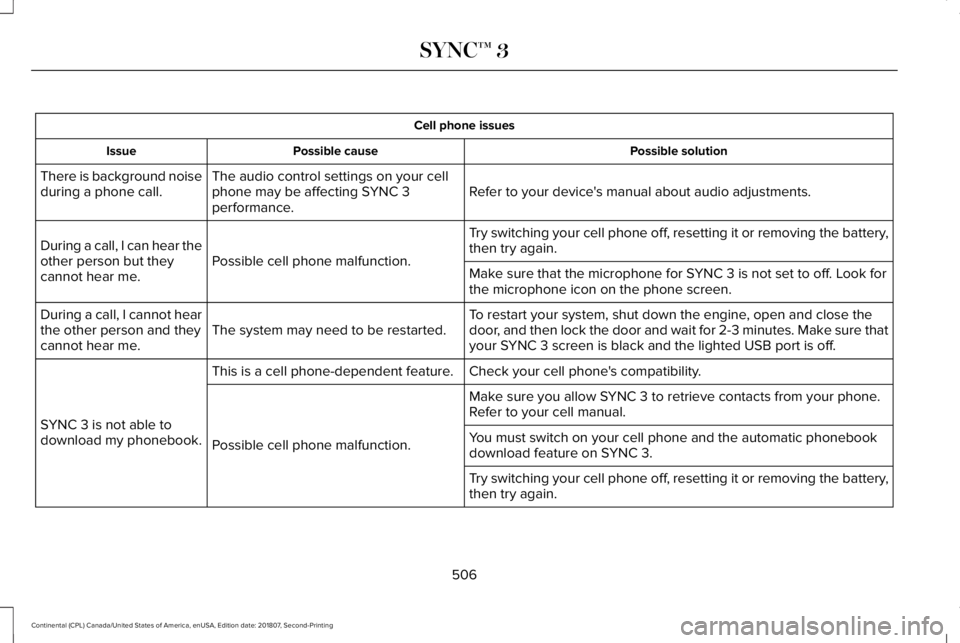
Cell phone issues
Possible solution
Possible cause
Issue
Refer to your device's manual about audio adjustments.
The audio control settings on your cell
phone may be affecting SYNC 3
performance.
There is background noise
during a phone call.
Try switching your cell phone off, resetting it or removing the battery,
then try again.
Possible cell phone malfunction.
During a call, I can hear the
other person but they
cannot hear me.
Make sure that the microphone for SYNC 3 is not set to off. Look for
the microphone icon on the phone screen.
To restart your system, shut down the engine, open and close the
door, and then lock the door and wait for 2-3 minutes. Make sure that
your SYNC 3 screen is black and the lighted USB port is off.
The system may need to be restarted.
During a call, I cannot hear
the other person and they
cannot hear me.
Check your cell phone's compatibility.
This is a cell phone-dependent feature.
SYNC 3 is not able to
download my phonebook. Make sure you allow SYNC 3 to retrieve contacts from your phone.
Refer to your cell manual.
Possible cell phone malfunction. You must switch on your cell phone and the automatic phonebook
download feature on SYNC 3.
Try switching your cell phone off, resetting it or removing the battery,
then try again.
506
Continental (CPL) Canada/United States of America, enUSA, Edition date: 201807, Second-Printing SYNC™ 3
Page 533 of 627
Make sure to change your vehicle
’s oils and
fluids at the specified intervals or in
conjunction with a repair. Flushing is a viable
way to change fluid for many vehicle
sub-systems during scheduled maintenance. It is critical that systems are flushed only with
new fluid that is the same as that required
to fill and operate the system or using a
Ford-approved flushing chemical.
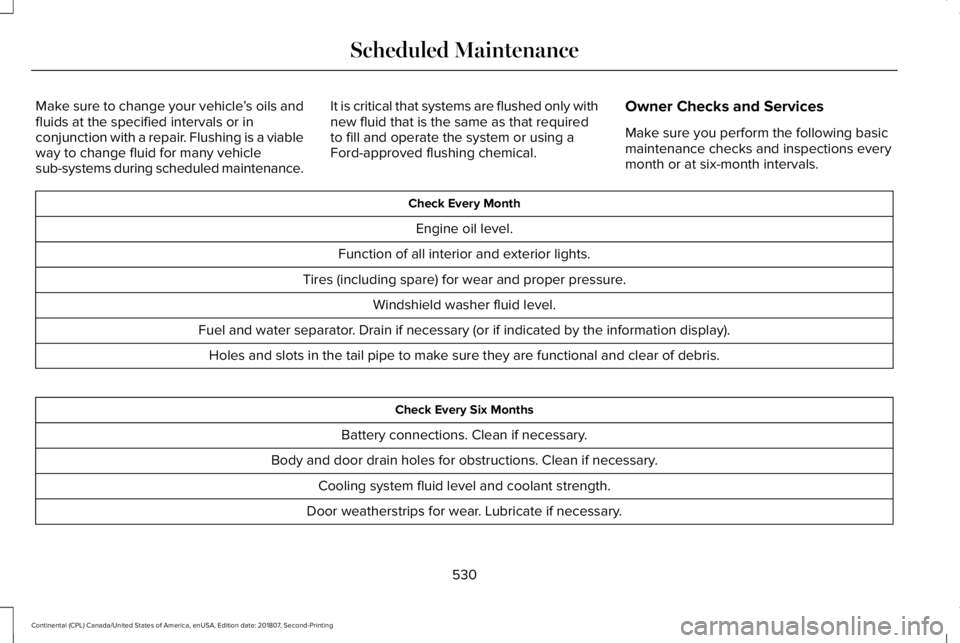
Owner Checks and Services
Make sure you perform the following basic
maintenance checks and inspections every
month or at six-month intervals. Check Every Month
Engine oil level.
Function of all interior and exterior lights.
Tires (including spare) for wear and proper pressure. Windshield washer fluid level.
Fuel and water separator. Drain if necessary (or if indicated by the information display). Holes and slots in the tail pipe to make sure they are functional and clear of debris. Check Every Six Months
Battery connections. Clean if necessary.
Body and door drain holes for obstructions. Clean if necessary. Cooling system fluid level and coolant strength.
Door weatherstrips for wear. Lubricate if necessary.
530
Continental (CPL) Canada/United States of America, enUSA, Edition date: 201807, Second-Printing Scheduled Maintenance
Page 599 of 627
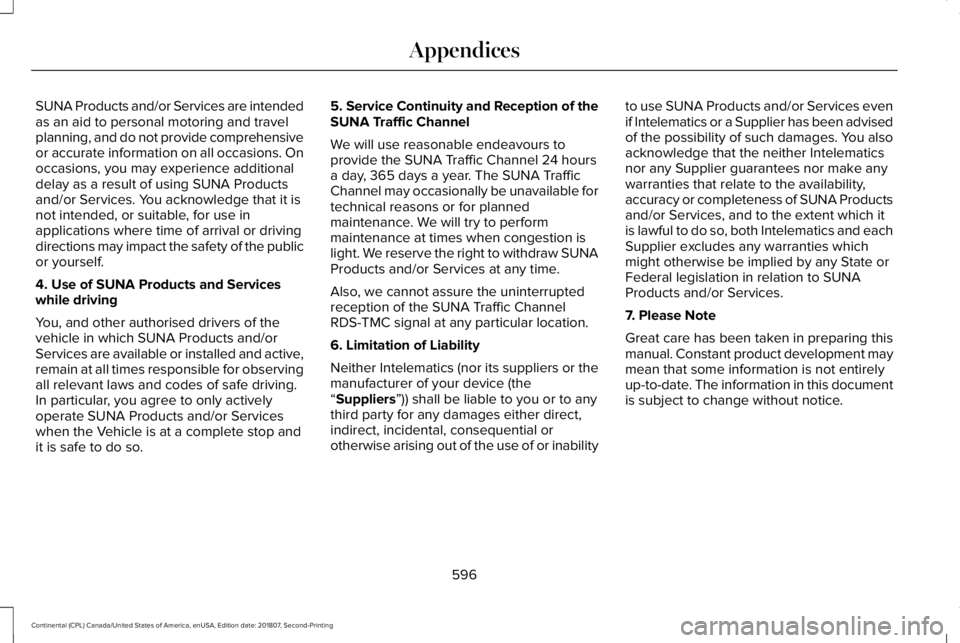
SUNA Products and/or Services are intended
as an aid to personal motoring and travel
planning, and do not provide comprehensive
or accurate information on all occasions. On
occasions, you may experience additional
delay as a result of using SUNA Products
and/or Services. You acknowledge that it is
not intended, or suitable, for use in
applications where time of arrival or driving
directions may impact the safety of the public
or yourself.
4. Use of SUNA Products and Services
while driving
You, and other authorised drivers of the
vehicle in which SUNA Products and/or
Services are available or installed and active,
remain at all times responsible for observing
all relevant laws and codes of safe driving.
In particular, you agree to only actively
operate SUNA Products and/or Services
when the Vehicle is at a complete stop and
it is safe to do so.
5. Service Continuity and Reception of the
SUNA Traffic Channel
We will use reasonable endeavours to
provide the SUNA Traffic Channel 24 hours
a day, 365 days a year. The SUNA Traffic
Channel may occasionally be unavailable for
technical reasons or for planned
maintenance. We will try to perform
maintenance at times when congestion is
light. We reserve the right to withdraw SUNA
Products and/or Services at any time.
Also, we cannot assure the uninterrupted
reception of the SUNA Traffic Channel
RDS-TMC signal at any particular location.
6. Limitation of Liability
Neither Intelematics (nor its suppliers or the
manufacturer of your device (the
“Suppliers”)) shall be liable to you or to any
third party for any damages either direct,
indirect, incidental, consequential or
otherwise arising out of the use of or inability to use SUNA Products and/or Services even
if Intelematics or a Supplier has been advised
of the possibility of such damages. You also
acknowledge that the neither Intelematics
nor any Supplier guarantees nor make any
warranties that relate to the availability,
accuracy or completeness of SUNA Products
and/or Services, and to the extent which it
is lawful to do so, both Intelematics and each
Supplier excludes any warranties which
might otherwise be implied by any State or
Federal legislation in relation to SUNA
Products and/or Services.
7. Please Note
Great care has been taken in preparing this
manual. Constant product development may
mean that some information is not entirely
up-to-date. The information in this document
is subject to change without notice.
596
Continental (CPL) Canada/United States of America, enUSA, Edition date: 201807, Second-Printing Appendices
Page 614 of 627
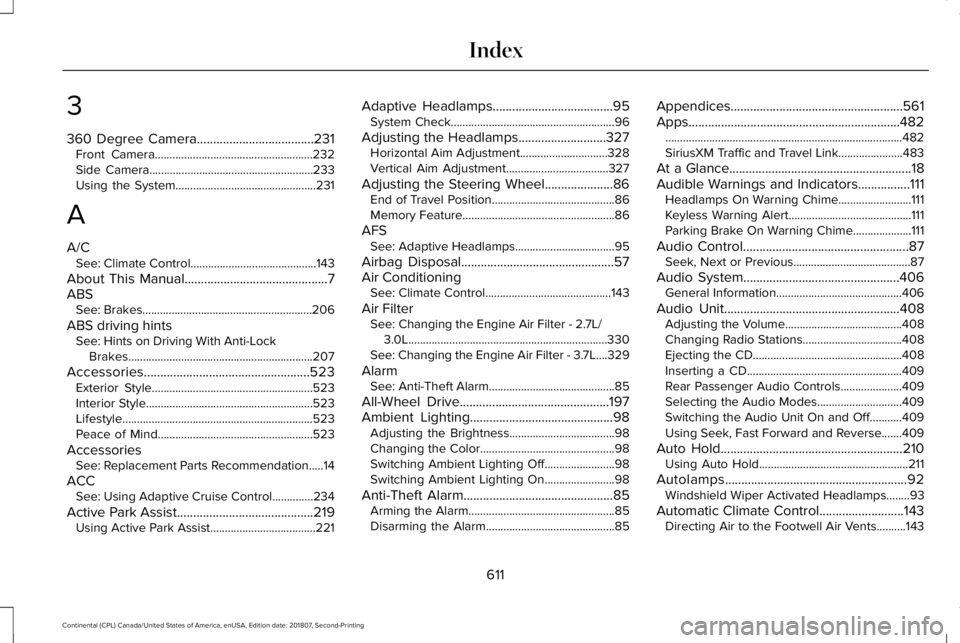
3
360 Degree Camera....................................231
Front Camera......................................................232
Side Camera........................................................233
Using the System................................................231
A
A/C See: Climate Control...........................................143
About This Manual............................................7
ABS See: Brakes..........................................................206
ABS driving hints See: Hints on Driving With Anti-Lock
Brakes...............................................................207
Accessories...................................................523 Exterior Style.......................................................523
Interior Style.........................................................523
Lifestyle.................................................................523
Peace of Mind.....................................................523
Accessories See: Replacement Parts Recommendation.....14
ACC See: Using Adaptive Cruise Control..............
234
Active Park Assist..........................................219 Using Active Park Assist....................................221 Adaptive Headlamps
.....................................95
System Check........................................................96
Adjusting the Headlamps...........................327 Horizontal Aim Adjustment..............................328
Vertical Aim Adjustment...................................327
Adjusting the Steering Wheel.....................86 End of Travel Position..........................................86
Memory Feature....................................................86
AFS See: Adaptive Headlamps..................................95
Airbag Disposal...............................................57
Air Conditioning See: Climate Control...........................................143
Air Filter See: Changing the Engine Air Filter - 2.7L/
3.0L....................................................................330
See: Changing the Engine Air Filter - 3.7L....329
Alarm See: Anti-Theft Alarm...........................................85
All-Wheel Drive
..............................................197
Ambient Lighting............................................98
Adjusting the Brightness....................................98
Changing the Color..............................................
98
Switching Ambient Lighting Off........................98
Switching Ambient Lighting On
........................98
Anti-Theft Alarm..............................................
85
Arming the Alarm..................................................85
Disarming the Alarm............................................85 Appendices.....................................................561
Apps.................................................................482
........................................................................\
.........482
SiriusXM Traffic and Travel Link......................483
At a Glance
........................................................18
Audible Warnings and Indicators................111 Headlamps On Warning Chime.........................111
Keyless Warning Alert..........................................111
Parking Brake On Warning Chime....................111
Audio Control
...................................................87
Seek, Next or Previous........................................87
Audio System................................................406 General Information...........................................406
Audio Unit
......................................................408
Adjusting the Volume........................................408
Changing Radio S
tations..................................408
Ejecting the CD...................................................
408
Inserting a CD.....................................................409
Rear Passenger Audio Controls.....................409
Selecting the Audio Modes.............................
409
Switching the Audio Unit On and Off...........409
Using Seek, Fast Forward and Reverse.......409
Auto Hold........................................................210 Using Auto Hold...................................................211
Autolamps........................................................92 Windshield Wiper Activated Headlamps........93
Automatic Climate Control..........................143 Directing Air to the Footwell Air Vents..........143
611
Continental (CPL) Canada/United States of America, enUSA, Edition date: 201807, Second-Printing Index
Page 616 of 627
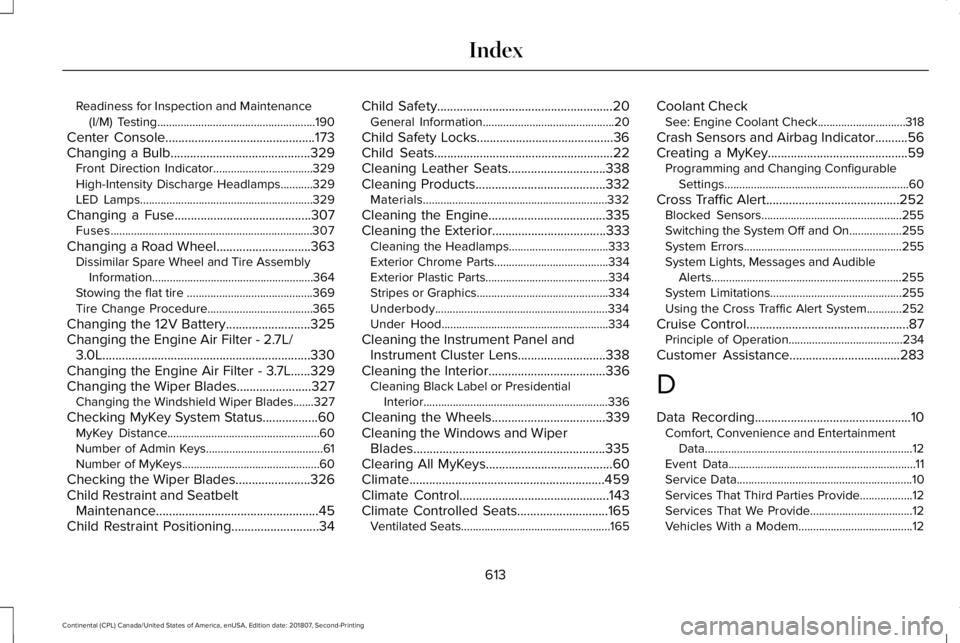
Readiness for Inspection and Maintenance
(I/M) Testing......................................................190
Center Console..............................................173
Changing a Bulb...........................................329
Front Direction Indicator..................................329
High-Intensity Discharge Headlamps...........329
LED Lamps...........................................................329
Changing a Fuse
..........................................307
Fuses.....................................................................307
Changing a Road Wheel.............................363 Dissimilar Spare Wheel and Tire Assembly
Information.......................................................364
Stowing the flat tire ...........................................369
Tire Change Procedure....................................365
Changing the 12V Battery..........................325
Changing the Engine Air Filter - 2.7L/ 3.0L................................................................330
Changing the Engine Air Filter - 3.7L......329
Changing the Wiper Blades.......................327 Changing the Windshield Wiper Blades.......327
Checking MyKey S
ystem Status.................60
MyKey Distance....................................................60
Number of Admin Keys........................................61
Number of MyKeys...............................................60
Checking the Wiper Blades.......................326
Child Restraint and Seatbelt Maintenance..................................................45
Child Restraint Positioning...........................34 Child Safety......................................................20
General Information.............................................20
Child Safety Locks..........................................36
Child Seats.......................................................22
Cleaning Leather Seats..............................338
Cleaning Products........................................332 Materials...............................................................332
Cleaning the Engine....................................335
Cleaning the Exterior...................................333 Cleaning the Headlamps..................................333
Exterior Chrome Parts.......................................334
Exterior Plastic Parts..........................................334
Stripes or Graphics.............................................334
Underbody...........................................................334
Under Hood.........................................................334
Cleaning the Instrument Panel and Instrument Cluster Lens...........................338
Cleaning the Interior
....................................336
Cleaning Black Label or Presidential
Interior...............................................................336
Cleaning the Wheels
...................................339
Cleaning the Windows and Wiper Blades...........................................................335
Clearing All MyKeys.......................................60
Climate............................................................459
Climate Control..............................................143
Climate Controlled Seats............................165 Ventilated Seats...................................................165 Coolant Check
See: Engine Coolant Check..............................318
Crash Sensors and Airbag Indicator..........56
Creating a MyKey...........................................59 Programming and Changing Configurable
Settings...............................................................60
Cross Traffic Alert
.........................................252
Blocked Sensors................................................255
Switching the System Off and On..................255
System Errors
......................................................255
System Lights, Messages and Audible Alerts.................................................................255
System Limitations.............................................255
Using the Cross Traffic Alert System............252
Cruise Control
..................................................87
Principle of Operation.......................................234
Customer Assistance
..................................283
D
Data Recording
................................................10
Comfort, Convenience and Entertainment
Data.......................................................................12
Event Data................................................................11
Service Data............................................................10
Services That Third Parties Provide..................12
Services That We Provide...................................12
Vehicles With a Modem.......................................12
613
Continental (CPL) Canada/United States of America, enUSA, Edition date: 201807, Second-Printing Index
Page 620 of 627
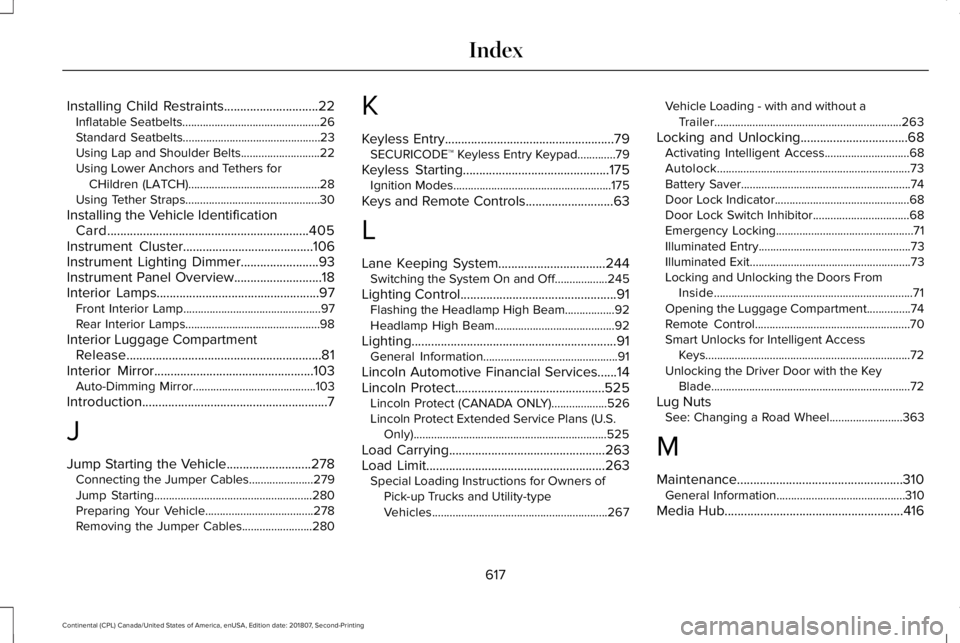
Installing Child Restraints.............................22
Inflatable Seatbelts...............................................26
Standard Seatbelts...............................................23
Using Lap and Shoulder Belts...........................22
Using Lower Anchors and Tethers for
CHildren (LATCH).............................................28
Using Tether Straps..............................................30
Installing the Vehicle Identification Card..............................................................405
Instrument Cluster........................................106
Instrument Lighting Dimmer........................93
Instrument Panel Overview...........................18
Interior Lamps..................................................97 Front Interior Lamp...............................................97
Rear Interior Lamps..............................................98
Interior Luggage Compartment Release............................................................81
Interior Mirror.................................................103
Auto-Dimming Mirror..........................................103
Introduction
.........................................................7
J
Jump Starting the Vehicle..........................278 Connecting the Jumper Cables......................279
Jump Starting......................................................280
Preparing Your Vehicle.....................................278
Removing the Jumper Cables........................280 K
Keyless Entry
....................................................79
SECURICODE™ Keyless Entry Keypad.............79
Keyless Starting
.............................................175
Ignition Modes......................................................175
Keys and Remote Controls
...........................63
L
Lane Keeping System.................................244 Switching the System On and Off..................245
Lighting Control
................................................91
Flashing the Headlamp High Beam.................92
Headlamp High Beam.........................................92
Lighting...............................................................91 General Information..............................................91
Lincoln Automotive Financial Services......14
Lincoln Protect..............................................525 Lincoln Protect (CANADA ONLY)...................526
Lincoln Protect Extended Service Plans (U.S.
Only)
..................................................................525
Load Carrying
................................................263
Load Limit.......................................................263 Special Loading Instructions for Owners of
Pick-up Trucks and Utility-type
Vehicles............................................................267 Vehicle Loading - with and without a
Trailer................................................................263
Locking and Unlocking
.................................68
Activating Intelligent Access.............................68
Autolock..................................................................73
Battery Saver..........................................................74
Door Lock Indicator..............................................68
Door Lock Switch Inhibitor.................................68
Emergency Locking...............................................71
Illuminated Entry....................................................73
Illuminated Exit.......................................................73
Locking and Unlocking the Doors From
Inside....................................................................71
Opening the Luggage Compartment...............74
Remote Control.....................................................70
Smart Unlocks for Intelligent Access Keys......................................................................72
Unlocking the Driver Door with the Key Blade....................................................................72
Lug Nuts See: Changing a Road Wheel.........................363
M
Maintenance...................................................310 General Information............................................310
Media Hub
.......................................................416
617
Continental (CPL) Canada/United States of America, enUSA, Edition date: 201807, Second-Printing Index
Page 623 of 627

Running Out of Fuel.....................................182
Adding Fuel From a Portable Fuel
Container..........................................................182
Filling a Portable Fuel Container.....................182
S
Safety Canopy™
...............................................55
Safety Precautions........................................180
Satellite Radio................................................413
Satellite Radio Electronic Serial Number
(ESN)...................................................................414
Satellite Radio Reception Factors...................413
SiriusXM Satellite Radio Service.....................414
Troubleshooting...................................................415
Scheduled Maintenance Record
..............540
Scheduled Maintenance............................528
Seatbelt Extension.........................................46
Seatbelt Height Adjustment.........................42
Seatbelt Reminder..........................................43 Belt-Minder™...........................................................43
Seatbelts
...........................................................37
Principle of Operation..........................................37
Seatbelt Warning Lamp and Indicator Chime..............................................................42
Conditions of operation......................................43
Seats.................................................................150
Security..............................................................83 Settings...........................................................485
911 Assist...............................................................493
Ambient Lighting................................................502
Bluetooth..............................................................488
Clock......................................................................487
Display..................................................................504
General.................................................................499
Media Player........................................................486
Mobile Apps.........................................................498
Navigation............................................................495
Phone....................................................................488
Radio......................................................................494
SiriusXM................................................................495
Sound....................................................................485
Valet Mode...........................................................505
Vehicle..................................................................502
Voice Control.......................................................504
Wi-Fi & Hotspot..................................................500
Side Airbags.....................................................53
Side Sensing System...................................218 Obstacle Distance Indicator.............................218
Sitting in the Correct Position....................150
Snow Chains See: Using Snow Chains..................................356
Soft Closing Door
............................................79
Spare Wheel See: Changing a Road Wheel.........................363 Special Notices
................................................15
New Vehicle Limited Warranty...........................15
On Board Diagnostics Data Link
Connector...........................................................15
Special Instructions...............................................15
Special Operating Conditions Scheduled Maintenance...............................................537
Exceptions............................................................539
Speed Control See: Cruise Control............................................234
Stability Control
.............................................213
Principle of Operation........................................213
Starting a Gasoline Engine
.........................176
Automatic Engine Shutdown............................177
Failure to Start......................................................176
Guarding Against Exhaust Fumes...................178
Important Ventilating Information....................178
Starting Y
our Vehicle..........................................176
Stopping the Engine When Your Vehicle is Moving...............................................................178
Stopping the Engine When Your Vehicle is Stationary..........................................................177
Starting and Stopping the Engine.............175 General Information............................................175
Steering..........................................................256 Adaptive Steering...............................................257
Electric Power Steering....................................256
Steering Wheel................................................86
620
Continental (CPL) Canada/United States of America, enUSA, Edition date: 201807, Second-Printing Index
Page 625 of 627

Changing the Set Speed..................................237
Detection Issues.................................................238
Following a Vehicle............................................235
Following a Vehicle to a Complete
Stop...................................................................236
Hilly Condition Usage.......................................238
Overriding the Set Speed................................237
Park Brake Application.....................................238
Resuming the Set Speed..................................237
Setting the Adaptive Cruise Speed...............235
Setting the Adaptive Cruise Speed When Your Vehicle is Stationary......................................235
Setting the Gap Distance.................................236
Switching Adaptive Cruise Control Off.........238
Switching Adaptive Cruise Control On.........235
Switching to Normal Cruise Control..............242
System Not Available........................................239
Using All-Wheel Drive..................................197 Driving In Special Conditions With All-Wheel
Drive (AWD)......................................................199
Operating AWD Vehicles With Spare or Mismatched Tires...........................................199
Using MyKey With Remote Start Systems...........................................................61
Using Snow Chains......................................356
Using Stability Control.................................214
Using Summer Tires....................................356 Using Traction Control
.................................212
Switching the System Off..................................212
System Indicator Lights and Messages.........212
Using a Switch.....................................................212
Using the Information Display Controls........212
Using Voice R
ecognition............................435
Audio Voice Commands...................................437
Climate Voice Commands................................438
Mobile App Voice Commands
........................443
Navigation Voice Commands...........................441
Phone Voice Commands..................................439
SiriusXM Traffic and Travel Link Voice Commands.......................................................444
Voice Settings Commands...............................444
Utilizing the Mediation/Arbitration Program (Canada Only).............................................286
V
Vehicle Care..................................................332 General Information
...........................................332
Vehicle Certification Label.........................380
Vehicle Identification Number..................380
Vehicle Identification...................................405
Vehicle Storage............................................340 Battery....................................................................341
Body.......................................................................340
Brakes.....................................................................341 Cooling system....................................................341
Engine...................................................................340
Fuel system..........................................................340
General.................................................................340
Miscellaneous
.......................................................341
Removing Vehicle From Storage
.....................341
Tires........................................................................\
341
Ventilation See: Climate Control...........................................143
VIN See: Vehicle Identification Number...............380
Voice Control
...................................................87
W
Warning Lamps and Indicators
..................107
Adaptive Cruise Control....................................107
Adaptive Steering...............................................108
Anti-Lock Braking System.................................108
Autohold Active...................................................108
Autohold Unavailable.........................................108
Automatic Headlamp High Beam...................108
Battery....................................................................
108
Blind Spot Monitor..............................................108
Brake System Warning Lamp...........................109
Cruise Control......................................................109
Direction Indicator..............................................109
Door Ajar...............................................................109
622
Continental (CPL) Canada/United States of America, enUSA, Edition date: 201807, Second-Printing Index