child lock LINCOLN CONTINENTAL 2019 User Guide
[x] Cancel search | Manufacturer: LINCOLN, Model Year: 2019, Model line: CONTINENTAL, Model: LINCOLN CONTINENTAL 2019Pages: 627, PDF Size: 6.39 MB
Page 42 of 627
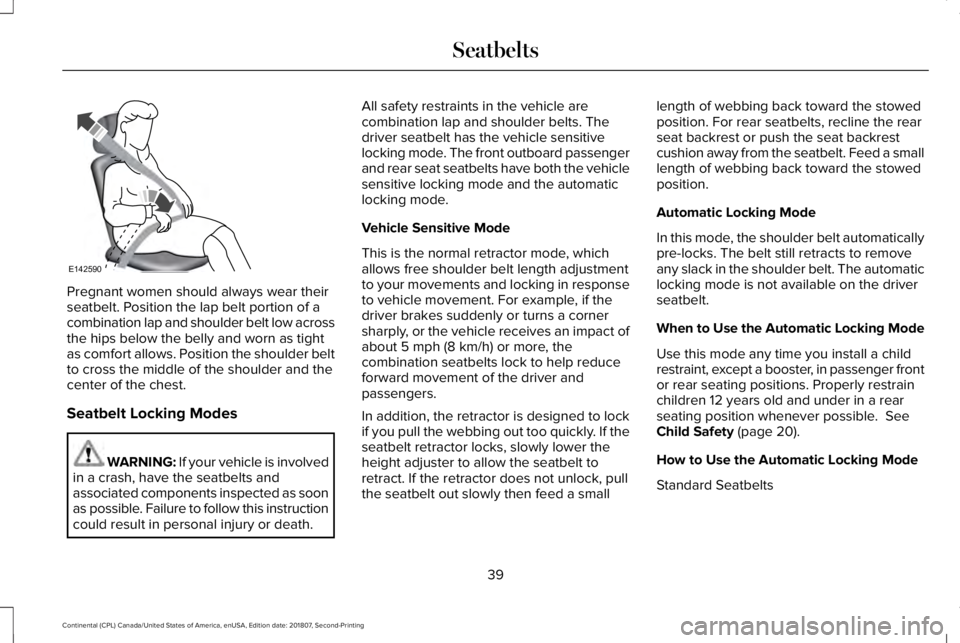
Pregnant women should always wear their
seatbelt. Position the lap belt portion of a
combination lap and shoulder belt low across
the hips below the belly and worn as tight
as comfort allows. Position the shoulder belt
to cross the middle of the shoulder and the
center of the chest.
Seatbelt Locking Modes
WARNING: If your vehicle is involved
in a crash, have the seatbelts and
associated components inspected as soon
as possible. Failure to follow this instruction
could result in personal injury or death. All safety restraints in the vehicle are
combination lap and shoulder belts. The
driver seatbelt has the vehicle sensitive
locking mode. The front outboard passenger
and rear seat seatbelts have both the vehicle
sensitive locking mode and the automatic
locking mode.
Vehicle Sensitive Mode
This is the normal retractor mode, which
allows free shoulder belt length adjustment
to your movements and locking in response
to vehicle movement. For example, if the
driver brakes suddenly or turns a corner
sharply, or the vehicle receives an impact of
about 5 mph (8 km/h) or more, the
combination seatbelts lock to help reduce
forward movement of the driver and
passengers.
In addition, the retractor is designed to lock
if you pull the webbing out too quickly. If the
seatbelt retractor locks, slowly lower the
height adjuster to allow the seatbelt to
retract. If the retractor does not unlock, pull
the seatbelt out slowly then feed a small length of webbing back toward the stowed
position. For rear seatbelts, recline the rear
seat backrest or push the seat backrest
cushion away from the seatbelt. Feed a small
length of webbing back toward the stowed
position.
Automatic Locking Mode
In this mode, the shoulder belt automatically
pre-locks. The belt still retracts to remove
any slack in the shoulder belt. The automatic
locking mode is not available on the driver
seatbelt.
When to Use the Automatic Locking Mode
Use this mode any time you install a child
restraint, except a booster, in passenger front
or rear seating positions. Properly restrain
children 12 years old and under in a rear
seating position whenever possible.
See
Child Safety (page 20).
How to Use the Automatic Locking Mode
Standard Seatbelts
39
Continental (CPL) Canada/United States of America, enUSA, Edition date: 201807, Second-Printing SeatbeltsE142590
Page 44 of 627
Note:
The rear inflatable seatbelts are
compatible with most infant and child safety
car seats and belt positioning booster seats
when properly installed. This is because they
are designed to fill with a cooled gas at a
lower pressure and at a slower rate than
traditional airbags. After inflation, the
shoulder portion of the seatbelt remains cool
to the touch.
The rear inflatable seatbelt consists of the
following:
• An inflatable bag in the shoulder seatbelt
webbing.
• Lap seatbelt webbing with automatic
locking mode.
• The same warning light, electronic
control and diagnostic unit as used for
the front seatbelts.
• Impact sensors in various parts of the
vehicle. How does the rear inflatable seatbelt
system work? WARNING: If a supplementary
restraint system component has deployed,
it will not function again. Have the system
and associated components inspected as
soon as possible. Failure to follow this
instruction could result in personal injury
or death.
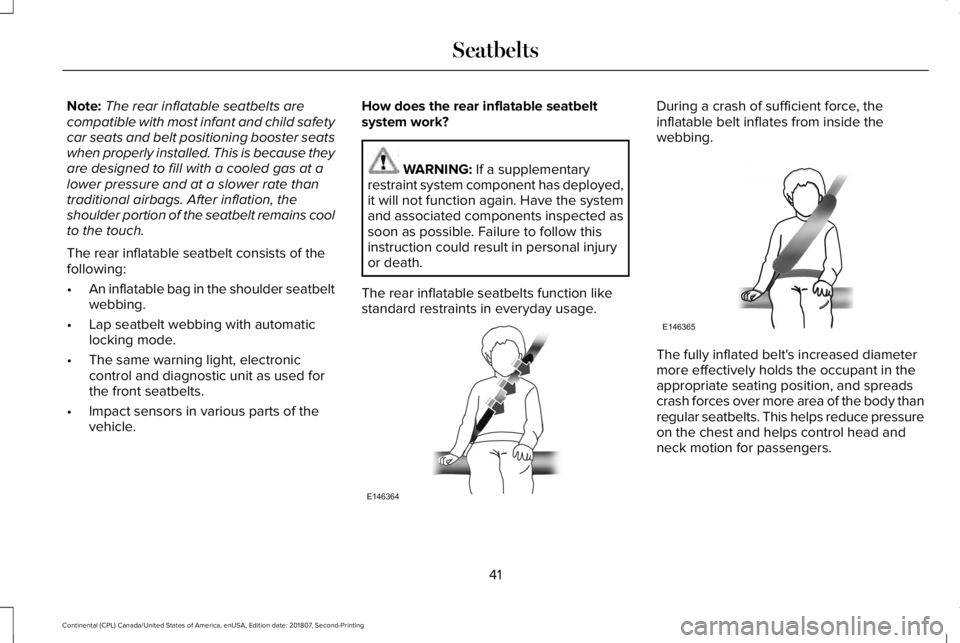
The rear inflatable seatbelts function like
standard restraints in everyday usage. During a crash of sufficient force, the
inflatable belt inflates from inside the
webbing.
The fully inflated belt's increased diameter
more effectively holds the occupant in the
appropriate seating position, and spreads
crash forces over more area of the body than
regular seatbelts. This helps reduce pressure
on the chest and helps control head and
neck motion for passengers.
41
Continental (CPL) Canada/United States of America, enUSA, Edition date: 201807, Second-Printing SeatbeltsE146364 E146365
Page 79 of 627
WARNING: Keep keys out of the
reach of children. Do not allow children to
operate or play near an open or moving
power decklid. You should supervise the
operation of the power decklid at all times.
Note: Do not drive with the decklid open
unless you switch off the power feature.
Make sure you fully close the decklid before
you drive your vehicle.
You can switch the power decklid feature on
or off in the information display. See
General
Information (page 112). The remote control
and instrument panel button still operates
the decklid regardless of the setting.
Opening and Closing the Power
Decklid WARNING:
Make sure all persons
are clear of the power decklid area before
using the power decklid control. Note:
You can reverse the decklid
movement. Press the instrument panel or
decklid button again, or press the remote
control button twice.
Note: Do not push or pull on the power
decklid while it is under operation, as this
may cause damage to your vehicle.
The decklid only operates with the
transmission in park (P).
If the decklid starts to close after it has fully
opened, this indicates there may be
excessive weight on the decklid or a possible
strut failure. A repetitive tone sounds and
the decklid closes under control. Remove
any excessive weight from the decklid. If the
decklid continues to close after opening,
have the system checked by an authorized
dealer.
From Inside Your Vehicle Press the button on the instrument
panel.With the Remote Control Press the button twice within three
seconds.
76
Continental (CPL) Canada/United States of America, enUSA, Edition date: 201807, Second-Printing Doors and LocksE159323 E138630
Page 84 of 627
Note:
All doors unlock if the two-stage
unlocking feature is turned off. See Locking
and Unlocking (page 68).
INTERIOR LUGGAGE
COMPARTMENT RELEASE WARNING:
Keep vehicle doors and
luggage compartment locked and keep
keys and remote transmitters out of a
child’ s reach. Unsupervised children could
lock themselves in the trunk and risk injury.
Children should be taught not to play in
vehicles. WARNING:
Do not leave children or
animals unattended in the vehicle. On hot
days, the temperature in the trunk or
vehicle interior can rise very quickly.
Exposure of people or animals to these
high temperatures for even a short time
can cause death or serious heat-related
injuries, including brain damage. Small
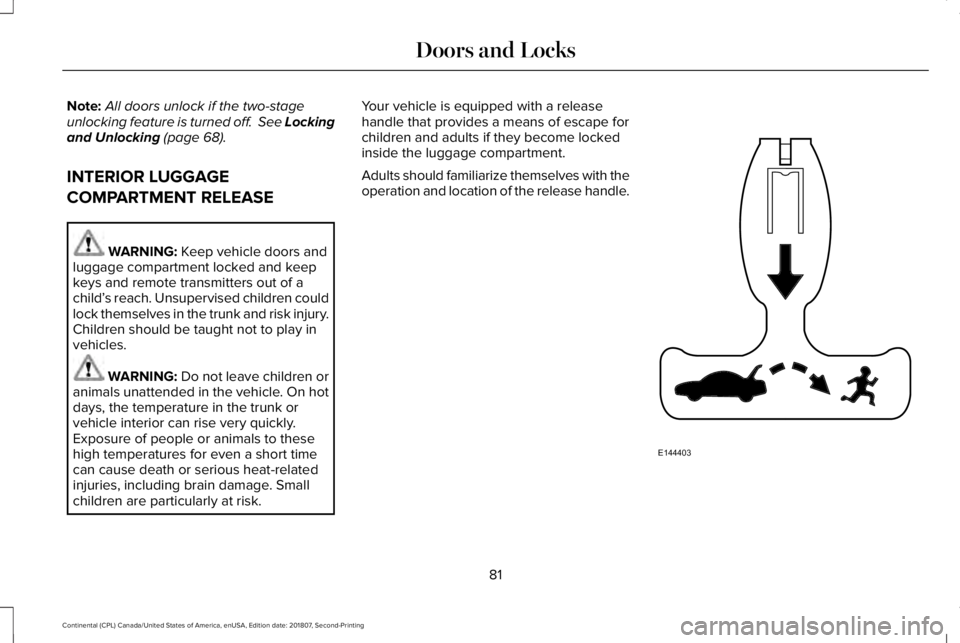
children are particularly at risk. Your vehicle is equipped with a release
handle that provides a means of escape for
children and adults if they become locked
inside the luggage compartment.
Adults should familiarize themselves with the
operation and location of the release handle.
81
Continental (CPL) Canada/United States of America, enUSA, Edition date: 201807, Second-Printing Doors and LocksE144403
Page 103 of 627
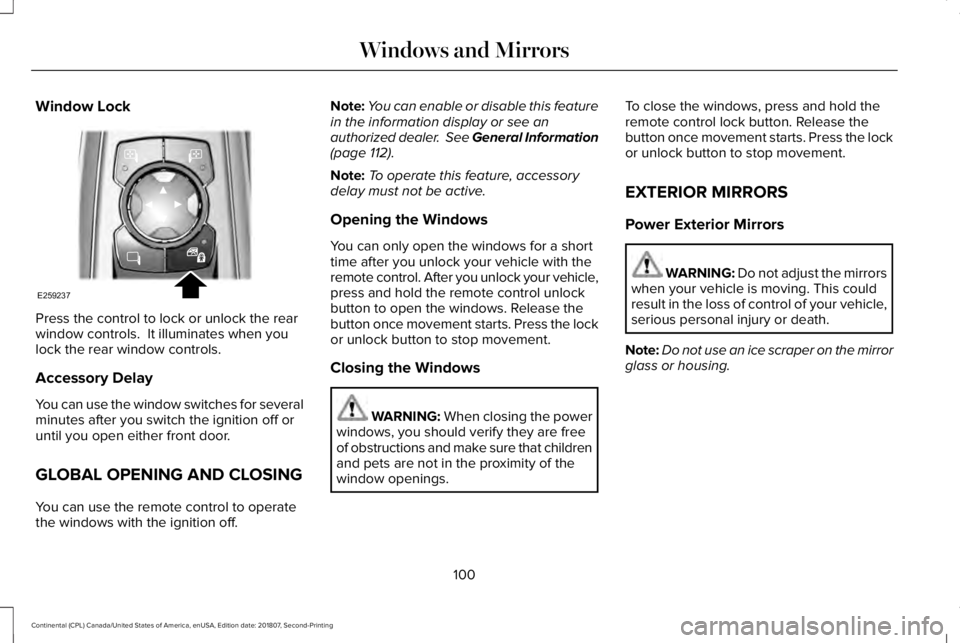
Window Lock
Press the control to lock or unlock the rear
window controls. It illuminates when you
lock the rear window controls.
Accessory Delay
You can use the window switches for several
minutes after you switch the ignition off or
until you open either front door.
GLOBAL OPENING AND CLOSING
You can use the remote control to operate
the windows with the ignition off. Note:
You can enable or disable this feature
in the information display or see an
authorized dealer. See General Information
(page 112).
Note: To operate this feature, accessory
delay must not be active.
Opening the Windows
You can only open the windows for a short
time after you unlock your vehicle with the
remote control. After you unlock your vehicle,
press and hold the remote control unlock
button to open the windows. Release the
button once movement starts. Press the lock
or unlock button to stop movement.
Closing the Windows WARNING: When closing the power
windows, you should verify they are free
of obstructions and make sure that children
and pets are not in the proximity of the
window openings. To close the windows, press and hold the
remote control lock button. Release the
button once movement starts. Press the lock
or unlock button to stop movement.
EXTERIOR MIRRORS
Power Exterior Mirrors
WARNING: Do not adjust the mirrors
when your vehicle is moving. This could
result in the loss of control of your vehicle,
serious personal injury or death.
Note: Do not use an ice scraper on the mirror
glass or housing.
100
Continental (CPL) Canada/United States of America, enUSA, Edition date: 201807, Second-Printing Windows and MirrorsE259237
Page 129 of 627

Blind Spot Information and Cross Traffic Alert System
Action
Message
A fault with the system has occurred. Contact an authorized dealer as so\
on as possible.
Blindspot System Fault
The system sensors are blocked. Contact an authorized dealer as soon as possible. See Blind
Spot Information System (page 250).
Blindspot Not Available Sensor Blocked
See Manual
The system detects a vehicle.
See Blind Spot Information System (page 250).
Vehicle Coming From X
The blind spot information system and cross traffic alert system sensors\
are blocked. See BlindSpot Information System
(page 250).
Cross Traffic Not Available Sensor Blocked
See Manual
A fault with the system has occurred. Contact an authorized dealer as so\
on as possible.
Cross Traffic System Fault
Doors and Locks Action
Message
The door listed is not completely closed.
X Door Ajar
The driver’s door is opened, your vehicle is in park and the engine is on.
Engine ON
Displays when the hood is not completely closed.
Hood Ajar
Displays when the door switches have been disabled.
Switches Inhibited Security Mode
There is a system malfunction with the child locks. Contact an authorize\
d dealer as soon as possible.
Child Lock Malfunction Service Required
126
Continental (CPL) Canada/United States of America, enUSA, Edition date: 201807, Second-Printing Information Displays
Page 130 of 627

Action
Message
Indicates that the rear seat interior door release switches and power wi\
ndows are switched off,preventing rear seat occupants from opening the doors or windows.
Child Lock ON
Indicates that the rear seat interior door release switches and power wi\
ndows are switched on.
Child Lock OFF
Displays when the door lock turns off.
Door Unlocked
Displays when the door lock is turned on and you attempt to open the doo\
r.
Doors Locked Unlock Before Opening
Indicates a driver door fault that requires manually opening the door by\
the override lever.Contact an authorized dealer.
Driver Door Fault Use Inside Override
Lever In Map Pocket
Indicates a fault with the electronic door system. Contact an authorized\
dealer.
Door Fault Service Required
Displays the factory keypad code after the keypad has been reset. See Keyless Entry (page
79).
Factory Keypad Code {X X X X X}
Driver Alert Action
Message
Stop and rest as soon as it is safe to do so.
Driver Alert Warning Rest Now
Take a rest soon.
Driver Alert Warning Rest Suggested
127
Continental (CPL) Canada/United States of America, enUSA, Edition date: 201807, Second-Printing Information Displays
Page 616 of 627
Readiness for Inspection and Maintenance
(I/M) Testing......................................................190
Center Console..............................................173
Changing a Bulb...........................................329
Front Direction Indicator..................................329
High-Intensity Discharge Headlamps...........329
LED Lamps...........................................................329
Changing a Fuse
..........................................307
Fuses.....................................................................307
Changing a Road Wheel.............................363 Dissimilar Spare Wheel and Tire Assembly
Information.......................................................364
Stowing the flat tire ...........................................369
Tire Change Procedure....................................365
Changing the 12V Battery..........................325
Changing the Engine Air Filter - 2.7L/ 3.0L................................................................330
Changing the Engine Air Filter - 3.7L......329
Changing the Wiper Blades.......................327 Changing the Windshield Wiper Blades.......327
Checking MyKey S
ystem Status.................60
MyKey Distance....................................................60
Number of Admin Keys........................................61
Number of MyKeys...............................................60
Checking the Wiper Blades.......................326
Child Restraint and Seatbelt Maintenance..................................................45
Child Restraint Positioning...........................34 Child Safety......................................................20
General Information.............................................20
Child Safety Locks..........................................36
Child Seats.......................................................22
Cleaning Leather Seats..............................338
Cleaning Products........................................332 Materials...............................................................332
Cleaning the Engine....................................335
Cleaning the Exterior...................................333 Cleaning the Headlamps..................................333
Exterior Chrome Parts.......................................334
Exterior Plastic Parts..........................................334
Stripes or Graphics.............................................334
Underbody...........................................................334
Under Hood.........................................................334
Cleaning the Instrument Panel and Instrument Cluster Lens...........................338
Cleaning the Interior
....................................336
Cleaning Black Label or Presidential
Interior...............................................................336
Cleaning the Wheels
...................................339
Cleaning the Windows and Wiper Blades...........................................................335
Clearing All MyKeys.......................................60
Climate............................................................459
Climate Control..............................................143
Climate Controlled Seats............................165 Ventilated Seats...................................................165 Coolant Check
See: Engine Coolant Check..............................318
Crash Sensors and Airbag Indicator..........56
Creating a MyKey...........................................59 Programming and Changing Configurable
Settings...............................................................60
Cross Traffic Alert
.........................................252
Blocked Sensors................................................255
Switching the System Off and On..................255
System Errors
......................................................255
System Lights, Messages and Audible Alerts.................................................................255
System Limitations.............................................255
Using the Cross Traffic Alert System............252
Cruise Control
..................................................87
Principle of Operation.......................................234
Customer Assistance
..................................283
D
Data Recording
................................................10
Comfort, Convenience and Entertainment
Data.......................................................................12
Event Data................................................................11
Service Data............................................................10
Services That Third Parties Provide..................12
Services That We Provide...................................12
Vehicles With a Modem.......................................12
613
Continental (CPL) Canada/United States of America, enUSA, Edition date: 201807, Second-Printing Index
Page 617 of 627
Vehicles With SYNC..............................................13
Daytime Running Lamps...............................93 Type One - Conventional
(Non-Configurable)..........................................94
Type Two - Configurable.....................................94
Declaration of Conformity..........................597
Radio Frequency Statement............................597
Digital Radio
...................................................410
HD Radio Reception and Station
Troubleshooting...............................................411
Direction Indicators
........................................96
Indicating a Lane Change..................................96
Doors and Locks.............................................68
Drive Control
..................................................261
Lincoln Drive Control..........................................261
Driver Alert
.....................................................243
Using Driver Alert...............................................244
Driver and Passenger Airbags....................49 Children and Airbags...........................................50
Proper Driver and Front Passenger Seating
Adjustment .........................................................50
Driver and Passenger Knee Airbags.........54
Driving Aids
....................................................243
Driving Hints..................................................273
Driving Through Water................................273
DRL See: Daytime Running Lamps...........................93 E
Economical Driving
......................................273
Electric Parking Brake.................................207 Applying the Electric Parking Brake..............207
Automatically Releasing the Electric Parking
Brake.................................................................208
Manually Releasing the Electric Parking Brake.................................................................208
Releasing the Electric Parking Brake if the Vehicle Battery is Running Out of
Charge..............................................................208
Electromagnetic Compatibility
...................561
Emergency Door Release.............................75
Emission Law..................................................187 Noise Emissions Warranty, Prohibited
Tampering Acts and Maintenance.............188
Tampering With a Noise Control System......187
End User License Agreement...................566 VEHICLE SOFTWARE END USER LICENSE
AGREEMENT (EULA) ....................................566
Engine Block Heater
.....................................178
Using the Engine Block Heater.......................179
Engine Coolant Check.................................318 Adding Coolant....................................................319
Coolant Change...................................................321
Engine Coolant Temperature
Management...................................................322 Fail-Safe Cooling.................................................321
Recycled Coolant...............................................320
Severe Climates.................................................320
Engine Emission Control.............................187
Engine Immobilizer See: Passive Anti-Theft System........................83
Engine Oil Check...........................................316 Adding Engine Oil...............................................317
Engine Oil Dipstick - 2.7L/3.0L...................316
Engine Oil Dipstick - 3.7L............................316
Engine Specifications - 2.7L.......................373 Drivebelt Routing................................................373
Engine Specifications - 3.0L......................374 Drivebelt Routing................................................375
Engine Specifications - 3.7L.......................376 Drivebelt Routing................................................376
Entertainment................................................446 AM/FM Radio.......................................................448
Apps.......................................................................459
Bluetooth Stereo or USB..................................457
CD (If equipped)..................................................456
HD Radio ™ Information (If Available)..............452
SiriusXM® Satellite Radio (If Activated).........448
Sources.................................................................447
Supported Media Players, Formats and Metadata Information...................................459
USB Ports.............................................................459
Environment......................................................17
614
Continental (CPL) Canada/United States of America, enUSA, Edition date: 201807, Second-Printing Index
Page 620 of 627
Installing Child Restraints.............................22
Inflatable Seatbelts...............................................26
Standard Seatbelts...............................................23
Using Lap and Shoulder Belts...........................22
Using Lower Anchors and Tethers for
CHildren (LATCH).............................................28
Using Tether Straps..............................................30
Installing the Vehicle Identification Card..............................................................405
Instrument Cluster........................................106
Instrument Lighting Dimmer........................93
Instrument Panel Overview...........................18
Interior Lamps..................................................97 Front Interior Lamp...............................................97
Rear Interior Lamps..............................................98
Interior Luggage Compartment Release............................................................81
Interior Mirror.................................................103
Auto-Dimming Mirror..........................................103
Introduction
.........................................................7
J
Jump Starting the Vehicle..........................278 Connecting the Jumper Cables......................279
Jump Starting......................................................280
Preparing Your Vehicle.....................................278
Removing the Jumper Cables........................280 K
Keyless Entry
....................................................79
SECURICODE™ Keyless Entry Keypad.............79
Keyless Starting
.............................................175
Ignition Modes......................................................175
Keys and Remote Controls
...........................63
L
Lane Keeping System.................................244 Switching the System On and Off..................245
Lighting Control
................................................91
Flashing the Headlamp High Beam.................92
Headlamp High Beam.........................................92
Lighting...............................................................91 General Information..............................................91
Lincoln Automotive Financial Services......14
Lincoln Protect..............................................525 Lincoln Protect (CANADA ONLY)...................526
Lincoln Protect Extended Service Plans (U.S.
Only)
..................................................................525
Load Carrying
................................................263
Load Limit.......................................................263 Special Loading Instructions for Owners of
Pick-up Trucks and Utility-type
Vehicles............................................................267 Vehicle Loading - with and without a
Trailer................................................................263
Locking and Unlocking
.................................68
Activating Intelligent Access.............................68
Autolock..................................................................73
Battery Saver..........................................................74
Door Lock Indicator..............................................68
Door Lock Switch Inhibitor.................................68
Emergency Locking...............................................71
Illuminated Entry....................................................73
Illuminated Exit.......................................................73
Locking and Unlocking the Doors From
Inside....................................................................71
Opening the Luggage Compartment...............74
Remote Control.....................................................70
Smart Unlocks for Intelligent Access Keys......................................................................72
Unlocking the Driver Door with the Key Blade....................................................................72
Lug Nuts See: Changing a Road Wheel.........................363
M
Maintenance...................................................310 General Information............................................310
Media Hub
.......................................................416
617
Continental (CPL) Canada/United States of America, enUSA, Edition date: 201807, Second-Printing Index