fuel LINCOLN CONTINENTAL 2019 User Guide
[x] Cancel search | Manufacturer: LINCOLN, Model Year: 2019, Model line: CONTINENTAL, Model: LINCOLN CONTINENTAL 2019Pages: 627, PDF Size: 6.39 MB
Page 113 of 627
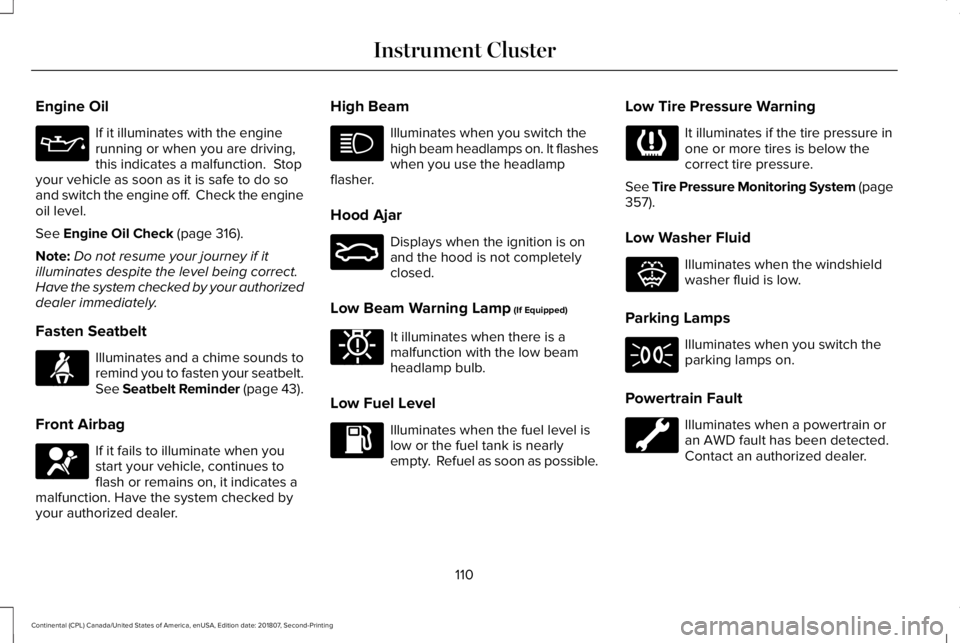
Engine Oil
If it illuminates with the engine
running or when you are driving,
this indicates a malfunction. Stop
your vehicle as soon as it is safe to do so
and switch the engine off. Check the engine
oil level.
See Engine Oil Check (page 316).
Note: Do not resume your journey if it
illuminates despite the level being correct.
Have the system checked by your authorized
dealer immediately.
Fasten Seatbelt Illuminates and a chime sounds to
remind you to fasten your seatbelt.
See
Seatbelt Reminder (page 43).
Front Airbag If it fails to illuminate when you
start your vehicle, continues to
flash or remains on, it indicates a
malfunction. Have the system checked by
your authorized dealer. High Beam Illuminates when you switch the
high beam headlamps on. It flashes
when you use the headlamp
flasher.
Hood Ajar Displays when the ignition is on
and the hood is not completely
closed.
Low Beam Warning Lamp
(If Equipped) It illuminates when there is a
malfunction with the low beam
headlamp bulb.
Low Fuel Level Illuminates when the fuel level is
low or the fuel tank is nearly
empty. Refuel as soon as possible.Low Tire Pressure Warning It illuminates if the tire pressure in
one or more tires is below the
correct tire pressure.
See Tire Pressure Monitoring System (page
357
).
Low Washer Fluid Illuminates when the windshield
washer fluid is low.
Parking Lamps Illuminates when you switch the
parking lamps on.
Powertrain Fault Illuminates when a powertrain or
an AWD fault has been detected.
Contact an authorized dealer.
110
Continental (CPL) Canada/United States of America, enUSA, Edition date: 201807, Second-Printing Instrument Cluster E71880 E67017 E159324 E181350 E132353
Page 117 of 627
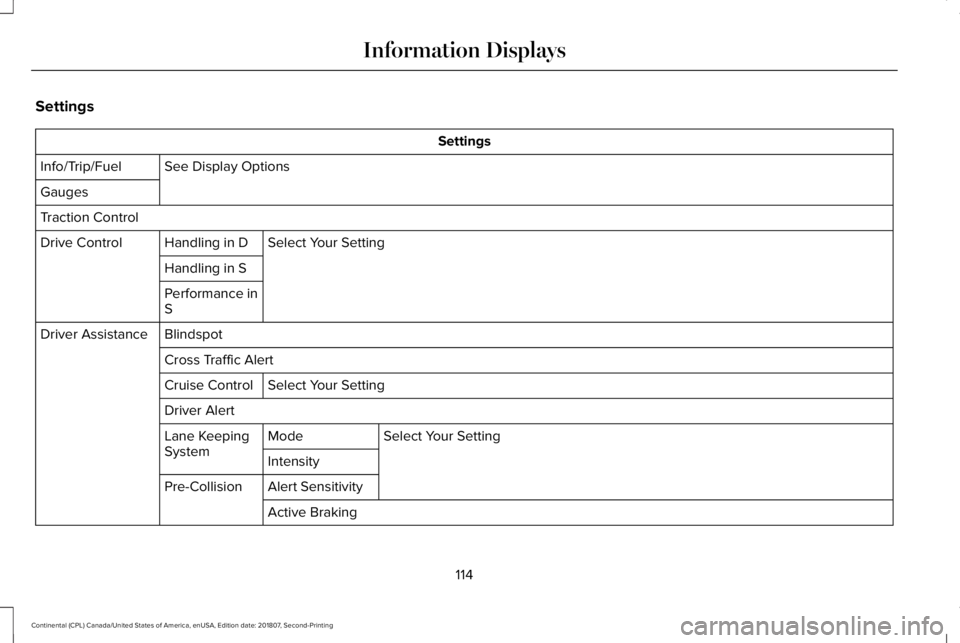
Settings
Settings
See Display Options
Info/Trip/Fuel
Gauges
Traction Control
Select Your Setting
Handling in D
Drive Control
Handling in S
Performance in
S
Blindspot
Driver Assistance
Cross Traffic AlertSelect Your Setting
Cruise Control
Driver Alert
Select Your Setting
Mode
Lane Keeping
System
Intensity
Alert Sensitivity
Pre-Collision
Active Braking
114
Continental (CPL) Canada/United States of America, enUSA, Edition date: 201807, Second-Printing Information Displays
Page 120 of 627
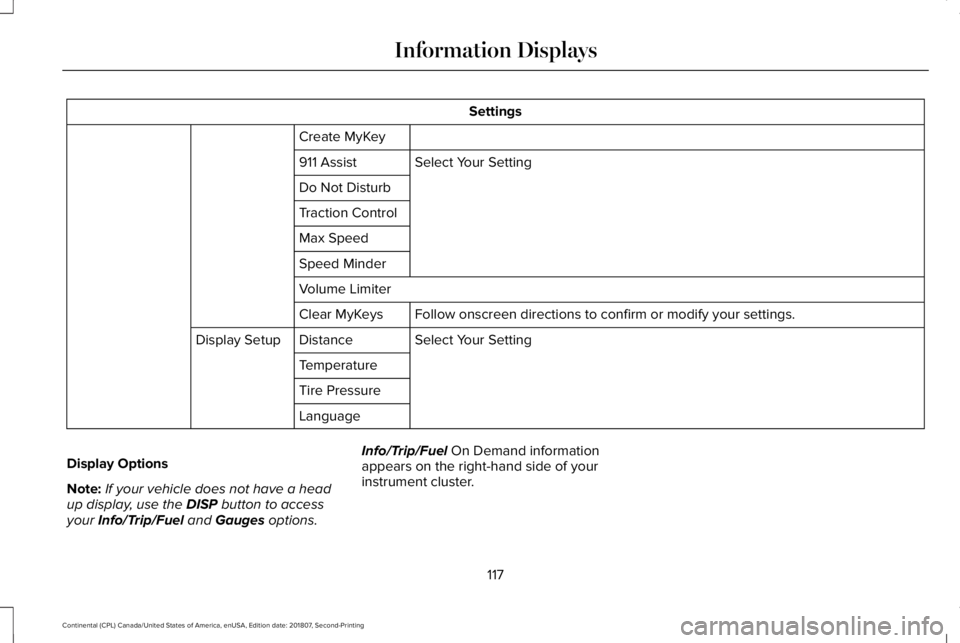
Settings
Create MyKey Select Your Setting
911 Assist
Do Not Disturb
Traction Control
Max Speed
Speed Minder
Volume Limiter
Follow onscreen directions to confirm or modify your settings.
Clear MyKeys
Select Your Setting
Distance
Display Setup
Temperature
Tire Pressure
Language
Display Options
Note: If your vehicle does not have a head
up display, use the DISP button to access
your Info/Trip/Fuel and Gauges options. Info/Trip/Fuel
On Demand information
appears on the right-hand side of your
instrument cluster.
117
Continental (CPL) Canada/United States of America, enUSA, Edition date: 201807, Second-Printing Information Displays
Page 121 of 627
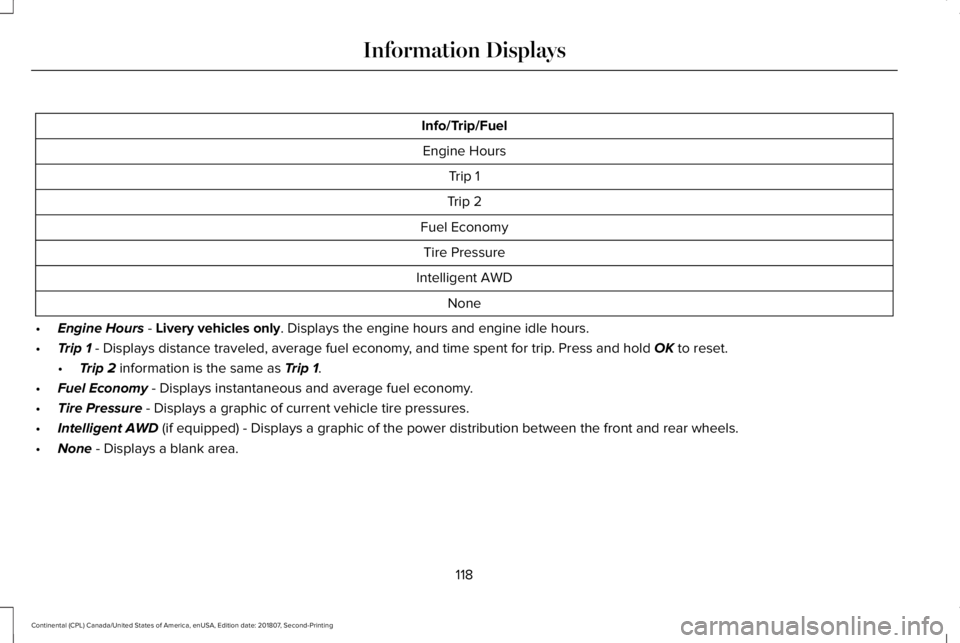
Info/Trip/Fuel
Engine Hours Trip 1
Trip 2
Fuel Economy Tire Pressure
Intelligent AWD None
• Engine Hours - Livery vehicles only. Displays the engine hours and engine idle hours.
• Trip 1
- Displays distance traveled, average fuel economy, and time spent for trip. Press and hold OK to reset.
• Trip 2
information is the same as Trip 1.
• Fuel Economy
- Displays instantaneous and average fuel economy.
• Tire Pressure
- Displays a graphic of current vehicle tire pressures.
• Intelligent AWD
(if equipped) - Displays a graphic of the power distribution between \
the front and rear wheels.
• None
- Displays a blank area.
118
Continental (CPL) Canada/United States of America, enUSA, Edition date: 201807, Second-Printing Information Displays
Page 122 of 627
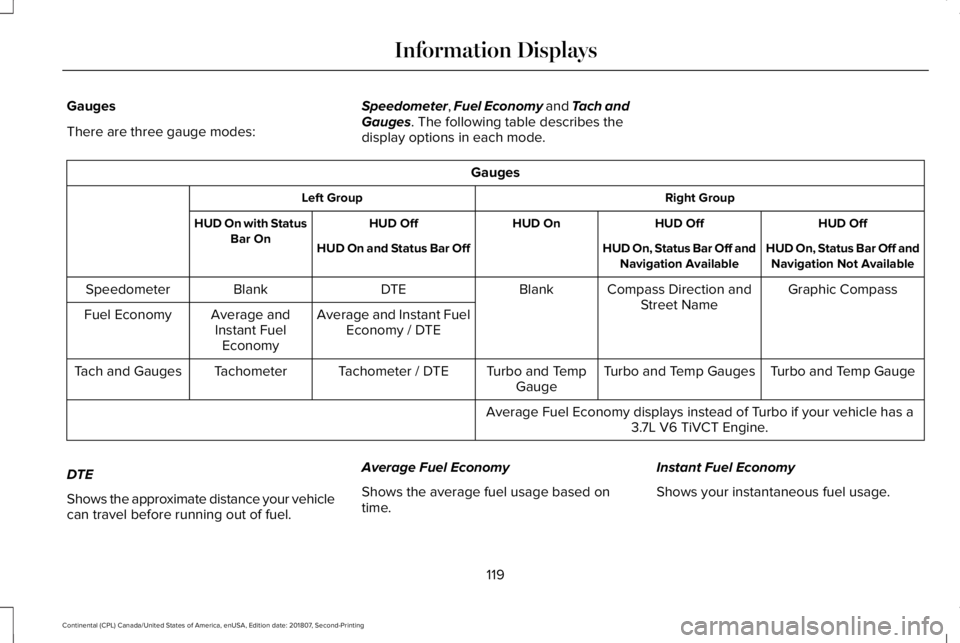
Gauges
There are three gauge modes:
Speedometer, Fuel Economy and Tach and
Gauges. The following table describes the
display options in each mode. Gauges
Right Group
Left Group
HUD Off
HUD Off
HUD On
HUD Off
HUD On with Status
Bar On HUD On, Status Bar Off and
Navigation Not Available
HUD On, Status Bar Off and
Navigation Available
HUD On and Status Bar Off
Graphic Compass
Compass Direction and
Street Name
Blank
DTE
Blank
Speedometer
Average and Instant FuelEconomy / DTE
Average and
Instant Fuel Economy
Fuel Economy
Turbo and Temp Gauge
Turbo and Temp Gauges
Turbo and Temp
Gauge
Tachometer / DTE
Tachometer
Tach and Gauges
Average Fuel Economy displays instead of Turbo if your vehicle has a3.7L V6 TiVCT Engine.
DTE
Shows the approximate distance your vehicle
can travel before running out of fuel. Average Fuel Economy
Shows the average fuel usage based on
time.
Instant Fuel Economy
Shows your instantaneous fuel usage.
119
Continental (CPL) Canada/United States of America, enUSA, Edition date: 201807, Second-Printing Information Displays
Page 126 of 627
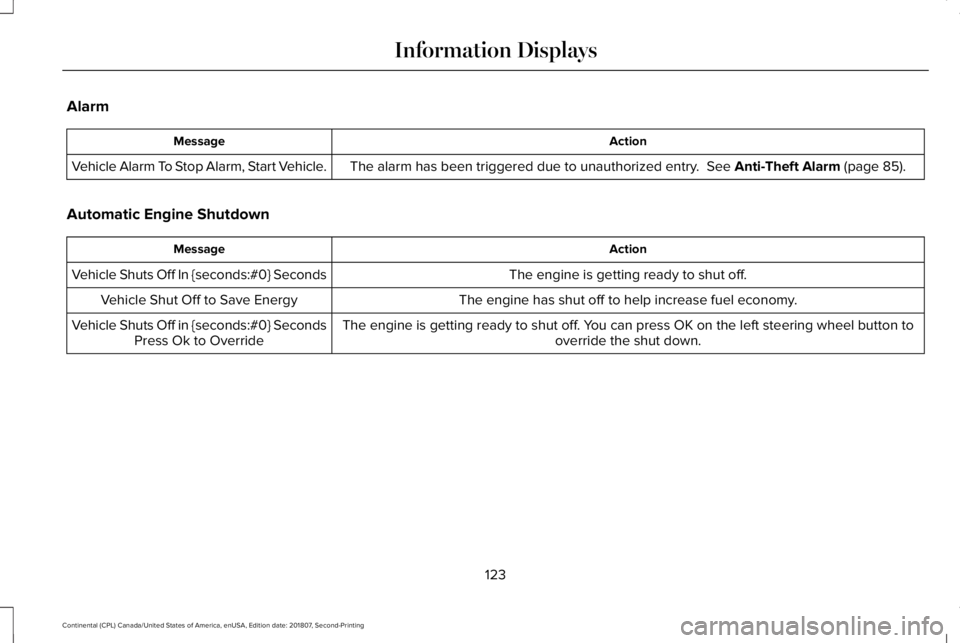
Alarm
Action
Message
The alarm has been triggered due to unauthorized entry. See Anti-Theft Alarm (page 85).
Vehicle Alarm To Stop Alarm, Start Vehicle.
Automatic Engine Shutdown Action
Message
The engine is getting ready to shut off.
Vehicle Shuts Off In {seconds:#0} Seconds
The engine has shut off to help increase fuel economy.
Vehicle Shut Off to Save Energy
The engine is getting ready to shut off. You can press OK on the left steering wheel button tooverride the shut down.
Vehicle Shuts Off in {seconds:#0} Seconds
Press Ok to Override
123
Continental (CPL) Canada/United States of America, enUSA, Edition date: 201807, Second-Printing Information Displays
Page 131 of 627
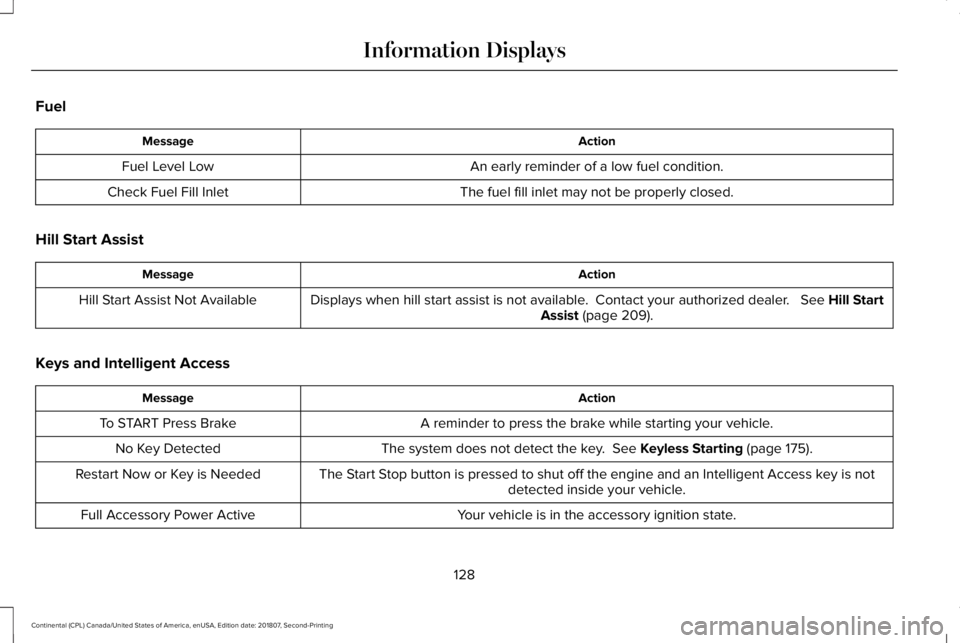
Fuel
Action
Message
An early reminder of a low fuel condition.
Fuel Level Low
The fuel fill inlet may not be properly closed.
Check Fuel Fill Inlet
Hill Start Assist Action
Message
Displays when hill start assist is not available. Contact your authorized dealer. See Hill Start
Assist (page 209).
Hill Start Assist Not Available
Keys and Intelligent Access Action
Message
A reminder to press the brake while starting your vehicle.
To START Press Brake
The system does not detect the key.
See Keyless Starting (page 175).
No Key Detected
The Start Stop button is pressed to shut off the engine and an Intelligent Access k\
ey is notdetected inside your vehicle.
Restart Now or Key is Needed
Your vehicle is in the accessory ignition state.
Full Accessory Power Active
128
Continental (CPL) Canada/United States of America, enUSA, Edition date: 201807, Second-Printing Information Displays
Page 143 of 627
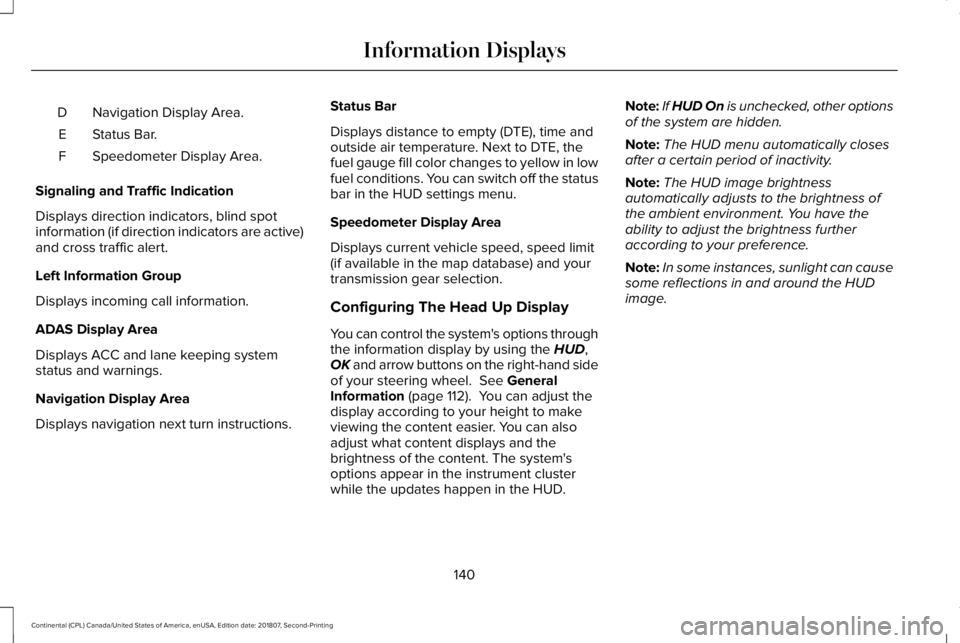
Navigation Display Area.
D
Status Bar.
E
Speedometer Display Area.
F
Signaling and Traffic Indication
Displays direction indicators, blind spot
information (if direction indicators are active)
and cross traffic alert.
Left Information Group
Displays incoming call information.
ADAS Display Area
Displays ACC and lane keeping system
status and warnings.
Navigation Display Area
Displays navigation next turn instructions. Status Bar
Displays distance to empty (DTE), time and
outside air temperature. Next to DTE, the
fuel gauge fill color changes to yellow in low
fuel conditions. You can switch off the status
bar in the HUD settings menu.
Speedometer Display Area
Displays current vehicle speed, speed limit
(if available in the map database) and your
transmission gear selection.
Configuring The Head Up Display
You can control the system's options through
the information display by using the HUD,
OK and arrow buttons on the right-hand side
of your steering wheel.
See General
Information (page 112). You can adjust the
display according to your height to make
viewing the content easier. You can also
adjust what content displays and the
brightness of the content. The system's
options appear in the instrument cluster
while the updates happen in the HUD. Note:
If HUD On is unchecked, other options
of the system are hidden.
Note: The HUD menu automatically closes
after a certain period of inactivity.
Note: The HUD image brightness
automatically adjusts to the brightness of
the ambient environment. You have the
ability to adjust the brightness further
according to your preference.
Note: In some instances, sunlight can cause
some reflections in and around the HUD
image.
140
Continental (CPL) Canada/United States of America, enUSA, Edition date: 201807, Second-Printing Information Displays
Page 151 of 627
Note:
Do not use harsh chemicals, razor
blades or other sharp objects to clean or
remove decals from the inside of the heated
rear window. The vehicle warranty may not
cover damage to the heated rear window
grid lines.
HEATED EXTERIOR MIRRORS
When you switch the heated rear window
on, the heated exterior mirrors turn on.
Note: Do not remove ice from the mirrors
with a scraper or adjust the mirror glass
when it is frozen in place.
Note: Do not clean the mirror housing or
glass with harsh abrasives, fuel or other
petroleum-based cleaning products. The
vehicle warranty may not cover damage
caused to the mirror housing or glass. CABIN AIR FILTER
Your vehicle is equipped with a cabin air
filter, which gives you and your passengers
the following benefits:
•
It improves your driving comfort by
reducing particle and odor concentration.
• It improves the interior compartment
cleanliness.
• It protects the climate control
components from particle deposits.
You can locate the cabin air filter behind the
glove box.
Note: Make sure you have a cabin air filter
installed at all times. This prevents foreign
objects from entering the system. Running
the system without a filter in place could
result in degradation or damage to the
system.
Replace the filter at regular intervals. See
Scheduled Maintenance (page 528).
For additional cabin air filter information, or
to replace the filter, see a qualified
technician. REMOTE START
The climate control system adjusts the
interior temperature during remote start.
You can switch this feature on or off and
adjust the settings using the information
display controls.
See Information Displays
(page 112).
You cannot adjust the climate control setting
during remote start operation. Switch the
ignition on to make adjustments.
Based on your remote start settings, the
following vehicle-dependent features may
or may not remain on after remote starting
your vehicle:
• Climate controlled seats.
• Heated steering wheel.
• Heated mirrors.
• Heated rear window.
• Windshield wiper de-icer.
Note: For dual zone climate controlled seats,
the passenger seat setting defaults to match
the driver seat during remote start.
148
Continental (CPL) Canada/United States of America, enUSA, Edition date: 201807, Second-Printing Climate Control
Page 180 of 627
2. Open the floor console storage
compartment lid.
3. Insert the passive key into the backup slot.
4. Press the push button ignition switch.
If the engine does not start after three
attempts, wait ten seconds and follow the
flooded engine procedure.
1. Apply the parking brake.
2. Press the brake pedal.
3. Shift into park (P).
4. Fully press the accelerator pedal.
5. Briefly press the push button ignition switch.
Fast Restart
The fast restart feature allows you to restart
your vehicle within 20 seconds of switching
it off, even if it does not detect a valid
passive key. Within 20 seconds of switching the engine
off, press the brake pedal and press the push
button ignition switch. After 20 seconds, you
can no longer start your vehicle if it does not
detect a valid passive key.
Once your vehicle starts, it remains running
until you press the push button ignition
switch, even if your vehicle does not detect
a valid passive key. If you open and close a
door while your vehicle is running, the
system searches for a valid passive key.
After 20 seconds, you can no longer start
your vehicle if it does not detect a valid
passive key.
Automatic Engine Shutdown
For vehicles with a keyless ignition, this
automatically shuts down your vehicle if it
has been idling for an extended period. The
ignition also turns off to save battery power.
Before your vehicle shuts down, a message
appears in the information display showing
a timer counting down. If you do not
intervene within 30 seconds, your vehicle
shuts down. Another message appears in
the information display to inform you that
your vehicle has shut down to save fuel.Start your vehicle as normal.
Automatic Engine Shutdown Override
Note:
You cannot permanently switch off
the automatic shutdown. The system
defaults to normal mode when you start your
vehicle.
You can stop the shutdown, or reset the
timer, at any point before the 30-second
countdown has expired by doing any of the
following:
• Interacting with your vehicle, for example
pressing the brake or accelerator pedal.
• Disabling the shutdown using the
information display. See Information
Displays (page 112).
• Pressing the OK or RESET button during
the 30-second countdown.
Stopping the Engine When Your
Vehicle is Stationary
Note: The ignition, all electrical circuits and
all warning lamps and indicators will be
turned off.
177
Continental (CPL) Canada/United States of America, enUSA, Edition date: 201807, Second-Printing Starting and Stopping the Engine