key LINCOLN CONTINENTAL 2019 User Guide
[x] Cancel search | Manufacturer: LINCOLN, Model Year: 2019, Model line: CONTINENTAL, Model: LINCOLN CONTINENTAL 2019Pages: 627, PDF Size: 6.39 MB
Page 67 of 627
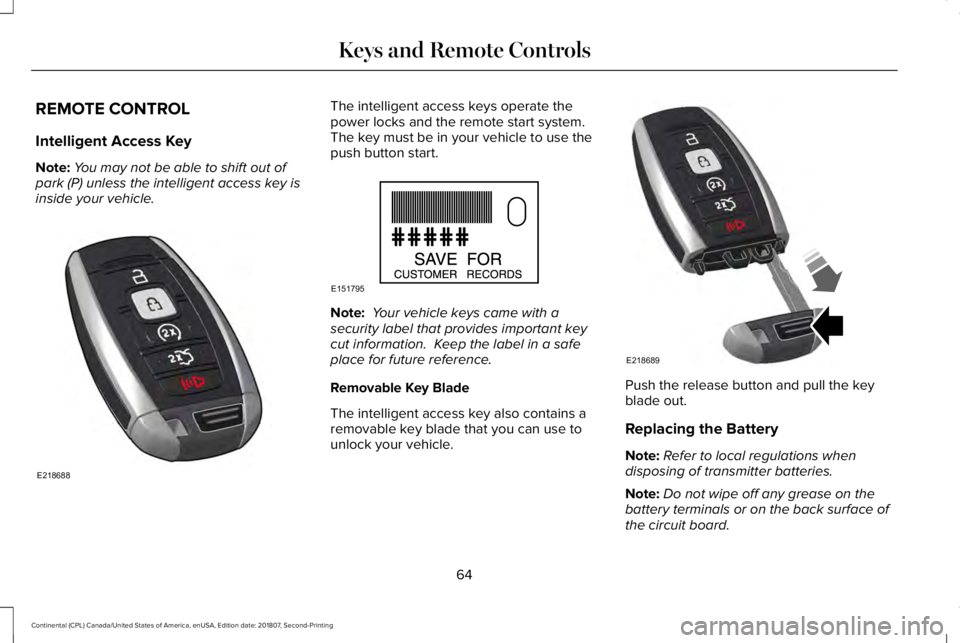
REMOTE CONTROL
Intelligent Access Key
Note:
You may not be able to shift out of
park (P) unless the intelligent access key is
inside your vehicle. The intelligent access keys operate the
power locks and the remote start system.
The key must be in your vehicle to use the
push button start.
Note:
Your vehicle keys came with a
security label that provides important key
cut information. Keep the label in a safe
place for future reference.
Removable Key Blade
The intelligent access key also contains a
removable key blade that you can use to
unlock your vehicle. Push the release button and pull the key
blade out.
Replacing the Battery
Note:
Refer to local regulations when
disposing of transmitter batteries.
Note: Do not wipe off any grease on the
battery terminals or on the back surface of
the circuit board.
64
Continental (CPL) Canada/United States of America, enUSA, Edition date: 201807, Second-Printing Keys and Remote ControlsE218688 E151795 E218689
Page 68 of 627
Note:
Replacing the battery does not erase
the programmed key from your vehicle. The
transmitter should operate normally.
A message appears in the information
display when the remote control battery is
low. See Information Messages (page 120).
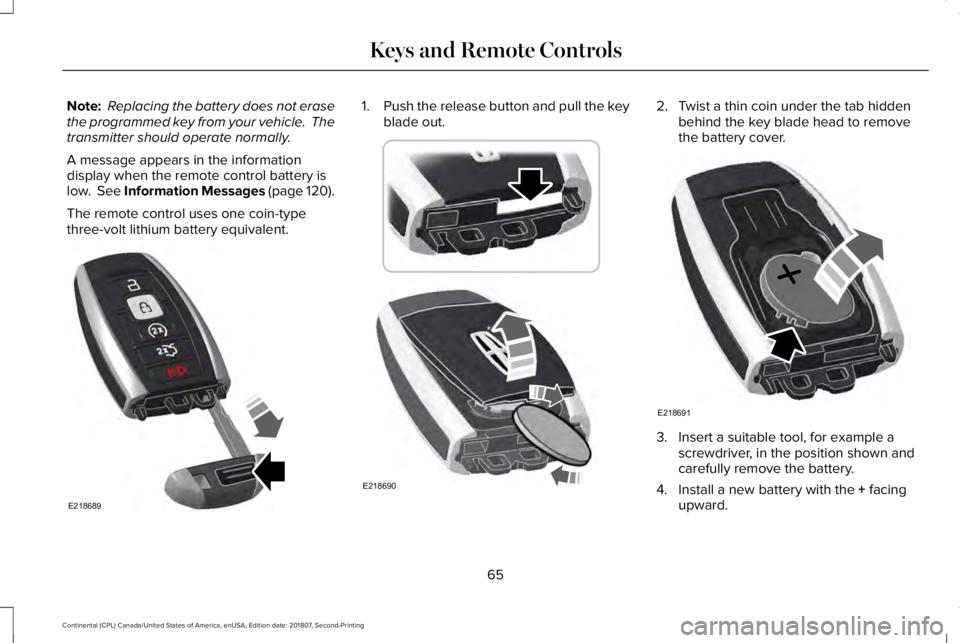
The remote control uses one coin-type
three-volt lithium battery equivalent. 1.
Push the release button and pull the key
blade out. 2. Twist a thin coin under the tab hidden
behind the key blade head to remove
the battery cover. 3. Insert a suitable tool, for example a
screwdriver, in the position shown and
carefully remove the battery.
4. Install a new battery with the
+ facing
upward.
65
Continental (CPL) Canada/United States of America, enUSA, Edition date: 201807, Second-Printing Keys and Remote ControlsE218689 E218690 E218691
Page 69 of 627
5. Reinstall the battery cover and the key
blade.
Car Finder Press the button twice within three
seconds. A tone sounds and the
direction indicators will flash. We
recommend you use this method to locate
your vehicle, rather than using the panic
alarm.
Sounding the Panic Alarm
Note: The panic alarm only operates when
the ignition is off. Press the button to sound the
panic alarm. Press the button
again or switch the ignition on to
turn it off. Remote Start WARNING: To avoid exhaust fumes,
do not use remote start if your vehicle is
parked indoors or in areas that are not well
ventilated.
Note: Do not use remote start if your fuel
level is low. The remote start button is on the
transmitter.
This feature allows you to start your vehicle
from the outside. The transmitter has an
extended operating range.
You can configure your automatic climate
control to operate when you remote start
your vehicle.
See Climate Control (page
143).
Many states and provinces have restrictions
for the use of remote start. Check your local
and state or provincial laws for specific
requirements regarding remote start
systems. The remote start system does not work if any
of the following occur:
•
The ignition is on.
• The anti-theft alarm triggers.
• You switch the feature off in the
information display.
• The hood is open.
• The transmission is not in park (P).
• The battery voltage is below the
minimum operating voltage.
Remote Control Feedback (If Equipped)
An LED on the remote control provides status
feedback of remote start or stop commands. Status
LED
Remote startsuccessful
Solid green
Remote stopsuccessful
Solid red
Request failed or
status not received
Blinking red
Status incomplete
Blinking green
66
Continental (CPL) Canada/United States of America, enUSA, Edition date: 201807, Second-Printing Keys and Remote ControlsE138623 E138624 E138625
Page 70 of 627
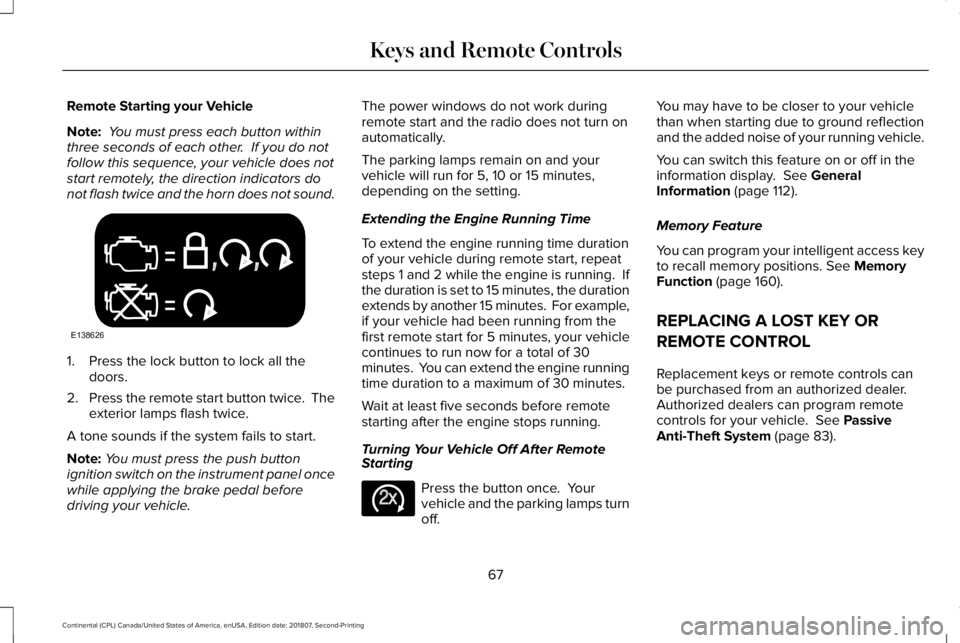
Remote Starting your Vehicle
Note:
You must press each button within
three seconds of each other. If you do not
follow this sequence, your vehicle does not
start remotely, the direction indicators do
not flash twice and the horn does not sound. 1. Press the lock button to lock all the
doors.
2. Press the remote start button twice. The
exterior lamps flash twice.
A tone sounds if the system fails to start.
Note: You must press the push button
ignition switch on the instrument panel once
while applying the brake pedal before
driving your vehicle. The power windows do not work during
remote start and the radio does not turn on
automatically.
The parking lamps remain on and your
vehicle will run for 5, 10 or 15 minutes,
depending on the setting.
Extending the Engine Running Time
To extend the engine running time duration
of your vehicle during remote start, repeat
steps 1 and 2 while the engine is running. If
the duration is set to 15 minutes, the duration
extends by another 15 minutes. For example,
if your vehicle had been running from the
first remote start for 5 minutes, your vehicle
continues to run now for a total of 30
minutes. You can extend the engine running
time duration to a maximum of 30 minutes.
Wait at least five seconds before remote
starting after the engine stops running.
Turning Your Vehicle Off After Remote
Starting
Press the button once. Your
vehicle and the parking lamps turn
off.You may have to be closer to your vehicle
than when starting due to ground reflection
and the added noise of your running vehicle.
You can switch this feature on or off in the
information display. See General
Information (page 112).
Memory Feature
You can program your intelligent access key
to recall memory positions.
See Memory
Function (page 160).
REPLACING A LOST KEY OR
REMOTE CONTROL
Replacement keys or remote controls can
be purchased from an authorized dealer.
Authorized dealers can program remote
controls for your vehicle.
See Passive
Anti-Theft System (page 83).
67
Continental (CPL) Canada/United States of America, enUSA, Edition date: 201807, Second-Printing Keys and Remote ControlsE138626 E138625
Page 71 of 627
LOCKING AND UNLOCKING
Your vehicle has an intelligent electronically
controlled door system that is in constant
communication with overall vehicle systems.
When you lock your vehicle using the lock
switch on each door interior trim panel, or
by using the keyless entry keypad or the lock
sensor on each door exterior trim panel, the
exterior door handle switches do not release
the doors. This helps to secure your vehicle
and prevent unauthorized entry. Also, when
your vehicle reaches a speed greater than
12 mph (20 km/h) the exterior door handle
switches do not release the doors.
If the airbags deploy or the fuel pump shutoff
switch activates, all interior and exterior
unlock switches do not unlock your door for
six seconds. This helps to secure the doors
in the event of a crash. After six seconds, all
switches reset and you can open the doors
using the interior and exterior unlatch
switches. Door Lock Indicator
An LED on each front door window trim
illuminates when you lock the doors. It
remains on for 2 to 5 seconds after you
switch the ignition off.
Door Lock Switch Inhibitor
When you electronically lock your vehicle,
the door lock switches and the interior
luggage compartment release switch do not
operate after 20 seconds. You must unlock
your vehicle with the remote control or
keyless entry keypad, or switch the ignition
on, to restore function to these switches.
You can switch this feature on or off in the
information display.
See General
Information (page 112).
Activating Intelligent Access
The intelligent access key must be within 3 ft
(1 m)
of the door or luggage compartment
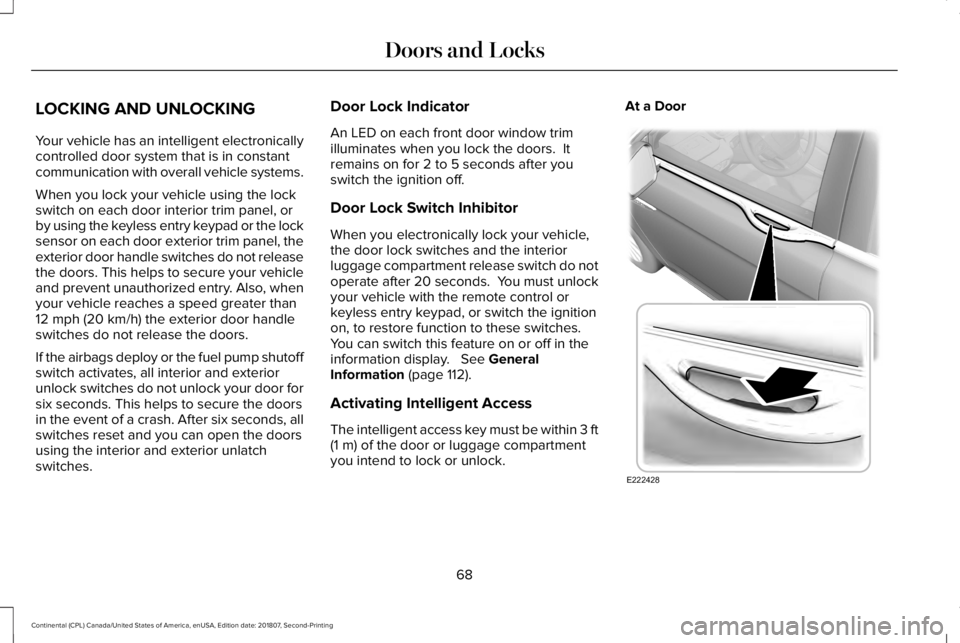
you intend to lock or unlock. At a Door
68
Continental (CPL) Canada/United States of America, enUSA, Edition date: 201807, Second-Printing Doors and LocksE222428
Page 72 of 627
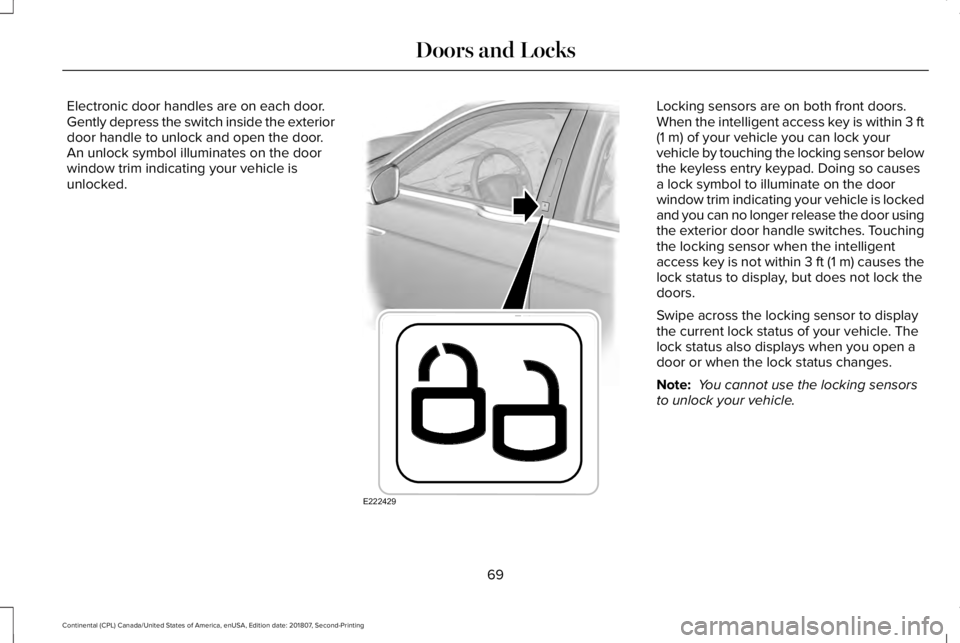
Electronic door handles are on each door.
Gently depress the switch inside the exterior
door handle to unlock and open the door.
An unlock symbol illuminates on the door
window trim indicating your vehicle is
unlocked. Locking sensors are on both front doors.
When the intelligent access key is within 3 ft
(1 m) of your vehicle you can lock your
vehicle by touching the locking sensor below
the keyless entry keypad. Doing so causes
a lock symbol to illuminate on the door
window trim indicating your vehicle is locked
and you can no longer release the door using
the exterior door handle switches. Touching
the locking sensor when the intelligent
access key is not within 3 ft (1 m) causes the
lock status to display, but does not lock the
doors.
Swipe across the locking sensor to display
the current lock status of your vehicle. The
lock status also displays when you open a
door or when the lock status changes.
Note: You cannot use the locking sensors
to unlock your vehicle.
69
Continental (CPL) Canada/United States of America, enUSA, Edition date: 201807, Second-Printing Doors and LocksE222429
Page 73 of 627
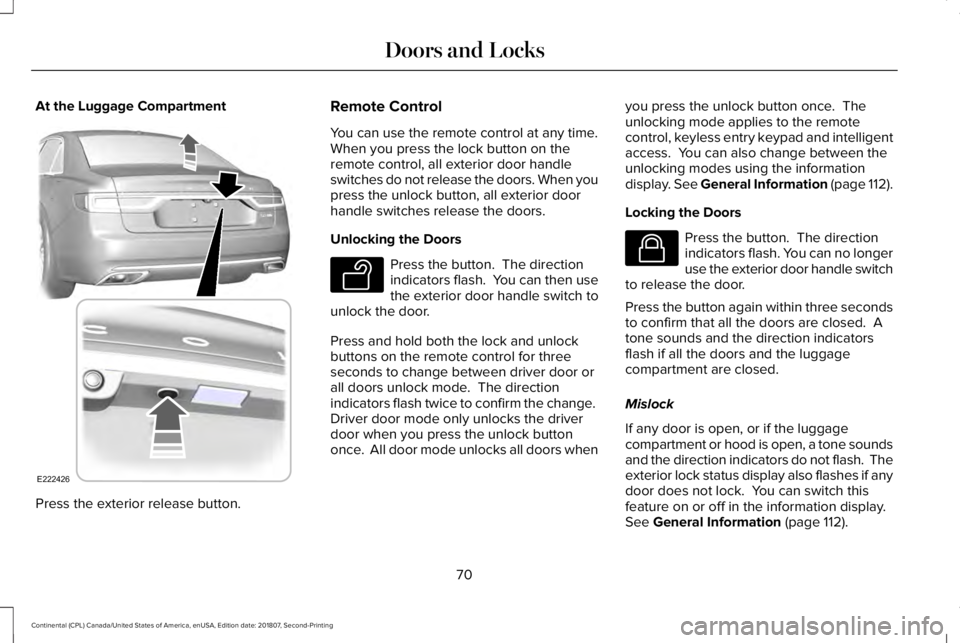
At the Luggage Compartment
Press the exterior release button. Remote Control
You can use the remote control at any time.
When you press the lock button on the
remote control, all exterior door handle
switches do not release the doors. When you
press the unlock button, all exterior door
handle switches release the doors.
Unlocking the Doors
Press the button. The direction
indicators flash. You can then use
the exterior door handle switch to
unlock the door.
Press and hold both the lock and unlock
buttons on the remote control for three
seconds to change between driver door or
all doors unlock mode. The direction
indicators flash twice to confirm the change.
Driver door mode only unlocks the driver
door when you press the unlock button
once. All door mode unlocks all doors when you press the unlock button once. The
unlocking mode applies to the remote
control, keyless entry keypad and intelligent
access. You can also change between the
unlocking modes using the information
display. See General Information (page 112).
Locking the Doors Press the button. The direction
indicators flash. You can no longer
use the exterior door handle switch
to release the door.
Press the button again within three seconds
to confirm that all the doors are closed. A
tone sounds and the direction indicators
flash if all the doors and the luggage
compartment are closed.
Mislock
If any door is open, or if the luggage
compartment or hood is open, a tone sounds
and the direction indicators do not flash. The
exterior lock status display also flashes if any
door does not lock. You can switch this
feature on or off in the information display.
See
General Information (page 112).
70
Continental (CPL) Canada/United States of America, enUSA, Edition date: 201807, Second-Printing Doors and LocksE222426 E138629 E138623
Page 74 of 627
Locking and Unlocking the Doors From
Inside
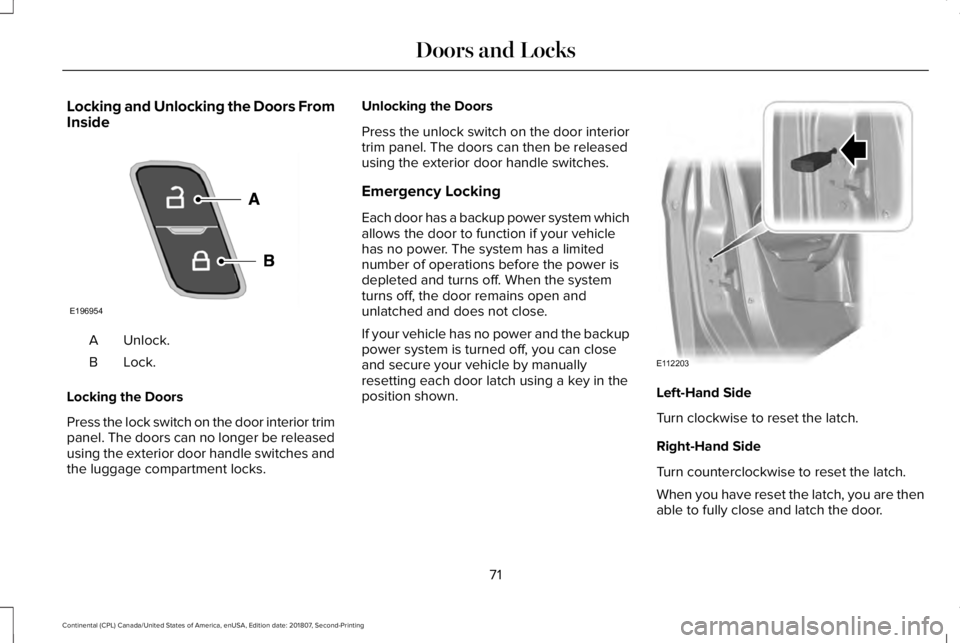
Unlock.
A
Lock.B
Locking the Doors
Press the lock switch on the door interior trim
panel. The doors can no longer be released
using the exterior door handle switches and
the luggage compartment locks. Unlocking the Doors
Press the unlock switch on the door interior
trim panel. The doors can then be released
using the exterior door handle switches.
Emergency Locking
Each door has a backup power system which
allows the door to function if your vehicle
has no power. The system has a limited
number of operations before the power is
depleted and turns off. When the system
turns off, the door remains open and
unlatched and does not close.
If your vehicle has no power and the backup
power system is turned off, you can close
and secure your vehicle by manually
resetting each door latch using a key in the
position shown.
Left-Hand Side
Turn clockwise to reset the latch.
Right-Hand Side
Turn counterclockwise to reset the latch.
When you have reset the latch, you are then
able to fully close and latch the door.
71
Continental (CPL) Canada/United States of America, enUSA, Edition date: 201807, Second-Printing Doors and LocksE196954 E112203
Page 75 of 627
Note:
You cannot open the door again until
the vehicle battery is fully charged and
operational.
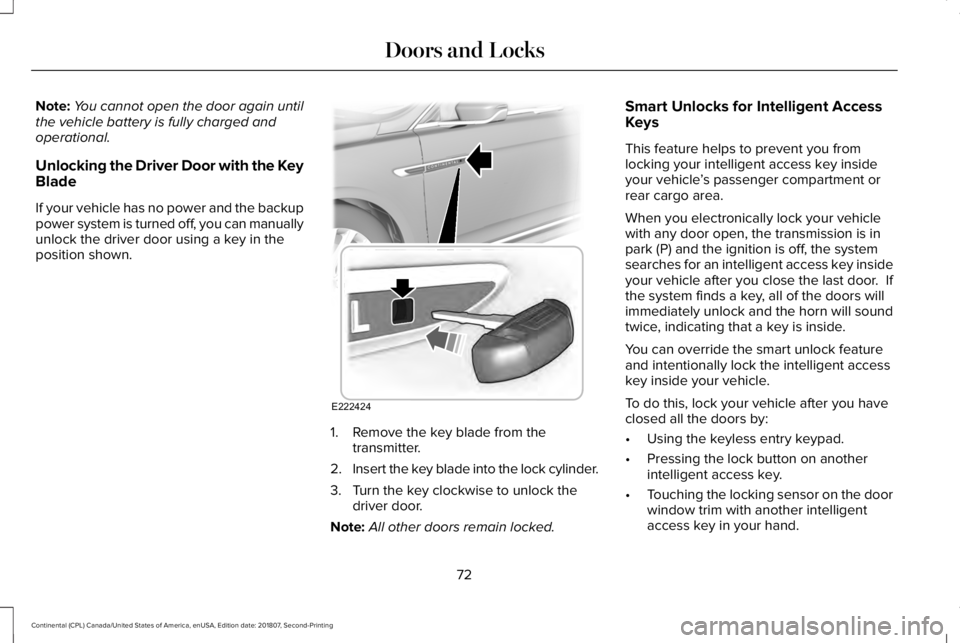
Unlocking the Driver Door with the Key
Blade
If your vehicle has no power and the backup
power system is turned off, you can manually
unlock the driver door using a key in the
position shown. 1. Remove the key blade from the
transmitter.
2. Insert the key blade into the lock cylinder.
3. Turn the key clockwise to unlock the driver door.
Note: All other doors remain locked. Smart Unlocks for Intelligent Access
Keys
This feature helps to prevent you from
locking your intelligent access key inside
your vehicle
’s passenger compartment or
rear cargo area.
When you electronically lock your vehicle
with any door open, the transmission is in
park (P) and the ignition is off, the system
searches for an intelligent access key inside
your vehicle after you close the last door. If
the system finds a key, all of the doors will
immediately unlock and the horn will sound
twice, indicating that a key is inside.
You can override the smart unlock feature
and intentionally lock the intelligent access
key inside your vehicle.
To do this, lock your vehicle after you have
closed all the doors by:
• Using the keyless entry keypad.
• Pressing the lock button on another
intelligent access key.
• Touching the locking sensor on the door
window trim with another intelligent
access key in your hand.
72
Continental (CPL) Canada/United States of America, enUSA, Edition date: 201807, Second-Printing Doors and LocksE222424
Page 77 of 627
Battery Saver
If you leave the courtesy lamps, interior
lamps or headlamps on, the battery saver
shuts them off 10 minutes after you switch
the ignition off.
Battery Saver for Intelligent Access Keys
If you leave the ignition switched on, it shuts
off when it detects a certain amount of
battery drain, or after 45 minutes.
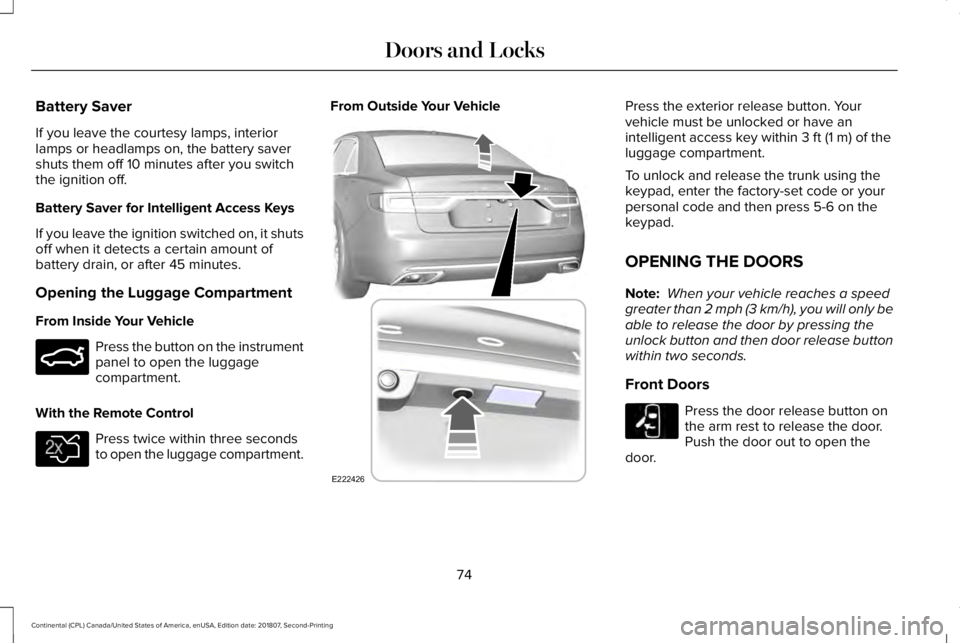
Opening the Luggage Compartment
From Inside Your Vehicle
Press the button on the instrument
panel to open the luggage
compartment.
With the Remote Control Press twice within three seconds
to open the luggage compartment. From Outside Your Vehicle Press the exterior release button. Your
vehicle must be unlocked or have an
intelligent access key within 3 ft (1 m) of the
luggage compartment.
To unlock and release the trunk using the
keypad, enter the factory-set code or your
personal code and then press 5-6 on the
keypad.
OPENING THE DOORS
Note: When your vehicle reaches a speed
greater than 2 mph (3 km/h), you will only be
able to release the door by pressing the
unlock button and then door release button
within two seconds.
Front Doors Press the door release button on
the arm rest to release the door.
Push the door out to open the
door.
74
Continental (CPL) Canada/United States of America, enUSA, Edition date: 201807, Second-Printing Doors and LocksE159323 E138630 E222426 E232417