navigation system LINCOLN CONTINENTAL 2019 User Guide
[x] Cancel search | Manufacturer: LINCOLN, Model Year: 2019, Model line: CONTINENTAL, Model: LINCOLN CONTINENTAL 2019Pages: 627, PDF Size: 6.39 MB
Page 433 of 627

Restricted features
Pairing a Bluetooth phone.
Cellular Phone
Browsing of list entries is limited for phone contacts and recent phone \
calls.
Editing the keypad code.
System Functionality
Enabling Valet Mode.
Editing settings while the rear view camera or active park assist are ac\
tive.
Editing Wi-Fi settings.
Wi-Fi
Editing the list of wireless networks.
Connecting to a new Wi-Fi network.
Viewing received text messages.
Text Messages
Using the keyboard to enter a destination.
Navigation
Adding or editing Navigation Favorites entries or Avoid Areas.
Creating a SYNC Owner Account
Why do I need a SYNC owner account? •
Essential for keeping up with the latest
software and connected features.
• Access to customer support for any
questions you may have.
• Maintain account permissions. Visit the website to sign up and register. Website
www.owner.lincoln.com
www.syncmyride.ca
430
Continental (CPL) Canada/United States of America, enUSA, Edition date: 201807, Second-Printing SYNC™ 3
Page 434 of 627
Website
www.syncmaroute.ca
Lincoln Connect with Lincoln Way (If
Equipped)
With a Lincoln Connect-equipped vehicle,
you can use Lincoln Way® to track your
vehicle ’s location and remotely access
vehicle features such as start, lock and
unlock and vehicle status including fuel level
and approximate mileage. You can also
schedule specific times to remotely start your
vehicle so it’ s ready to hit the road as soon
as you are. Lincoln Way® is available through
a free download via the Apple App Store®
or Google Play™. Message and data rates
may apply. Services may be limited by mobile
phone network coverage area.
• FCC: LHJ-FAN
• FCC: LHJ-FANW
• IC: 2807E-FAN
• IC: 2807E-FANW Updating Your System
You can choose to download the update
onto a USB drive or use Wi-Fi to deliver
automatic updates.
USB Updates
To use the USB update you need to log into
your owner account and visit the SYNC
software update page.
Website
www.owner.lincoln.com
www.syncmyride.ca
www.syncmaroute.ca
The website notifies you if an update is
available. You can then select to download
the update.
You will need an empty USB drive. Please
check the website for minimum
requirements. Once you have inserted the
USB drive into your computer, choose to start
the download. Follow the instructions
provided to download the files to the USB
drive. The installation of most files occurs in the
background, and does not interrupt your use
of the system. Navigation updates cannot be
installed in the background, because the files
are too large.
To install the update in your vehicle, remove
anything that is plugged in the USB ports on
the media hub and plug in the USB drive
containing the update. When the USB drive
is plugged in, the installation should begin
immediately. After a successful installation,
the update is available the next time the
vehicle is started.
Please reference the website for any further
actions.
Updating Over Wi-Fi
To update your System over Wi-Fi your
vehicle must be within the range of a Wi-Fi
access point. Data rates may apply.
431
Continental (CPL) Canada/United States of America, enUSA, Edition date: 201807, Second-Printing SYNC™ 3
Page 438 of 627

Home screen display
Tile
Item
Shows the active media source.
Audio
A
If your vehicle does not have navigation, this space contains the compas\
s.
The name of the connected phone appears on the screen. The status of the\
phone
features also appear. This includes signal strength, battery charge, 911 assist setting
state (On or Off ), text messaging and roaming.
Phone
B
This map displays your current location or current route in real time.
Navigation 1
C
When you have navigation active, you also see the next turn and the length of time
and distance to your destination.
If your vehicle does not have navigation, this space contains the audio \
information.
1 If equipped.
You can touch any of the feature displays to
access that feature.
Anytime you select the home button, the
system returns you to this screen. USING VOICE RECOGNITION
The SYNC 3 system allows you to use voice
commands, to control features like audio and
climate controls. By using voice commands,
you can keep your hands on the wheel and
your eyes on the road.
You can access each feature controlled by
SYNC 3 through a variety of commands. To activate the SYNC 3 voice
commands push the voice button
on the steering wheel and wait for
the prompt.
___ is a dynamic listing, meaning that it can
be the name of anything, such as artist, the
name of contact or number. The context and
the description of the command tell you what
to say for this dynamic option.
There are some commands that work for
every feature, these commands are:
435
Continental (CPL) Canada/United States of America, enUSA, Edition date: 201807, Second-Printing SYNC™ 3E142599
Page 439 of 627
Action and Description
Voice Command
Brings you to the main menu.
Main Menu
Returns you to the previous screen.
Go back
Ends the voice session.
Cancel
Gives you a list of possible voice commands.
List of Commands
You can name any feature and the system gives a list of commands availabl\
e for the feature. For
example, you could say:
___ List of Commands
Phone List of Commands
Navigation List of Commands
You can use this command to view the next page of options on any screen w\
here multiple pages of
choices are given.
Next Page
You can use this command to view the previous page of options on any scre\
en where multiple pages
of choices are given.
Previous Page
Gives you available commands you can use on the current screen.
Help
Included here are some of the most popular
commands for each SYNC 3 feature.
436
Continental (CPL) Canada/United States of America, enUSA, Edition date: 201807, Second-Printing SYNC™ 3
Page 474 of 627
To return to SYNC 3, select the speedometer
icon in the Android Auto menu bar at the
bottom of the touchscreen, and then touch
the option to return to SYNC.
Note:
Contact Google for Android Auto
support.
NAVIGATION (IF EQUIPPED)
Your navigation system is comprised of two
main features, destination mode and map
mode.
Map Mode
Map mode shows advanced viewing
comprised of 2D city maps, 3D landmarks
and 3D city models (when available). 2D city
maps show detailed outlines of buildings,
visible land use, landscape features, and
detailed railroad infrastructure for the most
essential cities around the globe.
3D landmarks appear as clear, visible objects
that are typically recognizable and have a
certain tourism value. 3D city models are complete 3D models of
entire city areas including navigable roads,
parks, rivers and rendered buildings. 3D
landmarks and city models appear in 3D map
mode only. Coverage of these varies and
improves with updated map releases. Select the zoom in icon to see a
closer view of the map.
Select the zoom out icon to see a
farther away view of the map.
You can adjust the view in preset increments.
You can also pinch to zoom in or out of the
map.
The information bar tells you the names of
streets, cities or landmarks as you hover over
them with the crosshair curser.
You can change your view of the map by
tapping on the location indicator icon on the
right hand side of the screen. You can
choose from the following options: Heading up (2D map)
This always
shows the direction of forward
travel to be upward on the screen.
This view is available for map
scales up to
3 mi (5 km). North up (2D map)
always shows
the northern direction to be
upward on the screen. 3D map mode
provides an
elevated perspective of the map.
Adjust this viewing angle and
rotate the map 180 degrees by
touching the map twice, and then dragging
your finger along the shaded bar with arrows
at the bottom of the map. Re-center the map by pressing this
icon whenever you scroll the map
away from your vehicle
’s current
location.
471
Continental (CPL) Canada/United States of America, enUSA, Edition date: 201807, Second-Printing SYNC™ 3E207752 E207753 E207750 E207749 E207748 E207751
Page 479 of 627
Description
Menu Item
Along Route
Near Destination
In a City
Once you have chosen your destination, press: Action and Description
Menu Item
This saves the destination to your favorites.
Save
This shows you a map of your entire route. You can then choose your route from three different options.
Start
Uses the fastest moving roads possible.
Fastest
Uses the shortest distance possible.
Shortest
Uses the most fuel-efficient route.
Economical Route
The time and distance for each route also displays.
On the route screen, you can choose to cancel the current navigation. Th\
e system asks for confirmation then
returns you to the map mode screen.
Cancel
476
Continental (CPL) Canada/United States of America, enUSA, Edition date: 201807, Second-Printing SYNC™ 3
Page 480 of 627

Once you have chosen your destination, press:
Action and Description
Menu Item
The system uses a variety of screens and prompts to guide you to your de\
stination.
Start
During Route guidance, you can press the maneuver arrow icon on the map if you want the syste\
m to repeat
route guidance instructions. When the system repeats the last guidance i\
nstruction, it updates the distance to
the next guidance instruction, since it detects that the vehicle is movi\
ng.
The navigation map shows your estimated time of arrival, remaining trave\
l time and the distance to your
destination.
SYNC 3 may not always announce vehicle arrival at the exact point of your\
destination and you may have to
cancel a route manually.
Navigation Menu
In map mode and during active navigation
you can access the navigation menu. During active navigation, touch the bottom
of the screen to view the menu and other
buttons.
To access the Navigation menu, press: Button
Menu
You can then select: A full screen map displays during navigation.
Full Map
Screen View
477
Continental (CPL) Canada/United States of America, enUSA, Edition date: 201807, Second-Printing SYNC™ 3
Page 481 of 627

Button
Highway exit information displays on the right hand side of the screen d\
uring navigation.
Highway Exit Info
Points of interest icons display for restaurants, hotels, fuel stations a\
nd ATMs when they
are present at the exit. You can select the POI icons to receive a listing of specific locations.
You can select the POI location as a waypoint or destination if desired.
Only available during an active route. Displays all of the turns on the current route.
Turn List
You can choose to avoid any road on the turn list by selecting the road f\
rom the list. A
screen then appears and you can press:
Avoid
The system calculates a new route and displays a new turn list.
You can find the SiriusXM Traffic and Travel Link information by pressing this button. This information require\
s
an active subscription to SiriusXM Traffic and Travel Link.
Traffic List
When a route is not active, a list of nearby traffic incidents displays (if any are present).
When a route is active, you can choose to display a list of traffic nearby or on the route.
Press this button to adjust your preferences. See Settings (page 485).
Navigation Settings
Provides your current location city and the nearest road.
Where Am I?
The following are only available on the menu during an active navigation\
route:
The system asks for confirmation and then returns you to the map mode sc\
reen.
Cancel Route
Press this to see a map of the full route.
View Route
An alternate route displays in comparison with the current route.
Detour
478
Continental (CPL) Canada/United States of America, enUSA, Edition date: 201807, Second-Printing SYNC™ 3
Page 482 of 627
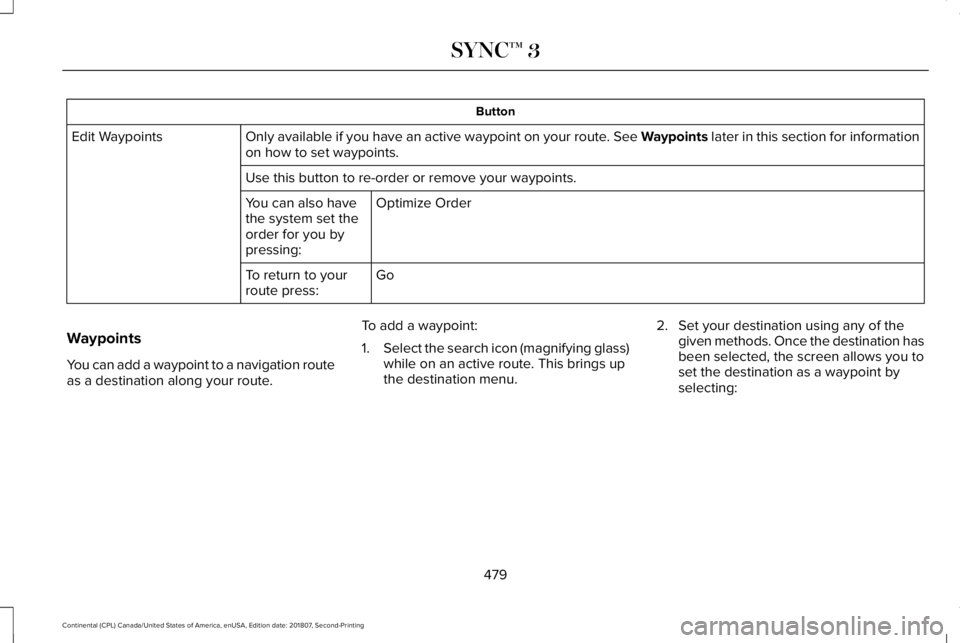
Button
Only available if you have an active waypoint on your route. See Waypoints later in this section for information
on how to set waypoints.
Edit Waypoints
Use this button to re-order or remove your waypoints.Optimize Order
You can also have
the system set the
order for you by
pressing:
Go
To return to your
route press:
Waypoints
You can add a waypoint to a navigation route
as a destination along your route. To add a waypoint:
1.
Select the search icon (magnifying glass)
while on an active route. This brings up
the destination menu. 2. Set your destination using any of the
given methods. Once the destination has
been selected, the screen allows you to
set the destination as a waypoint by
selecting:
479
Continental (CPL) Canada/United States of America, enUSA, Edition date: 201807, Second-Printing SYNC™ 3
Page 483 of 627
Menu Item
The waypoint list then appears and you are able to re-order all of your
waypoints by selecting the menu icon on the right hand side of the
location. You can select up to five waypoints.
Add Waypoint
Optimize Order
You can also have the system set the order for you by pressing:
Go
To return to your route, press:
SYNC AppLink
The AppLink app allows you to use some
SYNC 3 navigation features on your phone.
First Mile Navigation
When you switch your ignition off, the
location of your vehicle is recorded and sent
to your SYNC AppLink app. The location of
your vehicle can be viewed within the app.
You can also view walking directions to your
vehicle. Last Mile Navigation
When you park near your destination, the
system provides walking directions to your
destination.
POI Search
Your paired phone can be used to access
additional points of interest (POI). These
points of interest can only be access when
your phone is paired.
Send To Car
You can send destinations to your navigation
system using a computer or phone using
AppLink.cityseeker (If Equipped)
Note: cityseeker point of interest (POI)
information is limited to approximately 1,110
cities (1,049 in the United States, 36 in
Canada and 15 in Mexico). 480
Continental (CPL) Canada/United States of America, enUSA, Edition date: 201807, Second-Printing SYNC™ 3E225487