remote start LINCOLN CONTINENTAL 2019 User Guide
[x] Cancel search | Manufacturer: LINCOLN, Model Year: 2019, Model line: CONTINENTAL, Model: LINCOLN CONTINENTAL 2019Pages: 627, PDF Size: 6.39 MB
Page 87 of 627
Make sure that the ignition is switched off
before beginning this procedure. Make sure
that you close all the doors before beginning
and that they remain closed throughout the
procedure. Carry out all steps within 30
seconds of starting the sequence. Stop and
wait for at least one minute before starting
again if you carry out any steps out of
sequence.
Read and understand the entire procedure
before you begin.
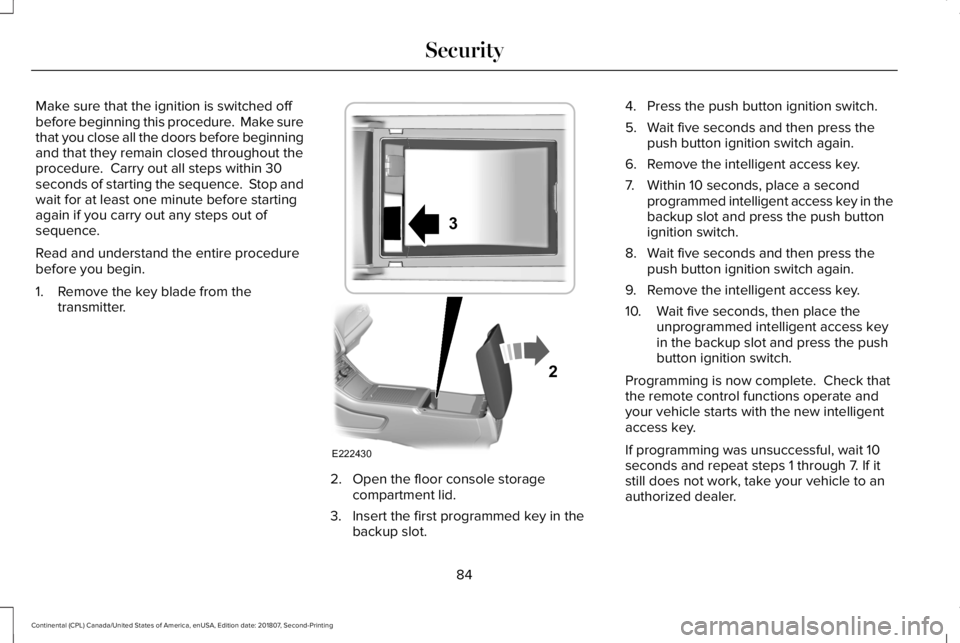
1. Remove the key blade from the
transmitter. 2. Open the floor console storage
compartment lid.
3. Insert the first programmed key in the backup slot. 4. Press the push button ignition switch.
5. Wait five seconds and then press the
push button ignition switch again.
6. Remove the intelligent access key.
7. Within 10 seconds, place a second programmed intelligent access key in the
backup slot and press the push button
ignition switch.
8. Wait five seconds and then press the push button ignition switch again.
9. Remove the intelligent access key.
10. Wait five seconds, then place the unprogrammed intelligent access key
in the backup slot and press the push
button ignition switch.
Programming is now complete. Check that
the remote control functions operate and
your vehicle starts with the new intelligent
access key.
If programming was unsuccessful, wait 10
seconds and repeat steps 1 through 7. If it
still does not work, take your vehicle to an
authorized dealer.
84
Continental (CPL) Canada/United States of America, enUSA, Edition date: 201807, Second-Printing SecurityE222430
2
3
Page 88 of 627
ANTI-THEFT ALARM
The system will warn you of an unauthorized
entry to your vehicle. It will be triggered if
any door, the luggage compartment or the
hood is opened without using the key,
remote control or keyless entry keypad.
The direction indicators will flash and the
horn will sound if unauthorized entry is
attempted while the alarm is armed.
Take all remote controls to an authorized
dealer if there is any potential alarm problem
with your vehicle.
Arming the Alarm
The alarm is ready to arm when there is not
a key in your vehicle. Electronically lock your
vehicle to arm the alarm.
Disarming the Alarm
Disarm the alarm by any of the following
actions:
•
Unlock the doors or luggage
compartment with the remote control or
keyless entry keypad.
• Switch your vehicle on or start your
vehicle.
• Use a key in the driver door to unlock
your vehicle, then switch your vehicle on
within 12 seconds.
Note: Pressing the panic button on the
remote control will stop the horn and signal
indicators, but will not disarm the system.
85
Continental (CPL) Canada/United States of America, enUSA, Edition date: 201807, Second-Printing Security
Page 103 of 627
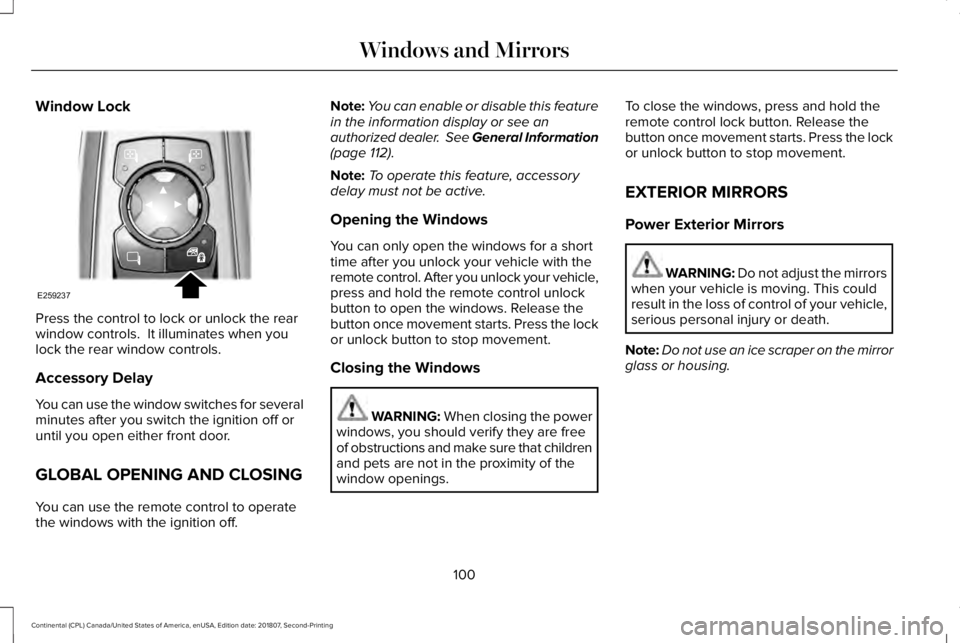
Window Lock
Press the control to lock or unlock the rear
window controls. It illuminates when you
lock the rear window controls.
Accessory Delay
You can use the window switches for several
minutes after you switch the ignition off or
until you open either front door.
GLOBAL OPENING AND CLOSING
You can use the remote control to operate
the windows with the ignition off. Note:
You can enable or disable this feature
in the information display or see an
authorized dealer. See General Information
(page 112).
Note: To operate this feature, accessory
delay must not be active.
Opening the Windows
You can only open the windows for a short
time after you unlock your vehicle with the
remote control. After you unlock your vehicle,
press and hold the remote control unlock
button to open the windows. Release the
button once movement starts. Press the lock
or unlock button to stop movement.
Closing the Windows WARNING: When closing the power
windows, you should verify they are free
of obstructions and make sure that children
and pets are not in the proximity of the
window openings. To close the windows, press and hold the
remote control lock button. Release the
button once movement starts. Press the lock
or unlock button to stop movement.
EXTERIOR MIRRORS
Power Exterior Mirrors
WARNING: Do not adjust the mirrors
when your vehicle is moving. This could
result in the loss of control of your vehicle,
serious personal injury or death.
Note: Do not use an ice scraper on the mirror
glass or housing.
100
Continental (CPL) Canada/United States of America, enUSA, Edition date: 201807, Second-Printing Windows and MirrorsE259237
Page 119 of 627
Settings
Select Your Setting
Remote
Unlock
Switch Inhibit
Follow onscreen directions to confirm or modify your settings.
Oil Life Reset
Select Your Setting
Power Decklid
Select Your Setting
Climate
Control
Remote Start
Seats and
Wheel
Duration
System
Follow onscreen directions to confirm or modify your settings.
Tire Monitor
Remote Open
Windows
Remote Close
Courtesy Wipe
Wipers
Rain Sensing
Follow onscreen directions to confirm or modify your settings.
MyKey Status
MyKey
116
Continental (CPL) Canada/United States of America, enUSA, Edition date: 201807, Second-Printing Information Displays
Page 138 of 627
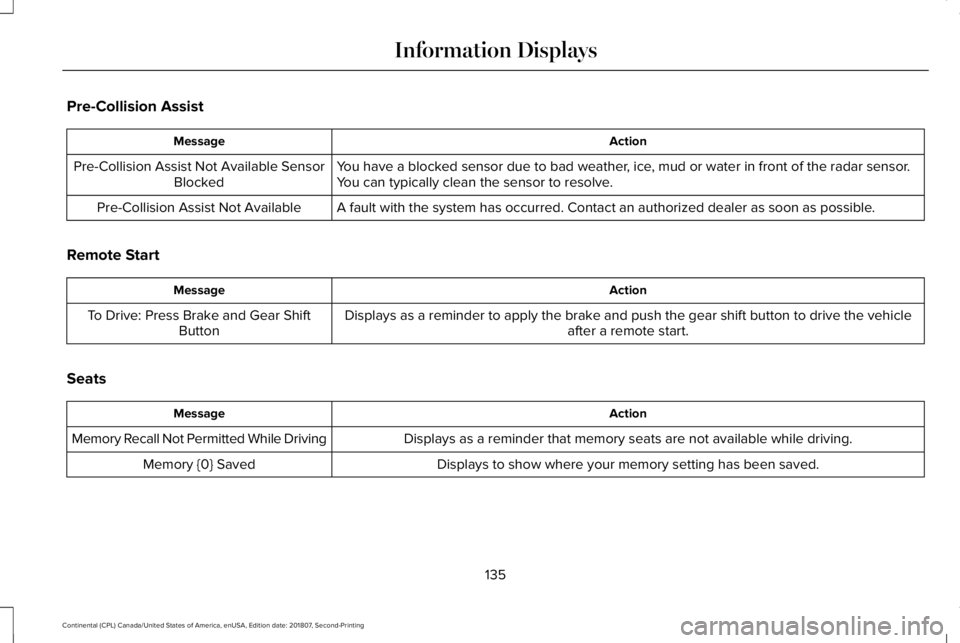
Pre-Collision Assist
Action
Message
You have a blocked sensor due to bad weather, ice, mud or water in front of the radar sensor.
You can typically clean the sensor to resolve.
Pre-Collision Assist Not Available Sensor
Blocked
A fault with the system has occurred. Contact an authorized dealer as so\
on as possible.
Pre-Collision Assist Not Available
Remote Start Action
Message
Displays as a reminder to apply the brake and push the gear shift button to drive the vehicle after a remote start.
To Drive: Press Brake and Gear Shift
Button
Seats Action
Message
Displays as a reminder that memory seats are not available while driving\
.
Memory Recall Not Permitted While Driving
Displays to show where your memory setting has been saved.
Memory {0} Saved
135
Continental (CPL) Canada/United States of America, enUSA, Edition date: 201807, Second-Printing Information Displays
Page 151 of 627
Note:
Do not use harsh chemicals, razor
blades or other sharp objects to clean or
remove decals from the inside of the heated
rear window. The vehicle warranty may not
cover damage to the heated rear window
grid lines.
HEATED EXTERIOR MIRRORS
When you switch the heated rear window
on, the heated exterior mirrors turn on.
Note: Do not remove ice from the mirrors
with a scraper or adjust the mirror glass
when it is frozen in place.
Note: Do not clean the mirror housing or
glass with harsh abrasives, fuel or other
petroleum-based cleaning products. The
vehicle warranty may not cover damage
caused to the mirror housing or glass. CABIN AIR FILTER
Your vehicle is equipped with a cabin air
filter, which gives you and your passengers
the following benefits:
•
It improves your driving comfort by
reducing particle and odor concentration.
• It improves the interior compartment
cleanliness.
• It protects the climate control
components from particle deposits.
You can locate the cabin air filter behind the
glove box.
Note: Make sure you have a cabin air filter
installed at all times. This prevents foreign
objects from entering the system. Running
the system without a filter in place could
result in degradation or damage to the
system.
Replace the filter at regular intervals. See
Scheduled Maintenance (page 528).
For additional cabin air filter information, or
to replace the filter, see a qualified
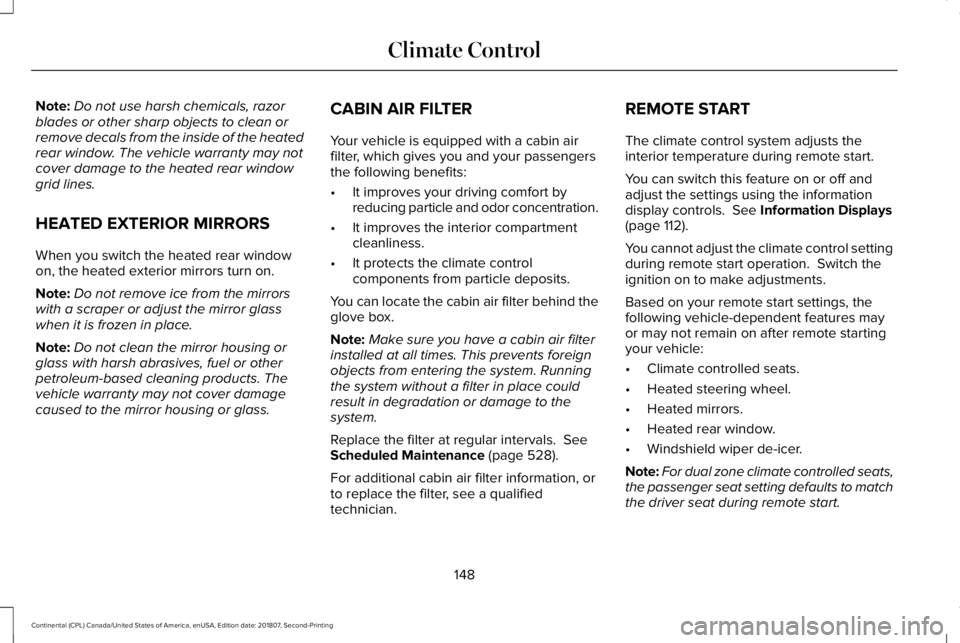
technician. REMOTE START
The climate control system adjusts the
interior temperature during remote start.
You can switch this feature on or off and
adjust the settings using the information
display controls.
See Information Displays
(page 112).
You cannot adjust the climate control setting
during remote start operation. Switch the
ignition on to make adjustments.
Based on your remote start settings, the
following vehicle-dependent features may
or may not remain on after remote starting
your vehicle:
• Climate controlled seats.
• Heated steering wheel.
• Heated mirrors.
• Heated rear window.
• Windshield wiper de-icer.
Note: For dual zone climate controlled seats,
the passenger seat setting defaults to match
the driver seat during remote start.
148
Continental (CPL) Canada/United States of America, enUSA, Edition date: 201807, Second-Printing Climate Control
Page 168 of 627
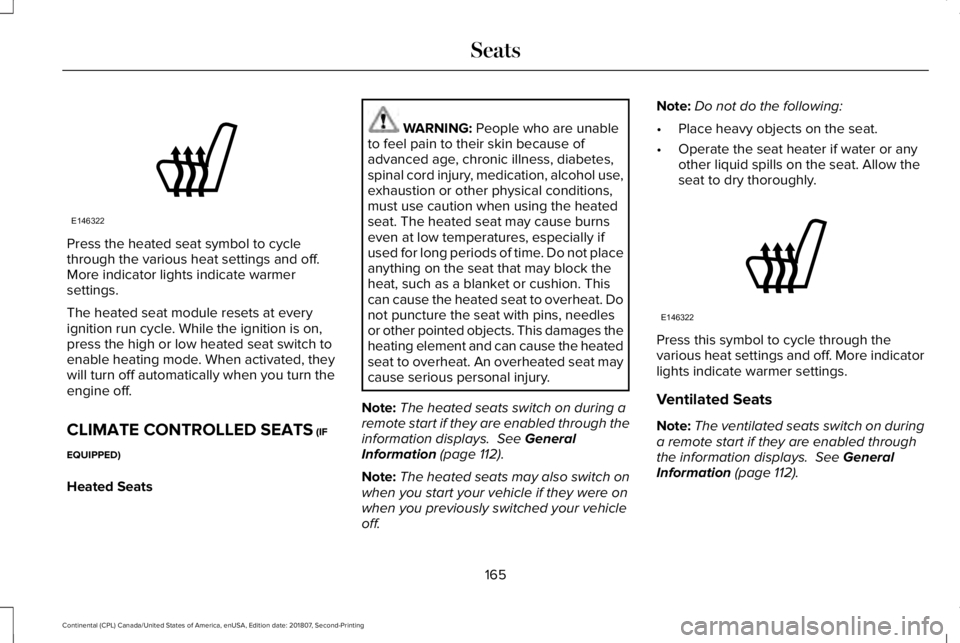
Press the heated seat symbol to cycle
through the various heat settings and off.
More indicator lights indicate warmer
settings.
The heated seat module resets at every
ignition run cycle. While the ignition is on,
press the high or low heated seat switch to
enable heating mode. When activated, they
will turn off automatically when you turn the
engine off.
CLIMATE CONTROLLED SEATS (IF
EQUIPPED)
Heated Seats WARNING:
People who are unable
to feel pain to their skin because of
advanced age, chronic illness, diabetes,
spinal cord injury, medication, alcohol use,
exhaustion or other physical conditions,
must use caution when using the heated
seat. The heated seat may cause burns
even at low temperatures, especially if
used for long periods of time. Do not place
anything on the seat that may block the
heat, such as a blanket or cushion. This
can cause the heated seat to overheat. Do
not puncture the seat with pins, needles
or other pointed objects. This damages the
heating element and can cause the heated
seat to overheat. An overheated seat may
cause serious personal injury.
Note: The heated seats switch on during a
remote start if they are enabled through the
information displays.
See General
Information (page 112).
Note: The heated seats may also switch on
when you start your vehicle if they were on
when you previously switched your vehicle
off. Note:
Do not do the following:
• Place heavy objects on the seat.
• Operate the seat heater if water or any
other liquid spills on the seat. Allow the
seat to dry thoroughly. Press this symbol to cycle through the
various heat settings and off. More indicator
lights indicate warmer settings.
Ventilated Seats
Note:
The ventilated seats switch on during
a remote start if they are enabled through
the information displays. See General
Information (page 112).
165
Continental (CPL) Canada/United States of America, enUSA, Edition date: 201807, Second-Printing SeatsE146322 E146322
Page 244 of 627
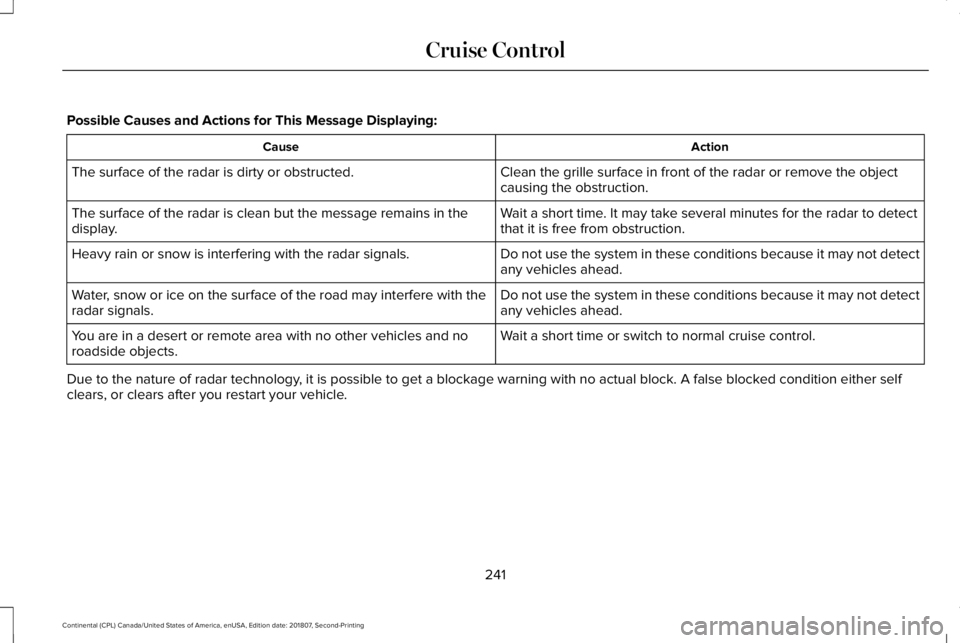
Possible Causes and Actions for This Message Displaying:
Action
Cause
Clean the grille surface in front of the radar or remove the object
causing the obstruction.
The surface of the radar is dirty or obstructed.
Wait a short time. It may take several minutes for the radar to detect
that it is free from obstruction.
The surface of the radar is clean but the message remains in the
display.
Do not use the system in these conditions because it may not detect
any vehicles ahead.
Heavy rain or snow is interfering with the radar signals.
Do not use the system in these conditions because it may not detect
any vehicles ahead.
Water, snow or ice on the surface of the road may interfere with the
radar signals.
Wait a short time or switch to normal cruise control.
You are in a desert or remote area with no other vehicles and no
roadside objects.
Due to the nature of radar technology, it is possible to get a blockage warning with no actual block. A false\
blocked condition either self
clears, or clears after you restart your vehicle.
241
Continental (CPL) Canada/United States of America, enUSA, Edition date: 201807, Second-Printing Cruise Control
Page 357 of 627
WARNING: 1. Make sure that you
have the correct tire and wheel size. WARNING: 2. Lubricate the tire
bead and wheel bead seat area again. WARNING:
3. Stand at a
minimum of 12 ft (3.66 m) away from
the wheel and tire assembly. WARNING:
4. Use both eye and
ear protection. WARNING:
For a mounting
pressure more than 20 psi (1.38 bar)
greater than the maximum pressure,
a Ford dealer or other tire service
professional should do the mounting. WARNING:
Always inflate steel
carcass tires with a remote air fill with
the person inflating standing at a
minimum of
12 ft (3.66 m) away from
the wheel and tire assembly. Important:
Remember to replace the
wheel valve stems when the road tires
are replaced on your vehicle
It is recommended that the two front
tires or two rear tires generally be
replaced as a pair.
The tire pressure sensors mounted in
the wheels (originally installed on your
vehicle) are not designed to be used in
aftermarket wheels.
The use of wheels or tires not
recommended by Ford Motor Company
may affect the operation of your tire
pressure monitoring system.
If the tire pressure monitoring system
indicator is flashing, your system is
malfunctioning. Your replacement tire
might be incompatible with your tire
pressure monitoring system, or some
component of the system may be
damaged. Safety Practices WARNING: If your vehicle is stuck
in snow, mud or sand, do not rapidly
spin the tires; spinning the tires can
tear the tire and cause an explosion.
A tire can explode in as little as three
to five seconds. WARNING:
Do not spin the
wheels at over 34 mph (55 km/h). The
tires may fail and injure a passenger
or bystander.
Driving habits have a great deal to do
with your tire mileage and safety.
• Observe posted speed limits
• Avoid fast starts, stops and turns
• Avoid potholes and objects on the
road
• Do not run over curbs or hit the tire
against a curb when parking
354
Continental (CPL) Canada/United States of America, enUSA, Edition date: 201807, Second-Printing Wheels and Tires
Page 434 of 627
Website
www.syncmaroute.ca
Lincoln Connect with Lincoln Way (If
Equipped)
With a Lincoln Connect-equipped vehicle,
you can use Lincoln Way® to track your
vehicle ’s location and remotely access
vehicle features such as start, lock and
unlock and vehicle status including fuel level
and approximate mileage. You can also
schedule specific times to remotely start your
vehicle so it’ s ready to hit the road as soon
as you are. Lincoln Way® is available through
a free download via the Apple App Store®
or Google Play™. Message and data rates
may apply. Services may be limited by mobile
phone network coverage area.
• FCC: LHJ-FAN
• FCC: LHJ-FANW
• IC: 2807E-FAN
• IC: 2807E-FANW Updating Your System
You can choose to download the update
onto a USB drive or use Wi-Fi to deliver
automatic updates.
USB Updates
To use the USB update you need to log into
your owner account and visit the SYNC
software update page.
Website
www.owner.lincoln.com
www.syncmyride.ca
www.syncmaroute.ca
The website notifies you if an update is
available. You can then select to download
the update.
You will need an empty USB drive. Please
check the website for minimum
requirements. Once you have inserted the
USB drive into your computer, choose to start
the download. Follow the instructions
provided to download the files to the USB
drive. The installation of most files occurs in the
background, and does not interrupt your use
of the system. Navigation updates cannot be
installed in the background, because the files
are too large.
To install the update in your vehicle, remove
anything that is plugged in the USB ports on
the media hub and plug in the USB drive
containing the update. When the USB drive
is plugged in, the installation should begin
immediately. After a successful installation,
the update is available the next time the
vehicle is started.
Please reference the website for any further
actions.
Updating Over Wi-Fi
To update your System over Wi-Fi your
vehicle must be within the range of a Wi-Fi
access point. Data rates may apply.
431
Continental (CPL) Canada/United States of America, enUSA, Edition date: 201807, Second-Printing SYNC™ 3