bluetooth LINCOLN CONTINENTAL 2019 Owner's Manual
[x] Cancel search | Manufacturer: LINCOLN, Model Year: 2019, Model line: CONTINENTAL, Model: LINCOLN CONTINENTAL 2019Pages: 627, PDF Size: 6.39 MB
Page 496 of 627
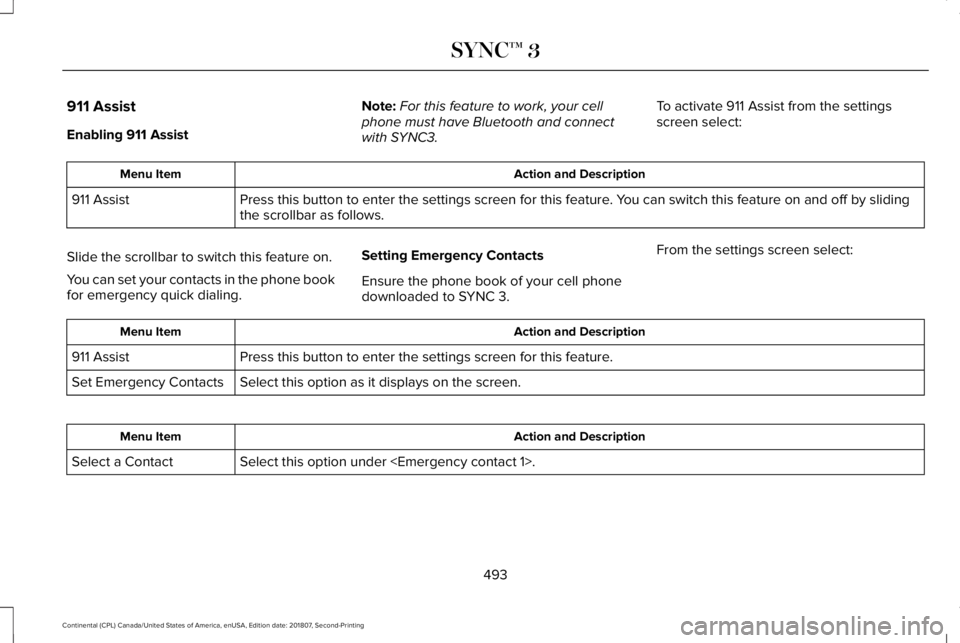
911 Assist
Enabling 911 Assist
Note:
For this feature to work, your cell
phone must have Bluetooth and connect
with SYNC3. To activate 911 Assist from the settings
screen select: Action and Description
Menu Item
Press this button to enter the settings screen for this feature. You can switch this feature on and off by sliding
the scrollbar as follows.
911 Assist
Slide the scrollbar to switch this feature on.
You can set your contacts in the phone book
for emergency quick dialing. Setting Emergency Contacts
Ensure the phone book of your cell phone
downloaded to SYNC 3.From the settings screen select: Action and Description
Menu Item
Press this button to enter the settings screen for this feature.
911 Assist
Select this option as it displays on the screen.
Set Emergency Contacts Action and Description
Menu Item
Select this option under
Select a Contact
493
Continental (CPL) Canada/United States of America, enUSA, Edition date: 201807, Second-Printing SYNC™ 3
Page 497 of 627
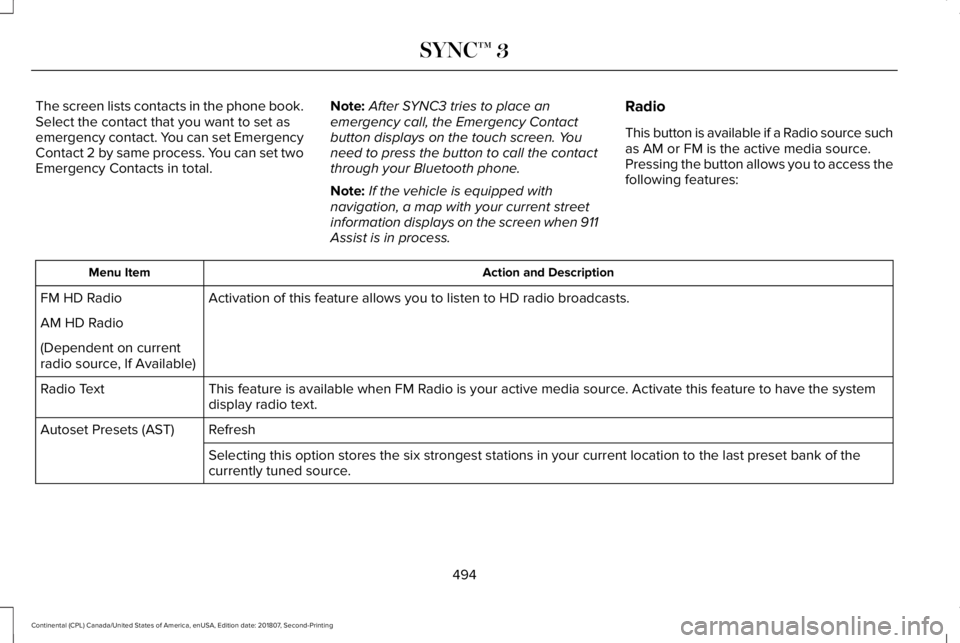
The screen lists contacts in the phone book.
Select the contact that you want to set as
emergency contact. You can set Emergency
Contact 2 by same process. You can set two
Emergency Contacts in total.
Note:
After SYNC3 tries to place an
emergency call, the Emergency Contact
button displays on the touch screen. You
need to press the button to call the contact
through your Bluetooth phone.
Note: If the vehicle is equipped with
navigation, a map with your current street
information displays on the screen when 911
Assist is in process. Radio
This button is available if a Radio source such
as AM or FM is the active media source.
Pressing the button allows you to access the
following features: Action and Description
Menu Item
Activation of this feature allows you to listen to HD radio broadcasts.
FM HD Radio
AM HD Radio
(Dependent on current
radio source, If Available)
This feature is available when FM Radio is your active media source. Activate this feature to have the system
display radio text.
Radio Text
Refresh
Autoset Presets (AST)
Selecting this option stores the six strongest stations in your current \
location to the last preset bank of the
currently tuned source.
494
Continental (CPL) Canada/United States of America, enUSA, Edition date: 201807, Second-Printing SYNC™ 3
Page 501 of 627
Navigation Source Selection
The screen lists available alternative
navigation sources using Applink.
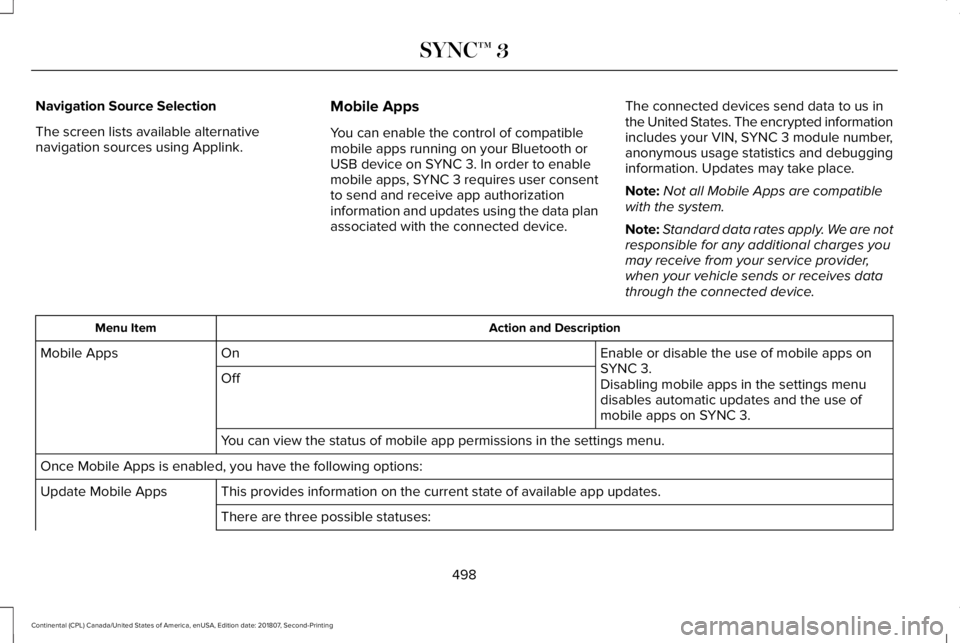
Mobile Apps
You can enable the control of compatible
mobile apps running on your Bluetooth or
USB device on SYNC 3. In order to enable
mobile apps, SYNC 3 requires user consent
to send and receive app authorization
information and updates using the data plan
associated with the connected device.The connected devices send data to us in
the United States. The encrypted information
includes your VIN, SYNC 3 module number,
anonymous usage statistics and debugging
information. Updates may take place.
Note:
Not all Mobile Apps are compatible
with the system.
Note: Standard data rates apply. We are not
responsible for any additional charges you
may receive from your service provider,
when your vehicle sends or receives data
through the connected device. Action and Description
Menu Item
Enable or disable the use of mobile apps on
SYNC 3.
On
Mobile Apps
Off Disabling mobile apps in the settings menu
disables automatic updates and the use of
mobile apps on SYNC 3.
You can view the status of mobile app permissions in the settings menu.
Once Mobile Apps is enabled, you have the following options: This provides information on the current state of available app updates.\
Update Mobile Apps
There are three possible statuses:
498
Continental (CPL) Canada/United States of America, enUSA, Edition date: 201807, Second-Printing SYNC™ 3
Page 510 of 627
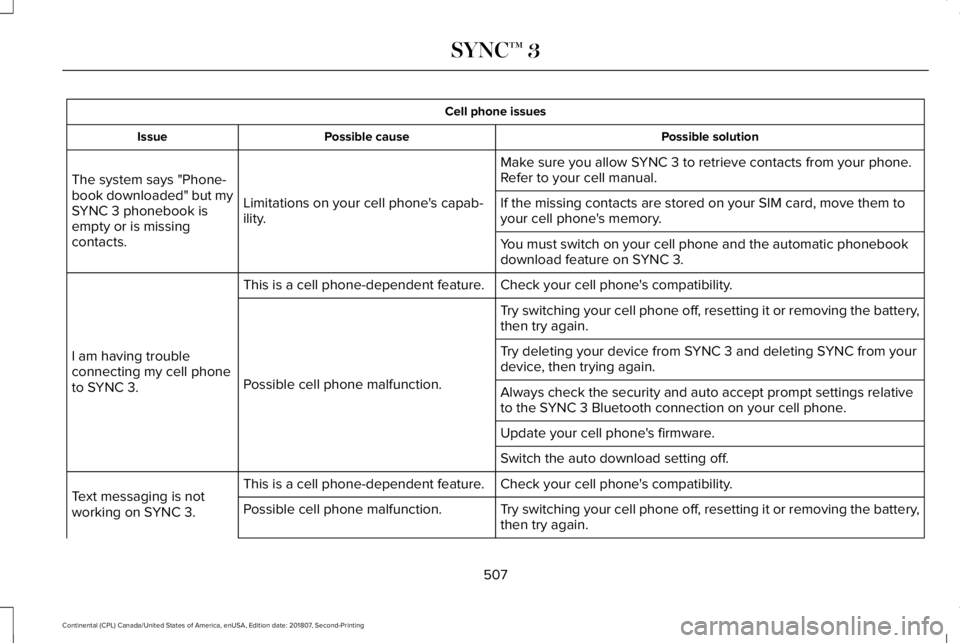
Cell phone issues
Possible solution
Possible cause
Issue
Make sure you allow SYNC 3 to retrieve contacts from your phone.
Refer to your cell manual.
Limitations on your cell phone's capab-
ility.
The system says "Phone-
book downloaded" but my
SYNC 3 phonebook is
empty or is missing
contacts. If the missing contacts are stored on your SIM card, move them to
your cell phone's memory.
You must switch on your cell phone and the automatic phonebook
download feature on SYNC 3.
Check your cell phone's compatibility.
This is a cell phone-dependent feature.
I am having trouble
connecting my cell phone
to SYNC 3. Try switching your cell phone off, resetting it or removing the battery,
then try again.
Possible cell phone malfunction. Try deleting your device from SYNC 3 and deleting SYNC from your
device, then trying again.
Always check the security and auto accept prompt settings relative
to the SYNC 3 Bluetooth connection on your cell phone.
Update your cell phone's firmware.
Switch the auto download setting off.
Check your cell phone's compatibility.
This is a cell phone-dependent feature.
Text messaging is not
working on SYNC 3. Try switching your cell phone off, resetting it or removing the battery,
then try again.
Possible cell phone malfunction.
507
Continental (CPL) Canada/United States of America, enUSA, Edition date: 201807, Second-Printing SYNC™ 3
Page 511 of 627
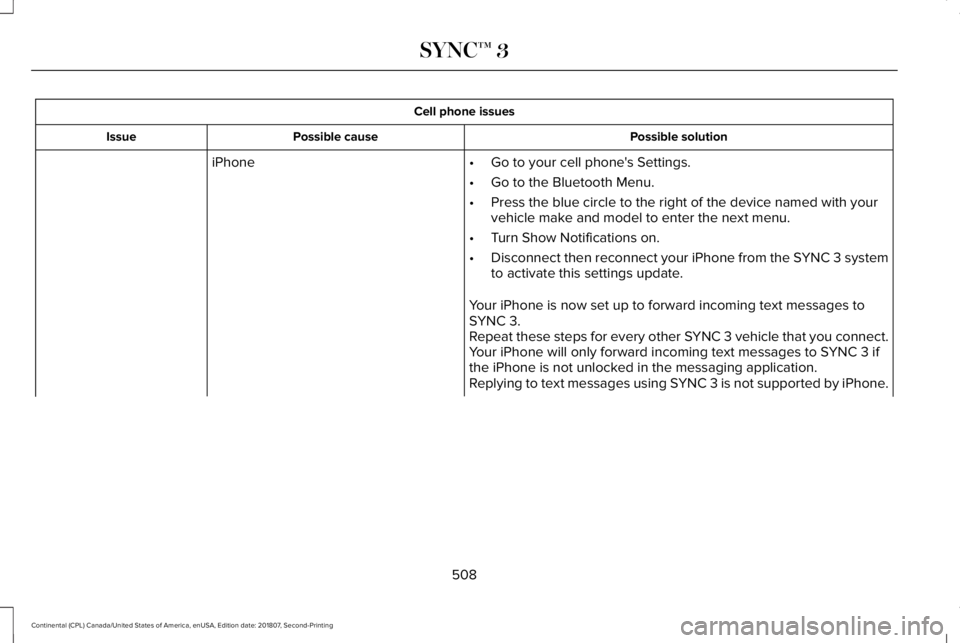
Cell phone issues
Possible solution
Possible cause
Issue
iPhone •Go to your cell phone's Settings.
• Go to the Bluetooth Menu.
• Press the blue circle to the right of the device named with your
vehicle make and model to enter the next menu.
• Turn Show Notifications on.
• Disconnect then reconnect your iPhone from the SYNC 3 system
to activate this settings update.
Your iPhone is now set up to forward incoming text messages to
SYNC 3.
Repeat these steps for every other SYNC 3 vehicle that you connect.
Your iPhone will only forward incoming text messages to SYNC 3 if
the iPhone is not unlocked in the messaging application.
Replying to text messages using SYNC 3 is not supported by iPhone.
508
Continental (CPL) Canada/United States of America, enUSA, Edition date: 201807, Second-Printing SYNC™ 3
Page 512 of 627
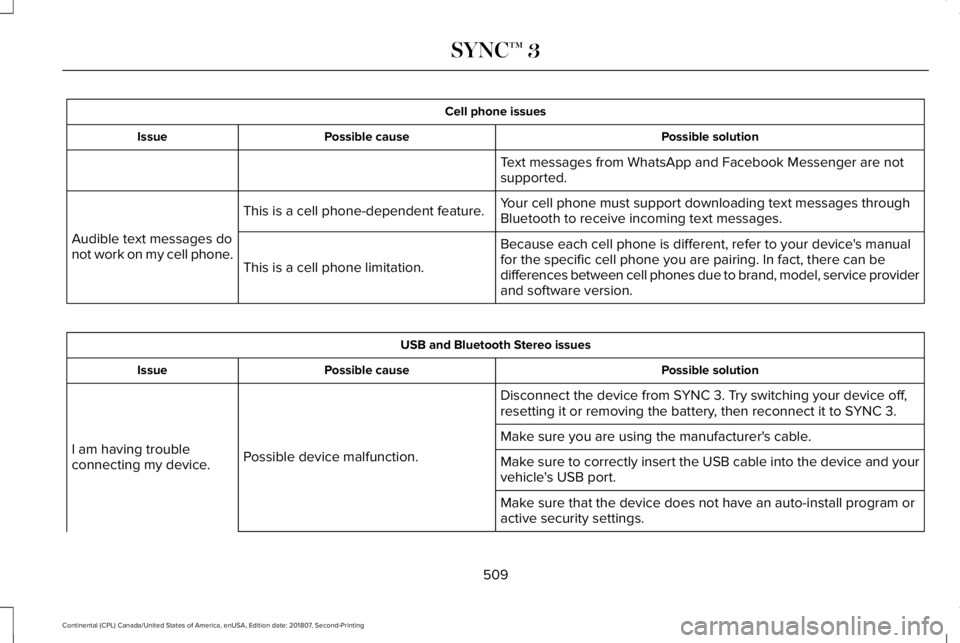
Cell phone issues
Possible solution
Possible cause
Issue
Text messages from WhatsApp and Facebook Messenger are not
supported.
Your cell phone must support downloading text messages through
Bluetooth to receive incoming text messages.
This is a cell phone-dependent feature.
Audible text messages do
not work on my cell phone. Because each cell phone is different, refer to your device's manual
for the specific cell phone you are pairing. In fact, there can be
differences between cell phones due to brand, model, service provider
and software version.
This is a cell phone limitation. USB and Bluetooth Stereo issues
Possible solution
Possible cause
Issue
Disconnect the device from SYNC 3. Try switching your device off,
resetting it or removing the battery, then reconnect it to SYNC 3.
Possible device malfunction.
I am having trouble
connecting my device. Make sure you are using the manufacturer's cable.
Make sure to correctly insert the USB cable into the device and your
vehicle's USB port.
Make sure that the device does not have an auto-install program or
active security settings.
509
Continental (CPL) Canada/United States of America, enUSA, Edition date: 201807, Second-Printing SYNC™ 3
Page 513 of 627
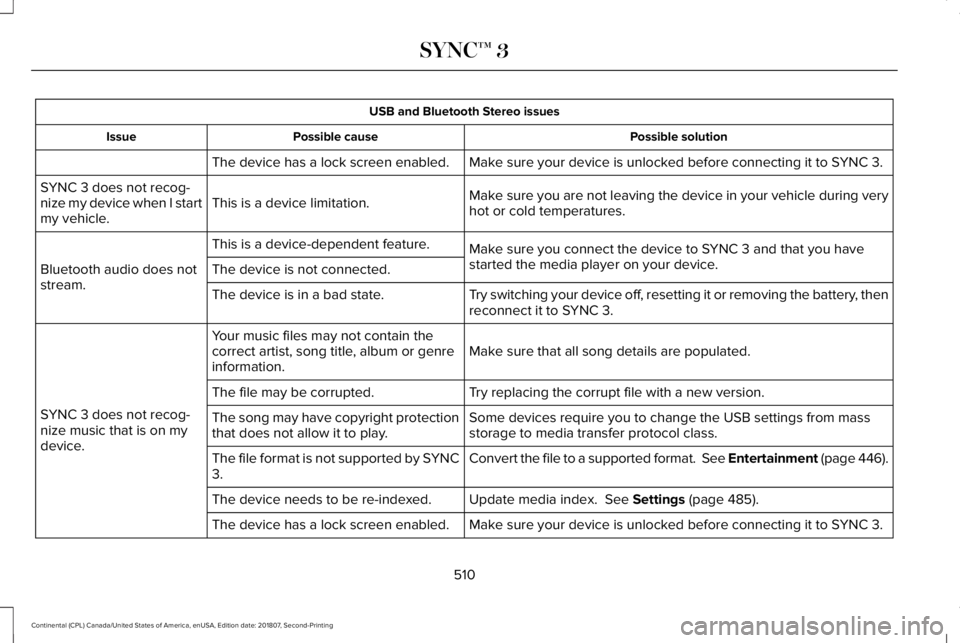
USB and Bluetooth Stereo issues
Possible solution
Possible cause
Issue
Make sure your device is unlocked before connecting it to SYNC 3.
The device has a lock screen enabled.
Make sure you are not leaving the device in your vehicle during very
hot or cold temperatures.
This is a device limitation.
SYNC 3 does not recog-
nize my device when I start
my vehicle.
Make sure you connect the device to SYNC 3 and that you have
started the media player on your device.
This is a device-dependent feature.
Bluetooth audio does not
stream. The device is not connected.
Try switching your device off, resetting it or removing the battery, then
reconnect it to SYNC 3.
The device is in a bad state.
Make sure that all song details are populated.
Your music files may not contain the
correct artist, song title, album or genre
information.
SYNC 3 does not recog-
nize music that is on my
device. Try replacing the corrupt file with a new version.
The file may be corrupted.
Some devices require you to change the USB settings from mass
storage to media transfer protocol class.
The song may have copyright protection
that does not allow it to play.
Convert the file to a supported format. See Entertainment (page 446).
The file format is not supported by SYNC
3.
Update media index.
See Settings (page 485).
The device needs to be re-indexed.
Make sure your device is unlocked before connecting it to SYNC 3.
The device has a lock screen enabled.
510
Continental (CPL) Canada/United States of America, enUSA, Edition date: 201807, Second-Printing SYNC™ 3
Page 514 of 627
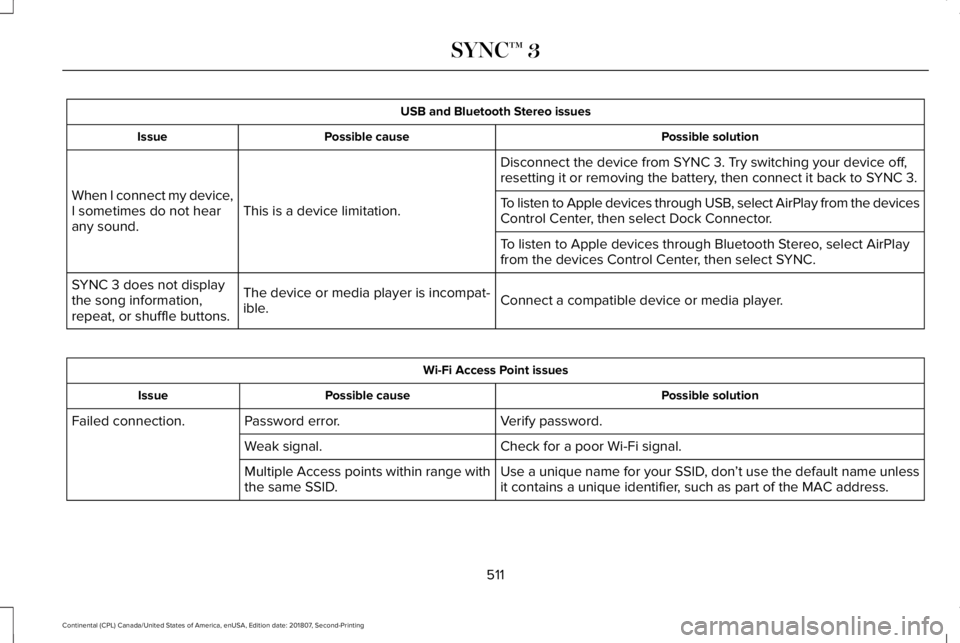
USB and Bluetooth Stereo issues
Possible solution
Possible cause
Issue
Disconnect the device from SYNC 3. Try switching your device off,
resetting it or removing the battery, then connect it back to SYNC 3.
This is a device limitation.
When I connect my device,
I sometimes do not hear
any sound. To listen to Apple devices through USB, select AirPlay from the devices
Control Center, then select Dock Connector.
To listen to Apple devices through Bluetooth Stereo, select AirPlay
from the devices Control Center, then select SYNC.
Connect a compatible device or media player.
The device or media player is incompat-
ible.
SYNC 3 does not display
the song information,
repeat, or shuffle buttons. Wi-Fi Access Point issues
Possible solution
Possible cause
Issue
Verify password.
Password error.
Failed connection.
Check for a poor Wi-Fi signal.
Weak signal.
Use a unique name for your SSID, don’t use the default name unless
it contains a unique identifier, such as part of the MAC address.
Multiple Access points within range with
the same SSID.
511
Continental (CPL) Canada/United States of America, enUSA, Edition date: 201807, Second-Printing SYNC™ 3
Page 515 of 627
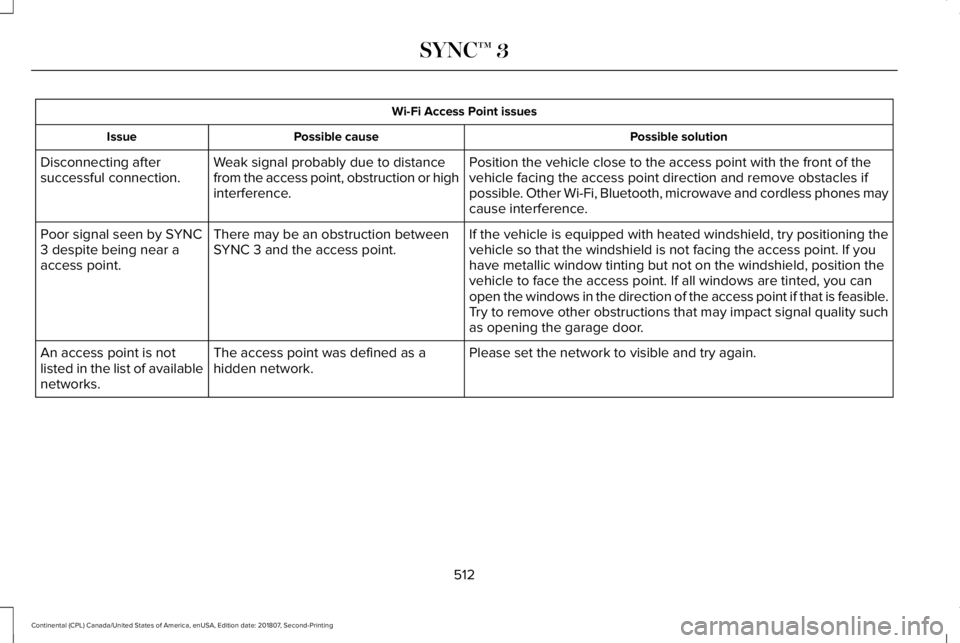
Wi-Fi Access Point issues
Possible solution
Possible cause
Issue
Position the vehicle close to the access point with the front of the
vehicle facing the access point direction and remove obstacles if
possible. Other Wi-Fi, Bluetooth, microwave and cordless phones may
cause interference.
Weak signal probably due to distance
from the access point, obstruction or high
interference.
Disconnecting after
successful connection.
If the vehicle is equipped with heated windshield, try positioning the
vehicle so that the windshield is not facing the access point. If you
have metallic window tinting but not on the windshield, position the
vehicle to face the access point. If all windows are tinted, you can
open the windows in the direction of the access point if that is feasibl\
e.
There may be an obstruction between
SYNC 3 and the access point.
Poor signal seen by SYNC
3 despite being near a
access point.
Try to remove other obstructions that may impact signal quality such
as opening the garage door.
Please set the network to visible and try again.
The access point was defined as a
hidden network.
An access point is not
listed in the list of available
networks.
512
Continental (CPL) Canada/United States of America, enUSA, Edition date: 201807, Second-Printing SYNC™ 3
Page 518 of 627
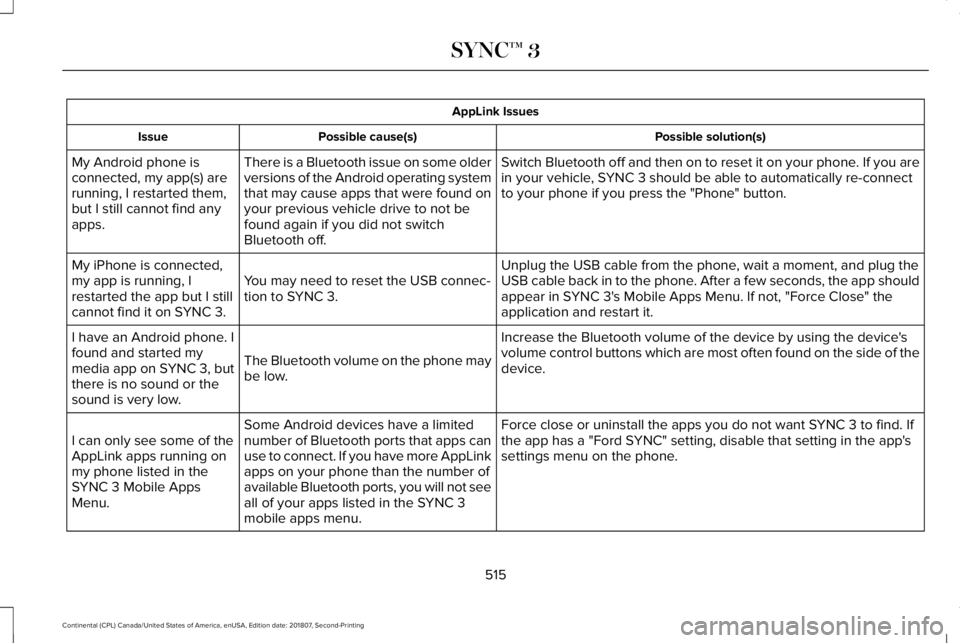
AppLink Issues
Possible solution(s)
Possible cause(s)
Issue
Switch Bluetooth off and then on to reset it on your phone. If you are
in your vehicle, SYNC 3 should be able to automatically re-connect
to your phone if you press the "Phone" button.
There is a Bluetooth issue on some older
versions of the Android operating system
that may cause apps that were found on
your previous vehicle drive to not be
found again if you did not switch
Bluetooth off.
My Android phone is
connected, my app(s) are
running, I restarted them,
but I still cannot find any
apps.
Unplug the USB cable from the phone, wait a moment, and plug the
USB cable back in to the phone. After a few seconds, the app should
appear in SYNC 3's Mobile Apps Menu. If not, "Force Close" the
application and restart it.
You may need to reset the USB connec-
tion to SYNC 3.
My iPhone is connected,
my app is running, I
restarted the app but I still
cannot find it on SYNC 3.
Increase the Bluetooth volume of the device by using the device's
volume control buttons which are most often found on the side of the
device.
The Bluetooth volume on the phone may
be low.
I have an Android phone. I
found and started my
media app on SYNC 3, but
there is no sound or the
sound is very low.
Force close or uninstall the apps you do not want SYNC 3 to find. If
the app has a "Ford SYNC" setting, disable that setting in the app's
settings menu on the phone.
Some Android devices have a limited
number of Bluetooth ports that apps can
use to connect. If you have more AppLink
apps on your phone than the number of
available Bluetooth ports, you will not see
all of your apps listed in the SYNC 3
mobile apps menu.
I can only see some of the
AppLink apps running on
my phone listed in the
SYNC 3 Mobile Apps
Menu.
515
Continental (CPL) Canada/United States of America, enUSA, Edition date: 201807, Second-Printing SYNC™ 3