instrument cluster LINCOLN CONTINENTAL 2019 Owner's Manual
[x] Cancel search | Manufacturer: LINCOLN, Model Year: 2019, Model line: CONTINENTAL, Model: LINCOLN CONTINENTAL 2019Pages: 627, PDF Size: 6.39 MB
Page 307 of 627
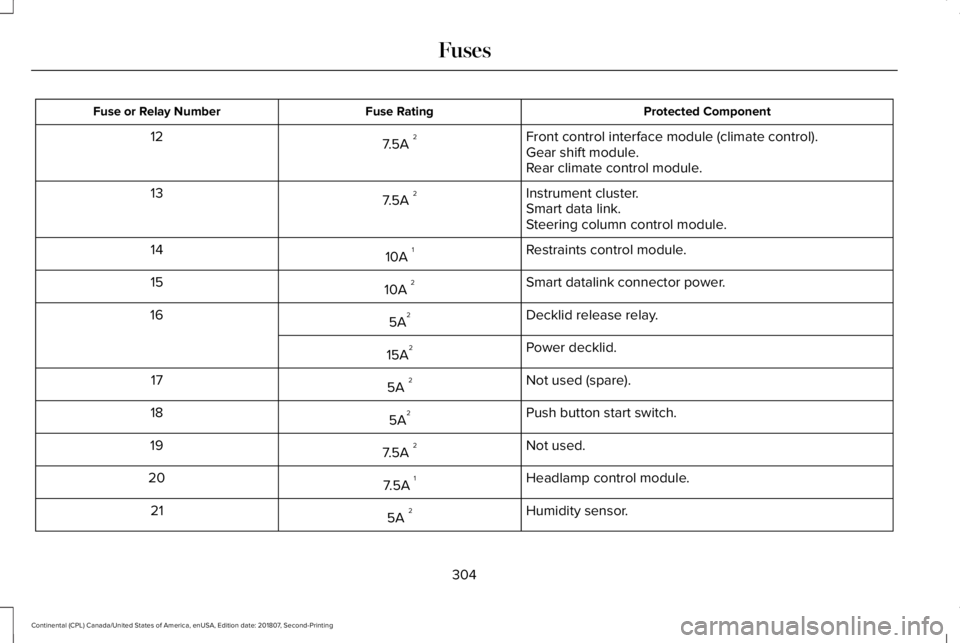
Protected Component
Fuse Rating
Fuse or Relay Number
Front control interface module (climate control).
7.5A 2
12
Gear shift module.
Rear climate control module.
Instrument cluster.
7.5A 2
13
Smart data link.
Steering column control module.
Restraints control module.
10A 1
14
Smart datalink connector power.
10A 2
15
Decklid release relay.
5A 2
16
Power decklid.
15A 2
Not used (spare).
5A 2
17
Push button start switch.
5A 2
18
Not used.
7.5A 2
19
Headlamp control module.
7.5A 1
20
Humidity sensor.
5A 2
21
304
Continental (CPL) Canada/United States of America, enUSA, Edition date: 201807, Second-Printing Fuses
Page 321 of 627
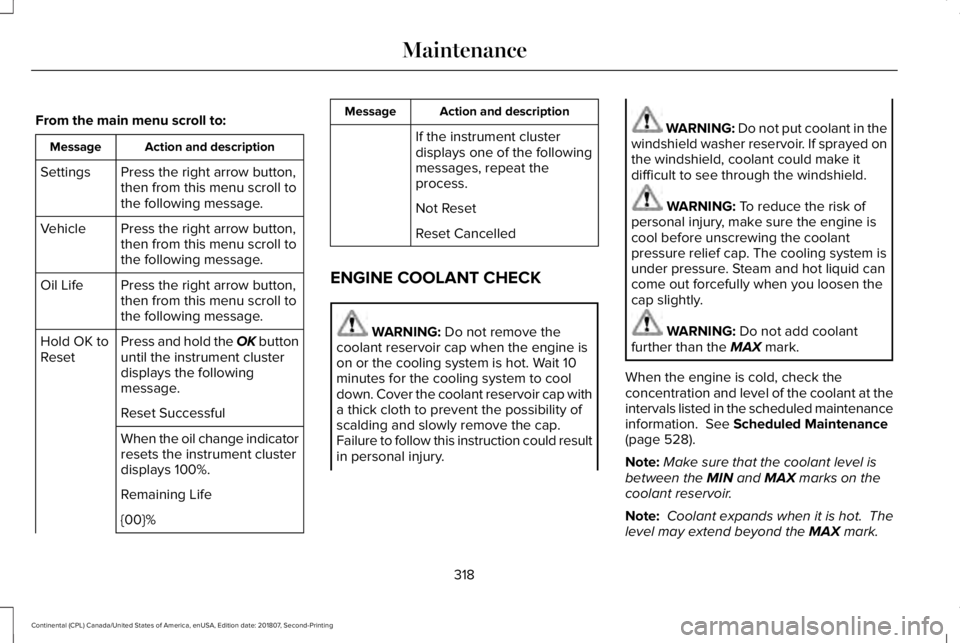
From the main menu scroll to:
Action and description
Message
Press the right arrow button,
then from this menu scroll to
the following message.
Settings
Press the right arrow button,
then from this menu scroll to
the following message.
Vehicle
Press the right arrow button,
then from this menu scroll to
the following message.
Oil Life
Press and hold the OK button
until the instrument cluster
displays the following
message.
Hold OK to
Reset
Reset Successful
When the oil change indicator
resets the instrument cluster
displays 100%.
Remaining Life
{00}% Action and description
Message
If the instrument cluster
displays one of the following
messages, repeat the
process.
Not Reset
Reset Cancelled
ENGINE COOLANT CHECK WARNING: Do not remove the
coolant reservoir cap when the engine is
on or the cooling system is hot. Wait 10
minutes for the cooling system to cool
down. Cover the coolant reservoir cap with
a thick cloth to prevent the possibility of
scalding and slowly remove the cap.
Failure to follow this instruction could result
in personal injury. WARNING:
Do not put coolant in the
windshield washer reservoir. If sprayed on
the windshield, coolant could make it
difficult to see through the windshield. WARNING:
To reduce the risk of
personal injury, make sure the engine is
cool before unscrewing the coolant
pressure relief cap. The cooling system is
under pressure. Steam and hot liquid can
come out forcefully when you loosen the
cap slightly. WARNING:
Do not add coolant
further than the MAX mark.
When the engine is cold, check the
concentration and level of the coolant at the
intervals listed in the scheduled maintenance
information.
See Scheduled Maintenance
(page 528).
Note: Make sure that the coolant level is
between the
MIN and MAX marks on the
coolant reservoir.
Note: Coolant expands when it is hot. The
level may extend beyond the
MAX mark.
318
Continental (CPL) Canada/United States of America, enUSA, Edition date: 201807, Second-Printing Maintenance
Page 341 of 627
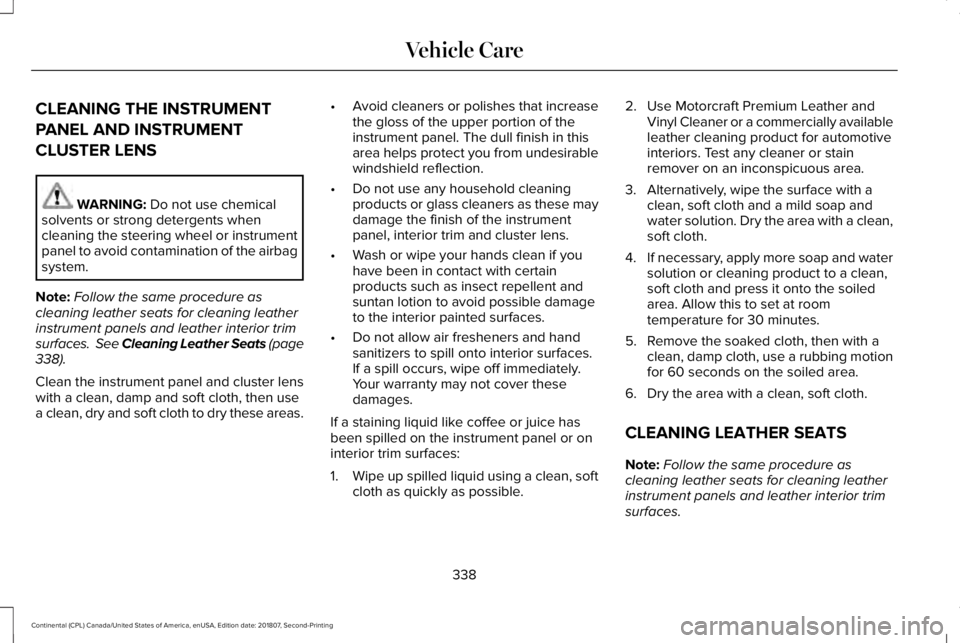
CLEANING THE INSTRUMENT
PANEL AND INSTRUMENT
CLUSTER LENS
WARNING: Do not use chemical
solvents or strong detergents when
cleaning the steering wheel or instrument
panel to avoid contamination of the airbag
system.
Note: Follow the same procedure as
cleaning leather seats for cleaning leather
instrument panels and leather interior trim
surfaces. See Cleaning Leather Seats
(page
338).
Clean the instrument panel and cluster lens
with a clean, damp and soft cloth, then use
a clean, dry and soft cloth to dry these areas. •
Avoid cleaners or polishes that increase
the gloss of the upper portion of the
instrument panel. The dull finish in this
area helps protect you from undesirable
windshield reflection.
• Do not use any household cleaning
products or glass cleaners as these may
damage the finish of the instrument
panel, interior trim and cluster lens.
• Wash or wipe your hands clean if you
have been in contact with certain
products such as insect repellent and
suntan lotion to avoid possible damage
to the interior painted surfaces.
• Do not allow air fresheners and hand
sanitizers to spill onto interior surfaces.
If a spill occurs, wipe off immediately.
Your warranty may not cover these
damages.
If a staining liquid like coffee or juice has
been spilled on the instrument panel or on
interior trim surfaces:
1. Wipe up spilled liquid using a clean, soft
cloth as quickly as possible. 2. Use Motorcraft Premium Leather and
Vinyl Cleaner or a commercially available
leather cleaning product for automotive
interiors. Test any cleaner or stain
remover on an inconspicuous area.
3. Alternatively, wipe the surface with a clean, soft cloth and a mild soap and
water solution. Dry the area with a clean,
soft cloth.
4. If necessary, apply more soap and water
solution or cleaning product to a clean,
soft cloth and press it onto the soiled
area. Allow this to set at room
temperature for 30 minutes.
5. Remove the soaked cloth, then with a clean, damp cloth, use a rubbing motion
for 60 seconds on the soiled area.
6. Dry the area with a clean, soft cloth.
CLEANING LEATHER SEATS
Note: Follow the same procedure as
cleaning leather seats for cleaning leather
instrument panels and leather interior trim
surfaces.
338
Continental (CPL) Canada/United States of America, enUSA, Edition date: 201807, Second-Printing Vehicle Care
Page 524 of 627
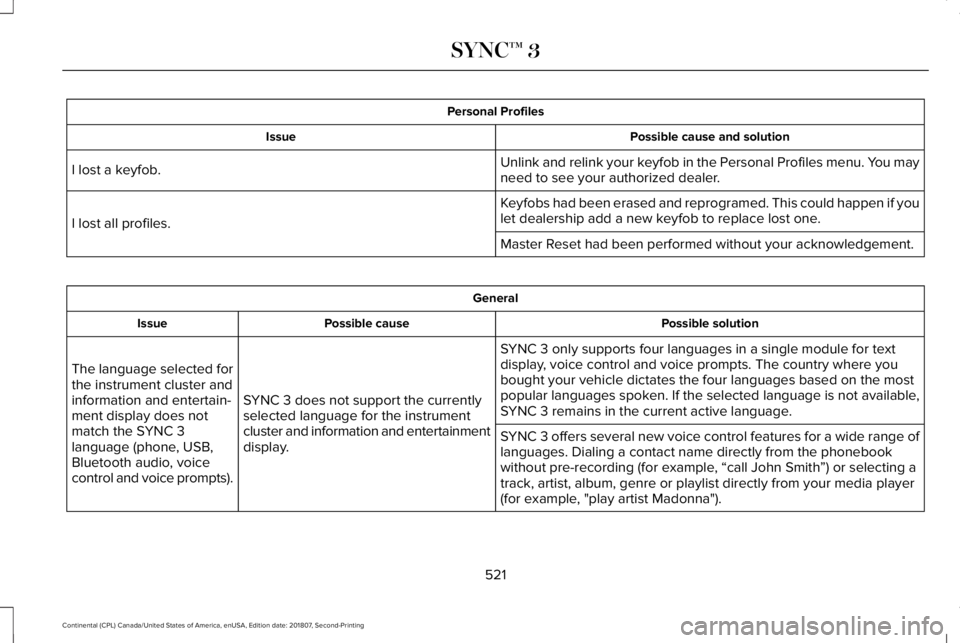
Personal Profiles
Possible cause and solution
Issue
Unlink and relink your keyfob in the Personal Profiles menu. You may
need to see your authorized dealer.
I lost a keyfob.
Keyfobs had been erased and reprogramed. This could happen if you
let dealership add a new keyfob to replace lost one.
I lost all profiles.
Master Reset had been performed without your acknowledgement. General
Possible solution
Possible cause
Issue
SYNC 3 only supports four languages in a single module for text
display, voice control and voice prompts. The country where you
bought your vehicle dictates the four languages based on the most
popular languages spoken. If the selected language is not available,
SYNC 3 remains in the current active language.
SYNC 3 does not support the currently
selected language for the instrument
cluster and information and entertainment
display.
The language selected for
the instrument cluster and
information and entertain-
ment display does not
match the SYNC 3
language (phone, USB,
Bluetooth audio, voice
control and voice prompts).
SYNC 3 offers several new voice control features for a wide range of
languages. Dialing a contact name directly from the phonebook
without pre-recording (for example, “call John Smith
”) or selecting a
track, artist, album, genre or playlist directly from your media player
(for example, "play artist Madonna").
521
Continental (CPL) Canada/United States of America, enUSA, Edition date: 201807, Second-Printing SYNC™ 3
Page 616 of 627
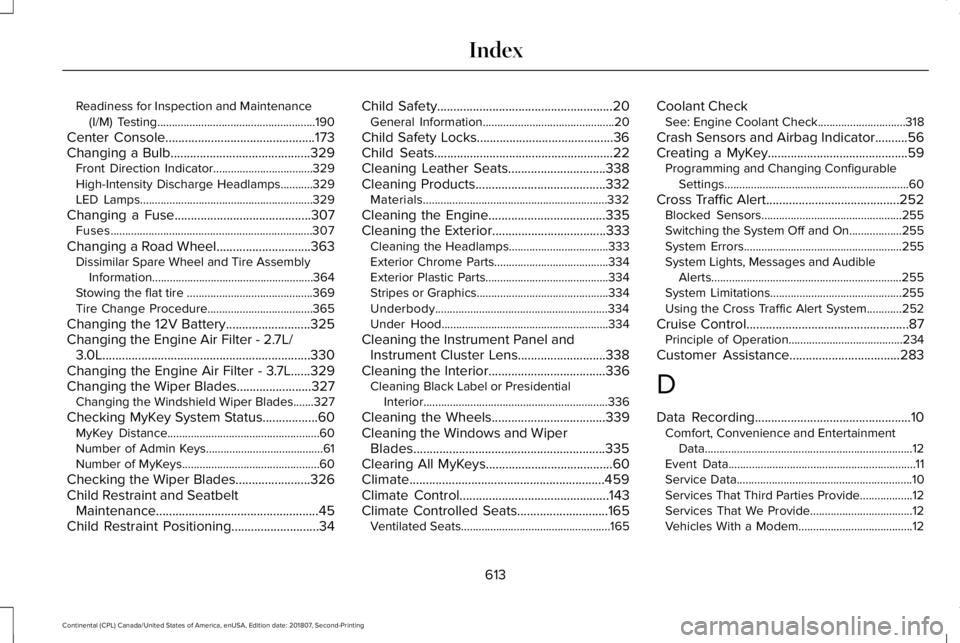
Readiness for Inspection and Maintenance
(I/M) Testing......................................................190
Center Console..............................................173
Changing a Bulb...........................................329
Front Direction Indicator..................................329
High-Intensity Discharge Headlamps...........329
LED Lamps...........................................................329
Changing a Fuse
..........................................307
Fuses.....................................................................307
Changing a Road Wheel.............................363 Dissimilar Spare Wheel and Tire Assembly
Information.......................................................364
Stowing the flat tire ...........................................369
Tire Change Procedure....................................365
Changing the 12V Battery..........................325
Changing the Engine Air Filter - 2.7L/ 3.0L................................................................330
Changing the Engine Air Filter - 3.7L......329
Changing the Wiper Blades.......................327 Changing the Windshield Wiper Blades.......327
Checking MyKey S
ystem Status.................60
MyKey Distance....................................................60
Number of Admin Keys........................................61
Number of MyKeys...............................................60
Checking the Wiper Blades.......................326
Child Restraint and Seatbelt Maintenance..................................................45
Child Restraint Positioning...........................34 Child Safety......................................................20
General Information.............................................20
Child Safety Locks..........................................36
Child Seats.......................................................22
Cleaning Leather Seats..............................338
Cleaning Products........................................332 Materials...............................................................332
Cleaning the Engine....................................335
Cleaning the Exterior...................................333 Cleaning the Headlamps..................................333
Exterior Chrome Parts.......................................334
Exterior Plastic Parts..........................................334
Stripes or Graphics.............................................334
Underbody...........................................................334
Under Hood.........................................................334
Cleaning the Instrument Panel and Instrument Cluster Lens...........................338
Cleaning the Interior
....................................336
Cleaning Black Label or Presidential
Interior...............................................................336
Cleaning the Wheels
...................................339
Cleaning the Windows and Wiper Blades...........................................................335
Clearing All MyKeys.......................................60
Climate............................................................459
Climate Control..............................................143
Climate Controlled Seats............................165 Ventilated Seats...................................................165 Coolant Check
See: Engine Coolant Check..............................318
Crash Sensors and Airbag Indicator..........56
Creating a MyKey...........................................59 Programming and Changing Configurable
Settings...............................................................60
Cross Traffic Alert
.........................................252
Blocked Sensors................................................255
Switching the System Off and On..................255
System Errors
......................................................255
System Lights, Messages and Audible Alerts.................................................................255
System Limitations.............................................255
Using the Cross Traffic Alert System............252
Cruise Control
..................................................87
Principle of Operation.......................................234
Customer Assistance
..................................283
D
Data Recording
................................................10
Comfort, Convenience and Entertainment
Data.......................................................................12
Event Data................................................................11
Service Data............................................................10
Services That Third Parties Provide..................12
Services That We Provide...................................12
Vehicles With a Modem.......................................12
613
Continental (CPL) Canada/United States of America, enUSA, Edition date: 201807, Second-Printing Index
Page 620 of 627
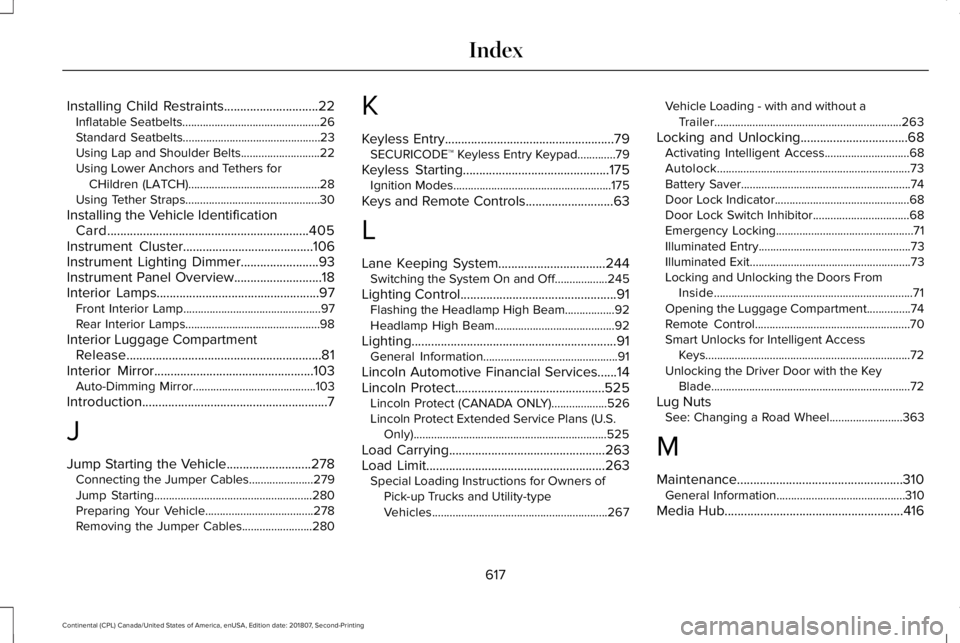
Installing Child Restraints.............................22
Inflatable Seatbelts...............................................26
Standard Seatbelts...............................................23
Using Lap and Shoulder Belts...........................22
Using Lower Anchors and Tethers for
CHildren (LATCH).............................................28
Using Tether Straps..............................................30
Installing the Vehicle Identification Card..............................................................405
Instrument Cluster........................................106
Instrument Lighting Dimmer........................93
Instrument Panel Overview...........................18
Interior Lamps..................................................97 Front Interior Lamp...............................................97
Rear Interior Lamps..............................................98
Interior Luggage Compartment Release............................................................81
Interior Mirror.................................................103
Auto-Dimming Mirror..........................................103
Introduction
.........................................................7
J
Jump Starting the Vehicle..........................278 Connecting the Jumper Cables......................279
Jump Starting......................................................280
Preparing Your Vehicle.....................................278
Removing the Jumper Cables........................280 K
Keyless Entry
....................................................79
SECURICODE™ Keyless Entry Keypad.............79
Keyless Starting
.............................................175
Ignition Modes......................................................175
Keys and Remote Controls
...........................63
L
Lane Keeping System.................................244 Switching the System On and Off..................245
Lighting Control
................................................91
Flashing the Headlamp High Beam.................92
Headlamp High Beam.........................................92
Lighting...............................................................91 General Information..............................................91
Lincoln Automotive Financial Services......14
Lincoln Protect..............................................525 Lincoln Protect (CANADA ONLY)...................526
Lincoln Protect Extended Service Plans (U.S.
Only)
..................................................................525
Load Carrying
................................................263
Load Limit.......................................................263 Special Loading Instructions for Owners of
Pick-up Trucks and Utility-type
Vehicles............................................................267 Vehicle Loading - with and without a
Trailer................................................................263
Locking and Unlocking
.................................68
Activating Intelligent Access.............................68
Autolock..................................................................73
Battery Saver..........................................................74
Door Lock Indicator..............................................68
Door Lock Switch Inhibitor.................................68
Emergency Locking...............................................71
Illuminated Entry....................................................73
Illuminated Exit.......................................................73
Locking and Unlocking the Doors From
Inside....................................................................71
Opening the Luggage Compartment...............74
Remote Control.....................................................70
Smart Unlocks for Intelligent Access Keys......................................................................72
Unlocking the Driver Door with the Key Blade....................................................................72
Lug Nuts See: Changing a Road Wheel.........................363
M
Maintenance...................................................310 General Information............................................310
Media Hub
.......................................................416
617
Continental (CPL) Canada/United States of America, enUSA, Edition date: 201807, Second-Printing Index