audio LINCOLN CONTINENTAL 2019 Workshop Manual
[x] Cancel search | Manufacturer: LINCOLN, Model Year: 2019, Model line: CONTINENTAL, Model: LINCOLN CONTINENTAL 2019Pages: 627, PDF Size: 6.39 MB
Page 509 of 627
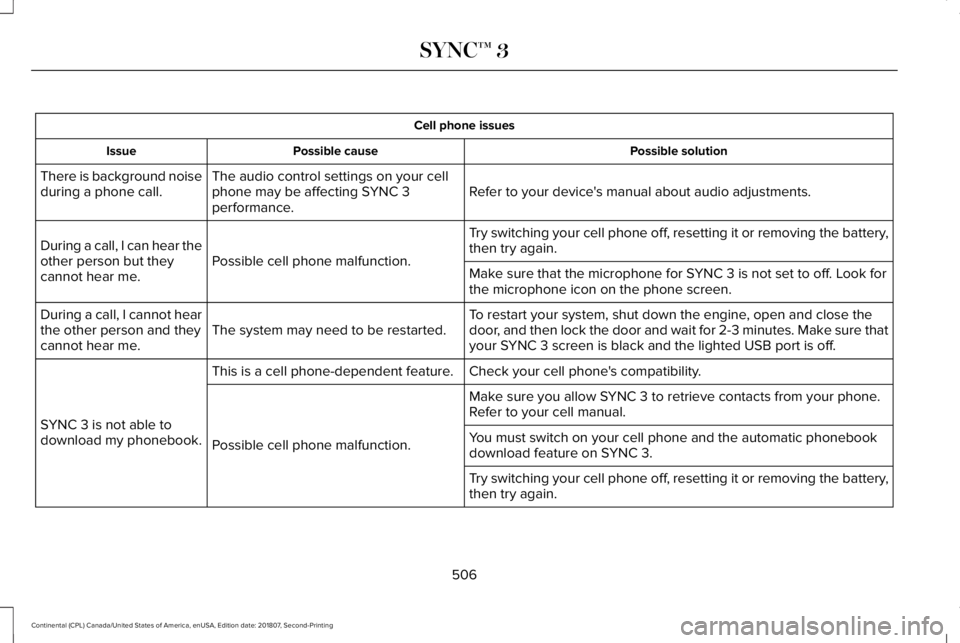
Cell phone issues
Possible solution
Possible cause
Issue
Refer to your device's manual about audio adjustments.
The audio control settings on your cell
phone may be affecting SYNC 3
performance.
There is background noise
during a phone call.
Try switching your cell phone off, resetting it or removing the battery,
then try again.
Possible cell phone malfunction.
During a call, I can hear the
other person but they
cannot hear me.
Make sure that the microphone for SYNC 3 is not set to off. Look for
the microphone icon on the phone screen.
To restart your system, shut down the engine, open and close the
door, and then lock the door and wait for 2-3 minutes. Make sure that
your SYNC 3 screen is black and the lighted USB port is off.
The system may need to be restarted.
During a call, I cannot hear
the other person and they
cannot hear me.
Check your cell phone's compatibility.
This is a cell phone-dependent feature.
SYNC 3 is not able to
download my phonebook. Make sure you allow SYNC 3 to retrieve contacts from your phone.
Refer to your cell manual.
Possible cell phone malfunction. You must switch on your cell phone and the automatic phonebook
download feature on SYNC 3.
Try switching your cell phone off, resetting it or removing the battery,
then try again.
506
Continental (CPL) Canada/United States of America, enUSA, Edition date: 201807, Second-Printing SYNC™ 3
Page 513 of 627
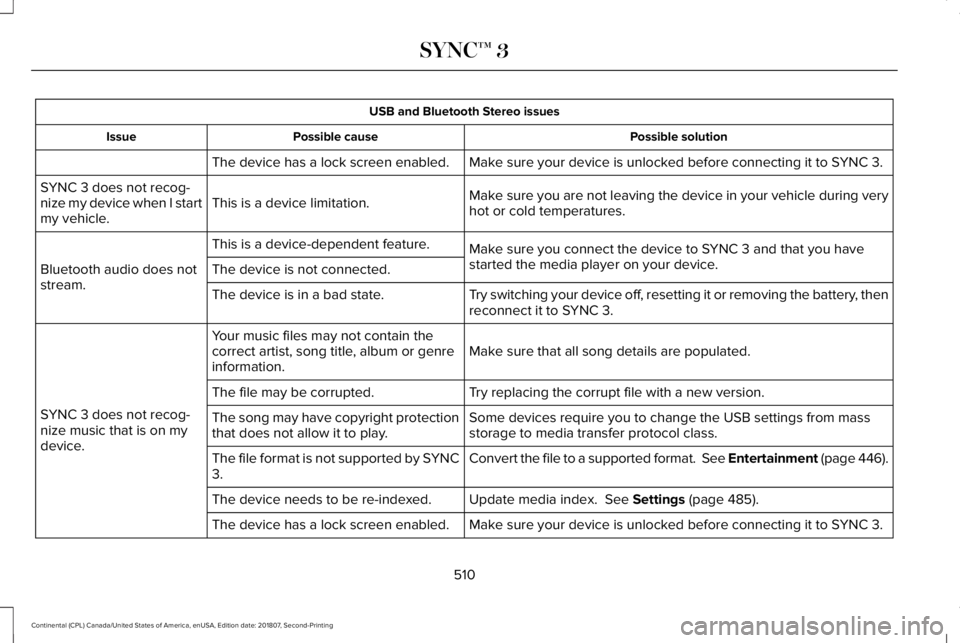
USB and Bluetooth Stereo issues
Possible solution
Possible cause
Issue
Make sure your device is unlocked before connecting it to SYNC 3.
The device has a lock screen enabled.
Make sure you are not leaving the device in your vehicle during very
hot or cold temperatures.
This is a device limitation.
SYNC 3 does not recog-
nize my device when I start
my vehicle.
Make sure you connect the device to SYNC 3 and that you have
started the media player on your device.
This is a device-dependent feature.
Bluetooth audio does not
stream. The device is not connected.
Try switching your device off, resetting it or removing the battery, then
reconnect it to SYNC 3.
The device is in a bad state.
Make sure that all song details are populated.
Your music files may not contain the
correct artist, song title, album or genre
information.
SYNC 3 does not recog-
nize music that is on my
device. Try replacing the corrupt file with a new version.
The file may be corrupted.
Some devices require you to change the USB settings from mass
storage to media transfer protocol class.
The song may have copyright protection
that does not allow it to play.
Convert the file to a supported format. See Entertainment (page 446).
The file format is not supported by SYNC
3.
Update media index.
See Settings (page 485).
The device needs to be re-indexed.
Make sure your device is unlocked before connecting it to SYNC 3.
The device has a lock screen enabled.
510
Continental (CPL) Canada/United States of America, enUSA, Edition date: 201807, Second-Printing SYNC™ 3
Page 519 of 627
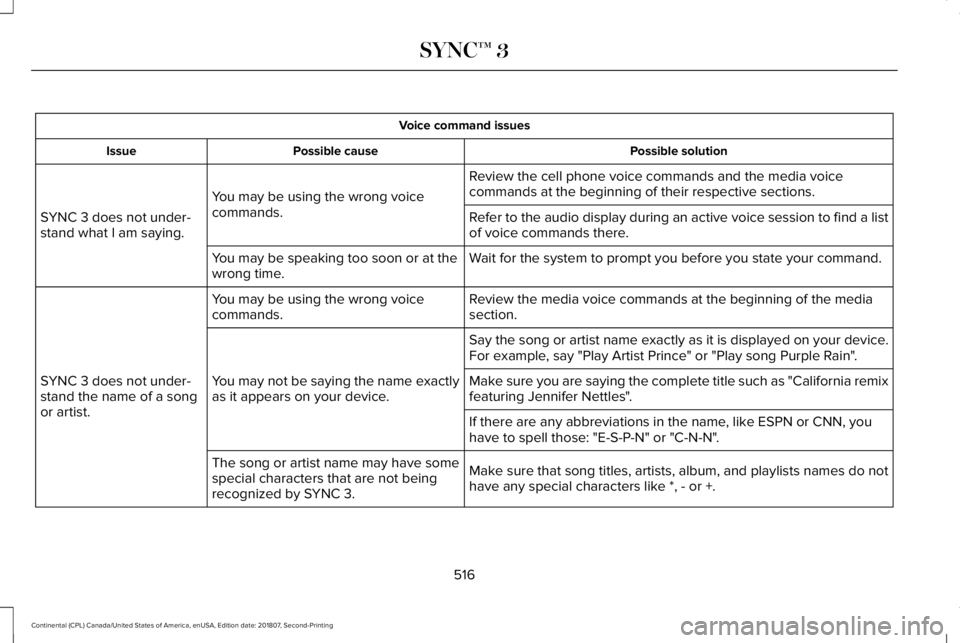
Voice command issues
Possible solution
Possible cause
Issue
Review the cell phone voice commands and the media voice
commands at the beginning of their respective sections.
You may be using the wrong voice
commands.
SYNC 3 does not under-
stand what I am saying. Refer to the audio display during an active voice session to find a list
of voice commands there.
Wait for the system to prompt you before you state your command.
You may be speaking too soon or at the
wrong time.
Review the media voice commands at the beginning of the media
section.
You may be using the wrong voice
commands.
SYNC 3 does not under-
stand the name of a song
or artist. Say the song or artist name exactly as it is displayed on your device.
For example, say "Play Artist Prince" or "Play song Purple Rain".
You may not be saying the name exactly
as it appears on your device. Make sure you are saying the complete title such as "California remix
featuring Jennifer Nettles".
If there are any abbreviations in the name, like ESPN or CNN, you
have to spell those: "E-S-P-N" or "C-N-N".
Make sure that song titles, artists, album, and playlists names do not
have any special characters like *, - or +.
The song or artist name may have some
special characters that are not being
recognized by SYNC 3.
516
Continental (CPL) Canada/United States of America, enUSA, Edition date: 201807, Second-Printing SYNC™ 3
Page 524 of 627
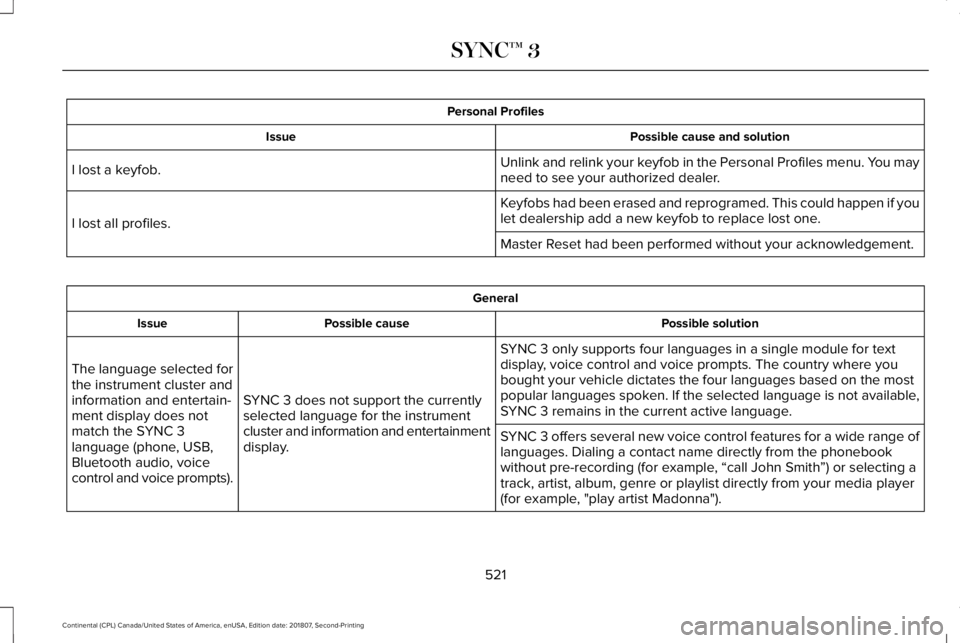
Personal Profiles
Possible cause and solution
Issue
Unlink and relink your keyfob in the Personal Profiles menu. You may
need to see your authorized dealer.
I lost a keyfob.
Keyfobs had been erased and reprogramed. This could happen if you
let dealership add a new keyfob to replace lost one.
I lost all profiles.
Master Reset had been performed without your acknowledgement. General
Possible solution
Possible cause
Issue
SYNC 3 only supports four languages in a single module for text
display, voice control and voice prompts. The country where you
bought your vehicle dictates the four languages based on the most
popular languages spoken. If the selected language is not available,
SYNC 3 remains in the current active language.
SYNC 3 does not support the currently
selected language for the instrument
cluster and information and entertainment
display.
The language selected for
the instrument cluster and
information and entertain-
ment display does not
match the SYNC 3
language (phone, USB,
Bluetooth audio, voice
control and voice prompts).
SYNC 3 offers several new voice control features for a wide range of
languages. Dialing a contact name directly from the phonebook
without pre-recording (for example, “call John Smith
”) or selecting a
track, artist, album, genre or playlist directly from your media player
(for example, "play artist Madonna").
521
Continental (CPL) Canada/United States of America, enUSA, Edition date: 201807, Second-Printing SYNC™ 3
Page 572 of 627
•
Links to Third Party Sites: The
SOFTWARE may provide you with the
ability to link to third party sites. The third
party sites are not under the control of
FORD MOTOR COMPANY, its affiliates
and/or its designated agent. Neither
FORD MOTOR COMPANY nor its
affiliates nor its designated agent are
responsible for (I) the contents of any
third party sites, any links contained in
third party sites, or any changes or
updates to third party sites, or (ii)
webcasting or any other form of
transmission received from any third
party sites. If the SOFTWARE provides
links to third party sites, those links are
provided to you only as a convenience,
and the inclusion of any link does not
imply an endorsement of the third party
site by FORD MOTOR COMPANY, its
affiliates and/or its designated agent.
• Obligation to Drive Responsibly:
You
recognize your obligation to drive
responsibly and keep attention on the
road. You will read and abide with the
DEVICES operating instructions
particularly as they pertain to safety and
you agree to assume any risk associated with the use of the DEVICES.
UPGRADES AND RECOVERY MEDIA: If the
SOFTWARE is provided by FORD MOTOR
COMPANY separate from the DEVICES on
media such as a ROM chip, CD ROM disk(s)
or via web download or other means, and is
labeled "For Upgrade Purposes Only" or "For
Recovery Purposes Only" you may install one
(1) copy of such SOFTWARE onto the
DEVICES as a replacement copy for the
existing SOFTWARE, and use it in
accordance with this EULA, including any
additional EULA terms accompanying the
upgrade SOFTWARE.
INTELLECTUAL PROPERTY RIGHTS:
All
title and intellectual property rights in and to
the SOFTWARE (including but not limited to
any images, photographs, animations, video,
audio, music, text and "applets" incorporated
into the SOFTWARE), the accompanying
printed materials, and any copies of the
SOFTWARE, are owned by FORD MOTOR
COMPANY, or its affiliates or suppliers. The
SOFTWARE is licensed, not sold. You may
not copy the printed materials accompanying
the SOFTWARE. All title and intellectual
property rights in and to the content which may be accessed through use of the
SOFTWARE is the property of the respective
content owner and may be protected by
applicable copyright or other intellectual
property laws and treaties. This EULA grants
you no rights to use such content outside its
intended use. All rights not specifically
granted under this EULA are reserved by
FORD MOTOR COMPANY, its affiliates, and
third party software and service providers
and suppliers. Use of any on-line services
which may be accessed through the
SOFTWARE may be governed by the
respective terms of use relating to such
services. If this SOFTWARE contains
documentation that is provided only in
electronic form, you may print one copy of
such electronic documentation.
569
Continental (CPL) Canada/United States of America, enUSA, Edition date: 201807, Second-Printing Appendices
Page 580 of 627
(b) use your own personal judgment while
driving. If you feel that a route suggested by
the TeleNav Software instructs you to
perform an unsafe or illegal maneuver,
places you in an unsafe situation, or directs
you into an area that you consider to be
unsafe, do not follow such instructions;
(c) do not input destinations, or otherwise
manipulate the TeleNav Software, unless
your vehicle is stationary and parked;
(d) do not use the TeleNav Software for any
illegal, unauthorized, unintended, unsafe,
hazardous, or unlawful purposes, or in any
manner inconsistent with this Agreement;
(e) arrange all GPS and wireless devices and
cables necessary for use of the TeleNav
Software in a secure manner in your vehicle
so that they will not interfere with your
driving and will not prevent the operation of
any safety device (such as an airbag).
You agree to indemnify and hold TeleNav
harmless against all claims resulting from any
dangerous or otherwise inappropriate use
of the TeleNav Software in any moving
vehicle, including as a result of your failure
to comply with the directions above.
2. Account Information
You agree: (a) when registering the TeleNav
Software, to provide TeleNav with true,
accurate, current, and complete information
about yourself, and (b) to inform TeleNav
promptly of any changes to such information,
and to keep it true, accurate, current and
complete.
3. Software License
•
Subject to your compliance with the
terms of this Agreement, TeleNav hereby
grants to you a personal, non-exclusive,
non-transferable license (except as
expressly permitted below in connection
with your permanent transfer of the
TeleNav Software license), without the
right to sublicense, to use the TeleNav
Software (in object code form only) in
order to access and use the TeleNav
Software. This license shall terminate
upon any termination or expiration of this
Agreement. You agree that you will use
the TeleNav Software only for your
personal business or leisure purposes,
and not to provide commercial navigation
services to other parties. 3.1 License Limitations
•
(a) reverse engineer, decompile,
disassemble, translate, modify, alter or
otherwise change the TeleNav Software
or any part thereof; (b) attempt to derive
the source code, audio library or
structure of the TeleNav Software without
the prior express written consent of
TeleNav;
(c) remove from the TeleNav
Software, or alter, any of TeleNav's or its
suppliers' trademarks, trade names,
logos, patent or copyright notices, or
other notices or markings;
(d) distribute,
sublicense or otherwise transfer the
TeleNav Software to others, except as
part of your permanent transfer of the
TeleNav Software; or (e) use the TeleNav
Software in any manner that
I. infringes the intellectual property or
proprietary rights, rights of publicity or
privacy or other rights of any party,
ii. violates any law, statute, ordinance or
regulation, including but not limited to laws
and regulations related to spamming, privacy,
consumer and child protection, obscenity or
defamation, or
577
Continental (CPL) Canada/United States of America, enUSA, Edition date: 201807, Second-Printing Appendices
Page 613 of 627
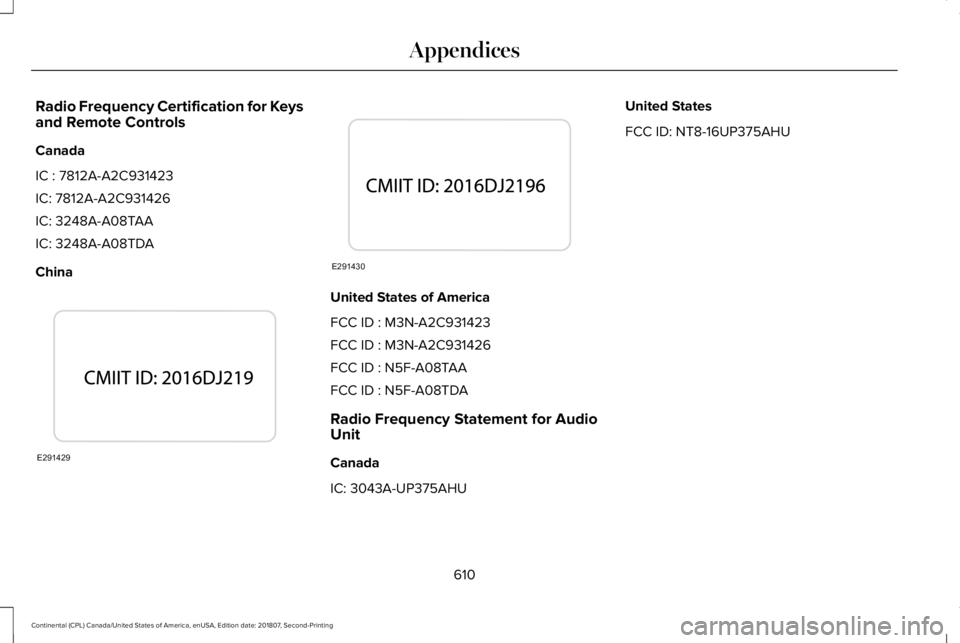
Radio Frequency Certification for Keys
and Remote Controls
Canada
IC : 7812A-A2C931423
IC: 7812A-A2C931426
IC: 3248A-A08TAA
IC: 3248A-A08TDA
China
United States of America
FCC ID : M3N-A2C931423
FCC ID : M3N-A2C931426
FCC ID : N5F-A08TAA
FCC ID : N5F-A08TDA
Radio Frequency Statement for Audio
Unit
Canada
IC: 3043A-UP375AHUUnited States
FCC ID: NT8-16UP375AHU
610
Continental (CPL) Canada/United States of America, enUSA, Edition date: 201807, Second-Printing AppendicesE291429 E291430
Page 614 of 627
3
360 Degree Camera....................................231
Front Camera......................................................232
Side Camera........................................................233
Using the System................................................231
A
A/C See: Climate Control...........................................143
About This Manual............................................7
ABS See: Brakes..........................................................206
ABS driving hints See: Hints on Driving With Anti-Lock
Brakes...............................................................207
Accessories...................................................523 Exterior Style.......................................................523
Interior Style.........................................................523
Lifestyle.................................................................523
Peace of Mind.....................................................523
Accessories See: Replacement Parts Recommendation.....14
ACC See: Using Adaptive Cruise Control..............
234
Active Park Assist..........................................219 Using Active Park Assist....................................221 Adaptive Headlamps
.....................................95
System Check........................................................96
Adjusting the Headlamps...........................327 Horizontal Aim Adjustment..............................328
Vertical Aim Adjustment...................................327
Adjusting the Steering Wheel.....................86 End of Travel Position..........................................86
Memory Feature....................................................86
AFS See: Adaptive Headlamps..................................95
Airbag Disposal...............................................57
Air Conditioning See: Climate Control...........................................143
Air Filter See: Changing the Engine Air Filter - 2.7L/
3.0L....................................................................330
See: Changing the Engine Air Filter - 3.7L....329
Alarm See: Anti-Theft Alarm...........................................85
All-Wheel Drive
..............................................197
Ambient Lighting............................................98
Adjusting the Brightness....................................98
Changing the Color..............................................
98
Switching Ambient Lighting Off........................98
Switching Ambient Lighting On
........................98
Anti-Theft Alarm..............................................
85
Arming the Alarm..................................................85
Disarming the Alarm............................................85 Appendices.....................................................561
Apps.................................................................482
........................................................................\
.........482
SiriusXM Traffic and Travel Link......................483
At a Glance
........................................................18
Audible Warnings and Indicators................111 Headlamps On Warning Chime.........................111
Keyless Warning Alert..........................................111
Parking Brake On Warning Chime....................111
Audio Control
...................................................87
Seek, Next or Previous........................................87
Audio System................................................406 General Information...........................................406
Audio Unit
......................................................408
Adjusting the Volume........................................408
Changing Radio S
tations..................................408
Ejecting the CD...................................................
408
Inserting a CD.....................................................409
Rear Passenger Audio Controls.....................409
Selecting the Audio Modes.............................
409
Switching the Audio Unit On and Off...........409
Using Seek, Fast Forward and Reverse.......409
Auto Hold........................................................210 Using Auto Hold...................................................211
Autolamps........................................................92 Windshield Wiper Activated Headlamps........93
Automatic Climate Control..........................143 Directing Air to the Footwell Air Vents..........143
611
Continental (CPL) Canada/United States of America, enUSA, Edition date: 201807, Second-Printing Index
Page 618 of 627
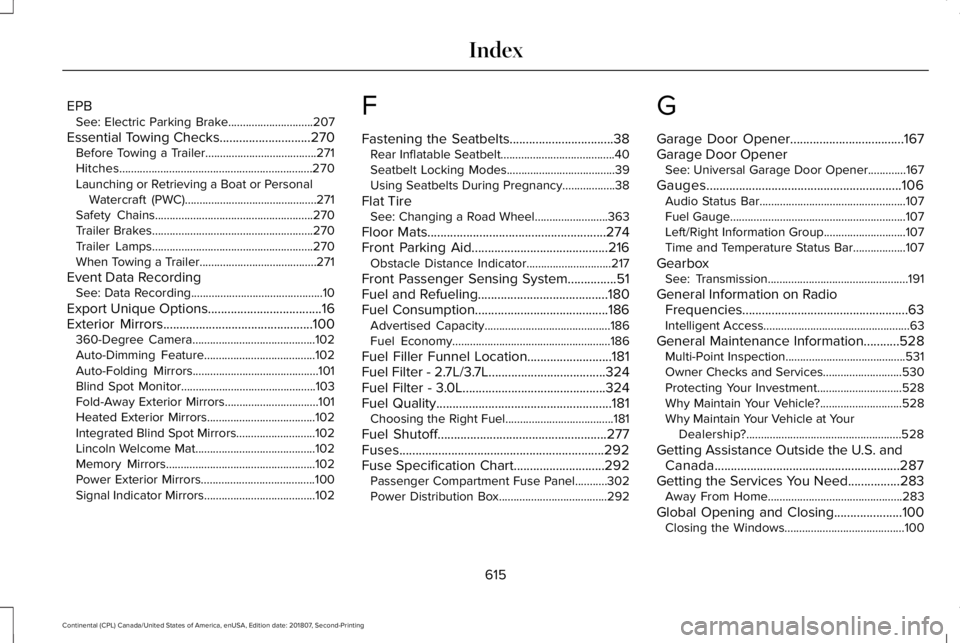
EPB
See: Electric Parking Brake.............................207
Essential Towing Checks............................270 Before Towing a Trailer......................................271
Hitches..................................................................270
Launching or Retrieving a Boat or Personal
Watercraft (PWC).............................................271
Safety Chains......................................................270
Trailer Brakes.......................................................270
Trailer Lamps.......................................................270
When Towing a Trailer........................................271
Event Data Recording See: Data Recording.............................................10
Export Unique Options...................................16
Exterior Mirrors..............................................100
360-Degree Camera..........................................102
Auto-Dimming Feature......................................102
Auto-Folding Mirrors...........................................101
Blind Spot Monitor..............................................103
Fold-Away Exterior Mirrors................................101
Heated Exterior Mirrors.....................................102
Integrated Blind Spot Mirrors...........................102
Lincoln Welcome Mat.........................................102
Memory Mirrors...................................................102
Power Exterior Mirrors.......................................100
Signal Indicator Mirrors......................................102 F
Fastening the Seatbelts................................38
Rear Inflatable Seatbelt.......................................40
Seatbelt Locking Modes.....................................39
Using Seatbelts During Pregnancy..................38
Flat Tire See: Changing a Road Wheel.........................363
Floor Mats
.......................................................274
Front Parking Aid..........................................216 Obstacle Distance Indicator.............................217
Front Passenger Sensing System
...............51
Fuel and Refueling........................................180
Fuel Consumption.........................................186 Advertised Capacity...........................................186
Fuel Economy......................................................186
Fuel Filler Funnel Location..........................181
Fuel Filter - 2.7L/3.7L....................................324
Fuel Filter - 3.0L............................................324
Fuel Quality......................................................181 Choosing the Right Fuel.....................................181
Fuel Shutoff....................................................277
Fuses...............................................................292
Fuse Specification Chart............................292 Passenger Compartment Fuse Panel...........302
Power Distribution Box.....................................292 G
Garage Door Opener...................................167
Garage Door Opener
See: Universal Garage Door Opener.............167
Gauges............................................................106 Audio Status Bar..................................................107
Fuel Gauge............................................................107
Left/Right Information Group............................107
Time and Temperature Status Bar..................107
Gearbox See: Transmission................................................191
General Information on Radio Frequencies...................................................63
Intelligent Access..................................................63
General Maintenance Information...........528 Multi-Point Inspection.........................................531
Owner Checks and Services...........................530
Protecting Your Investment.............................528
Why Maintain Your Vehicle?............................528
Why Maintain Your Vehicle at Your
Dealership?.....................................................528
Getting Assistance Outside the U.S. and Canada.........................................................287
Getting the Services You Need................283 Away From Home..............................................283
Global Opening and Closing.....................100 Closing the Windows.........................................100
615
Continental (CPL) Canada/United States of America, enUSA, Edition date: 201807, Second-Printing Index
Page 624 of 627

Storage Compartments................................173
Sunroof See: Moonroof.....................................................105
Sun Shades
.....................................................104
Sun Visors.......................................................104
Illuminated Vanity Mirror...................................104
Supplementary Restraints S
ystem.............48
Principle of Operation..........................................48
Symbols Glossary
..............................................7
SYNC™ 3...........................................................418 General Information............................................418
SYNC™ 3 Troubleshooting.........................505
T
Technical Specifications See: Capacities and Specifications................373
The Better Business Bureau (BBB) Auto Line Program (U.S. Only).........................285
Tire Care
.........................................................342
Glossary of Tire Terminology...........................344
Important Information About Low-Profile
Tires
...................................................................342
Information About Uniform Tire Quality Grading.............................................................342
Information Contained on the Tire Sidewall............................................................345
Temperature A B C.............................................343 Traction AA A B C...............................................343
Treadwear.............................................................343
Tire Pressure Monitoring System.............357 Changing Tires With a Tire Pressure
Monitoring System........................................359
Understanding Your Tire Pressure Monitoring System .............................................................359
Tires See: Wheels and Tires......................................342
Towing a Trailer
.............................................268
Load Placement..................................................268
Towing the Vehicle on Four Wheels........272 Emergency Towing.............................................272
Recreational Towing..........................................272
Towing.............................................................268
Traction Control
.............................................212
Principle of Operation........................................212
Transmission Code Designation
...............381
Transmission....................................................191
Transporting the Vehicle............................282
Type Approvals
.............................................597
China.....................................................................609
Radio Frequency Certification for Keys and
Remote Controls.............................................610
Radio Frequency Certifications for Blind Spot Information System.......................................607
Radio Frequency Certifications for Body Control Module
..............................................609 Radio Frequency Certifications for Cruise
Control Module..............................................609
Radio Frequency Certifications for Mid Range Radar..................................................................601
Radio Frequency Certifications for Passive Anti-Theft System..........................................602
Radio Frequency Certifications for Radio Transceiver Module......................................605
Radio Frequency Certifications for SYNC 3........................................................................\
.609
Radio Frequency Certifications for Tire Pressure Monitoring Sensor(s)...................597
Radio Frequency Certifications for Wireless Charging
..........................................................608
Radio Frequency Statement for Audio Unit.....................................................................610
U
Under Hood Overview - 2.7L/3.0L............312
Under Hood Overview - 3.7L......................314
Universal Garage Door Opener................167 HomeLink Wireless Control System...............167
USB Port..........................................................416
Using Adaptive Cruise Control.................
234
Automatic Cancellation.....................................238
Blocked Sensor..................................................240
Canceling the Set Speed..................................237
621
Continental (CPL) Canada/United States of America, enUS
A, Edition date: 201807, Second-Printing Index