brake LINCOLN CONTINENTAL 2019 Workshop Manual
[x] Cancel search | Manufacturer: LINCOLN, Model Year: 2019, Model line: CONTINENTAL, Model: LINCOLN CONTINENTAL 2019Pages: 627, PDF Size: 6.39 MB
Page 227 of 627
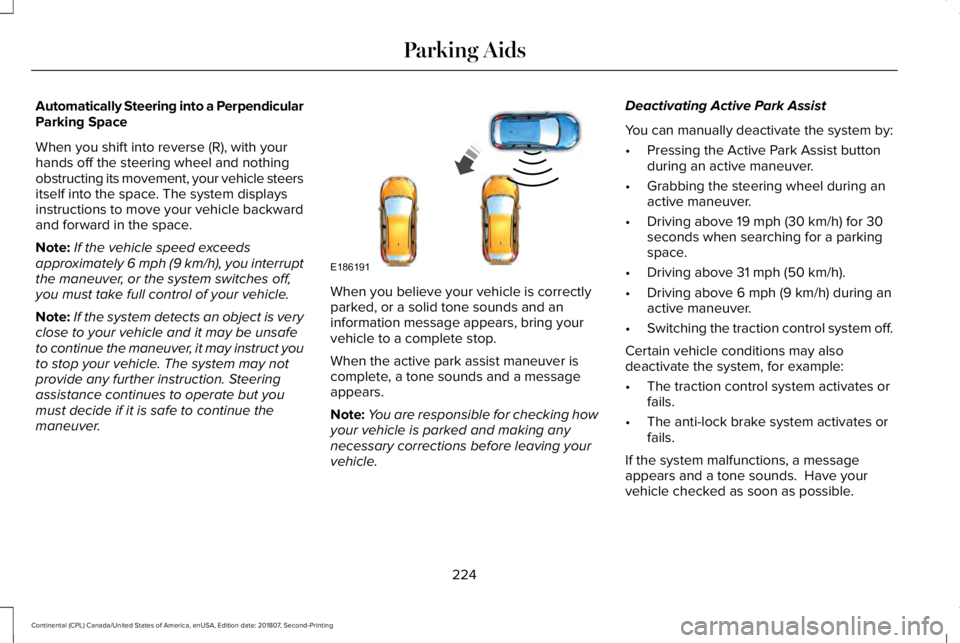
Automatically Steering into a Perpendicular
Parking Space
When you shift into reverse (R), with your
hands off the steering wheel and nothing
obstructing its movement, your vehicle steers
itself into the space. The system displays
instructions to move your vehicle backward
and forward in the space.
Note:
If the vehicle speed exceeds
approximately 6 mph (9 km/h), you interrupt
the maneuver, or the system switches off,
you must take full control of your vehicle.
Note: If the system detects an object is very
close to your vehicle and it may be unsafe
to continue the maneuver, it may instruct you
to stop your vehicle. The system may not
provide any further instruction. Steering
assistance continues to operate but you
must decide if it is safe to continue the
maneuver. When you believe your vehicle is correctly
parked, or a solid tone sounds and an
information message appears, bring your
vehicle to a complete stop.
When the active park assist maneuver is
complete, a tone sounds and a message
appears.
Note:
You are responsible for checking how
your vehicle is parked and making any
necessary corrections before leaving your
vehicle. Deactivating Active Park Assist
You can manually deactivate the system by:
•
Pressing the Active Park Assist button
during an active maneuver.
• Grabbing the steering wheel during an
active maneuver.
• Driving above
19 mph (30 km/h) for 30
seconds when searching for a parking
space.
• Driving above
31 mph (50 km/h).
• Driving above
6 mph (9 km/h) during an
active maneuver.
• Switching the traction control system off.
Certain vehicle conditions may also
deactivate the system, for example:
• The traction control system activates or
fails.
• The anti-lock brake system activates or
fails.
If the system malfunctions, a message
appears and a tone sounds. Have your
vehicle checked as soon as possible.
224
Continental (CPL) Canada/United States of America, enUSA, Edition date: 201807, Second-Printing Parking AidsE186191
Page 228 of 627
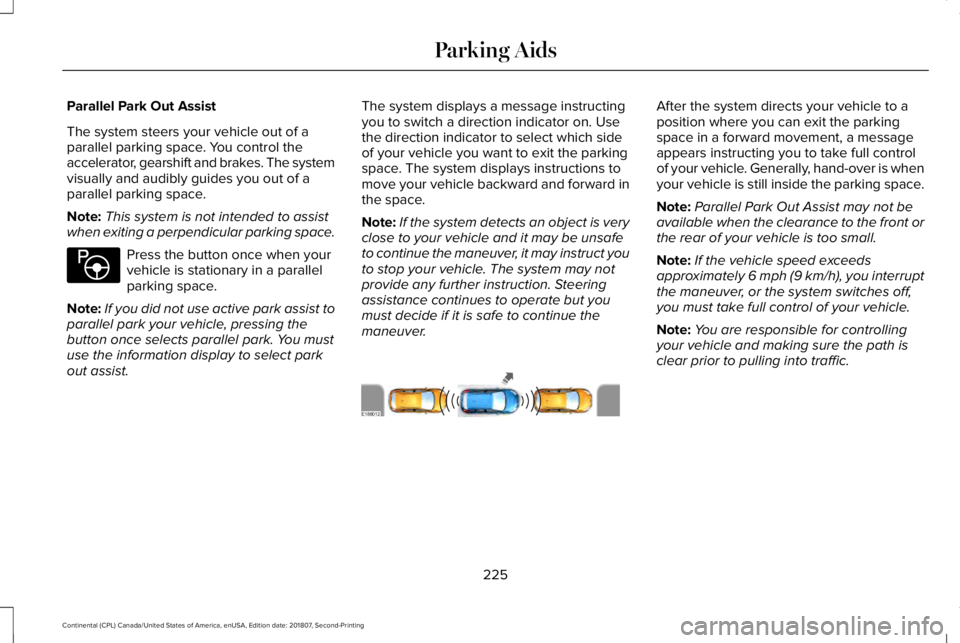
Parallel Park Out Assist
The system steers your vehicle out of a
parallel parking space. You control the
accelerator, gearshift and brakes. The system
visually and audibly guides you out of a
parallel parking space.
Note:
This system is not intended to assist
when exiting a perpendicular parking space. Press the button once when your
vehicle is stationary in a parallel
parking space.
Note: If you did not use active park assist to
parallel park your vehicle, pressing the
button once selects parallel park. You must
use the information display to select park
out assist. The system displays a message instructing
you to switch a direction indicator on. Use
the direction indicator to select which side
of your vehicle you want to exit the parking
space. The system displays instructions to
move your vehicle backward and forward in
the space.
Note:
If the system detects an object is very
close to your vehicle and it may be unsafe
to continue the maneuver, it may instruct you
to stop your vehicle. The system may not
provide any further instruction. Steering
assistance continues to operate but you
must decide if it is safe to continue the
maneuver. After the system directs your vehicle to a
position where you can exit the parking
space in a forward movement, a message
appears instructing you to take full control
of your vehicle. Generally, hand-over is when
your vehicle is still inside the parking space.
Note:
Parallel Park Out Assist may not be
available when the clearance to the front or
the rear of your vehicle is too small.
Note: If the vehicle speed exceeds
approximately 6 mph (9 km/h), you interrupt
the maneuver, or the system switches off,
you must take full control of your vehicle.
Note: You are responsible for controlling
your vehicle and making sure the path is
clear prior to pulling into traffic.
225
Continental (CPL) Canada/United States of America, enUSA, Edition date: 201807, Second-Printing Parking AidsE146186 E188012
Page 237 of 627
PRINCIPLE OF OPERATION
Cruise control lets you maintain a set speed
without keeping your foot on the accelerator
pedal. You can use cruise control when your
vehicle speed is greater than 20 mph
(30 km/h).
USING ADAPTIVE CRUISE
CONTROL WARNING:
Always pay close
attention to changing road conditions when
using adaptive cruise control. The system
does not replace attentive driving. Failing
to pay attention to the road may result in
a crash, serious injury or death. WARNING: Do not use the adaptive
cruise control when entering or leaving a
highway, on roads with intersections or
roundabouts or non-vehicular traffic or
roads that are winding, slippery, unpaved,
or steep slopes. WARNING:
Do not use the system
in poor visibility, for example fog, heavy
rain, spray or snow. WARNING:
Do not use the system
when towing a trailer that has aftermarket
electronic trailer brake controls. Failure to
follow this instruction could result in the
loss of control of your vehicle, personal
injury or death. WARNING:
Do not use tire sizes
other than those recommended because
this can affect the normal operation of the
system. Failure to do so may result in a loss
of vehicle control, which could result in
serious injury. WARNING:
Adaptive cruise control
may not detect stationary or slow moving
vehicles below
6 mph (10 km/h). WARNING:
Adaptive cruise control
does not detect pedestrians or objects in
the road. WARNING:
Adaptive cruise control
does not detect oncoming vehicles in the
same lane. WARNING:
Adaptive cruise control
is not a crash warning or avoidance
system.
The system adjusts your vehicle speed to
maintain the set gap between you and the
vehicle in front of you in the same lane. You
can select four gap settings.
The system uses a radar sensor which
projects a beam directly in front of your
vehicle.
Note: It is your responsibility to stay alert,
drive safely and be in control of the vehicle
at all times.
234
Continental (CPL) Canada/United States of America, enUSA, Edition date: 201807, Second-Printing Cruise Control
Page 238 of 627
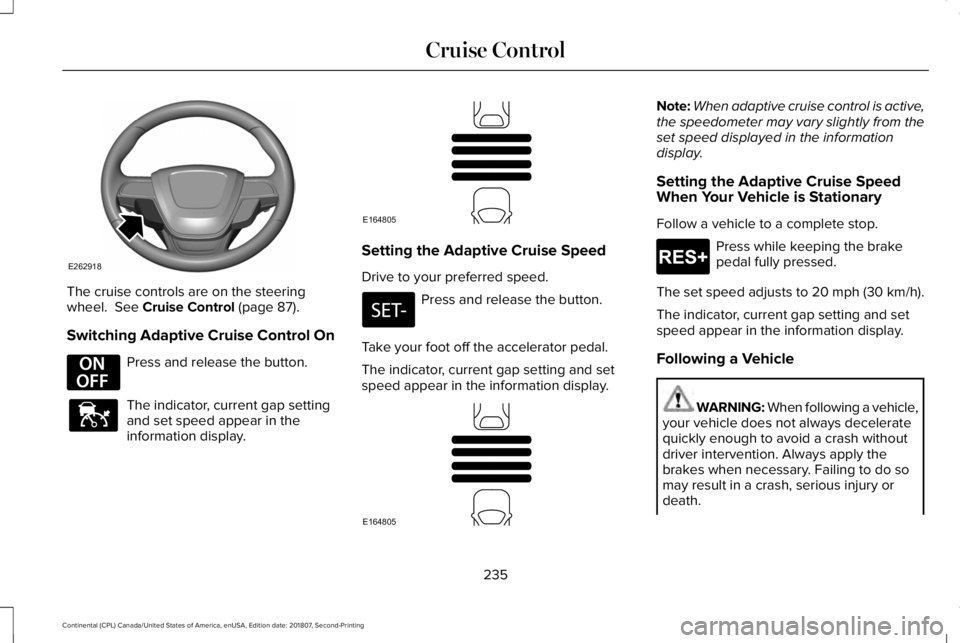
The cruise controls are on the steering
wheel. See Cruise Control (page 87).
Switching Adaptive Cruise Control On Press and release the button.
The indicator, current gap setting
and set speed appear in the
information display. Setting the Adaptive Cruise Speed
Drive to your preferred speed.
Press and release the button.
Take your foot off the accelerator pedal.
The indicator, current gap setting and set
speed appear in the information display. Note:
When adaptive cruise control is active,
the speedometer may vary slightly from the
set speed displayed in the information
display.
Setting the Adaptive Cruise Speed
When Your Vehicle is Stationary
Follow a vehicle to a complete stop. Press while keeping the brake
pedal fully pressed.
The set speed adjusts to 20 mph (30 km/h).
The indicator, current gap setting and set
speed appear in the information display.
Following a Vehicle WARNING:
When following a vehicle,
your vehicle does not always decelerate
quickly enough to avoid a crash without
driver intervention. Always apply the
brakes when necessary. Failing to do so
may result in a crash, serious injury or
death.
235
Continental (CPL) Canada/United States of America, enUSA, Edition date: 201807, Second-Printing Cruise ControlE262918 E294678 E144529 E164805 E164805 E265299
Page 239 of 627
WARNING: Adaptive cruise control
only warns of vehicles detected by the
radar sensor. In some cases there may be
no warning or a delayed warning. You
should always apply the brakes when
necessary. Failure to do so may result in a
crash, serious injury or death.
When a vehicle ahead of you enters the
same lane or a slower vehicle is ahead in the
same lane, the vehicle speed adjusts to
maintain a preset gap distance. A vehicle
graphic illuminates in the instrument cluster.
Note: The brakes may emit noise when
applied by the system.
Note: When you are following a vehicle and
you switch on a direction indicator, adaptive
cruise control may provide a small temporary
acceleration to help you pass. Your vehicle maintains a consistent gap from
the vehicle ahead until:
•
The vehicle in front of you accelerates to
a speed above the set speed.
• The vehicle in front of you moves out of
the lane you are in.
• You set a new gap distance.
The system applies the brakes to slow your
vehicle to maintain a safe gap distance from
the vehicle in front. The system only applies
limited braking. You can override the system
by applying the brakes.
If the system determines that its maximum
braking level is not sufficient, an audible
warning sounds, a message appears in the
information display and an indicator flashes
when the system continues to brake. Take
immediate action.
Following a Vehicle to a Complete Stop
If your vehicle follows a vehicle to a complete
stop and remains stationary for less than
three seconds, your vehicle accelerates from
a stationary position to follow the vehicle
ahead. If your vehicle follows a vehicle to
a complete stop and remains
stationary for more than three
seconds, press to follow the vehicle ahead.
Or press the accelerator pedal.
Setting the Gap Distance
You can decrease or increase the distance
between your vehicle and the vehicle in front
by pressing the gap control. Press and release to decrease the
gap distance.
Press and release to increase the
gap distance.
The selected gap appears in the information
display as shown by the bars in the image.
236
Continental (CPL) Canada/United States of America, enUSA, Edition date: 201807, Second-Printing Cruise ControlE265299 E263697 E263696 E164805
Page 240 of 627
Note:
The gap setting is time dependent and
therefore the distance adjusts with your
vehicle speed.
Note: It is your responsibility to select a gap
appropriate to the driving conditions.
Adaptive Cruise Control Gap Settings Dynamic
behavior
Distance Gap
Graphic
display,
bars indic- ated
between vehicles
Sport.
Closest.
1
Normal.
Close.
2
Normal.
Medium.
3
Comfort.
Far.
4
Each time you switch the system on, it
selects the last chosen gap setting. Overriding the Set Speed WARNING: If you override the
system by pressing the accelerator pedal,
it does not automatically apply the brakes
to maintain a gap from any vehicle ahead.
When you press the accelerator pedal, you
override the set speed and gap distance. Use the accelerator pedal normally
to intentionally exceed the set
speed limit.
When you override the system, the green
indicator light illuminates and the vehicle
image does not appear in the information
display.
The system resumes operation when you
release the accelerator pedal. The vehicle
speed decreases to the set speed, or a lower
speed if following a slower vehicle.
Changing the Set Speed Press and release to increase the
set speed in small increments. Press and release to decrease the
set speed in small increments.
Press and hold either button to change the
set speed in large increments. Release the
button when you reach your preferred speed.
The system may apply the brakes to slow
the vehicle to the new set speed. The set
speed displays continuously in the
information display when the system is
active.
Canceling the Set Speed Press and release the button or tap
the brake pedal.
The set speed does not erase.
Resuming the Set Speed Press and release the button.
Your vehicle speed returns to the previously
set speed and gap setting. The set speed
displays continuously in the information
display when the system is active.
237
Continental (CPL) Canada/United States of America, enUSA, Edition date: 201807, Second-Printing Cruise ControlE144529 E265299 E265299
Page 241 of 627
Note:
Only use resume if you are aware of
the set speed and intend to return to it.
Automatic Cancellation
Automatic cancellation can also occur when:
• The tires lose traction.
• You apply the parking brake.
Park Brake Application
Automatic parking brake application and
cancellation occurs if:
• You unbuckle the seatbelt and open the
door after you stop the vehicle.
• You hold the vehicle at a stop
continuously for more than three minutes.
Hilly Condition Usage
You should select a lower gear when the
system is active in situations such as
prolonged downhill driving on steep grades,
for example in mountainous areas. The
system needs additional engine braking in
these situations to reduce the load on the
vehicle ’s regular brake system to prevent it
from overheating. Note:
An audible alarm sounds and the
system shuts down if it applies brakes for an
extended period of time. This allows the
brakes to cool. The system functions
normally again after the brakes cool.
Switching Adaptive Cruise Control Off Press and release the button when
the system is in standby mode, or
switch the ignition off.
Note: You erase the set speed and gap
setting when you switch the system off.
Detection Issues WARNING: On rare occasions,
detection issues can occur due to the road
infrastructures, for example bridges,
tunnels and safety barriers. In these cases,
the system may brake late or
unexpectedly. At all times, you are
responsible for controlling your vehicle,
supervising the system and intervening, if
required. WARNING:
If the system
malfunctions, have your vehicle checked
as soon as possible.
The radar sensor has a limited field of view.
It may not detect vehicles at all or detect a
vehicle later than expected in some
situations. The lead vehicle graphic does not
illuminate if the system does not detect a
vehicle in front of you.
238
Continental (CPL) Canada/United States of America, enUSA, Edition date: 201807, Second-Printing Cruise ControlE294678
Page 242 of 627
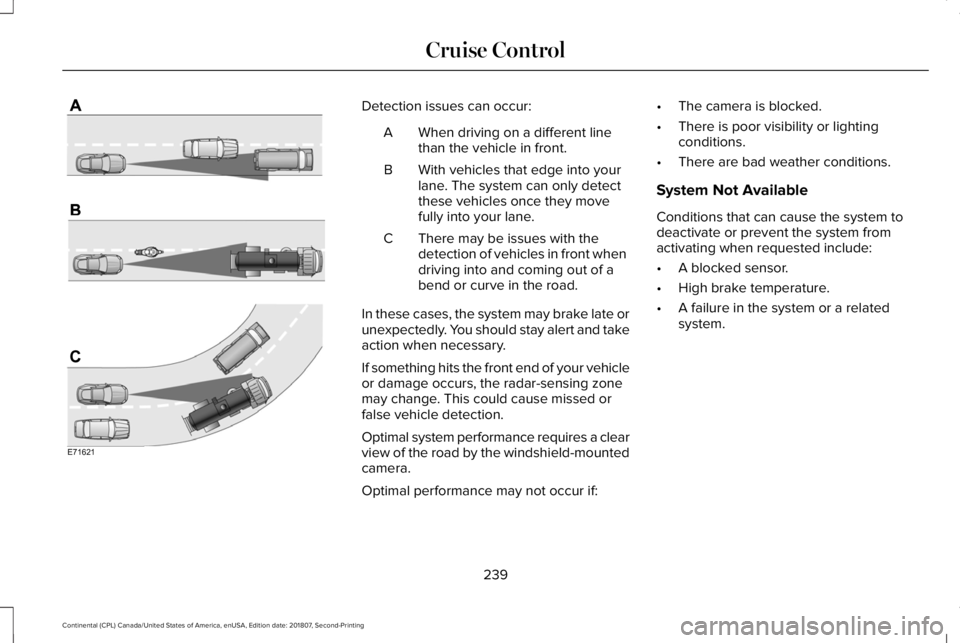
Detection issues can occur:
When driving on a different line
than the vehicle in front.
A
With vehicles that edge into your
lane. The system can only detect
these vehicles once they move
fully into your lane.
B
There may be issues with the
detection of vehicles in front when
driving into and coming out of a
bend or curve in the road.
C
In these cases, the system may brake late or
unexpectedly. You should stay alert and take
action when necessary.
If something hits the front end of your vehicle
or damage occurs, the radar-sensing zone
may change. This could cause missed or
false vehicle detection.
Optimal system performance requires a clear
view of the road by the windshield-mounted
camera.
Optimal performance may not occur if: •
The camera is blocked.
• There is poor visibility or lighting
conditions.
• There are bad weather conditions.
System Not Available
Conditions that can cause the system to
deactivate or prevent the system from
activating when requested include:
• A blocked sensor.
• High brake temperature.
• A failure in the system or a related
system.
239
Continental (CPL) Canada/United States of America, enUSA, Edition date: 201807, Second-Printing Cruise ControlE71621
Page 245 of 627
Switching to Normal Cruise Control
WARNING: Normal cruise control will
not brake when your vehicle is
approaching slower vehicles. Always be
aware of which mode you have selected
and apply the brakes when necessary. The cruise control indicator light
replaces the adaptive cruise
control indicator light if you select
normal cruise control. The gap setting does
not display, and the system does not respond
to lead vehicles. Automatic braking remains
active to maintain set speed.
You can change from adaptive cruise control
to normal cruise control through the
information display.
242
Continental (CPL) Canada/United States of America, enUSA, Edition date: 201807, Second-Printing Cruise ControlE71340
Page 260 of 627
Adaptive Learning
The electronic power steering system
adaptive learning helps correct road
irregularities and improves overall handling
and steering feel. It communicates with the
brake system to help operate advanced
stability control and accident avoidance
systems. Additionally, whenever the battery
is disconnected or a new battery installed,
you must drive your vehicle a short distance
before the system relearns the strategy and
reactivates all systems.
Adaptive Steering (If Equipped)
Note: The adaptive steering system has
diagnostic checks that continuously monitor
the system. If a fault is detected a message
displays in the information display. If a red
warning message displays, stop your vehicle
as soon as it is safe to do so. The message
may clear if the fault is no longer present. If
an adaptive steering system warning
message appears each time you start your
vehicle, have the system checked as soon
as possible. The adaptive steering system continually
changes the steering ratio with changes to
vehicle speed, optimizing the steering
response in all conditions.
The adaptive steering system is designed
with a locking device. While the lock is
engaged, your vehicle returns to a fixed
steering ratio. You may also notice a sound
when you start or turn off your vehicle as the
lock is disengaged or engaged. If your
vehicle loses electrical power or detects a
fault while you are driving, the lock engages
and you are able to continue steering. During
this time it is possible that the steering wheel
may not be straight when the vehicle is
driving straight ahead. During this time you
may notice that the steering wheel angle
required to steer the vehicle may be
different. Extreme operating conditions may
also cause the lock to engage. This strategy
prevents overheating and permanent
damage to the adaptive steering system.
Typical steering and driving maneuvers allow
the system to cool and return to normal
operation.
PRE-COLLISION ASSIST WARNING:
You are responsible for
controlling your vehicle at all times. The
system is designed to be an aid and does
not relieve you of your responsibility to
drive with due care and attention. Failure
to follow this instruction could result in the
loss of control of your vehicle, personal
injury or death. WARNING:
The system does not
detect vehicles that are driving in a
different direction, pedestrians at night,
cyclists or animals. Failure to take care may
result in the loss of control of your vehicle,
serious personal injury or death. WARNING:
The system does not
operate during hard acceleration or
steering. Failure to take care may lead to
a crash or personal injury.
257
Continental (CPL) Canada/United States of America, enUSA, Edition date: 201807, Second-Printing Driving Aids