ESP LINCOLN CONTINENTAL 2019 Repair Manual
[x] Cancel search | Manufacturer: LINCOLN, Model Year: 2019, Model line: CONTINENTAL, Model: LINCOLN CONTINENTAL 2019Pages: 627, PDF Size: 6.39 MB
Page 466 of 627

Manual airflow distribution controls:
H
Defrost: A pop-up appears on the screen to display the defrost options.
MAX Defrost: Touch the button to maximize defrosting. Air flows through the windshield\
vents, the fan automatically adjusts to the
highest speed and the driver and passenger temperatures are set to HI. Y\
ou can use this setting to defog or clear a thin covering
of ice from the windshield. The heated rear window also automatically tu\
rns on when you select MAX Defrost.
Defrost:
Distributes air through the windshield defroster vents and demister vent\
s.
Heated rear window:
Turns the heated rear window on and off. See Heated Rear Window (page 147).
Panel:
Distributes air through the instrument panel vents.
Floor:
Distributes air through the demister vents, floor vents and rear seat f\
loor vents.
Driver temperature:
Touch up or down to adjust the temperature.
I
PHONE WARNING:
Driving while distracted
can result in loss of vehicle control, crash
and injury. We strongly recommend that
you use extreme caution when using any
device that may take your focus off the
road. Your primary responsibility is the safe
operation of your vehicle. We recommend against the use of any hand-held device
while driving and encourage the use of
voice-operated systems when possible.
Make sure you are aware of all applicable
local laws that may affect the use of
electronic devices while driving.
Hands-free calling is one of the main features
of the system. Once you pair your cell phone,
you can access many options using the
touchscreen or voice commands. While the
system supports a variety of features, many
are dependent on your cell phone
’s
functionality.
Pairing Your Cell Phone for the First
Time
Pair your Bluetooth enabled phone with the
system before using the functions in
hands-free mode.
463
Continental (CPL) Canada/United States of America, enUSA, Edition date: 201807, Second-Printing SYNC™ 3
Page 485 of 627
HERE is the digital map provider for the
navigation application. If you find map data
errors, you may report them directly to HERE
by going to www.here.com/mapcreator.
HERE evaluates all reported map errors and
responds with the result of their investigation
by e-mail.
Map coverage includes the USA (including
Puerto Rico and the US Virgin Islands),
Canada and Mexico.
APPS
The system enables voice, steering wheel,
and touch screen control of SYNC 3 AppLink
enabled smartphone apps. When an app is
running through AppLink, you can control
main features of the app through voice
commands and steering wheel controls.
Note:
Available AppLink enabled apps will
vary by market.
Note: You must pair and connect your
smartphone via Bluetooth to SYNC 3 to
access AppLink. Note:
iPhone users need to connect the
phone to the USB port.
Note: For information on available apps,
supported smartphone devices and
troubleshooting tips please visit: Websites
owner.lincoln.com
www.syncmyride.ca
www.syncmaroute.ca
Note: Make sure you have an active account
for the app that you have downloaded. Some
apps will work with no setup. Other apps will
want you to configure your personal settings
and personalize your experience by creating
stations or favorites. We recommend you do
this at home or outside of your vehicle.
Note: We encourage you to review the
smartphone app ’s terms of service and
privacy policies because Lincoln is not
responsible for your app or its use of data. Note:
AppLink is a native SYNC system
feature. Accessing mobile apps through
AppLink is only possible when Android Auto
or Apple CarPlay are disabled. Some apps
may only be accessible in the car through
AppLink and others only through Android
Auto or Apple CarPlay. Please refer to the
Smartphone Connectivity information to
disable Android Auto or Apple CarPlay.
Note: In order to use an app with SYNC 3,
the app needs to be running in the
background of your phone. If you shut down
the app on your phone, it shuts down the
app on SYNC 3 as well.
Note: If a SYNC 3 AppLink compatible app
is not shown in the Apps Domain, make sure
the required app is running on the mobile
device.
482
Continental (CPL) Canada/United States of America, enUSA, Edition date: 201807, Second-Printing SYNC™ 3
Page 486 of 627
Action and Descrip-
tion
Menu Item
SYNC 3 will search
and connect to
compatible app(s)
running on your
mobile device.
Find Mobile Apps
Enabling SYNC 3 Mobile Apps
In order to enable mobile apps, SYNC 3
requires user consent to send and receive
app authorization information and updates
using the data plan associated with the
connected device.
The connected device sends data to Lincoln
in the United States. The information is
encrypted and includes your VIN, SYNC 3
module number, odometer, usage statistics
and debugging information. We retain this
data for only as long as necessary to provide
this service, troubleshoot, and improve
products and services and to offer you
products and services that may interest you
where allowed by law. Note:
You must enable mobile apps for each
connected device the first time you select a
mobile app using the system.
Note: Lincoln reserves the right to limit
functionality or deactivate mobile apps at
any time.
Note: Standard data rates apply. Lincoln is
not responsible for any additional charges
you may receive from your service provider,
when your vehicle sends or receives data
through the connected device. This includes
any additional charges incurred due to
driving in areas when roaming out of a home
network.
You can enable and disable apps through
settings. See Settings (page 485).
App Permissions
The system organizes the app permissions
into groups. You can individually grant these
group permissions.You can change a
permission group status any time when not
driving, by using the settings menu. While
in the settings menu, you can also see the
data included in each group. When you launch an app using SYNC 3, the
system may ask you to grant certain
permissions, for example Vehicle information,
Driving characteristics, GPS and Speed,
and/or Push notifications. You can enable all
groups or none of them during the initial app
permissions prompts. The settings menu
offers individual group permission control.
Note:
You are only prompted to grant
permissions the first time you use an app
with SYNC 3.
Note: If you disable group permissions, apps
will still be enabled to work with SYNC 3
unless you deactivate All Apps in the settings
menu.
SiriusXM Traffic and Travel Link (If
Equipped) WARNING:
Driving while distracted
can result in loss of vehicle control, crash
and injury. We strongly recommend that
you use extreme caution when using any
device that may take your focus off the
road. Your primary responsibility is the safe
483
Continental (CPL) Canada/United States of America, enUSA, Edition date: 201807, Second-Printing SYNC™ 3
Page 487 of 627
operation of your vehicle. We recommend
against the use of any hand-held device
while driving and encourage the use of
voice-operated systems when possible.
Make sure you are aware of all applicable
local laws that may affect the use of
electronic devices while driving.
Note: SiriusXM Traffic and Travel Link may
not be available in all markets. Note:
In order to use SiriusXM Traffic and
Travel Link, your vehicle must have
navigation.
Note: A paid subscription is required to
access and use these features. Go to
www.siriusxm.com/travellink for more
information.
Note: Visit www.siriusxm.com/traffic and click
on Coverage map and details for a complete
listing of all traffic areas covered by SiriusXM
Traffic and Travel Link. Note:
Neither Sirius nor Lincoln is
responsible for any errors or inaccuracies in
the SiriusXM Traffic and Travel Link services
or its use in vehicles.
When you subscribe to SiriusXM Traffic and
Travel Link, it can help you locate the best
gas prices, find movie listings, get current
traffic alerts, view the current weather map,
get accurate ski conditions and see scores
to current sports games. Action and Description
Menu Item
Touch these buttons to identify traffic incidents on your route, near your vehicle ’s current location
or near any of your favorite places, if programmed.
Traffic on Route
Traffic Nearby
Touch this button to view fuel prices at stations close to your vehicle ’s location or on an active
navigation route.
Fuel Prices
Touch this button to view nearby movie theaters and their show times, if \
available.
Movie Listings
Touch this button to view the nearby weather, current weather, or the five-day forecast for the
chosen area.
Weather
Select to see the weather map, which can show storms,
radar information, charts and winds.
Map
484
Continental (CPL) Canada/United States of America, enUSA, Edition date: 201807, Second-Printing SYNC™ 3
Page 501 of 627
Navigation Source Selection
The screen lists available alternative
navigation sources using Applink.
Mobile Apps
You can enable the control of compatible
mobile apps running on your Bluetooth or
USB device on SYNC 3. In order to enable
mobile apps, SYNC 3 requires user consent
to send and receive app authorization
information and updates using the data plan
associated with the connected device.The connected devices send data to us in
the United States. The encrypted information
includes your VIN, SYNC 3 module number,
anonymous usage statistics and debugging
information. Updates may take place.
Note:
Not all Mobile Apps are compatible
with the system.
Note: Standard data rates apply. We are not
responsible for any additional charges you
may receive from your service provider,
when your vehicle sends or receives data
through the connected device. Action and Description
Menu Item
Enable or disable the use of mobile apps on
SYNC 3.
On
Mobile Apps
Off Disabling mobile apps in the settings menu
disables automatic updates and the use of
mobile apps on SYNC 3.
You can view the status of mobile app permissions in the settings menu.
Once Mobile Apps is enabled, you have the following options: This provides information on the current state of available app updates.\
Update Mobile Apps
There are three possible statuses:
498
Continental (CPL) Canada/United States of America, enUSA, Edition date: 201807, Second-Printing SYNC™ 3
Page 502 of 627
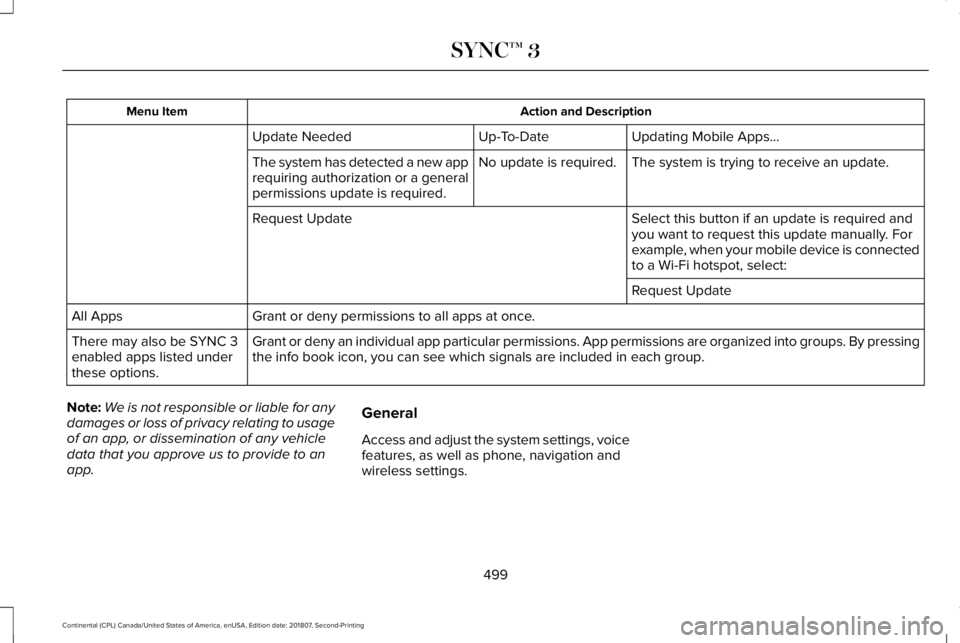
Action and Description
Menu Item
Updating Mobile Apps…
Up-To-Date
Update Needed
The system is trying to receive an update.
No update is required.
The system has detected a new app
requiring authorization or a general
permissions update is required.
Select this button if an update is required and
you want to request this update manually. For
example, when your mobile device is connected
to a Wi-Fi hotspot, select:
Request Update
Request Update
Grant or deny permissions to all apps at once.
All Apps
Grant or deny an individual app particular permissions. App permissions \
are organized into groups. By pressing
the info book icon, you can see which signals are included in each group\
.
There may also be SYNC 3
enabled apps listed under
these options.
Note: We is not responsible or liable for any
damages or loss of privacy relating to usage
of an app, or dissemination of any vehicle
data that you approve us to provide to an
app. General
Access and adjust the system settings, voice
features, as well as phone, navigation and
wireless settings.
499
Continental (CPL) Canada/United States of America, enUSA, Edition date: 201807, Second-Printing SYNC™ 3
Page 505 of 627
Note:
The Vehicle Wi-Fi Hotspot (Vehicle
Hotspot) may be operational while ignition
is On and may remain operational while the
ignition is Off.
Note: Vehicle Hotspot services are provided
by the vehicle network carrier, subject to
your vehicle network carrier agreement,
coverage and availability.
Note: It is the account owner’ s responsibility
to remove the vehicle from the vehicle
network carrier account when ownership of
the vehicle is transferred. If the owner would
like to remove the vehicle from the account
for any reason, please contact your vehicle
network carrier for more information. Note:
Data, such as the Vehicle Identification
Number (VIN), SIM Card ID, and data plan
usage, is shared between us and the vehicle
network carrier to provide the Vehicle
Hotspot service in accordance with your
vehicle network carrier agreement, coverage
and availability, and may be used to enable
a seamless transition from an old to new
embedded modem and to confirm any
updates are successfully delivered.
Note: For your convenience data usage may
be available for monitoring under Settings
but may not reflect actual or current usage.
The vehicle network carrier is responsible
for providing information about your account.
Please contact the vehicle network carrier
for more information.
Note: We may need to update operating
system software on your vehicle, including
security updates and bug fixes, to keep
connected services current, like Vehicle
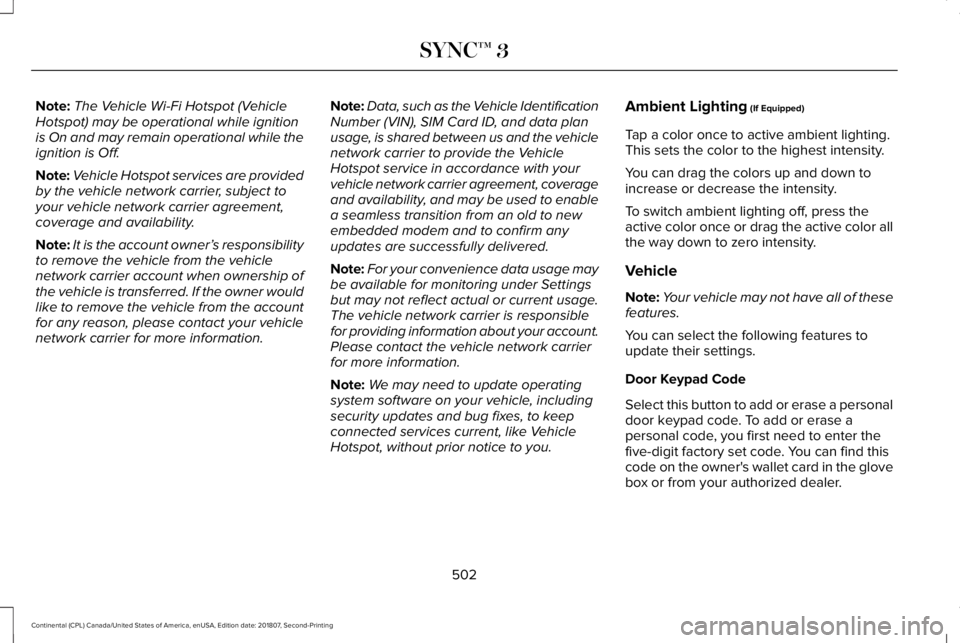
Hotspot, without prior notice to you. Ambient Lighting (If Equipped)
Tap a color once to active ambient lighting.
This sets the color to the highest intensity.
You can drag the colors up and down to
increase or decrease the intensity.
To switch ambient lighting off, press the
active color once or drag the active color all
the way down to zero intensity.
Vehicle
Note: Your vehicle may not have all of these
features.
You can select the following features to
update their settings.
Door Keypad Code
Select this button to add or erase a personal
door keypad code. To add or erase a
personal code, you first need to enter the
five-digit factory set code. You can find this
code on the owner's wallet card in the glove
box or from your authorized dealer.
502
Continental (CPL) Canada/United States of America, enUSA, Edition date: 201807, Second-Printing SYNC™ 3
Page 515 of 627
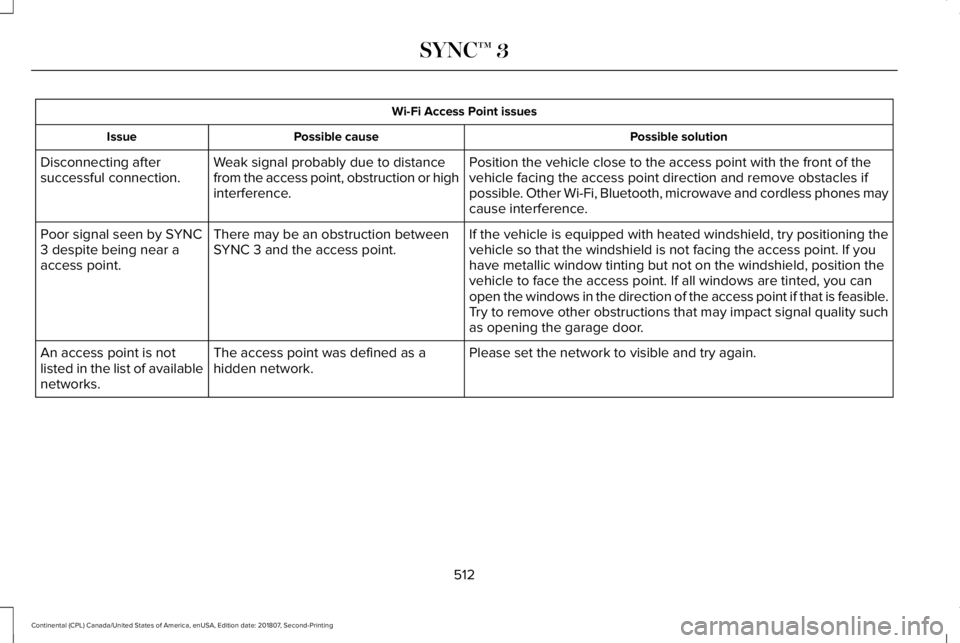
Wi-Fi Access Point issues
Possible solution
Possible cause
Issue
Position the vehicle close to the access point with the front of the
vehicle facing the access point direction and remove obstacles if
possible. Other Wi-Fi, Bluetooth, microwave and cordless phones may
cause interference.
Weak signal probably due to distance
from the access point, obstruction or high
interference.
Disconnecting after
successful connection.
If the vehicle is equipped with heated windshield, try positioning the
vehicle so that the windshield is not facing the access point. If you
have metallic window tinting but not on the windshield, position the
vehicle to face the access point. If all windows are tinted, you can
open the windows in the direction of the access point if that is feasibl\
e.
There may be an obstruction between
SYNC 3 and the access point.
Poor signal seen by SYNC
3 despite being near a
access point.
Try to remove other obstructions that may impact signal quality such
as opening the garage door.
Please set the network to visible and try again.
The access point was defined as a
hidden network.
An access point is not
listed in the list of available
networks.
512
Continental (CPL) Canada/United States of America, enUSA, Edition date: 201807, Second-Printing SYNC™ 3
Page 519 of 627
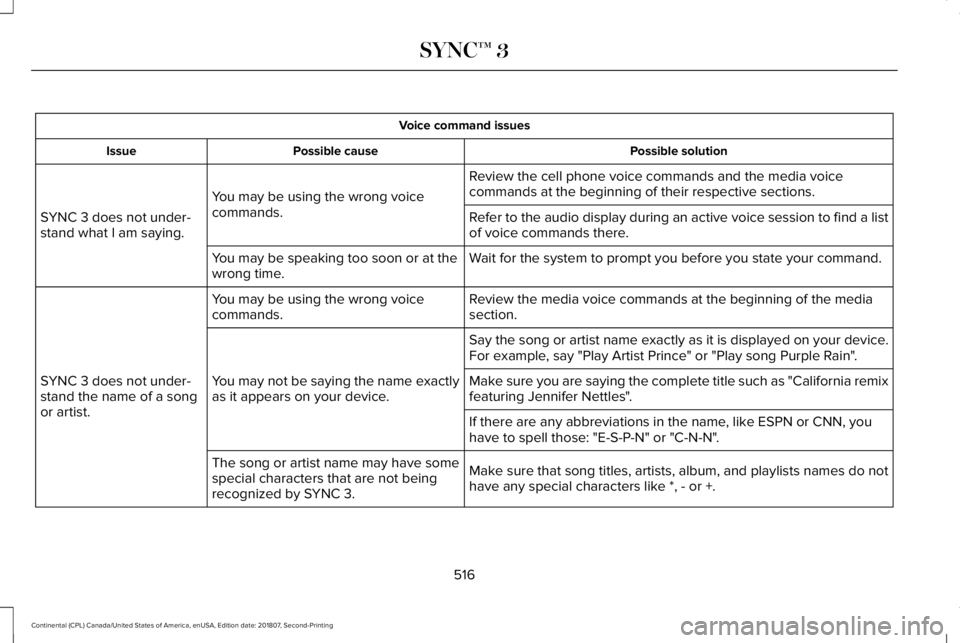
Voice command issues
Possible solution
Possible cause
Issue
Review the cell phone voice commands and the media voice
commands at the beginning of their respective sections.
You may be using the wrong voice
commands.
SYNC 3 does not under-
stand what I am saying. Refer to the audio display during an active voice session to find a list
of voice commands there.
Wait for the system to prompt you before you state your command.
You may be speaking too soon or at the
wrong time.
Review the media voice commands at the beginning of the media
section.
You may be using the wrong voice
commands.
SYNC 3 does not under-
stand the name of a song
or artist. Say the song or artist name exactly as it is displayed on your device.
For example, say "Play Artist Prince" or "Play song Purple Rain".
You may not be saying the name exactly
as it appears on your device. Make sure you are saying the complete title such as "California remix
featuring Jennifer Nettles".
If there are any abbreviations in the name, like ESPN or CNN, you
have to spell those: "E-S-P-N" or "C-N-N".
Make sure that song titles, artists, album, and playlists names do not
have any special characters like *, - or +.
The song or artist name may have some
special characters that are not being
recognized by SYNC 3.
516
Continental (CPL) Canada/United States of America, enUSA, Edition date: 201807, Second-Printing SYNC™ 3
Page 531 of 627
GENERAL MAINTENANCE
INFORMATION
Why Maintain Your Vehicle?
Carefully following the maintenance
schedule helps protect against major repair
expenses resulting from neglect or
inadequate maintenance and may help to
increase the value of your vehicle when you
sell or trade it. Keep all receipts for
completed maintenance with your vehicle.
We have established regular maintenance
intervals for your vehicle based upon
rigorous testing. It is important that you have
your vehicle serviced at the proper times.
These intervals serve two purposes; one is
to maintain the reliability of your vehicle and
the second is to keep your cost of owning
your vehicle down.
It is your responsibility to have all scheduled
maintenance performed and to make sure
that the materials used meet the
specifications identified in this owner's
manual. See Capacities and Specifications
(page 373).
Failure to perform scheduled maintenance
invalidates warranty coverage on parts
affected by the lack of maintenance.
Why Maintain Your Vehicle at Your
Dealership?
Factory-Trained Technicians
Service technicians participate in extensive
factory-sponsored certification training to
help them become experts on the operation
of your vehicle. Ask your dealership about
the training and certification their technicians
have received.
Genuine Ford and Motorcraft® Replacement
Parts
Dealerships stock Ford, Motorcraft and
Ford-authorized branded re-manufactured
replacement parts. These parts meet or
exceed our specifications. Parts installed at
your dealership carry a nationwide 24-month
or unlimited mile (kilometer) parts and labor
limited warranty.
If you do not use our authorized parts they
may not meet our specifications and
depending on the part, it could affect
emissions compliance.
Convenience
Many dealerships have extended evening
and Saturday hours to make your service
visit more convenient and they offer one stop
shopping. They can perform any services
that are required on your vehicle, from
general maintenance to collision repairs.
Note:
Not all dealers have extended hours
or body shops. Please contact your dealer
for details.
Protecting Your Investment
Maintenance is an investment that pays
dividends in the form of improved reliability,
durability and resale value. To maintain the
proper performance of your vehicle and its
emission control systems, make sure you
have scheduled maintenance performed at
the designated intervals.
528
Continental (CPL) Canada/United States of America, enUSA, Edition date: 201807, Second-Printing Scheduled Maintenance