reset LINCOLN CONTINENTAL 2019 Repair Manual
[x] Cancel search | Manufacturer: LINCOLN, Model Year: 2019, Model line: CONTINENTAL, Model: LINCOLN CONTINENTAL 2019Pages: 627, PDF Size: 6.39 MB
Page 523 of 627
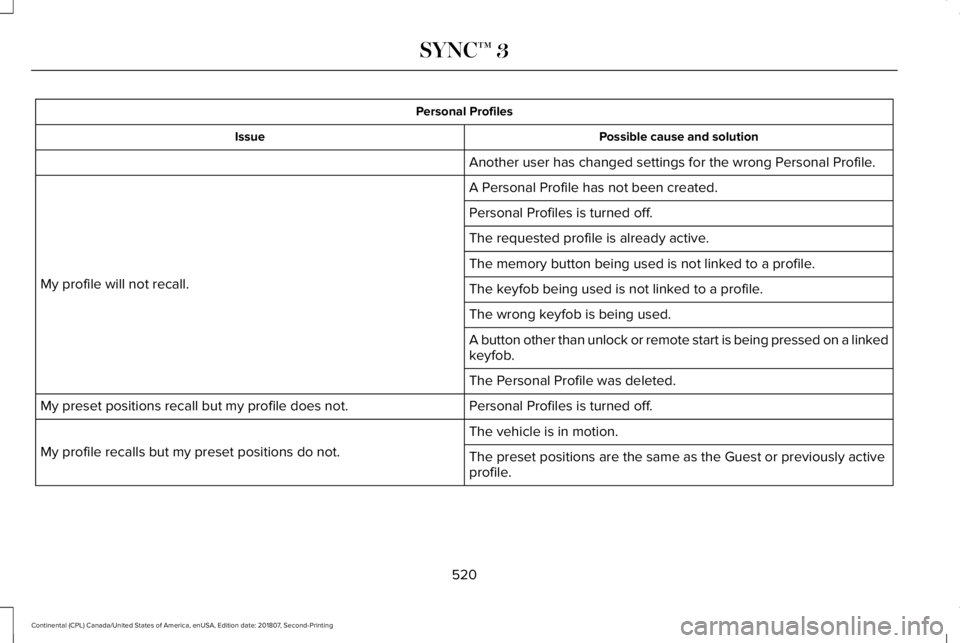
Personal Profiles
Possible cause and solution
Issue
Another user has changed settings for the wrong Personal Profile.
A Personal Profile has not been created.
My profile will not recall. Personal Profiles is turned off.
The requested profile is already active.
The memory button being used is not linked to a profile.
The keyfob being used is not linked to a profile.
The wrong keyfob is being used.
A button other than unlock or remote start is being pressed on a linked
keyfob.
The Personal Profile was deleted.
Personal Profiles is turned off.
My preset positions recall but my profile does not.
The vehicle is in motion.
My profile recalls but my preset positions do not. The preset positions are the same as the Guest or previously active
profile.
520
Continental (CPL) Canada/United States of America, enUSA, Edition date: 201807, Second-Printing SYNC™ 3
Page 524 of 627
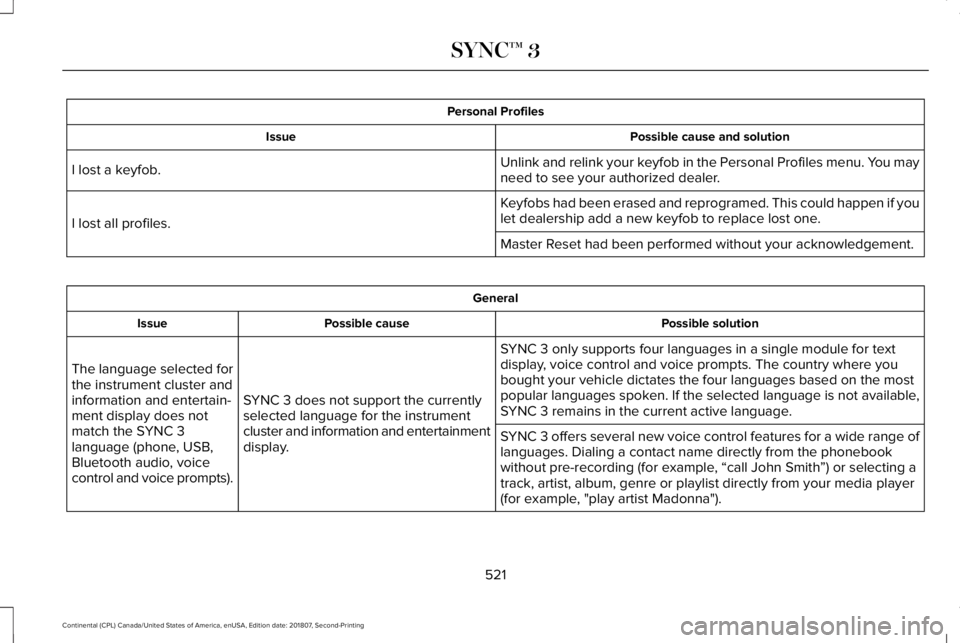
Personal Profiles
Possible cause and solution
Issue
Unlink and relink your keyfob in the Personal Profiles menu. You may
need to see your authorized dealer.
I lost a keyfob.
Keyfobs had been erased and reprogramed. This could happen if you
let dealership add a new keyfob to replace lost one.
I lost all profiles.
Master Reset had been performed without your acknowledgement. General
Possible solution
Possible cause
Issue
SYNC 3 only supports four languages in a single module for text
display, voice control and voice prompts. The country where you
bought your vehicle dictates the four languages based on the most
popular languages spoken. If the selected language is not available,
SYNC 3 remains in the current active language.
SYNC 3 does not support the currently
selected language for the instrument
cluster and information and entertainment
display.
The language selected for
the instrument cluster and
information and entertain-
ment display does not
match the SYNC 3
language (phone, USB,
Bluetooth audio, voice
control and voice prompts).
SYNC 3 offers several new voice control features for a wide range of
languages. Dialing a contact name directly from the phonebook
without pre-recording (for example, “call John Smith
”) or selecting a
track, artist, album, genre or playlist directly from your media player
(for example, "play artist Madonna").
521
Continental (CPL) Canada/United States of America, enUSA, Edition date: 201807, Second-Printing SYNC™ 3
Page 525 of 627
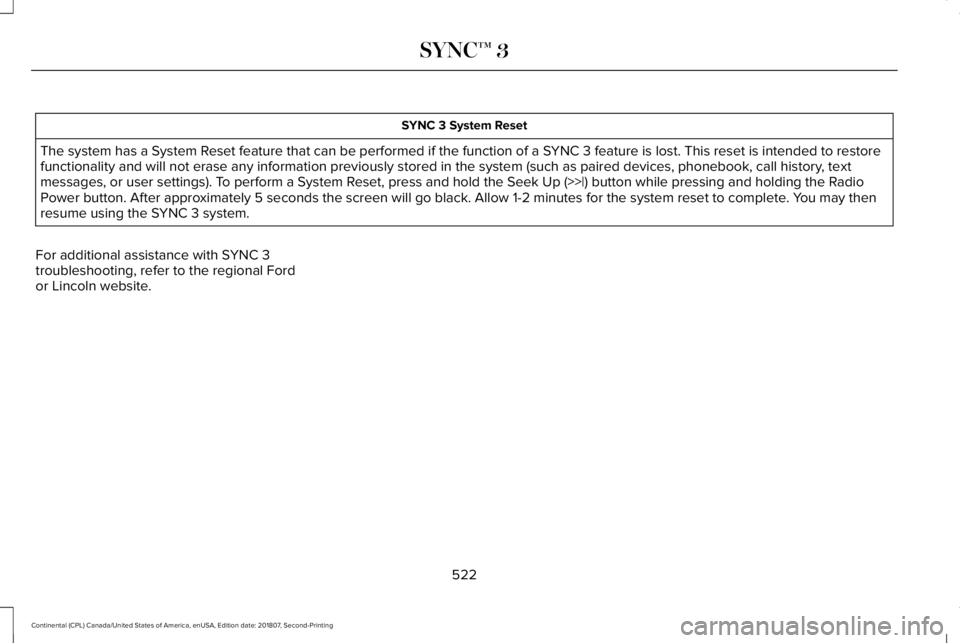
SYNC 3 System Reset
The system has a System Reset feature that can be performed if the function of a SYNC 3 feature is lost. This reset is intended to restore
functionality and will not erase any information previously stored in th\
e system (such as paired devices, phonebook, call history , text
messages, or user settings). To perform a System Reset, press and hold the Seek Up (>>|) button while pressing and holdi\
ng the Radio
Power button. After approximately 5 seconds the screen will go black. Allow 1-2 minutes for the s\
ystem reset to complete. You may then
resume using the SYNC 3 system.
For additional assistance with SYNC 3
troubleshooting, refer to the regional Ford
or Lincoln website.
522
Continental (CPL) Canada/United States of America, enUSA, Edition date: 201807, Second-Printing SYNC™ 3
Page 532 of 627
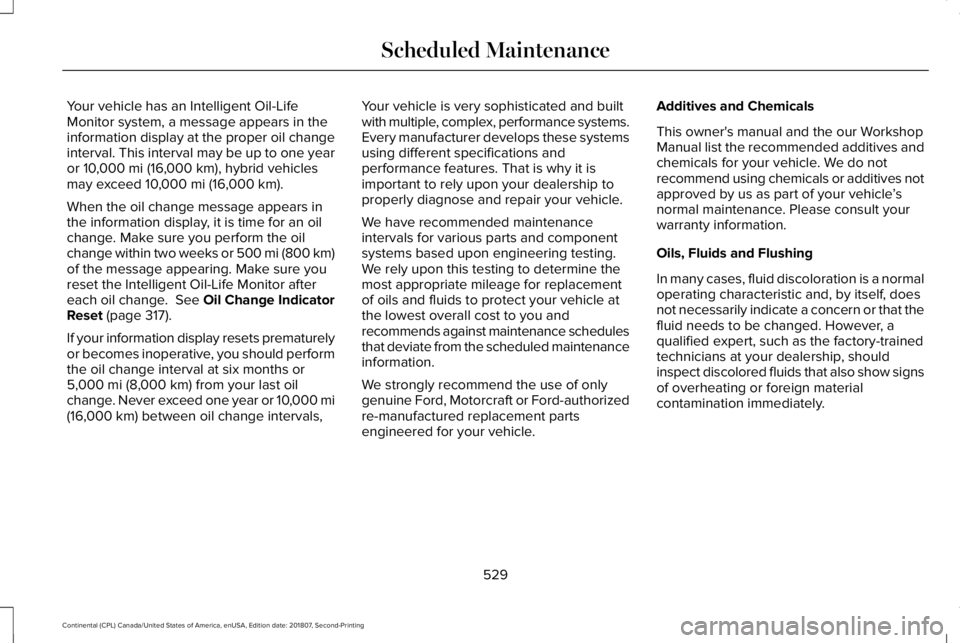
Your vehicle has an Intelligent Oil-Life
Monitor system, a message appears in the
information display at the proper oil change
interval. This interval may be up to one year
or 10,000 mi (16,000 km), hybrid vehicles
may exceed 10,000 mi (16,000 km).
When the oil change message appears in
the information display, it is time for an oil
change. Make sure you perform the oil
change within two weeks or 500 mi (800 km)
of the message appearing. Make sure you
reset the Intelligent Oil-Life Monitor after
each oil change. See Oil Change Indicator
Reset
(page 317).
If your information display resets prematurely
or becomes inoperative, you should perform
the oil change interval at six months or
5,000 mi (8,000 km)
from your last oil
change. Never exceed one year or 10,000 mi
(16,000 km)
between oil change intervals, Your vehicle is very sophisticated and built
with multiple, complex, performance systems.
Every manufacturer develops these systems
using different specifications and
performance features. That is why it is
important to rely upon your dealership to
properly diagnose and repair your vehicle.
We have recommended maintenance
intervals for various parts and component
systems based upon engineering testing.
We rely upon this testing to determine the
most appropriate mileage for replacement
of oils and fluids to protect your vehicle at
the lowest overall cost to you and
recommends against maintenance schedules
that deviate from the scheduled maintenance
information.
We strongly recommend the use of only
genuine Ford, Motorcraft or Ford-authorized
re-manufactured replacement parts
engineered for your vehicle. Additives and Chemicals
This owner's manual and the our Workshop
Manual list the recommended additives and
chemicals for your vehicle. We do not
recommend using chemicals or additives not
approved by us as part of your vehicle
’s
normal maintenance. Please consult your
warranty information.
Oils, Fluids and Flushing
In many cases, fluid discoloration is a normal
operating characteristic and, by itself, does
not necessarily indicate a concern or that the
fluid needs to be changed. However, a
qualified expert, such as the factory-trained
technicians at your dealership, should
inspect discolored fluids that also show signs
of overheating or foreign material
contamination immediately.
529
Continental (CPL) Canada/United States of America, enUSA, Edition date: 201807, Second-Printing Scheduled Maintenance
Page 538 of 627
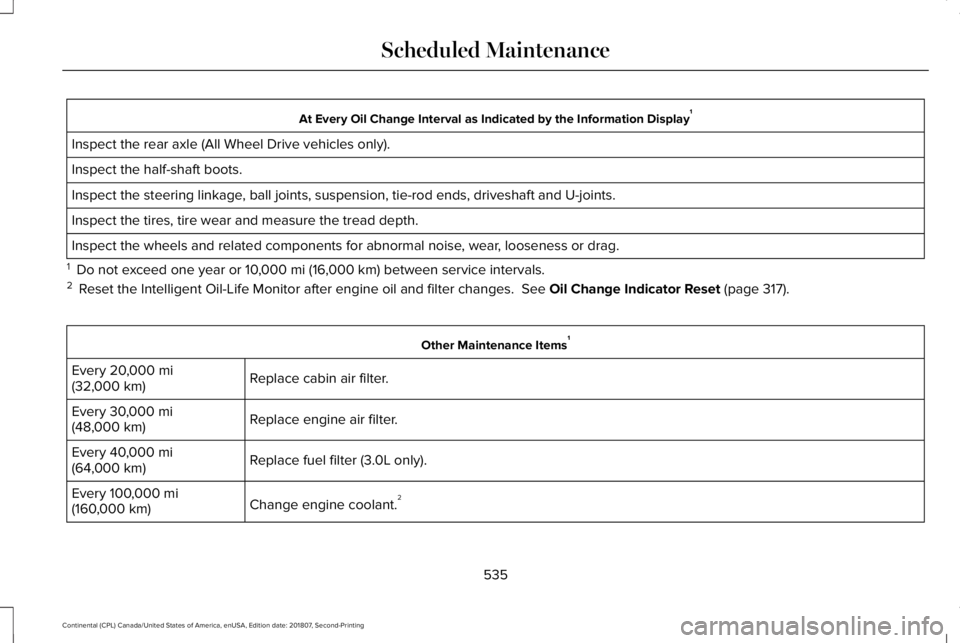
At Every Oil Change Interval as Indicated by the Information Display
1
Inspect the rear axle (All Wheel Drive vehicles only).
Inspect the half-shaft boots.
Inspect the steering linkage, ball joints, suspension, tie-rod ends, driveshaft and U-joints.
Inspect the tires, tire wear and measure the tread depth.
Inspect the wheels and related components for abnormal noise, wear, looseness or drag.
1 Do not exceed one year or 10,000 mi (16,000 km) between service intervals.
2 Reset the Intelligent Oil-Life Monitor after engine oil and filter change\
s.
See Oil Change Indicator Reset (page 317). Other Maintenance Items
1
Replace cabin air filter.
Every
20,000 mi
(32,000 km)
Replace engine air filter.
Every
30,000 mi
(48,000 km)
Replace fuel filter (3.0L only).
Every
40,000 mi
(64,000 km)
Change engine coolant.2
Every
100,000 mi
(160,000 km)
535
Continental (CPL) Canada/United States of America, enUSA, Edition date: 201807, Second-Printing Scheduled Maintenance
Page 540 of 627
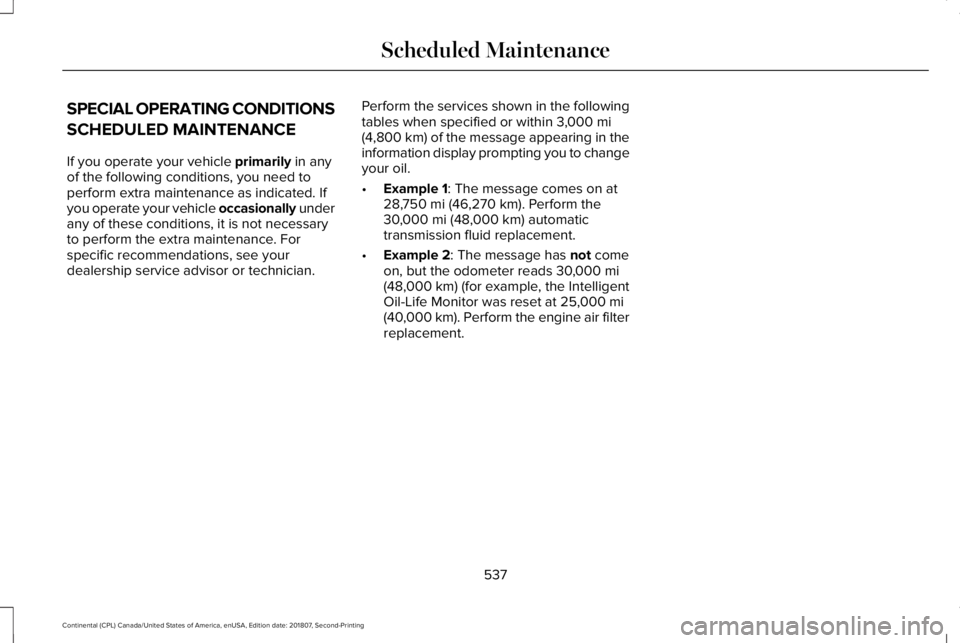
SPECIAL OPERATING CONDITIONS
SCHEDULED MAINTENANCE
If you operate your vehicle primarily in any
of the following conditions, you need to
perform extra maintenance as indicated. If
you operate your vehicle occasionally under
any of these conditions, it is not necessary
to perform the extra maintenance. For
specific recommendations, see your
dealership service advisor or technician. Perform the services shown in the following
tables when specified or within
3,000 mi
(4,800 km) of the message appearing in the
information display prompting you to change
your oil.
• Example 1
: The message comes on at
28,750 mi (46,270 km). Perform the
30,000 mi (48,000 km) automatic
transmission fluid replacement.
• Example 2
: The message has not come
on, but the odometer reads 30,000 mi
(48,000 km) (for example, the Intelligent
Oil-Life Monitor was reset at 25,000 mi
(40,000 km). Perform the engine air filter
replacement.
537
Continental (CPL) Canada/United States of America, enUSA, Edition date: 201807, Second-Printing Scheduled Maintenance
Page 542 of 627
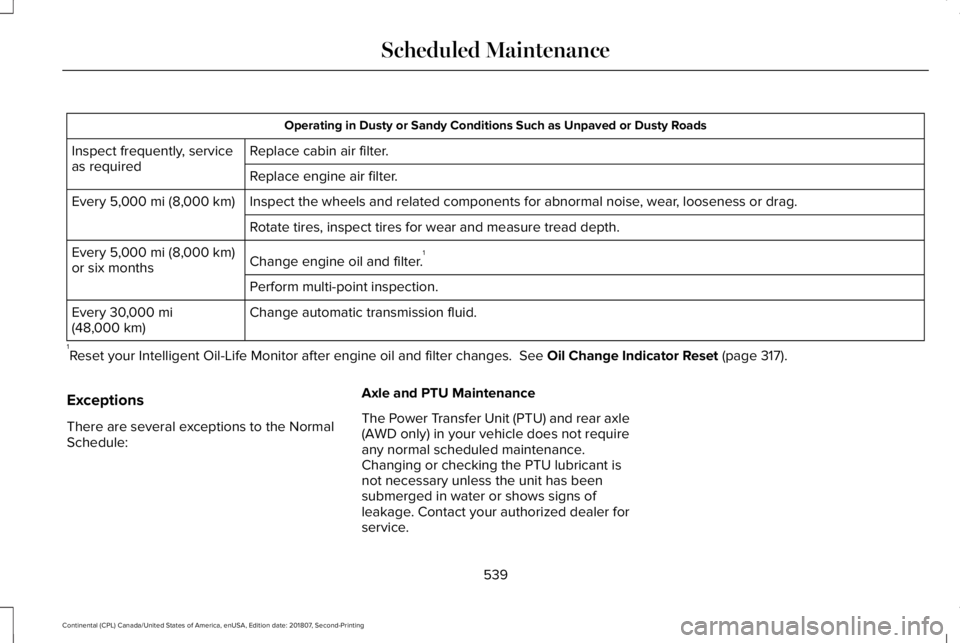
Operating in Dusty or Sandy Conditions Such as Unpaved or Dusty Roads
Replace cabin air filter.
Inspect frequently, service
as required
Replace engine air filter.
Inspect the wheels and related components for abnormal noise, wear, looseness or drag.
Every 5,000 mi (8,000 km)
Rotate tires, inspect tires for wear and measure tread depth.
Change engine oil and filter. 1
Every
5,000 mi (8,000 km)
or six months
Perform multi-point inspection.
Change automatic transmission fluid.
Every
30,000 mi
(48,000 km)
1 Reset your Intelligent Oil-Life Monitor after engine oil and filter chang\
es.
See Oil Change Indicator Reset (page 317).
Exceptions
There are several exceptions to the Normal
Schedule: Axle and PTU Maintenance
The Power Transfer Unit (PTU) and rear axle
(AWD only) in your vehicle does not require
any normal scheduled maintenance.
Changing or checking the PTU lubricant is
not necessary unless the unit has been
submerged in water or shows signs of
leakage. Contact your authorized dealer for
service.
539
Continental (CPL) Canada/United States of America, enUSA, Edition date: 201807, Second-Printing Scheduled Maintenance
Page 621 of 627

Memory Function..........................................160
Easy Entry and Exit Feature...............................161
Linking a Preset Position to your Remote
Control or Intelligent Access Key Fob........161
Saving a Preset Position....................................160
Message Center See: Information Displays..................................112
Mirrors See: Windows and Mirrors.................................99
Mobile Communications Equipment..........15
Moonroof.........................................................105 Bounce-Back........................................................105
Opening and Closing the Moonroof..............105
Motorcraft Parts - 2.7L..................................377
Motorcraft Parts - 3.0L.................................378
Motorcraft Parts - 3.7L.................................379
MyKey – Troubleshooting
.............................61
MyKey™..............................................................58 Principle of Operation.........................................58
N
Navigation
.......................................................471
cityseeker.............................................................480
Destination Mode...............................................472
Map Mode..............................................................471
Navigation Map Updates...................................481
Navigation Menu.................................................
477 SiriusXM Traffic and Travel Link.......................481
SYNC AppLink....................................................480
Waypoints.............................................................479
Normal Scheduled Maintenance..............533 Intelligent Oil-Life Monitor™..............................533
Normal Maintenance Intervals........................534
O
Oil Change Indicator Reset.........................317
Oil Check See: Engine Oil Check.......................................316
Opening and Closing the Hood
................310
Closing the Hood.................................................311
Opening the Hood..............................................310
Opening the Doors.........................................74 Front Doors.............................................................74
Rear Doors..............................................................75
Ordering Additional Owner's Literature.....................................................289
Obtaining a French Owner’ s Manual............289
Overhead Console........................................173
P
Parking Aids
....................................................215
Principle of Operation........................................215 Passive Anti-Theft System............................83
SecuriLock®............................................................83
PATS See: Passive Anti-Theft System........................83
Perchlorate........................................................13
Personal Safety System ™
...............................47
How Does the Personal Safety System
Work?...................................................................47
Phone..............................................................463 During a Phone Call...........................................468
Making Calls.........................................................467
Pairing Your Cell Phone for the First
Time...................................................................463
Phone Menu........................................................464
Receiving Calls....................................................468
Smartphone Connectivity.................................470
Text Messaging...................................................469
Post-Crash Alert System
..............................281
Power Decklid..................................................75
Hands-Free Feature.............................................78
Obstacle Detection...............................................78
Opening and Closing the Power Decklid.......76
Power Door Locks See: Locking and Unlocking..............................68
Power Seats
....................................................154
24-Way Seat Controls........................................156
30-Way Seat Controls........................................154
618
Continental (CPL) Canada/United States of America, enUSA, Edition date: 201807, Second-Printing Index